



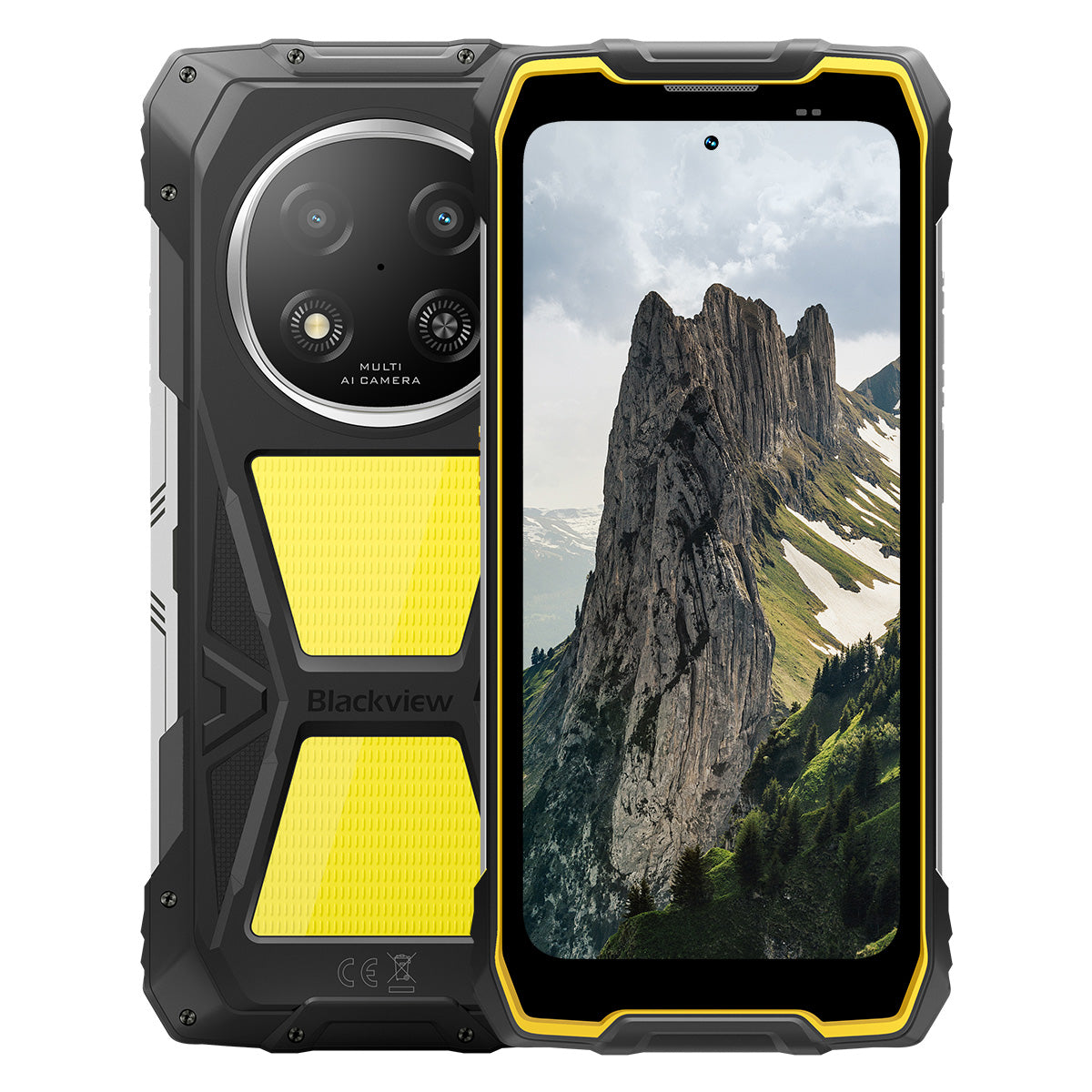


Blackview ROCK 2 Pro 6,67-tums 120Hz skärm 400LM campinglampa 15000mAh 5G tålig telefon

Skynda dig, endast 9 artiklar kvar i lager.
Höjdpunkter
Höjdpunkter
✔6,67-tums 120Hz smart uppdateringsfrekvensskärm
✔Inbyggd dubbel 400LM campinglampa
✔5G 6nm UNISOC T8100 åttakärnig processor
✔15000mAh & 33W snabbladdning
✔16MP AI huvudkamera + 13MP AI frontkamera
✔IP68 & IP69K & MIL-STD-810H certifierad
Informationer
Informationer
Blackview ROCK 2 Pro är byggd för användare som behöver pålitlig mobil prestanda i krävande miljöer. Den kombinerar en 6,67-tums 120Hz-skärm med UNISOC T8100 5G-prestanda och ett 15000mAh-batteri med 33W snabbladdning för arbete, resor, navigation och utomhusbruk. Viktiga fältanpassade funktioner inkluderar 16MP bakre och 13MP främre AI-kameror, dubbla 400LM campinglampor samt IP68 & IP69K & MIL-STD-810H-skydd. Designad för arbetsplatser, avlägsna resor och vardaglig tuffhet ger den användarna självförtroendet att hålla sig uppkopplade, fånga detaljer och fortsätta när vanliga telefoner inte räcker till.
Om varumärket
Om varumärket
På Blackview tror vi att fantastisk teknik ska gå bortom imponerande specifikationer. Den ska passa verkliga livet, lösa verkliga problem och vara pålitlig när det verkligen gäller.
Blackview började med robusta telefoner byggda för tuffa miljöer. Idag erbjuder vi ett bredare ekosystem av smarta enheter, inklusive smartphones, surfplattor, bärbara datorer, smartklockor, ljudprodukter och mer.
I varje kategori är vårt fokus detsamma: hållbar kvalitet, praktisk innovation och tillgängliga priser. Vi designar produkter som känns pålitliga från dag ett.
Vi förstår vad kunder värdesätter mest: smidig prestanda, långvarig pålitlighet, användbara funktioner och teknik som gör vardagen enklare utan onödiga kostnader.
Därför lägger Blackview verklig omsorg på produkttestning, användarupplevelse och funktioner som tillför verkligt värde till arbete, resor, skapande, utomhusäventyr och daglig kontakt.
Blackview är gjort för människor som vill ha teknik de kan lita på: smarta, kapabla enheter byggda för att hänga med i det moderna livet.
Påliteliga från början. Praktiska av naturen. Gjorda för verkliga livet.
Frakt och returer
Frakt och returer
• Frakt: Beställningar behandlas inom 1–2 arbetsdagar. Standardleverans tar 3–7 arbetsdagar beroende på din plats.
• Returer: Du kan returnera eller byta produkter inom 30 dagar efter att du mottagit din beställning. Artiklar måste vara i originalskick med inköpsbevis.
Om din vara är defekt eller skadad på grund av tillverkningsfel byter vi gärna ut den utan extra kostnad.

Snabbare 5G, starkare ljus, oövervinnerlig kraft
Gå bortom gränser, bemästra varje utmaning


Varför välja Blackview ROCK 2 Pro?

Nr 1
IP69K, IP68 & MIL-STD-810H Certifierad,
Byggd för att bemästra alla extrema förhållanden.

Nr 2
Blixtsnabb 5G med 6nm UNISOC T8100,
Upplev oöverträffad hastighet
Mjuk och fantastisk
Dagar i standby.
Var som helst
2.0, intelligens utan gränser
Baserad på Android 16
Nr 1
IP69K, IP68 & MIL-STD-810H Certifierad,
Byggd för att bemästra alla extrema förhållanden.

400lm campinglampa
Ljust, justerbart och pålitligt — designat för att lysa upp din lägerplats och säkerställa trygghet i varje utomhusäventyr.

BelysningslägeTre ljusstyrkenivåer: Låg/Högljus/Extremt ljus
Lågt för strömsparande, Högt och Ultra-ljust för mångsidiga utomhusbelysningsbehov.

Utomhuscamping

Utomhusreparationer

Nattvandring

SOS-läge
Sänder en tydlig, synlig nödsignal för att säkerställa din säkerhet i kritiska utomhussituationer.

Vilse i vildmarken

Fordonshaveri

Allvarligt vädernödläge

Snabb blinkande läge
Perfekt för nödlarm, avskräcka potentiella hot eller snabbt få uppmärksamhet.

Utomhusförsvar

Vägvarning

Nödevakuering

Dyk. Spraya. Blöt. Den bara fungerar.
IP69K & IP68 Certifierad
ROCK 2 Pro är konstruerad för de tuffaste förhållanden, ger oöverträffat skydd mot vatten, damm och högtrycksstrålar.


Sömlös skärmtätning: Felfri
vattentät prestanda.

Korrosionsbeständiga aluminiumknappar:
Förstärkt med premium silikonpackningar.

TPU-tätad USB-port: Maximal dammtäthet
och vattentålighet.

Vattentät kamera: Fånga oförglömliga
ögonblick under ytan.

Högtalarrengöring: Avlägsnar automatiskt vatten och
skräp för kristallklart ljud.

Stöttålig. Dammfri. Stridsklar.
MIL-STD-810H Certifierad
Från -20°C arktiska platser till 60°C ökenvärme, från 1,2 m betongfall till sandstormar — ROCK 2 Pro överlever där andra misslyckas.

Bevisad genom dessa extrema tester

Regn

Sand och damm

Vibration

Stöt

Fuktighet

Höjd

Acceleration

Hög temperatur

Låg temperatur

Nedsänkning

Förstärkta gummihörn:
Stötupptagning på toppnivå.

Ultrahållbar kompositbaksida:
Byggd för att hålla.

Flygplansklassad aluminiumram:
Stark, lätt och stöttålig.

Panda Glass Display: Reptålig och
splittersäker för ultimat hållbarhet.
Handskläge 2.0
Fungerar felfritt —
även med tjocka handskar på.


Användbar Verktygslåda
Kompass, Ficklampa, Förstoringsglas och mer —
din allt-i-ett praktiska verktygslåda.
Nr 2
Blixtsnabb 5G med 6nm UNISOC T8100,
Upplev oöverträffad hastighet
5G 6nm UNISOC T8100
Hastighet du behöver. Kraft du litar på.
Upplev blixtsnabb 5G med 6nm UNISOC T8100-chipsetet, med en kraftfull 2,2GHz CPU för sömlös multitasking och smidig prestanda i krävande appar!


4*A76@2.2GHz
+ 4*A55@2.0GHz

Arm Mali G57

748,099
AnTuTu Benchmark
Upp till 32GB LPDDR4X RAM
Multitaska som ingenting.
Multitaska utan ansträngning—starta appar direkt, växla sömlöst och arbeta och underhåll dig med obruten hastighet.
Upp till 32GB RAM=8GB RAM + 24GB expansion
Atomized Memory 2.0
9 % mer RAM tillgängligt


256GB UFS 3.1-lagring
Uppgraderad till UFS 3.1 för 2,4x snabbare hastigheter, lägre energiförbrukning, minskad latens och snabbare skrivprestanda—lagra mer, ladda snabbare och arbeta smartare.

ROCK 2 Pro
UFS 3.1

ROCK 2
UFS 2.2
2,4x snabbare dataöverföringshastighet
Effektiv värmeavledning
Kyls under press
Med en kylarea på 1700 mm² njut av snabb värmeavledning för stabil och jämn prestanda oavsett hur intensiv uppgiften är.

Nr 3
6,67" 120Hz smart ögonvårdsskärm,
Mjuk och fantastisk
6,67" HD+ IPS-skärm
Bredare vy, skarpare detaljer
Utrustad med en 6,67" HD+ IPS-skärm levererar ROCK 2 Pro uppslukande bilder med 120Hz smart uppdatering och 650 nits ljusstyrka — perfekt för spel, streaming och vardagliga uppgifter.

120Hz
AI smart uppdateringsfrekvens
650 nits
Ljusstyrka
85%
Skärm-till-kroppsförhållande
720*1604
Upplösning
120Hz AI smart uppdateringsfrekvens
Mjukare, snabbare, smartare
Säg adjö till lagg—smart uppdatering anpassar sig efter dina behov och säkerställer silkeslen scrollning samtidigt som batteritiden optimeras.
120Hz
60Hz
Dubbel uppdateringsfrekvens,
Dubbel så mjukt

Ögonvårdslägen
Komfort som varar hela dagen
Skydda dina ögon med fyra anpassade lägen designade för läsning, arbete och avkoppling.


Läsläge
Papperslik komfort för långa lästimmar

Nattlampa
Mjuk belysning för att minska blåljusbelastning

Mörkerläge
Perfekt för miljöer med svagt ljus

Ljusläge
Ljust och klart för dagsljusbruk
2W högeffekts-högtalare
Kraftfullt ljud, exceptionell klarhet
ROCK 2 Pro levererar kraftfullt, kristallklart ljud med sin 2W högeffekts-högtalare som skär igenom bullriga miljöer för att säkerställa ljud i toppklass för både kommunikation och underhållning.

Nr 4
Massivt 15 000 mAh-batteri,
Upp till 50 dagars standby.
15 000 mAh massivt batteri
Kraft som hänger med. Med ett gigantiskt 15 000 mAh-batteri hanterar ROCK 2 Pro enkelt arbetsresor, utomhusäventyr och daglig användning—ingen jakt på eluttag behövs.

Intelligent laddning
Skydd

AI strömsparande
Algoritm


28 timmar
Spel

43 timmar
Samtal

97 timmar
Musik

34 timmar
Webbsurfning

26 timmar
Videouppspelning

50 dagar
Standby
*Data testad av Blackview Lab baserat på kontinuerlig användning. Den faktiska användningen kan variera beroende på verkliga användningsförhållanden.

Klassledande intelligent djup
Strömsparläge
ROCK 2 Pro justerar intelligent strömmen förbrukning med avancerad optimering under viloperioder — ger längre batteritid utan att kompromissa med prestanda.
Längre användningstid vid lätt användning
Mindre urladdning över natten
5W OTG omvänd laddning
Dela kraft när du är på språng
ROCK 2 Pro fungerar också som en portabel powerbank, så att du kan ladda hörlurar, smartklockor eller till och med din väns telefon på språng.

Nr 5
Fånga varje ögonblick,
När som helst, var som helst

16MP AI-huvudkamera
Fånga perfekt. Dela direkt.
ROCK 2 Pro:s 16MP AI-huvudkamera levererar kristallklara, livfulla bilder—oavsett om du tar professionella bilder eller jagar den perfekta solnedgången.
16MP
13MP AI-frontkamera
Var dig själv—bara ljusare.
ROCK 2 Pro:s 13MP AI-frontkamera anpassar sig till alla ljusförhållanden och säkerställer att dina selfies förblir skarpa, naturligt och enkelt fantastiskt.

Skönhetsläge
Stråla enkelt, naturligt.
AI skönhetsläge förbättrar din hud och ton med subtila, naturliga justeringar—framhäver dina bästa drag med finess.

Porträttläge
Fokusera på dig, sudda ut resten.
AI djupsensor framhäver ditt motiv samtidigt som det skapar en mjuk, studiokvalitativ bokeh-effekt—ingen extra utrustning behövs.

Nattläge
Bemästra natten, varje detalj räknas.
AI nattläge avslöjar dolda detaljer i mörkret—ljusa himlar, skarpa kanter och perfekt stabila bilder, oavsett hur svagt ljuset är.

Nr 6
Exklusivt egenutvecklad Doke
AI 2.0, intelligens utan gränser
Genom att integrera tre banbrytande AI-modeller använder Doke AI toppmodern teknik för att djupt förstå användarnas behov och leverera snabbare, smartare och mer skräddarsydda lösningar.

DeepSeek-R1

ChatGPT-4o mini

Gemini AI 2.0 Flash
Din exklusiva smarta livschef

Röstaktivering &
Röstavtrycksigenkänning
Lås upp enkelt med din röst —
beröringsfritt och mycket säkert!

AI Global Smart Control
Hantera appar och inställningar enkelt med enkla röstkommandon, vilket effektiviserar dina dagliga uppgifter.
 Kompatibla appar:
AI Hjälp i helskärm
Ge omedelbart svar och insikter relaterade till
till ditt nuvarande skärminnehåll.


AI Realtidsinteraktion
Njut av sömlös, realtidskommunikation,
att öka produktiviteten i varje ögonblick.
Fyra innovativa Doke AI-appar för
Höj din upplevelse

AI Chat-app
Din alltid tillgängliga AI-chattkompis Från uppgiftsplanering till kreativ brainstorming, AI Chat är din pålitliga intelligenta assistent, alltid redo att hjälpa till.


Nästa generation
DeepSeek-R1

AI Online-sökning

Dokumentanalys

Handledarassistent

Chatta med AI

AI Photos-app
Ditt portabla AI-fotoredigeringsverktyg med 18 avancerade AI-funktioner, AI Photos förvandlar vanliga foton till fantastiska visuella skapelser, redo att imponera och delas.

AI Ta bort objekt

AI OutPainting


AI Sudda ut foto
AI Byt bakgrund

AI Animate


AI Video-app
Ditt AI-verktyg för videoproduktion
Förvandla text, bilder och vardagsögonblick till filmiska videor utan ansträngning — ingen expertis krävs!


AI Music-app
Din AI Music-skapelse
Plattform
Inga instrument eller studio behövs—AI Music ger dig kraften att skapa unik musik enkelt, anpassat för varje tillfälle.

Nr 7
Senaste DokeOS 5.0 baserat på Android 16
Från DokeOS 4.2 till 5.0 har vi byggt om upplevelsen: snabbare, renare, smartare och djupt personlig. Detta är inte bara en uppdatering – det är ett stort steg framåt i hur du interagerar med din ROCK 2.

Gör det som är viktigt. Utan brus.

Sidoknappsfunktion
Ett tryck. Omedelbar åtkomst.
Aktivera snabbt ficklampa, SOS, undervattenskamera, PTT eller din favoritapp. Alltid redo, ingen väntan.

Starta ljudinspelning

Öppna ficklampa

Skärmdumpar

Öppna undervattenskamera

Öppna PTT

Öppna SOS

Quad-core navigering
Global precision. Alltid på rätt spår.
Drivs av GPS, Beidou, Galileo och Glonass för exakt positionering – var som helst, när som helst.
Mer än ett köp, vi har dig täckt.

Android versionsuppdatering

Hotline-hjälp

24/7 online-support

Pålitligt offline-reparationscenter
Blackview ROCK 1 specifikationer
| Modell | ROCK 2 Pro |
| Färg | Svart/Gul |
| Dimension | 187,6 * 85,8 * 26mm |
| Vikt | 558g |
| Operativsystem | DokeOS 5.0 baserat på Android 16 |
| Skärm | 6,67-tums HD+ IPS, 720 * 1604 upplösning 120Hz smart uppdateringsfrekvens, 85% skärm-till-kropp-förhållande |
| CPU | Octa-core 5G 6nm UNISOC T8100 |
| RAM & ROM | 8GB RAM + 256GB ROM, LPDDR4X + UFS3.1 |
| TF-utbyggnad | Upp till 512GB utbyggbart lagringsutrymme |
| Batteri | 15000mAh; 33W snabbladdning |
| Främre kamera | 13MP |
| Bakre kamera | 16MP |
| Högtalare | 2W Boxhögtalare |
| Navigering | GPS+GLONASS+Galileo+Beidou |
| Kortplats | Två; 2SIM/1SIM +1*TF-kort |
| NFC | Stöd |
| Wi-Fi & Bluetooth | (IEEE802.11a/b/g/n/ac) (2.4GHz/5GHz) ; BT 5.0 |
| Nätverksanslutning | 2G-band: B2/B3/B5/B8 3G-band: WCDMA: B1/B2/B5/B8 4G-band: TDD:B38/B40/B41 FDD:B1/B2/B3/B4/B5/B7/B8/B12/B17 B19/B20/B26/28A/28B/B66 5G-band: N1/2/3/5/7/8/20/26 28/38/40/41/66/77/78 |
| Modell | ROCK 2 Pro |
| Färg | Svart/Gul |
| Dimension | 187,6 * 85,8 * 26 mm |
| Vikt | 558g |
| Operativsystem | DokeOS 5.0 baserat på Android 16 |
| Visa | 6,67-tums HD+ IPS, 720 * 1604 upplösning 120Hz smart uppdateringsfrekvens, 85 % skärm-till-kropp-förhållande |
| CPU | Octa-core 5G 6nm UNISOC T8100 |
| RAM & ROM | 8GB RAM + 256GB ROM, LPDDR4X + UFS3.1 |
| TF-expansion | Upp till 512GB utbyggbart lagringsutrymme |
| Batteri | 15000mAh; 33W snabbladdning |
| Främre kamera | 13MP |
| Bakre kamera | 16MP |
| Högtalare | 2W låd-högtalare |
| Navigering | GPS+GLONASS+Galileo+Beidou |
| Kortplats | Två; 2SIM/1SIM + 1*TF-kort |
| NFC | Support |
| Wi-Fi & Bluetooth | (IEEE802.11a/b/g/n/ac) (2,4 GHz/5 GHz); BT 5.0 |
| Nätverksanslutning | 2G-band: B2/B3/B5/B8 3G-band: WCDMA: B1/B2/B5/B8 4G-band: TDD: B38/B40/B41 FDD: B1/B2/B3/B4/B5/B7/B8/B12/B17 B19/B20/B26/28A/28B/B66 5G-band: N1/2/3/5/7/8/20/26 28/38/40/41/66/77/78 |
Is the Blackview ROCK 2 Pro comfortable to carry every day?
Yes, the Blackview ROCK 2 Pro is well-suited for daily carry, making it highly convenient for commutes, site inspections, and travel between different work locations. Weighing approximately 558 grams and measuring about 26 mm in thickness, it features a high-capacity battery and a rugged, durable design. You can adjust how you carry it based on your personal preferences and specific needs.
For ease of movement and quick access, you might consider placing it in a work bag or a suitably sized waist pouch. If you are purchasing a waist pouch or a vehicle mount, ensure that the model you choose is compatible with the device's dimensions and weight.
How does continuous navigation affect the Blackview ROCK 2 Pro’s battery life?
Using navigation continuously increases power consumption and shortens the phone's battery life, as the device must maintain location tracking and process route information. While the 15,000mAh high-capacity battery offers significantly more power than a typical smartphone, the actual duration for continuous navigation will still vary based on screen settings, network signal strength, and other applications running in the background.
For long-duration navigation, consider using voice prompts—provided it is safe to do so and does not hinder your ability to follow the route. If your work requires all-day continuous navigation, it is advisable to estimate power consumption based on your specific route and settings, and to plan time for recharging
Can I use the Blackview ROCK 2 Pro’s camping light for nighttime work?
Yes. The Blackview ROCK 2 Pro features a 400-lumen camping light with three adjustable brightness levels. It provides illumination for close-range tasks such as inspecting equipment, locating tools, checking wiring, or performing temporary repairs at night. You can adjust the brightness based on ambient lighting conditions and the specific requirements of your task to ensure the work area remains clearly visible.
When you need both hands free, you can place the phone securely so that the light is directed toward your work area. Keep in mind that using the camping light for extended periods will increase battery consumption; it is recommended to select an appropriate brightness level and turn the light off when it is no longer needed.
Is the Blackview ROCK 2 Pro suitable for use in dusty construction environments?
Yes, it is. With IP68 and IP69K ratings, the rugged Blackview ROCK 2 Pro is well-suited for environments prone to dust, moisture, and frequent physical impact—such as renovation sites, outdoor construction zones, and various maintenance work areas.
After a day of work in a dusty environment, it is recommended to wipe any loose dust off the device before placing it in a bag or connecting a charging cable. Before charging, ensure that the USB-C port is clean and dry. Additionally, keep the phone away from cutting tools and operating machinery, and avoid placing it in locations where it might be crushed or compressed.
Is the Blackview ROCK 2 Pro’s front camera suitable for video calls?
Yes, it is. The Blackview ROCK 2 Pro features a 13MP front-facing camera, which is well-suited for everyday video calls—whether you are communicating with colleagues for work or staying in touch with friends and family. In well-lit conditions with a stable network connection, it captures facial expressions clearly, making interactions smoother.
During video calls, it is recommended to face a light source and avoid having a window or a strong light source directly behind you. For longer calls, you may want to place the phone on a stand to keep the image steady and free up your hands. If you experience lag or a blurry image, check your network connection and try adjusting the lighting or the camera angle.
What should I do if a banking app does not work on my Blackview ROCK 2 Pro?
If you are unable to open a banking app, log in, or complete a transaction, first check your internet connection, restart your phone, and ensure the app is updated to the latest version via the download channels specified on the bank’s official website. Additionally, verify that your phone’s date and time settings are correct, and grant any necessary permissions as prompted by the app.
If the issue persists, note down any specific error messages and contact the bank’s customer service to check if your account or device is subject to any security restrictions. If you need to reinstall the app, ensure that your login password, linked phone number, and verification methods are accessible so that you can successfully log back in or complete device verification.
What should I do if an app cannot verify my identity using the Blackview ROCK 2 Pro’s front camera?
Before starting, ensure you have granted the app permission to access the camera and clean the lens. In an environment with even lighting, position your face within the indicated frame. Remove any face masks or sunglasses, and ensure your hair is not covering your eyebrows or eyes. If your glasses are causing reflections, or if you are wearing colored contact lenses, try removing them before attempting the verification again.
If verification fails, try adjusting the lighting or the angle of your face; follow any specific instructions provided by the app. If the issue persists after multiple attempts, contact the platform's customer support to ask if they offer manual review, allow the submission of valid identification documents, or provide alternative verification methods.
What should I do if an app keeps freezing or crashing on my Blackview ROCK 2 Pro?
If you experience frequent freezing or crashing, try restarting the app or the phone, and ensure the app is updated to the latest version. Additionally, check that you have sufficient storage space, close any background apps you aren't currently using, and delete any unnecessary files.
If the issue is limited to a single app, try clearing its cache, or back up your important data and reinstall the app. If multiple apps are frequently freezing or crashing, first check for system updates. If the problem persists, make a note of any error messages and the circumstances under which the issues occur, then contact customer support for further assistance.
How can I check for software updates on the Blackview ROCK 2 Pro?
Open "Settings" on your phone, navigate to the system update page, and tap "Check for updates." If a new version is available, you can review the update notes to learn about the included feature enhancements and bug fixes, then follow the on-screen prompts to download and install it. Checking for updates regularly ensures you receive system optimizations and security patches in a timely manner.
Before updating, connect to a stable Wi-Fi network, ensure your phone has sufficient battery, and back up any important data. It is best to perform the update when you do not need to use your phone; do not force a shutdown or restart during the process—simply wait for the system to complete the update. If no updates are currently available, you can continue using your phone as usual and check again later.
What accessories are included with the Blackview ROCK 2 Pro?
The Blackview ROCK 2 Pro comes with different charger configurations, depending on the version purchased. In the UK, you can choose a version that includes either a UK-standard three-pin plug charger or an EU-standard two-pin plug charger. In the US, you can choose a version that either excludes a charger or includes an EU-standard two-pin plug charger.
Please verify the charger configuration of your chosen version before placing an order. US users who select the version with an EU-standard plug will need to obtain a suitable plug adapter; those who select the version without a charger will need to provide their own compatible charger.
How can I protect the Blackview ROCK 2 Pro’s camera lenses during outdoor work?
When carrying the phone outdoors, avoid direct contact between the lens and hard objects such as keys, screws, or tools; it is best to keep the phone in a separate pocket or a dedicated compartment in your bag. When setting the phone down, choose a clean, flat surface to prevent the lens area from coming into contact with sand or gravel.
If the lens becomes dusty or sandy, gently remove the debris using a soft-bristled brush or an air blower, then wipe it lightly with a clean microfiber cloth. Avoid rubbing the lens directly, as this may cause scratches. If you choose to use a protective case or a lens protector, ensure it is specifically designed for the ROCK 2 Pro, and take care not to obstruct the lens, flash, or camping light.
What should I check when my Blackview ROCK 2 Pro arrives?
After receiving your package, first inspect it and the phone for any visible damage. Verify that the model, color, storage capacity, and included accessories match your order. If the package is damaged or any accessories are missing, take clear photographs and retain the original packaging along with the shipping label.
Once powered on, check that the touchscreen, physical buttons, camera, speakers, microphone, and charging port are all functioning correctly. You may also want to test the device by connecting to Wi-Fi and inserting a SIM card. Please note: Do not test the phone’s ruggedness by intentionally dropping it or submerging it in water. If you encounter any issues, contact the seller through the platform where you made the purchase, providing your order number and a detailed description of the problem.
How can I request a return if there is a problem with my Blackview ROCK 2 Pro?
If you experience any issues with your Blackview ROCK 2 Pro, please contact the customer service team of the channel where you purchased the device. You will need to provide your order details, a description of the issue, and photos or videos that clearly illustrate the problem. The customer service team will assist in troubleshooting, verify the device's warranty status, and advise on the next steps.
For devices that qualify for warranty coverage, service will be provided in accordance with the warranty policy. If your device is outside the warranty period or the scope of coverage, you may consult with customer service regarding paid repair options. If you need to send your device in for repair, please contact customer service first to make arrangements; additionally, ensure that you back up your personal data and remove your SIM card and any memory cards.
Jump to another section