



Oscal Pilot 3 tålig 5G AI-telefon med 6.78-tumsskärm, MediaTek Dimensity 6300, 12GB+256GB, 50MP+20MP mörkerseendekamera och 7500mAh

Skynda dig, endast 4 artiklar kvar i lager.
Höjdpunkter
Höjdpunkter
✔5G Al Robust Telefon med DeepSeek-R1, ChatGPT & Gemini
✔5G 6nm MediaTek Dimensity 6300 CPU, Upp till 2.4GHz
✔6.78-tums 2.4K Skärm med 120Hz Smart Al Uppdateringsfrekvens
✔50MP AI Huvud- & 20MP Nattvisionskameror
Information
Information
OSCAL Pilot 3 är en robust 5G-telefon för användare som behöver snabbhet, nattseende och utomhushållbarhet i en enhet. Dess 6,78-tums 120Hz FHD+-skärm, Dimensity 6300-processor, 7500mAh-batteri och 33W snabbladdning klarar krävande dagligt bruk och fältarbete. Med en 50MP huvudkamera, 20MP nattvisionskamera, 32MP frontkamera, 2K videoinspelning, NFC, GPS med QZSS, IP68 & IP69K-skydd och AI-verktyg är den designad för arbetsplatser, resor och miljöer med svagt ljus.
Om varumärket
Om varumärket
På Blackview anser vi att fantastisk teknik ska erbjuda mer än imponerande specifikationer. Den ska passa det verkliga livet, lösa verkliga problem och vara tillförlitlig när det verkligen gäller.
Blackview började med tåliga telefoner byggda för krävande miljöer. I dag erbjuder vi ett bredare ekosystem av smarta enheter, däribland smartphones, surfplattor, bärbara datorer, smartklockor, ljudprodukter och mer.
I alla produktkategorier är vårt fokus detsamma: hållbar kvalitet, praktisk innovation och överkomliga priser. Vi utformar produkter som känns pålitliga från första dagen.
Vi vet vad kunder värdesätter mest: smidig prestanda, långvarig tillförlitlighet, användbara funktioner och teknik som förenklar vardagen utan onödiga kostnader.
Därför lägger Blackview stor vikt vid produkttester, användarupplevelse och funktioner som skapar verkligt värde för arbete, resor, skapande, friluftsliv och vardaglig kontakt.
Blackview är till för människor som vill ha teknik de kan lita på: smarta och kapabla enheter som hänger med i det moderna livet.
Tillförlitlig redan från början. Praktisk av naturen. Gjord för verkliga livet.
Frakt och returer
Frakt och returer
• Frakt: Orderhanteringen tar vanligtvis cirka 2–7 arbetsdagar, förutom för produkter som säljs på förhand. Fraktiden gäller endast arbetsdagar, helgdagar och arbetsfria dagar är undantagna. Leveranstiden beror på fraktmetod.
• Returer: Du kan begära en retur inom 14 dagar efter leverans om telefonen är oanvänd och oskadad och alla originaltillbehör medföljer. Produktrelaterade fel som upptäcks inom en månad kan berättiga till en ersättningsprodukt, återbetalning eller kostnadsfri reparation efter inspektion. Skador som orsakats av felaktig användning, tappskador, vatten, demontering eller obehöriga ändringar omfattas inte.

 PILOT 3
Tre främsta AI-modeller för djupgående tänkande
episk tålighet Med tåliga linjer, unika antiglidstrukturer och skarpt definierade kanter förkroppsligar PILOT 3 perfekt känslan av att utforska naturen. Varje detalj, från kameramodulens utformning till ramens gängade design och valet av varje material till body, präglas av en obeveklig strävan efter perfektion.

Doke AI-appar som drivs av tre AI-modeller i toppklass Full kraft från DeepSeek-R1, ChatGPT, Gemini AI 2.0 Flash, enkel och säker röstaktivering,
smart global styrning, en handsfree-framtid med maximal integritet

OSCAL Doke AI, allsidig AI-assistent. Uppnå mer, utforska vidare, knyt djupare band

styr allt Säg bara till så aktiveras Doke AI direkt för uppgifter utan händerna. Din röst är din personliga fjärrkontroll som ger dig allt inom räckhåll.


Starta dagen med ett enkelt kommando, där dina ord får

inför en äventyrsresa Få dina reseuppgifter på några sekunder, även mitt ute i ingenstans
direkt i okänd terräng Få vägbeskrivningar direkt så att du aldrig går vilse

chatta när som helst Ställ bara dina frågor högt och få omedelbart tydliga svar som låter naturliga i realtid - utan att skriva. Oavsett om du befinner dig i en nödsituation eller har händerna fulla på en byggarbetsplats har det aldrig varit enklare att få tillgång till information.


ord till underverk Upplev blixtsnabb AI-sökning med djup eftertanke, smidig dokumentanalys och smart skrivhjälp. Se dina ord komma till liv och lås upp oändliga kreativa möjligheter, direkt vid dina fingertoppar.

få varje inlägg att bli viralt Vill du att dina foton ska bli höjdpunkten på sociala medier? Med hjälp av upp till 18 kraftfulla AI-redigeringsverktyg kan du enkelt ge varje inlägg nytt liv och få det att bli viralt på nolltid!
minnen får liv igen Simulera detaljer som blinkningar, leenden och huvudrörelser för att ge dina foton liv och göra minnena omedelbart levande, fulla av rörelse och berättelser!
med ett enda tryck Himlen förändras,
känslorna likaså Byt enkelt himmel med ett enda tryck. Oavsett om du vill ha klarblå himmel, en dramatisk solnedgång eller en stjärnklar natt kan du byta till den himmel du föredrar.
enformighet,
stick ut Identifiera motivet i dina foton exakt så att du fritt kan ersätta det med valfri bakgrund och genast ge dina foton en ny miljö och stämning.
lystern fördubblas Oavsett om det gäller selfies, porträtt eller gruppbilder kan funktionen intelligent försköna och varsamt retuschera, så att varje foto av dig strålar och blomstrar av självförtroende!
perspektivet vidgas Med ett enkelt tryck kan du låta dina foton spränga ramens gränser och genast och intelligent utvidga vyn samtidigt som detaljerna bevaras! Gör varje foto till ett visuellt mästerverk!
balanserad vy Som med en trollstav korrigerar du förvrängningar, lutningar och perspektivproblem på ett ögonblick, så att dina foton återfår sin ursprungliga skönhet.
precis som du vill ha den Skapa om dina foton med AI-driven redigering, inklusive beskärning, filter, klistermärken, text och mycket mer, och förvandla varje foto till ett konstverk.
konsten får nytt liv Lägg enkelt två foton ovanpå varandra och skapa drömlika visuella effekter. Låt dina foton bryta mönstret och fyllas av konstnärlighet!
livfullt på ett ögonblick Gör bakgrunden suddig på ett ögonblick och framhäv motivet för att skapa en filmisk skärpedjupseffekt.
skönheten består Identifiera och reparera varsamt små fläckar eller tydliga ojämnheter på huden eller fotoytan, så att fotot blir helt perfekt.
färgerna återvänder Återställ färgerna i minsta detalj så att människorna, landskapen och till och med en solstråle i de gamla fotona kommer till liv, som om tiden har vridits tillbaka.
låt fotona tala Markera enkelt specifika områden eller objekt i ett foto och klistra in dem i andra områden för att skapa unika visuella effekter.
sväva fritt Duplicera valfritt område eller objekt i dina foton och klistra in det någon annanstans. ”Klona” och rita identiskt eller liknande innehåll och ge dina foton nytt liv och oändliga möjligheter.
Släpp loss din stil Ge dina foton en visuell skjuts! Applicera slående färgkrockseffekter på olika element i dina bilder och skapa en unik, modern visuell stil.
kreativitet Fånga samspelet mellan människor och omgivningen och blanda sömlöst in det med en dynamisk spiraleffekt som ger varje foto oändliga möjligheter.
i centrum Från vardagsvloggar och kreativa kortfilmer till spännande ögonblick – ge dina videor nytt liv med smart AI-teknik! Tänk dig att du bara skriver in en text eller väljer bilder, så skapar AI:n kreativa videor åt dig och förvandlar ord eller bilder till en visuell fest.
symfoni, ditt eget soundtrack När inspirationen slår till flödar melodin, men du behöver inga proffskunskaper. Justera stil, stämning, instrument och rytm fritt, och skriv till och med dina egna texter. Skapa unik musik med Soundle-appen. Från idé till symfoni, din musik på ditt sätt.

upp till 36 GB RAM, 256 GB ROM Ta dig igenom uppgifter och spel i hög hastighet

 Svarshastighet
 1 TB extra TF-utrymme
7500 mAh megabatteri och snabb 33 W-laddning Kraft som räcker, skrollning som flyter
med ögonen först
upplevelse samtidigt.


även i direkt solljus
20 % extra kraft
bekvämlighet, ett tryggt
val Slipp krånglet med att koppla in och ur. Placera den bara försiktigt i hållaren så börjar laddningen. Håll skrivbordet snyggt och effektivt, både på jobbet och fritiden.
20 MP mörkerseendekamera Skärpa och säkerhet, dag som natt

Låt din briljans synas


4-i-1-pixelbinningsteknik
Förbättra bildens ljusstyrka, särskilt på natten
Dubbel Super PD
Snabbare och skarpare autofokus

Se allt, orädd i mörkret, dubbel säkerhet

Magiska AI-redigeringsverktyg,
Gör varje vardaglig bild till ett mästerverk
 AI-magiskt suddgummi
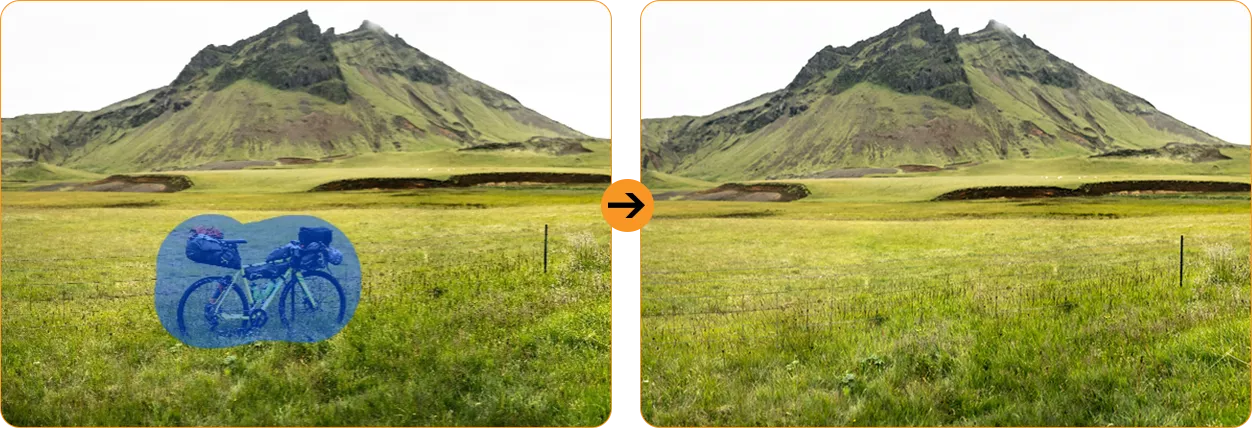
 AI-oskärpeborttagning för foton

 AI-himmelbyte


 AI-porträttoskärpa
 AI-porträttljus

 AI-färgfokus


vattentätt och dammtätt skydd Bättre än standarden: tåligare, starkare, bättre

 *Vattentät ned till 1,5 m i 30 minuter.
Inifrån och ut, redo för alla utmaningar

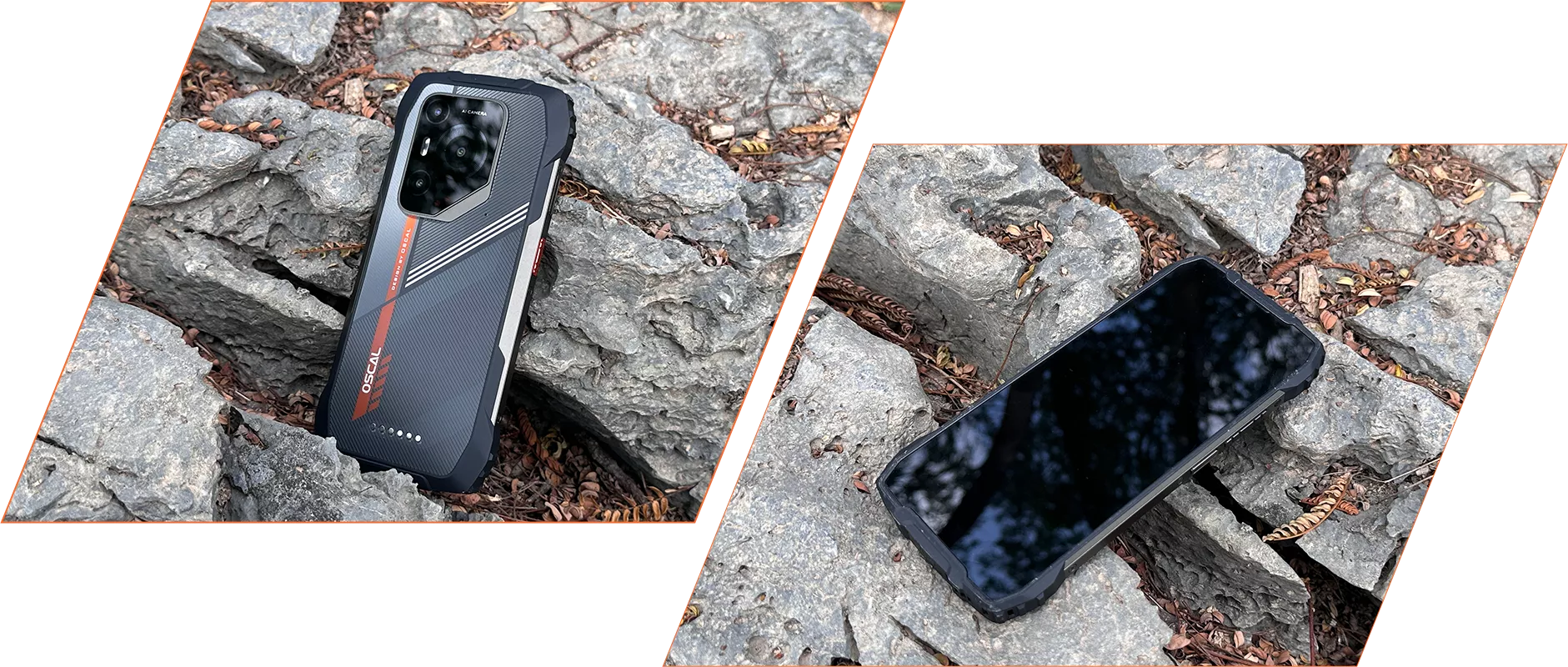 *Tål fall från upp till 1,2 m. Den faktiska prestandan kan variera beroende på faktorer som
underlagets material, fallvinkeln osv.

Använd med förtroende

smidigare än någonsin Anpassat för dig, smartare än någonsin Personanpassning↑ Bekvämlighet↑ Smidighet↑ Integritet↑
stråla av livfullhet Ge skärmen på PILOT 3 liv med flödande konst och livfulla färger, så att den sprudlar av energi och ger dig en ny visuell upplevelse.
privat utrymme Med Workspace-appen kan du separera arbetsutrymmet från det privata utrymmet, så att dina företagsdata hålls säkra och du får en tydlig gräns mellan arbetslivet och privatlivet.
dubbelt så effektivt Med den nya knappen ”Lägg till widget” får du ett snabbt och intuitivt sätt att komma åt och placera widgetar på startskärmen, vilket förenklar processen och gör den mer effektiv.
direkt åtkomst hela vägen Snabb åtkomst med ett finger


 9 % mer tillgängligt RAM-minne↑
 *EasyShare fungerar endast när du aktiverar Wi-Fi i Inställningar, men är inte
beroende av nätverket. Dataöverföringshastigheten kan variera beroende på testmiljön.


 Systemhanterare

dela tryggt redan nu Du kan begränsa skärminspelningen till en viss app i stället för hela skärmen, så att du kan spela in eller dela det som behövs eller som du vill, samtidigt som resten förblir privat. Perfekt för onlinemöten, utbildningstillfällen och samarbeten i team.

kundtjänst per telefon dygnet runt och reparationscenter i Europa Mer omtanke, mindre oro
Android-versioner På OSCAL erbjuder vi regelbundna systemuppdateringar så att din enhet hålls uppdaterad med de senaste Android-versionerna, funktionerna, säkerhetskorrigeringarna och prestanda- förbättringarna.
Omedelbar hjälp, när som helst,
var som helst Vårt professionella tekniska supportteam är redo att lösa alla problem, oavsett om du kontaktar oss online via vår officiella webbplats, telefonlinjer, sociala medier eller e-post, eller på plats på våra auktoriserade servicecenter.
Kontakta oss
 *Alla tider anges i lokal tid.

Support på plats, snabb hjälp

center i Europa För att hjälpa dig ytterligare erbjuder våra professionella tekniker hjälp på plats, noggrann feldiagnos och effektiva reparationstjänster.
Upptäck fler funktioner
+Beidou+QZSS Få positionsspårning i realtid och håll kontakten var du än befinner dig.
-
ModellPILOT 3
-
FärgSvart, orange
-
Mått182.2*86*14.5mm
-
Vikt357 g
-
OperativsystemDokeOS 4.1 baserat på Android 15
-
Skärm6,78-tums 2,4K IPS, upplösning på 1080*2460
120 Hz uppdateringsfrekvens, 86 % skärm-till-enhet-förhållande
Corning® Gorilla® Glass 5 -
CPU5G MediaTek Dimensity 6300 med åtta kärnor, 6 nm
-
RAM & ROMUpp till 36 GB RAM=12 GB+24 GB utökning
256 GB ROM+2 TB TF-expansion
LPDDR4X+UFS2.2 -
Batteri7500 mAh; 33 W snabbladdning
-
Främre kamera32MP
-
Bakre kamera50 MP (Samsung® ISOCELL JN1)
20 MP mörkerseende (SONY IMX376) -
Högtalare1 smart högtalare med K-box
-
NavigeringGPS+GLONASS+Galileo+Beidou+QZSS
-
KortplatsDubbel; 2*SIM/1*SIM +1*TF-kort
-
NFCStöd
-
Dubbel 5G VoLTEStöd
-
Wi-Fi & BT802.11 b/g/n/a/ac; BT 5.2
-
Nätverksanslutning2G-band: B2/B3/B5/B8
3G-band: WCDMA:B1/B2/B4/B5/B6/B8/B19
CDMA:BC0/BC1/BC10
4G-band: TDD:B34/B38/B39/B40/B41
FDD:B1/B2/B3/B4/B5/B7/B8/B12/B13/B17/B18/
B19/B20/B25/B26/B28A/B28B/B30/B66
5G-band: N1/3/5/7/8/20/28/38/40/41/77/78/79
| Modell | PILOT 3 |
| Färg | Svart, Orange |
| Dimension | 182,2*86*14,5mm |
| Vikt | 357g |
| Operativsystem | DokeOS 4.1 baserat på Android 15 |
| Visa | 6,78-tums 2.4K IPS, 1080*2460 upplösning 120Hz uppdateringsfrekvens, 86% skärm-till-kropps-förhållande Corning® Gorilla® Glass 5 |
| CPU | 5G Octa-core MediaTek Dimensity 6300, 6nm |
| RAM & ROM | Upp till 36GB RAM=12GB+24GB expansion 256GB ROM+2TB TF-expansion LPDDR4X+UFS2.2 |
| Batteri | 7500mAh; 33W snabbladdning |
| Främre kamera | 32MP |
| Bakre kamera | 50MP (Samsung® ISOCELL JN1) 20MP nattseende (SONY IMX376) |
| Högtalare | 1 st Smart-K Box-högtalare |
| Navigering | GPS+GLONASS+Galileo+Beidou+QZSS |
| Kortplats | Dubbel; 2*SIM/1*SIM +1*TF-kort |
| NFC | Support |
| Dubbel 5G VoLTE | Support |
| Wi-Fi & BT | 802.11 b/g/n/a/ac; BT 5.2 |
| Nätverksanslutning | 2G-band: B2/B3/B5/B8 3G-band: WCDMA: B1/B2/B4/B5/B6/B8/B19 CDMA: BC0/BC1/BC10 4G-band: TDD: B34/B38/B39/B40/B41 FDD: B1/B2/B3/B4/B5/B7/B8/B12/B13/B17/B18/ B19/B20/B25/B26/B28A/B28B/B30/B66 5G-band: N1/3/5/7/8/20/28/38/40/41/77/78/79 |
Does the OSCAL PILOT 3 rugged phone’s night vision camera support thermal imaging?
No. The PILOT 3 features a 20MP night vision camera for capturing your surroundings in low light or complete darkness. It helps you see details that are difficult to make out with a standard camera after dark, making it useful at campsites and in unlit outdoor areas.
Night vision and thermal imaging serve different purposes. The PILOT 3 captures images of your surroundings rather than measuring temperature differences. You can use it to observe objects and terrain at night, but tasks such as identifying overheating components or locating heat leaks require a thermal imaging device.
How do I use the night vision camera on the OSCAL PILOT 3 rugged phone, and when is it useful?
Access the night vision feature through the phone’s camera interface and frame your subject using the on-screen preview. Keep the camera area clear of fingers or other obstructions, and hold the phone steady while taking the photo. The preview helps you adjust your position and find a suitable shooting distance.
Night vision is useful when checking a campsite, observing nearby surroundings, or photographing outdoor scenes after dark. Image clarity depends on the distance, subject movement, and surrounding conditions. For better results, focus on nearby subjects and pause briefly before taking each shot.
Why aren’t photos always taken at 50MP on the OSCAL PILOT 3 rugged phone?
The PILOT 3’s 50MP main camera uses four-in-one pixel binning technology. When this processing is applied, information from four pixels is combined to produce a photo of approximately 12.5MP. This helps improve brightness in low-light conditions while keeping image files more manageable.
The camera’s sensor resolution and the resolution of a saved photo are different measurements. A 12.5MP image does not mean your camera is limited to 12.5MP; it reflects the processing used for that shot. The final photo resolution depends on the shooting mode and image processing, balancing detail, brightness, and everyday storage needs.
Can I use two SIM cards and a memory card together in the OSCAL PILOT 3 rugged phone?
No, you can’t use all three at once. The PILOT 3 has a shared card slot design that supports either two SIM cards or one SIM card and one TF/microSD memory card. The second slot accommodates a SIM card or a memory card, so you can choose the combination that suits your needs.
Use two SIM cards to keep separate work and personal numbers or add a local number when travelling. If additional storage is more useful, choose one SIM card and a memory card for your photos, videos, and files. Follow the markings on the tray and make sure each card sits securely before reinserting it.
What does “up to 36GB RAM” mean on the OSCAL PILOT 3 rugged phone?
“Up to 36GB RAM” means 12GB of physical RAM plus up to 24GB of expanded RAM. The expanded portion uses part of the phone’s internal storage to provide additional memory resources for managing apps. It supplements the built-in RAM rather than adding another 24GB of physical memory.
RAM expansion can help with multitasking when you regularly switch between several apps. Because it shares space with your stored content, keep enough internal storage available for both expansion and everyday files. The amount you need will depend on how you use your phone and how many apps you typically keep open.
Can I take underwater photos with the OSCAL PILOT 3 rugged phone?
Yes. The PILOT 3 includes an Underwater Camera feature and supports underwater photography at depths of up to 1.5 meters. Its stated water-resistance test conditions are up to 1.5 meters for 30 minutes. Familiarize yourself with the underwater controls before use, and check that the phone’s protective covers and seals are properly closed and undamaged.
Treat these figures as test limits rather than a guarantee for every water environment. Avoid strong currents, high-pressure water, and use beyond the stated depth or duration. After taking the phone out of the water, dry it carefully and allow the charging port and cable connector to dry completely before charging.
Which positioning systems does the OSCAL PILOT 3 rugged phone support for outdoor navigation?
The PILOT 3 supports GPS, GLONASS, Galileo, BeiDou, and QZSS positioning systems. Combined with a compatible navigation app, these help you check your location, follow a route, and find your way during travel or outdoor activities. Before setting off, enable location services and grant your chosen app the necessary permissions.
If your route passes through areas with limited mobile coverage, download the relevant maps in advance using an app with offline support. Satellite positioning can work without mobile data, while available offline navigation features depend on the app. An open view of the sky helps positioning; dense trees, tall buildings, and steep terrain may affect accuracy.
What AI features does the OSCAL PILOT 3 rugged phone offer, and do they require internet access or a subscription?
The PILOT 3 includes Doke AI tools for writing assistance, document analysis, image generation, and photo editing. You can use them to draft text, work through documents, turn ideas into images, and make creative changes to photos. These features bring useful writing and creative tools together on your phone.
Online AI features need an internet connection, and the relevant service may ask you to sign in. Access conditions can vary between tools, so check the feature’s in-app information for any usage limits or payment requirements. Before activating a paid option, review what it includes and choose it only if it suits your needs.
How can I customize the shortcut button on the OSCAL PILOT 3 rugged phone?
The PILOT 3’s shortcut button supports single presses, double presses, and long presses. You can assign available functions or apps to these actions, making frequently used tools easier to reach. For example, a flashlight shortcut can be useful when working in a dim area or moving around a campsite after dark.
Use the shortcut button configuration on your phone to select an action and assign a function from the available options. Once set, try each press action to become familiar with your choices. You can change the assignments as your routine changes, keeping the tools you use most within easy reach.
What does the 120Hz refresh rate offer on the OSCAL PILOT 3 rugged phone, and how can I manage it?
The PILOT 3 features a smart refresh rate of up to 120Hz, helping scrolling, swiping, and animations appear smoother. The difference is especially noticeable when browsing long webpages, scrolling through social feeds, or moving between screens. It contributes to a more fluid experience during everyday use.
To review any refresh-rate controls available on your phone, check its display settings and follow the options shown there. Higher refresh rates generally favor smoother motion, while lower rates can help reduce power use. The available settings depend on the installed software, and actual smoothness also varies with the app and content.
Is the OSCAL PILOT 3 rugged phone compatible with smartwatches and Bluetooth headphones?
Yes. The PILOT 3 supports Bluetooth 5.2 and can connect to compatible wireless headphones and smartwatches. Depending on the accessory, you can listen to music, take calls, receive notifications, or sync activity data. This makes it convenient to use your preferred accessories while commuting, working, or exercising.
For headphones, put them in pairing mode and select them in the phone’s Bluetooth settings. For a smartwatch, follow its companion app’s setup instructions and allow the permissions needed for notifications or syncing. Check that the watch and its app support your phone’s Android version, as available features vary by accessory.
What video resolution and frame rate does the OSCAL PILOT 3 rugged phone support?
The PILOT 3 supports video recording at up to 2K resolution and 30fps, giving you detailed footage of daily life, outdoor trips, and work activities. Use the Camera app’s video interface to review the recording options available for your selected camera and mode before filming.
Higher-resolution videos generally take up more storage, so check your available space before recording longer clips. For clearer results, clean the lens, use good lighting where possible, and hold the phone steadily. Smooth, controlled movements also make your footage easier to watch when filming while on the move.
Can I use two apps in split-screen mode on the OSCAL PILOT 3 rugged phone?
Yes. The PILOT 3 supports split-screen use with compatible apps, allowing you to work with two apps on the screen at once. You can read a document while taking notes or keep a reference page open while writing a message, reducing the need to switch back and forth.
The App Pairs feature lets you save frequently used split-screen combinations and reopen them with a single tap. Follow the on-screen split-screen and pairing options to arrange your preferred apps. App support determines which combinations are available, so choose two compatible apps that work well together for your routine.
How can I keep work and personal apps separate on the OSCAL PILOT 3 rugged phone?
The PILOT 3 includes a Workspace app to help separate work and personal use. It also offers Private Space, which provides a separate area for keeping sensitive apps hidden and protected. Together, these features help you organize different activities and control how you access personal content.
Follow the setup instructions for each feature and add the apps you want to use in that space. For example, keep work tools together for your daily tasks and place selected personal apps in Private Space. This gives you a clearer separation between work activities and content you prefer to keep away from your main interface.
Jump to another section