



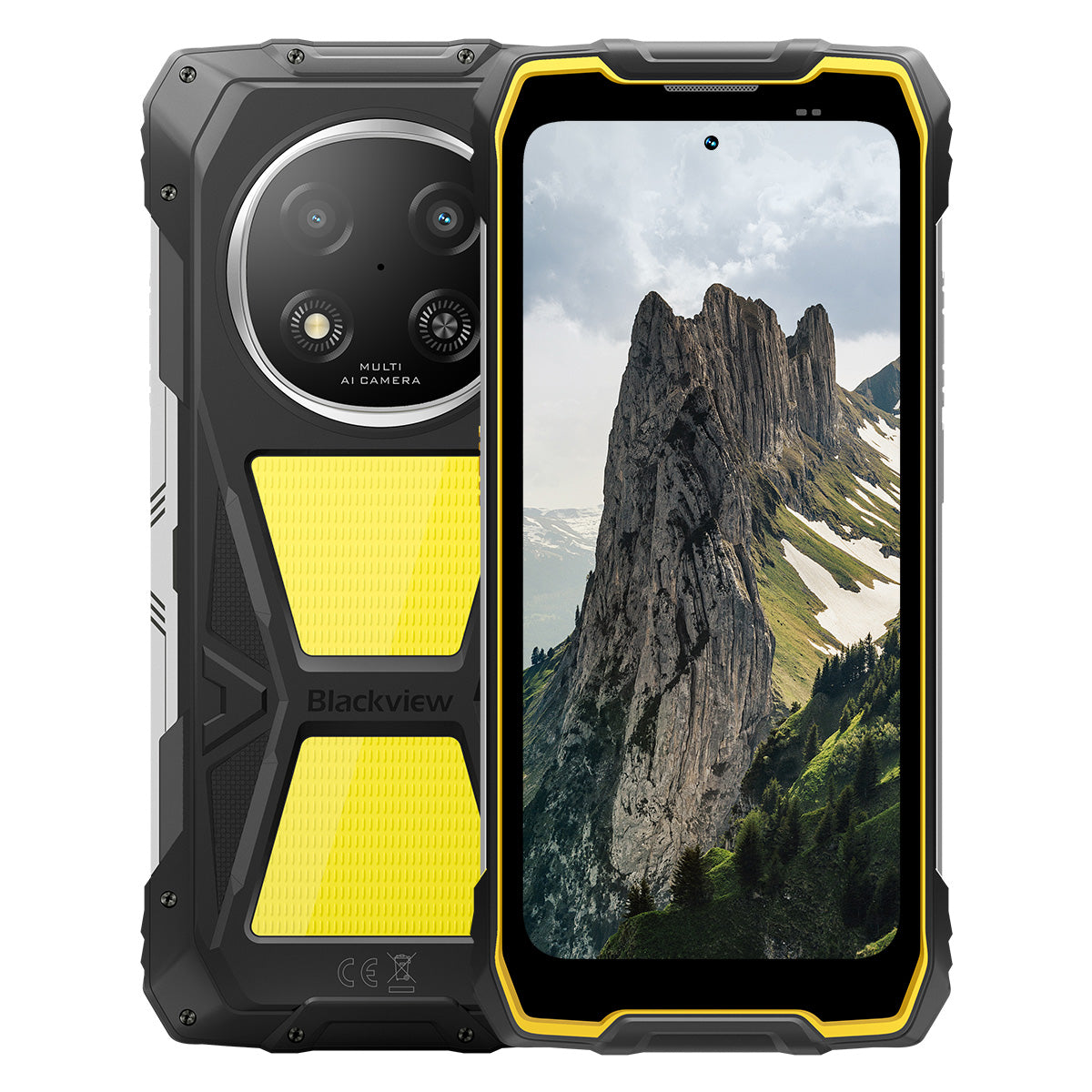


Blackview ROCK 2 Pro 6,67-calowy wyświetlacz 120Hz latarka kempingowa 400LM telefon wytrzymały 15000mAh 5G

Pospiesz się, zostało tylko 2 sztuk na stanie.
Najważniejsze informacje
Najważniejsze informacje
✔6,67-calowy wyświetlacz o częstotliwości odświeżania 120 Hz
✔Wbudowane podwójne światło kempingowe 400LM
✔5G 6nm ośmiordzeniowy procesor UNISOC T8100
✔Akumulator 15000mAh i szybkie ładowanie 33W
✔Główny aparat 16MP z AI + przedni aparat 13MP z AI
✔Certyfikaty IP68, IP69K oraz MIL-STD-810H
Informacje
Informacje
Blackview ROCK 2 Pro jest stworzony dla użytkowników, którzy potrzebują niezawodnej wydajności mobilnej w wymagających warunkach. Łączy 6,67-calowy wyświetlacz 120Hz z wydajnością UNISOC T8100 5G oraz baterię 15000mAh z szybkim ładowaniem 33W, idealne do pracy, podróży, nawigacji i użytku na zewnątrz. Kluczowe funkcje gotowe do pracy w terenie to 16MP tylna i 13MP przednia kamera AI, podwójne lampy kempingowe 400LM oraz ochrona IP68, IP69K i MIL-STD-810H. Zaprojektowany na place budowy, wyprawy w tereny odległe i codzienną wytrzymałość, daje użytkownikom pewność, że pozostaną w kontakcie, uchwycą szczegóły i będą działać, gdy zwykłe telefony nie wystarczają.
O marce
O marce
W Blackview wierzymy, że doskonała technologia powinna wykraczać poza imponujące specyfikacje. Powinna pasować do prawdziwego życia, rozwiązywać rzeczywiste problemy i być niezawodna wtedy, gdy jest to najważniejsze.
Blackview zaczęło od wytrzymałych telefonów stworzonych do trudnych warunków. Dziś oferujemy szerszy ekosystem inteligentnych urządzeń, w tym smartfony, tablety, laptopy, smartwatche, produkty audio i wiele więcej.
W każdej kategorii nasz cel pozostaje ten sam: trwała jakość, praktyczne innowacje i przystępne ceny. Projektujemy produkty, które od pierwszego dnia dają poczucie niezawodności.
Rozumiemy, co klienci cenią najbardziej: płynne działanie, długotrwałą niezawodność, przydatne funkcje oraz technologię, która ułatwia codzienne życie bez zbędnych kosztów.
Dlatego Blackview przykłada dużą wagę do testowania produktów, doświadczenia użytkownika oraz funkcji, które wnoszą realną wartość w pracy, podróży, twórczości, eksploracji na świeżym powietrzu i codziennym kontakcie.
Blackview jest stworzone dla osób, które chcą technologii, na której mogą polegać: inteligentnych, wydajnych urządzeń zaprojektowanych, by nadążać za nowoczesnym życiem.
Niezawodne z założenia. Praktyczne z natury. Stworzone do prawdziwego życia.
Wysyłka i zwroty
Wysyłka i zwroty
• Wysyłka: Zamówienia są realizowane w ciągu 1–2 dni roboczych. Standardowa dostawa trwa 3–7 dni roboczych, w zależności od lokalizacji.
• Zwroty: Możesz zwrócić lub wymienić produkty w ciągu 30 dni od otrzymania zamówienia. Przedmioty muszą być w oryginalnym stanie wraz z dowodem zakupu.
Jeśli Twój produkt jest wadliwy lub uszkodzony z powodu problemów produkcyjnych, chętnie wymienimy go bez dodatkowych kosztów.

Szybsze 5G, jaśniejsze światło, niepowstrzymana moc
Przekraczaj granice, pokonuj każde wyzwanie


Dlaczego warto wybrać Blackview ROCK 2 Pro?

Nr 1
Certyfikaty IP69K, IP68 & MIL-STD-810H,
Zaprojektowany, by pokonać każde ekstremum.

Nr 2
Błyskawiczne 5G z 6nm UNISOC T8100,
Doświadcz niezrównanej prędkości
Płynny i oszałamiający
Dni czuwania.
Gdziekolwiek
2.0, inteligencja bez granic
Oparte na Android 16
Nr 1
Certyfikaty IP69K, IP68 & MIL-STD-810H,
Zaprojektowany, by pokonać każde ekstremum.

400lm światło kempingowe
Jasne, regulowane i niezawodne — zaprojektowane, by oświetlić twój obóz i zapewnić bezpieczeństwo podczas każdej przygody na zewnątrz.

Tryb oświetleniaTrzy poziomy jasności: niski/wysoki/bardzo jasny
Niski dla oszczędzania energii, Wysoki i Ultra jasny dla wszechstronnych potrzeb oświetlenia na zewnątrz.

Kemping na zewnątrz

Naprawy na zewnątrz

Nocne wędrówki

Tryb SOS
Wysyła wyraźny, widoczny sygnał alarmowy, aby zapewnić bezpieczeństwo w krytycznych sytuacjach na zewnątrz.

Zagubiony na dzikości

Awaria pojazdu

Nagłe warunki pogodowe

Tryb szybkiego migania
Idealny do ostrzeżeń awaryjnych, odstraszania potencjalnych zagrożeń lub szybkiego przyciągania uwagi.

Obrona na zewnątrz

Ostrzeżenie na drodze

Ewakuacja awaryjna

Zanurzaj się. Spryskuj. Mocz. Po prostu działa.
Certyfikaty IP69K & IP68
ROCK 2 Pro jest zaprojektowany do najtrudniejszych ochrona w każdych warunkach, zapewniająca niezrównaną ochronę przed wodą, kurzem i strumieniami pod wysokim ciśnieniem.


Bezszwowe uszczelnienie ekranu: bezbłędna
wodoodporna wydajność.

Przyciski z aluminium odpornego na korozję:
Wzmocniony wysokiej jakości silikonowymi uszczelkami.

Uszczelniony port USB TPU: maksymalna ochrona przed kurzem
i odporność na wodę.

Kamera podwodna: uchwyć niezapomniane
chwile pod powierzchnią.

Czyszczenie głośnika: automatyczne usuwanie wody i
usuwanie zanieczyszczeń dla krystalicznie czystego dźwięku.

Odporność na upadki. Odporność na kurz. Gotowy do walki.
Certyfikat MIL-STD-810H
Od -20°C arktycznych terenów po 60°C upały pustyni, od upadków z 1,2 m na beton po burze piaskowe — ROCK 2 Pro przetrwa tam, gdzie inni zawodzą.

Sprawdzone w ekstremalnych testach

Deszcz

Piasek i kurz

Wibracje

Wstrząs

Wilgotność

Wysokość

Przyspieszenie

Wysoka temperatura

Niska temperatura

Zanurzenie

Wzmocnione gumowe narożniki:
Najlepsza absorpcja wstrząsów.

Ultra-trwały tył z kompozytu:
Zaprojektowany, by wytrzymać.

Rama z aluminium klasy lotniczej:
Mocny, lekki i odporny na uderzenia.

Wyświetlacz Panda Glass: odporny na zarysowania i
odporny na stłuczenia dla maksymalnej trwałości.
Tryb Rękawiczek 2.0
Działaj bezbłędnie —
nawet w grubych rękawiczkach.


Przydatna torba narzędziowa
Kompas, Latarka, Lupa i więcej —
twój praktyczny zestaw narzędzi w jednym.
Nr 2
Błyskawiczne 5G z 6nm UNISOC T8100,
Doświadcz niezrównanej prędkości
5G 6nm UNISOC T8100
Prędkość, której potrzebujesz. Moc, której ufasz.
Doświadcz błyskawicznego 5G z chipsetem 6nm UNISOC T8100, wyposażonym w potężny 2,2GHz Procesor do płynnego wielozadaniowości i sprawnej pracy w wymagających aplikacjach!


4*A76@2.2GHz
+ 4*A55@2.0GHz

Arm Mali G57

748,099
Benchmark AnTuTu
Do 32GB RAM LPDDR4X
Wielozadaniowość jak nic.
Wielozadaniowość bez wysiłku — uruchamiaj aplikacje natychmiast, przełączaj się płynnie i pracuj oraz baw się z niezachwianą szybkością.
Do 32GB RAM=8GB RAM + 24GB rozszerzenia
Atomized Memory 2.0
9% więcej dostępnej pamięci RAM


Pamięć 256GB UFS 3.1
Ulepszony do UFS 3.1 dla 2,4x szybszych prędkości, niższego zużycia energii, zmniejszona latencja i przyspieszona wydajność zapisu — przechowuj więcej, ładuj szybciej i pracuj efektywniej.

ROCK 2 Pro
UFS 3.1

ROCK 2
UFS 2.2
2,4x szybsza prędkość transferu danych
Efektywne rozpraszanie ciepła
Chłodny pod presją
Dzięki powierzchni chłodzącej 1700 mm² ciesz się szybkim rozpraszaniem ciepła dla stabilnej, płynnej wydajności bez względu na intensywność zadania.

Nr 3
6,67" 120Hz inteligentny ekran ochrony wzroku,
Płynny i oszałamiający
Ekran 6,67" HD+ IPS
Szerszy widok, ostrzejsze detale
Wyposażony w 6,67" ekran HD+ IPS, ROCK 2 Pro oferuje wciągające wizualizacje z 120Hz inteligentnym odświeżaniem i jasnością 650 nitów — idealny do gier, streamingu i codziennych zadań.

120Hz
Inteligentne odświeżanie AI
650 nitów
Jasność
85%
Proporcje ekranu do obudowy
720*1604
Rozdzielczość
120Hz inteligentne odświeżanie AI
Płynniej, szybciej, mądrzej
Pożegnaj się z opóźnieniami — inteligentne odświeżanie dostosowuje się do Twoich potrzeb, zapewniając płynne przewijanie i optymalizując żywotność baterii.
120Hz
60Hz
Dwukrotnie wyższa częstotliwość odświeżania,
Dwukrotnie płynniejszy obraz

Tryby ochrony wzroku
Komfort na cały dzień
Chroń oczy dzięki czterem dostosowanym trybom zaprojektowanym do czytania, pracy i relaksu.


Tryb czytania
Komfort jak papier do długich godzin czytania

Lampka nocna
Delikatne oświetlenie zmniejszające zmęczenie oczu przez niebieskie światło

Tryb ciemny
Idealny do słabo oświetlonych miejsc

Tryb jasny
Jasny i wyraźny do użytku w ciągu dnia
Głośnik o wysokiej mocy 2W
Potężny dźwięk, wyjątkowa klarowność
ROCK 2 Pro oferuje odważny, krystalicznie czysty dźwięk dzięki głośnikowi o mocy 2W, przebijając się przez hałaśliwe otoczenie aby zapewnić najwyższą jakość dźwięku zarówno do komunikacji, jak i rozrywki.

Nr 4
Ogromna bateria 15 000 mAh,
Do 50 dni w trybie czuwania.
Ogromna bateria 15 000 mAh
Energia, która nadąża. Dzięki ogromnej baterii 15 000 mAh, ROCK 2 Pro bez trudu radzi sobie z wyjazdami służbowymi, przygody na świeżym powietrzu i codzienne użytkowanie — bez konieczności szukania gniazdka.

Inteligentne ładowanie
Ochrona

AI oszczędzanie energii
Algorytm


28 godz.
Gry

43 godz.
Rozmowa

97 godz.
Muzyka

34 godz.
Przeglądanie internetu

26 godz.
Odtwarzanie wideo

50 dni
Tryb czuwania
*Dane testowane przez Blackview Lab na podstawie ciągłego użytkowania. Rzeczywiste wyniki mogą się różnić w zależności od warunków użytkowania.

Inteligentne głębokie oszczędzanie energii klasy premium
Tryb oszczędzania energii
ROCK 2 Pro inteligentnie dostosowuje moc zużycie dzięki zaawansowanej optymalizacji podczas okresów bezczynności — zapewniając dłuższy żywotność baterii bez poświęcania wydajności.
Dłuższy czas użytkowania przy lekkim obciążeniu
Mniejsze zużycie energii podczas nocnego czuwania
5W OTG ładowanie zwrotne
Udostępniaj energię w podróży
ROCK 2 Pro pełni też funkcję przenośnego power banka, pozwalając ładować słuchawki, smartwatche lub nawet twój telefon przyjaciela w podróży.

Nr 5
Uchwyć każdą chwilę,
Zawsze i wszędzie

Główny aparat AI 16MP
Uchwyć perfekcję. Udostępnij natychmiast.
Główny aparat AI 16MP w ROCK 2 Pro oferuje krystalicznie czyste, żywe obrazy — niezależnie czy robisz profesjonalne zdjęcia, czy łapiesz idealny zachód słońca.
16MP
Przedni aparat AI 13MP
Bądź sobą — tylko jaśniej.
Przedni aparat AI 13MP w ROCK 2 Pro dostosowuje się do każdego oświetlenia, zapewniając ostre selfie, naturalny i zachwycająco prosty.

Tryb piękna
Błyszcz naturalnie i bez wysiłku.
Tryb piękna AI poprawia twoją skórę i ton z subtelnymi, naturalnymi korektami — podkreślając twoje najlepsze cechy z finezją.

Tryb portretowy
Skup się na sobie, rozmyj resztę.
Czujnik głębi AI podkreśla twój obiekt, tworząc gładki, studyjnej jakości efekt bokeh — bez dodatkowego sprzętu.

Tryb nocny
Opanuj noc, każdy detal się liczy.
Tryb nocny AI ujawnia ukryte detale w ciemności — jasne niebo, ostre krawędzie i idealnie stabilne ujęcia, niezależnie od słabego oświetlenia.

Nr 6
Wyłącznie samodzielnie opracowany Doke
AI 2.0, inteligencja bez granic
Integrując trzy nowoczesne modele AI, Doke AI wykorzystuje najnowszą technologię, aby głęboko zrozumieć potrzeby użytkownika, dostarczając szybsze, mądrzejsze i bardziej dopasowane rozwiązania.

DeepSeek-R1

ChatGPT-4o mini

Gemini AI 2.0 Flash
Twój ekskluzywny menedżer inteligentnego życia

Aktywacja głosowa &
Rozpoznawanie głosu
Odblokuj bez wysiłku głosem —
bezdotykowa i bardzo bezpieczna!

Globalna inteligentna kontrola AI
Zarządzaj aplikacjami i ustawieniami łatwo za pomocą prostych poleceń głosowych, usprawniając codzienne zadania.
 Kompatybilne aplikacje:
Pełnoekranowa pomoc AI
Natychmiast udzielaj odpowiedzi i wglądów związanych z
do aktualnej zawartości ekranu.


Interakcja AI w czasie rzeczywistym
Ciesz się płynną, komunikacją w czasie rzeczywistym,
zwiększania produktywności w każdej chwili.
Cztery innowacyjne aplikacje Doke AI do
Podnieś swoje doświadczenie

Aplikacja AI Chat
Twój zawsze dostępny towarzysz AI Chat Od planowania zadań po kreatywne burze mózgów, AI Chat to twój zaufany inteligentny asystent, zawsze gotowy do pomocy.


Nowa generacja
DeepSeek-R1

Wyszukiwanie online AI

Analiza dokumentów

Asystent nauki

Rozmowa z AI

Aplikacja AI Photos
Twoje przenośne narzędzie do edycji zdjęć AI z 18 zaawansowane funkcje AI, AI Photos przekształca zwykłe zdjęcia w oszałamiające wizualne dzieła, gotowe do zachwycenia i udostępnienia.

AI Usuń obiekty

AI OutPainting


AI Rozmycie zdjęcia
AI Zmień tło

AI Animate


Aplikacja AI Video
Twoje narzędzie do tworzenia filmów AI
Przekształć tekst, obrazy i codzienne chwile w kinowe filmy bez wysiłku — bez potrzeby specjalistycznej wiedzy!


Aplikacja AI Music
Twoje tworzenie muzyki AI
Platforma
Nie potrzebujesz instrumentów ani studia — AI Music pozwala tworzyć unikalną muzykę bez wysiłku, dopasowany do każdej okazji.

Nr 7
Najnowszy DokeOS 5.0 oparty na Android 16
Od DokeOS 4.2 do 5.0 przebudowaliśmy doświadczenie: szybciej, czyściej, mądrzej i bardziej osobiście. To nie tylko aktualizacja — to skok naprzód w interakcji z Twoim ROCK 2.

Rób to, co ważne. Bez hałasu.

Funkcja klawisza bocznego
Jedno naciśnięcie. Natychmiastowy dostęp.
Szybko aktywuj latarkę, SOS, aparat podwodny, PTT lub ulubioną aplikację. Zawsze gotowe, bez czekania.

Rozpocznij nagrywanie dźwięku

Włącz latarkę

Zrzuty ekranu

Włącz aparat podwodny

Włącz PTT

Włącz SOS

Nawigacja czterordzeniowa
Globalna precyzja. Zawsze na właściwym kursie.
Zasilany przez GPS, Beidou, Galileo i Glonass dla dokładnego pozycjonowania — gdziekolwiek i kiedykolwiek.
Po zakupie nadal Cię wspieramy.

Aktualizacja wersji Androida

Pomoc telefoniczna

Całodobowa obsługa online

Zaufane centrum napraw offline
Specyfikacja Blackview ROCK 1
| Model | ROCK 2 Pro |
| Kolor | Czarny/Żółty |
| Wymiary | 187,6 * 85,8 * 26mm |
| Waga | 558g |
| System operacyjny | DokeOS 5.0 oparty na Android 16 |
| Wyświetlacz | 6,67-calowy HD+ IPS, rozdzielczość 720 * 1604 Inteligentna częstotliwość odświeżania 120Hz, 85% stosunek ekranu do obudowy |
| Procesor | Ośmiordzeniowy 5G 6nm UNISOC T8100 |
| RAM i ROM | 8GB RAM + 256GB ROM, LPDDR4X + UFS3.1 |
| Rozszerzenie TF | Pamięć rozszerzalna do 512GB |
| Bateria | 15000mAh; szybkie ładowanie 33W |
| Aparat przedni | 13MP |
| Aparat tylny | 16MP |
| Głośnik | Głośnik 2W w obudowie |
| Nawigacja | GPS+GLONASS+Galileo+Beidou |
| Gniazdo kart | Dwa; 2SIM/1SIM +1*karta TF |
| NFC | Wsparcie |
| Wi-Fi i Bluetooth | (IEEE802.11a/b/g/n/ac) (2.4GHz/5GHz) ; BT 5.0 |
| Łączność sieciowa | Pasmo 2G: B2/B3/B5/B8 Pasmo 3G: WCDMA: B1/B2/B5/B8 Pasmo 4G: TDD:B38/B40/B41 FDD:B1/B2/B3/B4/B5/B7/B8/B12/B17 B19/B20/B26/28A/28B/B66 Pasmo 5G: N1/2/3/5/7/8/20/26 28/38/40/41/66/77/78 |
| Model | ROCK 2 Pro |
| Kolor | Czarny/Żółty |
| Wymiar | 187,6 * 85,8 * 26mm |
| Waga | 558g |
| System operacyjny | DokeOS 5.0 oparty na Android 16 |
| Wyświetlacz | Ekran 6,67 cala HD+ IPS, rozdzielczość 720 * 1604 Inteligentna częstotliwość odświeżania 120Hz, 85% stosunek ekranu do obudowy |
| CPU | Ośmiordzeniowy 5G 6nm UNISOC T8100 |
| RAM i ROM | 8GB RAM + 256GB ROM, LPDDR4X + UFS3.1 |
| Rozszerzenie TF | Pamięć rozszerzalna do 512GB |
| Bateria | 15000mAh; szybkie ładowanie 33W |
| Aparat przedni | 13MP |
| Aparat tylny | 16MP |
| Głośnik | Głośnik 2W w obudowie |
| Nawigacja | GPS+GLONASS+Galileo+Beidou |
| Gniazdo kart | Dwa; 2SIM/1SIM + 1* karta TF |
| NFC | Wsparcie |
| Wi-Fi i Bluetooth | (IEEE802.11a/b/g/n/ac) (2.4GHz/5GHz); BT 5.0 |
| Łączność sieciowa | Pasmo 2G: B2/B3/B5/B8 Pasmo 3G: WCDMA: B1/B2/B5/B8 Pasmo 4G: TDD: B38/B40/B41 FDD: B1/B2/B3/B4/B5/B7/B8/B12/B17 B19/B20/B26/28A/28B/B66 Pasmo 5G: N1/2/3/5/7/8/20/26 28/38/40/41/66/77/78 |
Is the Blackview ROCK 2 Pro comfortable to carry every day?
Yes, the Blackview ROCK 2 Pro is well-suited for daily carry, making it highly convenient for commutes, site inspections, and travel between different work locations. Weighing approximately 558 grams and measuring about 26 mm in thickness, it features a high-capacity battery and a rugged, durable design. You can adjust how you carry it based on your personal preferences and specific needs.
For ease of movement and quick access, you might consider placing it in a work bag or a suitably sized waist pouch. If you are purchasing a waist pouch or a vehicle mount, ensure that the model you choose is compatible with the device's dimensions and weight.
How does continuous navigation affect the Blackview ROCK 2 Pro’s battery life?
Using navigation continuously increases power consumption and shortens the phone's battery life, as the device must maintain location tracking and process route information. While the 15,000mAh high-capacity battery offers significantly more power than a typical smartphone, the actual duration for continuous navigation will still vary based on screen settings, network signal strength, and other applications running in the background.
For long-duration navigation, consider using voice prompts—provided it is safe to do so and does not hinder your ability to follow the route. If your work requires all-day continuous navigation, it is advisable to estimate power consumption based on your specific route and settings, and to plan time for recharging
Can I use the Blackview ROCK 2 Pro’s camping light for nighttime work?
Yes. The Blackview ROCK 2 Pro features a 400-lumen camping light with three adjustable brightness levels. It provides illumination for close-range tasks such as inspecting equipment, locating tools, checking wiring, or performing temporary repairs at night. You can adjust the brightness based on ambient lighting conditions and the specific requirements of your task to ensure the work area remains clearly visible.
When you need both hands free, you can place the phone securely so that the light is directed toward your work area. Keep in mind that using the camping light for extended periods will increase battery consumption; it is recommended to select an appropriate brightness level and turn the light off when it is no longer needed.
Is the Blackview ROCK 2 Pro suitable for use in dusty construction environments?
Yes, it is. With IP68 and IP69K ratings, the rugged Blackview ROCK 2 Pro is well-suited for environments prone to dust, moisture, and frequent physical impact—such as renovation sites, outdoor construction zones, and various maintenance work areas.
After a day of work in a dusty environment, it is recommended to wipe any loose dust off the device before placing it in a bag or connecting a charging cable. Before charging, ensure that the USB-C port is clean and dry. Additionally, keep the phone away from cutting tools and operating machinery, and avoid placing it in locations where it might be crushed or compressed.
Is the Blackview ROCK 2 Pro’s front camera suitable for video calls?
Yes, it is. The Blackview ROCK 2 Pro features a 13MP front-facing camera, which is well-suited for everyday video calls—whether you are communicating with colleagues for work or staying in touch with friends and family. In well-lit conditions with a stable network connection, it captures facial expressions clearly, making interactions smoother.
During video calls, it is recommended to face a light source and avoid having a window or a strong light source directly behind you. For longer calls, you may want to place the phone on a stand to keep the image steady and free up your hands. If you experience lag or a blurry image, check your network connection and try adjusting the lighting or the camera angle.
What should I do if a banking app does not work on my Blackview ROCK 2 Pro?
If you are unable to open a banking app, log in, or complete a transaction, first check your internet connection, restart your phone, and ensure the app is updated to the latest version via the download channels specified on the bank’s official website. Additionally, verify that your phone’s date and time settings are correct, and grant any necessary permissions as prompted by the app.
If the issue persists, note down any specific error messages and contact the bank’s customer service to check if your account or device is subject to any security restrictions. If you need to reinstall the app, ensure that your login password, linked phone number, and verification methods are accessible so that you can successfully log back in or complete device verification.
What should I do if an app cannot verify my identity using the Blackview ROCK 2 Pro’s front camera?
Before starting, ensure you have granted the app permission to access the camera and clean the lens. In an environment with even lighting, position your face within the indicated frame. Remove any face masks or sunglasses, and ensure your hair is not covering your eyebrows or eyes. If your glasses are causing reflections, or if you are wearing colored contact lenses, try removing them before attempting the verification again.
If verification fails, try adjusting the lighting or the angle of your face; follow any specific instructions provided by the app. If the issue persists after multiple attempts, contact the platform's customer support to ask if they offer manual review, allow the submission of valid identification documents, or provide alternative verification methods.
What should I do if an app keeps freezing or crashing on my Blackview ROCK 2 Pro?
If you experience frequent freezing or crashing, try restarting the app or the phone, and ensure the app is updated to the latest version. Additionally, check that you have sufficient storage space, close any background apps you aren't currently using, and delete any unnecessary files.
If the issue is limited to a single app, try clearing its cache, or back up your important data and reinstall the app. If multiple apps are frequently freezing or crashing, first check for system updates. If the problem persists, make a note of any error messages and the circumstances under which the issues occur, then contact customer support for further assistance.
How can I check for software updates on the Blackview ROCK 2 Pro?
Open "Settings" on your phone, navigate to the system update page, and tap "Check for updates." If a new version is available, you can review the update notes to learn about the included feature enhancements and bug fixes, then follow the on-screen prompts to download and install it. Checking for updates regularly ensures you receive system optimizations and security patches in a timely manner.
Before updating, connect to a stable Wi-Fi network, ensure your phone has sufficient battery, and back up any important data. It is best to perform the update when you do not need to use your phone; do not force a shutdown or restart during the process—simply wait for the system to complete the update. If no updates are currently available, you can continue using your phone as usual and check again later.
What accessories are included with the Blackview ROCK 2 Pro?
The Blackview ROCK 2 Pro comes with different charger configurations, depending on the version purchased. In the UK, you can choose a version that includes either a UK-standard three-pin plug charger or an EU-standard two-pin plug charger. In the US, you can choose a version that either excludes a charger or includes an EU-standard two-pin plug charger.
Please verify the charger configuration of your chosen version before placing an order. US users who select the version with an EU-standard plug will need to obtain a suitable plug adapter; those who select the version without a charger will need to provide their own compatible charger.
How can I protect the Blackview ROCK 2 Pro’s camera lenses during outdoor work?
When carrying the phone outdoors, avoid direct contact between the lens and hard objects such as keys, screws, or tools; it is best to keep the phone in a separate pocket or a dedicated compartment in your bag. When setting the phone down, choose a clean, flat surface to prevent the lens area from coming into contact with sand or gravel.
If the lens becomes dusty or sandy, gently remove the debris using a soft-bristled brush or an air blower, then wipe it lightly with a clean microfiber cloth. Avoid rubbing the lens directly, as this may cause scratches. If you choose to use a protective case or a lens protector, ensure it is specifically designed for the ROCK 2 Pro, and take care not to obstruct the lens, flash, or camping light.
What should I check when my Blackview ROCK 2 Pro arrives?
After receiving your package, first inspect it and the phone for any visible damage. Verify that the model, color, storage capacity, and included accessories match your order. If the package is damaged or any accessories are missing, take clear photographs and retain the original packaging along with the shipping label.
Once powered on, check that the touchscreen, physical buttons, camera, speakers, microphone, and charging port are all functioning correctly. You may also want to test the device by connecting to Wi-Fi and inserting a SIM card. Please note: Do not test the phone’s ruggedness by intentionally dropping it or submerging it in water. If you encounter any issues, contact the seller through the platform where you made the purchase, providing your order number and a detailed description of the problem.
How can I request a return if there is a problem with my Blackview ROCK 2 Pro?
If you experience any issues with your Blackview ROCK 2 Pro, please contact the customer service team of the channel where you purchased the device. You will need to provide your order details, a description of the issue, and photos or videos that clearly illustrate the problem. The customer service team will assist in troubleshooting, verify the device's warranty status, and advise on the next steps.
For devices that qualify for warranty coverage, service will be provided in accordance with the warranty policy. If your device is outside the warranty period or the scope of coverage, you may consult with customer service regarding paid repair options. If you need to send your device in for repair, please contact customer service first to make arrangements; additionally, ensure that you back up your personal data and remove your SIM card and any memory cards.
Jump to another section