



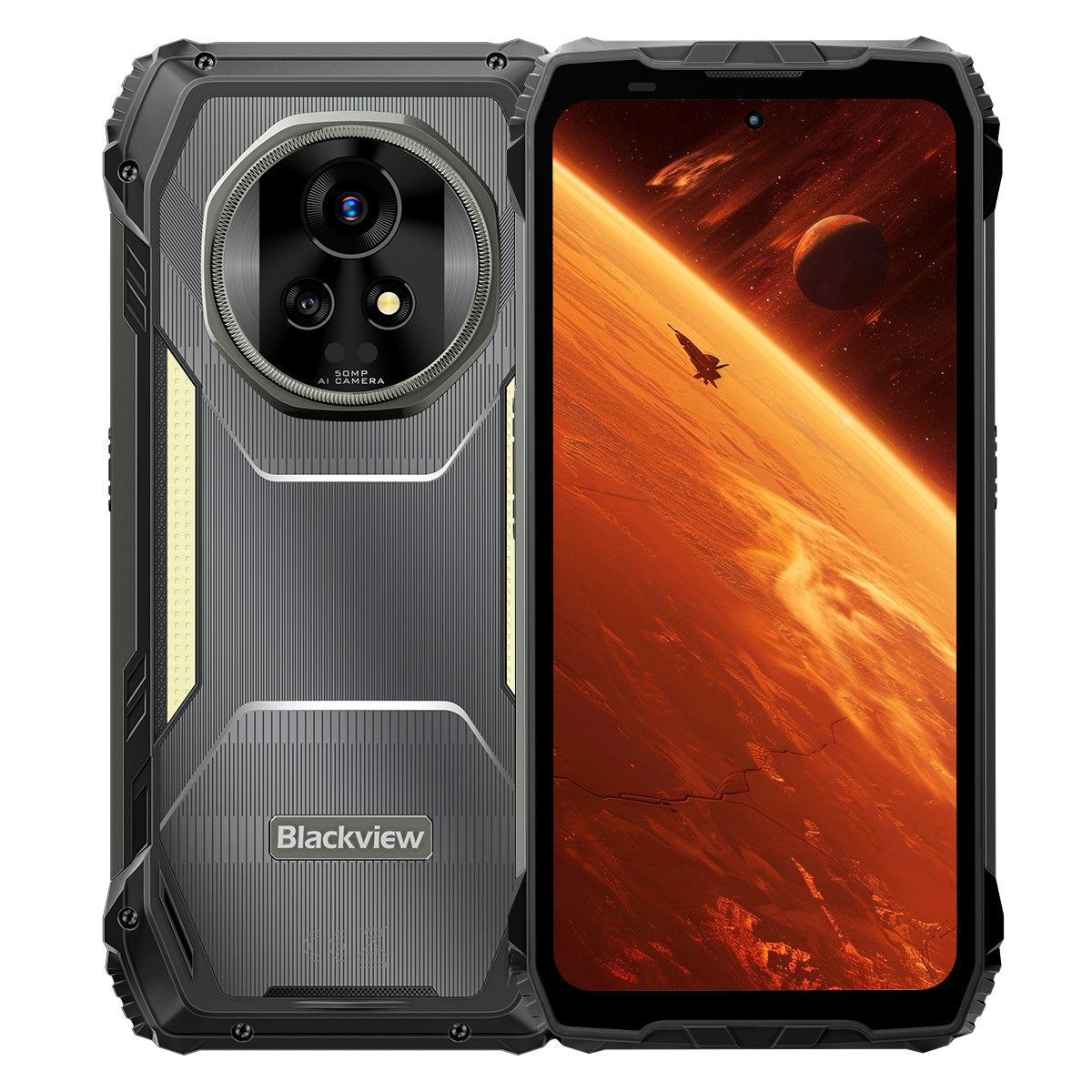


Blackview XPLORE 2 6.73" 3.2K AMOLED-scherm MediaTek Dimensity 8300 Octa-core 20000mAh 467LM Campinglamp 5G AI Robuuste Telefoon

Beschikbaar op voorraad (41)
Hoogtepunten
Hoogtepunten
✔6,73" 120Hz 3,2K LTPO AMOLED-scherm
✔Ingebouwde 467 Lumen Dubbele Campinglamp
✔MediaTek Dimensity 8300 4nm 5G Octa-core & WiFi 6E
✔20000mAh Batterij met 120W Snelladen
✔50MP Hoofdcamera+20MP Nachtzichtcamera
✔IP68 & IP69K & MIL-STD-810H Gecertificeerd
✔eSIM Ondersteuning
Informatie
Informatie
De Blackview XPLORE 2 is een robuuste 5G vlaggenschiptelefoon, ontworpen voor gebruikers die topkwaliteit scherm, lange batterijduur en professionele outdoor functionaliteit willen. Het 6,73-inch 120Hz 3,2K AMOLED-scherm, de Dimensity 8300-processor, WiFi 6E en de enorme 20.000mAh batterij met 120W snelladen maken het krachtig voor werk, navigatie, media en reizen. Een 50MP hoofdcamera, 20MP nachtzichtcamera, 467LM campinglamp, eSIM-ondersteuning, IP68 & IP69K bescherming en MIL-STD-810H duurzaamheid maken het klaar voor veeleisende omstandigheden in het veld.
Over het merk
Over het merk
Bij Blackview geloven we dat geweldige technologie verder moet gaan dan indrukwekkende specificaties. Het moet passen bij het echte leven, echte problemen oplossen en betrouwbaar blijven wanneer het er het meest toe doet.
Blackview begon met robuuste telefoons die gebouwd zijn voor zware omgevingen. Tegenwoordig bieden we een breder ecosysteem van slimme apparaten, waaronder smartphones, tablets, laptops, smartwatches, audioapparaten en meer.
In elke categorie blijft onze focus hetzelfde: duurzame kwaliteit, praktische innovatie en betaalbare prijzen. We ontwerpen producten die vanaf dag één betrouwbaar aanvoelen.
We begrijpen wat klanten het meest waarderen: soepele prestaties, langdurige betrouwbaarheid, nuttige functies en technologie die het dagelijks leven gemakkelijker maakt zonder onnodige kosten.
Daarom besteedt Blackview echte aandacht aan producttesten, gebruikerservaring en functies die waarde toevoegen aan werk, reizen, creatie, buitenavonturen en dagelijkse verbinding.
Blackview is gemaakt voor mensen die technologie willen waarop ze kunnen vertrouwen: slimme, capabele apparaten die meegaan met het moderne leven.
Betrouwbaar van ontwerp. Praktisch van aard. Gemaakt voor het echte leven.
Verzending & Retouren
Verzending & Retouren
• Verzending: Bestellingen worden binnen 1–2 werkdagen verwerkt. Standaard levering duurt 3–7 werkdagen, afhankelijk van uw locatie.
• Retouren: U kunt producten binnen 30 dagen na ontvangst van uw bestelling retourneren of ruilen. Artikelen moeten in originele staat zijn met een aankoopbewijs.
Als uw artikel defect of beschadigd is door fabricageproblemen, vervangen wij het graag zonder extra kosten.


Werelds Eerste 3.2K AMOLED 5G
AI Robuuste Armor Flagship
Geboren voor de Top. Gemaakt voor de Wildernis.
6.73" 3.2K AMOLED 120Hz Scherm | HDR Adembenemende Beelden | Dubbele 50MP Samsung® Camera's+20MP Nachtzicht| Dubbele Anti-Schok (OIS + EIS) | 5G 4nm Dimensity 8300 | 48GB LPDDR5X & 1TB UFS4.0 + Tot 2TB TF Uitbreiding | 20000mAh Mega Batterij & 120W Super-snel Opladen
Top 9 redenen om voor Blackview te kiezen
XPLORE 2

De sterkste duurzaamheid in de industrie
Topklasse militaire MIL-STD-810H
6 meter valbestendigheid | 500kg ultra-zware belasting | -20°C tot +60°C extreme temperatuurbestendigheid

Het toppunt van waterdichte bescherming
Topniveau IP69K & IP68 bescherming
Een-klik stof- & waterafstoting | AI regenbestendige touch| Onderwaterfoto's
2m diep onderdompelen gedurende 30 minuten waterdicht | 80℃ kookwaterbestendigheid

Nachtwacht
467lm campinglamp
Helderder licht | Krachtige stroboscoop voor waarschuwingen & verdediging | Direct SOS-signaal voor noodgevallen

Revolutionair stereogeluid
Dubbele 2W Smart-K Box Stereo Luidsprekers
Tot 316% krachtiger stereo voor meeslepend geluid, overal.

Infrarood afstandsbediening
Verander je telefoon in een alles-in-één afstandsbediening in seconden!

Voorbij visuele grenzen
Een 6,73” 3.2K HDR-display — onovertroffen in zijn klasse
2600 nits toonaangevende piekhelderheid in de industrie | 1–120Hz LTPO adaptieve verversingssnelheid 1920Hz hoogfrequente dimming | TÜV SÜD Low Blue Light gecertificeerd

Beeldvorming op zijn best
Dubbele 50MP Samsung® AI Camera's | 20MP Nachtzicht | Ultra HDR | OIS & EIS
Cinematische 4K HDR10+ video-opname | Bewegingsvolging | 8× Zoom

Prestaties, volledig geëvolueerd
Top 5G Dimensity 8300-chip | 16GB LPDDR5X RAM + 32GB uitbreiding | 1TB UFS4.0 ROM
1,339,275
AnTuTu Score
↑ 84%
Algehele Prestaties

Alles-in-één AI Beeldbewerking
AI Objecten verwijderen | AI Uitbreiden | AI Foto vervagen | AI Achtergrond vervangen | AI Animeren


Batterijkracht koning
Grootste Rugged Phone Batterij Ooit
20.000mAh Gigantische Dual-Cell Batterij | Tot 75 dagen ultra-lange standby | 120W Hyper Fast Charging | 10W omgekeerd opladen

De enige zelfontwikkelde in de industrie
Top 3 AI-modellen ter wereld. Allemaal in één.
Voiceprint-activatie & handsfree bediening

De enige zelfontwikkelde in de industrie
Helemaal nieuwe DokeOS 4.2 gebaseerd op Android 15

Slimme upgrades voor elke situatie

De enige after-sales garantie in de industrie
Robuustheid opnieuw gedefinieerd
Topklasse robuuste bescherming.
Topklasse robuuste certificeringen in de industrie
Gecertificeerd met militaire MIL-STD-810H en IP68/IP69K classificaties, biedt de XPLORE 2 ultieme bescherming tegen vallen, stof, water en verplettering—en zet een nieuwe standaard voor robuuste duurzaamheid.

6 meter
Echt valbestendig
Overleeft vallen van maximaal 6 meter, onder elke hoek, op elk oppervlak.

IP6X
Echt stofdicht
Volledige bescherming tegen zand, stof en industriële deeltjes.

IPX9K
Echt waterdicht
Weerstaat hoge temperatuur, hogedrukstralen, spatten en onderdompeling.

MIL-STD-810H
Echt verpletteringsbestendig
Weerstaat extreme compressie, impact en zware omgevingen.
De sterkste duurzaamheid in de industrie
Onbreekbaar van elke kant
Sterker dan ooit—versterkt van binnen en buiten om vallen te weerstaan, verpletterende kracht en extreme temperaturen.
6 meter
Valbestendigheid
Valbestendigheid op een hoger niveau
1,5 meter
Dodelijke val
Overleeft directe vallen
500kg
Draagvermogen
Weerstaat ultra-zware druk2
-20°C tot +60°C
Extreme temperaturen
Breed werkbereik

Bewezen door deze extreme tests

Ultra-robuste bouw
Eerste in de industrie
ArmorShield structuur
XPLORE 2 gebruikt een 5-laags ArmorShield ontwerp, versterkt met Gorilla® Glass 5 en aero-grade Al-Ti legering voor allround duurzaamheid.
5-laags
ArmorShield
Structuur
4 hoeken
Versterkt
Bescherming
400% ↑
Sterkere impact
Weerstand

Het toppunt van waterdichte bescherming
Topniveau IP69K bescherming
Gecertificeerd met IP69K en IP68, het doorstaat alles—heet kokend water, onophoudelijke hogedrukjets, sprays onder meerdere hoeken en langdurige onderdompeling.
80℃
Duurzaamheid tegen kokend water
10000 kPa
Weerstaat industriële jets
0° / 30° / 60° / 90°
Bescherming tegen spuiten vanuit alle hoeken
2m gedurende 30 minuten
Bewijs tegen diepe onderdompeling4
1.000.000+ keer
Betrouwbaarheid getest op onderdompeling

Dubbele waterdichte USB-poort
Weerstaat water zonder afdekking, dubbel beschermd wanneer afgesloten.

Een-klik stof- & waterafstoting
Maakt de speaker direct vrij om elke oproep luid en duidelijk.5

AI regenbestendige touch
Zelfs bij zware regenbuien, de scherm blijft soepel en responsief.6

Onderwaterfoto's
Van spatten tot duiken, leg je vast wereld onder water met gemak.
Nachtwacht
467lm campinglamp voor een helderdere, veiligere natuur
Wanneer de nacht valt, verandert de 467lm campinglamp van XPLORE 2 duisternis in veiligheid. Van campings tot stroomuitval, het houdt je voorbereid en in controle.


Infrarood afstandsbediening
Verander je telefoon in een alles-in-één afstandsbediening in seconden!8

Revolutionair stereogeluid
Dubbele 2W Smart-K Box Stereo Luidsprekers
Tot 316% krachtiger stereo voor meeslepend geluid, overal.

5dB ↑
Luidere volume 10
+50% ↑
Helderder geluid11
Voorbij visuele grenzen
Scherm
Levendig
Levensgetrouw
HDR
Verbeterd contrast & detail
Professionele kleurnauwkeurigheid
Verbeterd contrast & detail
2600 nits
Industrieel toonaangevende piekhelderheid12
6,73 inch
Flagship AMOLED-display
521 PPI
Haarscherpe pixeldichtheid
Altijd-aan display
Tijd & meldingen in één oogopslag
DCI-P3
Cinema-kwaliteit breed kleurengamma13
68,7 miljard
Levensechte Kleuren
10,000,000:1
Ultra-Hoog Contrastverhouding
1–120Hz
LTPO Adaptieve Verversingssnelheid14

Scherm
Verlicht
Comfort


Full-Link HDR
Beginnend met verbluffende beelden en uitlopend op ultra-dynamische opname, levert Full-Link HDR levensechte schittering en zorgt ervoor dat elk detail behouden blijft.

Beeldvorming op zijn best
Helderdere & Stabielere Beelden
50MP Samsung® GN9 Flagship Hoofdcamera
Van verre uitzichten tot bewegende momenten, leg alles in detail vast.
1/1.57"
Grotere sensor
f/1.88
Helderdere Nachtfoto's
6P
Ultra-scherpe helderheid


Beste detail in zijn klasse
Ultra HDR-fotografie, 3× meer details
Zie de natuur in volle details — van zonverbrande horizon tot schaduwrijke paden, met elke schaduw, hoogtepunt en kleur levendiger dan ooit.

Toonaangevend in de industrie
8× dichterbij. Nog steeds ultra-hel
Breng verre scènes dichterbij met kristalheldere details en stabiele focus.

50MP Samsung® JN1 frontcamera
Of het nu fel daglicht of schemerig licht is, maak selfies die helder, licht en natuurlijk zijn.

Nachtzicht naar een hoger niveau
20MP Sony® nachtzichtcamera
Van veiligheidsinspecties tot reddingsmissies, zie duidelijk in totale duisternis.

Video van professionele kwaliteit
Cinematische 4K HDR10+
Leg ultra-gedetailleerde beelden vast, levendige kleuren en levensecht contrast met 60FPS. Van landschappen tot persoonlijke films, elke opname vertelt een cinematografisch verhaal.


Alles-in-één AI  Beeldbewerking
Transformeer je foto's in verbluffende beelden met één klik — bewerken is nog nooit zo eenvoudig geweest!
AI Objecten verwijderen
Verwijder moeiteloos afleidingen met precisie.

AI OutPainting
Breid grenzen intelligent uit.

AI Foto vervagen
Verander achtergronden en transformeer scènes naar wens.

AI Achtergrond vervangen
Verander achtergronden en transformeer scènes naar wens.

Momenten, herboren
AI Animeren
Breng stilstaande beelden tot leven! Voeg beweging toe aan gezichten en zie je herinneringen dansen van energie

Prestaties, volledig geëvolueerd
Prestaties naar een hoger niveau
Topklasse 5G 4nm MediaTek Dimensity 8300
Gebouwd op een 4nm-proces en opgevoerd tot 3,35GHz, werkt de XPLORE 2 moeiteloos door gamingmarathons en intens multitasken met vlaggenschipvloeiendheid.
40%
Grotere sensor
30% ↑
Sterkere GPU17
84% ↑
Algehele Prestaties18
1,339,275
AnTuTu Score

Geheugen, Maximaal
Tot 48GB RAM
(16GB Fysiek + 32GB Uitbreiding)
Gebouwd op een 4nm-proces en opgevoerd tot 3,35GHz, werkt de XPLORE 2 moeiteloos door gamingmarathons en intens multitasken met vlaggenschipvloeiendheid.
2X ↑
Snellere Gegevensoverdracht19
45% ↑
Snellere App-start & Wisseling20
22 Apps ↑
Vloeiend Multitasken, Geen Vertraging21
LPDDR5X
Hoge Snelheid RAM

Opslag, Versneld
1TB ROM + Meer
tot 2TB TF-uitbreiding
Met 1TB UFS4.0 ROM plus tot 2TB TF-uitbreiding slaat de XPLORE 2 alles op, van kaarten in hoge resolutie en dronebeelden tot reddingsbestanden — directe toegang, zelfs in het veld.
2X ↑
Grotere Opslagcapaciteit22
2.3X ↑
Snellere Lees- & Schrijfsnelheid23
UFS4.0
Ultrasnelle Opslag
1TB + 2TB TF Uitbreiding = Alles Opslaan

Connectiviteit van de Volgende Generatie
WiFi 6E + Dubbele 5G Ondersteuning
Blijf vooroplopen met WiFi 6E en Dubbele 5G — sneller, vloeiender en echt wereldwijd.
↑ 3X Snellere Snelheid
Direct Laden. Naadloos Streamen.24
6GHz + 5GHz + 2.4GHz
Tri-Band WiFi. Sneller. Sterker.

2.5Gbps Uplink | 5.11Gbps Downlink
Razendsnelle Uploads & Downloads.25
Dubbele 5G Ondersteuning
Echt Wereldwijde Connectiviteit

Volledige Prestaties Ontketend
3-in-1 efficiënt koelsysteem
Blijf koel met geavanceerd thermisch ontwerp — zelfs tijdens intensief gamen, continu 5G-streamen of de hele dag buiten werken.

Grafiet + Koper + Siliconen
Drievoudige materialen, snelle warmteoverdracht
2.262,8 mm² afvoeroppervlak
Snellere warmteverspreiding, langere piekprestaties
<37°C dagelijks gebruik
Altijd koel, altijd stabiel
Beeldvorming op zijn best
20.000mAh Gigantische Dual-Cell Batterij
Gelijk aan 4×5000mAh telefoons in één — onstuitbare kracht, uithoudingsvermogen voor de hele dag.

AI-energiebeheer


1,6X ↑
Langere levensduur26
36 uur+
Zwaar gebruik27
23 uur+
Gamen
24 uur+
Web browsen
166 uur+
Bellen
10 uur+
Continue verlichting
75 dagen
Stand-by
Snelste in zijn klasse
120W Hyper Fast Charging
50% in 39 minuten. 100% in 117 minuten. Altijd klaar wanneer jij dat bent.
118%
Sneller
Opladen
Geen wachttijd. Pure kracht.29
10W omgekeerd opladen
Deel stroom altijd en overal.


De enige zelfontwikkelde in de industrie


Spraakgestuurde intelligentie
Gemini AI 2.0
Slimmer. Sneller. Spraakgestuurd. XPLORE 2 houdt je aan het roer — handsfree, waar je ook gaat.
Voiceprint-activatie & handsfree bediening
Ontgrendel en bedien met je stem — veilig en handsfree.

Wereldwijde slimme bediening
Één stem, volledige controle over apps en instellingen.

Hulp op volledig scherm
Directe hulp op het scherm, waar je ook bent.

Interacties in real-time
Praat natuurlijk, waar je plicht je ook brengt.

De enige zelfontwikkelde AI-suite in de industrie
Hi Doki | ImageX | VidGen | Soundle
Vier apps, eindeloze creaties — schrijf, bewerk, film en componeer zonder grenzen.

De enige zelfontwikkelde in de industrie
Hi Doki
AI-gestuurde zoekopdrachten, documentanalyse en slim schrijven. Van onderzoek tot creatie, ideeën komen tot leven met één tik.

De enige zelfontwikkelde in de industrie
ImageX
Met 18 AI-bewerkingshulpmiddelen verander je gewone opnames in verbluffende beelden — verbeterd, gestyled en klaar om te delen.

De enige zelfontwikkelde in de industrie
VidGen
Van tekst tot video, van afbeeldingen tot verhalen — AI zet je ideeën moeiteloos om in vlogs, korte video's en boeiende verhalen.

De enige zelfontwikkelde in de industrie
Soundle
Voer je stemming in en laat AI componeren. Van romantische melodieën tot energieke beats, muziek wordt speciaal voor jou gemaakt.

De enige zelfontwikkelde in de industrie
Helemaal nieuwe DokeOS 4.2 gebaseerd op Android 15
Slimmer. Sneller. Veiliger. Meer jij.
XPLORE 2 herdefinieert prestaties met snelheid, efficiëntie, privacy en grenzeloze personalisatie.

Slimme upgrades voor elke situatie

eSIM-ondersteuning &
Wereldwijde connectiviteit
Blackview's eerste robuuste telefoon met eSIM-ondersteuning, die je wereldwijd verbonden houdt met moeiteloos roaming.32

Quad-satellietsysteem
Blijf op koers met hoge precisie positionering — betrouwbare nauwkeurigheid van 1 meter in elke omgeving.32

Nieuwste draadloze BT 5.4
Bestanden 50% sneller overzetten, geniet van sterkere verbindingen en koppel moeiteloos met al je apparaten.34

Hoge precisie gyroscoop
Navigeer nauwkeurig. Meet precies met AR. Speel soepeler bij elke beweging.

Aangepaste sneltoetsknop
Je essentials, één druk verwijderd.

All-Scenario NFC
Van betalingen tot toegangspassen, allemaal met een tik.35

3 jaar Android OS-updates
Langere ondersteuning, altijd up-to-date

Callcenter Ondersteuning
Directe hotline assistentie wanneer u het nodig heeft

24/7 Online Service
Directe hulp, dag en nacht

Vertrouwde Reparatiecentra
Betrouwbare offline service waarop u kunt vertrouwen
Blackview XPLORE 2 Specificaties

| Model | XPLORE 2 |
| Kleur | Zwart |
| Afmetingen | 186 * 87.8 * 29mm |
| Gewicht | 670g |
| OS | DokeOS 4.2 gebaseerd op Android 15 |
| Scherm | 6,73-inch 3.2K AMOLED-scherm, 1440 * 3200 Resolutie, Corning® Gorilla® Glass 5, 120Hz Verversingssnelheid |
| CPU | Octa-core 5G MediaTek Dimensity 8300, 4nm, Tot 3,35GHz |
| RAM & ROM | 12GB RAM & 256GB ROM, LPDDR5X+UFS4.0 16GB RAM & 1TB ROM, LPDDR5X+UFS4.0 |
| TF-uitbreiding | Tot 2TB TF-uitbreiding |
| Batterij | 20.000mAh; 120W Hyper Snel Opladen |
| Frontcamera | 50MP |
| Achtercamera | 50MP Hoofdcamera+20MP Nachtzicht |
| Luidspreker | Dubbele Smart-K BOX Luidspreker |
| Robuustheidsclassificatie | IP68 & IP69K & MIL-STD-810H |
| Navigatie | L1+L5 GPS/GLONASS/BeiDou/Galileo |
| Kaartsleuf | Dual: 2*SIM/1*SIM +1*TF-kaart |
| NFC | Ondersteuning |
| Dual 5G VoLTE | Ondersteuning |
| Wi-Fi&Bluetooth | Wi-Fi6E; BT 5.4 |
| Netwerkconnectiviteit |
2G Band: B2/B3/B5/B8 3G Band: WCDMA: B1/B2/B4/B5/B6/B8/B19 (RXD) CDMA: BC0 4G Band: TDD:B34/B38/B39/B40/B41 FDD:B1/2/3/4/5/7/8/12/13/17/18/19/20/25/26/28A/28B/30/66 5G Band: N1/3/5/7/8/20/28/38/40/41/77/78/79 |
1. Gegevens afkomstig van Blackview Laboratory. Als een precisie-elektronisch apparaat kan de telefoon nog steeds beschadigd raken door vallen. Vermijd het laten vallen of botsen van het apparaat. De daadwerkelijke prestaties kunnen variëren afhankelijk van de gebruiksomgeving, valhoek en oppervlaktemateriaal. Raadpleeg de daadwerkelijke ervaring.
2. Gegevens afkomstig van Blackview Laboratory. Als een precisie-elektronisch apparaat kan de telefoon nog steeds beschadigd raken onder zware druk. Vermijd het knijpen in of botsen met het apparaat.
3. Gegevens afkomstig van Corning Laboratory, waarbij Gorilla® Glass 5 wordt vergeleken met gewoon soda-lime glas. Onder gecontroleerde omstandigheden toont Gorilla® Glass 5 superieure prestaties.
4. XPLORE 2 kan spatten, water en stof weerstaan onder normale gebruiksomstandigheden en behaalt IP69K- en IP68-classificaties onder gecontroleerde laboratoriumomstandigheden. De beschermende prestaties zijn niet permanent en de daadwerkelijke resultaten kunnen variëren door veroudering van het apparaat, gebruiksgewoonten en omgevingsfactoren. Laad de telefoon niet op terwijl deze nat is.
5. Maakt gebruik van geluidsgolven om stof en water van de luidspreker te verwijderen, wat helpt om heldere gesprekken en normale audioprestaties te behouden. De daadwerkelijke reinigingsresultaten kunnen variëren afhankelijk van de mate van stof- of waterophoping en de gebruiksomgeving. Raadpleeg de daadwerkelijke ervaring.
6. De touch-ervaring kan variëren door regenval, toepassingsscenario's en individuele gebruiksgewoonten. Raadpleeg de daadwerkelijke ervaring.
7. Gegevens afkomstig van Blackview Laboratory. Drie helderheidsniveaus zijn: Ultra Bright 467lm, High Bright 368lm en Low Bright 236lm.
8. De infrarood afstandsbediening ondersteunt in theorie de meeste IR-gestuurde apparaten, maar de daadwerkelijke compatibiliteit kan variëren afhankelijk van het specifieke model en de omgeving. De prestaties kunnen verschillen in het dagelijks gebruik.
9.De prestatievergelijking met conventionele 1W dubbele luidsprekers is gebaseerd op gesimuleerde laboratoriumtestresultaten, geëvalueerd met de technische kenmerken van het product. Werkelijke resultaten kunnen variëren door gebruiksomgeving, apparaattype of technische configuratie.
10.In vergelijking met dubbele 1W-luidsprekers neemt het geluidsniveau toe met ongeveer 5dB. Audioprestaties kunnen variëren afhankelijk van gebruiksscenario's, geluidsbronkwaliteit en omgevingsgeluid. Raadpleeg de werkelijke ervaring.
11.In vergelijking met dubbele 1W-luidsprekers is de menselijke gehoorverbetering ongeveer 50%. Specifieke audioprestaties zijn afhankelijk van de werkelijke ervaring.
12.De piekhelderheid kan 2600 nits bereiken, met een globale activatiehelderheid van 1300 nits, effectief alleen in specifieke scenario's. De reguliere handmatige helderheid is 500 nits. De werkelijke ervaring hangt af van de gebruiksomstandigheden.
13.DCI-P3 breed kleurengamma display vereist compatibele beeld- en videosources voor optimaal effect.
14.Het scherm ondersteunt een dynamische verversingssnelheid van 120Hz. Verversingssnelheden kunnen licht variëren tussen verschillende app-interfaces en gamescenario's. Raadpleeg de werkelijke ervaring.
15.De data is afkomstig van tests uitgevoerd in het laboratorium van Blackview onder gecontroleerde omstandigheden. Werkelijke prestaties kunnen variëren door factoren zoals verlichting, complexiteit van de scène of apparaatconfiguraties.
16.Data afkomstig van theoretische tests in Blackview Laboratory, vergeleken met Blackview XPLORE 1. Werkelijke prestaties kunnen worden beïnvloed door systeemoptimalisatie, applicatielast en netwerkomgeving. Raadpleeg de werkelijke ervaring.
17.Data afkomstig van theoretische tests in Blackview Laboratory, vergeleken met Blackview XPLORE 1. Werkelijke prestaties kunnen variëren door systeemoptimalisatie, applicatielast en netwerkomgeving. Raadpleeg de werkelijke ervaring.
18.Data afkomstig van theoretische tests in Blackview Laboratory, vergeleken met Blackview XPLORE 1. Uitgebreide prestaties kunnen variëren door systeemoptimalisatie, applicatielast en netwerkomgeving. Raadpleeg de werkelijke ervaring.
19.Data afkomstig van Blackview Laboratory onder gestandaardiseerde testomstandigheden, vergeleken met Blackview XPLORE 1. Specifieke prestaties kunnen variëren afhankelijk van de daadwerkelijke gebruiksomstandigheden.
20.Data afkomstig van Blackview Laboratory onder gestandaardiseerde testomstandigheden, vergeleken met Blackview XPLORE 1. Specifieke prestaties kunnen variëren afhankelijk van de daadwerkelijke gebruiksomstandigheden.
21.Data is gebaseerd op tests uitgevoerd in Blackview Laboratory onder gecontroleerde omstandigheden. De werkelijke prestaties kunnen variëren door factoren zoals app-type, systeeminstellingen, achtergrondprocessen, enz.
22.De data is afkomstig van Blackview Laboratory, met de vergelijking gemaakt met Blackview XPLORE 1.
23.Data is afkomstig van theoretische tests in Blackview Laboratory, met vergelijkingen gemaakt met Blackview XPLORE 1. Werkelijke snelheden kunnen variëren afhankelijk van de daadwerkelijke gebruiksomstandigheden.
24.Data afkomstig van Blackview Laboratory, vergeleken met WiFi 5. De werkelijke ervaring kan variëren door omgevings- en apparaatsfactoren.
25.De genoemde netsnelheden vertegenwoordigen theoretische maximumwaarden. Werkelijke snelheden kunnen variëren afhankelijk van netwerkomstandigheden, dragerondersteuning, apparaatconfiguratie en andere factoren. Prestaties zijn afhankelijk van daadwerkelijke gebruiksomstandigheden.
26.Ondersteunt tot 800 volledige laadcycli. Werkelijke prestaties kunnen variëren afhankelijk van gebruikspatronen, omgevingsfactoren, apparaatonderhoud, enz.
27.Alle gebruikstijden zijn gebaseerd op tests uitgevoerd op modellen van het Blackview Laboratorium. Werkelijke prestaties kunnen variëren afhankelijk van gebruiksscenario's, applicatielasten, netwerkomstandigheden en individuele gewoonten.
28.Oplaadsnelheid kan variëren door oplader, oplaadkabel, spanning en omgevingstemperatuur. Raadpleeg de daadwerkelijke gebruiksomstandigheden.
29.Gegevens afkomstig van Blackview Laboratorium, vergeleken met Blackview XPLORE 1.
30.Doke AI ondersteunt een gratis proefperiode van 30 dagen. De effectiviteit van AI-functies kan variëren door gebruiksscenario's, invoerinhoud en individuele gewoonten. Raadpleeg de daadwerkelijke ervaring.
31.Functies worden continu verbeterd met OTA-updates. Raadpleeg de daadwerkelijke ervaring.
32.Wanneer eSIM is ingeschakeld, ondersteunt het één SIM-kaart en één TF-kaart. Wanneer eSIM niet is ingeschakeld, ondersteunt het gelijktijdig twee SIM-kaarten of één SIM-kaart en één TF-kaart.
33.Gegevens afkomstig van Blackview Laboratorium. Positioneringsnauwkeurigheid kan variëren door omgevingsobstakels, interferentie en multipad-effecten. Raadpleeg de daadwerkelijke ervaring.
34.Gegevens afkomstig van Blackview Laboratorium, vergeleken met Blackview XPLORE 1.
35.Specifieke gebruikseffecten kunnen variëren door kaarttype, encryptiemethode en apparaatcompatibiliteit. Versleutelde toegangskaarten worden mogelijk niet ondersteund en betaalfuncties kunnen wachtwoorden of verificatie vereisen. Raadpleeg de daadwerkelijke ervaring.
36.Specifieke service-inhoud kan variëren door regionale beleidsregels en mogelijkheden van reparatiecentra. Raadpleeg de werkelijke omstandigheden.
*Pixelverschillen kunnen bestaan tussen verschillende foto- en videomodi. Raadpleeg de werkelijke omstandigheden.
*Productafbeeldingen en scherminhoud op bovenstaande pagina's zijn alleen ter illustratie. Werkelijke producteffecten (inclusief maar niet beperkt tot uiterlijk, kleur, grootte) en schermweergave-inhoud (inclusief maar niet beperkt tot achtergronden, UI, illustraties) kunnen licht verschillen. Raadpleeg het daadwerkelijke product.
*Gegevens op bovenstaande pagina's zijn theoretische waarden afkomstig van het Blackview Laboratorium, verkregen onder specifieke testomstandigheden (raadpleeg specifieke beschrijvingen voor elk item). Het daadwerkelijke gebruik kan licht variëren door individuele productverschillen, softwareversies, gebruiksomstandigheden en omgevingsfactoren. Raadpleeg de werkelijke gebruiksomstandigheden.
*Vanwege realtime wijzigingen in productpartijen en productievoorzieningsfactoren kan Blackview de tekstuele beschrijvingen en afbeeldingeffecten op bovenstaande pagina's aanpassen en herzien om zo nauwkeurig mogelijk aan te sluiten bij de werkelijke productprestaties, specificaties, indexen en componenten.
*In gevallen waarin dergelijke aanpassingen en wijzigingen noodzakelijk zijn, wordt geen speciale kennisgeving gegeven.
| Model | XPLORE 2 |
| Kleur | Zwart |
| Afmeting | 186 * 87,8 * 29mm |
| Gewicht | 670g |
| Besturingssysteem | DokeOS 4.2 gebaseerd op Android 15 |
| Weergeven | 6,73-inch 3.2K AMOLED-scherm, 1440 * 3200 resolutie, Corning® Gorilla® Glass 5, 120Hz verversingssnelheid |
| CPU | Octa-core 5G MediaTek Dimensity 8300, 4nm, tot 3,35GHz |
| RAM & ROM | 12GB RAM & 256GB ROM, LPDDR5X+UFS4.0 16GB RAM & 1TB ROM, LPDDR5X+UFS4.0 |
| TF-uitbreiding | Uitbreiding tot 2TB TF |
| Batterij | 20.000mAh; 120W Hyper Snelladen |
| Frontcamera | 50MP |
| Achtercamera | 50MP hoofdcamera + 20MP nachtzicht |
| Luidspreker | Dubbele Smart-K BOX-luidspreker |
| Robuustheidsclassificatie | IP68 & IP69K & MIL-STD-810H |
| Navigatie | L1+L5 GPS/GLONASS/BeiDou/Galileo |
| Kaartsleuf | Dubbel: 2*SIM/1*SIM +1*TF-kaart |
| NFC | Ondersteuning |
| Dubbele 5G VoLTE | Ondersteuning |
| Wi-Fi&Bluetooth | Wi-Fi6E; BT 5.4 |
| Netwerkconnectiviteit | 2G-band: B2/B3/B5/B8 3G-band: WCDMA: B1/B2/B4/B5/B6/B8/B19 (RXD) CDMA: BC0 4G-band: TDD: B34/B38/B39/B40/B41 FDD: B1/2/3/4/5/7/8/12/13/17/18/19/20/25/26/28A/28B/30/66 5G-band: N1/3/5/7/8/20/28/38/40/41/77/78/79 |
• EU-pakket: Stroomadapter niet inbegrepen
• Niet-EU-pakket: Stroomadapter inbegrepen

How can I check whether the Blackview XPLORE 2 is compatible with my mobile carrier?
The Blackview XPLORE 2 supports 2G, 3G, 4G LTE, and 5G networks. Before purchasing, please check that the network bands supported by the XPLORE 2 match those used by your mobile network operator. First, identify which networks you use, then check the supported network bands in the specifications section of the product details page.
Alternatively, you can contact your mobile network operator to enquire whether this handset supports voice calls, text messages, and mobile data services via a SIM card. This will help you determine whether it is compatible. Please note that the availability of 4G or 5G services also depends on your operator’s network coverage, your mobile plan, and the operator’s support for this handset.
Does the Blackview XPLORE 2 support eSIM, and how do I activate it?
Yes. The Blackview XPLORE 2 series supports eSIM, allowing you to activate a mobile plan online without inserting a physical SIM card. To use this feature, you will need to register for the eSIM service with a mobile network operator or service provider that supports the XPLORE 2.
Before registering, please check whether this service is available in your region and whether it includes all the features you require. Some eSIM plans offer mobile data only, whilst others also include voice calls and text messaging. Ask your service provider for instructions on how to activate the service.
How long does the Blackview XPLORE 2’s 20,000mAh battery last with everyday use?
In laboratory testing, the Blackview XPLORE 2’s 20,000mAh battery delivered more than 36 hours of heavy use, making it well suited to long workdays and outdoor activities. Actual battery life varies depending on how much time you spend on calls, navigation, browsing, and entertainment.
Keeping navigation running on screen throughout the day uses more power than occasionally checking directions or replying to messages. Gaming and high screen brightness also drain the battery faster. Before a longer trip, try using the phone as you normally would for a day to get a better idea of how long a charge will last for you. This can help you decide whether to bring a power bank.
Should I choose the Blackview XPLORE 2 with 12GB RAM and 256GB storage or 16GB RAM and 1TB storage?
The 12GB/256GB version is suitable for everyday use, photography, navigation, and gaming. If you frequently use large apps or prefer to store more large games, videos, and work files, we recommend the 16GB/1TB version.
You can base your decision on your storage habits. If you regularly back up your photos and clear out junk files, 256GB should be sufficient. Conversely, if you prefer to keep everything—such as downloaded films and offline maps—1TB would be more suitable, as you won’t need to free up space as frequently.
How does the Blackview XPLORE 2 perform in demanding games like Genshin Impact?
Yes, you can play demanding games such as Genshin Impact on the Blackview XPLORE 2. Its Dimensity 8300 processor and LPDDR5X RAM enable it to handle these games and deliver smooth gameplay with appropriate graphics settings. It is recommended to start with medium graphics settings, which offer a better balance of image quality and responsiveness.
Higher graphics settings and extended play sessions may result in occasional drops in frame rate, particularly in complex scenes or when the device is warm. Should this occur, reducing the graphics quality can help maintain smoother gameplay. However, a consistent frame rate or the complete absence of stuttering cannot be guaranteed.
Is the Blackview XPLORE 2’s camera suitable for quick snapshots and moving subjects?
Yes. The XPLORE 2’s 50-megapixel main camera is ideal for everyday snapshots, such as moments in family life or work scenes. The optical image stabilisation feature helps reduce camera shake, whilst the motion tracking function ensures moving objects remain sharply in focus at all times.
When photographing children, pets, or other moving subjects, it is advisable to shoot in well-lit conditions and ensure the subject remains within the frame at all times. In low light, ask the subject to pause briefly; This will yield better results than adjusting the camera settings. The image stabilisation feature effectively minimises hand shake, but cannot eliminate blurring caused by fast-moving subjects.
How do I turn on the Blackview XPLORE 2’s camping light, and what lighting modes are available?
The XPLORE 2’s camping light offers three modes: steady, flashing, and SOS. Steady mode is suitable for lighting while pitching a tent, searching for equipment, or during a power cut; flashing mode can attract the attention of people nearby; SOS mode lets you send a distress signal with the light.
When using the light, select the appropriate mode for the situation; switch it off when not in use to conserve battery power. Please note that SOS mode is merely a visible light signal; it does not automatically transmit your location or contact emergency services.
What can I use the Blackview XPLORE 2’s night vision camera for?
The 20-megapixel infrared night vision camera helps you observe and photograph your surroundings in the dark. When there is insufficient ambient light, you can use it to check around your tent, inspect unlit storage spaces, or capture details of your equipment.
The images produced by the night vision function are in black and white, not colour photographs. Its operating principle also differs from thermal imaging: you can see the outline of objects in the dark, but you cannot use it to measure temperature or identify hot or cold areas.
Can I replace the Blackview XPLORE 2’s battery myself?
If your XPLORE 2’s battery life isn’t as long as it used to be and you don’t want to buy a new phone, you can replace the battery. We recommend contacting Blackview’s after-sales team first to help determine whether the issue requires a battery replacement or a repair. If you find it more convenient or quicker to visit a local repair shop, be sure to ask the technician whether they are familiar with repairing rugged smartphones to ensure the phone functions correctly after repair.
Alternatively, if you are a qualified repair technician or have the relevant experience and tools, you may purchase a suitable battery and replace it yourself. Before replacing the battery, please ensure it is compatible and that you can reassemble and reseal the phone correctly. Please note that opening the phone will affect its water resistance, and any damage caused during unauthorised repairs will not be covered by the Blackview warranty.
What are the differences between the Blackview XPLORE 2 Standard, Satellite, and Projector versions?
The Blackview XPLORE 2 Standard is primarily designed for everyday tasks. The Satellite Edition adds messaging capabilities in supported areas without mobile network coverage, whilst the Projector Edition allows you to watch films at your campsite or share presentations on a wall or screen. The table below outlines their main differences.
| Feature | XPLORE 2 Standard | XPLORE 2 Satellite | XPLORE 2 Projector |
|---|---|---|---|
| eSIM support | Yes | Yes | Yes |
| Satellite messaging | No | Yes—voice, text, and location messages* | No |
| Built-in projector | No | No | 100 lumens; 854 × 480 resolution; up to 100″ |
| Processor | MediaTek Dimensity 8300 | MediaTek Dimensity 8300 | MediaTek Dimensity 8300 |
| RAM / Storage | 12GB / 256GB or 16GB / 1TB | 12GB / 256GB or 16GB / 1TB | 12GB / 256GB or 16GB / 1TB |
| Battery / Charging | 20,000mAh / Up to 120W wired | 20,000mAh / Up to 120W wired | 20,000mAh / Up to 120W wired |
| Weight / Dimensions | 670g / 186 × 87.8 × 29mm | 675g / 186 × 87.8 × 29mm | 710g / 186 × 87.8 × 29mm |
| Best suited for | Everyday work and outdoor activities | Remote work and exploration beyond mobile coverage | Movies, camping entertainment, and presentations |
What software updates are available for the Blackview XPLORE 2, and how do I install them?
The XPLORE 2 comes pre-installed with DokeOS 4.2, based on Android 15, and offers three years of Android operating system update support. This refers to the support period, not a guaranteed number of major Android version upgrades.
When your phone notifies you that an update is available, connect to Wi-Fi and follow the on-screen instructions to install it. Before starting the update, we recommend backing up important files and ensuring the battery is sufficiently charged. If the installation fails, please send the error message and the current software version to Blackview Customer Service so that we can assist you with the next steps.
What warranty and after-sales services are available for the Blackview XPLORE 2 purchased from the official shop?
If you have purchased the XPLORE 2 from the official Blackview store, you are entitled to a 12-month repair warranty covering eligible faults. Should your mobile phone fail to function properly, please provide your order number and a brief description of the issue to our official customer service team. Attaching photographs or videos will help us understand the problem and provide more useful troubleshooting advice.
If repairs are required, please contact us before posting the phone so that we can confirm the relevant arrangements. For approved warranty repairs, you will be responsible for the cost of returning the phone, whilst Blackview will cover the cost of returning the repaired device. Damage caused by improper use is not covered by the free repair service; Please check with our team in advance if any repair costs are incurred.
Can I use the Blackview XPLORE 2 Projector to watch movies at home or while camping?
Yes. The XPLORE 2 projector allows you to turn any suitable wall or portable screen into a cinema. It supports a maximum screen size of 100 inches, with a brightness of 100 lumens and a resolution of 854 × 480.
For a family film night, we recommend a dimly lit room or watching after dark, using a smooth, light-coloured surface. If the image appears too dark, you can reduce the image size or dim the surrounding lights. Before going camping, download films onto your mobile phone in advance to avoid issues with unstable network signals at your campsite.
How do I turn on the projector on the Blackview XPLORE 2 Projector and adjust the image for a clear picture?
Once the projection function is enabled, point the lens at a flat surface and turn the physical focus knob until the text and edges appear clear and sharp. When the phone is projecting at an upward or downward angle, the automatic vertical keystone correction feature helps to correct the image.
Place the phone on a stable coffee table or desk, facing the centre of the viewing area. Move the phone closer to produce a smaller image, or further away to produce a larger one, then refocus. If the image remains blurry, try dimming the surrounding lights first, then increase the projection size.
Where are satellite services available for the Blackview XPLORE 2 Satellite, and do they require a subscription?
The Blackview XPLORE 2 Satellite service covers satellite messaging in 36 countries across regions including Australia and New Zealand. If you are unsure whether the service is available in your area before purchasing, please contact the Blackview customer service team and let us know where you plan to use it, so that we can help you check whether that location is supported.
Satellite messaging is a paid service separate from standard mobile plans. Before travelling to areas without mobile coverage, please check the available plans, text message limits, and activation requirements, and complete the setup in advance.
Jump to another section