



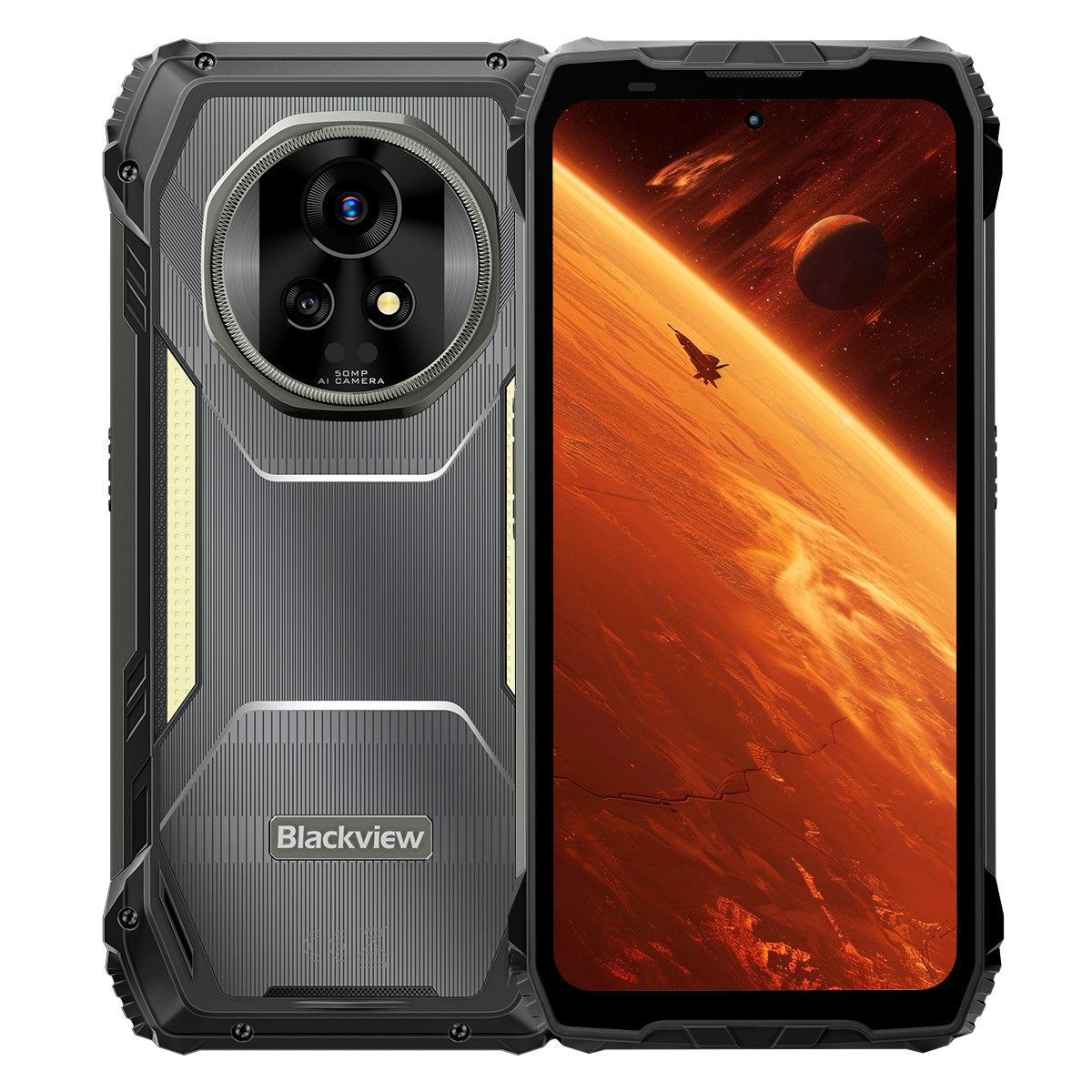


Blackview XPLORE 2 Écran AMOLED 6,73" 3,2K MediaTek Dimensity 8300 Octa-core 20000mAh Lampe de camping 467LM Téléphone robuste 5G IA

Disponible en stock (41)
Points forts
Points forts
✔Écran AMOLED LTPO 6,73" 120Hz 3,2K
✔Lampe de camping double intégrée 467 lumens
✔MediaTek Dimensity 8300 4nm 5G Octa-core & WiFi 6E
✔Batterie 20000mAh avec charge rapide 120W
✔Appareil photo principal 50MP + vision nocturne 20MP
✔Certifié IP68 & IP69K & MIL-STD-810H
✔Support eSIM
Informations
Informations
Le Blackview XPLORE 2 est un smartphone robuste 5G haut de gamme conçu pour les utilisateurs recherchant une qualité d'affichage d'élite, une longue autonomie et une utilité professionnelle en extérieur. Son écran AMOLED 3,2K de 6,73 pouces à 120 Hz, son processeur Dimensity 8300, le WiFi 6E et sa batterie massive de 20 000 mAh avec charge rapide 120W le rendent puissant pour le travail, la navigation, les médias et les voyages. Un appareil photo principal de 50MP, une caméra de vision nocturne de 20MP, une lampe de camping de 467LM, la prise en charge eSIM, la protection IP68 & IP69K et la durabilité MIL-STD-810H le préparent aux conditions de terrain les plus exigeantes.
À propos de la marque
À propos de la marque
Chez Blackview, nous croyons que la grande technologie doit aller au-delà des spécifications impressionnantes. Elle doit s’adapter à la vie réelle, résoudre de vrais problèmes et rester fiable quand cela compte le plus.
Blackview a commencé avec des téléphones robustes conçus pour des environnements difficiles. Aujourd’hui, nous proposons un écosystème plus large d’appareils intelligents, incluant smartphones, tablettes, ordinateurs portables, montres connectées, produits audio, et plus encore.
Dans chaque catégorie, notre objectif reste le même : qualité durable, innovation pratique et prix accessibles. Nous concevons des produits qui inspirent confiance dès le premier jour.
Nous comprenons ce que les clients apprécient le plus : des performances fluides, une fiabilité durable, des fonctionnalités utiles et une technologie qui facilite la vie quotidienne sans coût superflu.
C’est pourquoi Blackview accorde une réelle attention aux tests produits, à l’expérience utilisateur et aux fonctionnalités qui apportent une valeur significative au travail, aux voyages, à la création, à l’exploration en plein air et à la connexion quotidienne.
Blackview est fait pour les personnes qui veulent une technologie de confiance : des appareils intelligents et performants conçus pour suivre le rythme de la vie moderne.
Fiable par conception. Pratique par nature. Fait pour la vie réelle.
Expédition et retours
Expédition et retours
• Livraison : Les commandes sont traitées sous 1 à 2 jours ouvrables. La livraison standard prend de 3 à 7 jours ouvrables selon votre localisation.
• Retours : Vous pouvez retourner ou échanger les produits dans les 30 jours suivant la réception de votre commande. Les articles doivent être dans leur état d'origine avec une preuve d'achat.
Si votre article est défectueux ou endommagé en raison d'un problème de fabrication, nous le remplacerons volontiers sans frais supplémentaires.


Premier au MondeA 3.2K AMOLED 5G
Flagship Blindé IA
Né pour le Sommet. Conçu pour la Nature.
Écran AMOLED 6,73" 3.2K 120Hz | Visuels HDR Époustouflants | Double 50MP Samsung® Appareils photo + Vision Nocturne 20MP| Double Anti-Tremblement (OIS + EIS) | 5G 4nm Dimensity 8300 | 48GB LPDDR5X & 1TB UFS4.0 + Jusqu'à 2TB d'Extension TF | Batterie Méga 20000mAh & Charge Super-Rapide 120W
Top 9 des raisons de choisir Blackview
XPLORE 2

Durabilité la plus robuste de l'industrie
Norme militaire de premier ordre MIL-STD-810H
Résistance aux chutes de 6 mètres | Charge ultra-lourde de 500kg | Résistance aux températures extrêmes de -20°C à +60°C

Le summum de la protection étanche
Protection de niveau supérieur IP69K & IP68
Expulsion de poussière et d'eau en une seule touche | Toucher anti-pluie IA| Photos sous-marines
Étanche à 2m pendant 30 minutes | Résistance à l'eau bouillante à 80℃

Gardien de nuit
Lampe de camping 467lm
Lumière plus brillante | Stroboscope puissant pour avertissements et défense | Signal SOS instantané pour les urgences

Son stéréo révolutionnaire
Haut-parleurs stéréo Smart-K Box doubles 2W
Un son stéréo jusqu'à 316% plus puissant pour un audio immersif partout.

Télécommande infrarouge
Transformez votre téléphone en télécommande tout-en-un en quelques secondes !

Au-Delà des Limites Visuelles
Un Écran 6,73” 3.2K HDR — Inégalé dans sa Catégorie
Luminosité de pointe de 2600 nits, leader du secteur | Taux de rafraîchissement adaptatif LTPO 1–120Hz Dimming haute fréquence 1920Hz | Certifié TÜV SÜD Low Blue Light

Imagerie à son apogée
Double caméra AI Samsung® 50MP | Vision nocturne 20MP | Ultra HDR | OIS & EIS
Enregistrement vidéo cinématographique 4K HDR10+ | Suivi de mouvement | Zoom 8×

Performance, pleinement évoluée
Puce Dimensity 8300 5G haut de gamme | 16GB LPDDR5X RAM + 32GB d'extension | ROM 1TB UFS4.0
1,339,275
Score AnTuTu
↑ 84%
Performance Globale

Édition d'image IA tout-en-un
Suppression d'objets IA | Peinture extérieure IA | Flou photo IA | Remplacement de fond IA | Animation IA


Roi de la puissance de la batterie
La plus grande batterie jamais vue sur un téléphone robuste
Batterie géante double cellule de 20 000mAh | Jusqu'à 75 jours en veille ultra-longue | Charge hyper rapide 120W | Charge inversée 10W

La seule solution auto-développée de l'industrie
Les 3 meilleurs modèles d'IA au monde. Tous en un.
Activation par empreinte vocale & contrôle mains libres

La seule solution auto-développée de l'industrie
Tout nouveau DokeOS 4.2 basé sur Android 15

Mises à niveau intelligentes pour chaque scénario

Le seul engagement après-vente de l'industrie
Robustesse redéfinie
Protection robuste de premier ordre.
Certifications robustes de premier ordre de l'industrie
Certifié avec les normes militaires MIL-STD-810H et IP68/IP69K, XPLORE 2 offre une protection ultime contre les chutes, la poussière, l'eau et l'écrasement — établissant une nouvelle référence en matière de durabilité robuste.

6 mètres
Véritable résistance aux chutes
Résiste aux chutes jusqu'à 6 mètres, sous n'importe quel angle, sur toute surface.

IP6X
Véritable étanchéité à la poussière
Protection complète contre le sable, la poussière et les particules industrielles.

IPX9K
Véritable étanchéité
Supporte les jets à haute température et haute pression, les éclaboussures et l'immersion.

MIL-STD-810H
Véritable résistance à l'écrasement
Résiste à la compression extrême, aux chocs et aux environnements difficiles.
La durabilité la plus robuste de l'industrie
Incassable de tous les côtés
Plus solide que jamais—renforcé à l'intérieur comme à l'extérieur pour supporter les chutes, force d'écrasement et températures extrêmes.
6 mètres
Résistance aux chutes
Endurance aux chutes de niveau supérieur
1,5 mètres
Chute mortelle
Survit à des chutes directes
500kg
Capacité de charge
Résiste à une pression ultra-élevée2
-20°C à +60°C
Températures extrêmes
Large plage de fonctionnement

Prouvé par ces tests extrêmes

Construction ultra-résiliente
Première dans l'industrie
Structure ArmorShield
XPLORE 2 adopte un design ArmorShield à 5 couches, renforcé avec Gorilla® Glass 5 et un alliage Al-Ti de qualité aérospatiale pour une durabilité totale.
5 couches
ArmorShield
Structure
4 coins
Renforcé
Protection
400% ↑
Impact plus fort
Résistance

Le summum de la protection étanche
Défense IP69K de premier ordre
Certifié IP69K et IP68, il supporte tout—eau bouillante, jets haute pression incessants, pulvérisations multi-angles et immersions de longue durée.
80℃
Endurance à l'eau bouillante
10000 kPa
Résiste aux jets de qualité industrielle
0° / 30° / 60° / 90°
Protection contre les pulvérisations sous tous les angles
2m pendant 30 minutes
Preuve de submersion profonde4
Plus de 1 000 000 de fois
Fiabilité testée par immersion

Port USB étanche double
Résiste à l'eau sans couvercle, double protégé lorsqu'il est scellé.

Expulsion de poussière et d'eau en une seule touche
Nettoie instantanément le haut-parleur pour garder chaque appel est clair et net.5

Toucher anti-pluie IA
Même sous de fortes averses, l'écran reste fluide et réactif.6

Photos sous-marines
Des éclaboussures aux plongées, capturez vos explorez le monde sous-marin en toute simplicité.
Gardien de nuit
Lampe de camping 467lm pour une nature plus lumineuse et plus sûre
Quand la nuit tombe, la lampe de camping 467lm du XPLORE 2 transforme l'obscurité en sécurité. Des campings aux coupures de courant, elle vous garde prêt et maître de la situation.


Télécommande infrarouge
Transformez votre téléphone en télécommande tout-en-un en quelques secondes !8

Son stéréo révolutionnaire
Haut-parleurs stéréo Smart-K Box doubles 2W
Un son stéréo jusqu'à 316% plus puissant pour un audio immersif partout.

5dB ↑
Volume plus fort 10
+50% ↑
Audio plus clair11
Au-Delà des Limites Visuelles
Écran
Vif
Fidèle à la Réalité
HDR
Contraste & Détails Améliorés
Précision des Couleurs de Niveau Professionnel
Contraste & Détails Améliorés
2600 nits
Luminosité Maximale de Pointe Leader du Secteur12
6,73 pouces
Écran AMOLED Haut de Gamme
521 PPI
Densité de Pixels Ultra-Précise
Écran Toujours Allumé
Heure & Alertes en Un Coup d’Œil
DCI-P3
Gamme de Couleurs Large de Qualité Cinéma13
68.7 Milliards
Couleurs fidèles à la réalité
10,000,000:1
Ratio de contraste ultra-élevé
1–120Hz
Taux de rafraîchissement adaptatif LTPO14

Écran
Soulage
Conforts


Full-Link HDR
Allant de visuels époustouflants à une capture ultra-dynamique, Full-Link HDR offre une brillance réaliste et garantit que chaque détail est préservé.

Imagerie à son apogée
Imagerie plus claire et plus stable
Appareil photo principal phare 50MP Samsung® GN9
Des vues lointaines aux moments en mouvement, capturez tout en détail.
1/1.57"
Capteur plus grand
f/1.88
Photos de nuit plus lumineuses
6P
Clarté Ultra-Précise


Détail de Première Classe
Photographie Ultra HDR, 3× Plus de Détails
Voyez la nature sauvage en plein détail — des horizons brûlés par le soleil aux sentiers ombragés, avec chaque ombre, reflet et couleur plus vivants que jamais.

Leader de l'industrie
8× Plus Proche. Toujours Ultra-Clair
Rapprochez les scènes lointaines avec des détails cristallins et une mise au point stable.

Caméra Frontale 50MP Samsung® JN1
Que ce soit en plein jour éblouissant ou en faible lumière, capturez des selfies clairs, lumineux et naturels.

Vision Nocturne de Niveau Supérieur
Caméra Vision Nocturne 20MP Sony®
Des inspections de sécurité aux missions de sauvetage, voyez clairement dans l'obscurité totale.

Vidéo de qualité professionnelle
Cinématographique 4K HDR10+
Capturez des détails ultra-clairs, des couleurs vives et un contraste réaliste à 60FPS. Des paysages aux films personnels, chaque prise raconte une histoire cinématographique.


IA Tout-en-Un  Édition d'images
Transformez vos photos en visuels époustouflants en un clic — l'édition n'a jamais été aussi facile !
IA Supprimer des objets
Effacez les distractions avec précision et sans effort.

IA OutPainting
Élargissez les limites intelligemment.

IA Flouter la photo
Changez les arrière-plans et transformez les scènes à volonté.

IA Remplacer l'arrière-plan
Changez les arrière-plans et transformez les scènes à volonté.

Moments, renaissants
IA Animer
Donnez vie aux photos fixes ! Ajoutez du mouvement aux visages et regardez vos souvenirs danser d'énergie

Performance, pleinement évoluée
Performance de niveau supérieur
MediaTek Dimensity 8300 5G 4nm de premier ordre
Construit sur un procédé 4nm et boosté jusqu'à 3,35GHz, XPLORE 2 surpasse marathons de jeu et multitâche intensif avec la fluidité d'un flagship.
40%
Capteur plus grand
30% ↑
GPU plus puissant17
84% ↑
Performance Globale18
1,339,275
Score AnTuTu

Mémoire, Optimisée
Jusqu'à 48GB de RAM
(16GB Physique + 32GB Extension)
Construit sur un procédé 4nm et boosté jusqu'à 3,35GHz, XPLORE 2 surpasse marathons de jeu et multitâche intensif avec la fluidité d'un flagship.
2X ↑
Transmission de Données Plus Rapide19
45% ↑
Lancement et Changement d'App Plus Rapides20
22 Apps ↑
Multitâche Fluide, Sans Lags21
LPDDR5X
RAM Haute Vitesse

Stockage, Accéléré
1TB ROM + Plus
jusqu'à 2TB d'extension TF
Avec 1TB UFS4.0 ROM plus jusqu'à 2TB d'extension TF, XPLORE 2 stocke tout, des cartes haute résolution et vidéos de drone aux fichiers de secours — accès instantané, même sur le terrain.
2X ↑
Capacité de Stockage Plus Grande22
2,3X ↑
Vitesse de Lecture et d'Écriture Plus Rapide23
UFS4.0
Stockage Ultra-Rapide
Extension TF 1TB + 2TB = Stockez Tout

Connectivité de Nouvelle Génération
WiFi 6E + Support Double 5G
Restez en avance avec WiFi 6E et Double 5G — plus rapide, plus fluide et vraiment global.
↑ Vitesse 3X Plus Rapide
Chargement Instantané. Streaming Fluide.24
6GHz + 5GHz + 2.4GHz
WiFi Tri-Bande. Plus Rapide. Plus Puissant.

Débit Montant de 2,5 Gbps | Débit Descendant de 5,11 Gbps
Téléversements et Téléchargements Ultra-Rapides.25
Support Double 5G
Connectivité Vraiment Globale

Performance Totale Déchaînée
Système de refroidissement efficace 3-en-1
Restez au frais grâce à un design thermique avancé — même lors de sessions de jeu intenses, de streaming 5G continu ou de travail en extérieur toute la journée.

Graphite + Cuivre + Silicone
Triple matériaux, transfert rapide de chaleur
2 262,8 mm² de surface de dissipation
Dissipation de chaleur plus rapide, performance maximale prolongée
<37°C utilisation quotidienne
Toujours frais, toujours stable
Imagerie à son apogée
Batterie géante double cellule de 20 000mAh
Équivalent à 4 téléphones de 5000mAh en un seul — puissance inarrêtable, endurance toute la journée.

Gestion de l'énergie par IA


1.6X ↑
Durée de vie prolongée26
36hrs+
Usage intensif27
23hrs+
Jeu
24hrs+
Navigation Web
Plus de 166 h
Appels
Plus de 10 h
Éclairage continu
75 jours
Veille
Le plus rapide de sa catégorie
Charge hyper rapide 120W
50 % en 39 min. 100 % en 117 min. Toujours prêt quand vous l'êtes.
118%
Plus rapide
Chargement
Zéro attente. Puissance pure.29
Charge inversée 10W
Partagez l'énergie à tout moment, n'importe où.


La seule solution auto-développée de l'industrie


Intelligence commandée par la voix
Gemini AI 2.0
Plus intelligent. Plus rapide. Commandé par la voix. XPLORE 2 vous garde aux commandes — mains libres, où que vous alliez.
Activation par empreinte vocale & contrôle mains libres
Déverrouillez et contrôlez avec votre voix — sécurisé et mains libres.

Contrôle intelligent global
Une voix, contrôle total sur les applications et les paramètres.

Assistance plein écran
Aide instantanée à l'écran, où que vous soyez.

Interaction en temps réel
Conversez naturellement, où que le devoir vous mène.

Suite IA auto-développée unique dans l'industrie
Hi Doki | ImageX | VidGen | Soundle
Quatre applications, créations infinies — écrivez, éditez, filmez et composez sans limites.

La seule solution auto-développée de l'industrie
Hi Doki
Recherche alimentée par IA, analyse de documents et écriture intelligente. De la recherche à la création, les idées prennent vie en une seule touche.

La seule solution auto-développée de l'industrie
ImageX
Avec 18 outils d'édition IA, transformez des prises ordinaires en visuels époustouflants — améliorés, stylisés et prêts à être partagés.

La seule solution auto-développée de l'industrie
VidGen
Du texte à la vidéo, des images aux histoires — l'IA transforme vos idées en vlogs, vidéos courtes et histoires captivantes sans effort.

La seule solution auto-développée de l'industrie
Soundle
Saisissez votre humeur et laissez l'IA composer. Des airs romantiques aux rythmes énergiques, la musique est créée juste pour vous.

La seule solution auto-développée de l'industrie
Tout nouveau DokeOS 4.2 basé sur Android 15
Plus intelligent. Plus rapide. Plus sûr. Plus vous.
XPLORE 2 redéfinit la performance avec rapidité, efficacité, confidentialité et personnalisation illimitée.

Mises à niveau intelligentes pour chaque scénario

Prise en charge eSIM &
Connectivité mondiale
Le premier téléphone robuste Blackview avec prise en charge eSIM, vous gardant connecté dans le monde entier avec un itinérance sans effort.32

Système quad-satellite
Restez sur la bonne voie avec un positionnement haute précision — une précision fiable à 1 mètre dans n'importe quel environnement.32

Dernier Bluetooth sans fil 5.4
Transférez les fichiers 50 % plus vite, profitez de connexions plus solides et associez-vous sans effort à tous vos appareils.34

Gyroscope haute précision
Naviguez avec précision. Mesurez avec exactitude grâce à la RA. Jouez plus fluidement à chaque mouvement.

Bouton de raccourci personnalisé
Vos essentiels, à portée d'une pression.

NFC pour tous les scénarios
Des paiements aux cartes d'accès, tout en un seul tapotement.35

3 ans d'Android Mises à jour du système d'exploitation
Support prolongé, toujours à jour

Support du centre d'appels
Assistance hotline directe quand vous en avez besoin

Service en ligne 24/7
Aide instantanée, jour et nuit

Centres de réparation de confiance
Service hors ligne fiable en qui vous pouvez avoir confiance
Spécifications Blackview XPLORE 2

| Modèle | XPLORE 2 |
| Couleur | Noir |
| Dimensions | 186 * 87.8 * 29mm |
| Poids | 670g |
| Système d'exploitation | DokeOS 4.2 basé sur Android 15 |
| Écran | Écran AMOLED 3,2K de 6,73 pouces, résolution 1440 * 3200, Corning® Gorilla® Glass 5, taux de rafraîchissement 120Hz |
| CPU | MediaTek Dimensity 8300 Octa-core 5G, 4nm, jusqu'à 3,35GHz |
| RAM & ROM | 12GB RAM & 256GB ROM, LPDDR5X+UFS4.0 16GB RAM & 1TB ROM, LPDDR5X+UFS4.0 |
| Extension TF | Extension TF jusqu'à 2 To |
| Batterie | 20 000mAh; Charge hyper rapide 120W |
| Caméra frontale | 50MP |
| Caméra arrière | 50MP Principal+20MP Vision nocturne |
| Haut-parleur | Haut-parleur double Smart-K BOX |
| Indice de robustesse | IP68 & IP69K & MIL-STD-810H |
| Navigation | L1+L5 GPS/GLONASS/BeiDou/Galileo |
| Emplacement de carte | Double : 2*SIM/1*SIM +1*Carte TF |
| NFC | Support |
| Double 5G VoLTE | Support |
| Wi-Fi&Bluetooth | Wi-Fi6E ; BT 5.4 |
| Connectivité réseau |
Bande 2G : B2/B3/B5/B8 Bande 3G : WCDMA : B1/B2/B4/B5/B6/B8/B19 (RXD) CDMA : BC0 Bande 4G : TDD : B34/B38/B39/B40/B41 FDD : B1/2/3/4/5/7/8/12/13/17/18/19/20/25/26/28A/28B/30/66 Bande 5G : N1/3/5/7/8/20/28/38/40/41/77/78/79 |
1. Données provenant du laboratoire Blackview. En tant qu'appareil électronique de précision, le téléphone peut toujours subir des dommages en cas de chute. Veuillez éviter de faire tomber ou heurter l'appareil. Les performances réelles peuvent varier en fonction de l'environnement d'utilisation, de l'angle de chute et du matériau de la surface. Veuillez vous référer à l'expérience réelle.
2. Données provenant du laboratoire Blackview. En tant qu'appareil électronique de précision, le téléphone peut toujours subir des dommages sous une forte pression. Veuillez éviter de serrer ou de heurter l'appareil.
3. Données provenant du laboratoire Corning, comparant Gorilla® Glass 5 avec du verre sodocalcique ordinaire. Dans des conditions contrôlées, Gorilla® Glass 5 démontre des performances supérieures.
4. XPLORE 2 peut résister aux éclaboussures, à l'eau et à la poussière dans des conditions d'utilisation normales et atteint les certifications IP69K et IP68 en conditions de laboratoire contrôlées. La performance de protection n'est pas permanente, et les résultats réels peuvent varier en raison du vieillissement de l'appareil, des habitudes d'utilisation et des facteurs environnementaux. Ne chargez pas le téléphone lorsqu'il est humide.
5. Utilise la vibration par ondes sonores pour éliminer la poussière et l'eau du haut-parleur, aidant à maintenir des appels clairs et des performances audio normales. Les résultats réels de nettoyage peuvent varier en fonction de l'accumulation de poussière ou d'eau et de l'environnement d'utilisation. Veuillez vous référer à l'expérience réelle.
6. L'expérience tactile peut varier en raison de la pluie, des scénarios d'application et des habitudes d'utilisation individuelles. Veuillez vous référer à l'expérience réelle.
7. Données provenant du laboratoire Blackview. Trois niveaux de luminosité sont : Ultra lumineux 467lm, Luminosité élevée 368lm, et Luminosité faible 236lm.
8. La fonction télécommande infrarouge prend en charge la plupart des appareils contrôlés par IR en théorie, mais la compatibilité réelle peut varier en fonction du modèle spécifique et de l'environnement. Les performances peuvent différer en utilisation réelle.
9. La comparaison des performances avec les haut-parleurs doubles conventionnels de 1W est basée sur des résultats de tests simulés en laboratoire, évalués avec les caractéristiques techniques du produit. Les résultats réels peuvent varier en fonction de l'environnement d'utilisation, du modèle d'appareil ou de la configuration technique.
10. Comparé aux haut-parleurs doubles de 1W, le niveau sonore augmente d'environ 5 dB. Les performances audio peuvent varier selon les scénarios d'utilisation, la qualité de la source audio et le bruit ambiant. Veuillez vous référer à l'expérience réelle.
11. Comparé aux haut-parleurs doubles de 1W, l'amélioration de l'audition humaine est d'environ 50 %. Les performances audio spécifiques dépendent de l'expérience réelle.
12. La luminosité maximale peut atteindre 2600 nits, avec une luminosité d'activation globale à 1300 nits, effective uniquement dans des scénarios spécifiques. La luminosité manuelle régulière est de 500 nits. L'expérience réelle dépend des conditions d'utilisation.
13. L'affichage à large gamut de couleurs DCI-P3 nécessite des sources d'images et de vidéos compatibles pour un effet optimal.
14. L'écran prend en charge un taux de rafraîchissement dynamique de 120 Hz. Les taux de rafraîchissement peuvent légèrement varier selon les interfaces d'applications et les scénarios de jeu. Veuillez vous référer à l'expérience réelle.
15. Les données proviennent de tests réalisés dans le laboratoire de Blackview dans des conditions contrôlées. Les performances réelles peuvent varier en fonction de facteurs tels que l'éclairage, la complexité de la scène ou la configuration de l'appareil.
16. Données provenant des tests théoriques du laboratoire Blackview, comparées au Blackview XPLORE 1. Les performances réelles peuvent être affectées par l'optimisation du système, la charge des applications et l'environnement réseau. Veuillez vous référer à l'expérience réelle.
17. Données provenant des tests théoriques du laboratoire Blackview, comparées au Blackview XPLORE 1. Les performances réelles peuvent varier en raison de l'optimisation du système, de la charge des applications et de l'environnement réseau. Veuillez vous référer à l'expérience réelle.
18. Données provenant des tests théoriques du laboratoire Blackview, comparées au Blackview XPLORE 1. Les performances globales peuvent varier en raison de l'optimisation du système, de la charge des applications et de l'environnement réseau. Veuillez vous référer à l'expérience réelle.
19. Données issues du laboratoire Blackview dans des conditions de test standardisées, comparées au Blackview XPLORE 1. Les performances spécifiques peuvent varier selon les conditions d'utilisation.
20. Données issues du laboratoire Blackview dans des conditions de test standardisées, comparées au Blackview XPLORE 1. Les performances spécifiques peuvent varier selon les conditions d'utilisation.
21. Les données sont basées sur des tests réalisés dans le laboratoire Blackview dans des conditions contrôlées. Les performances réelles peuvent varier en raison de facteurs tels que le type d'application, les paramètres système, les processus en arrière-plan, etc.
22. Les données proviennent du laboratoire Blackview, avec une comparaison effectuée par rapport au Blackview XPLORE 1.
23. Les données proviennent des tests théoriques du laboratoire Blackview, avec des comparaisons effectuées par rapport au Blackview XPLORE 1. Les vitesses réelles peuvent varier selon les conditions d'utilisation.
24. Données provenant du laboratoire Blackview, comparées au WiFi 5. L'expérience réelle peut varier en fonction des facteurs environnementaux et de l'appareil.
25.Les vitesses réseau mentionnées représentent des valeurs maximales théoriques. Les vitesses réelles peuvent varier en fonction des conditions réseau, du support de l'opérateur, de la configuration de l'appareil et d'autres facteurs. Les performances dépendent des conditions d'utilisation réelles.
26.Prend en charge jusqu'à 800 cycles de charge complets. Les performances réelles peuvent varier en fonction des modes d'utilisation, des facteurs environnementaux, de l'entretien de l'appareil, etc.
27.Tous les temps d'utilisation sont basés sur des tests effectués sur des modèles du laboratoire Blackview. Les performances réelles peuvent varier en fonction des scénarios d'utilisation, des charges d'application, des conditions réseau et des habitudes individuelles.
28.La vitesse de charge peut varier en fonction du chargeur, du câble de charge, de la tension et de la température ambiante. Veuillez vous référer aux conditions d'utilisation réelles.
29.Données provenant du laboratoire Blackview, comparées avec Blackview XPLORE 1.
30.Doke AI prend en charge un essai gratuit de 30 jours. L'efficacité des fonctionnalités AI peut varier en fonction des scénarios d'utilisation, du contenu d'entrée et des habitudes individuelles. Veuillez vous référer à l'expérience réelle.
31.Les fonctions seront continuellement améliorées avec les mises à jour OTA. Veuillez vous référer à l'expérience réelle.
32.Lorsque l'eSIM est activée, prend en charge une carte SIM et une carte TF. Lorsque l'eSIM n'est pas activée, prend en charge simultanément deux cartes SIM ou une carte SIM et une carte TF.
33.Données provenant du laboratoire Blackview. La précision de positionnement peut varier en raison d'obstacles environnementaux, d'interférences et d'effets de trajets multiples. Veuillez vous référer à l'expérience réelle.
34.Données provenant du laboratoire Blackview, comparées avec Blackview XPLORE 1.
35.Les effets d'utilisation spécifiques peuvent varier en fonction du type de carte, de la méthode de cryptage et de la compatibilité de l'appareil. Les cartes d'accès cryptées peuvent ne pas être prises en charge, et les fonctions de paiement peuvent nécessiter des mots de passe ou une vérification. Veuillez vous référer à l'expérience réelle.
36.Le contenu spécifique du service peut varier en raison des politiques régionales et des capacités des centres de réparation. Veuillez vous référer aux conditions réelles.
*Des différences de pixels peuvent exister entre différents modes photo et vidéo. Veuillez vous référer aux conditions réelles.
*Les images des produits et le contenu des écrans sur les pages ci-dessus sont à titre illustratif uniquement. Les effets réels du produit (y compris mais sans s'y limiter l'apparence, la couleur, la taille) et le contenu d'affichage de l'écran (y compris mais sans s'y limiter les arrière-plans, l'interface utilisateur, les illustrations) peuvent différer légèrement. Veuillez vous référer au produit réel.
*Les données sur les pages ci-dessus sont des valeurs théoriques provenant du laboratoire Blackview, obtenues dans des environnements de test spécifiques (se référer aux descriptions spécifiques pour chaque élément). L'utilisation réelle peut varier légèrement en raison des différences individuelles des produits, des versions logicielles, des conditions d'utilisation et des facteurs environnementaux. Veuillez vous référer aux conditions d'utilisation réelles.
*En raison des changements en temps réel des lots de produits et des facteurs d'approvisionnement en production, Blackview peut ajuster et réviser les descriptions textuelles et les effets d'image sur les pages ci-dessus pour correspondre aussi étroitement que possible aux performances réelles du produit, aux spécifications, aux indices et aux composants.
*Dans les cas où de telles modifications et ajustements sont nécessaires, aucune notification spéciale ne sera fournie.
| Modèle | XPLORE 2 |
| Couleur | Noir |
| Dimension | 186 * 87,8 * 29 mm |
| Poids | 670 g |
| Système d'exploitation | DokeOS 4.2 basé sur Android 15 |
| Afficher | Écran AMOLED 3,2K de 6,73 pouces, résolution 1440 * 3200 Verre Corning® Gorilla® Glass 5, taux de rafraîchissement 120 Hz |
| Processeur | Processeur octa-core 5G MediaTek Dimensity 8300, 4 nm, jusqu’à 3,35 GHz |
| RAM & ROM | 12 Go RAM & 256 Go ROM, LPDDR5X+UFS4.0 16 Go RAM & 1 To ROM, LPDDR5X+UFS4.0 |
| Extension TF | Extension TF jusqu’à 2 To |
| Batterie | 20 000 mAh ; charge hyper rapide 120W |
| Caméra frontale | 50MP |
| Caméra arrière | 50MP principal + 20MP vision nocturne |
| Haut-parleur | Haut-parleur double Smart-K BOX |
| Indice de robustesse | IP68 & IP69K & MIL-STD-810H |
| Navigation | GPS L1+L5/GLONASS/BeiDou/Galileo |
| Emplacement carte | Double : 2*SIM/1*SIM +1*Carte TF |
| NFC | Assistance |
| Double VoLTE 5G | Assistance |
| Wi-Fi & Bluetooth | Wi-Fi6E ; BT 5.4 |
| Connectivité réseau | Bande 2G : B2/B3/B5/B8 Bande 3G : WCDMA : B1/B2/B4/B5/B6/B8/B19 (RXD) CDMA : BC0 Bande 4G : TDD : B34/B38/B39/B40/B41 FDD : B1/2/3/4/5/7/8/12/13/17/18/19/20/25/26/28A/28B/30/66 Bande 5G : N1/3/5/7/8/20/28/38/40/41/77/78/79 |
• Forfait UE : Adaptateur secteur non inclus
• Forfait hors UE : Adaptateur secteur inclus

How can I check whether the Blackview XPLORE 2 is compatible with my mobile carrier?
The Blackview XPLORE 2 supports 2G, 3G, 4G LTE, and 5G networks. Before purchasing, please check that the network bands supported by the XPLORE 2 match those used by your mobile network operator. First, identify which networks you use, then check the supported network bands in the specifications section of the product details page.
Alternatively, you can contact your mobile network operator to enquire whether this handset supports voice calls, text messages, and mobile data services via a SIM card. This will help you determine whether it is compatible. Please note that the availability of 4G or 5G services also depends on your operator’s network coverage, your mobile plan, and the operator’s support for this handset.
Does the Blackview XPLORE 2 support eSIM, and how do I activate it?
Yes. The Blackview XPLORE 2 series supports eSIM, allowing you to activate a mobile plan online without inserting a physical SIM card. To use this feature, you will need to register for the eSIM service with a mobile network operator or service provider that supports the XPLORE 2.
Before registering, please check whether this service is available in your region and whether it includes all the features you require. Some eSIM plans offer mobile data only, whilst others also include voice calls and text messaging. Ask your service provider for instructions on how to activate the service.
How long does the Blackview XPLORE 2’s 20,000mAh battery last with everyday use?
In laboratory testing, the Blackview XPLORE 2’s 20,000mAh battery delivered more than 36 hours of heavy use, making it well suited to long workdays and outdoor activities. Actual battery life varies depending on how much time you spend on calls, navigation, browsing, and entertainment.
Keeping navigation running on screen throughout the day uses more power than occasionally checking directions or replying to messages. Gaming and high screen brightness also drain the battery faster. Before a longer trip, try using the phone as you normally would for a day to get a better idea of how long a charge will last for you. This can help you decide whether to bring a power bank.
Should I choose the Blackview XPLORE 2 with 12GB RAM and 256GB storage or 16GB RAM and 1TB storage?
The 12GB/256GB version is suitable for everyday use, photography, navigation, and gaming. If you frequently use large apps or prefer to store more large games, videos, and work files, we recommend the 16GB/1TB version.
You can base your decision on your storage habits. If you regularly back up your photos and clear out junk files, 256GB should be sufficient. Conversely, if you prefer to keep everything—such as downloaded films and offline maps—1TB would be more suitable, as you won’t need to free up space as frequently.
How does the Blackview XPLORE 2 perform in demanding games like Genshin Impact?
Yes, you can play demanding games such as Genshin Impact on the Blackview XPLORE 2. Its Dimensity 8300 processor and LPDDR5X RAM enable it to handle these games and deliver smooth gameplay with appropriate graphics settings. It is recommended to start with medium graphics settings, which offer a better balance of image quality and responsiveness.
Higher graphics settings and extended play sessions may result in occasional drops in frame rate, particularly in complex scenes or when the device is warm. Should this occur, reducing the graphics quality can help maintain smoother gameplay. However, a consistent frame rate or the complete absence of stuttering cannot be guaranteed.
Is the Blackview XPLORE 2’s camera suitable for quick snapshots and moving subjects?
Yes. The XPLORE 2’s 50-megapixel main camera is ideal for everyday snapshots, such as moments in family life or work scenes. The optical image stabilisation feature helps reduce camera shake, whilst the motion tracking function ensures moving objects remain sharply in focus at all times.
When photographing children, pets, or other moving subjects, it is advisable to shoot in well-lit conditions and ensure the subject remains within the frame at all times. In low light, ask the subject to pause briefly; This will yield better results than adjusting the camera settings. The image stabilisation feature effectively minimises hand shake, but cannot eliminate blurring caused by fast-moving subjects.
How do I turn on the Blackview XPLORE 2’s camping light, and what lighting modes are available?
The XPLORE 2’s camping light offers three modes: steady, flashing, and SOS. Steady mode is suitable for lighting while pitching a tent, searching for equipment, or during a power cut; flashing mode can attract the attention of people nearby; SOS mode lets you send a distress signal with the light.
When using the light, select the appropriate mode for the situation; switch it off when not in use to conserve battery power. Please note that SOS mode is merely a visible light signal; it does not automatically transmit your location or contact emergency services.
What can I use the Blackview XPLORE 2’s night vision camera for?
The 20-megapixel infrared night vision camera helps you observe and photograph your surroundings in the dark. When there is insufficient ambient light, you can use it to check around your tent, inspect unlit storage spaces, or capture details of your equipment.
The images produced by the night vision function are in black and white, not colour photographs. Its operating principle also differs from thermal imaging: you can see the outline of objects in the dark, but you cannot use it to measure temperature or identify hot or cold areas.
Can I replace the Blackview XPLORE 2’s battery myself?
If your XPLORE 2’s battery life isn’t as long as it used to be and you don’t want to buy a new phone, you can replace the battery. We recommend contacting Blackview’s after-sales team first to help determine whether the issue requires a battery replacement or a repair. If you find it more convenient or quicker to visit a local repair shop, be sure to ask the technician whether they are familiar with repairing rugged smartphones to ensure the phone functions correctly after repair.
Alternatively, if you are a qualified repair technician or have the relevant experience and tools, you may purchase a suitable battery and replace it yourself. Before replacing the battery, please ensure it is compatible and that you can reassemble and reseal the phone correctly. Please note that opening the phone will affect its water resistance, and any damage caused during unauthorised repairs will not be covered by the Blackview warranty.
What are the differences between the Blackview XPLORE 2 Standard, Satellite, and Projector versions?
The Blackview XPLORE 2 Standard is primarily designed for everyday tasks. The Satellite Edition adds messaging capabilities in supported areas without mobile network coverage, whilst the Projector Edition allows you to watch films at your campsite or share presentations on a wall or screen. The table below outlines their main differences.
| Feature | XPLORE 2 Standard | XPLORE 2 Satellite | XPLORE 2 Projector |
|---|---|---|---|
| eSIM support | Yes | Yes | Yes |
| Satellite messaging | No | Yes—voice, text, and location messages* | No |
| Built-in projector | No | No | 100 lumens; 854 × 480 resolution; up to 100″ |
| Processor | MediaTek Dimensity 8300 | MediaTek Dimensity 8300 | MediaTek Dimensity 8300 |
| RAM / Storage | 12GB / 256GB or 16GB / 1TB | 12GB / 256GB or 16GB / 1TB | 12GB / 256GB or 16GB / 1TB |
| Battery / Charging | 20,000mAh / Up to 120W wired | 20,000mAh / Up to 120W wired | 20,000mAh / Up to 120W wired |
| Weight / Dimensions | 670g / 186 × 87.8 × 29mm | 675g / 186 × 87.8 × 29mm | 710g / 186 × 87.8 × 29mm |
| Best suited for | Everyday work and outdoor activities | Remote work and exploration beyond mobile coverage | Movies, camping entertainment, and presentations |
What software updates are available for the Blackview XPLORE 2, and how do I install them?
The XPLORE 2 comes pre-installed with DokeOS 4.2, based on Android 15, and offers three years of Android operating system update support. This refers to the support period, not a guaranteed number of major Android version upgrades.
When your phone notifies you that an update is available, connect to Wi-Fi and follow the on-screen instructions to install it. Before starting the update, we recommend backing up important files and ensuring the battery is sufficiently charged. If the installation fails, please send the error message and the current software version to Blackview Customer Service so that we can assist you with the next steps.
What warranty and after-sales services are available for the Blackview XPLORE 2 purchased from the official shop?
If you have purchased the XPLORE 2 from the official Blackview store, you are entitled to a 12-month repair warranty covering eligible faults. Should your mobile phone fail to function properly, please provide your order number and a brief description of the issue to our official customer service team. Attaching photographs or videos will help us understand the problem and provide more useful troubleshooting advice.
If repairs are required, please contact us before posting the phone so that we can confirm the relevant arrangements. For approved warranty repairs, you will be responsible for the cost of returning the phone, whilst Blackview will cover the cost of returning the repaired device. Damage caused by improper use is not covered by the free repair service; Please check with our team in advance if any repair costs are incurred.
Can I use the Blackview XPLORE 2 Projector to watch movies at home or while camping?
Yes. The XPLORE 2 projector allows you to turn any suitable wall or portable screen into a cinema. It supports a maximum screen size of 100 inches, with a brightness of 100 lumens and a resolution of 854 × 480.
For a family film night, we recommend a dimly lit room or watching after dark, using a smooth, light-coloured surface. If the image appears too dark, you can reduce the image size or dim the surrounding lights. Before going camping, download films onto your mobile phone in advance to avoid issues with unstable network signals at your campsite.
How do I turn on the projector on the Blackview XPLORE 2 Projector and adjust the image for a clear picture?
Once the projection function is enabled, point the lens at a flat surface and turn the physical focus knob until the text and edges appear clear and sharp. When the phone is projecting at an upward or downward angle, the automatic vertical keystone correction feature helps to correct the image.
Place the phone on a stable coffee table or desk, facing the centre of the viewing area. Move the phone closer to produce a smaller image, or further away to produce a larger one, then refocus. If the image remains blurry, try dimming the surrounding lights first, then increase the projection size.
Where are satellite services available for the Blackview XPLORE 2 Satellite, and do they require a subscription?
The Blackview XPLORE 2 Satellite service covers satellite messaging in 36 countries across regions including Australia and New Zealand. If you are unsure whether the service is available in your area before purchasing, please contact the Blackview customer service team and let us know where you plan to use it, so that we can help you check whether that location is supported.
Satellite messaging is a paid service separate from standard mobile plans. Before travelling to areas without mobile coverage, please check the available plans, text message limits, and activation requirements, and complete the setup in advance.
Jump to another section