



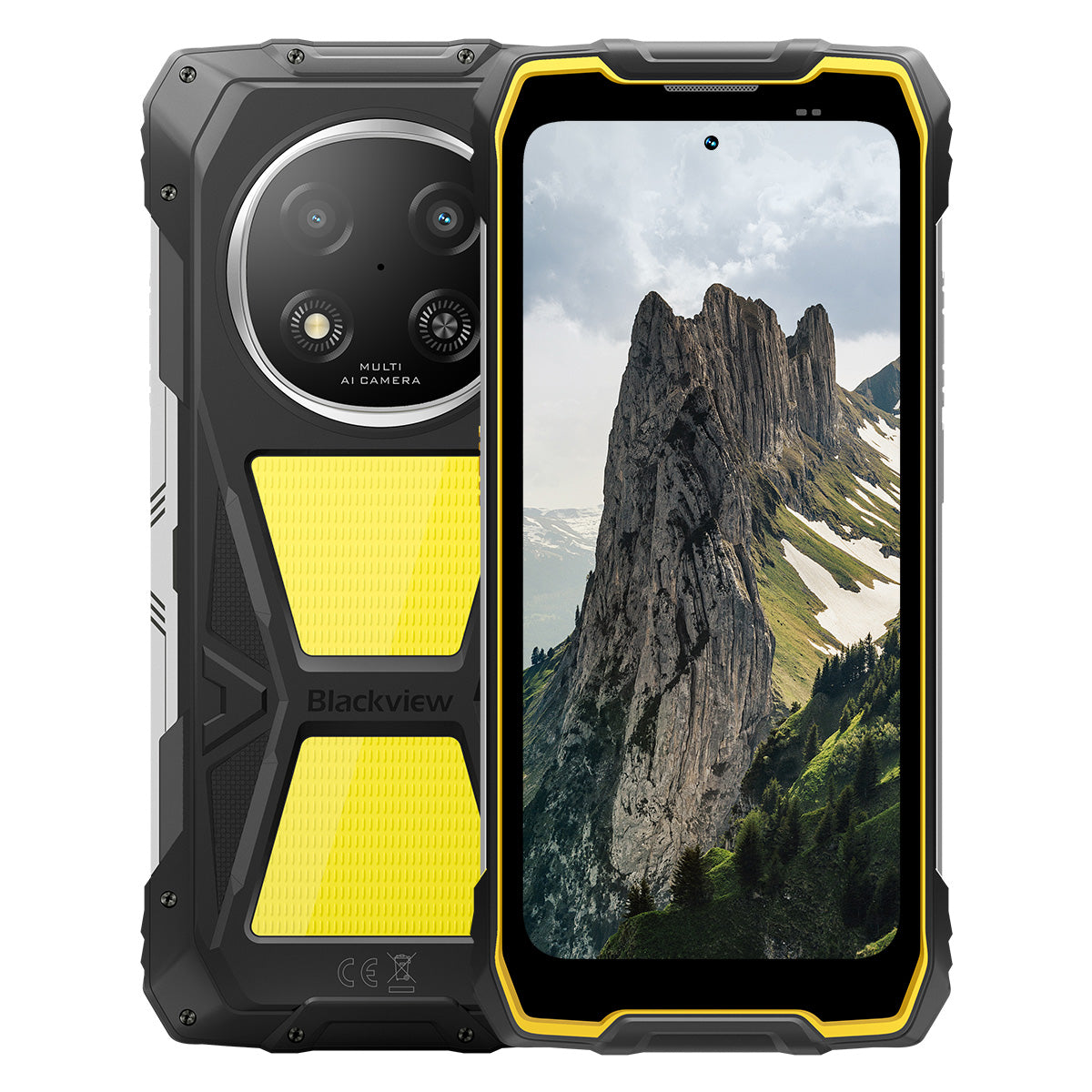


Blackview ROCK 2 Pro 6,67 tuuman 120 Hz näyttö 400 lm retkivalaisin 15000 mAh 5G kestävä puhelin

Kiirehdi, varastossa on enää 9 kappaletta.
Kohokohdat
Kohokohdat
✔6,67 tuuman 120 Hz älykäs virkistystaajuusnäyttö
✔Sisäänrakennettu kaksinkertainen 400 lm retkivalo
✔5G 6 nm UNISOC T8100 kahdeksanytiminen suoritin
✔15000 mAh & 33 W pikalataus
✔16 MP tekoälypääkamera + 13 MP tekoälyetuinen kamera
✔IP68 & IP69K & MIL-STD-810H -sertifioitu
Tiedot
Tiedot
Blackview ROCK 2 Pro on suunniteltu käyttäjille, jotka tarvitsevat luotettavaa mobiilisuorituskykyä vaativissa ympäristöissä. Se yhdistää 6,67 tuuman 120 Hz näytön, UNISOC T8100 5G -suorituskyvyn ja 15000 mAh akun, jossa on 33 W pikalataus, työskentelyyn, matkustamiseen, navigointiin ja ulkokäyttöön. Keskeisiä kenttävalmiita ominaisuuksia ovat 16 MP takakamera ja 13 MP etukamera tekoälyllä, kaksi 400 lm retkivalaisinta sekä IP68-, IP69K- ja MIL-STD-810H-suojaus. Työmaille, etämatkoille ja arjen kestävyystarpeisiin suunniteltu laite antaa käyttäjille varmuuden pysyä yhteydessä, tallentaa yksityiskohdat ja jatkaa eteenpäin silloin, kun tavalliset puhelimet eivät riitä.
Tietoa merkistä
Tietoa merkistä
Blackview uskoo, että erinomainen teknologia ei saa rajoittua pelkkiin vaikuttaviin teknisiin ominaisuuksiin. Sen tulee sopia oikeaan elämään, ratkaista todellisia ongelmia ja pysyä luotettavana silloin, kun sillä on eniten merkitystä.
Blackview sai alkunsa kestävistä puhelimista, jotka on suunniteltu vaativiin ympäristöihin. Nykyään tarjoamme laajemman ekosysteemin älylaitteita, mukaan lukien älypuhelimet, tabletit, kannettavat tietokoneet, älykellot, äänituotteet ja paljon muuta.
Jokaisessa kategoriassa painopisteemme pysyy samana: kestävä laatu, käytännöllinen innovaatio ja saavutettavat hinnat. Suunnittelemme tuotteita, jotka tuntuvat luotettavilta alusta alkaen.
Ymmärrämme, mitä asiakkaat arvostavat eniten: sujuvaa suorituskykyä, pitkäkestoista luotettavuutta, hyödyllisiä ominaisuuksia ja teknologiaa, joka helpottaa arkea ilman turhia kustannuksia.
Siksi Blackview panostaa aidosti tuotetestaukseen, käyttäjäkokemukseen ja ominaisuuksiin, jotka tuovat merkityksellistä arvoa työhön, matkustamiseen, luomiseen, ulkoiluun ja päivittäiseen yhteydenpitoon.
Blackview on tehty ihmisille, jotka haluavat teknologiaa, johon voi luottaa: älykkäitä, kykeneviä laitteita, jotka pysyvät mukana nykyaikaisessa elämässä.
Luotettava suunnittelultaan. Käytännöllinen olemukseltaan. Tehty oikeaan elämään.
Toimitus ja palautukset
Toimitus ja palautukset
• Toimitus: Tilaukset käsitellään 1–2 arkipäivän kuluessa. Tavallinen toimitus kestää 3–7 arkipäivää sijainnistasi riippuen.
• Palautukset: Voit palauttaa tai vaihtaa tuotteita 30 päivän kuluessa tilauksesi vastaanottamisesta. Tuotteiden tulee olla alkuperäisessä kunnossa ja mukana on oltava ostotodistus.
Jos tuotteesi on viallinen tai vahingoittunut valmistusvirheen vuoksi, vaihdamme sen mielellämme ilman lisäkustannuksia.

Nopeampi 5G, kirkkaampi valo, pysäyttämätön teho
Mene rajojen yli, voita jokainen haaste


Miksi valita Blackview ROCK 2 Pro?

Nro 1
IP69K, IP68 & MIL-STD-810H -sertifioitu,
Rakennettu valloittamaan kaikki äärimmäisyydet.

Nro 2
Salamannopea 5G 6nm UNISOC T8100:lla,
Koe vertaansa vailla oleva nopeus
Sujuva ja upea
Päivien valmiusaika.
Missä tahansa
2.0, älykkyys ilman rajoja
Perustuu Android 16:een
Nro 1
IP69K, IP68 & MIL-STD-810H -sertifioitu,
Rakennettu valloittamaan kaikki äärimmäisyydet.

400 lm leirivalaisin
Kirkas, säädettävä ja luotettava — suunniteltu valaisemaan leirisi ja varmistamaan turvallisuus jokaisessa ulkoseikkailussa.

ValaistustilaKolme kirkkaustasoa: matala/korkea/erittäin kirkas
Matala virransäästöä varten, korkea ja erittäin kirkas monipuolisiin ulkovalaistustarpeisiin.

Ulkomajoitus

Ulkoruuvaukset

Yövaellus

SOS-tila
Lähettää selkeän, näkyvän hätäsignaalin varmistaakseen turvallisuutesi kriittisissä ulkoilmatilanteissa.

Eksyminen luonnossa

Ajoneuvon hajoaminen

Ankarat sääolosuhteet

Nopea vilkkumistila
Ihanteellinen hätävaroituksiin, mahdollisten uhkien torjuntaan tai nopeaan huomion herättämiseen.

Ulkoilman puolustus

Tienvarsivaroitus

Hätäpoistuminen

Sukella. Suihkuta. Kastele. Se toimii vain.
IP69K- & IP68-sertifioitu
ROCK 2 Pro on suunniteltu kaikkein vaativimpiin olosuhteissa, tarjoten vertaansa vailla olevaa suojaa vettä, pölyä ja korkeapaineisia suihkuja vastaan.


Saumaton näytön tiivistys: moitteeton
vedenkestävä suorituskyky.

Korroosionkestävät alumiinipainikkeet:
Vahvistettu premium-silikonitiivisteillä.

TPU-suojattu USB-portti: maksimaalinen pölynkestävyys
ja vedenkestävyys.

Vedenalainen kamera: tallenna unohtumattomia
hetkiä pinnan alla.

Kaiuttimen puhdistus: poistaa automaattisesti vettä ja
roskat kristallinkirkasta ääntä varten.

Pudotuksenkestävä. Pölynkestävä. Taistelukelpoinen.
MIL-STD-810H -sertifioitu
-20 °C arktisilta alueilta 60 °C aavikon kuumuuteen, 1,2 metrin betonipudotuksista hiekkamyrskyihin — ROCK 2 Pro kestää siellä, missä muut epäonnistuvat.

Todistettu näissä äärimmäisissä testeissä

Sade

Hiekka ja pöly

Tärinä

Isku

Kosteus

Korkeus

Kiihtyvyys

Korkea lämpötila

Alhainen lämpötila

Upotus

Vahvistetut kumikulmat:
Iskunvaimennus parhaimmillaan.

Erittäin kestävä komposiittitausta:
Rakennettu kestämään.

Lentokoneen luokan alumiinirunko:
Vahva, kevyt ja iskunkestävä.

Panda Glass -näyttö: naarmuuntumaton ja
särkymätön äärimmäistä kestävyyttä varten.
Hanskatila 2.0
Toimii moitteettomasti —
jopa paksut hanskat kädessä.


Käytännöllinen työkalupakki
Kompassi, taskulamppu, suurennuslasi ja paljon muuta —
kaikki yhdessä käytännöllisessä työkalupakissasi.
Nro 2
Salamannopea 5G 6nm UNISOC T8100:lla,
Koe vertaansa vailla oleva nopeus
5G 6nm UNISOC T8100
Tarvitsemasi nopeus. Luotettava teho.
Koe salamannopea 5G 6nm UNISOC T8100 -piirisarjalla, jossa on tehokas 2,2 GHz Suorittimella sujuva moniajo ja sulava suorituskyky vaativissa sovelluksissa!


4*A76@2.2GHz
+ 4*A55@2.0GHz

Arm Mali G57

748,099
AnTuTu-benchmark
Jopa 32 Gt LPDDR4X RAM-muistia
Moniajo kuin se olisi helppoa.
Moniajo sujuu vaivattomasti — käynnistä sovellukset välittömästi, vaihda saumattomasti ja tee töitä sekä viihdy nopeudesta tinkimättä.
Jopa 32 Gt RAM = 8 Gt RAM + 24 Gt laajennus
Atomized Memory 2.0
9 % enemmän RAM-muistia käytettävissä


256 Gt UFS 3.1 -tallennustila
Päivitetty UFS 3.1:een 2,4 kertaa nopeampaa nopeutta, alhaisempaa virrankulutusta, vähentynyt viive ja nopeutettu kirjoitusnopeus — tallenna enemmän, lataa nopeammin ja työskentele älykkäämmin.

ROCK 2 Pro
UFS 3.1

ROCK 2
UFS 2.2
2,4 kertaa nopeampi tiedonsiirtonopeus
Tehokas lämmönpoisto
Viileänä paineen alla
1700 mm² jäähdytyspinta-alalla nauti nopeasta lämmön hajotuksesta vakaaseen ja sujuvaan suorituskykyyn riippumatta tehtävän intensiteetistä.

Nro 3
6,67" 120 Hz älykäs silmien hoitotila,
Sujuva ja upea
6,67" HD+ IPS-näyttö
Laajempi näkymä, terävämmät yksityiskohdat
Varustettu 6,67" HD+ IPS -näytöllä, ROCK 2 Pro tarjoaa mukaansatempaavat kuvat 120 Hz älykkäällä virkistystaajuudella ja 650 nitiä kirkkaudella — täydellinen pelaamiseen, suoratoistoon ja arkipäivän tehtäviin.

120 Hz
AI-älykäs virkistystaajuus
650 nitiä
Kirkkaus
85%
Näytön ja rungon suhde
720*1604
Resoluutio
120 Hz AI-älykäs virkistystaajuus
Sujuvampi, nopeampi, älykkäämpi
Sano hyvästit viiveelle — älykäs virkistystaajuus mukautuu tarpeisiisi, varmistaen sulavan vierityksen ja optimoiden akun keston.
120 Hz
60 Hz
Kaksinkertainen virkistystaajuus,
Kaksinkertainen sujuvuus

Silmien hoitotilat
Mukavuutta koko päiväksi
Suojaa silmiäsi neljällä räätälöidyllä tilalla, jotka on suunniteltu lukemiseen, työskentelyyn ja rentoutumiseen.


Lukutila
Paperin kaltainen mukavuus pitkille lukuhetkille

Yövalo
Hellävarainen valaistus vähentämään sinisen valon rasitusta

Tumma tila
Täydellinen hämärään ympäristöön

Valotila
Kirkas ja selkeä päiväkäyttöön
2W tehokas laatikkokaiutin
Tehokas ääni, poikkeuksellinen selkeys
ROCK 2 Pro tarjoaa rohkean, kristallinkirkkaan äänen 2W tehokkaalla kaiuttimellaan, joka läpäisee meluisat ympäristöt varmistamaan huippuluokan äänen sekä viestintään että viihteeseen.

Nro 4
Jättimäinen 15 000 mAh akku,
Jopa 50 päivää valmiustilassa.
15 000 mAh jättimäinen akku
Virtaa, joka pysyy mukana. Jättimäisellä 15 000 mAh akulla ROCK 2 Pro hoitaa vaivatta työmatkat, ulkoiluseikkailuihin ja päivittäiseen käyttöön — ei tarvitse etsiä pistorasiaa.

Älykäs lataus
Suojaus

AI-virransäästö
Algoritmi


28 tuntia
Peli

43 tuntia
Puhelu

97 tuntia
Musiikki

34 tuntia
Verkkoselailu

26 tuntia
Videon toisto

50 päivää
Valmiustila
*Tiedot on testannut Blackview Lab jatkuvan käytön perusteella. Todellinen käyttö voi vaihdella todellisten käyttöolosuhteiden mukaan.

Luokkansa ainutlaatuinen älykäs syvä
Virransäästötila
ROCK 2 Pro säätää älykkäästi virrankäyttöä kulutusta edistyneen optimoinnin avulla lepotilassa — tarjoten pidemmän akun kestoa ilman suorituskyvyn heikentämistä.
Pidempi kevytkäyttöaika
Vähemmän yöllistä virrankulutusta
5W OTG-käänteinen lataus
Jaa virtaa liikkeellä ollessasi
ROCK 2 Pro toimii myös kannettavana virtapankkina, jonka avulla voit ladata kuulokkeita, älykelloja tai jopa omaa ystävän puhelin liikkeellä ollessa.

Nro 5
Tallenna jokainen hetki,
Milloin tahansa, missä tahansa

16MP AI pääkamera
Tallenna täydellisesti. Jaa välittömästi.
ROCK 2 Pro:n 16MP AI pääkamera tarjoaa kirkkaana, eloisina kuvia—oli kyseessä sitten ammattilaiskuvat tai täydellisen auringonlaskun tavoittelu.
16MP
13MP AI etukamera
Ole oma itsesi—vain kirkkaampana.
ROCK 2 Pro:n 13MP AI etukamera mukautuu kaikkiin valaistusolosuhteisiin varmistaen, että selfieesi pysyvät terävinä, luonnollinen ja vaivattoman upea.

Kauneustila
Hehku vaivattomasti, luonnollisesti.
AI kauneustila parantaa ihoasi ja sävyäsi hienovaraisilla, luonnollisilla säädöillä—korostaen parhaita piirteitäsi tyylikkäästi.

Muotokuva-tila
Keskity sinuun, sumenna muu.
AI syvyyden tunnistus korostaa kohdetta samalla luoden pehmeän, studiolaadukkaan bokeh-efektin—ei tarvita lisälaitteita.

Yötila
Hallitse yötä, jokainen yksityiskohta merkitsee.
AI yötila paljastaa pimeässä piilevät yksityiskohdat—kirkkaita taivaita, teräviä reunoja ja täydellisen vakaita otoksia, riippumatta valaistuksesta.

Nro 6
Yksinomaan itse kehitetty Doke
AI 2.0, älykkyyttä ilman rajoja
Kolmen huipputeknologisen AI-mallin yhdistämällä Doke AI hyödyntää edistynyttä teknologiaa ymmärtääkseen käyttäjän tarpeet syvällisesti, tarjoten nopeampia, älykkäämpiä ja räätälöidympiä ratkaisuja.

DeepSeek-R1

ChatGPT-4o mini

Gemini AI 2.0 Flash
Sinun yksinoikeudellinen älyelämän hallinnoijasi

Äänikäynnistys &
Äänijälkitunnistus
Avaa vaivattomasti äänelläsi —
kosketukseton ja erittäin turvallinen!

AI Globaali älykäs ohjaus
Hallitse sovelluksia ja asetuksia helposti yksinkertaisilla äänikomennoilla, tehostaen päivittäisiä tehtäviäsi.
 Yhteensopivat sovellukset:
AI Koko näytön apu
Tarjoa välittömästi vastauksia ja oivalluksia liittyen
nykyiseen näyttöönsi.


AI Reaaliaikainen vuorovaikutus
Nauti saumattomasta, reaaliaikaisesta viestinnästä,
tuottavuuden parantamiseen joka hetki.
Neljä innovatiivista Doke AI -sovellusta
Nosta kokemuksesi uudelle tasolle

AI Chat -sovellus
Sinun aina käytettävissä oleva AI Chat -kumppanisi Tehtäväsuunnittelusta luovaan ideointiin, AI Chat on luotettava älykäs avustajasi, aina valmiina auttamaan.


Uuden sukupolven
DeepSeek-R1

AI Verkkohaku

Asiakirjojen jäsentäminen

Opetusavustaja

Keskustele AI:n kanssa

AI Photos -sovellus
Sinun kannettava AI-kuvankäsittelytyökalusi, jossa on 18 edistyneet AI-ominaisuudet, AI Photos muuttaa tavalliset valokuvat upeiksi visuaalisiksi luomuksiksi, valmiina vaikuttamaan ja jaettavaksi.

AI Kohteiden poisto

AI Ulkopainttaus


AI Kuvan sumentaminen
AI Taustan vaihto

AI Animaatio


AI Video -sovellus
Sinun AI Video -luontityökalusi
Muuta teksti, kuvat ja arjen hetket vaivattomasti elokuvamaisiksi videoiksi — ei vaadi asiantuntemusta!


AI Music -sovellus
Sinun AI Music -luomuksesi
Alusta
Ei tarvita soittimia tai studiota—AI Music antaa sinulle voiman luoda ainutlaatuista musiikkia vaivattomasti, joka tilanteeseen räätälöitynä.

Nro 7
Uusin DokeOS 5.0 perustuu Android 16:een
DokeOS 4.2:sta 5.0:aan olemme uudistaneet kokemuksen: nopeampi, puhtaampi, älykkäämpi ja henkilökohtaisempi. Tämä ei ole vain päivitys — se on harppaus eteenpäin siinä, miten käytät ROCK 2:ta.

Tee tärkeät asiat. Ilman häiriöitä.

Sivupainikkeen toiminto
Yksi painallus. Välitön pääsy.
Aktivoi nopeasti taskulamppu, SOS, vedenalainen kamera, PTT tai suosikkisovelluksesi. Aina valmiina, ei odotusta.

Aloita äänitys

Avaa taskulamppu

Näyttökuvat

Avaa vedenalainen kamera

Avaa PTT

Avaa SOS

Neljän ytimen navigointi
Maailmanlaajuinen tarkkuus. Aina oikealla polulla.
Toimii GPS:n, Beidoun, Galileon ja Glonassin avulla tarkkaan paikannukseen — missä ja milloin tahansa.
Ostoksen jälkeenkin olemme tukenasi.

Android-versiopäivitys

Pikapuhelinapu

24/7 verkkopalvelu

Luotettu offline-huoltokeskus
Blackview ROCK 1 tekniset tiedot
| Malli | ROCK 2 Pro |
| Väri | Musta/Keltainen |
| Mitat | 187,6 * 85,8 * 26mm |
| Paino | 558g |
| Käyttöjärjestelmä | DokeOS 5.0 perustuu Android 16:een |
| Näyttö | 6,67 tuuman HD+ IPS, 720 * 1604 resoluutio 120Hz älykäs virkistystaajuus, 85 % näyttö-runkosuhde |
| CPU | Kahdeksanytiminen 5G 6nm UNISOC T8100 |
| RAM & ROM | 8GB RAM + 256GB ROM, LPDDR4X + UFS3.1 |
| TF-laajennus | Jopa 512GB laajennettava tallennustila |
| Akku | 15000mAh; 33W pikalataus |
| Etukamera | 13MP |
| Takakamera | 16MP |
| Kaiutin | 2W-laatikko kaiutin |
| Navigointi | GPS+GLONASS+Galileo+Beidou |
| Korttipaikka | Kaksi; 2SIM/1SIM +1*TF-kortti |
| NFC | Tuki |
| Wi-Fi & Bluetooth | (IEEE802.11a/b/g/n/ac) (2.4GHz/5GHz) ; BT 5.0 |
| Verkkoyhteydet | 2G-taajuusalue: B2/B3/B5/B8 3G-taajuusalue: WCDMA: B1/B2/B5/B8 4G-taajuusalue: TDD:B38/B40/B41 FDD:B1/B2/B3/B4/B5/B7/B8/B12/B17 B19/B20/B26/28A/28B/B66 5G-taajuusalue: N1/2/3/5/7/8/20/26 28/38/40/41/66/77/78 |
| Malli | ROCK 2 Pro |
| Väri | Musta/Keltainen |
| Mitat | 187,6 x 85,8 x 26 mm |
| Paino | 558 g |
| Käyttöjärjestelmä | DokeOS 5.0, perustuu Android 16:een |
| Näytä | 6,67 tuuman HD+ IPS, 720 x 1604 resoluutio 120 Hz älykäs virkistystaajuus, 85 % näyttö-runkosuhde |
| Suoritin | Kahdeksanytiminen 5G 6nm UNISOC T8100 |
| RAM & ROM | 8 Gt RAM + 256 Gt ROM, LPDDR4X + UFS3.1 |
| TF-laajennus | Jopa 512 Gt laajennettava tallennustila |
| Paristo | 15000 mAh; 33W pikalataus |
| Etukamera | 13MP |
| Takakamera | 16MP |
| Kaiutin | 2W-laatikko kaiutin |
| Navigointi | GPS+GLONASS+Galileo+Beidou |
| Korttipaikka | Kaksi; 2SIM/1SIM + 1*TF-kortti |
| NFC | Tuki |
| Wi-Fi & Bluetooth | (IEEE802.11a/b/g/n/ac) (2,4 GHz/5 GHz); BT 5.0 |
| Verkkoyhteydet | 2G-taajuusalue: B2/B3/B5/B8 3G-taajuusalue: WCDMA: B1/B2/B5/B8 4G-taajuusalue: TDD: B38/B40/B41 FDD: B1/B2/B3/B4/B5/B7/B8/B12/B17 B19/B20/B26/28A/28B/B66 5G-taajuusalue: N1/2/3/5/7/8/20/26 28/38/40/41/66/77/78 |
Is the Blackview ROCK 2 Pro comfortable to carry every day?
Yes, the Blackview ROCK 2 Pro is well-suited for daily carry, making it highly convenient for commutes, site inspections, and travel between different work locations. Weighing approximately 558 grams and measuring about 26 mm in thickness, it features a high-capacity battery and a rugged, durable design. You can adjust how you carry it based on your personal preferences and specific needs.
For ease of movement and quick access, you might consider placing it in a work bag or a suitably sized waist pouch. If you are purchasing a waist pouch or a vehicle mount, ensure that the model you choose is compatible with the device's dimensions and weight.
How does continuous navigation affect the Blackview ROCK 2 Pro’s battery life?
Using navigation continuously increases power consumption and shortens the phone's battery life, as the device must maintain location tracking and process route information. While the 15,000mAh high-capacity battery offers significantly more power than a typical smartphone, the actual duration for continuous navigation will still vary based on screen settings, network signal strength, and other applications running in the background.
For long-duration navigation, consider using voice prompts—provided it is safe to do so and does not hinder your ability to follow the route. If your work requires all-day continuous navigation, it is advisable to estimate power consumption based on your specific route and settings, and to plan time for recharging
Can I use the Blackview ROCK 2 Pro’s camping light for nighttime work?
Yes. The Blackview ROCK 2 Pro features a 400-lumen camping light with three adjustable brightness levels. It provides illumination for close-range tasks such as inspecting equipment, locating tools, checking wiring, or performing temporary repairs at night. You can adjust the brightness based on ambient lighting conditions and the specific requirements of your task to ensure the work area remains clearly visible.
When you need both hands free, you can place the phone securely so that the light is directed toward your work area. Keep in mind that using the camping light for extended periods will increase battery consumption; it is recommended to select an appropriate brightness level and turn the light off when it is no longer needed.
Is the Blackview ROCK 2 Pro suitable for use in dusty construction environments?
Yes, it is. With IP68 and IP69K ratings, the rugged Blackview ROCK 2 Pro is well-suited for environments prone to dust, moisture, and frequent physical impact—such as renovation sites, outdoor construction zones, and various maintenance work areas.
After a day of work in a dusty environment, it is recommended to wipe any loose dust off the device before placing it in a bag or connecting a charging cable. Before charging, ensure that the USB-C port is clean and dry. Additionally, keep the phone away from cutting tools and operating machinery, and avoid placing it in locations where it might be crushed or compressed.
Is the Blackview ROCK 2 Pro’s front camera suitable for video calls?
Yes, it is. The Blackview ROCK 2 Pro features a 13MP front-facing camera, which is well-suited for everyday video calls—whether you are communicating with colleagues for work or staying in touch with friends and family. In well-lit conditions with a stable network connection, it captures facial expressions clearly, making interactions smoother.
During video calls, it is recommended to face a light source and avoid having a window or a strong light source directly behind you. For longer calls, you may want to place the phone on a stand to keep the image steady and free up your hands. If you experience lag or a blurry image, check your network connection and try adjusting the lighting or the camera angle.
What should I do if a banking app does not work on my Blackview ROCK 2 Pro?
If you are unable to open a banking app, log in, or complete a transaction, first check your internet connection, restart your phone, and ensure the app is updated to the latest version via the download channels specified on the bank’s official website. Additionally, verify that your phone’s date and time settings are correct, and grant any necessary permissions as prompted by the app.
If the issue persists, note down any specific error messages and contact the bank’s customer service to check if your account or device is subject to any security restrictions. If you need to reinstall the app, ensure that your login password, linked phone number, and verification methods are accessible so that you can successfully log back in or complete device verification.
What should I do if an app cannot verify my identity using the Blackview ROCK 2 Pro’s front camera?
Before starting, ensure you have granted the app permission to access the camera and clean the lens. In an environment with even lighting, position your face within the indicated frame. Remove any face masks or sunglasses, and ensure your hair is not covering your eyebrows or eyes. If your glasses are causing reflections, or if you are wearing colored contact lenses, try removing them before attempting the verification again.
If verification fails, try adjusting the lighting or the angle of your face; follow any specific instructions provided by the app. If the issue persists after multiple attempts, contact the platform's customer support to ask if they offer manual review, allow the submission of valid identification documents, or provide alternative verification methods.
What should I do if an app keeps freezing or crashing on my Blackview ROCK 2 Pro?
If you experience frequent freezing or crashing, try restarting the app or the phone, and ensure the app is updated to the latest version. Additionally, check that you have sufficient storage space, close any background apps you aren't currently using, and delete any unnecessary files.
If the issue is limited to a single app, try clearing its cache, or back up your important data and reinstall the app. If multiple apps are frequently freezing or crashing, first check for system updates. If the problem persists, make a note of any error messages and the circumstances under which the issues occur, then contact customer support for further assistance.
How can I check for software updates on the Blackview ROCK 2 Pro?
Open "Settings" on your phone, navigate to the system update page, and tap "Check for updates." If a new version is available, you can review the update notes to learn about the included feature enhancements and bug fixes, then follow the on-screen prompts to download and install it. Checking for updates regularly ensures you receive system optimizations and security patches in a timely manner.
Before updating, connect to a stable Wi-Fi network, ensure your phone has sufficient battery, and back up any important data. It is best to perform the update when you do not need to use your phone; do not force a shutdown or restart during the process—simply wait for the system to complete the update. If no updates are currently available, you can continue using your phone as usual and check again later.
What accessories are included with the Blackview ROCK 2 Pro?
The Blackview ROCK 2 Pro comes with different charger configurations, depending on the version purchased. In the UK, you can choose a version that includes either a UK-standard three-pin plug charger or an EU-standard two-pin plug charger. In the US, you can choose a version that either excludes a charger or includes an EU-standard two-pin plug charger.
Please verify the charger configuration of your chosen version before placing an order. US users who select the version with an EU-standard plug will need to obtain a suitable plug adapter; those who select the version without a charger will need to provide their own compatible charger.
How can I protect the Blackview ROCK 2 Pro’s camera lenses during outdoor work?
When carrying the phone outdoors, avoid direct contact between the lens and hard objects such as keys, screws, or tools; it is best to keep the phone in a separate pocket or a dedicated compartment in your bag. When setting the phone down, choose a clean, flat surface to prevent the lens area from coming into contact with sand or gravel.
If the lens becomes dusty or sandy, gently remove the debris using a soft-bristled brush or an air blower, then wipe it lightly with a clean microfiber cloth. Avoid rubbing the lens directly, as this may cause scratches. If you choose to use a protective case or a lens protector, ensure it is specifically designed for the ROCK 2 Pro, and take care not to obstruct the lens, flash, or camping light.
What should I check when my Blackview ROCK 2 Pro arrives?
After receiving your package, first inspect it and the phone for any visible damage. Verify that the model, color, storage capacity, and included accessories match your order. If the package is damaged or any accessories are missing, take clear photographs and retain the original packaging along with the shipping label.
Once powered on, check that the touchscreen, physical buttons, camera, speakers, microphone, and charging port are all functioning correctly. You may also want to test the device by connecting to Wi-Fi and inserting a SIM card. Please note: Do not test the phone’s ruggedness by intentionally dropping it or submerging it in water. If you encounter any issues, contact the seller through the platform where you made the purchase, providing your order number and a detailed description of the problem.
How can I request a return if there is a problem with my Blackview ROCK 2 Pro?
If you experience any issues with your Blackview ROCK 2 Pro, please contact the customer service team of the channel where you purchased the device. You will need to provide your order details, a description of the issue, and photos or videos that clearly illustrate the problem. The customer service team will assist in troubleshooting, verify the device's warranty status, and advise on the next steps.
For devices that qualify for warranty coverage, service will be provided in accordance with the warranty policy. If your device is outside the warranty period or the scope of coverage, you may consult with customer service regarding paid repair options. If you need to send your device in for repair, please contact customer service first to make arrangements; additionally, ensure that you back up your personal data and remove your SIM card and any memory cards.
Jump to another section