



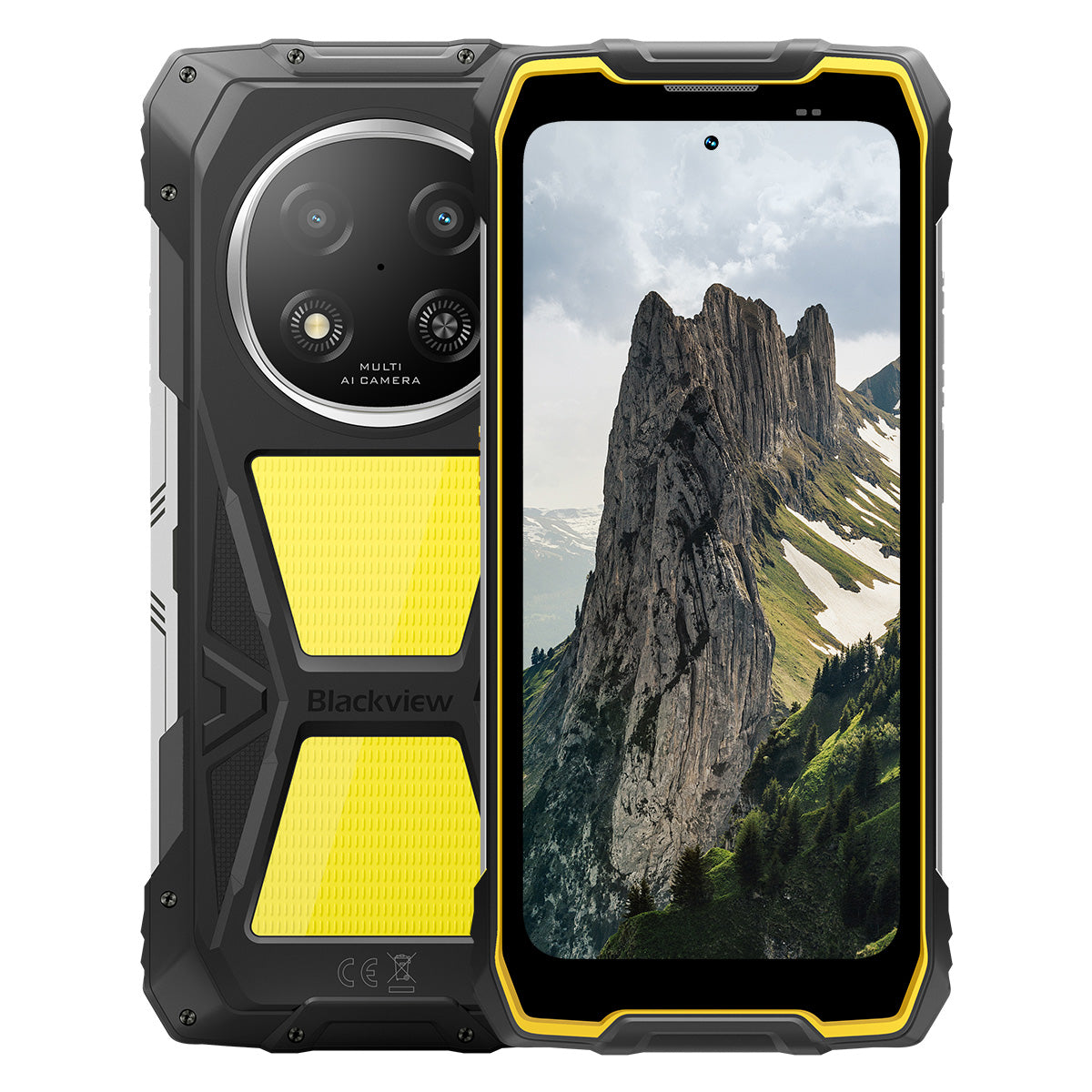


Blackview ROCK 2 Pro 6,67-tommer 120Hz Skærm 400LM Campinglampe 15000mAh 5G Robust Telefon

Skynd dig, der er kun 2 varer tilbage på lager.
Højdepunkter
Højdepunkter
✔6,67-tommer 120Hz Smart Opdateringshastighedsskærm
✔Indbygget Dobbelt 400LM Campinglys
✔5G 6nm UNISOC T8100 Otte-kernet Processor
✔15000mAh & 33W Hurtig Opladning
✔16MP AI Hovedkamera + 13MP AI Frontkamera
✔IP68 & IP69K & MIL-STD-810H Certificeret
Informationer
Informationer
Blackview ROCK 2 Pro er designet til brugere, der har brug for pålidelig mobil ydeevne i krævende miljøer. Den kombinerer en 6,67-tommer 120Hz skærm med UNISOC T8100 5G ydeevne og et 15000mAh batteri med 33W hurtigopladning til arbejde, rejser, navigation og udendørs brug. Vigtige funktioner til feltbrug inkluderer 16MP bagkamera og 13MP front AI-kameraer, to 400LM campinglygter samt IP68 & IP69K & MIL-STD-810H beskyttelse. Designet til byggepladser, fjerntliggende ture og daglig robusthed giver den brugerne selvtillid til at forblive forbundet, fange detaljer og fortsætte, når almindelige telefoner ikke er nok.
Om mærket
Om mærket
Hos Blackview mener vi, at fremragende teknologi skal gå ud over imponerende specifikationer. Den skal passe til det virkelige liv, løse reelle problemer og forblive pålidelig, når det virkelig gælder.
Blackview startede med robuste telefoner bygget til barske miljøer. I dag tilbyder vi et bredere økosystem af smarte enheder, herunder smartphones, tablets, bærbare computere, smartwatches, lydprodukter og mere.
På tværs af alle kategorier er vores fokus det samme: holdbar kvalitet, praktisk innovation og tilgængelige priser. Vi designer produkter, der føles pålidelige fra dag ét.
Vi forstår, hvad kunder værdsætter mest: glat ydeevne, langvarig pålidelighed, nyttige funktioner og teknologi, der gør hverdagen lettere uden unødvendige omkostninger.
Derfor lægger Blackview ægte fokus på produkttest, brugeroplevelse og funktioner, der tilfører reel værdi til arbejde, rejser, skabelse, udendørs udforskning og daglig forbindelse.
Blackview er lavet til folk, der ønsker teknologi, de kan stole på: smarte, kapable enheder bygget til at følge med det moderne liv.
Pålidelig af design. Praktisk af natur. Lavet til det virkelige liv.
Forsendelse og returnering
Forsendelse og returnering
• Forsendelse: Ordrer behandles inden for 1–2 hverdage. Standard levering tager 3–7 hverdage afhængigt af din placering.
• Retur: Du kan returnere eller bytte produkter inden for 30 dage efter modtagelse af din ordre. Varerne skal være i original stand med købsbevis.
Hvis din vare er defekt eller beskadiget på grund af produktionsfejl, erstatter vi den gerne uden ekstra omkostninger.

Hurtigere 5G, stærkere lys, ustoppelig kraft
Gå ud over grænserne, overvinde enhver udfordring


Hvorfor vælge Blackview ROCK 2 Pro?

Nr. 1
IP69K, IP68 & MIL-STD-810H Certificeret,
Bygget til at overvinde enhver ekstrem situation.

Nr. 2
Lynhurtig 5G med 6nm UNISOC T8100,
Oplev Uovertruffen Hastighed
Glidende og imponerende
Dages standby.
Overalt
2.0, intelligens uden grænser
Baseret på Android 16
Nr. 1
IP69K, IP68 & MIL-STD-810H Certificeret,
Bygget til at overvinde enhver ekstrem situation.

400lm Campinglys
Lys, justerbar og pålidelig — designet til at oplyse din lejr og sikre sikkerhed i alle udendørs eventyr.

BelysningstilstandTre lysstyrkeniveauer:Lav/Høj/Meget lys
Lav til strømbesparelse, Høj og Ultra-lys til alsidige udendørs belysningsbehov.

Udendørs camping

Udendørs reparationer

Natvandring

SOS-tilstand
Sender et klart, synligt nødsignal for at sikre din sikkerhed i kritiske udendørssituationer.

Faret vild i naturen

Bilnedbrud

Alvorligt vejr-nødstilfælde

Hurtig blinkende tilstand
Ideel til nødvarsler, afskrækkelse af potentielle trusler eller hurtigt at tiltrække opmærksomhed.

Udendørs forsvar

Vejhjælpsadvarsel

Nød-evakuering

Dyk. Spray. Blødgør. Det virker bare.
IP69K & IP68 Certificeret
ROCK 2 Pro er designet til de hårdeste forhold, der giver uovertruffen beskyttelse mod vand, støv og højtryksstråler.


Sømløs skærmforsegling: Fejlfri
vandafvisende ydeevne.

Korrosionsbestandige aluminiumsknapper:
Forstærket med premium silikoneforseglinger.

TPU-forseglet USB-port: Maksimal støv
og vandafvisning.

Undervandskamera: Fang uforglemmelige
øjeblikke under overfladen.

Højttalerrensning: Automatisk udstøder vand og
affald for krystalklar lyd.

Faldsikker. Støvtæt. Klar til kamp.
MIL-STD-810H Certificeret
Fra -20°C arktiske områder til 60°C ørkenvarme, fra 1,2 m fald på beton til sandstorme — ROCK 2 Pro overlever, hvor andre fejler.

Bevist gennem disse ekstreme tests

Regn

Sand og støv

Vibration

Stød

Fugtighed

Højde

Acceleration

Høj temperatur

Lav temperatur

Nedsænkning

Forstærkede gummihjørner:
Stødabsorbering på sit bedste.

Ultra-holdbar kompositbagside:
Bygget til at holde.

Aluminiumramme i flykvalitet:
Stærk, let og slagfast.

Panda Glass Display: Ridsefast og
splintresikker for ultimativ holdbarhed.
Handskemode 2.0
Fungerer fejlfrit —
selv med tykke handsker på.


Nyttig Værktøjstaske
Kompas, Lommelygte, Forstørrelsesglas og mere —
dit alt-i-en praktiske værktøjssæt.
Nr. 2
Lynhurtig 5G med 6nm UNISOC T8100,
Oplev Uovertruffen Hastighed
5G 6nm UNISOC T8100
Hastighed Du Har Brug For. Kraft Du Stoler På.
Oplev lynhurtig 5G med 6nm UNISOC T8100-chipsettet, der har en kraftfuld 2,2GHz CPU til problemfri multitasking og glat ydeevne i krævende apps!


4*A76@2.2GHz
+ 4*A55@2.0GHz

Arm Mali G57

748,099
AnTuTu benchmark
Op til 32GB LPDDR4X RAM
Multitask som ingenting.
Multitask ubesværet — start apps øjeblikkeligt, skift problemfrit og arbejd og underhold dig med uformindsket hastighed.
Op til 32GB RAM=8GB RAM + 24GB udvidelse
Atomized Memory 2.0
9% mere RAM tilgængeligt


256GB UFS 3.1 lagerplads
Opgraderet til UFS 3.1 for 2,4x hurtigere hastigheder, lavere strømforbrug, reduceret latenstid og accelereret skriveydelse — gem mere, indlæs hurtigere og arbejd smartere.

ROCK 2 Pro
UFS 3.1

ROCK 2
UFS 2.2
2,4x hurtigere dataoverførselshastighed
Effektiv varmeafledning
Køler under pres
Med et køleareal på 1700mm² kan du nyde hurtig varmeafledning for stabil og glat ydeevne uanset hvor intens opgaven er.

Nr.3
6,67" 120Hz smart øjenplejeskærm,
Glidende og imponerende
6,67" HD+ IPS-skærm
Bredere udsyn, skarpere detaljer
Udstyret med en 6,67" HD+ IPS-skærm leverer ROCK 2 Pro medrivende visuelle oplevelser med 120Hz smart opdatering og 650 nits lysstyrke — perfekt til gaming, streaming og daglige opgaver.

120Hz
AI smart opdateringshastighed
650 nits
Lysstyrke
85%
Skærm-til-krop-forhold
720*1604
Opløsning
120Hz AI smart opdateringshastighed
Glattere, hurtigere, smartere
Sig farvel til forsinkelse — smart opdatering tilpasser sig dine behov og sikrer silkeblød rulning samtidig med at batterilevetiden optimeres.
120Hz
60Hz
Dobbelt så høj opdateringshastighed,
Dobbelt så glat

Øjenplejetilstande
Komfort der varer hele dagen
Beskyt dine øjne med fire tilpassede tilstande designet til læsning, arbejde og afslapning.


Læsningstilstand
Papiragtig komfort til lange læsetimer

Natlys
Blid belysning for at reducere belastning fra blåt lys

Mørk tilstand
Perfekt til miljøer med svagt lys

Lys tilstand
Lys og klar til dagsbrug
2W højtydende højttaler
Kraftfuld lyd, enestående klarhed
ROCK 2 Pro leverer kraftfuld, krystalklar lyd med sin 2W højtydende højttaler, der skærer igennem støjende omgivelser for at sikre lyd i topklasse til både kommunikation og underholdning.

Nr.4
Kæmpe 15.000mAh batteri,
Op til 50 dages standby.
15.000mAh kæmpebatteri
Strøm der følger med. Med et gigantisk 15.000mAh batteri håndterer ROCK 2 Pro ubesværet arbejdsrejser, udendørs eventyr og daglig brug — ingen jagt efter stikkontakter nødvendig.

Intelligent opladning
Beskyttelse

AI strømbesparelse
Algoritme


28 timer
Spil

43 timer
Opkald

97 timer
Musik

34 timer
Webbrowsing

26 timer
Videoafspilning

50 dage
Standby
*Data er testet af Blackview Lab baseret på kontinuerlig brug. Den faktiske brug kan variere afhængigt af virkelige brugsforhold.

Klassespecifik intelligent dyb
Strømbesparende tilstand
ROCK 2 Pro justerer intelligent strømmen forbrug med avanceret optimering under inaktive perioder — hvilket giver længere batterilevetid uden at gå på kompromis med ydeevnen.
Længere tid ved let brug
Mindre strømforbrug om natten
5W OTG omvendt opladning
Del strøm på farten
ROCK 2 Pro fungerer også som en bærbar powerbank, så du kan oplade earbuds, smartwatches eller endda din vennens telefon på farten.

Nr.5
Fang hvert øjeblik,
Når som helst, hvor som helst

16MP AI Hovedkamera
Fang perfekt. Del øjeblikkeligt.
ROCK 2 Pro's 16MP AI hovedkamera leverer krystalklare, levende billeder—uanset om du tager professionelle billeder eller jagter den perfekte solnedgang.
16MP
13MP AI Frontkamera
Vær dig selv—bare mere strålende.
ROCK 2 Pro's 13MP AI frontkamera tilpasser sig alle lysforhold og sikrer, at dine selfies forbliver skarpe, naturlig og ubesværet smuk.

Skønhedstilstand
Strål ubesværet, naturligt.
AI skønhedstilstand forbedrer din hud og tone med subtile, naturlige justeringer—fremhæver dine bedste træk med finesse.

Portrættilstand
Fokus på dig, slør resten.
AI dybdesensor fremhæver dit motiv og skaber en glat, studie-kvalitets bokeh-effekt—ingen ekstra udstyr nødvendig.

Nattilstand
Mestring af natten, hver detalje tæller.
AI nattilstand afslører skjulte detaljer i mørket—lyse himle, skarpe kanter og perfekt stabile optagelser, uanset hvor svagt lyset er.

Nr.6
Eksklusivt selvudviklet Doke
AI 2.0, intelligens uden grænser
Ved at integrere tre banebrydende AI-modeller udnytter Doke AI avanceret teknologi til dybt at forstå brugerbehov og levere hurtigere, smartere og mere skræddersyede løsninger.

DeepSeek-R1

ChatGPT-4o mini

Gemini AI 2.0 Flash
Din eksklusive smarte livsmanager

Stemmeaktivering &
Stemmegenkendelse
Lås op ubesværet med din stemme —
berøringsfri og meget sikker!

AI Global Smart Control
Administrer apps og indstillinger nemt med simple stemmekommandoer, der effektiviserer dine daglige opgaver.
 Kompatible apps:
AI Fuldskærmsassistance
Giv øjeblikkeligt svar og indsigt relateret til
til dit nuværende skærmindhold.


AI Realtidsinteraktion
Nyd problemfri, realtidskommunikation,
at øge produktiviteten i hvert øjeblik.
Fire innovative Doke AI apps til
Forbedr din oplevelse

AI Chat App
Din altid tilgængelige AI Chat følgesvend Fra opgaveplanlægning til kreativ brainstorming, AI Chat er din pålidelige intelligente assistent, altid klar til at hjælpe.


Næste generation
DeepSeek-R1

AI Online Søgning

Dokumentanalyse

Undervisningsassistent

Chat med AI

AI Photos App
Dit bærbare AI fotoredigeringsværktøj med 18 avancerede AI-funktioner, AI Photos forvandler almindelige fotos til fantastiske visuelle kreationer, klar til at imponere og dele.

AI Fjern Objekter

AI OutPainting


AI Slør Foto
AI Erstat Baggrund

AI Animate


AI Video App
Dit AI Video Skabelsesværktøj
Forvandl tekst, billeder og hverdagens øjeblikke til filmiske videoer uden besvær — ingen ekspertise nødvendig!


AI Music App
Din AI Music Skabelse
Platform
Ingen instrumenter eller studie nødvendigt—AI Music giver dig mulighed for at skabe unik musik ubesværet, tilpasset til enhver lejlighed.

Nr.7
Seneste DokeOS 5.0 baseret på Android 16
Fra DokeOS 4.2 til 5.0 har vi genopbygget oplevelsen: hurtigere, renere, smartere og dybt personlig. Dette er ikke bare en opdatering—det er et spring fremad i, hvordan du interagerer med din ROCK 2.

Gør det, der betyder noget. Uden støj.

Sideknap funktion
Et tryk. Øjeblikkelig adgang.
Aktiver hurtigt lommelygte, SOS, undervandskamera, PTT eller din favoritapp. Altid klar, ingen ventetid.

Start lydoptagelse

Åben lommelygte

Skærmbilleder

Åben undervandskamera

Åben PTT

Åben SOS

Quad-core navigation
Global præcision. Altid på sporet.
Drevet af GPS, Beidou, Galileo og Glonass for præcis positionering — hvor som helst, når som helst.
Ud over købet, vi har dig dækket.

Android versionsopdatering

Hotline assistance

24/7 online service

Betroet offline reparationscenter
Blackview ROCK 1 specifikationer
| Model | ROCK 2 Pro |
| Farve | Sort/Gul |
| Dimension | 187,6 * 85,8 * 26mm |
| Vægt | 558g |
| OS | DokeOS 5.0 baseret på Android 16 |
| Skærm | 6,67-tommer HD+ IPS, 720 * 1604 opløsning 120Hz smart opdateringshastighed, 85% skærm-til-krop-forhold |
| CPU | Octa-core 5G 6nm UNISOC T8100 |
| RAM & ROM | 8GB RAM + 256GB ROM, LPDDR4X + UFS3.1 |
| TF-udvidelse | Op til 512GB udvidelig lagerplads |
| Batteri | 15000mAh; 33W hurtigopladning |
| Frontkamera | 13MP |
| Bagkamera | 16MP |
| Højttaler | 2W boks-højttaler |
| Navigation | GPS+GLONASS+Galileo+Beidou |
| Kortplads | To; 2SIM/1SIM +1*TF-kort |
| NFC | Understøttelse |
| Wi-Fi & Bluetooth | (IEEE802.11a/b/g/n/ac) (2.4GHz/5GHz) ; BT 5.0 |
| Netværksforbindelse | 2G-bånd: B2/B3/B5/B8 3G-bånd: WCDMA: B1/B2/B5/B8 4G-bånd: TDD:B38/B40/B41 FDD:B1/B2/B3/B4/B5/B7/B8/B12/B17 B19/B20/B26/28A/28B/B66 5G-bånd: N1/2/3/5/7/8/20/26 28/38/40/41/66/77/78 |
| Model | ROCK 2 Pro |
| Farve | Sort/Gul |
| Dimension | 187,6 * 85,8 * 26mm |
| Vægt | 558g |
| OS | DokeOS 5.0 baseret på Android 16 |
| Vis | 6,67-tommer HD+ IPS, 720 * 1604 opløsning 120Hz smart opdateringshastighed, 85% skærm-til-krop-forhold |
| CPU | Octa-core 5G 6nm UNISOC T8100 |
| RAM & ROM | 8GB RAM + 256GB ROM, LPDDR4X + UFS3.1 |
| TF-udvidelse | Op til 512GB udvidelig lagerplads |
| Batteri | 15000mAh; 33W hurtigopladning |
| Frontkamera | 13MP |
| Bagkamera | 16MP |
| Højttaler | 2W kassehøjttaler |
| Navigation | GPS+GLONASS+Galileo+Beidou |
| Kortplads | To; 2SIM/1SIM + 1*TF-kort |
| NFC | Support |
| Wi-Fi & Bluetooth | (IEEE802.11a/b/g/n/ac) (2,4 GHz/5 GHz); BT 5.0 |
| Netværksforbindelse | 2G-bånd: B2/B3/B5/B8 3G-bånd: WCDMA: B1/B2/B5/B8 4G-bånd: TDD: B38/B40/B41 FDD: B1/B2/B3/B4/B5/B7/B8/B12/B17 B19/B20/B26/28A/28B/B66 5G-bånd: N1/2/3/5/7/8/20/26 28/38/40/41/66/77/78 |
Is the Blackview ROCK 2 Pro comfortable to carry every day?
Yes, the Blackview ROCK 2 Pro is well-suited for daily carry, making it highly convenient for commutes, site inspections, and travel between different work locations. Weighing approximately 558 grams and measuring about 26 mm in thickness, it features a high-capacity battery and a rugged, durable design. You can adjust how you carry it based on your personal preferences and specific needs.
For ease of movement and quick access, you might consider placing it in a work bag or a suitably sized waist pouch. If you are purchasing a waist pouch or a vehicle mount, ensure that the model you choose is compatible with the device's dimensions and weight.
How does continuous navigation affect the Blackview ROCK 2 Pro’s battery life?
Using navigation continuously increases power consumption and shortens the phone's battery life, as the device must maintain location tracking and process route information. While the 15,000mAh high-capacity battery offers significantly more power than a typical smartphone, the actual duration for continuous navigation will still vary based on screen settings, network signal strength, and other applications running in the background.
For long-duration navigation, consider using voice prompts—provided it is safe to do so and does not hinder your ability to follow the route. If your work requires all-day continuous navigation, it is advisable to estimate power consumption based on your specific route and settings, and to plan time for recharging
Can I use the Blackview ROCK 2 Pro’s camping light for nighttime work?
Yes. The Blackview ROCK 2 Pro features a 400-lumen camping light with three adjustable brightness levels. It provides illumination for close-range tasks such as inspecting equipment, locating tools, checking wiring, or performing temporary repairs at night. You can adjust the brightness based on ambient lighting conditions and the specific requirements of your task to ensure the work area remains clearly visible.
When you need both hands free, you can place the phone securely so that the light is directed toward your work area. Keep in mind that using the camping light for extended periods will increase battery consumption; it is recommended to select an appropriate brightness level and turn the light off when it is no longer needed.
Is the Blackview ROCK 2 Pro suitable for use in dusty construction environments?
Yes, it is. With IP68 and IP69K ratings, the rugged Blackview ROCK 2 Pro is well-suited for environments prone to dust, moisture, and frequent physical impact—such as renovation sites, outdoor construction zones, and various maintenance work areas.
After a day of work in a dusty environment, it is recommended to wipe any loose dust off the device before placing it in a bag or connecting a charging cable. Before charging, ensure that the USB-C port is clean and dry. Additionally, keep the phone away from cutting tools and operating machinery, and avoid placing it in locations where it might be crushed or compressed.
Is the Blackview ROCK 2 Pro’s front camera suitable for video calls?
Yes, it is. The Blackview ROCK 2 Pro features a 13MP front-facing camera, which is well-suited for everyday video calls—whether you are communicating with colleagues for work or staying in touch with friends and family. In well-lit conditions with a stable network connection, it captures facial expressions clearly, making interactions smoother.
During video calls, it is recommended to face a light source and avoid having a window or a strong light source directly behind you. For longer calls, you may want to place the phone on a stand to keep the image steady and free up your hands. If you experience lag or a blurry image, check your network connection and try adjusting the lighting or the camera angle.
What should I do if a banking app does not work on my Blackview ROCK 2 Pro?
If you are unable to open a banking app, log in, or complete a transaction, first check your internet connection, restart your phone, and ensure the app is updated to the latest version via the download channels specified on the bank’s official website. Additionally, verify that your phone’s date and time settings are correct, and grant any necessary permissions as prompted by the app.
If the issue persists, note down any specific error messages and contact the bank’s customer service to check if your account or device is subject to any security restrictions. If you need to reinstall the app, ensure that your login password, linked phone number, and verification methods are accessible so that you can successfully log back in or complete device verification.
What should I do if an app cannot verify my identity using the Blackview ROCK 2 Pro’s front camera?
Before starting, ensure you have granted the app permission to access the camera and clean the lens. In an environment with even lighting, position your face within the indicated frame. Remove any face masks or sunglasses, and ensure your hair is not covering your eyebrows or eyes. If your glasses are causing reflections, or if you are wearing colored contact lenses, try removing them before attempting the verification again.
If verification fails, try adjusting the lighting or the angle of your face; follow any specific instructions provided by the app. If the issue persists after multiple attempts, contact the platform's customer support to ask if they offer manual review, allow the submission of valid identification documents, or provide alternative verification methods.
What should I do if an app keeps freezing or crashing on my Blackview ROCK 2 Pro?
If you experience frequent freezing or crashing, try restarting the app or the phone, and ensure the app is updated to the latest version. Additionally, check that you have sufficient storage space, close any background apps you aren't currently using, and delete any unnecessary files.
If the issue is limited to a single app, try clearing its cache, or back up your important data and reinstall the app. If multiple apps are frequently freezing or crashing, first check for system updates. If the problem persists, make a note of any error messages and the circumstances under which the issues occur, then contact customer support for further assistance.
How can I check for software updates on the Blackview ROCK 2 Pro?
Open "Settings" on your phone, navigate to the system update page, and tap "Check for updates." If a new version is available, you can review the update notes to learn about the included feature enhancements and bug fixes, then follow the on-screen prompts to download and install it. Checking for updates regularly ensures you receive system optimizations and security patches in a timely manner.
Before updating, connect to a stable Wi-Fi network, ensure your phone has sufficient battery, and back up any important data. It is best to perform the update when you do not need to use your phone; do not force a shutdown or restart during the process—simply wait for the system to complete the update. If no updates are currently available, you can continue using your phone as usual and check again later.
What accessories are included with the Blackview ROCK 2 Pro?
The Blackview ROCK 2 Pro comes with different charger configurations, depending on the version purchased. In the UK, you can choose a version that includes either a UK-standard three-pin plug charger or an EU-standard two-pin plug charger. In the US, you can choose a version that either excludes a charger or includes an EU-standard two-pin plug charger.
Please verify the charger configuration of your chosen version before placing an order. US users who select the version with an EU-standard plug will need to obtain a suitable plug adapter; those who select the version without a charger will need to provide their own compatible charger.
How can I protect the Blackview ROCK 2 Pro’s camera lenses during outdoor work?
When carrying the phone outdoors, avoid direct contact between the lens and hard objects such as keys, screws, or tools; it is best to keep the phone in a separate pocket or a dedicated compartment in your bag. When setting the phone down, choose a clean, flat surface to prevent the lens area from coming into contact with sand or gravel.
If the lens becomes dusty or sandy, gently remove the debris using a soft-bristled brush or an air blower, then wipe it lightly with a clean microfiber cloth. Avoid rubbing the lens directly, as this may cause scratches. If you choose to use a protective case or a lens protector, ensure it is specifically designed for the ROCK 2 Pro, and take care not to obstruct the lens, flash, or camping light.
What should I check when my Blackview ROCK 2 Pro arrives?
After receiving your package, first inspect it and the phone for any visible damage. Verify that the model, color, storage capacity, and included accessories match your order. If the package is damaged or any accessories are missing, take clear photographs and retain the original packaging along with the shipping label.
Once powered on, check that the touchscreen, physical buttons, camera, speakers, microphone, and charging port are all functioning correctly. You may also want to test the device by connecting to Wi-Fi and inserting a SIM card. Please note: Do not test the phone’s ruggedness by intentionally dropping it or submerging it in water. If you encounter any issues, contact the seller through the platform where you made the purchase, providing your order number and a detailed description of the problem.
How can I request a return if there is a problem with my Blackview ROCK 2 Pro?
If you experience any issues with your Blackview ROCK 2 Pro, please contact the customer service team of the channel where you purchased the device. You will need to provide your order details, a description of the issue, and photos or videos that clearly illustrate the problem. The customer service team will assist in troubleshooting, verify the device's warranty status, and advise on the next steps.
For devices that qualify for warranty coverage, service will be provided in accordance with the warranty policy. If your device is outside the warranty period or the scope of coverage, you may consult with customer service regarding paid repair options. If you need to send your device in for repair, please contact customer service first to make arrangements; additionally, ensure that you back up your personal data and remove your SIM card and any memory cards.
Jump to another section