



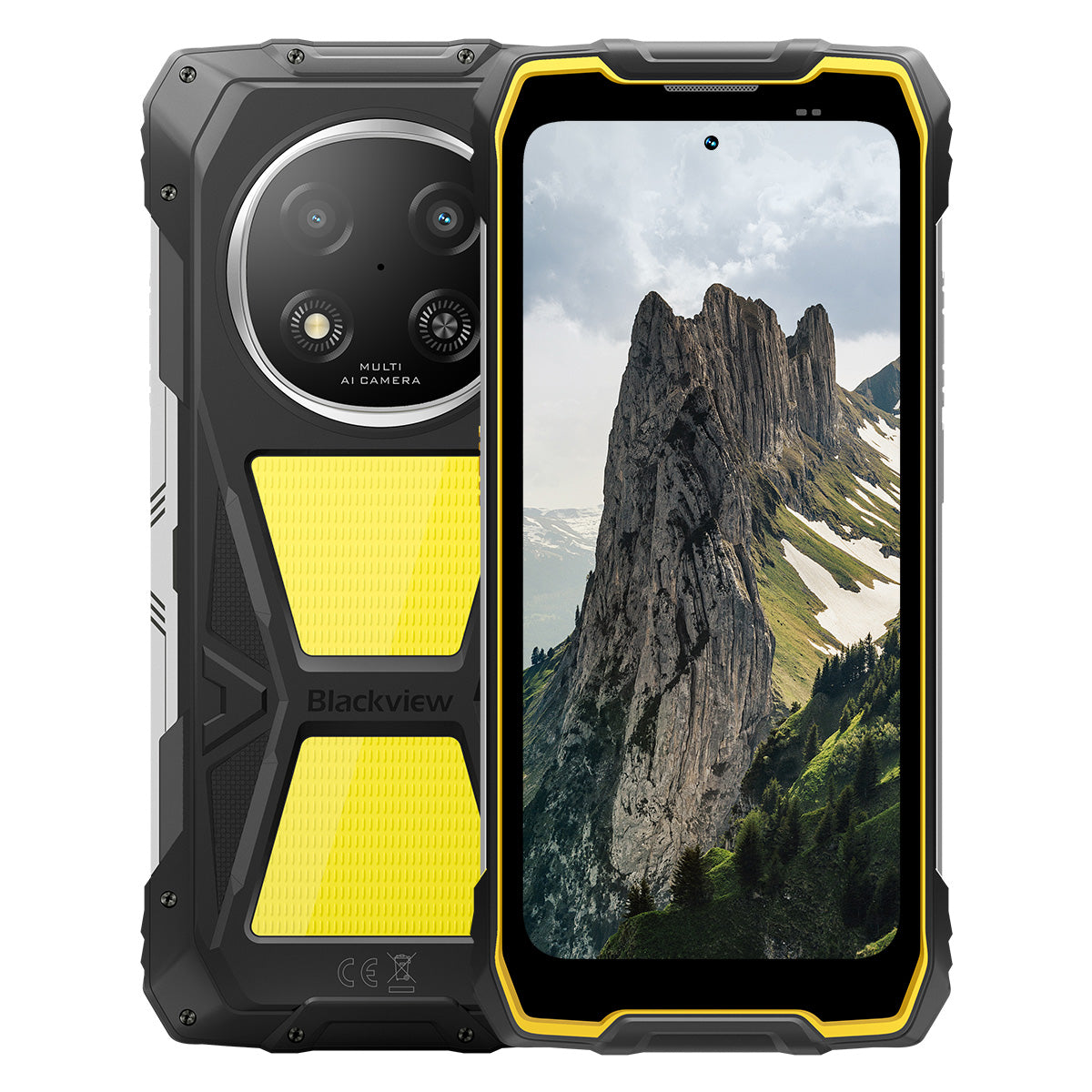


Blackview ROCK 2 Pro 6,67palcový displej 120Hz 8+256GB 400LM kempinková svítilna 15000mAh odolný 5G mobilní telefon

Vyprodáno
Hlavní body
Hlavní body
✔6,67palcový displej s inteligentní obnovovací frekvencí 120 Hz
✔Vestavěné dvojité kempinkové světlo 400LM
✔5G 6nm osmijádrový procesor UNISOC T8100
✔15000mAh a rychlé nabíjení 33W
✔16MP hlavní AI fotoaparát + 13MP přední AI fotoaparát
✔Certifikace IP68, IP69K a MIL-STD-810H
Informace
Informace
Blackview ROCK 2 Pro je navržen pro uživatele, kteří potřebují spolehlivý mobilní výkon v náročných podmínkách. Kombinuje 6,67palcový displej s obnovovací frekvencí 120 Hz, výkon UNISOC T8100 5G a baterii s kapacitou 15000 mAh s rychlým nabíjením 33 W pro práci, cestování, navigaci a venkovní použití. Klíčové funkce připravené pro terén zahrnují 16MP zadní a 13MP přední AI kamery, dvojité 400LM kempingové světla a ochranu IP68, IP69K a MIL-STD-810H. Navržený pro pracovní místa, vzdálené výpravy a každodenní odolnost, dává uživatelům jistotu zůstat ve spojení, zachytit detaily a pokračovat, když běžné telefony nestačí.
O značce
O značce
Ve společnosti Blackview věříme, že skvělá technologie by měla jít nad rámec působivých specifikací. Měla by zapadat do reálného života, řešit skutečné problémy a být spolehlivá, když je to nejdůležitější.
Blackview začal s odolnými telefony určenými pro náročné prostředí. Dnes nabízíme širší ekosystém chytrých zařízení, včetně smartphonů, tabletů, notebooků, chytrých hodinek, audio produktů a dalších.
Ve všech kategoriích zůstává náš cíl stejný: odolná kvalita, praktické inovace a dostupné ceny. Navrhujeme produkty, které jsou spolehlivé od prvního dne.
Chápeme, co zákazníci nejvíce oceňují: plynulý výkon, dlouhodobou spolehlivost, užitečné funkce a technologii, která usnadňuje každodenní život bez zbytečných nákladů.
Proto Blackview věnuje skutečnou pozornost testování produktů, uživatelskému zážitku a funkcím, které přinášejí smysluplnou hodnotu pro práci, cestování, tvorbu, venkovní objevování a každodenní spojení.
Blackview je vytvořen pro lidi, kteří chtějí technologii, na kterou se mohou spolehnout: chytrá, schopná zařízení postavená tak, aby držela krok s moderním životem.
Spolehlivé designem. Praktické svou podstatou. Vytvořené pro skutečný život.
Doprava a vrácení zboží
Doprava a vrácení zboží
• Doprava: Objednávky jsou zpracovávány do 1–2 pracovních dnů. Standardní doručení trvá 3–7 pracovních dnů v závislosti na vaší lokalitě.
• Reklamace: Produkty můžete vrátit nebo vyměnit do 30 dnů od obdržení objednávky. Položky musí být v původním stavu a s dokladem o koupi.
Pokud je váš výrobek vadný nebo poškozený z výrobních důvodů, rádi jej zdarma vyměníme.

Rychlejší 5G, jasnější světlo, nezastavitelná síla
Jděte za hranice, překonejte každou výzvu


Proč si vybrat Blackview ROCK 2 Pro?

Č.1
Certifikace IP69K, IP68 & MIL-STD-810H,
Postaveno, aby zvládlo jakýkoli extrém.

Č. 2
Bleskurychlé 5G s 6nm UNISOC T8100,
Zažijte nepřekonatelnou rychlost
Hladký a ohromující
Dny v pohotovosti.
Kdekoli
2.0, Inteligence bez hranic
Založeno na Android 16
Č.1
Certifikace IP69K, IP68 & MIL-STD-810H,
Postaveno, aby zvládlo jakýkoli extrém.

400lm Kempingové světlo
Jasné, nastavitelné a spolehlivé — navrženo tak, aby osvětlilo váš tábor a zajistilo bezpečnost při každém venkovním dobrodružství.

Režim osvětleníTři úrovně jasu:Nízký/Zvýrazněný/Extrémně jasný
Nízký pro úsporu energie, Vysoký a Ultra jasný pro všestranné venkovní osvětlení.

Venkovní kempování

Venkovní opravy

Noční turistika

Režim SOS
Odesílá jasný, viditelný signál nouze, aby zajistil vaši bezpečnost v kritických venkovních situacích.

Ztraceni v divočině

Porucha vozidla

Nouzové situace při nepříznivém počasí

Režim rychlého blikání
Ideální pro nouzová varování, odstrašení potenciálních hrozeb nebo rychlé upoutání pozornosti.

Venkovní obrana

Varování na kraji silnice

Nouzová evakuace

Potápějte se. Postříkejte. Namočte. Prostě to funguje.
Certifikace IP69K & IP68
ROCK 2 Pro je navržen pro ty nejnáročnější podmínky, které poskytují bezkonkurenční ochranu proti vodě, prachu a vysokotlakým proudům.


Bezešvé utěsnění obrazovky: Bezchybné
vodotěsné vlastnosti.

Korozivzdorná hliníková tlačítka:
Zesílený prémiovými silikonovými těsněními.

TPU utěsněný USB port: Maximální ochrana proti prachu
a odolnost proti vodě.

Podvodní kamera: Zachyťte nezapomenutelné
okamžiky pod hladinou.

Čištění reproduktoru: Automaticky vypuzuje vodu a
nečistoty pro křišťálově čistý zvuk.

Odolný proti pádům. Odolný proti prachu. Připravený do boje.
Certifikováno podle MIL-STD-810H
Od -20°C arktických oblastí po 60°C pouštní horka, od pádů z 1,2 m na beton po písečné bouře — ROCK 2 Pro přežije tam, kde ostatní selhávají.

Ověřeno těmito extrémními testy

Déšť

Písek a prach

Vibrace

Náraz

Vlhkost

Nadmořská výška

Zrychlení

Vysoká teplota

Nízká teplota

Ponoření

Zesílené gumové rohy:
Absorpce nárazů v nejlepší formě.

Ultraodolný kompozitní zadní kryt:
Postavený, aby vydržel.

Hliníkový rám letecké kvality:
Silný, lehký a odolný proti nárazům.

Panda Glass displej: Odolný proti poškrábání a
nezničitelný pro maximální odolnost.
Režim rukavic 2.0
Pracujte bezchybně —
i s tlustými rukavicemi.


Užitečná sada nástrojů
Kompas, baterka, lupa a další —
váš všestranný praktický nástroj
Č. 2
Bleskurychlé 5G s 6nm UNISOC T8100,
Zažijte nepřekonatelnou rychlost
5G 6nm UNISOC T8100
Rychlost, kterou potřebujete. Výkon, kterému důvěřujete.
Zažijte bleskově rychlé 5G s 6nm čipsetem UNISOC T8100, který nabízí výkonný 2,2GHz CPU pro plynulý multitasking a hladký výkon v náročných aplikacích!


4*A76@2.2GHz
+ 4*A55@2.0GHz

Arm Mali G57

748,099
AnTuTu benchmark
Až 32GB LPDDR4X RAM
Multitasking jako nic.
Multitasking bez námahy—spouštějte aplikace okamžitě, přepínejte plynule a pracujte i bavte se s neochvějnou rychlostí.
Až 32GB RAM=8GB RAM + 24GB rozšíření
Atomized Memory 2.0
9 % více dostupné RAM


256GB UFS 3.1 úložiště
Aktualizováno na UFS 3.1 pro 2,4x rychlejší rychlosti, nižší spotřebu energie, snížená latence a zrychlený výkon zápisu—uložte více, načítejte rychleji a pracujte chytřeji.

ROCK 2 Pro
UFS 3.1

ROCK 2
UFS 2.2
2,4x rychlejší přenos dat
Efektivní rozptyl tepla
Chladný pod tlakem
S chladicím povrchem o velikosti 1700mm² si užijte rychlé rozptýlení tepla pro stabilní a plynulý výkon bez ohledu na náročnost úkolu.

Č. 3
6,67" 120Hz chytrý displej s péčí o oči,
Hladký a ohromující
6,67" HD+ IPS displej
Širší pohled, ostřejší detaily
Vybaven 6,67" HD+ IPS displejem, ROCK 2 Pro nabízí pohlcující vizuální zážitek s 120Hz chytrou obnovovací frekvencí a jasem 650nits — ideální pro hraní her, streamování a každodenní úkoly.

120Hz
AI chytrá obnovovací frekvence
650nits
Jas
85%
Poměr obrazovky k tělu
720*1604
Rozlišení
120Hz AI chytrá obnovovací frekvence
Hladší, rychlejší, chytřejší
Rozlučte se s prodlevami—chytrá obnovovací frekvence se přizpůsobí vašim potřebám, zajišťuje plynulé posouvání a zároveň optimalizuje výdrž baterie.
120Hz
60Hz
Dvakrát vyšší obnovovací frekvence,
Dvakrát hladší

Režimy péče o oči
Pohodlí, které vydrží celý den
Chraňte své oči se čtyřmi přizpůsobenými režimy navrženými pro čtení, práci a odpočinek.


Režim čtení
Pohodlí jako papír pro dlouhé hodiny čtení

Noční světlo
Jemné osvětlení pro snížení únavy očí způsobené modrým světlem

Tmavý režim
Ideální pro prostředí se slabým osvětlením

Světelný režim
Jasný a čistý pro denní použití
2W výkonný reproduktor
Silný zvuk, výjimečná čistota
ROCK 2 Pro přináší výrazný, křišťálově čistý zvuk se svým 2W výkonným reproduktorem, který proráží hlučné prostředí pro zajištění špičkového zvuku jak pro komunikaci, tak pro zábavu.

Č.4
Obrovská baterie 15 000mAh,
Až 50 dní v pohotovostním režimu.
Obrovská baterie 15 000mAh
Výkon, který drží krok. S obrovskou baterií 15 000mAh ROCK 2 Pro bez námahy zvládá pracovní cesty, venkovní dobrodružství a každodenní použití – bez nutnosti hledat zásuvku.

Inteligentní nabíjení
Ochrana

AI úspora energie
Algoritmus


28 hodin
Hra

43 hodin
Hovor

97 hodin
Hudba

34 hodin
Prohlížení webu

26 hodin
Přehrávání videa

50 dní
Pohotovostní režim
*Data jsou testována v laboratoři Blackview na základě nepřetržitého používání. Skutečné použití se může lišit v závislosti na reálných podmínkách používání.

Exkluzivní inteligentní hluboký
Režim úspory energie
ROCK 2 Pro inteligentně upravuje spotřebu energie spotřeba s pokročilou optimalizací během nečinnosti — poskytující delší výdrž baterie bez obětování výkonu.
Delší doba používání při nízké zátěži
Méně nočního vybíjení
5W OTG reverzní nabíjení
Sdílejte energii na cestách
ROCK 2 Pro slouží také jako přenosná powerbanka, která vám umožní nabíjet sluchátka, chytré hodinky nebo dokonce váš telefon přítele na cestách.

Č.5
Zachyťte každý okamžik,
Kdykoli, kdekoli

Hlavní 16MP AI kamera
Zachyťte dokonale. Sdílejte okamžitě.
Hlavní 16MP AI kamera ROCK 2 Pro poskytuje krystalicky čisté, živé snímky—ať už pořizujete profesionální fotografie nebo honíte dokonalý západ slunce.
16MP
Přední 13MP AI kamera
Buďte sami sebou—jen jasnější.
Přední 13MP AI kamera ROCK 2 Pro se přizpůsobí jakýmkoli světelným podmínkám, zajišťující, že vaše selfie zůstanou ostré, přirozený a bez námahy ohromující.

Režim krásy
Záříte snadno a přirozeně.
AI režim krásy vylepšuje vaši pokožku a tón s jemnými, přirozenými úpravami — zdůrazňuje vaše nejlepší rysy s elegancí.

Portrétní režim
Zaměřte se na sebe, rozostřete zbytek.
AI hloubkové snímání zvýrazňuje váš objekt a vytváří hladký bokeh efekt ve studiové kvalitě — bez potřeby dalšího vybavení.

Noční režim
Ovládněte noc, každý detail se počítá.
Noční režim AI odhaluje skryté detaily ve tmě — jasné oblohy, ostré hrany a dokonale stabilní snímky, bez ohledu na to, jak je scéna tmavá.

Č. 6
Exkluzivně vlastní vývoj Doke
AI 2.0, inteligence bez hranic
Integrací tří špičkových AI modelů využívá Doke AI nejmodernější technologie k hlubokému porozumění potřebám uživatelů a poskytuje rychlejší, chytřejší a více přizpůsobená řešení.

DeepSeek-R1

ChatGPT-4o mini

Gemini AI 2.0 Flash
Váš exkluzivní správce chytrého života

Hlasová aktivace &
Rozpoznání hlasového otisku
Odemkněte snadno hlasem —
bez dotyku a vysoce zabezpečené!

Globální inteligentní ovládání AI
Snadno spravujte aplikace a nastavení pomocí jednoduchých hlasových příkazů, což zjednodušuje vaše každodenní úkoly.
 Kompatibilní aplikace:
AI asistence na celou obrazovku
Okamžitě poskytujte odpovědi a poznatky související s
k obsahu vašeho aktuálního displeje.


AI interakce v reálném čase
Užijte si plynulou komunikaci v reálném čase,
zvyšování produktivity v každém okamžiku.
Čtyři inovativní Doke AI aplikace pro
Pozvedněte svůj zážitek

Aplikace AI Chat
Váš vždy dostupný AI Chat společník Od plánování úkolů po kreativní brainstorming, AI Chat je váš důvěryhodný inteligentní asistent, vždy připravený pomoci.


Nová generace
DeepSeek-R1

AI Online vyhledávání

Zpracování dokumentů

Asistent pro doučování

Chat s AI

Aplikace AI Fotky
Váš přenosný AI nástroj pro úpravu fotografií s 18 pokročilé AI funkce, AI Photos přeměňuje obyčejné fotografie na ohromující vizuální výtvory, připravené zaujmout a sdílet.

AI Remove Objects

AI OutPainting


AI Blur Photo
AI Replace Background

AI Animate


AI Video aplikace
Váš nástroj pro tvorbu AI videí
Přeměňte text, obrázky a každodenní okamžiky na filmová videa bez námahy — není potřeba žádná odbornost!


AI Music aplikace
Vaše AI hudební tvorba
Platforma
Žádné nástroje ani studio nejsou potřeba—AI Music vám umožní vytvářet jedinečnou hudbu bez námahy, přizpůsobené každé příležitosti.

No.7
Nejnovější DokeOS 5.0 založený na Android 16
Od DokeOS 4.2 po 5.0 jsme zcela přestavěli zážitek: rychlejší, čistší, chytřejší a hluboce osobní. Toto není jen aktualizace—je to skok vpřed v tom, jak komunikujete se svým ROCK 2.

Dělejte to, co je důležité. Bez hluku.

Funkce bočního tlačítka
Jedno stisknutí. Okamžitý přístup.
Rychle aktivujte svítilnu, SOS, podvodní kameru, PTT nebo svou oblíbenou aplikaci. Vždy připraveno, bez čekání.

Spustit zvukový záznam

Zapnout svítilnu

Snímky obrazovky

Otevřít podvodní kameru

Otevřít PTT

Otevřít SOS

Čtyřjádrová navigace
Globální přesnost. Vždy na správné cestě.
Poháněno GPS, Beidou, Galileo a Glonass pro přesné umístění — kdekoli, kdykoli.
Více než jen nákup, jsme tu pro vás.

Aktualizace verze Androidu

Asistence na lince

Online služba 24/7

Důvěryhodné offline servisní centrum
Specifikace Blackview ROCK 1
| Model | ROCK 2 Pro |
| Barva | Černá/Žlutá |
| Rozměry | 187,6 * 85,8 * 26mm |
| Hmotnost | 558g |
| Operační systém | DokeOS 5.0 založený na Android 16 |
| Displej | 6,67palcový HD+ IPS, rozlišení 720 * 1604 120Hz Chytrá obnovovací frekvence, 85% poměr obrazovky k tělu |
| CPU | Osmijádrový 5G 6nm UNISOC T8100 |
| RAM & ROM | 8GB RAM + 256GB ROM, LPDDR4X + UFS3.1 |
| TF rozšíření | Až 512GB rozšiřitelná paměť |
| Baterie | 15000mAh; 33W Rychlé nabíjení |
| Přední kamera | 13MP |
| Zadní kamera | 16MP |
| Reproduktor | 2W reproduktor v krabici |
| Navigace | GPS+GLONASS+Galileo+Beidou |
| Slot na kartu | Dva; 2SIM/1SIM +1*TF karta |
| NFC | Podpora |
| Wi-Fi & Bluetooth | (IEEE802.11a/b/g/n/ac) (2.4GHz/5GHz) ; BT 5.0 |
| Síťové připojení | 2G pásmo: B2/B3/B5/B8 3G pásmo: WCDMA: B1/B2/B5/B8 4G pásmo: TDD:B38/B40/B41 FDD:B1/B2/B3/B4/B5/B7/B8/B12/B17 B19/B20/B26/28A/28B/B66 5G pásmo: N1/2/3/5/7/8/20/26 28/38/40/41/66/77/78 |
| Model | ROCK 2 Pro |
| Barva | Černá/Žlutá |
| Rozměr | 187,6 * 85,8 * 26mm |
| Hmotnost | 558g |
| Operační systém | DokeOS 5.0 založený na Androidu 16 |
| Zobrazit | 6,67palcový HD+ IPS, rozlišení 720 * 1604 120Hz inteligentní obnovovací frekvence, 85% poměr obrazovky k tělu |
| CPU | Osmijádrový 5G 6nm UNISOC T8100 |
| RAM a ROM | 8GB RAM + 256GB ROM, LPDDR4X + UFS3.1 |
| TF rozšíření | Až 512GB rozšiřitelná paměť |
| Baterie | 15000mAh; 33W rychlé nabíjení |
| Přední kamera | 13MP |
| Zadní kamera | 16MP |
| Reproduktor | 2W reproduktor v krabici |
| Navigace | GPS+GLONASS+Galileo+Beidou |
| Slot na kartu | Dva; 2SIM/1SIM + 1*TF karta |
| NFC | Podpora |
| Wi-Fi a Bluetooth | (IEEE802.11a/b/g/n/ac) (2,4GHz/5GHz); BT 5.0 |
| Síťové připojení | 2G pásmo: B2/B3/B5/B8 3G pásmo: WCDMA: B1/B2/B5/B8 4G pásmo: TDD: B38/B40/B41 FDD: B1/B2/B3/B4/B5/B7/B8/B12/B17 B19/B20/B26/28A/28B/B66 5G pásmo: N1/2/3/5/7/8/20/26 28/38/40/41/66/77/78 |
Is the Blackview ROCK 2 Pro comfortable to carry every day?
Yes, the Blackview ROCK 2 Pro is well-suited for daily carry, making it highly convenient for commutes, site inspections, and travel between different work locations. Weighing approximately 558 grams and measuring about 26 mm in thickness, it features a high-capacity battery and a rugged, durable design. You can adjust how you carry it based on your personal preferences and specific needs.
For ease of movement and quick access, you might consider placing it in a work bag or a suitably sized waist pouch. If you are purchasing a waist pouch or a vehicle mount, ensure that the model you choose is compatible with the device's dimensions and weight.
How does continuous navigation affect the Blackview ROCK 2 Pro’s battery life?
Using navigation continuously increases power consumption and shortens the phone's battery life, as the device must maintain location tracking and process route information. While the 15,000mAh high-capacity battery offers significantly more power than a typical smartphone, the actual duration for continuous navigation will still vary based on screen settings, network signal strength, and other applications running in the background.
For long-duration navigation, consider using voice prompts—provided it is safe to do so and does not hinder your ability to follow the route. If your work requires all-day continuous navigation, it is advisable to estimate power consumption based on your specific route and settings, and to plan time for recharging
Can I use the Blackview ROCK 2 Pro’s camping light for nighttime work?
Yes. The Blackview ROCK 2 Pro features a 400-lumen camping light with three adjustable brightness levels. It provides illumination for close-range tasks such as inspecting equipment, locating tools, checking wiring, or performing temporary repairs at night. You can adjust the brightness based on ambient lighting conditions and the specific requirements of your task to ensure the work area remains clearly visible.
When you need both hands free, you can place the phone securely so that the light is directed toward your work area. Keep in mind that using the camping light for extended periods will increase battery consumption; it is recommended to select an appropriate brightness level and turn the light off when it is no longer needed.
Is the Blackview ROCK 2 Pro suitable for use in dusty construction environments?
Yes, it is. With IP68 and IP69K ratings, the rugged Blackview ROCK 2 Pro is well-suited for environments prone to dust, moisture, and frequent physical impact—such as renovation sites, outdoor construction zones, and various maintenance work areas.
After a day of work in a dusty environment, it is recommended to wipe any loose dust off the device before placing it in a bag or connecting a charging cable. Before charging, ensure that the USB-C port is clean and dry. Additionally, keep the phone away from cutting tools and operating machinery, and avoid placing it in locations where it might be crushed or compressed.
Is the Blackview ROCK 2 Pro’s front camera suitable for video calls?
Yes, it is. The Blackview ROCK 2 Pro features a 13MP front-facing camera, which is well-suited for everyday video calls—whether you are communicating with colleagues for work or staying in touch with friends and family. In well-lit conditions with a stable network connection, it captures facial expressions clearly, making interactions smoother.
During video calls, it is recommended to face a light source and avoid having a window or a strong light source directly behind you. For longer calls, you may want to place the phone on a stand to keep the image steady and free up your hands. If you experience lag or a blurry image, check your network connection and try adjusting the lighting or the camera angle.
What should I do if a banking app does not work on my Blackview ROCK 2 Pro?
If you are unable to open a banking app, log in, or complete a transaction, first check your internet connection, restart your phone, and ensure the app is updated to the latest version via the download channels specified on the bank’s official website. Additionally, verify that your phone’s date and time settings are correct, and grant any necessary permissions as prompted by the app.
If the issue persists, note down any specific error messages and contact the bank’s customer service to check if your account or device is subject to any security restrictions. If you need to reinstall the app, ensure that your login password, linked phone number, and verification methods are accessible so that you can successfully log back in or complete device verification.
What should I do if an app cannot verify my identity using the Blackview ROCK 2 Pro’s front camera?
Before starting, ensure you have granted the app permission to access the camera and clean the lens. In an environment with even lighting, position your face within the indicated frame. Remove any face masks or sunglasses, and ensure your hair is not covering your eyebrows or eyes. If your glasses are causing reflections, or if you are wearing colored contact lenses, try removing them before attempting the verification again.
If verification fails, try adjusting the lighting or the angle of your face; follow any specific instructions provided by the app. If the issue persists after multiple attempts, contact the platform's customer support to ask if they offer manual review, allow the submission of valid identification documents, or provide alternative verification methods.
What should I do if an app keeps freezing or crashing on my Blackview ROCK 2 Pro?
If you experience frequent freezing or crashing, try restarting the app or the phone, and ensure the app is updated to the latest version. Additionally, check that you have sufficient storage space, close any background apps you aren't currently using, and delete any unnecessary files.
If the issue is limited to a single app, try clearing its cache, or back up your important data and reinstall the app. If multiple apps are frequently freezing or crashing, first check for system updates. If the problem persists, make a note of any error messages and the circumstances under which the issues occur, then contact customer support for further assistance.
How can I check for software updates on the Blackview ROCK 2 Pro?
Open "Settings" on your phone, navigate to the system update page, and tap "Check for updates." If a new version is available, you can review the update notes to learn about the included feature enhancements and bug fixes, then follow the on-screen prompts to download and install it. Checking for updates regularly ensures you receive system optimizations and security patches in a timely manner.
Before updating, connect to a stable Wi-Fi network, ensure your phone has sufficient battery, and back up any important data. It is best to perform the update when you do not need to use your phone; do not force a shutdown or restart during the process—simply wait for the system to complete the update. If no updates are currently available, you can continue using your phone as usual and check again later.
What accessories are included with the Blackview ROCK 2 Pro?
The Blackview ROCK 2 Pro comes with different charger configurations, depending on the version purchased. In the UK, you can choose a version that includes either a UK-standard three-pin plug charger or an EU-standard two-pin plug charger. In the US, you can choose a version that either excludes a charger or includes an EU-standard two-pin plug charger.
Please verify the charger configuration of your chosen version before placing an order. US users who select the version with an EU-standard plug will need to obtain a suitable plug adapter; those who select the version without a charger will need to provide their own compatible charger.
How can I protect the Blackview ROCK 2 Pro’s camera lenses during outdoor work?
When carrying the phone outdoors, avoid direct contact between the lens and hard objects such as keys, screws, or tools; it is best to keep the phone in a separate pocket or a dedicated compartment in your bag. When setting the phone down, choose a clean, flat surface to prevent the lens area from coming into contact with sand or gravel.
If the lens becomes dusty or sandy, gently remove the debris using a soft-bristled brush or an air blower, then wipe it lightly with a clean microfiber cloth. Avoid rubbing the lens directly, as this may cause scratches. If you choose to use a protective case or a lens protector, ensure it is specifically designed for the ROCK 2 Pro, and take care not to obstruct the lens, flash, or camping light.
What should I check when my Blackview ROCK 2 Pro arrives?
After receiving your package, first inspect it and the phone for any visible damage. Verify that the model, color, storage capacity, and included accessories match your order. If the package is damaged or any accessories are missing, take clear photographs and retain the original packaging along with the shipping label.
Once powered on, check that the touchscreen, physical buttons, camera, speakers, microphone, and charging port are all functioning correctly. You may also want to test the device by connecting to Wi-Fi and inserting a SIM card. Please note: Do not test the phone’s ruggedness by intentionally dropping it or submerging it in water. If you encounter any issues, contact the seller through the platform where you made the purchase, providing your order number and a detailed description of the problem.
How can I request a return if there is a problem with my Blackview ROCK 2 Pro?
If you experience any issues with your Blackview ROCK 2 Pro, please contact the customer service team of the channel where you purchased the device. You will need to provide your order details, a description of the issue, and photos or videos that clearly illustrate the problem. The customer service team will assist in troubleshooting, verify the device's warranty status, and advise on the next steps.
For devices that qualify for warranty coverage, service will be provided in accordance with the warranty policy. If your device is outside the warranty period or the scope of coverage, you may consult with customer service regarding paid repair options. If you need to send your device in for repair, please contact customer service first to make arrangements; additionally, ensure that you back up your personal data and remove your SIM card and any memory cards.
Jump to another section