



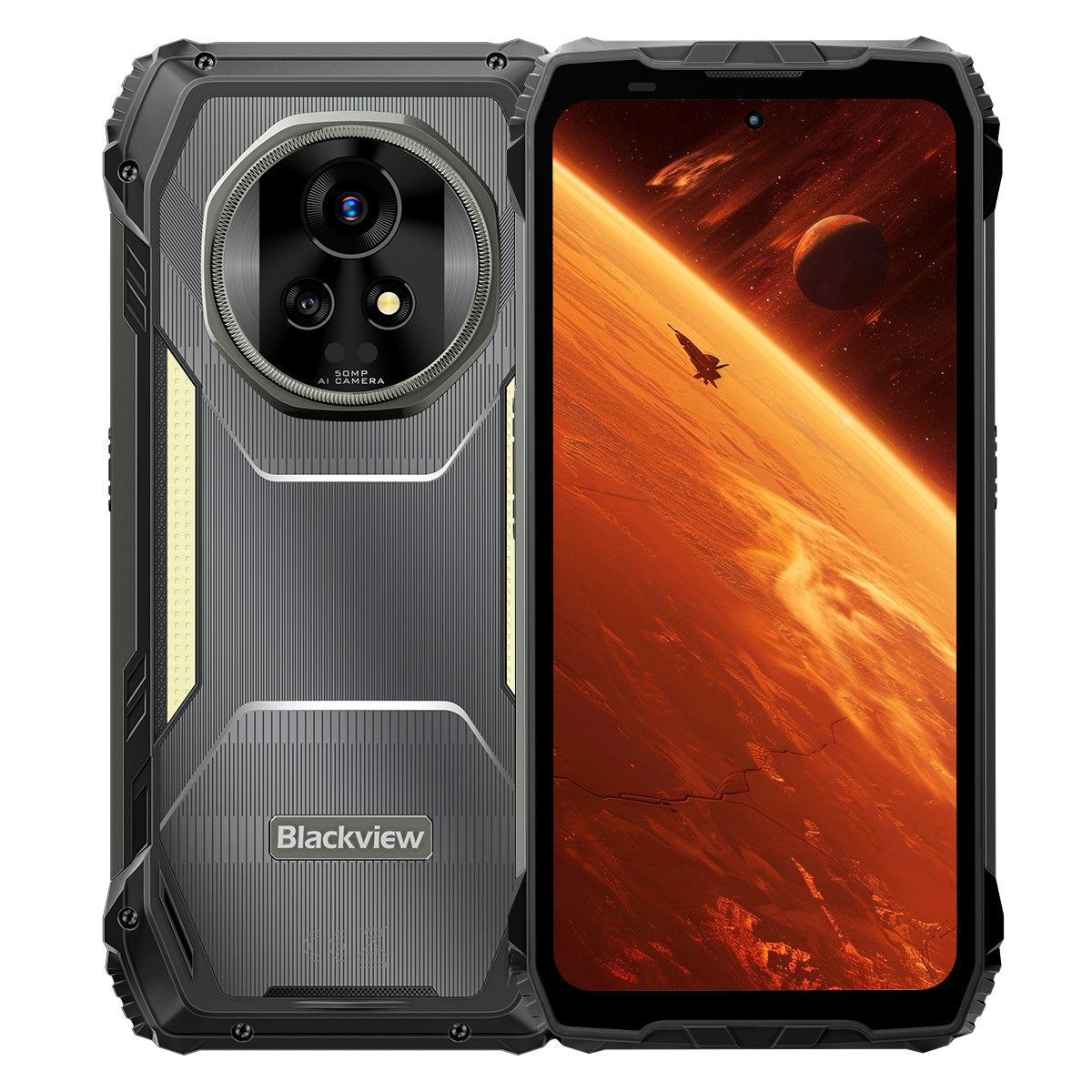


Blackview XPLORE 2 6.73" 3.2K AMOLED дисплей MediaTek Dimensity 8300 восьмиядерный 20000mAh 467LM кемпинговый фонарь 5G AI защищённый телефон

В наличии (41)
Основные моменты
Основные моменты
✔6,73" 120 Гц 3,2K LTPO AMOLED дисплей
✔Встроенный двойной кемпинговый фонарь 467 люмен
✔MediaTek Dimensity 8300 4нм 5G восьмиядерный процессор и WiFi 6E
✔Аккумулятор 20000 мАч с быстрой зарядкой 120 Вт
✔Основная камера 50 МП + ночное видение 20 МП
✔Сертификаты IP68, IP69K и MIL-STD-810H
✔Поддержка eSIM
Информация
Информация
Blackview XPLORE 2 — это прочный флагманский 5G-смартфон, созданный для пользователей, которые ценят высокое качество дисплея, долгую автономную работу и профессиональные возможности для активного отдыха. Его 6,73-дюймовый AMOLED-экран с частотой обновления 120 Гц и разрешением 3,2K, процессор Dimensity 8300, WiFi 6E и мощная батарея ёмкостью 20 000 мАч с быстрой зарядкой 120 Вт обеспечивают высокую производительность для работы, навигации, медиа и путешествий. Основная камера на 50 МП, ночная камера на 20 МП, кемпинговый фонарь яркостью 467 люмен, поддержка eSIM, защита по стандартам IP68 и IP69K, а также прочность по стандарту MIL-STD-810H делают устройство готовым к самым суровым условиям на местности.
О бренде
О бренде
В Blackview мы считаем, что отличные технологии должны выходить за рамки впечатляющих характеристик. Они должны соответствовать реальной жизни, решать реальные проблемы и оставаться надежными в самые важные моменты.
Blackview начиналась с прочных телефонов, созданных для суровых условий. Сегодня мы предлагаем более широкий ассортимент умных устройств, включая смартфоны, планшеты, ноутбуки, умные часы, аудиопродукты и многое другое.
Во всех категориях наш фокус остается неизменным: прочное качество, практичные инновации и доступные цены. Мы разрабатываем продукты, которые с первого дня кажутся надежными.
Мы понимаем, что для клиентов важнее всего: плавная работа, долговечная надежность, полезные функции и технологии, которые упрощают повседневную жизнь без лишних затрат.
Именно поэтому Blackview уделяет особое внимание тестированию продуктов, пользовательскому опыту и функциям, которые приносят реальную пользу в работе, путешествиях, творчестве, активном отдыхе и ежедневном общении.
Blackview создан для тех, кто хочет технологии, которым можно доверять: умные, функциональные устройства, способные идти в ногу с современной жизнью.
Надежность в основе. Практичность в природе. Создано для реальной жизни.
Доставка и возврат
Доставка и возврат
• Доставка: Заказы обрабатываются в течение 1–2 рабочих дней. Стандартная доставка занимает 3–7 рабочих дней в зависимости от вашего местоположения.
• Возвраты: Вы можете вернуть или обменять товары в течение 30 дней с момента получения заказа. Товары должны быть в оригинальном состоянии с подтверждением покупки.
Если ваш товар имеет дефект или поврежден по производственным причинам, мы с радостью заменим его бесплатно.


Первый в мире 3.2K AMOLED 5G
AI Защищённый флагман
Создан для вершины. Построен для дикой природы.
6.73" 3.2K AMOLED 120Hz дисплей | HDR Потрясающая визуализация | Двойная 50MP Samsung® Камеры + 20MP ночное видение| Двойная антишоковая стабилизация (OIS + EIS) | 5G 4nm Dimensity 8300 | 48GB LPDDR5X & 1TB UFS4.0 + До 2TB TF расширения | 20000mAh Мега аккумулятор & 120W Супербыстрая зарядка
Топ-9 причин выбрать Blackview
XPLORE 2

Самая прочная в отрасли надежность
Военный стандарт высшего уровня MIL-STD-810H
Устойчивость к падению с 6 метров | Ультра-тяжелая нагрузка 500 кг | Устойчивость к экстремальным температурам от -20°C до +60°C

Вершина водонепроницаемой защиты
Высший уровень защиты IP69K и IP68
Удаление пыли и воды одним касанием | AI водонепроницаемый сенсор| Подводные снимки
Водонепроницаемость при погружении на 2 м в течение 30 минут | Выдерживает кипящую воду при 80℃

Ночной страж
467 лм кемпинговый фонарь
Ярче свет | Мощный стробоскоп для предупреждений и защиты | Мгновенный SOS сигнал для экстренных случаев

Революционный стереозвук
Двойные 2Вт умные стереодинамики Smart-K Box
Стереозвук мощностью до 316% для полного погружения в аудио где угодно.

Инфракрасное дистанционное управление
Превратите свой телефон в универсальный пульт за секунды!

За пределами визуальных возможностей
6.73” 3.2K HDR-дисплей — непревзойдённый в своём классе
2600 нит — ведущая в отрасли пиковая яркость | Адаптивная частота обновления LTPO 1–120 Гц 1920 Гц высокочастотное затемнение | Сертификация TÜV SÜD Low Blue Light

Съёмка на пике возможностей
Двойные 50MP Samsung® AI камеры | 20MP ночное видение | Ультра HDR | OIS & EIS
Кинематографическая запись видео 4K HDR10+ | Отслеживание движения | 8× Зум

Производительность, полностью эволюционировавшая
Топовый 5G чип Dimensity 8300 | 16GB LPDDR5X RAM + 32GB расширение | 1TB UFS4.0 ROM
1,339,275
Результат AnTuTu
↑ 84%
Общая производительность

Все-в-одном AI редактирование изображений
AI Удаление объектов | AI OutPainting | AI Размытие фото | AI Замена фона | AI Анимация


Король мощности батареи
Самая большая батарея для защищённого телефона
Гигантская двойная батарея 20,000mAh | До 75 дней сверхдлительного режима ожидания | Гипербыстрая зарядка 120W | Обратная зарядка 10W

Единственная в отрасли собственная разработка
Топ-3 мировых AI-моделей. Все в одном.
Активация по голосовому отпечатку и управление без рук

Единственная в отрасли собственная разработка
Совершенно новая DokeOS 4.2 на базе Android 15

Умные обновления для любых сценариев

Единственное в отрасли послепродажное обязательство
Переосмысление прочности
Защита высшего уровня.
Лучшие в отрасли сертификации для защищённых устройств
Сертифицированный по военному стандарту MIL-STD-810H и рейтингам IP68/IP69K, XPLORE 2 обеспечивает максимальную защиту от падений, пыли, воды и сжатия — устанавливая новый стандарт прочности.

6 метров
Настоящая ударопрочность
Выдерживает падения с высоты до 6 метров под любым углом на любую поверхность.

IP6X
Настоящая пыленепроницаемость
Полная защита от песка, пыли и промышленных частиц.

IPX9K
Настоящая водонепроницаемость
Выдерживает струи высокой температуры и давления, брызги и погружение.

MIL-STD-810H
Настоящая защита от сжатия
Выдерживает экстремальное сжатие, удары и суровые условия.
Самая прочная в отрасли
Неразрушим со всех сторон
Сильнее, чем когда-либо — усилен внутри и снаружи для выдерживания падений, сила сжатия и экстремальные температуры.
6 метров
Устойчивость к падениям
Выносливость при падениях нового уровня
1,5 метра
Смертельное падение
Выживает при прямых падениях
500 кг
Грузоподъемность
Выдерживает сверхсильное давление2
-20°C до +60°C
Экстремальные температуры
Широкий диапазон рабочих температур

Проверено в экстремальных испытаниях

Сверхпрочный корпус
Первый в отрасли
Конструкция ArmorShield
XPLORE 2 использует 5-слойный дизайн ArmorShield, усиленный стеклом Gorilla® Glass 5 и авиационным алюминиево-титановым сплавом для всесторонней прочности.
5-слойный
ArmorShield
Конструкция
4 угла
Усиленный
Защита
400% ↑
Усиленная защита от ударов
Устойчивость

Вершина водонепроницаемой защиты
Высший уровень защиты IP69K
Сертифицированный по IP69K и IP68, он выдерживает всё — кипящую воду, непрекращающиеся струи высокого давления, распыление под разными углами и длительные погружения.
80℃
Выдерживает кипящую воду
10000 кПа
Устойчив к промышленным струям
0° / 30° / 60° / 90°
Защита от распыления под любым углом
2 м в течение 30 минут
Защита от глубокого погружения4
Более 1 000 000 раз
Надёжность, проверенная погружением

Двойной водонепроницаемый USB-порт
Устойчив к воде без крышки, двойной защищён при запечатывании.

Удаление пыли и воды одним касанием
Мгновенно очищает динамик, чтобы сохранить каждый звонок громкий и четкий.5

AI водонепроницаемый сенсор
Даже под сильным дождем экран остается плавным и отзывчивым.6

Подводные снимки
От брызг до погружений, запечатлейте свои мир под водой с легкостью.
Ночной страж
Кемпинговый фонарь 467лм для яркой и безопасной природы
Когда наступает ночь, кемпинговый фонарь XPLORE 2 с яркостью 467лм превращает темноту в безопасность. От лагерей до отключений электроэнергии — он помогает быть готовым и контролировать ситуацию.


Инфракрасное дистанционное управление
Превратите свой телефон в универсальный пульт за секунды!8

Революционный стереозвук
Двойные 2Вт умные стереодинамики Smart-K Box
Стереозвук мощностью до 316% для полного погружения в аудио где угодно.

5дБ ↑
Громче звук 10
+50% ↑
Чище звук11
За пределами визуальных возможностей
Дисплей
Яркий
Реалистичный
HDR
Улучшенная контрастность и детализация
Профессиональная цветопередача
Улучшенная контрастность и детализация
2600 нит
Лидирующая в отрасли максимальная яркость12
6.73 дюйма
Флагманский AMOLED-дисплей
521 PPI
Чёткая плотность пикселей
Всегда включённый дисплей
Время и оповещения с первого взгляда
DCI-P3
Киношкала с широким цветовым охватом13
68.7 миллиардов
Реалистичные цвета
10,000,000:1
Ультра высокий коэффициент контрастности
1–120Hz
Адаптивная частота обновления LTPO14

Дисплей
Облегчает
Комфорт


Full-Link HDR
Начиная с потрясающих визуальных эффектов и заканчивая ультрадинамичной съемкой, Full-Link HDR обеспечивает реалистичную яркость и сохраняет каждую деталь.

Съёмка на пике возможностей
Четче и стабильнее изображение
50MP Samsung® GN9 флагманская основная камера
От далеких видов до движущихся моментов — запечатлейте всё в деталях.
1/1.57"
Более крупный сенсор
f/1.88
Ярче ночные снимки
6P
Ультрачеткая ясность


Лучшие в классе детали
Ультра HDR фотография, в 3 раза больше деталей
Видьте дикую природу во всех деталях — от выжженных солнцем горизонтов до тенистых троп, с каждой тенью, бликом и цветом, живыми как никогда.

Лидер отрасли
В 8 раз ближе. Всё ещё ультрачетко
Приближайте удалённые сцены с кристально чистыми деталями и стабильной фокусировкой.

50MP Samsung® JN1 фронтальная камера
Будь то яркий дневной свет или тусклое освещение — делайте селфи четкими, яркими и естественными.

Ночное видение нового уровня
20MP Sony® камера ночного видения
От проверок безопасности до спасательных операций — видьте ясно в полной темноте.

Видео профессионального уровня
Кинематографический 4K HDR10+
Запечатлейте ультрачеткие детали, яркие цвета и реалистичный контраст с частотой 60FPS. От пейзажей до личных фильмов — каждый кадр рассказывает кинематографическую историю.


Все-в-одном AI  Редактирование изображений
Преобразуйте ваши фотографии в потрясающие визуальные шедевры одним кликом — редактирование никогда не было таким простым!
ИИ Удалить объекты
Легко удаляйте отвлекающие элементы с точностью.

ИИ OutPainting
Интеллектуально расширяйте границы.

ИИ Размыть фото
Меняйте фоны и трансформируйте сцены по желанию.

ИИ Заменить фон
Меняйте фоны и трансформируйте сцены по желанию.

Моменты, возрожденные
ИИ Анимировать
Оживите фотографии! Добавьте движение лицам и смотрите, как ваши воспоминания танцуют с энергией

Производительность, полностью эволюционировавшая
Производительность нового уровня
Передовой 5G 4нм MediaTek Dimensity 8300
Создан на 4нм техпроцессе и разогнан до 3,35ГГц, XPLORE 2 справляется с игровые марафоны и интенсивная многозадачность с плавностью флагмана.
40%
Более крупный сенсор
30% ↑
Более мощный GPU17
84% ↑
Общая производительность18
1,339,275
Результат AnTuTu

Память, на максимуме
До 48ГБ RAM
(16ГБ физической + 32ГБ расширения)
Создан на 4нм техпроцессе и разогнан до 3,35ГГц, XPLORE 2 справляется с игровые марафоны и интенсивная многозадачность с плавностью флагмана.
2X ↑
Быстрая передача данных19
45% ↑
Быстрый запуск и переключение приложений20
22 приложения ↑
Плавный многозадачность, без задержек21
LPDDR5X
Высокоскоростная RAM

Хранение, ускоренное
1ТБ ROM +
до 2ТБ расширения TF
С 1ТБ UFS4.0 ROM и расширением TF до 2ТБ, XPLORE 2 хранит всё — от карт высокого разрешения и дрон-съёмки до спасательных файлов — мгновенный доступ даже в полевых условиях.
2X ↑
Увеличенная емкость хранилища22
2.3X ↑
Более высокая скорость чтения и записи23
UFS4.0
Ультрабыстрое хранилище
1TB + 2TB TF расширение = Храните всё

Связь следующего поколения
Поддержка WiFi 6E + Dual 5G
Будьте впереди с WiFi 6E и Dual 5G — быстрее, плавнее и по-настоящему глобально.
↑ Скорость в 3 раза выше
Мгновенная загрузка. Плавный стриминг.24
6GHz + 5GHz + 2.4GHz
Три полосы WiFi. Быстрее. Надежнее.

2.5 Гбит/с на передачу | 5.11 Гбит/с на прием
Молниеносная загрузка и скачивание.25
Поддержка Dual 5G
По-настоящему глобальная связь

Полная производительность без ограничений
Эффективная система охлаждения 3-в-1
Оставайтесь прохладными благодаря продуманному термодизайну — даже во время интенсивных игр, непрерывной 5G трансляции или работы на улице весь день.

Графит + медь + силикон
Тройные материалы, быстрое теплоотведение
Площадь рассеивания 2,262.8 мм²
Быстрое рассеивание тепла, длительная максимальная производительность
<37°C при ежедневном использовании
Всегда прохладно, всегда стабильно
Съёмка на пике возможностей
Гигантская двойная батарея 20,000mAh
Эквивалент 4×5000mAh телефонов в одном — неостановимая мощность, выносливость на весь день.

Управление мощностью с ИИ


1.6X ↑
Длительный срок службы26
36 часов+
Интенсивное использование27
23 часа+
Игры
24 часа+
Просмотр веб-страниц
Более 166 часов
Звонки
Более 10 часов
Непрерывное освещение
75 дней
Режим ожидания
Самая быстрая в классе
Гипербыстрая зарядка 120W
50% за 39 минут. 100% за 117 минут. Всегда готов, когда вы готовы.
118%
Быстрее
Зарядка
Никакого ожидания. Чистая мощность.29
Обратная зарядка 10W
Делитесь энергией в любое время и в любом месте.


Единственная в отрасли собственная разработка


Интеллект с голосовым управлением
Gemini AI 2.0
Умнее. Быстрее. Голосовое управление. XPLORE 2 держит вас в командовании — без рук, куда бы вы ни шли.
Активация по голосовому отпечатку и управление без рук
Разблокировка и управление голосом — безопасно и без рук.

Глобальное умное управление
Один голос, полный контроль над приложениями и настройками.

Помощь на весь экран
Мгновенная помощь на экране, где бы вы ни были.

Взаимодействие в реальном времени
Общайтесь естественно, куда бы ни вел долг.

Единственный в отрасли собственный AI-набор
Hi Doki | ImageX | VidGen | Soundle
Четыре приложения, бесконечные творения — пишите, редактируйте, снимайте и сочиняйте без ограничений.

Единственная в отрасли собственная разработка
Hi Doki
Поиск на базе AI, анализ документов и умное написание. От исследований до создания — идеи оживают одним касанием.

Единственная в отрасли собственная разработка
ImageX
С 18 инструментами AI для редактирования преобразуйте обычные кадры в потрясающие визуальные эффекты — улучшенные, стилизованные и готовые к публикации.

Единственная в отрасли собственная разработка
VidGen
От текста к видео, от изображений к историям — AI превращает ваши идеи в влоги, короткие видео и захватывающие истории без усилий.

Единственная в отрасли собственная разработка
Soundle
Введите ваше настроение, и AI создаст музыку. От романтических мелодий до энергичных ритмов — музыка создаётся специально для вас.

Единственная в отрасли собственная разработка
Совершенно новая DokeOS 4.2 на базе Android 15
Умнее. Быстрее. Безопаснее. Больше вас.
XPLORE 2 переопределяет производительность с точки зрения скорости, эффективности, конфиденциальности и безграничной персонализации.

Умные обновления для любых сценариев

Поддержка eSIM &
Глобальная связь
Первый защищённый телефон Blackview с поддержкой eSIM, который обеспечивает связь по всему миру с лёгким роумингом.32

Четырёхспутниковая система
Оставайтесь на курсе с высокоточным позиционированием — надежная точность до 1 метра в любых условиях.32

Новейший беспроводной BT 5.4
Передавайте файлы на 50% быстрее, наслаждайтесь более стабильным соединением и легко подключайтесь ко всем вашим устройствам.34

Высокоточный гироскоп
Точное навигация. Точные измерения с AR. Плавный игровой процесс в каждом движении.

Кнопка пользовательского ярлыка
Ваши необходимые функции — в одном нажатии.

NFC для всех сценариев
От платежей до пропусков — всё одним касанием.35

3 года Android Обновления ОС
Длительная поддержка, всегда актуально

Поддержка Call Center
Прямая горячая линия, когда она вам нужна

Круглосуточное онлайн обслуживание
Мгновенная помощь, днем и ночью

Доверенные сервисные центры
Надежное офлайн обслуживание, которому можно доверять
Технические характеристики Blackview XPLORE 2

| Модель | XPLORE 2 |
| Цвет | Черный |
| Размеры | 186 * 87.8 * 29мм |
| Вес | 670г |
| ОС | DokeOS 4.2 на базе Android 15 |
| Дисплей | 6,73-дюймовый 3.2K AMOLED дисплей, разрешение 1440 * 3200, Corning® Gorilla® Glass 5, частота обновления 120 Гц |
| ЦП | Восьмиядерный 5G MediaTek Dimensity 8300, 4 нм, до 3,35 ГГц |
| ОЗУ & ПЗУ | 12 ГБ ОЗУ & 256 ГБ ПЗУ, LPDDR5X+UFS4.0 16 ГБ ОЗУ & 1 ТБ ПЗУ, LPDDR5X+UFS4.0 |
| Расширение TF | Поддержка TF до 2 ТБ |
| Аккумулятор | 20 000 мАч; 120 Вт сверхбыстрая зарядка |
| Фронтальная камера | 50MP |
| Основная камера | 50МП основная + 20МП ночное видение |
| Динамик | Двойной умный динамик Smart-K BOX |
| Класс защиты | IP68 & IP69K & MIL-STD-810H |
| Навигация | L1+L5 GPS/GLONASS/BeiDou/Galileo |
| Слот для карты | Двойной: 2*SIM/1*SIM +1*TF Card |
| NFC | Поддержка |
| Двойной 5G VoLTE | Поддержка |
| Wi-Fi&Bluetooth | Wi-Fi6E; BT 5.4 |
| Сетевое подключение |
2G Band: B2/B3/B5/B8 3G Band: WCDMA: B1/B2/B4/B5/B6/B8/B19 (RXD) CDMA: BC0 4G Band: TDD:B34/B38/B39/B40/B41 FDD:B1/2/3/4/5/7/8/12/13/17/18/19/20/25/26/28A/28B/30/66 5G Band: N1/3/5/7/8/20/28/38/40/41/77/78/79 |
1. Данные получены из лаборатории Blackview. Как точное электронное устройство, телефон может получить повреждения при падениях. Пожалуйста, избегайте падений или ударов устройства. Фактическая производительность может варьироваться в зависимости от условий использования, угла падения и материала поверхности. Пожалуйста, ориентируйтесь на фактический опыт.
2. Данные получены из лаборатории Blackview. Как точное электронное устройство, телефон может получить повреждения при сильном давлении. Пожалуйста, избегайте сдавливания или ударов устройства.
3. Данные получены из лаборатории Corning, сравнивающей Gorilla® Glass 5 с обычным стеклом из содового известняка. В контролируемых условиях Gorilla® Glass 5 демонстрирует превосходные характеристики.
4. XPLORE 2 может противостоять брызгам, воде и пыли при нормальных условиях использования и достигает рейтингов IP69K и IP68 в контролируемых лабораторных условиях. Защитные свойства не являются постоянными, и фактические результаты могут отличаться из-за старения устройства, привычек использования и факторов окружающей среды. Не заряжайте телефон, когда он влажный.
5. Использует вибрацию звуковой волны для очистки динамика от пыли и воды, что помогает поддерживать чистоту звонков и нормальную работу аудио. Фактические результаты очистки могут варьироваться в зависимости от степени накопления пыли или воды и условий эксплуатации. Пожалуйста, ориентируйтесь на фактический опыт.
6. Ощущение от касания может различаться из-за дождя, сценариев использования и индивидуальных привычек. Пожалуйста, ориентируйтесь на фактический опыт.
7. Данные получены из лаборатории Blackview. Три уровня яркости: Ultra Bright 467 лм, High Bright 368 лм и Low Bright 236 лм.
8. Функция инфракрасного пульта дистанционного управления теоретически поддерживает большинство устройств с ИК-управлением, но фактическая совместимость может варьироваться в зависимости от конкретной модели и условий эксплуатации. Производительность может отличаться в реальных условиях.
9. Сравнение производительности с обычными двумя динамиками по 1 Вт основано на смоделированных лабораторных тестах и оценено с учётом технических характеристик продукта. Фактические результаты могут отличаться из-за условий использования, модели устройства или технической конфигурации.
10. По сравнению с двумя динамиками по 1 Вт, уровень децибелов увеличивается примерно на 5 дБ. Аудиопроизводительность может варьироваться в зависимости от сценариев использования, качества аудиосигнала и уровня шума в окружающей среде. Пожалуйста, ориентируйтесь на фактический опыт.
11. По сравнению с двумя динамиками по 1 Вт, улучшение восприятия звука человеком составляет примерно 50%. Конкретные аудиохарактеристики зависят от фактического опыта.
12. Пиковая яркость может достигать 2600 нит, при этом глобальная яркость активации составляет 1300 нит и эффективна только в определённых сценариях. Обычная ручная яркость — 500 нит. Фактический опыт зависит от условий использования.
13. Дисплей с широким цветовым охватом DCI-P3 требует совместимых изображений и видеоматериалов для оптимального эффекта.
14. Экран поддерживает динамическую частоту обновления 120 Гц. Частота обновления может незначительно варьироваться в разных интерфейсах приложений и игровых сценариях. Пожалуйста, ориентируйтесь на фактический опыт.
15. Данные получены из тестов, проведённых в лаборатории Blackview в контролируемых условиях. Фактическая производительность может отличаться из-за таких факторов, как освещение, сложность сцены или конфигурация устройства.
16. Данные получены из теоретических тестов лаборатории Blackview, сравнение с Blackview XPLORE 1. Фактическая производительность может зависеть от оптимизации системы, нагрузки приложений и сетевой среды. Пожалуйста, ориентируйтесь на фактический опыт.
17. Данные получены из теоретических тестов лаборатории Blackview, сравнение с Blackview XPLORE 1. Фактическая производительность может отличаться из-за оптимизации системы, нагрузки приложений и сетевой среды. Пожалуйста, ориентируйтесь на фактический опыт.
18. Данные получены из теоретических тестов лаборатории Blackview, сравнение с Blackview XPLORE 1. Комплексная производительность может варьироваться из-за оптимизации системы, нагрузки приложений и сетевой среды. Пожалуйста, ориентируйтесь на фактический опыт.
19. Данные получены из лаборатории Blackview при стандартизированных условиях тестирования, сравнение с Blackview XPLORE 1. Конкретная производительность может варьироваться в зависимости от условий использования.
20. Данные получены из лаборатории Blackview при стандартизированных условиях тестирования, сравнение с Blackview XPLORE 1. Конкретная производительность может варьироваться в зависимости от условий использования.
21. Данные основаны на тестах, проведённых в лаборатории Blackview в контролируемых условиях. Фактическая производительность может отличаться из-за таких факторов, как тип приложения, настройки системы, фоновые процессы и т.д.
22. Данные получены из лаборатории Blackview, сравнение проведено с Blackview XPLORE 1.
23. Данные получены из теоретических тестов лаборатории Blackview, с сравнением с Blackview XPLORE 1. Фактическая скорость может варьироваться в зависимости от условий использования.
24. Данные получены из лаборатории Blackview, сравнение с WiFi 5. Фактический опыт может отличаться из-за факторов окружающей среды и устройства.
25.Указанные скорости сети представляют теоретические максимальные значения. Фактические скорости могут варьироваться в зависимости от условий сети, поддержки оператора, конфигурации устройства и других факторов. Производительность зависит от реальных условий использования.
26.Поддерживает до 800 полных циклов зарядки. Фактическая производительность может варьироваться в зависимости от моделей использования, факторов окружающей среды, обслуживания устройства и прочего.
27.Все времена использования основаны на тестах, проведённых на моделях лаборатории Blackview. Фактическая производительность может варьироваться в зависимости от сценариев использования, нагрузки приложений, условий сети и индивидуальных привычек.
28.Скорость зарядки может варьироваться в зависимости от зарядного устройства, кабеля, напряжения и температуры окружающей среды. Пожалуйста, ориентируйтесь на фактические условия использования.
29.Данные получены в лаборатории Blackview, сравнительно с Blackview XPLORE 1.
30.Doke AI поддерживает 30-дневный бесплатный пробный период. Эффективность AI-функций может варьироваться в зависимости от сценариев использования, вводимого контента и индивидуальных привычек. Пожалуйста, ориентируйтесь на фактический опыт.
31.Функции будут постоянно улучшаться с помощью OTA-обновлений. Пожалуйста, ориентируйтесь на фактический опыт.
32.При включенной eSIM поддерживается одна SIM-карта и одна TF-карта. При отключенной eSIM поддерживаются одновременно две SIM-карты или одна SIM-карта и одна TF-карта.
33.Данные получены в лаборатории Blackview. Точность позиционирования может варьироваться из-за препятствий в окружающей среде, помех и многолучевых эффектов. Пожалуйста, ориентируйтесь на фактический опыт.
34.Данные получены в лаборатории Blackview, сравнительно с Blackview XPLORE 1.
35.Конкретные эффекты использования могут варьироваться в зависимости от типа карты, метода шифрования и совместимости устройства. Шифрованные карты доступа могут не поддерживаться, а функции оплаты могут требовать пароли или проверку. Пожалуйста, ориентируйтесь на фактический опыт.
36.Конкретное содержание сервиса может варьироваться в зависимости от региональных политик и возможностей сервисных центров. Пожалуйста, ориентируйтесь на фактические условия.
*Могут существовать различия в пикселях между различными режимами фото и видео. Пожалуйста, ориентируйтесь на фактические условия.
*Изображения продукта и содержимое экрана на вышеуказанных страницах приведены для иллюстрации. Фактические эффекты продукта (включая, но не ограничиваясь внешним видом, цветом, размером) и содержимое экрана (включая, но не ограничиваясь фонами, интерфейсом, иллюстрациями) могут незначительно отличаться. Пожалуйста, ориентируйтесь на фактический продукт.
*Данные на вышеуказанных страницах являются теоретическими значениями, полученными в лаборатории Blackview в специфических условиях тестирования (см. конкретные описания для каждого пункта). Фактическое использование может незначительно отличаться из-за индивидуальных особенностей продукта, версий программного обеспечения, условий эксплуатации и факторов окружающей среды. Пожалуйста, ориентируйтесь на реальные условия использования.
*Из-за изменений в режиме реального времени партий продукции и факторов поставок производства, Blackview может корректировать и пересматривать текстовые описания и визуальные эффекты на вышеуказанных страницах, чтобы максимально точно соответствовать фактическим характеристикам продукта, спецификациям, индексам и компонентам.
*В случаях, когда такие модификации и корректировки необходимы, специальное уведомление предоставлено не будет.
| Модель | XPLORE 2 |
| Цвет | Черный |
| Размеры | 186 * 87,8 * 29 мм |
| Вес | 670 г |
| ОС | DokeOS 4.2 на базе Android 15 |
| Дисплей | 6,73-дюймовый 3,2K AMOLED дисплей, разрешение 1440 * 3200 Corning® Gorilla® Glass 5, частота обновления 120 Гц |
| ЦПУ | Восьмиядерный 5G MediaTek Dimensity 8300, 4 нм, до 3,35 ГГц |
| ОЗУ и ПЗУ | 12 ГБ ОЗУ и 256 ГБ ПЗУ, LPDDR5X+UFS4.0 16 ГБ ОЗУ и 1 ТБ ПЗУ, LPDDR5X+UFS4.0 |
| Расширение TF | Поддержка TF-карт до 2 ТБ |
| Аккумулятор | 20 000 мАч; 120 Вт сверхбыстрая зарядка |
| Фронтальная камера | 50MP |
| Основная камера | Основная камера 50 МП + ночное видение 20 МП |
| Динамик | Двойной умный динамик Smart-K BOX |
| Защищённый рейтинг | IP68 и IP69K и MIL-STD-810H |
| Навигация | L1+L5 GPS/ГЛОНАСС/BeiDou/Galileo |
| Слот для карты | Двойной: 2*SIM/1*SIM +1*TF карта |
| NFC | Поддержка |
| Двойной 5G VoLTE | Поддержка |
| Wi-Fi и Bluetooth | Wi-Fi6E; BT 5.4 |
| Сетевое подключение | Диапазон 2G: B2/B3/B5/B8 Диапазон 3G: WCDMA: B1/B2/B4/B5/B6/B8/B19 (RXD) CDMA: BC0 Диапазон 4G: TDD: B34/B38/B39/B40/B41 FDD: B1/2/3/4/5/7/8/12/13/17/18/19/20/25/26/28A/28B/30/66 Диапазон 5G: N1/3/5/7/8/20/28/38/40/41/77/78/79 |
• Пакет для ЕС: адаптер питания не включён
• Пакет для стран вне ЕС: адаптер питания включён

How can I check whether the Blackview XPLORE 2 is compatible with my mobile carrier?
The Blackview XPLORE 2 supports 2G, 3G, 4G LTE, and 5G networks. Before purchasing, please check that the network bands supported by the XPLORE 2 match those used by your mobile network operator. First, identify which networks you use, then check the supported network bands in the specifications section of the product details page.
Alternatively, you can contact your mobile network operator to enquire whether this handset supports voice calls, text messages, and mobile data services via a SIM card. This will help you determine whether it is compatible. Please note that the availability of 4G or 5G services also depends on your operator’s network coverage, your mobile plan, and the operator’s support for this handset.
Does the Blackview XPLORE 2 support eSIM, and how do I activate it?
Yes. The Blackview XPLORE 2 series supports eSIM, allowing you to activate a mobile plan online without inserting a physical SIM card. To use this feature, you will need to register for the eSIM service with a mobile network operator or service provider that supports the XPLORE 2.
Before registering, please check whether this service is available in your region and whether it includes all the features you require. Some eSIM plans offer mobile data only, whilst others also include voice calls and text messaging. Ask your service provider for instructions on how to activate the service.
How long does the Blackview XPLORE 2’s 20,000mAh battery last with everyday use?
In laboratory testing, the Blackview XPLORE 2’s 20,000mAh battery delivered more than 36 hours of heavy use, making it well suited to long workdays and outdoor activities. Actual battery life varies depending on how much time you spend on calls, navigation, browsing, and entertainment.
Keeping navigation running on screen throughout the day uses more power than occasionally checking directions or replying to messages. Gaming and high screen brightness also drain the battery faster. Before a longer trip, try using the phone as you normally would for a day to get a better idea of how long a charge will last for you. This can help you decide whether to bring a power bank.
Should I choose the Blackview XPLORE 2 with 12GB RAM and 256GB storage or 16GB RAM and 1TB storage?
The 12GB/256GB version is suitable for everyday use, photography, navigation, and gaming. If you frequently use large apps or prefer to store more large games, videos, and work files, we recommend the 16GB/1TB version.
You can base your decision on your storage habits. If you regularly back up your photos and clear out junk files, 256GB should be sufficient. Conversely, if you prefer to keep everything—such as downloaded films and offline maps—1TB would be more suitable, as you won’t need to free up space as frequently.
How does the Blackview XPLORE 2 perform in demanding games like Genshin Impact?
Yes, you can play demanding games such as Genshin Impact on the Blackview XPLORE 2. Its Dimensity 8300 processor and LPDDR5X RAM enable it to handle these games and deliver smooth gameplay with appropriate graphics settings. It is recommended to start with medium graphics settings, which offer a better balance of image quality and responsiveness.
Higher graphics settings and extended play sessions may result in occasional drops in frame rate, particularly in complex scenes or when the device is warm. Should this occur, reducing the graphics quality can help maintain smoother gameplay. However, a consistent frame rate or the complete absence of stuttering cannot be guaranteed.
Is the Blackview XPLORE 2’s camera suitable for quick snapshots and moving subjects?
Yes. The XPLORE 2’s 50-megapixel main camera is ideal for everyday snapshots, such as moments in family life or work scenes. The optical image stabilisation feature helps reduce camera shake, whilst the motion tracking function ensures moving objects remain sharply in focus at all times.
When photographing children, pets, or other moving subjects, it is advisable to shoot in well-lit conditions and ensure the subject remains within the frame at all times. In low light, ask the subject to pause briefly; This will yield better results than adjusting the camera settings. The image stabilisation feature effectively minimises hand shake, but cannot eliminate blurring caused by fast-moving subjects.
How do I turn on the Blackview XPLORE 2’s camping light, and what lighting modes are available?
The XPLORE 2’s camping light offers three modes: steady, flashing, and SOS. Steady mode is suitable for lighting while pitching a tent, searching for equipment, or during a power cut; flashing mode can attract the attention of people nearby; SOS mode lets you send a distress signal with the light.
When using the light, select the appropriate mode for the situation; switch it off when not in use to conserve battery power. Please note that SOS mode is merely a visible light signal; it does not automatically transmit your location or contact emergency services.
What can I use the Blackview XPLORE 2’s night vision camera for?
The 20-megapixel infrared night vision camera helps you observe and photograph your surroundings in the dark. When there is insufficient ambient light, you can use it to check around your tent, inspect unlit storage spaces, or capture details of your equipment.
The images produced by the night vision function are in black and white, not colour photographs. Its operating principle also differs from thermal imaging: you can see the outline of objects in the dark, but you cannot use it to measure temperature or identify hot or cold areas.
Can I replace the Blackview XPLORE 2’s battery myself?
If your XPLORE 2’s battery life isn’t as long as it used to be and you don’t want to buy a new phone, you can replace the battery. We recommend contacting Blackview’s after-sales team first to help determine whether the issue requires a battery replacement or a repair. If you find it more convenient or quicker to visit a local repair shop, be sure to ask the technician whether they are familiar with repairing rugged smartphones to ensure the phone functions correctly after repair.
Alternatively, if you are a qualified repair technician or have the relevant experience and tools, you may purchase a suitable battery and replace it yourself. Before replacing the battery, please ensure it is compatible and that you can reassemble and reseal the phone correctly. Please note that opening the phone will affect its water resistance, and any damage caused during unauthorised repairs will not be covered by the Blackview warranty.
What are the differences between the Blackview XPLORE 2 Standard, Satellite, and Projector versions?
The Blackview XPLORE 2 Standard is primarily designed for everyday tasks. The Satellite Edition adds messaging capabilities in supported areas without mobile network coverage, whilst the Projector Edition allows you to watch films at your campsite or share presentations on a wall or screen. The table below outlines their main differences.
| Feature | XPLORE 2 Standard | XPLORE 2 Satellite | XPLORE 2 Projector |
|---|---|---|---|
| eSIM support | Yes | Yes | Yes |
| Satellite messaging | No | Yes—voice, text, and location messages* | No |
| Built-in projector | No | No | 100 lumens; 854 × 480 resolution; up to 100″ |
| Processor | MediaTek Dimensity 8300 | MediaTek Dimensity 8300 | MediaTek Dimensity 8300 |
| RAM / Storage | 12GB / 256GB or 16GB / 1TB | 12GB / 256GB or 16GB / 1TB | 12GB / 256GB or 16GB / 1TB |
| Battery / Charging | 20,000mAh / Up to 120W wired | 20,000mAh / Up to 120W wired | 20,000mAh / Up to 120W wired |
| Weight / Dimensions | 670g / 186 × 87.8 × 29mm | 675g / 186 × 87.8 × 29mm | 710g / 186 × 87.8 × 29mm |
| Best suited for | Everyday work and outdoor activities | Remote work and exploration beyond mobile coverage | Movies, camping entertainment, and presentations |
What software updates are available for the Blackview XPLORE 2, and how do I install them?
The XPLORE 2 comes pre-installed with DokeOS 4.2, based on Android 15, and offers three years of Android operating system update support. This refers to the support period, not a guaranteed number of major Android version upgrades.
When your phone notifies you that an update is available, connect to Wi-Fi and follow the on-screen instructions to install it. Before starting the update, we recommend backing up important files and ensuring the battery is sufficiently charged. If the installation fails, please send the error message and the current software version to Blackview Customer Service so that we can assist you with the next steps.
What warranty and after-sales services are available for the Blackview XPLORE 2 purchased from the official shop?
If you have purchased the XPLORE 2 from the official Blackview store, you are entitled to a 12-month repair warranty covering eligible faults. Should your mobile phone fail to function properly, please provide your order number and a brief description of the issue to our official customer service team. Attaching photographs or videos will help us understand the problem and provide more useful troubleshooting advice.
If repairs are required, please contact us before posting the phone so that we can confirm the relevant arrangements. For approved warranty repairs, you will be responsible for the cost of returning the phone, whilst Blackview will cover the cost of returning the repaired device. Damage caused by improper use is not covered by the free repair service; Please check with our team in advance if any repair costs are incurred.
Can I use the Blackview XPLORE 2 Projector to watch movies at home or while camping?
Yes. The XPLORE 2 projector allows you to turn any suitable wall or portable screen into a cinema. It supports a maximum screen size of 100 inches, with a brightness of 100 lumens and a resolution of 854 × 480.
For a family film night, we recommend a dimly lit room or watching after dark, using a smooth, light-coloured surface. If the image appears too dark, you can reduce the image size or dim the surrounding lights. Before going camping, download films onto your mobile phone in advance to avoid issues with unstable network signals at your campsite.
How do I turn on the projector on the Blackview XPLORE 2 Projector and adjust the image for a clear picture?
Once the projection function is enabled, point the lens at a flat surface and turn the physical focus knob until the text and edges appear clear and sharp. When the phone is projecting at an upward or downward angle, the automatic vertical keystone correction feature helps to correct the image.
Place the phone on a stable coffee table or desk, facing the centre of the viewing area. Move the phone closer to produce a smaller image, or further away to produce a larger one, then refocus. If the image remains blurry, try dimming the surrounding lights first, then increase the projection size.
Where are satellite services available for the Blackview XPLORE 2 Satellite, and do they require a subscription?
The Blackview XPLORE 2 Satellite service covers satellite messaging in 36 countries across regions including Australia and New Zealand. If you are unsure whether the service is available in your area before purchasing, please contact the Blackview customer service team and let us know where you plan to use it, so that we can help you check whether that location is supported.
Satellite messaging is a paid service separate from standard mobile plans. Before travelling to areas without mobile coverage, please check the available plans, text message limits, and activation requirements, and complete the setup in advance.
Jump to another section