



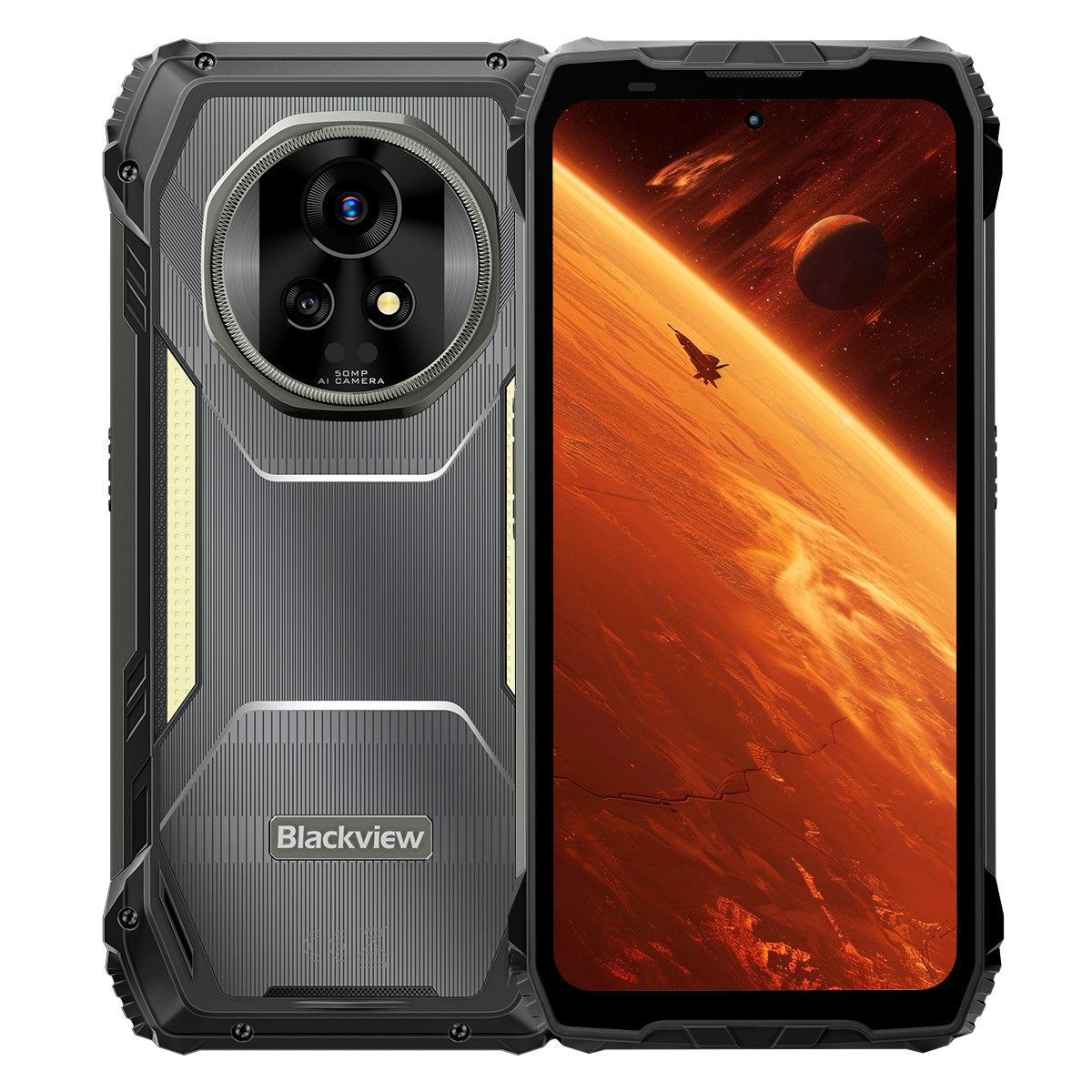


Blackview XPLORE 2 6.73-Inch wyświetlacz AMOLED 3.2K 12+256GB lub 16+1TB Dimensity 8300 20000mAh Lampka kempingowa 467LM Wytrzymały telefon 5G AI

Dostępne w magazynie (41)
Najważniejsze cechy
Najważniejsze cechy
✔6,73" 120Hz 3,2K LTPO AMOLED Wyświetlacz
✔Wbudowane 467 lumenów podwójne światło kempingowe
✔MediaTek Dimensity 8300 4nm 5G ośmiordzeniowy & WiFi 6E
✔Bateria 20000mAh z szybkim ładowaniem 120W
✔50MP Główny+20MP Kamera z noktowizorem
✔Certyfikaty IP68 & IP69K & MIL-STD-810H
✔Obsługa eSIM
Informacje
Informacje
Blackview XPLORE 2 to wytrzymały flagowiec 5G stworzony dla użytkowników, którzy oczekują najwyższej jakości wyświetlacza, długiej wytrzymałości i profesjonalnej funkcjonalności na zewnątrz. Jego 6,73-calowy ekran AMOLED 3,2K o częstotliwości odświeżania 120 Hz, procesor Dimensity 8300, WiFi 6E oraz ogromna bateria 20 000 mAh z szybkim ładowaniem 120W sprawiają, że jest potężny do pracy, nawigacji, mediów i podróży. Główny aparat 50 MP, kamera do widzenia nocnego 20 MP, latarka kempingowa 467LM, wsparcie eSIM, ochrona IP68 i IP69K oraz wytrzymałość zgodna z normą MIL-STD-810H czynią go gotowym na wymagające warunki terenowe.
O marce Brand
O marce Brand
W Blackview wierzymy, że świetna technologia powinna oferować coś więcej niż imponujące specyfikacje. Powinna sprawdzać się w codziennym życiu, rozwiązywać realne problemy i pozostawać niezawodna wtedy, gdy jest najbardziej potrzebna.
Blackview zaczynało od wytrzymałych telefonów stworzonych do pracy w trudnych warunkach. Dziś oferujemy szerszy ekosystem inteligentnych urządzeń, w tym smartfony, tablety, laptopy, smartwatche, sprzęt audio i wiele więcej.
We wszystkich kategoriach kierujemy się tymi samymi priorytetami: trwałą jakością, praktycznymi innowacjami i przystępnymi cenami. Projektujemy produkty, którym można zaufać od pierwszego dnia.
Wiemy, co klienci cenią najbardziej: płynne działanie, długotrwałą niezawodność, przydatne funkcje i technologię, która ułatwia codzienne życie bez zbędnych kosztów.
Dlatego Blackview przywiązuje dużą wagę do testowania produktów, komfortu użytkowania i funkcji, które zapewniają realną wartość w pracy, podróży, tworzeniu, odkrywaniu świata na świeżym powietrzu i codziennym kontakcie z innymi.
Blackview tworzy urządzenia dla osób, które chcą korzystać z technologii, której mogą zaufać: inteligentnych, funkcjonalnych sprzętów nadążających za tempem współczesnego życia.
Niezawodność w projekcie. Praktyczność z natury. Stworzone z myślą o prawdziwym życiu.
Wysyłka i zwroty
Wysyłka i zwroty
• Wysyłka: Czas realizacji zamówienia wynosi zwykle około 2-7 dni roboczych, z wyjątkiem produktów w przedsprzedaży. Okres wysyłki obejmuje wyłącznie dni robocze, z wyłączeniem świąt i dni wolnych od pracy. Czas dostawy zależy od wybranej metody wysyłki.
• Zwroty: Możesz poprosić o zwrot w ciągu 14 dni od dostawy, jeśli telefon jest nieużywany, nieuszkodzony i zawiera wszystkie oryginalne akcesoria. Usterki związane z produktem zgłoszone w ciągu miesiąca mogą kwalifikować się do wymiany, zwrotu pieniędzy lub bezpłatnej naprawy po przeprowadzeniu kontroli. Uszkodzenia spowodowane niewłaściwym użytkowaniem, upadkiem, kontaktem z wodą, demontażem lub nieautoryzowanymi modyfikacjami nie są objęte ochroną.


Pierwszy na świecie 5G z wyświetlaczem AMOLED 3.2K
Flagowiec z pancerną ochroną AI
Stworzony na szczyty. Gotowy na dzicz.
6,73-calowy wyświetlacz AMOLED 3.2K 120 Hz | Zachwycający obraz HDR | Dwa aparaty Samsung® 50 MP + noktowizor 20 MP| Podwójna stabilizacja (OIS + EIS) | 5G, 4 nm, Dimensity 8300 | 48 GB LPDDR5X i 1 TB UFS4.0 + rozszerzenie TF do 2 TB | Ogromna bateria 20 000 mAh i superszybkie ładowanie 120 W
9 najważniejszych powodów, by wybrać Blackview
XPLORE 2

Najwyższa trwałość w branży
Najwyższa wojskowa norma MIL-STD-810H
Odporność na upadki z wysokości 6 metrów | Ekstremalna nośność 500 kg | Odporność na ekstremalne temperatury od -20°C do +60°C

Szczytowa ochrona przed wodą
Najwyższy poziom ochrony IP69K i IP68
Usuwanie kurzu i wody jednym dotknięciem | Dotyk odporny na deszcz dzięki AI| Zdjęcia pod wodą
Wodoodporność przy zanurzeniu na głębokość 2 m przez 30 min | Odporność na wrzątek o temperaturze 80℃

Strażnik nocy
Lampka kempingowa 467 lm
Jaśniejsze światło | Mocne światło stroboskopowe do ostrzegania i obrony | Natychmiastowy sygnał SOS w sytuacjach awaryjnych

Rewolucyjny dźwięk stereo
Dwa głośniki stereo Smart-K o mocy 2 W
Nawet o 316% mocniejszy dźwięk stereo, który zapewnia wciągające wrażenia w każdym miejscu.

Pilot na podczerwień
Zamień telefon w uniwersalny pilot w kilka sekund!

Poza granicami obrazu
Ekran HDR 3.2K o przekątnej 6,73 cala — bezkonkurencyjny w swojej klasie
Szczytowa jasność 2600 nitów, wiodąca w branży | Adaptacyjna częstotliwość odświeżania LTPO 1–120 Hz | Przyciemnianie wysokiej częstotliwości 1920 Hz | Certyfikat TÜV SÜD potwierdzający niski poziom niebieskiego światła

Obrazowanie na najwyższym poziomie
Dwa aparaty Samsung® AI 50 MP | Noktowizja 20 MP | Ultra HDR | OIS i EIS
Filmowanie w jakości 4K HDR10+ | Śledzenie ruchu | Zoom 8×

Wydajność w pełnej odsłonie
Najlepszy układ 5G Dimensity 8300 | 16 GB pamięci RAM LPDDR5X + 32 GB rozszerzenia | 1 TB pamięci ROM UFS 4.0
1,339,275
Wynik AnTuTu
 84%
Ogólna wydajność

Łączność nowej generacji
Obsługa Wi-Fi 6E i dwóch sieci 5G
3 razy większa szybkość
Błyskawiczne ładowanie. Płynne strumieniowanie.
Naprawdę globalna łączność

Pierwszy w branży
Wytrzymały smartfon z obsługą eSIM
Oszczędź do 90% na opłatach roamingowych | Bez fizycznej karty SIM | Swoboda zmiany operatora

Król mocy baterii
Największa bateria w historii wytrzymałych telefonów
Ogromna bateria dwukomorowa 20 000 mAh | Do 75 dni bardzo długiego czasu czuwania | Superszybkie ładowanie 120 W | Ładowanie zwrotne 10 W

Jedyne w branży, opracowane samodzielnie
3 najlepsze modele AI na świecie. Wszystkie w jednym.
Aktywacja rozpoznawaniem głosu & sterowanie bez użycia rąk

Jedyne w branży, opracowane samodzielnie
Całkowicie nowy DokeOS 4.2 oparty na Androidzie 15

Inteligentne ulepszenia w każdej sytuacji

Jedyna w branży gwarancja obsługi posprzedażowej
Nowy wymiar wytrzymałości
Najwyższy poziom ochrony.
Najwyższe certyfikaty wytrzymałości w branży
Certyfikowany zgodnie z wojskową normą MIL-STD-810H oraz klasami IP68/IP69K, XPLORE 2 zapewnia najwyższą ochronę przed upadkami, kurzem, wodą i zgniataniem - wyznaczając nowy standard wytrzymałości.

6 metrów
Pełna odporność na upadki
Przetrwa upadek z wysokości do 6 metrów, pod dowolnym kątem i na każdą powierzchnię.1

IP6X
Pełna pyłoszczelność
Pełna ochrona przed piaskiem, kurzem i cząstkami przemysłowymi.

IPX9K
Pełna wodoodporność
Wytrzymuje strumienie wody o wysokiej temperaturze i pod wysokim ciśnieniem, zachlapania oraz zanurzenie.

MIL-STD-810H
Prawdziwa odporność na zgniatanie
Wytrzymuje ekstremalne zgniatanie, uderzenia i trudne warunki.
Najwyższa trwałość w branży
Niezniszczalny z każdej strony
Wytrzymałość większa niż kiedykolwiek - wzmocniony od wewnątrz i z zewnątrz, by wytrzymać upadki, zgniatanie i ekstremalne temperatury.
6 metrów
Odporność na upadki
Wyjątkowa odporność na upadki
1,5 metra
Upadek z wysokości
Przetrwa upadki na płasko
500 kg
Nośność
Wytrzymuje ekstremalnie duży nacisk2
-20°C do +60°C
Ekstremalne temperatury
Szeroki zakres temperatur pracy

Potwierdzone w tych ekstremalnych testach

Ultrawytrzymała konstrukcja
Pierwszy w branży
Konstrukcja ArmorShield
XPLORE 2 ma 5-warstwową konstrukcję ArmorShield, wzmocnioną szkłem Gorilla® Glass 5 i stopem aluminium i tytanu klasy lotniczej, co zapewnia wszechstronną trwałość.
5 warstw
ArmorShield
Konstrukcja
4 narożniki
Wzmocniony
Ochrona
400%
Silniejsze uderzenia
Odporność3

Szczytowa ochrona przed wodą
Najwyższy poziom ochrony IP69K
Certyfikaty IP69K i IP68 potwierdzają odporność na ekstremalne warunki: parzącą wodę, nieustanne strumienie pod wysokim ciśnieniem, natrysk pod różnymi kątami oraz długotrwałe zanurzenie.
80 ℃
Odporność na wrzącą wodę
10 000 kPa
Odporność na strumienie przemysłowe
0° / 30° / 60° / 90°
Ochrona przed strumieniem wody pod każdym kątem
2 m przez 30 min
Odporność na głębokie zanurzenie4
Ponad 1 000 000 razy
Niezawodność potwierdzona testami zanurzeniowymi

Podwójnie wodoszczelny port USB
Odporność na wodę bez osłony, a po jej założeniu — podwójna ochrona.

Usuwanie kurzu i wody jednym dotknięciem
Błyskawicznie oczyszcza głośnik, by każde połączenie było głośne i wyraźne.5

Dotyk odporny na deszcz dzięki AI
Nawet podczas ulewy ekran działa płynnie i reaguje na dotyk.6

Zdjęcia pod wodą
Od zachlapań po nurkowanie — z łatwością uwieczniaj podwodny świat.
Strażnik nocy
Latarka kempingowa 467 lm — bezpieczniej w dziczy i jaśniej
Po zmroku latarka kempingowa 467 lm w telefonie XPLORE 2 rozprasza ciemność i zwiększa bezpieczeństwo. Na kempingu i podczas awarii zasilania zapewnia gotowość i kontrolę.


Pilot na podczerwień
Zamień telefon w uniwersalny pilot w kilka sekund!8

Rewolucyjny dźwięk stereo
Dwa głośniki stereo Smart-K o mocy 2 W
Nawet o 316% mocniejszy dźwięk stereo, który zapewnia wciągające wrażenia w każdym miejscu.9

5 dB
Głośniejszy dźwięk 10
+50%
Czystszy dźwięk11
Poza granicami obrazu
Wyświetlacz
Żywe
Naturalne
HDR
Lepszy kontrast i więcej szczegółów
Precyzja odwzorowania kolorów na poziomie profesjonalnym
Lepszy kontrast i więcej szczegółów
2600 nitów
Wiodąca w branży maksymalna jasność12
6,73 cala
Flagowy wyświetlacz AMOLED
521 PPI
Niezwykle wysoka gęstość pikseli
Zawsze włączony ekran
Godzina i powiadomienia na pierwszy rzut oka
DCI-P3
Szeroka gama kolorów klasy kinowej13
68,7 mld
Naturalne kolory
10,000,000:1
Ultrawysoki współczynnik kontrastu
1–120 Hz
Adaptacyjna częstotliwość odświeżania LTPO14

Wyświetlacz
Łagodzi
Zapewnia komfort


Full-Link HDR
Full-Link HDR zapewnia oszałamiający obraz i niezwykle szeroki zakres dynamiki, dzięki czemu kolory wyglądają naturalnie, a każdy szczegół zostaje zachowany.

Obrazowanie na najwyższym poziomie
Wyraźniejszy i stabilniejszy obraz
Główny aparat Samsung® GN9 50 MP klasy flagowej
Uchwyć w szczegółach wszystko: od odległych widoków po ulotne chwile w ruchu.
1/1.57"
Większa matryca
f/1.88
Jaśniejsze zdjęcia nocne
6P
Ultrawysoka ostrość


Szczegółowość w swojej klasie
Fotografia Ultra HDR, 3× więcej szczegółów15
Zobacz dziką przyrodę w najdrobniejszych szczegółach — od rozpalonych słońcem horyzontów po zacienione szlaki. Każdy cień, blask i kolor ożywa jak nigdy dotąd.

Wiodąca w branży jakość
8× bliżej. Nadal ultrawyraźnie
Przybliż odległe sceny i uchwyć krystalicznie czyste detale oraz stabilny obraz.

Przedni aparat Samsung® JN1 50 MP
Niezależnie od tego, czy robisz zdjęcie w pełnym słońcu, czy przy słabym oświetleniu, uchwyć wyraźne, jasne i naturalne selfie.

Noktowizja nowej generacji
Aparat noktowizyjny Sony® 20 MP
Od inspekcji bezpieczeństwa po akcje ratunkowe — widź wyraźnie nawet w całkowitej ciemności.

Wideo klasy profesjonalnej
Kinowe 4K HDR10+
Rejestruj niezwykle wyraźne szczegóły, żywe kolory i realistyczny kontrast z szybkością 60 kl./s. Od krajobrazów po osobiste filmy — każde ujęcie opowiada kinową historię.

Inteligentniejsze narzędzia fotograficzne

Inteligentne funkcje AI

Wszystko w jednym: AI  Edycja obrazów
Jednym kliknięciem zmieniaj zdjęcia w zachwycające obrazy — edytowanie jeszcze nigdy nie było tak łatwe!
AI Usuń obiekty
Z łatwością i precyzją usuwaj niepożądane elementy.

AI Rozszerz obraz
Inteligentnie poszerzaj kadry.

AI Rozmyj zdjęcie
Skup się na tym, co ważne, dzięki inteligentnemu rozmyciu.

AI Zmień tło
Zmieniaj tła i przekształcaj scenerie, kiedy tylko chcesz.

Chwile ożywają na nowo
AI Animuj
Ożyw zdjęcia! Dodaj ruch twarzom i spraw, by wspomnienia nabrały energii

Wydajność w pełnej odsłonie
Wydajność nowej generacji
Najwyższej klasy układ MediaTek Dimensity 8300 5G w procesie technologicznym 4 nm
Dzięki procesowi technologicznemu 4 nm i taktowaniu do 3,35 GHz model XPLORE 2 doskonale radzi sobie z długimi sesjami gier i intensywną pracą wielu aplikacji.
40%
Szybszy procesor16
30%
Wydajniejszy procesor graficzny17
84%
Ogólna wydajność18
1,339,275
Wynik AnTuTu

Maksymalna wydajność pamięci
Do 48 GB pamięci RAM
(16 GB pamięci fizycznej + 32 GB rozszerzenia)
Dzięki nawet 48 GB pamięci RAM i technologii Atomized Memory 2.0 model XPLORE 2 zapewnia szybszą reakcję, płynną pracę wielu aplikacji i działanie bez opóźnień.
2X
Szybszy transfer danych19
45%
Szybsze uruchamianie i przełączanie aplikacji20
22 aplikacje
Płynna praca wielu aplikacji bez opóźnień21
LPDDR5X
Szybka pamięć RAM

Szybsza pamięć
1 TB pamięci ROM + maksymalnie
Rozszerzenie o maksymalnie 2 TB na karcie TF
Dzięki 1 TB pamięci ROM UFS 4.0 oraz możliwości rozszerzenia o maksymalnie 2 TB na karcie TF model XPLORE 2 przechowuje wszystko — od szczegółowych map i nagrań z drona po pliki ratunkowe — zapewniając natychmiastowy dostęp nawet w terenie.
2X
Większa pojemność pamięci22
2,3 raza
Większa szybkość odczytu i zapisu23
UFS 4.0
Ultraszybka pamięć
1 TB + rozszerzenie o 2 TB na karcie TF = przechowuj wszystko

Łączność nowej generacji
Obsługa Wi-Fi 6E i dwóch sieci 5G
Wyprzedzaj innych dzięki Wi-Fi 6E i dwóm sieciom 5G — szybciej, płynniej i naprawdę globalnie.
3 razy większa szybkość
Błyskawiczne ładowanie. Płynne strumieniowanie.24
6 GHz + 5 GHz + 2,4 GHz
Trójzakresowe Wi-Fi. Szybsze. Mocniejsze.

Wysyłanie z szybkością 2,5 Gb/s | Pobieranie z szybkością 5,11 Gb/s
Błyskawiczne wysyłanie i pobieranie.25
Obsługa dwóch sieci 5G
Naprawdę globalna łączność

Pełna moc bez ograniczeń
Wydajny system chłodzenia 3 w 1
Zaawansowana konstrukcja termiczna utrzymuje niską temperaturę — nawet podczas intensywnego grania, ciągłego streamingu 5G czy całodziennej pracy na zewnątrz.

Grafit + miedź + silikon
Trzy materiały, szybkie przewodzenie ciepła
Powierzchnia odprowadzania ciepła: 2262,8 mm²
Szybsze odprowadzanie ciepła, dłuższa wydajność szczytowa
<37°C podczas codziennego użytkowania
Zawsze chłodny, zawsze stabilny
Pierwszy w branży
Wytrzymały smartfon z obsługą eSIM
Rewolucja w globalnej komunikacji!
Łączność na całym świecie — prościej i taniej!

Oszczędzaj: obniż koszty roamingu nawet o 90%!
Oszczędzaj wysiłek: bez fizycznej karty SIM, swobodnie zmieniaj operatorów!
Pozostań w kontakcie: niezawodny sygnał, zawsze online!
Pozostań w kontakcie zawsze i wszędzie!
Podróżuj po świecie
Odkrywaj świat swobodnie i pozostań w kontakcie!

Podróże służbowe
Przekraczaj granice i pracuj wydajniej!

Przygody na świeżym powietrzu
Bądź online i bezpieczny!

Król mocy baterii
Ogromna bateria dwukomorowa 20 000 mAh
Jak cztery telefony z baterią 5000 mAh — niezawodna moc i energia na cały dzień.

Zarządzanie energią przez AI


1,6 raza
Dłuższa żywotność26
Ponad 36 godz.
Intensywne użytkowanie27
Ponad 23 godz.
Granie
Ponad 24 godz.
Przeglądanie internetu
Ponad 166 godz.
Rozmowy
Ponad 10 godz.
Ciągłe oświetlenie
75 dni
Czuwanie
Najszybsze w swojej klasie
Superszybkie ładowanie 120 W
50% w 39 min. 100% w 117 min. Zawsze gotowy, gdy go potrzebujesz.28
118% Szybsze
Ładowanie
Bez czekania. Czysta moc.29
Ładowanie zwrotne 10 W
Dziel się energią zawsze i wszędzie.


Jedyne w branży, opracowane samodzielnie


Inteligencja sterowana głosem
Gemini AI 2.0
Inteligentniej. Szybciej. Głosem. XPLORE 2 zapewnia Ci pełną kontrolę — bez użycia rąk, gdziekolwiek jesteś.
Aktywacja rozpoznawaniem głosu & sterowanie bez użycia rąk
Odblokowuj i steruj głosem — bezpiecznie i bez użycia rąk.

Inteligentne sterowanie wszystkim
Jeden głos, pełna kontrola nad aplikacjami i ustawieniami.

Pomoc na pełnym ekranie
Natychmiastowa pomoc na ekranie, gdziekolwiek jesteś.

Interakcja w czasie rzeczywistym
Rozmawiaj swobodnie, gdziekolwiek zaprowadzą Cię obowiązki.

Jedyny w branży autorski pakiet AI
Hi Doki | ImageX | VidGen | Soundle
Cztery aplikacje, nieskończone możliwości — pisz, edytuj, nagrywaj i komponuj bez ograniczeń.30

Jedyne w branży, opracowane samodzielnie
Hi Doki
Wyszukiwanie oparte na AI, analiza dokumentów i inteligentne pisanie. Od badań po tworzenie — pomysły ożywają jednym dotknięciem.

Jedyne w branży, opracowane samodzielnie
ImageX
Dzięki 18 narzędziom do edycji opartym na AI zmieniaj zwykłe ujęcia w zachwycające obrazy — ulepszone, stylizowane i gotowe do udostępnienia.

Jedyne w branży, opracowane samodzielnie
VidGen
Od tekstu po wideo, od obrazów po historie — AI z łatwością przekształca Twoje pomysły w vlogi, krótkie filmy i wciągające opowieści.

Jedyne w branży, opracowane samodzielnie
Soundle
Wpisz swój nastrój i pozwól AI komponować. Od romantycznych melodii po energetyczne rytmy — muzyka tworzona specjalnie dla Ciebie.

Jedyne w branży, opracowane samodzielnie
Całkowicie nowy DokeOS 4.2 oparty na Androidzie 15
Inteligentniejszy. Szybszy. Bezpieczniejszy. Bardziej Twój.
XPLORE 2 na nowo definiuje wydajność, łącząc szybkość, efektywność, prywatność i nieograniczone możliwości personalizacji.31

Inteligentne ulepszenia w każdej sytuacji

System czterech satelitów
Trzymaj się właściwej trasy dzięki precyzyjnemu pozycjonowaniu — dokładność do 1 metra w każdych warunkach.32

Najnowszy bezprzewodowy BT 5.4
Przesyłaj pliki o 50% szybciej, korzystaj ze stabilniejszego połączenia i bezproblemowo łącz się ze wszystkimi urządzeniami.34

Żyroskop o wysokiej precyzji
Precyzyjna nawigacja. Dokładne pomiary w AR. Płynniejsza rozgrywka przy każdym ruchu.

Konfigurowalny przycisk skrótu
Najważniejsze funkcje zawsze pod ręką.

NFC do każdej sytuacji
Płać i korzystaj z kart dostępu jednym dotknięciem.35
Jedyna w branży gwarancja obsługi posprzedażowej
Szybsza pomoc. Dłuższe wsparcie. Pełne poczucie bezpieczeństwa.36

3 lata aktualizacji systemu Android
Dłuższe wsparcie, zawsze aktualne

Wsparcie telefoniczne
Bezpośrednia pomoc telefoniczna, gdy jej potrzebujesz

Serwis online 24/7
Natychmiastowa pomoc o każdej porze dnia i nocy

Zaufane centra napraw
Niezawodny serwis stacjonarny, któremu możesz zaufać
Specyfikacja Blackview XPLORE 2

| Model | XPLORE 2 |
| Kolor | Czarny |
| Wymiary | 186 * 87.8 * 29 mm |
| Waga | 670 g |
| System operacyjny | DokeOS 4.2 oparty na Androidzie 15 |
| Wyświetlacz | Wyświetlacz AMOLED 6,73 cala, 3.2K, rozdzielczość 1440 * 3200, Corning® Gorilla® Glass 5, częstotliwość odświeżania 120 Hz |
| Procesor | Ośmiordzeniowy procesor 5G MediaTek Dimensity 8300, 4 nm, do 3,35 GHz |
| RAM i ROM | 12 GB RAM i 256 GB ROM, LPDDR5X+UFS4.0 16 GB RAM i 1 TB ROM, LPDDR5X+UFS4.0 |
| Rozszerzenie pamięci TF | Możliwość rozszerzenia pamięci TF do 2 TB |
| Bateria | 20 000 mAh; szybkie ładowanie Hyper 120 W |
| Aparat przedni | 50MP |
| Aparat tylny | Główny aparat 50 MP + kamera noktowizyjna 20 MP |
| Głośnik | Podwójny głośnik Smart-K BOX |
| Klasa odporności | IP68 & IP69K & MIL-STD-810H |
| Nawigacja | L1+L5 GPS/GLONASS/BeiDou/Galileo |
| Gniazdo kart | Dual: 2*SIM/1*SIM +1*TF Card |
| NFC | Obsługa |
| Dual 5G VoLTE | Obsługa |
| Wi-Fi&Bluetooth | Wi-Fi 6E; BT 5.4 |
| Łączność sieciowa | Pasmo 2G: B2/B3/B5/B8 Pasmo 3G: WCDMA: B1/B2/B4/B5/B6/B8/B19 (RXD) CDMA: BC0 Pasmo 4G: TDD:B34/B38/B39/B40/B41 FDD:B1/2/3/4/5/7/8/12/13/17/18/19/20/25/26/28A/28B/30/66 Pasmo 5G: N1/3/5/7/8/20/28/38/40/41/77/78/79 |
1.Dane pochodzące z Laboratorium Blackview. Jako precyzyjne urządzenie elektroniczne telefon może ulec uszkodzeniu w wyniku upadku. Unikaj upuszczania i uderzania urządzenia. Rzeczywista wydajność może się różnić w zależności od warunków użytkowania, kąta upadku i rodzaju powierzchni. Kieruj się własnym doświadczeniem.
2.Dane pochodzące z Laboratorium Blackview. Jako precyzyjne urządzenie elektroniczne telefon może ulec uszkodzeniu pod wpływem dużego nacisku. Unikaj ściskania i uderzania urządzenia.
3. Dane pochodzą z laboratorium Corning i przedstawiają porównanie szkła Gorilla® Glass 5 ze zwykłym szkłem sodowo-wapniowym. W kontrolowanych warunkach Gorilla® Glass 5 wykazuje lepsze właściwości.
4. XPLORE 2 jest odporny na zachlapania, wodę i kurz w normalnych warunkach użytkowania oraz uzyskał klasy IP69K i IP68 w kontrolowanych warunkach laboratoryjnych. Ochrona nie jest trwała, a rzeczywiste wyniki mogą się różnić w zależności od zużycia urządzenia, nawyków użytkowania i czynników środowiskowych. Nie ładuj telefonu, gdy jest mokry.
5. Wykorzystuje wibracje fal dźwiękowych do usuwania kurzu i wody z głośnika, pomagając utrzymać wyraźny dźwięk rozmów i prawidłowe działanie audio. Rzeczywiste efekty czyszczenia mogą się różnić w zależności od ilości nagromadzonego kurzu lub wody oraz środowiska użytkowania. Rzeczywiste wrażenia mogą być inne.
6. Wrażenia z obsługi dotykowej mogą się różnić w zależności od opadów deszczu, scenariusza użytkowania i indywidualnych nawyków. Rzeczywiste wrażenia mogą być inne.
7. Dane pochodzą z laboratorium Blackview. Trzy poziomy jasności to: bardzo jasny 467 lm, jasny 368 lm i słaby 236 lm.
8. Funkcja pilota na podczerwień teoretycznie obsługuje większość urządzeń sterowanych za pomocą podczerwieni, ale rzeczywista zgodność może zależeć od konkretnego modelu i otoczenia. Działanie w praktyce może się różnić.
9. Porównanie wydajności ze standardowymi dwoma głośnikami 1 W opiera się na symulowanych wynikach testów laboratoryjnych i uwzględnia parametry techniczne produktu. Rzeczywiste wyniki mogą się różnić w zależności od środowiska użytkowania, modelu urządzenia lub konfiguracji technicznej.
10. W porównaniu z dwoma głośnikami 1 W poziom dźwięku wzrasta o około 5 dB. Jakość dźwięku może się różnić w zależności od scenariusza użytkowania, jakości źródła dźwięku i hałasu otoczenia. Rzeczywiste wrażenia mogą być inne.
11. W porównaniu z dwoma głośnikami 1 W poprawa słyszalności wynosi około 50%. Rzeczywiste parametry dźwięku mogą się różnić.
12. Jasność szczytowa może osiągać 2600 nitów, a jasność przy globalnym włączeniu wynosi 1300 nitów; wartości te są osiągane tylko w określonych scenariuszach. Standardowa jasność ustawiana ręcznie wynosi 500 nitów. Rzeczywiste wrażenia zależą od warunków użytkowania.
13. Wyświetlacz z szeroką gamą kolorów DCI-P3 wymaga zgodnych źródeł obrazu i wideo, aby zapewnić optymalny efekt.
14. Ekran obsługuje dynamiczną częstotliwość odświeżania 120 Hz. Częstotliwość odświeżania może się nieznacznie różnić w zależności od interfejsu aplikacji i scenariusza gry. Rzeczywiste wrażenia mogą być inne.
15. Dane pochodzą z testów przeprowadzonych w laboratorium Blackview w kontrolowanych warunkach. Rzeczywista wydajność może się różnić w zależności od takich czynników, jak oświetlenie, złożoność sceny czy konfiguracja urządzenia.
16. Dane pochodzą z teoretycznych testów laboratorium Blackview, w których porównano urządzenie z Blackview XPLORE 1. Na rzeczywistą wydajność mogą wpływać optymalizacja systemu, obciążenie aplikacji i środowisko sieciowe. Rzeczywiste wrażenia mogą się różnić.
17. Dane pochodzą z teoretycznych testów laboratorium Blackview, w których porównano urządzenie z Blackview XPLORE 1. Rzeczywista wydajność może się różnić w zależności od optymalizacji systemu, obciążenia aplikacji i środowiska sieciowego. Rzeczywiste wrażenia mogą się różnić.
18. Dane pochodzą z teoretycznych testów laboratorium Blackview, w których porównano urządzenie z Blackview XPLORE 1. Ogólna wydajność może się różnić w zależności od optymalizacji systemu, obciążenia aplikacji i środowiska sieciowego. Rzeczywiste wrażenia mogą się różnić.
19. Dane pochodzą z laboratorium Blackview, z testów przeprowadzonych w standardowych warunkach i porównujących urządzenie z Blackview XPLORE 1. Rzeczywista wydajność może się różnić w zależności od warunków użytkowania.
20. Dane pochodzą z laboratorium Blackview, z testów przeprowadzonych w standardowych warunkach i porównujących urządzenie z Blackview XPLORE 1. Rzeczywista wydajność może się różnić w zależności od warunków użytkowania.
21. Dane pochodzą z testów przeprowadzonych w laboratorium Blackview w kontrolowanych warunkach. Rzeczywista wydajność może się różnić w zależności od takich czynników, jak rodzaj aplikacji, ustawienia systemu, procesy działające w tle itp.
22. Dane pochodzą z laboratorium Blackview; porównano urządzenie z Blackview XPLORE 1.
23. Dane pochodzą z teoretycznych testów laboratorium Blackview, w których porównano urządzenie z Blackview XPLORE 1. Rzeczywiste prędkości mogą się różnić w zależności od warunków użytkowania.
24. Dane pochodzą z laboratorium Blackview i opierają się na porównaniu z Wi-Fi 5. Rzeczywiste wrażenia mogą się różnić ze względu na czynniki środowiskowe i związane z urządzeniem.
25. Podane prędkości sieci to wartości maksymalne w warunkach teoretycznych. Rzeczywiste prędkości mogą się różnić w zależności od warunków sieciowych, obsługi operatora, konfiguracji urządzenia i innych czynników. Wydajność zależy od rzeczywistych warunków użytkowania.
26. Obsługuje do 800 pełnych cykli ładowania. Rzeczywista wydajność może się różnić w zależności od sposobu użytkowania, czynników środowiskowych, konserwacji urządzenia itp.
27.Wszystkie podane czasy użytkowania opierają się na testach przeprowadzonych na modelach w laboratorium Blackview. Rzeczywista wydajność może się różnić w zależności od scenariusza użytkowania, obciążenia aplikacji, warunków sieciowych i indywidualnych przyzwyczajeń.
28.Szybkość ładowania może się różnić w zależności od ładowarki, kabla do ładowania, napięcia i temperatury otoczenia. Należy kierować się rzeczywistymi warunkami użytkowania.
29.Dane pochodzą z laboratorium Blackview i stanowią porównanie z Blackview XPLORE 1.
30.Doke AI oferuje 30-dniowy bezpłatny okres próbny. Skuteczność funkcji AI może się różnić w zależności od scenariusza użytkowania, wprowadzanych treści i indywidualnych przyzwyczajeń. Należy kierować się rzeczywistym działaniem.
Funkcje będą stale ulepszane za pomocą aktualizacji OTA. Należy kierować się rzeczywistym działaniem.
32.Dane pochodzą z laboratorium Blackview. Dokładność pozycjonowania może się różnić ze względu na przeszkody środowiskowe, zakłócenia i efekty wielodrożności. Należy kierować się rzeczywistym działaniem.
33.Dane pochodzą z laboratorium Blackview i stanowią porównanie z Blackview XPLORE 1.
34.Rzeczywiste działanie może się różnić w zależności od rodzaju karty, metody szyfrowania i zgodności urządzenia. Zaszyfrowane karty dostępu mogą nie być obsługiwane, a korzystanie z funkcji płatniczych może wymagać podania hasła lub weryfikacji. Należy kierować się rzeczywistym działaniem.
35.Szczegółowy zakres usług może się różnić w zależności od lokalnych przepisów i możliwości punktu serwisowego. Należy kierować się rzeczywistymi warunkami.
*Mogą występować różnice w liczbie pikseli między poszczególnymi trybami zdjęć i filmów. Należy kierować się rzeczywistymi warunkami.
*Zdjęcia produktów i zawartość ekranu na powyższych stronach mają wyłącznie charakter poglądowy. Rzeczywisty wygląd produktu (w tym między innymi jego wygląd, kolor i rozmiar) oraz zawartość wyświetlana na ekranie (w tym między innymi tła, interfejs użytkownika i ilustracje) mogą się nieznacznie różnić. Należy kierować się rzeczywistym wyglądem produktu.
*Dane na powyższych stronach to wartości teoretyczne pochodzące z laboratorium Blackview, uzyskane w określonych warunkach testowych (szczegółowe informacje znajdują się w opisach poszczególnych pozycji). Rzeczywiste wyniki mogą się nieznacznie różnić ze względu na różnice między egzemplarzami, wersje oprogramowania, warunki użytkowania i czynniki środowiskowe. Należy kierować się rzeczywistymi warunkami użytkowania.
*Ze względu na zmiany partii produktów w czasie rzeczywistym oraz czynniki związane z dostawami produkcyjnymi Blackview może dostosowywać i aktualizować opisy tekstowe oraz efekty wizualne na powyższych stronach, aby jak najdokładniej odpowiadały rzeczywistym parametrom, specyfikacjom, wskaźnikom i komponentom produktu.
*W przypadkach, gdy takie modyfikacje i dostosowania są konieczne, nie zostanie wysłane żadne specjalne powiadomienie.
| Model | XPLORE 2 |
| Kolor | Czarny |
| Wymiar | 186 * 87,8 * 29 mm |
| Waga | 670g |
| System operacyjny | DokeOS 4.2 oparty na Android 15 |
| Wyświetlacz | Wyświetlacz AMOLED 6,73 cala 3,2K, rozdzielczość 1440 * 3200 Corning® Gorilla® Glass 5, częstotliwość odświeżania 120Hz |
| Procesor | Ośmiordzeniowy 5G MediaTek Dimensity 8300, 4nm, do 3,35GHz |
| RAM i pamięć ROM | 12GB RAM & 256GB ROM, LPDDR5X+UFS4.0 16GB RAM & 1TB ROM, LPDDR5X+UFS4.0 |
| Rozszerzenie TF | Rozszerzenie pamięci TF do 2TB |
| Bateria | 20 000 mAh; szybkie ładowanie 120W Hyper Fast |
| Aparat przedni | 50MP |
| Aparat tylny | Główny 50MP + 20MP tryb nocny |
| Głośnik | Podwójny głośnik Smart-K BOX |
| Klasa wytrzymałości | IP68 & IP69K & MIL-STD-810H |
| Nawigacja | L1+L5 GPS/GLONASS/BeiDou/Galileo |
| Gniazdo kart | Dual: 2*SIM/1*SIM +1*karta TF |
| NFC | Wsparcie |
| Podwójne 5G VoLTE | Wsparcie |
| Wi-Fi i Bluetooth | Wi-Fi6E; BT 5.4 |
| Łączność sieciowa | Pasmo 2G: B2/B3/B5/B8 Pasmo 3G: WCDMA: B1/B2/B4/B5/B6/B8/B19 (RXD) CDMA: BC0 Pasmo 4G: TDD: B34/B38/B39/B40/B41 FDD: B1/2/3/4/5/7/8/12/13/17/18/19/20/25/26/28A/28B/30/66 Pasmo 5G: N1/3/5/7/8/20/28/38/40/41/77/78/79 |
• Opakowanie UE: Zasilacz nie jest dołączony
• Opakowanie spoza UE: Zasilacz jest dołączony

How can I check whether the Blackview XPLORE 2 is compatible with my mobile carrier?
The Blackview XPLORE 2 supports 2G, 3G, 4G LTE, and 5G networks. Before purchasing, please check that the network bands supported by the XPLORE 2 match those used by your mobile network operator. First, identify which networks you use, then check the supported network bands in the specifications section of the product details page.
Alternatively, you can contact your mobile network operator to enquire whether this handset supports voice calls, text messages, and mobile data services via a SIM card. This will help you determine whether it is compatible. Please note that the availability of 4G or 5G services also depends on your operator’s network coverage, your mobile plan, and the operator’s support for this handset.
Does the Blackview XPLORE 2 support eSIM, and how do I activate it?
Yes. The Blackview XPLORE 2 series supports eSIM, allowing you to activate a mobile plan online without inserting a physical SIM card. To use this feature, you will need to register for the eSIM service with a mobile network operator or service provider that supports the XPLORE 2.
Before registering, please check whether this service is available in your region and whether it includes all the features you require. Some eSIM plans offer mobile data only, whilst others also include voice calls and text messaging. Ask your service provider for instructions on how to activate the service.
How long does the Blackview XPLORE 2’s 20,000mAh battery last with everyday use?
In laboratory testing, the Blackview XPLORE 2’s 20,000mAh battery delivered more than 36 hours of heavy use, making it well suited to long workdays and outdoor activities. Actual battery life varies depending on how much time you spend on calls, navigation, browsing, and entertainment.
Keeping navigation running on screen throughout the day uses more power than occasionally checking directions or replying to messages. Gaming and high screen brightness also drain the battery faster. Before a longer trip, try using the phone as you normally would for a day to get a better idea of how long a charge will last for you. This can help you decide whether to bring a power bank.
Should I choose the Blackview XPLORE 2 with 12GB RAM and 256GB storage or 16GB RAM and 1TB storage?
The 12GB/256GB version is suitable for everyday use, photography, navigation, and gaming. If you frequently use large apps or prefer to store more large games, videos, and work files, we recommend the 16GB/1TB version.
You can base your decision on your storage habits. If you regularly back up your photos and clear out junk files, 256GB should be sufficient. Conversely, if you prefer to keep everything—such as downloaded films and offline maps—1TB would be more suitable, as you won’t need to free up space as frequently.
How does the Blackview XPLORE 2 perform in demanding games like Genshin Impact?
Yes, you can play demanding games such as Genshin Impact on the Blackview XPLORE 2. Its Dimensity 8300 processor and LPDDR5X RAM enable it to handle these games and deliver smooth gameplay with appropriate graphics settings. It is recommended to start with medium graphics settings, which offer a better balance of image quality and responsiveness.
Higher graphics settings and extended play sessions may result in occasional drops in frame rate, particularly in complex scenes or when the device is warm. Should this occur, reducing the graphics quality can help maintain smoother gameplay. However, a consistent frame rate or the complete absence of stuttering cannot be guaranteed.
Is the Blackview XPLORE 2’s camera suitable for quick snapshots and moving subjects?
Yes. The XPLORE 2’s 50-megapixel main camera is ideal for everyday snapshots, such as moments in family life or work scenes. The optical image stabilisation feature helps reduce camera shake, whilst the motion tracking function ensures moving objects remain sharply in focus at all times.
When photographing children, pets, or other moving subjects, it is advisable to shoot in well-lit conditions and ensure the subject remains within the frame at all times. In low light, ask the subject to pause briefly; This will yield better results than adjusting the camera settings. The image stabilisation feature effectively minimises hand shake, but cannot eliminate blurring caused by fast-moving subjects.
How do I turn on the Blackview XPLORE 2’s camping light, and what lighting modes are available?
The XPLORE 2’s camping light offers three modes: steady, flashing, and SOS. Steady mode is suitable for lighting while pitching a tent, searching for equipment, or during a power cut; flashing mode can attract the attention of people nearby; SOS mode lets you send a distress signal with the light.
When using the light, select the appropriate mode for the situation; switch it off when not in use to conserve battery power. Please note that SOS mode is merely a visible light signal; it does not automatically transmit your location or contact emergency services.
What can I use the Blackview XPLORE 2’s night vision camera for?
The 20-megapixel infrared night vision camera helps you observe and photograph your surroundings in the dark. When there is insufficient ambient light, you can use it to check around your tent, inspect unlit storage spaces, or capture details of your equipment.
The images produced by the night vision function are in black and white, not colour photographs. Its operating principle also differs from thermal imaging: you can see the outline of objects in the dark, but you cannot use it to measure temperature or identify hot or cold areas.
Can I replace the Blackview XPLORE 2’s battery myself?
If your XPLORE 2’s battery life isn’t as long as it used to be and you don’t want to buy a new phone, you can replace the battery. We recommend contacting Blackview’s after-sales team first to help determine whether the issue requires a battery replacement or a repair. If you find it more convenient or quicker to visit a local repair shop, be sure to ask the technician whether they are familiar with repairing rugged smartphones to ensure the phone functions correctly after repair.
Alternatively, if you are a qualified repair technician or have the relevant experience and tools, you may purchase a suitable battery and replace it yourself. Before replacing the battery, please ensure it is compatible and that you can reassemble and reseal the phone correctly. Please note that opening the phone will affect its water resistance, and any damage caused during unauthorised repairs will not be covered by the Blackview warranty.
What are the differences between the Blackview XPLORE 2 Standard, Satellite, and Projector versions?
The Blackview XPLORE 2 Standard is primarily designed for everyday tasks. The Satellite Edition adds messaging capabilities in supported areas without mobile network coverage, whilst the Projector Edition allows you to watch films at your campsite or share presentations on a wall or screen. The table below outlines their main differences.
| Feature | XPLORE 2 Standard | XPLORE 2 Satellite | XPLORE 2 Projector |
|---|---|---|---|
| eSIM support | Yes | Yes | Yes |
| Satellite messaging | No | Yes—voice, text, and location messages* | No |
| Built-in projector | No | No | 100 lumens; 854 × 480 resolution; up to 100″ |
| Processor | MediaTek Dimensity 8300 | MediaTek Dimensity 8300 | MediaTek Dimensity 8300 |
| RAM / Storage | 12GB / 256GB or 16GB / 1TB | 12GB / 256GB or 16GB / 1TB | 12GB / 256GB or 16GB / 1TB |
| Battery / Charging | 20,000mAh / Up to 120W wired | 20,000mAh / Up to 120W wired | 20,000mAh / Up to 120W wired |
| Weight / Dimensions | 670g / 186 × 87.8 × 29mm | 675g / 186 × 87.8 × 29mm | 710g / 186 × 87.8 × 29mm |
| Best suited for | Everyday work and outdoor activities | Remote work and exploration beyond mobile coverage | Movies, camping entertainment, and presentations |
What software updates are available for the Blackview XPLORE 2, and how do I install them?
The XPLORE 2 comes pre-installed with DokeOS 4.2, based on Android 15, and offers three years of Android operating system update support. This refers to the support period, not a guaranteed number of major Android version upgrades.
When your phone notifies you that an update is available, connect to Wi-Fi and follow the on-screen instructions to install it. Before starting the update, we recommend backing up important files and ensuring the battery is sufficiently charged. If the installation fails, please send the error message and the current software version to Blackview Customer Service so that we can assist you with the next steps.
What warranty and after-sales services are available for the Blackview XPLORE 2 purchased from the official shop?
If you have purchased the XPLORE 2 from the official Blackview store, you are entitled to a 12-month repair warranty covering eligible faults. Should your mobile phone fail to function properly, please provide your order number and a brief description of the issue to our official customer service team. Attaching photographs or videos will help us understand the problem and provide more useful troubleshooting advice.
If repairs are required, please contact us before posting the phone so that we can confirm the relevant arrangements. For approved warranty repairs, you will be responsible for the cost of returning the phone, whilst Blackview will cover the cost of returning the repaired device. Damage caused by improper use is not covered by the free repair service; Please check with our team in advance if any repair costs are incurred.
Can I use the Blackview XPLORE 2 Projector to watch movies at home or while camping?
Yes. The XPLORE 2 projector allows you to turn any suitable wall or portable screen into a cinema. It supports a maximum screen size of 100 inches, with a brightness of 100 lumens and a resolution of 854 × 480.
For a family film night, we recommend a dimly lit room or watching after dark, using a smooth, light-coloured surface. If the image appears too dark, you can reduce the image size or dim the surrounding lights. Before going camping, download films onto your mobile phone in advance to avoid issues with unstable network signals at your campsite.
How do I turn on the projector on the Blackview XPLORE 2 Projector and adjust the image for a clear picture?
Once the projection function is enabled, point the lens at a flat surface and turn the physical focus knob until the text and edges appear clear and sharp. When the phone is projecting at an upward or downward angle, the automatic vertical keystone correction feature helps to correct the image.
Place the phone on a stable coffee table or desk, facing the centre of the viewing area. Move the phone closer to produce a smaller image, or further away to produce a larger one, then refocus. If the image remains blurry, try dimming the surrounding lights first, then increase the projection size.
Where are satellite services available for the Blackview XPLORE 2 Satellite, and do they require a subscription?
The Blackview XPLORE 2 Satellite service covers satellite messaging in 36 countries across regions including Australia and New Zealand. If you are unsure whether the service is available in your area before purchasing, please contact the Blackview customer service team and let us know where you plan to use it, so that we can help you check whether that location is supported.
Satellite messaging is a paid service separate from standard mobile plans. Before travelling to areas without mobile coverage, please check the available plans, text message limits, and activation requirements, and complete the setup in advance.
Jump to another section