



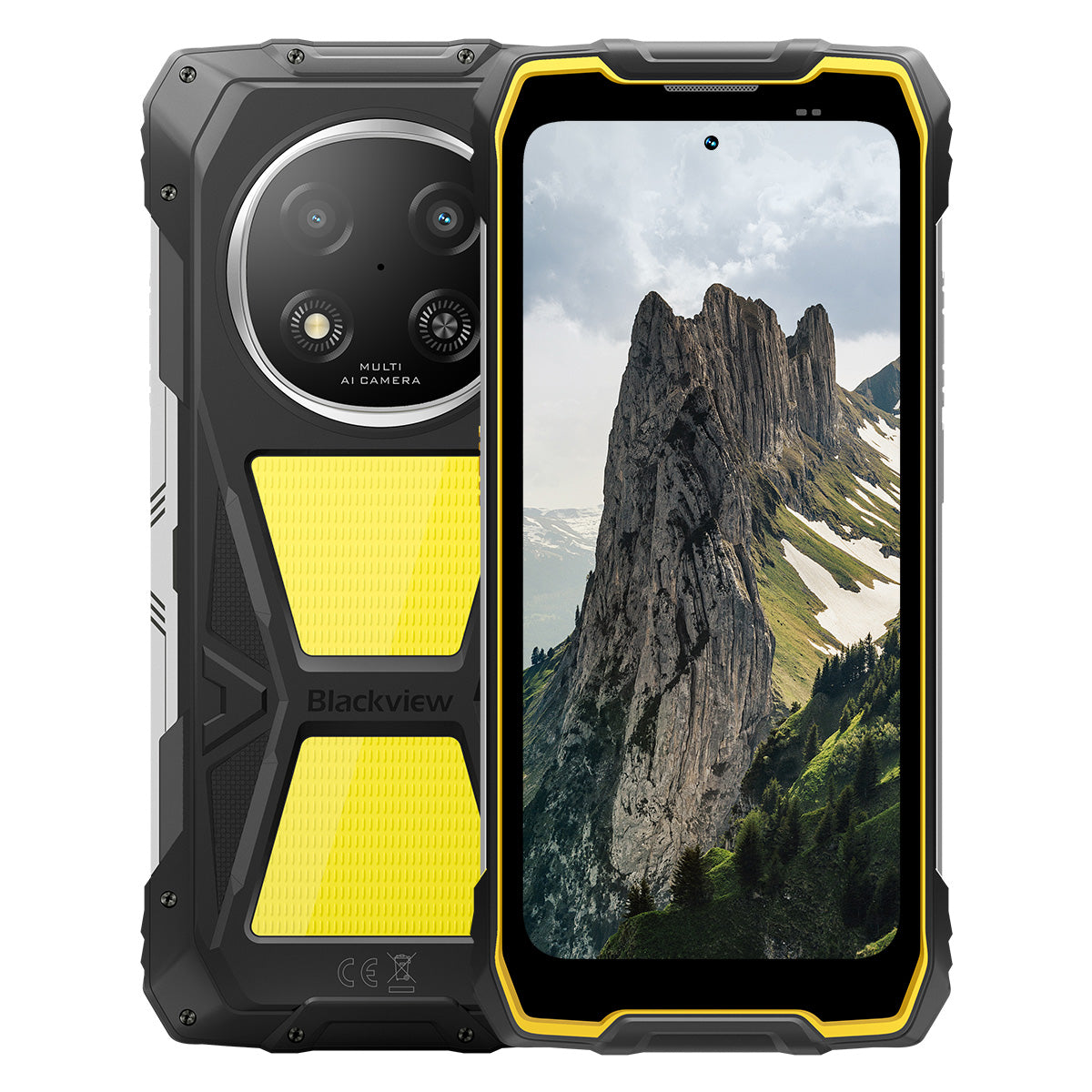


Blackview ROCK 2 Pro 6,67-tommers 120Hz skjerm 400LM campinglampe 15000mAh 5G robust telefon

Skynd deg, det er bare 2 varer igjen på lager.
Høydepunkter
Høydepunkter
✔6,67-tommers skjerm med 120 Hz smart oppdateringsfrekvens
✔Innebygd dobbelt 400LM campinglys
✔5G 6nm UNISOC T8100 åttekjernet prosessor
✔15000mAh og 33W hurtiglading
✔16MP AI hovedkamera + 13MP AI frontkamera
✔IP68 & IP69K & MIL-STD-810H sertifisert
Informasjon
Informasjon
Blackview ROCK 2 Pro er laget for brukere som trenger pålitelig mobil ytelse i krevende miljøer. Den kombinerer en 6,67-tommers 120Hz skjerm med UNISOC T8100 5G-ytelse og et 15000mAh batteri med 33W hurtiglading for arbeid, reise, navigasjon og utendørs bruk. Viktige feltklare funksjoner inkluderer 16MP bak- og 13MP front AI-kameraer, doble 400LM campinglys, og IP68 & IP69K & MIL-STD-810H beskyttelse. Designet for arbeidsplasser, fjernturer og daglig robusthet, gir den brukerne trygghet til å holde seg tilkoblet, fange detaljer og fortsette når vanlige telefoner ikke er nok.
Om merket
Om merket
Hos Blackview mener vi at god teknologi bør gå utover imponerende spesifikasjoner. Den skal passe til det virkelige liv, løse reelle problemer og være pålitelig når det virkelig gjelder.
Blackview startet med robuste telefoner laget for tøffe miljøer. I dag tilbyr vi et bredere økosystem av smarte enheter, inkludert smarttelefoner, nettbrett, bærbare datamaskiner, smartklokker, lydprodukter og mer.
På tvers av alle kategorier er fokuset vårt det samme: holdbar kvalitet, praktisk innovasjon og tilgjengelige priser. Vi designer produkter som føles pålitelige fra første dag.
Vi forstår hva kundene verdsetter mest: jevn ytelse, langvarig pålitelighet, nyttige funksjoner og teknologi som gjør hverdagen enklere uten unødvendige kostnader.
Derfor legger Blackview ekte fokus på produkttesting, brukeropplevelse og funksjoner som gir meningsfull verdi til arbeid, reise, skapelse, utendørs utforskning og daglig kontakt.
Blackview er laget for folk som ønsker teknologi de kan stole på: smarte, kapable enheter bygget for å følge med i det moderne livet.
Pålitelige av design. Praktiske av natur. Laget for det virkelige liv.
Frakt og retur
Frakt og retur
• Frakt: Bestillinger behandles innen 1–2 virkedager. Standard levering tar 3–7 virkedager avhengig av hvor du befinner deg.
• Returer: Du kan returnere eller bytte produkter innen 30 dager etter at du har mottatt bestillingen. Varene må være i original stand med kjøpsbevis.
Hvis varen din er defekt eller skadet på grunn av produksjonsfeil, bytter vi den gjerne uten ekstra kostnad.

Raskere 5G, sterkere lys, ustoppelig kraft
Gå utover grenser, mestre enhver utfordring


Hvorfor velge Blackview ROCK 2 Pro?

Nr. 1
IP69K, IP68 & MIL-STD-810H-sertifisert,
Bygget for å mestre alle ekstreme forhold.

Nr. 2
Lynrask 5G med 6nm UNISOC T8100,
Opplev uovertruffen hastighet
Jevn og imponerende
Dager i standby.
Hvor som helst
2.0, intelligens uten grenser
Basert på Android 16
Nr. 1
IP69K, IP68 & MIL-STD-810H-sertifisert,
Bygget for å mestre alle ekstreme forhold.

400lm campinglys
Lyssterk, justerbar og pålitelig — designet for å lyse opp leiren din og sikre trygghet i alle utendørseventyr.

BelysningsmodusTre lysstyrkenivåer:Lav/Høy/Ekstra lyssterk
Lav for strømsparing, Høy og Ekstra lyssterk for allsidige utendørs belysningsbehov.

Utendørs camping

Utendørs reparasjoner

Nattvandring

SOS-modus
Sender et klart, synlig nødsignal for å sikre din sikkerhet i kritiske utendørssituasjoner.

Tapt i villmarken

Kjøretøystans

Alvorlig værnødsituasjon

Rask blinkemodus
Ideell for nødvarsler, avskrekking av potensielle trusler eller raskt å tiltrekke oppmerksomhet.

Utendørs forsvar

Varsling ved veikanten

Nødutrykning

Dykk. Spray. Bløtlegg. Det bare fungerer.
IP69K & IP68-sertifisert
ROCK 2 Pro er konstruert for de tøffeste forhold, som gir uovertruffen beskyttelse mot vann, støv og høytrykksstråler.


Sømløs skjermforsegling: Feilfri
vanntett ytelse.

Korrosjonsbestandige aluminiums-knapper:
Forsterket med førsteklasses silikonpakninger.

TPU-forseglet USB-port: Maksimal støvbeskyttelse
og vannmotstand.

Undervannskamera: Fang uforglemmelige
øyeblikk under overflaten.

Høyttalerrengjøring: Automatisk utstøting av vann og
rusk for krystallklar lyd.

Fall-sikker. Støv-sikker. Klar for kamp.
MIL-STD-810H-sertifisert
Fra -20°C arktiske områder til 60°C ørkenvarme, fra 1,2 m fall på betong til sandstormer — ROCK 2 Pro overlever der andre feiler.

Testet gjennom disse ekstreme prøvene

Regn

Sand og støv

Vibrasjon

Støt

Fuktighet

Høyde

Akselerasjon

Høy temperatur

Lav temperatur

Nedsenking

Forsterkede gummihjørner:
Best mulig støtabsorbering.

Ultrasterk komposittbakside:
Bygget for å tåle.

Aluminiumsramme i luftfartskvalitet:
Sterk, lett og støtbestandig.

Panda Glass-skjerm: Ripesikker og
knusningssikker for ultimat holdbarhet.
Hanskemodus 2.0
Fungerer feilfritt —
selv med tykke hansker på.


Nyttig verktøypose
Kompass, lykt, forstørrelsesglass og mer —
din alt-i-ett praktiske verktøykasse.
Nr. 2
Lynrask 5G med 6nm UNISOC T8100,
Opplev uovertruffen hastighet
5G 6nm UNISOC T8100
Hastigheten du trenger. Kraften du stoler på.
Opplev lynrask 5G med 6nm UNISOC T8100-brikkesettet, med en kraftig 2,2GHz CPU for sømløs multitasking og jevn ytelse i krevende apper!


4*A76@2.2GHz
+ 4*A55@2.0GHz

Arm Mali G57

748,099
AnTuTu Benchmark
Opptil 32GB LPDDR4X RAM
Multitask som ingenting.
Multitask uten anstrengelse—start apper umiddelbart, bytt sømløst og jobb gjennom arbeid og underholdning med uavbrutt hastighet.
Opptil 32GB RAM=8GB RAM + 24GB utvidelse
Atomized Memory 2.0
9 % mer RAM tilgjengelig


256GB UFS 3.1 lagring
Oppgradert til UFS 3.1 for 2,4x raskere hastigheter, lavere strømforbruk, redusert ventetid og akselerert skriveytelse—lagre mer, last raskere og jobb smartere.

ROCK 2 Pro
UFS 3.1

ROCK 2
UFS 2.2
2,4x raskere dataoverføringshastighet
Effektiv varmeavledning
Kjølig under press
Med et kjøleområde på 1700 mm², nyt rask varmeavledning for stabil og jevn ytelse uansett hvor krevende oppgaven er.

Nr. 3
6,67" 120Hz smart øyepleieskjerm,
Jevn og imponerende
6,67" HD+ IPS-skjerm
Bredere utsikt, skarpere detaljer
Utstyrt med en 6,67" HD+ IPS-skjerm leverer ROCK 2 Pro engasjerende visuelle opplevelser med 120Hz smart oppdatering og 650 nits lysstyrke — perfekt for spilling, strømming og daglige oppgaver.

120Hz
AI smart oppdateringsfrekvens
650 nits
Lysstyrke
85%
Skjerm-til-kropp-forhold
720*1604
Oppløsning
120Hz AI smart oppdateringsfrekvens
Jevnere, raskere, smartere
Si farvel til forsinkelser—smart oppdatering tilpasser seg dine behov, og sikrer silkemyk scrolling samtidig som batterilevetiden optimaliseres.
120Hz
60Hz
Dobbelt så høy oppdateringsfrekvens,
Dobbelt så jevn

Øyepleiemoduser
Komfort som varer hele dagen
Beskytt øynene dine med fire tilpassede moduser designet for lesing, arbeid og avslapning.


Lesemodus
Papiraktig komfort for lange lesestunder

Nattlys
Skånsom belysning for å redusere blått lys-belastning

Mørk modus
Perfekt for miljøer med lite lys

Lysmodus
Lyst og klart for dagslysbruk
2W høyeffekt høyttaler
Kraftfull lyd, eksepsjonell klarhet
ROCK 2 Pro leverer kraftig, krystallklar lyd med sin 2W høyeffektshøyttaler, som skjærer gjennom støyende omgivelser for å sikre førsteklasses lyd både for kommunikasjon og underholdning.

Nr. 4
Massivt 15 000 mAh batteri,
Opptil 50 dager i ventemodus.
15 000 mAh massivt batteri
Strøm som holder tritt. Med et gigantisk 15 000 mAh batteri håndterer ROCK 2 Pro enkelt jobbturer, utendørseventyr og daglig bruk—ingen behov for å lete etter stikkontakt.

Intelligent lading
Beskyttelse

AI strømsparing
Algoritme


28 timer
Spill

43 timer
Samtale

97 timer
Musikk

34 timer
Nettlesing

26 timer
Videospill

50 dager
Ventemodus
*Data er testet av Blackview Lab basert på kontinuerlig bruk. Faktisk bruk kan variere avhengig av virkelige bruksforhold.

Klasse-eksklusiv intelligent dyp
Strømsparingsmodus
ROCK 2 Pro justerer strømmen intelligent forbruk med avansert optimalisering under inaktivitet — gir lengre batterilevetid uten å ofre ytelse.
Lengre tid ved lett bruk
Mindre tap over natten
5W OTG omvendt lading
Del strøm på farten
ROCK 2 Pro fungerer også som en bærbar powerbank, slik at du kan lade ørepropper, smartklokker eller til og med din vennens telefon på farten.

Nr.5
Fang hvert øyeblikk,
Når som helst, hvor som helst

16MP AI hovedkamera
Fang perfekt. Del umiddelbart.
16MP AI hovedkameraet til ROCK 2 Pro leverer krystallklare, livfulle bilder—enten du tar profesjonelle bilder eller jakter på den perfekte solnedgangen.
16MP
13MP AI frontkamera
Vær deg selv—bare klarere.
ROCK 2 Pro sin 13MP AI frontkamera tilpasser seg alle lysforhold, og sikrer at selfiene dine forblir skarpe, naturlig, og enkelt blendende.

Skjønnhetsmodus
Strål uten anstrengelse, naturlig.
AI skjønnhetsmodus forbedrer huden og tonen din med subtile, naturlige justeringer—fremhever dine beste trekk med finesse.

Portrettmodus
Fokuser på deg, uskarp resten.
AI dybdesensor fremhever motivet ditt samtidig som den skaper en jevn, studiokvalitets bokeh-effekt—ingen ekstra utstyr nødvendig.

Nattmodus
Mestre natten, hver detalj teller.
AI nattmodus avslører skjulte detaljer i mørket—lyse himler, skarpe kanter og perfekt stabile bilder, uansett hvor mørkt det er.

Nr.6
Eksklusivt selvutviklet Doke
AI 2.0, intelligens uten grenser
Ved å integrere tre banebrytende AI-modeller, utnytter Doke AI avansert teknologi for å forstå brukerbehov dypt, og leverer raskere, smartere og mer skreddersydde løsninger.

DeepSeek-R1

ChatGPT-4o mini

Gemini AI 2.0 Flash
Din eksklusive smarte livsmanager

Stemmeaktivering &
Stemmegjenkjenning
Lås opp enkelt med stemmen din —
berøringsfri og svært sikker!

AI Global Smart Kontroll
Administrer apper og innstillinger enkelt med enkle talekommandoer, og effektiviser dine daglige oppgaver.
 Kompatible apper:
AI Fullskjermassistanse
Gi umiddelbart svar og innsikt relatert til
til ditt nåværende skjerminnhold.


AI Sanntidsinteraksjon
Nyt sømløs, sanntidskommunikasjon,
å øke produktiviteten i hvert øyeblikk.
Fire innovative Doke AI-apper for
Hev opplevelsen din

AI Chat-app
Din alltid tilgjengelige AI Chat-kompis Fra oppgaveplanlegging til kreativ idémyldring, AI Chat er din pålitelige intelligente assistent, alltid klar til å hjelpe.


Neste generasjon
DeepSeek-R1

AI Nett-søk

Dokumentanalyse

Veiledningsassistent

Chat med AI

AI Photos-app
Ditt bærbare AI-fotoredigeringsverktøy med 18 avanserte AI-funksjoner, AI Photos forvandler vanlige bilder til fantastiske visuelle kreasjoner, klare til å imponere og dele.

AI Fjern Objekter

AI Utvidelse


AI Uskarphet Foto
AI Bytt Bakgrunn

AI Animer


AI Video-app
Ditt AI Video-skaperverktøy
Forvandle tekst, bilder og hverdagsøyeblikk til kinovideoer uten anstrengelse — ingen ekspertise nødvendig!


AI Music-app
Din AI Music-skaping
Plattform
Ingen instrumenter eller studio nødvendig—AI Music gir deg muligheten til å lage unik musikk enkelt, tilpasset enhver anledning.

Nr.7
Nyeste DokeOS 5.0 basert på Android 16
Fra DokeOS 4.2 til 5.0 har vi bygget opplevelsen på nytt: raskere, renere, smartere og dypt personlig. Dette er ikke bare en oppdatering—det er et sprang fremover i hvordan du samhandler med din ROCK 2.

Gjør det som betyr noe. Uten støy.

Sideknapp-funksjon
Ett trykk. Umiddelbar tilgang.
Aktiver raskt lommelykt, SOS, undervannskamera, PTT eller favorittappen din. Alltid klar, ingen venting.

Start lydopptak

Åpne lommelykt

Skjermbilder

Åpne undervannskamera

Åpne PTT

Åpne SOS

Quad-core navigasjon
Global presisjon. Alltid på sporet.
Drevet av GPS, Beidou, Galileo og Glonass for nøyaktig posisjonering — hvor som helst, når som helst.
Mer enn et kjøp, vi har deg dekket.

Android-versjonsoppdatering

Hotline-hjelp

24/7 nettjeneste

Pålitelig offline reparasjonssenter
Blackview ROCK 1 spesifikasjoner
| Modell | ROCK 2 Pro |
| Farge | Svart/Gul |
| Dimensjon | 187,6 * 85,8 * 26mm |
| Vekt | 558g |
| OS | DokeOS 5.0 basert på Android 16 |
| Skjerm | 6,67-tommers HD+ IPS, 720 * 1604 oppløsning 120Hz smart oppdateringsfrekvens, 85 % skjerm-til-kropp-forhold |
| CPU | Octa-core 5G 6nm UNISOC T8100 |
| RAM & ROM | 8GB RAM + 256GB ROM, LPDDR4X + UFS3.1 |
| TF-utvidelse | Opptil 512GB utvidbar lagring |
| Batteri | 15000mAh; 33W hurtiglading |
| Frontkamera | 13MP |
| Bakre kamera | 16MP |
| Høyttaler | 2W boks-høyttaler |
| Navigasjon | GPS+GLONASS+Galileo+Beidou |
| Kortspor | To; 2SIM/1SIM +1*TF-kort |
| NFC | Støtte |
| Wi-Fi & Bluetooth | (IEEE802.11a/b/g/n/ac) (2.4GHz/5GHz) ; BT 5.0 |
| Nettverkstilkobling | 2G-bånd: B2/B3/B5/B8 3G-bånd: WCDMA: B1/B2/B5/B8 4G-bånd: TDD:B38/B40/B41 FDD:B1/B2/B3/B4/B5/B7/B8/B12/B17 B19/B20/B26/28A/28B/B66 5G-bånd: N1/2/3/5/7/8/20/26 28/38/40/41/66/77/78 |
| Modell | ROCK 2 Pro |
| Farge | Svart/Gul |
| Dimensjon | 187,6 * 85,8 * 26 mm |
| Vekt | 558 g |
| OS | DokeOS 5.0 basert på Android 16 |
| Skjerm | 6,67-tommers HD+ IPS, 720 * 1604 oppløsning 120Hz smart oppdateringsfrekvens, 85 % skjerm-til-kropp-forhold |
| CPU | Octa-core 5G 6nm UNISOC T8100 |
| RAM og ROM | 8GB RAM + 256GB ROM, LPDDR4X + UFS3.1 |
| TF-utvidelse | Opptil 512GB utvidbar lagring |
| Batteri | 15000mAh; 33W hurtiglading |
| Frontkamera | 13MP |
| Bakre kamera | 16MP |
| Høyttaler | 2W boks-høyttaler |
| Navigasjon | GPS+GLONASS+Galileo+Beidou |
| Kortspor | To; 2SIM/1SIM + 1*TF-kort |
| NFC | Støtte |
| Wi-Fi og Bluetooth | (IEEE802.11a/b/g/n/ac) (2,4 GHz/5 GHz); BT 5.0 |
| Nettverkstilkobling | 2G-bånd: B2/B3/B5/B8 3G-bånd: WCDMA: B1/B2/B5/B8 4G-bånd: TDD: B38/B40/B41 FDD: B1/B2/B3/B4/B5/B7/B8/B12/B17 B19/B20/B26/28A/28B/B66 5G-bånd: N1/2/3/5/7/8/20/26 28/38/40/41/66/77/78 |
Is the Blackview ROCK 2 Pro comfortable to carry every day?
Yes, the Blackview ROCK 2 Pro is well-suited for daily carry, making it highly convenient for commutes, site inspections, and travel between different work locations. Weighing approximately 558 grams and measuring about 26 mm in thickness, it features a high-capacity battery and a rugged, durable design. You can adjust how you carry it based on your personal preferences and specific needs.
For ease of movement and quick access, you might consider placing it in a work bag or a suitably sized waist pouch. If you are purchasing a waist pouch or a vehicle mount, ensure that the model you choose is compatible with the device's dimensions and weight.
How does continuous navigation affect the Blackview ROCK 2 Pro’s battery life?
Using navigation continuously increases power consumption and shortens the phone's battery life, as the device must maintain location tracking and process route information. While the 15,000mAh high-capacity battery offers significantly more power than a typical smartphone, the actual duration for continuous navigation will still vary based on screen settings, network signal strength, and other applications running in the background.
For long-duration navigation, consider using voice prompts—provided it is safe to do so and does not hinder your ability to follow the route. If your work requires all-day continuous navigation, it is advisable to estimate power consumption based on your specific route and settings, and to plan time for recharging
Can I use the Blackview ROCK 2 Pro’s camping light for nighttime work?
Yes. The Blackview ROCK 2 Pro features a 400-lumen camping light with three adjustable brightness levels. It provides illumination for close-range tasks such as inspecting equipment, locating tools, checking wiring, or performing temporary repairs at night. You can adjust the brightness based on ambient lighting conditions and the specific requirements of your task to ensure the work area remains clearly visible.
When you need both hands free, you can place the phone securely so that the light is directed toward your work area. Keep in mind that using the camping light for extended periods will increase battery consumption; it is recommended to select an appropriate brightness level and turn the light off when it is no longer needed.
Is the Blackview ROCK 2 Pro suitable for use in dusty construction environments?
Yes, it is. With IP68 and IP69K ratings, the rugged Blackview ROCK 2 Pro is well-suited for environments prone to dust, moisture, and frequent physical impact—such as renovation sites, outdoor construction zones, and various maintenance work areas.
After a day of work in a dusty environment, it is recommended to wipe any loose dust off the device before placing it in a bag or connecting a charging cable. Before charging, ensure that the USB-C port is clean and dry. Additionally, keep the phone away from cutting tools and operating machinery, and avoid placing it in locations where it might be crushed or compressed.
Is the Blackview ROCK 2 Pro’s front camera suitable for video calls?
Yes, it is. The Blackview ROCK 2 Pro features a 13MP front-facing camera, which is well-suited for everyday video calls—whether you are communicating with colleagues for work or staying in touch with friends and family. In well-lit conditions with a stable network connection, it captures facial expressions clearly, making interactions smoother.
During video calls, it is recommended to face a light source and avoid having a window or a strong light source directly behind you. For longer calls, you may want to place the phone on a stand to keep the image steady and free up your hands. If you experience lag or a blurry image, check your network connection and try adjusting the lighting or the camera angle.
What should I do if a banking app does not work on my Blackview ROCK 2 Pro?
If you are unable to open a banking app, log in, or complete a transaction, first check your internet connection, restart your phone, and ensure the app is updated to the latest version via the download channels specified on the bank’s official website. Additionally, verify that your phone’s date and time settings are correct, and grant any necessary permissions as prompted by the app.
If the issue persists, note down any specific error messages and contact the bank’s customer service to check if your account or device is subject to any security restrictions. If you need to reinstall the app, ensure that your login password, linked phone number, and verification methods are accessible so that you can successfully log back in or complete device verification.
What should I do if an app cannot verify my identity using the Blackview ROCK 2 Pro’s front camera?
Before starting, ensure you have granted the app permission to access the camera and clean the lens. In an environment with even lighting, position your face within the indicated frame. Remove any face masks or sunglasses, and ensure your hair is not covering your eyebrows or eyes. If your glasses are causing reflections, or if you are wearing colored contact lenses, try removing them before attempting the verification again.
If verification fails, try adjusting the lighting or the angle of your face; follow any specific instructions provided by the app. If the issue persists after multiple attempts, contact the platform's customer support to ask if they offer manual review, allow the submission of valid identification documents, or provide alternative verification methods.
What should I do if an app keeps freezing or crashing on my Blackview ROCK 2 Pro?
If you experience frequent freezing or crashing, try restarting the app or the phone, and ensure the app is updated to the latest version. Additionally, check that you have sufficient storage space, close any background apps you aren't currently using, and delete any unnecessary files.
If the issue is limited to a single app, try clearing its cache, or back up your important data and reinstall the app. If multiple apps are frequently freezing or crashing, first check for system updates. If the problem persists, make a note of any error messages and the circumstances under which the issues occur, then contact customer support for further assistance.
How can I check for software updates on the Blackview ROCK 2 Pro?
Open "Settings" on your phone, navigate to the system update page, and tap "Check for updates." If a new version is available, you can review the update notes to learn about the included feature enhancements and bug fixes, then follow the on-screen prompts to download and install it. Checking for updates regularly ensures you receive system optimizations and security patches in a timely manner.
Before updating, connect to a stable Wi-Fi network, ensure your phone has sufficient battery, and back up any important data. It is best to perform the update when you do not need to use your phone; do not force a shutdown or restart during the process—simply wait for the system to complete the update. If no updates are currently available, you can continue using your phone as usual and check again later.
What accessories are included with the Blackview ROCK 2 Pro?
The Blackview ROCK 2 Pro comes with different charger configurations, depending on the version purchased. In the UK, you can choose a version that includes either a UK-standard three-pin plug charger or an EU-standard two-pin plug charger. In the US, you can choose a version that either excludes a charger or includes an EU-standard two-pin plug charger.
Please verify the charger configuration of your chosen version before placing an order. US users who select the version with an EU-standard plug will need to obtain a suitable plug adapter; those who select the version without a charger will need to provide their own compatible charger.
How can I protect the Blackview ROCK 2 Pro’s camera lenses during outdoor work?
When carrying the phone outdoors, avoid direct contact between the lens and hard objects such as keys, screws, or tools; it is best to keep the phone in a separate pocket or a dedicated compartment in your bag. When setting the phone down, choose a clean, flat surface to prevent the lens area from coming into contact with sand or gravel.
If the lens becomes dusty or sandy, gently remove the debris using a soft-bristled brush or an air blower, then wipe it lightly with a clean microfiber cloth. Avoid rubbing the lens directly, as this may cause scratches. If you choose to use a protective case or a lens protector, ensure it is specifically designed for the ROCK 2 Pro, and take care not to obstruct the lens, flash, or camping light.
What should I check when my Blackview ROCK 2 Pro arrives?
After receiving your package, first inspect it and the phone for any visible damage. Verify that the model, color, storage capacity, and included accessories match your order. If the package is damaged or any accessories are missing, take clear photographs and retain the original packaging along with the shipping label.
Once powered on, check that the touchscreen, physical buttons, camera, speakers, microphone, and charging port are all functioning correctly. You may also want to test the device by connecting to Wi-Fi and inserting a SIM card. Please note: Do not test the phone’s ruggedness by intentionally dropping it or submerging it in water. If you encounter any issues, contact the seller through the platform where you made the purchase, providing your order number and a detailed description of the problem.
How can I request a return if there is a problem with my Blackview ROCK 2 Pro?
If you experience any issues with your Blackview ROCK 2 Pro, please contact the customer service team of the channel where you purchased the device. You will need to provide your order details, a description of the issue, and photos or videos that clearly illustrate the problem. The customer service team will assist in troubleshooting, verify the device's warranty status, and advise on the next steps.
For devices that qualify for warranty coverage, service will be provided in accordance with the warranty policy. If your device is outside the warranty period or the scope of coverage, you may consult with customer service regarding paid repair options. If you need to send your device in for repair, please contact customer service first to make arrangements; additionally, ensure that you back up your personal data and remove your SIM card and any memory cards.
Jump to another section