



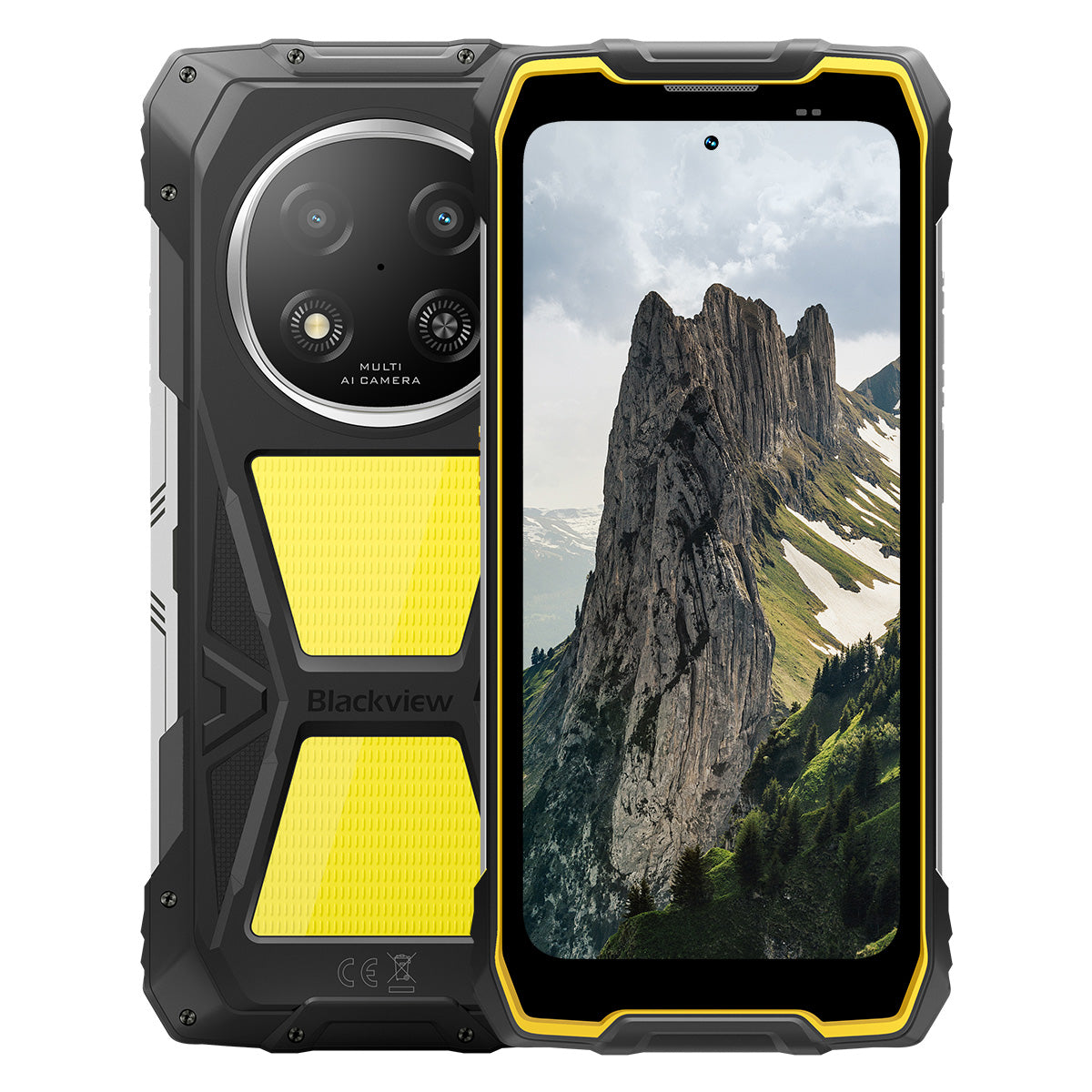


Blackview ROCK 2 Pro Telefono Robusto 5G con Schermo da 6,67 pollici 120Hz, Luce da Campeggio 400LM, Batteria 15000mAh

Esaurito
Punti salienti
Punti salienti
✔Schermo intelligente da 6,67 pollici con frequenza di aggiornamento a 120Hz
✔Luce da campeggio integrata doppia da 400LM
✔Processore octa-core UNISOC T8100 6nm 5G
✔Batteria da 15000mAh e ricarica rapida da 33W
✔Fotocamera principale AI da 16MP + fotocamera frontale AI da 13MP
✔Certificazioni IP68, IP69K e MIL-STD-810H
Informazioni
Informazioni
Il Blackview ROCK 2 Pro è progettato per utenti che necessitano di prestazioni mobili affidabili in ambienti impegnativi. Combina un display da 6,67 pollici a 120Hz con le prestazioni 5G UNISOC T8100 e una batteria da 15000mAh con ricarica rapida da 33W per lavoro, viaggi, navigazione e uso all'aperto. Le principali caratteristiche pronte per il campo includono fotocamere AI posteriori da 16MP e anteriori da 13MP, due luci da campeggio da 400LM e protezione IP68, IP69K e MIL-STD-810H. Progettato per cantieri, viaggi remoti e resistenza quotidiana, offre agli utenti la sicurezza di rimanere connessi, catturare dettagli e continuare quando i telefoni normali non sono sufficienti.
Informazioni su Brand
Informazioni su Brand
Da Blackview, crediamo che la grande tecnologia debba andare oltre specifiche impressionanti. Deve adattarsi alla vita reale, risolvere problemi concreti e rimanere affidabile quando conta davvero.
Blackview è nata con telefoni rugged progettati per ambienti difficili. Oggi offriamo un ecosistema più ampio di dispositivi smart, tra cui smartphone, tablet, laptop, smartwatch, prodotti audio e altro ancora.
In ogni categoria, il nostro focus rimane lo stesso: qualità durevole, innovazione pratica e prezzi accessibili. Progettiamo prodotti che risultano affidabili fin dal primo giorno.
Comprendiamo cosa i clienti apprezzano di più: prestazioni fluide, affidabilità duratura, funzionalità utili e tecnologia che rende la vita quotidiana più semplice senza costi inutili.
Per questo Blackview dedica vera attenzione ai test di prodotto, all’esperienza utente e alle funzionalità che portano un valore significativo al lavoro, ai viaggi, alla creatività, all’esplorazione all’aperto e alla connessione quotidiana.
Blackview è pensata per chi desidera una tecnologia di cui potersi fidare: dispositivi smart e capaci, costruiti per stare al passo con la vita moderna.
Affidabile per progettazione. Pratico per natura. Fatto per la vita reale.
Spedizioni e Resi
Spedizioni e Resi
• Spedizione: Gli ordini vengono elaborati entro 1-2 giorni lavorativi. La consegna standard richiede da 3 a 7 giorni lavorativi a seconda della tua posizione.
• Resi: Puoi restituire o scambiare i prodotti entro 30 giorni dal ricevimento dell'ordine. Gli articoli devono essere nelle condizioni originali con prova d'acquisto.
Se il tuo articolo è difettoso o danneggiato a causa di problemi di fabbricazione, lo sostituiremo volentieri senza costi aggiuntivi.

5G più veloce, luce più brillante, potenza inarrestabile
Supera i limiti, conquista ogni sfida


Perché scegliere Blackview ROCK 2 Pro?

N.1
Certificato IP69K, IP68 & MIL-STD-810H,
Costruito per conquistare ogni estremo.

N.2
5G fulmineo con UNISOC T8100 a 6nm,
Sperimenta una velocità senza pari
Fluido e sorprendente
Giorni di standby.
Ovunque
2.0, intelligenza senza limiti
Basato su Android 16
N.1
Certificato IP69K, IP68 & MIL-STD-810H,
Costruito per conquistare ogni estremo.

Luce da campeggio da 400lm
Luminoso, regolabile e affidabile — progettato per illuminare il tuo campo e garantire sicurezza in ogni avventura all'aperto.

Modalità illuminazioneTre livelli di luminosità: Basso/Alto/Estremamente luminoso
Basso per risparmio energetico, Alto e Ultra luminoso per esigenze di illuminazione versatile all'aperto.

Campeggio all'aperto

Riparazioni all'aperto

Escursioni notturne

Modalità SOS
Invia un segnale di soccorso chiaro e visibile per garantire la tua sicurezza in situazioni critiche all'aperto.

Perso nella natura

Guasto del veicolo

Situazioni di emergenza meteorologica

Modalità lampeggio rapido
Ideale per avvisi di emergenza, per scoraggiare potenziali minacce o attirare rapidamente l'attenzione.

Difesa all'aperto

Avviso stradale

Evacuazione d'emergenza

Immergiti. Spruzza. Immergiti. Funziona sempre.
Certificato IP69K & IP68
ROCK 2 Pro è progettato per le condizioni più difficili in ogni condizione, offrendo una protezione senza pari contro acqua, polvere e getti ad alta pressione.


Sigillatura dello schermo senza soluzione di continuità: protezione impeccabile
prestazioni impermeabili.

Pulsanti in alluminio resistenti alla corrosione:
Rinforzata con guarnizioni in silicone di alta qualità.

Porta USB sigillata in TPU: massima protezione dalla polvere
e resistenza all'acqua.

Fotocamera subacquea: cattura momenti indimenticabili
momenti sott'acqua.

Pulizia altoparlante: espelle automaticamente acqua e
detriti per un audio cristallino.

Resistente alle cadute. Resistente alla polvere. Pronto per la battaglia.
Certificato MIL-STD-810H
Da -20°C nelle regioni artiche a 60°C nel deserto, da cadute su cemento di 1,2 m a tempeste di sabbia — ROCK 2 Pro resiste dove gli altri falliscono.

Testato con questi test estremi

Pioggia

Sabbia e polvere

Vibrazione

Urto

Umidità

Altitudine

Accelerazione

Alta temperatura

Bassa temperatura

Immersione

Angoli rinforzati in gomma:
Assorbimento degli urti al massimo livello.

Retro in composito ultra-resistente:
Costruito per durare.

Cornice in alluminio di qualità aeronautica:
Robusto, leggero e resistente agli urti.

Display Panda Glass: resistente ai graffi e
antirottura per la massima durata.
Modalità Guanti 2.0
Funziona perfettamente —
anche con guanti spessi.


Kit di strumenti utili
Bussola, Torcia, Lente d'ingrandimento e altro —
il tuo kit pratico tutto-in-uno.
N.2
5G fulmineo con UNISOC T8100 a 6nm,
Sperimenta una velocità senza pari
5G 6nm UNISOC T8100
Velocità che ti serve. Potenza di cui ti puoi fidare.
Vivi la velocità fulminea del 5G con il chipset UNISOC T8100 a 6nm, dotato di un potente 2.2GHz CPU per multitasking fluido e prestazioni senza interruzioni nelle app più esigenti!


4*A76@2.2GHz
+ 4*A55@2.0GHz

Arm Mali G57

748,099
Benchmark AnTuTu
Fino a 32GB di RAM LPDDR4X
Multitasking come se nulla fosse.
Multitasking senza sforzo—avvia le app all'istante, passa senza interruzioni e affronta lavoro e intrattenimento con velocità costante.
Fino a 32GB di RAM=8GB RAM + 24GB espansione
Memoria atomizzata 2.0
9% di RAM disponibile in più


Memoria UFS 3.1 da 256GB
Aggiornato a UFS 3.1 per velocità 2,4 volte superiori, minor consumo energetico, latenza ridotta e prestazioni di scrittura accelerate—memorizza di più, carica più velocemente e lavora in modo più intelligente.

ROCK 2 Pro
UFS 3.1

ROCK 2
UFS 2.2
Velocità di trasferimento dati 2,4 volte più veloce
Dissipazione efficiente del calore
Fresco sotto pressione
Con un'area di raffreddamento di 1700mm², goditi una rapida dispersione del calore per prestazioni stabili e fluide, indipendentemente dall'intensità del compito.

N.3
Display smart eye-care da 6,67" 120Hz,
Fluido e sorprendente
Display IPS HD+ da 6,67"
Vista più ampia, dettagli più nitidi
Dotato di uno schermo IPS HD+ da 6,67", ROCK 2 Pro offre immagini coinvolgenti con aggiornamento intelligente a 120Hz e luminosità di 650 nit — perfetto per giochi, streaming e attività quotidiane.

120Hz
Frequenza di aggiornamento intelligente AI
650 nit
Luminosità
85%
Rapporto schermo-corpo
720*1604
Risoluzione
Frequenza di aggiornamento intelligente AI a 120Hz
Più fluido, più veloce, più intelligente
Dì addio al ritardo—l'aggiornamento intelligente si adatta alle tue esigenze, garantendo uno scorrimento fluido ottimizzando la durata della batteria.
120Hz
60Hz
Doppia frequenza di aggiornamento,
Doppia fluidità

Modalità cura degli occhi
Comfort che dura tutto il giorno
Proteggi i tuoi occhi con quattro modalità personalizzate progettate per leggere, lavorare e rilassarsi.


Modalità lettura
Comfort simile alla carta per lunghe ore di lettura

Luce notturna
Illuminazione delicata per ridurre l'affaticamento da luce blu

Modalità scura
Perfetto per ambienti con poca luce

Modalità luce
Luminoso e chiaro per l'uso diurno
Altoparlante box ad alta potenza da 2W
Suono potente, chiarezza eccezionale
ROCK 2 Pro offre un audio audace e cristallino con il suo altoparlante da 2W ad alta potenza, che si fa sentire anche in ambienti rumorosi per garantire un suono di prima qualità sia per comunicazione che per intrattenimento.

N.4
Batteria massiccia da 15.000mAh,
Fino a 50 giorni in standby.
Batteria massiccia da 15.000mAh
Energia che tiene il passo. Con una gigantesca batteria da 15.000mAh, ROCK 2 Pro gestisce senza sforzo viaggi di lavoro, avventure all'aperto e uso quotidiano—senza bisogno di cercare una presa.

Ricarica Intelligente
Protezione

Risparmio Energetico AI
Algoritmo


28 ore
Gioco

43 ore
Chiamata

97 ore
Musica

34 ore
Navigazione web

26 ore
Riproduzione video

50 giorni
Standby
*I dati sono testati dal laboratorio Blackview basandosi sull'uso continuo. L'uso reale può variare in base alle condizioni d'uso reali.

Esclusiva Classe Intelligente Profonda
Modalità Risparmio Energetico
ROCK 2 Pro regola intelligentemente l'alimentazione consumo con ottimizzazione avanzata durante i periodi di inattività — garantendo una durata più lunga durata della batteria senza sacrificare le prestazioni.
Più tempo di utilizzo leggero
Meno consumo notturno
Ricarica inversa OTG da 5W
Condividi energia in movimento
ROCK 2 Pro funge anche da power bank portatile, permettendoti di caricare auricolari, smartwatch o anche il tuo telefono di un amico in movimento.

N.5
Cattura ogni momento,
Sempre e ovunque

Fotocamera Principale AI 16MP
Cattura perfettamente. Condividi istantaneamente.
La fotocamera principale AI da 16MP di ROCK 2 Pro offre immagini cristalline e vibranti—che tu stia scattando foto professionali o inseguendo il tramonto perfetto.
16MP
Fotocamera Frontale AI 13MP
Sii te stesso—solo più luminoso.
La fotocamera frontale AI da 13MP di ROCK 2 Pro si adatta a qualsiasi condizione di luce, garantendo selfie nitidi, naturale e sorprendentemente affascinante.

Modalità Bellezza
Splendi senza sforzo, naturalmente.
La modalità bellezza AI migliora la tua pelle e il tono con regolazioni sottili e naturali—mettendo in risalto i tuoi migliori tratti con finezza.

Modalità Ritratto
Concentrati su di te, sfoca il resto.
La rilevazione di profondità AI mette in risalto il soggetto creando un effetto bokeh liscio e di qualità da studio—nessuna attrezzatura extra necessaria.

Modalità Notte
Domina la notte, ogni dettaglio conta.
La modalità notturna AI rivela dettagli nascosti nel buio—cieli luminosi, bordi nitidi e scatti perfettamente stabili, indipendentemente dalla scarsa illuminazione.

N.6
Doke esclusivamente auto-sviluppato
AI 2.0, intelligenza senza limiti
Integrando tre modelli AI all'avanguardia, Doke AI sfrutta tecnologia avanzata per comprendere profondamente le esigenze degli utenti, offrendo soluzioni più rapide, intelligenti e personalizzate.

DeepSeek-R1

ChatGPT-4o mini

Gemini AI 2.0 Flash
Il tuo esclusivo gestore della vita smart

Attivazione Vocale &
Riconoscimento Impronta Vocale
Sblocca facilmente con la tua voce —
senza contatto e altamente sicuro!

Controllo Intelligente Globale AI
Gestisci app e impostazioni con facilità usando semplici comandi vocali, semplificando le tue attività quotidiane.
 App compatibili:
Assistenza AI a schermo intero
Fornisci istantaneamente risposte e approfondimenti relativi
al contenuto attuale dello schermo.


Interazione AI in tempo reale
Goditi una comunicazione fluida e in tempo reale,
aumentare la produttività in ogni momento.
Quattro innovative app Doke AI per
Eleva la tua esperienza

App AI Chat
Il tuo compagno di chat AI sempre disponibile Da pianificazione di compiti a brainstorming creativo, AI Chat è il tuo assistente intelligente di fiducia, sempre pronto ad aiutarti.


Next-Gen
DeepSeek-R1

Ricerca Online AI

Parsing Documenti

Assistente di Tutoraggio

Chatta con AI

App AI Photos
Il tuo strumento portatile di fotoritocco AI con 18 funzionalità AI avanzate, AI Photos trasforma foto ordinarie in creazioni visive sorprendenti, pronte per impressionare e condividere.

AI Rimuovi Oggetti

AI OutPainting


AI Sfoca Foto
AI Sostituisci Sfondo

AI Animate


App AI Video
Il tuo strumento di creazione video AI
Trasforma testo, immagini e momenti quotidiani in video cinematografici senza sforzo — nessuna competenza richiesta!


App AI Music
La tua creazione musicale AI
Piattaforma
Nessuno strumento o studio necessario—AI Music ti permette di creare musica unica senza sforzo, su misura per ogni occasione.

N.7
Ultimo DokeOS 5.0 basato su Android 16
Da DokeOS 4.2 a 5.0, abbiamo ricostruito l'esperienza: più veloce, pulita, intelligente e profondamente personale. Non è solo un aggiornamento—è un salto in avanti nel modo in cui interagisci con il tuo ROCK 2.

Fai ciò che conta. Senza distrazioni.

Funzione tasto laterale
Un tocco. Accesso immediato.
Attiva rapidamente torcia, SOS, fotocamera subacquea, PTT o la tua app preferita. Sempre pronto, senza attese.

Avvia registrazione audio

Torcia attiva

Screenshot

Fotocamera subacquea attiva

PTT attivo

SOS attivo

Navigazione quad-core
Precisione globale. Sempre sulla giusta strada.
Alimentato da GPS, Beidou, Galileo e Glonass per un posizionamento preciso — ovunque, in qualsiasi momento.
Oltre l'acquisto, ti supportiamo sempre.

Aggiornamento versione Android

Assistenza telefonica

Servizio online 24/7

Centro di riparazione offline affidabile
Specifiche Blackview ROCK 1
| Modello | ROCK 2 Pro |
| Colore | Nero/Giallo |
| Dimensioni | 187.6 * 85.8 * 26mm |
| Peso | 558g |
| Sistema operativo | DokeOS 5.0 basato su Android 16 |
| Display | Display HD+ IPS da 6,67 pollici, risoluzione 720 * 1604 Frequenza di aggiornamento intelligente 120Hz, rapporto schermo-corpo 85% |
| CPU | Octa-core 5G 6nm UNISOC T8100 |
| RAM & ROM | 8GB RAM + 256GB ROM, LPDDR4X + UFS3.1 |
| Espansione TF | Memoria espandibile fino a 512GB |
| Batteria | 15000mAh; Ricarica rapida 33W |
| Fotocamera frontale | 13MP |
| Fotocamera posteriore | 16MP |
| Altoparlante | Altoparlante da 2W |
| Navigazione | GPS+GLONASS+Galileo+Beidou |
| Slot per schede | Due; 2SIM/1SIM +1*Scheda TF |
| NFC | Supporto |
| Wi-Fi & Bluetooth | (IEEE802.11a/b/g/n/ac) (2.4GHz/5GHz) ; BT 5.0 |
| Connettività di rete | Banda 2G: B2/B3/B5/B8 Banda 3G: WCDMA: B1/B2/B5/B8 Banda 4G: TDD:B38/B40/B41 FDD:B1/B2/B3/B4/B5/B7/B8/B12/B17 B19/B20/B26/28A/28B/B66 Banda 5G: N1/2/3/5/7/8/20/26 28/38/40/41/66/77/78 |
| Modello | ROCK 2 Pro |
| Colore | Nero/Giallo |
| Dimensione | 187,6 * 85,8 * 26mm |
| Peso | 558g |
| Sistema operativo | DokeOS 5.0 basato su Android 16 |
| Visualizza | Schermo HD+ IPS da 6,67 pollici, risoluzione 720 * 1604 Frequenza di aggiornamento intelligente 120Hz, rapporto schermo-corpo dell'85% |
| Processore | CPU Octa-core 5G 6nm UNISOC T8100 |
| RAM e ROM | 8GB RAM + 256GB ROM, LPDDR4X + UFS3.1 |
| Espansione TF | Memoria espandibile fino a 512GB |
| Batteria | 15000mAh; Ricarica rapida da 33W |
| Fotocamera frontale | 13MP |
| Fotocamera posteriore | 16MP |
| Altoparlante | Altoparlante da 2W |
| Navigazione | GPS+GLONASS+Galileo+Beidou |
| Slot per schede | Due; 2SIM/1SIM + 1*Scheda TF |
| NFC | Supporto |
| Wi-Fi e Bluetooth | (IEEE802.11a/b/g/n/ac) (2.4GHz/5GHz); BT 5.0 |
| Connettività di rete | Banda 2G: B2/B3/B5/B8 Banda 3G: WCDMA: B1/B2/B5/B8 Banda 4G: TDD: B38/B40/B41 FDD: B1/B2/B3/B4/B5/B7/B8/B12/B17 B19/B20/B26/28A/28B/B66 Banda 5G: N1/2/3/5/7/8/20/26 28/38/40/41/66/77/78 |
Is the Blackview ROCK 2 Pro comfortable to carry every day?
Yes, the Blackview ROCK 2 Pro is well-suited for daily carry, making it highly convenient for commutes, site inspections, and travel between different work locations. Weighing approximately 558 grams and measuring about 26 mm in thickness, it features a high-capacity battery and a rugged, durable design. You can adjust how you carry it based on your personal preferences and specific needs.
For ease of movement and quick access, you might consider placing it in a work bag or a suitably sized waist pouch. If you are purchasing a waist pouch or a vehicle mount, ensure that the model you choose is compatible with the device's dimensions and weight.
How does continuous navigation affect the Blackview ROCK 2 Pro’s battery life?
Using navigation continuously increases power consumption and shortens the phone's battery life, as the device must maintain location tracking and process route information. While the 15,000mAh high-capacity battery offers significantly more power than a typical smartphone, the actual duration for continuous navigation will still vary based on screen settings, network signal strength, and other applications running in the background.
For long-duration navigation, consider using voice prompts—provided it is safe to do so and does not hinder your ability to follow the route. If your work requires all-day continuous navigation, it is advisable to estimate power consumption based on your specific route and settings, and to plan time for recharging
Can I use the Blackview ROCK 2 Pro’s camping light for nighttime work?
Yes. The Blackview ROCK 2 Pro features a 400-lumen camping light with three adjustable brightness levels. It provides illumination for close-range tasks such as inspecting equipment, locating tools, checking wiring, or performing temporary repairs at night. You can adjust the brightness based on ambient lighting conditions and the specific requirements of your task to ensure the work area remains clearly visible.
When you need both hands free, you can place the phone securely so that the light is directed toward your work area. Keep in mind that using the camping light for extended periods will increase battery consumption; it is recommended to select an appropriate brightness level and turn the light off when it is no longer needed.
Is the Blackview ROCK 2 Pro suitable for use in dusty construction environments?
Yes, it is. With IP68 and IP69K ratings, the rugged Blackview ROCK 2 Pro is well-suited for environments prone to dust, moisture, and frequent physical impact—such as renovation sites, outdoor construction zones, and various maintenance work areas.
After a day of work in a dusty environment, it is recommended to wipe any loose dust off the device before placing it in a bag or connecting a charging cable. Before charging, ensure that the USB-C port is clean and dry. Additionally, keep the phone away from cutting tools and operating machinery, and avoid placing it in locations where it might be crushed or compressed.
Is the Blackview ROCK 2 Pro’s front camera suitable for video calls?
Yes, it is. The Blackview ROCK 2 Pro features a 13MP front-facing camera, which is well-suited for everyday video calls—whether you are communicating with colleagues for work or staying in touch with friends and family. In well-lit conditions with a stable network connection, it captures facial expressions clearly, making interactions smoother.
During video calls, it is recommended to face a light source and avoid having a window or a strong light source directly behind you. For longer calls, you may want to place the phone on a stand to keep the image steady and free up your hands. If you experience lag or a blurry image, check your network connection and try adjusting the lighting or the camera angle.
What should I do if a banking app does not work on my Blackview ROCK 2 Pro?
If you are unable to open a banking app, log in, or complete a transaction, first check your internet connection, restart your phone, and ensure the app is updated to the latest version via the download channels specified on the bank’s official website. Additionally, verify that your phone’s date and time settings are correct, and grant any necessary permissions as prompted by the app.
If the issue persists, note down any specific error messages and contact the bank’s customer service to check if your account or device is subject to any security restrictions. If you need to reinstall the app, ensure that your login password, linked phone number, and verification methods are accessible so that you can successfully log back in or complete device verification.
What should I do if an app cannot verify my identity using the Blackview ROCK 2 Pro’s front camera?
Before starting, ensure you have granted the app permission to access the camera and clean the lens. In an environment with even lighting, position your face within the indicated frame. Remove any face masks or sunglasses, and ensure your hair is not covering your eyebrows or eyes. If your glasses are causing reflections, or if you are wearing colored contact lenses, try removing them before attempting the verification again.
If verification fails, try adjusting the lighting or the angle of your face; follow any specific instructions provided by the app. If the issue persists after multiple attempts, contact the platform's customer support to ask if they offer manual review, allow the submission of valid identification documents, or provide alternative verification methods.
What should I do if an app keeps freezing or crashing on my Blackview ROCK 2 Pro?
If you experience frequent freezing or crashing, try restarting the app or the phone, and ensure the app is updated to the latest version. Additionally, check that you have sufficient storage space, close any background apps you aren't currently using, and delete any unnecessary files.
If the issue is limited to a single app, try clearing its cache, or back up your important data and reinstall the app. If multiple apps are frequently freezing or crashing, first check for system updates. If the problem persists, make a note of any error messages and the circumstances under which the issues occur, then contact customer support for further assistance.
How can I check for software updates on the Blackview ROCK 2 Pro?
Open "Settings" on your phone, navigate to the system update page, and tap "Check for updates." If a new version is available, you can review the update notes to learn about the included feature enhancements and bug fixes, then follow the on-screen prompts to download and install it. Checking for updates regularly ensures you receive system optimizations and security patches in a timely manner.
Before updating, connect to a stable Wi-Fi network, ensure your phone has sufficient battery, and back up any important data. It is best to perform the update when you do not need to use your phone; do not force a shutdown or restart during the process—simply wait for the system to complete the update. If no updates are currently available, you can continue using your phone as usual and check again later.
What accessories are included with the Blackview ROCK 2 Pro?
The Blackview ROCK 2 Pro comes with different charger configurations, depending on the version purchased. In the UK, you can choose a version that includes either a UK-standard three-pin plug charger or an EU-standard two-pin plug charger. In the US, you can choose a version that either excludes a charger or includes an EU-standard two-pin plug charger.
Please verify the charger configuration of your chosen version before placing an order. US users who select the version with an EU-standard plug will need to obtain a suitable plug adapter; those who select the version without a charger will need to provide their own compatible charger.
How can I protect the Blackview ROCK 2 Pro’s camera lenses during outdoor work?
When carrying the phone outdoors, avoid direct contact between the lens and hard objects such as keys, screws, or tools; it is best to keep the phone in a separate pocket or a dedicated compartment in your bag. When setting the phone down, choose a clean, flat surface to prevent the lens area from coming into contact with sand or gravel.
If the lens becomes dusty or sandy, gently remove the debris using a soft-bristled brush or an air blower, then wipe it lightly with a clean microfiber cloth. Avoid rubbing the lens directly, as this may cause scratches. If you choose to use a protective case or a lens protector, ensure it is specifically designed for the ROCK 2 Pro, and take care not to obstruct the lens, flash, or camping light.
What should I check when my Blackview ROCK 2 Pro arrives?
After receiving your package, first inspect it and the phone for any visible damage. Verify that the model, color, storage capacity, and included accessories match your order. If the package is damaged or any accessories are missing, take clear photographs and retain the original packaging along with the shipping label.
Once powered on, check that the touchscreen, physical buttons, camera, speakers, microphone, and charging port are all functioning correctly. You may also want to test the device by connecting to Wi-Fi and inserting a SIM card. Please note: Do not test the phone’s ruggedness by intentionally dropping it or submerging it in water. If you encounter any issues, contact the seller through the platform where you made the purchase, providing your order number and a detailed description of the problem.
How can I request a return if there is a problem with my Blackview ROCK 2 Pro?
If you experience any issues with your Blackview ROCK 2 Pro, please contact the customer service team of the channel where you purchased the device. You will need to provide your order details, a description of the issue, and photos or videos that clearly illustrate the problem. The customer service team will assist in troubleshooting, verify the device's warranty status, and advise on the next steps.
For devices that qualify for warranty coverage, service will be provided in accordance with the warranty policy. If your device is outside the warranty period or the scope of coverage, you may consult with customer service regarding paid repair options. If you need to send your device in for repair, please contact customer service first to make arrangements; additionally, ensure that you back up your personal data and remove your SIM card and any memory cards.
Jump to another section