



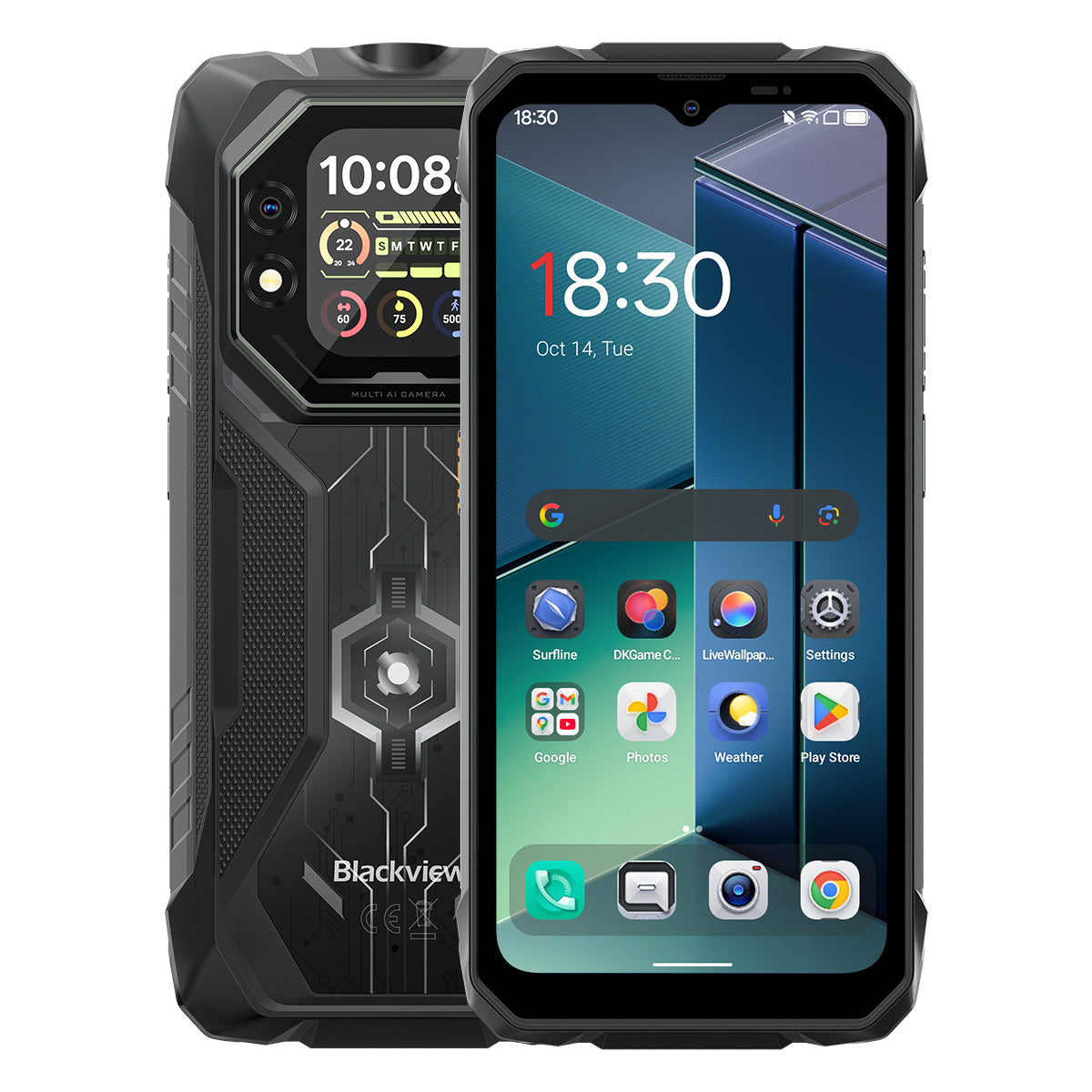


Blackview ROCK 1 6,56-tommer 90Hz Hoved- og 2,01" Sekundær Skærm MediaTek Helio G81 Octa-core 15000mAh 20MP Natvision Kamera 4G Robust Telefon

Tilgængelig på lager (13)
Højdepunkter
Højdepunkter
✔6,56-tommer hoved- og 2,01" multifunktionelt sekundærdisplay
✔Octa-core MediaTek Helio G81 processor
✔15000mAh & 33W hurtigopladning
✔20MP Sony® natvisionskamera
✔IP68 & IP69K & MIL-STD-810H certificeret
Informationer
Informationer
Blackview ROCK 1 er designet til brugere, der har brug for pålidelig mobil ydeevne i krævende miljøer. Den kombinerer en 6,56-tommer 90Hz hovedskærm og en 2,01-tommer sekundær skærm med MediaTek Helio G81 ydeevne og et 15000mAh batteri med 33W hurtigopladning til arbejde, rejser, navigation og udendørs brug. Vigtige funktioner til feltbrug inkluderer et 20MP Sony natvisionskamera, dual-screen funktionalitet til hurtige statuskontroller samt IP68 & IP69K & MIL-STD-810H beskyttelse. Designet til byggepladser, fjernrejser og daglig robusthed giver den brugerne selvtillid til at forblive forbundet, fange detaljer og fortsætte, når almindelige telefoner ikke er nok.
Om mærket
Om mærket
Hos Blackview mener vi, at fremragende teknologi skal gå ud over imponerende specifikationer. Den skal passe til det virkelige liv, løse reelle problemer og forblive pålidelig, når det virkelig gælder.
Blackview startede med robuste telefoner bygget til barske miljøer. I dag tilbyder vi et bredere økosystem af smarte enheder, herunder smartphones, tablets, bærbare computere, smartwatches, lydprodukter og mere.
På tværs af alle kategorier er vores fokus det samme: holdbar kvalitet, praktisk innovation og tilgængelige priser. Vi designer produkter, der føles pålidelige fra dag ét.
Vi forstår, hvad kunder værdsætter mest: glat ydeevne, langvarig pålidelighed, nyttige funktioner og teknologi, der gør hverdagen lettere uden unødvendige omkostninger.
Derfor lægger Blackview ægte fokus på produkttest, brugeroplevelse og funktioner, der tilfører reel værdi til arbejde, rejser, skabelse, udendørs udforskning og daglig forbindelse.
Blackview er lavet til folk, der ønsker teknologi, de kan stole på: smarte, kapable enheder bygget til at følge med det moderne liv.
Pålidelig af design. Praktisk af natur. Lavet til det virkelige liv.
Forsendelse og returnering
Forsendelse og returnering
• Forsendelse: Ordrer behandles inden for 1–2 hverdage. Standard levering tager 3–7 hverdage afhængigt af din placering.
• Retur: Du kan returnere eller bytte produkter inden for 30 dage efter modtagelse af din ordre. Varerne skal være i original stand med købsbevis.
Hvis din vare er defekt eller beskadiget på grund af produktionsfejl, erstatter vi den gerne uden ekstra omkostninger.

Innovative dobbeltskærme
Opfylder massiv kraft
Dit pålidelige valg til udendørs eventyr for at udforske mere


Robust design møder gennemtænkt æstetik
ROCK 1 har en holdbar robust struktur, der fremhæver dens hardcore teknologiske styrke. Bagcoveret integrerer et unikt mat design, der interagerer med lys for at skabe dynamiske visuelle effekter og tilføjer et subtilt strejf af sofistikering til dens robuste udseende.

Fastgør nemt en rem, hæng den hvor som helst, og hold den sikker.


Nr. 1
MIL-STD-810H & IP69K & IP68 certificeret, bygget
til at overvinde ekstreme forhold
Nr. 2
Innovativ dobbeltskærm, der redefinerer
Smart syn

Nr. 1
MIL-STD-810H & IP69K & IP68 certificeret,
Bygget til at overvinde ekstreme forhold

MIL-STD-810H certificeret
Bygget robust. Klar til alt.
ROCK 1 tilbyder militærklasse holdbarhed til at modstå fald, vand og støv. Fra byggepladser til ekstreme udendørs eventyr er det din pålidelige følgesvend til enhver udfordring.
Bevist gennem disse ekstreme tests

Regn

Sand og støv

Vibration

Stød

Fugtighed

Højde

Acceleration

Høj temperatur

Lav temperatur

Nedsænkning

Forstærkede stødabsorberende hjørner

Ultra-hårdt bagcover

Flygrade aluminium
Legeringsramme

Ridsefast
Skrøbelighedsbestandigt Panda-glas
IP69K & IP68 certificeret
Designet til ekstreme forhold.
ROCK 1 opfylder både IP68- og IP69K-standarderne — fuldt beskyttet mod støv, dyb nedsænkning i vand og kraftige højtryksstråler. Designet til ekstreme miljøer, hvor den fungerer pålideligt, hvor andre ikke kan.

*Vandtæt ned til 1,5 m dybde i 30 minutter.

Sømløs kantforsegling omkring skærmen

Korrosionsbestandige aluminiums knapper med premium silikone vandtætte ringe

TPU-prop til USB-port, komplet forsegling

Højttalerrensning, automatisk støv- og
Vandfjernelse
Undervandskamera

Nr. 2
Innovativ dobbeltskærm, der redefinerer smart syn
6,56" HD+ IPS-skærm
Se mere, nyd mere
ROCK 1's 6,56" HD+ IPS-skærm kombinerer fantastisk klarhed med brede betragtningsvinkler og leverer en medrivende visuel oplevelse til gaming, streaming og mere.

720*1612
Opløsning
178°
IPS fuld visning
450nits
Lysstyrke
180Hz
Touch-samplefrekvens
83%
Skærm-til-krop-forhold
90Hz AI smart opdateringshastighed
Glattere. Hurtigere. Bedre.
Sig farvel til forsinkelse — smart skift sikrer silkeblød rulning og maksimerer batterilevetiden.

2,01" multifunktionel sekundær skærm
Lille skærm, stor forskel
ROCK 1's smarte underskærm giver dig beskeder, musikstyring, tilpasselige urskiver og mere lige ved hånden — effektivt, bekvemt og uafbrudt sjov.

2,01 tommer
Størrelse
240*296
Opløsning
Panda
Glas
16:13
Billedformat
500 nits
Lysstyrke

Tag selfies med
Bagkamera

Tjek tid & dato

Afspil/pause/skift numre

Accepter/afvis opkald

Se besked
Notifikationer

Tjek vejrudsigter

Brug den indbyggede
Kompas

Spor dine skridt

Tilpas urstile
Øjenplejetilstande
Komfort der varer, dag og nat.
Fire øjenplejetilstande til at beskytte dit syn når som helst—læs, arbejd eller slap af med ultimativ komfort.


Læsningstilstand

Natlys

Mørketilstand

Lystilstand
Handsketilstand 2.0
Glidende kontrol, selv med handsker.

8% mere følsom berøring 
Nr. 3
Helio G81 boostet, ydeevne frigivet
Octa-core MediaTek Helio G81
Hurtig. Effektiv. Pålidelig.
Ingen forsinkelse—bare kør. Med ROCK 1 skifter du problemfrit mellem arbejdsapps, navigerer uden net og streamer på farten—hele dagen stabilt.


2*Cortex-A75@2.0GHz+
6*Cortex-A55@1.7GHz
Øjeblikkelig åbning, glat multitasking

Arm Mali-G52 MC2
Glattere grafik, klarere detaljer

345,548
AnTuTu benchmark
Op til 24GB LPDDR4X RAM
Multitask uden kompromis.
Bygget til at klare mere. ROCK 1 flyver gennem arbejdsapps og underholdning med hurtige indlæsninger, glidende skift og stabil hastighed.

Op til 24GB RAM=8GB RAM + 16GB udvidelse
Atomized Memory 2.0
9% mere RAM tilgængeligt
256GB eMMC 5.1 flashlager
Øjeblikkelig start, problemfri flow.
Installer og åbn massivt indhold på et øjeblik, med apps der starter lynhurtigt for en problemfri, altid-tilgængelig oplevelse!

F2FS filsystem
25% hurtigere tilfældig læsehastighed
3× hurtigere tilfældig skrivehastighed
EROFS skrivebeskyttet filsystem
Op til 300% hurtigere tilfældig læsning
2651mm² kølemestring
Hold dig kølig, præster bedre
ROCK 1 udnytter tredobbelt materiale-køleteknologi, der leverer fremragende varmeafledning og en glattere, køligere brugeroplevelse.

Grafit
Termisk silikonefedt
Kobberfolie
Holder sig kølig ved 38°C selv efter intens gaming
Nr. 4
15.000mAh kraftcenter, uendelig batterilevetid
15.000mAh kæmpe strøm
Ubegrænset energi, ustoppelig sjov!
ROCK 1 har en kæmpe kapacitet på 15.000mAh, der leverer ustoppelig strøm til arbejde, rejser og eventyr. Altid fuldt opladet, klar til at rocke hvert øjeblik!

Intelligent opladning
Beskyttelse

AI Strømbesparelse
Algoritme


20 timer
Spil

84 timer
Opkald

64 timer
Musik

26 timer
Web

22 timer
Video

45 dage
Standby
*Data er testet af Blackview Lab baseret på kontinuerlig brug. Den faktiske brug kan variere afhængigt af virkelige brugsforhold.
5W OTG omvendt opladning
Strøm når som helst,
Del overalt.
Oplad nemt dine høretelefoner, smartwatch og mere—altid klar til nødsituationer på farten.


Nr. 5
Fang hvert øjeblik, dag eller nat.

16MP AI hovedkamera
Klar. Levende. Ubesværet.
Fra arbejde til leg leverer det 16MP hovedkamera på ROCK 1 skarpe, levende billeder—klar til at dele med det samme.

13MP AI frontkamera
Perfekte selfies, når som helst.
Det AI-drevne 13MP frontkamera på ROCK 1 sikrer, at du altid skinner med smarte justeringer for fejlfri resultater i enhver situation.
Portræt
Fokus på det vigtige.
AI-drevet baggrundssløring fremhæver dit motiv med fantastisk dybde for et professionelt, iøjnefaldende look.


Skønhed
Ubesværet glød.
Naturligt dig.
Glat hud, forbedrede toner og AI-perfektion—hurtige selfies har aldrig set så ægte og fejlfri ud.
Nat
Eje natten.
Lyse, skarpe og levende—AI-forbedrede billeder i svagt lys fanger alle detaljer, selv i de mørkeste øjeblikke.


20MP Sony natvision
Se ud over mørket.
ROCK 1 bryder gennem mørket for at afsløre alle detaljer i natten og fanger det, det blotte øje ikke kan.
Nr. 6
Branchens eksklusive Doke AI smarte assistent
Drevet af integration med verdens tre bedste AI-modeller forstår Doke AI dine behov med præcision og leverer smartere, hurtigere og mere personlige serviceoplevelser!

DeepSeek-R1

ChatGPT-4o mini

Gemini AI 2.0 Flash
Gemini AI
Smartere assistent, skræddersyet til dig.

Stemmeaktivering &
Stemmegenkendelse
Låser op øjeblikkeligt og sikkert med din stemme, helt uden hænder.

Global smart kontrol
Én kommando, problemfri kontrol på tværs af apps og indstillinger.

Fuldskærmsassistance
Spørg om din skærm og få svar med det samme.


Interaktion i realtid
Øjeblikkelige svar, naturlige samtaler når som helst, hvor som helst.
Branchens eneste selvudviklede Doke AI-apps

Hi Doki-app
Din AI smarte chatassistent
Fra at løse opgaver til at skabe idéer, Hi Doki er din altid parate følgesvend.


Næste generation
DeepSeek-R1
Dyb tænkning, intelligens på næste niveau.

AI online søgning
Aktuelle indsigter, smartere svar.

Dokumentanalyse
Upload og analyser med det samme.

Undervisningsassistent
Scan, løs og lær smartere.

Chat med AI
19 AI-personligheder, uendelige samtaler

ImageX-app
Din AI på farten
Fotoredigeringsprogram
Med 18 AI fotoredigeringsværktøjer forvandler ROCK 1 ubesværet udendørsbilleder, feltfotos og hverdagens øjeblikke til fantastiske billeder klar til deling.

AI fjern objekter
Fjern uønskede elementer ubesværet med præcis nøjagtighed.

AI OutPainting
Udvid dit lærred og udvid perspektiver problemfrit.


AI slør foto
Fremhæv motivet med intelligent baggrundssløring.
AI Udskift Baggrund
Udskift nemt baggrunde og omdefiner dine scener.

AI Animer
Forvandl stillbilleder til dynamiske øjeblikke—se ansigter og minder komme til live!


VidGen App
Din AI Video Magisk Skaber!
Fra tekst til video, fotos til filmiske øjeblikke, forvandler VidGens smarte AI dine daglige eventyr til fantastiske, delingsklare kreationer med sjove, dynamiske effekter—alt sammen med få tryk!


Soundle App
Din AI Musikkomponist!
Ingen instrumenter eller studie nødvendigt—Soundle forvandler din telefon til et kraftfuldt musiklaboratorium, der skaber unikke melodier til ethvert øjeblik.

Nr.7
Seneste DokeOS 5.0 Baseret på Android 16
DokeOS er udviklet fra 4.2 (Android 15) til 5.0 (Android 16), hvilket giver hurtigere ydeevne, glattere drift, renere interface, mere personlig oplevelse og smartere funktioner. En komplet opgradering for en enestående brugeroplevelse.

Udforsk mere, lige ved hånden

Op til 120lm Lys Stærk Lommelygte
Kraftfuld belysning med SOS
flash til nødsituationer.

Sideknap Funktion
Enkelhed ved din fingerspids!
Én tryk, ingen besvær—få øjeblikkelig adgang til din
ofte brugte funktioner eller apps med lethed!

Start Lydoptagelse

Åbn lommelygte

Skærmbilleder

Åbn Undervandskamera

Åbn PTT

Åbn SOS
Nyttig Værktøjstaske
Værktøjer der passer i din lomme!
10 essentielle værktøjer i én app, der forvandler din ROCK 1 til en alsidig alt-i-en værktøjskasse til daglige opgaver.


Quad-Core Navigation
Naviger hvor som helst,
Erobr overalt!
Sømløs og præcis navigation drevet af GPS, Beidou, Galileo og Glonass, der sikrer pålidelighed selv på de mest fjerntliggende eller krævende steder.
Blackview ROCK 1 Specifikationer
| Model | ROCK 1 |
| Farve | Sort |
| Dimension | 177.9 * 83.5 * 24.7mm |
| Vægt | 490g |
| OS | DokeOS 5.0 Baseret på Android 16 |
| Skærm | 6,56 tommer HD+ IPS, 720 * 1612 Opløsning 90Hz Opdateringshastighed, 83% Skærm-til-krop Forhold Sekundær Skærm: 2,01 tommer, 240 * 296 Opløsning |
| CPU | Octa-core MediaTek Helio G81 |
| RAM & ROM | 8GB RAM + 256GB ROM, LPDDR4X + eMMC 5.1 |
| TF Udvidelse | Op til 256GB Udvidelig Lagerplads |
| Batteri | 15000mAh; 33W Hurtigopladning |
| Frontkamera | 13MP |
| Bagkamera | 16MP Hoved + 20MP Natvision |
| VHøjttaler | 1 stk. Smart-PA Box Højttaler |
| Lommelygte Lysstyrke | Maks 120 lm, Min 110 lm |
| Navigation | GPS+GLONASS+Galileo+Beidou |
| Kortplads | To; 2SIM/1SIM+1*TF-kort |
| NFC | Support |
| Wi-Fi & Bluetooth | Wi-Fi 5; BT 5.0 |
| Netværksforbindelse | 2G-bånd: B2/B3/B5/B8 3G-bånd: WCDMA: B1/B8 CDMA: BC0/BC1/BC10 4G-bånd: TDD: B40/B41 FDD:B1/B3/B7/B8/B19/B20/B28A/B28B |
| Design | |
| Produkt | Blackview ROCK 1 |
| Farve | Sort |
| Vis | |
| Hoveddisplay | 6,56-tommer |
| Sekundær skærm | 2,01-tommer |
| Opdateringshastighed | 90 Hz |
| Ydeevne | |
| Processor | MediaTek Helio G81 |
| Batteri & opladning | |
| Batteri | 15000mAh |
| Opladning | 33W Hurtigopladning |
| Kamera | |
| Natkikkertkamera | 20MP Sony |
| Holdbarhed | |
| Robusthedsvurdering | IP68 & IP69K & MIL-STD-810H |
| Forbindelse | |
| Netværk | 4G |
Who is the Blackview ROCK 1 rugged phone designed for?
The Blackview ROCK 1 is designed for construction workers, maintenance technicians, farmers, delivery drivers, and outdoor enthusiasts such as campers or anglers. It is also well-suited for workers who need a device for communication, navigation, and daily tasks in environments prone to dust, rain, or accidental impacts—such as construction sites or mines.
With its high-capacity battery, rugged, durable build, and night-vision camera, it supports both professional work and outdoor activities. Additionally, the rear display allows for quick access to information and control options. Beyond its practical tools and massive battery, it offers all the standard features found in mainstream smartphones.
Does the Blackview ROCK 1 have a 15,000mAh battery?
Yes. The Blackview ROCK 1 rugged phone is equipped with a 15,000mAh battery, providing ample power for calls, text messages, navigation, and entertainment. This ensures you stay powered up even when you are away from your desk or a wall outlet for the day. If used primarily for routine calls and text messages, the battery will last even longer.
The time between charges depends on how you use the phone. Intensive tasks like prolonged navigation, photography, or gaming may drain the battery down to 20%, while lighter use—such as occasional calls, texts, or a standard workday—will require less frequent charging. This capacity ensures you have enough power to start the next day or handle unexpected situations.
How much does the Blackview ROCK 1 weigh?
The Blackview ROCK 1 weighs 490 grams and measures 24.7 mm thick. These figures refer to the device's weight alone and do not include accessories such as cases or lanyards, which would increase the total weight.
For daily use at work, you can carry the device in a dedicated work pouch or a specific compartment in your bag, making it easy to access. If you prefer to keep it in a pocket, ensure that the pocket is spacious enough to accommodate the device's thickness.
What affects the Blackview ROCK 1’s battery life in everyday use?
The following factors can impact battery life:
Screen Brightness: Higher brightness levels consume more power. It is recommended to adjust the brightness to a comfortable level based on your current environment.
App Usage: Activities such as gaming, video calls, or prolonged navigation consume more power than occasional messaging or a glance at a map.
Mobile Signal Strength: When the signal is weak, the phone works harder to maintain a connection, which leads to increased power consumption.
Background Activity: Even when you are not actively using certain apps, they may still consume power by performing downloads, updates, or data synchronization in the background.
Hotspot and Flashlight: Enabling these features increases power consumption; leaving them on for extended periods will drain the battery significantly faster. It is best to turn them off when they are no longer in use.
You can also check your battery usage in "Settings" to identify which apps are consuming the most power and make adjustments accordingly.
What can I do with the Blackview ROCK 1’s rear display?
When the back of the phone is facing you, you can view notifications, control music playback, or check the time via the customizable watch faces—all without needing to flip the phone over to use the main screen. It provides a more convenient way to access specific information.
You can also view alerts or pause music playback directly, again without needing to turn the phone over. You can choose the display options that best suit your personal habits. For tasks such as reading long messages, typing, or browsing content, the main screen is recommended, as it offers more display space.
Can I use the Blackview ROCK 1’s rear display to take selfies?
Yes. The Blackview ROCK 1 supports taking selfies with the rear camera, and the rear display helps with framing. You can see your position within the frame on the screen, eliminating the need to guess where the camera is pointed.
When using the rear screen for photography, adjust your position within the preview frame and follow the on-screen prompts to take the shot. Clean the lens before shooting and face toward a light source for clearer results. If taking a group photo, ensure everyone is visible within the preview frame before capturing the image.
What can I see with the Blackview ROCK 1’s night vision camera?
The Blackview ROCK 1’s night-vision camera allows you to observe nearby objects, people, and animals in the dark. It is useful for viewing dimly lit areas or monitoring your surroundings when it is too dark for the main camera to capture clear details.
When using it, keep the phone steady and point the lens toward the area you wish to observe. Factors such as distance, obstacles, and reflective surfaces may affect the view. Please note that the night-vision function cannot measure temperature, nor can it see through objects.
Is the Blackview ROCK 1’s main camera suitable for everyday photos?
Yes, it is. The Blackview ROCK 1 features a 16MP main camera, which is capable of handling daily photography needs—such as capturing family moments, outdoor scenery, documents, or the condition of equipment. For the best results and sharper detail, it is recommended to take photos in well-lit environments.
To achieve better image quality, clean the lens, tap the subject on the screen to focus, and keep the phone steady. In low-light conditions, try to increase the available lighting; if your subject is moving, wait until they are still before pressing the shutter button.
How does the Blackview ROCK 1’s speaker perform for calls and music?
The built-in speaker on the Blackview ROCK 1 supports hands-free calling, voice navigation, video viewing, and general music playback. Performance is smooth when the phone is nearby, the network connection is stable, and the surrounding environment is quiet. Conversely, issues such as stuttering or poor audio clarity may occur under less-than-ideal conditions.
When using the speaker for calls, it is best to keep the phone close by, ensure the speaker is not obstructed, and adjust the volume to suit your environment. For the best experience during hands-free calls, choose a quiet location. If you are listening to music—for instance, in a living room—and desire better sound quality, you can connect headphones or an external Bluetooth speaker.
What can I customize with the Blackview ROCK 1’s shortcut button?
You can configure the shortcut key on the Blackview ROCK 1 to perform specific actions, such as starting a voice recording, turning on the flashlight, taking a screenshot, or launching the underwater camera. This allows for quicker access to frequently used features.
Locate the shortcut key settings within the "Settings" menu and select your desired action. For example, if you assign the "Flashlight" function to the shortcut key, you can quickly turn it on whenever you need temporary illumination. Once configured, you may want to test it; please note that some functions may require you to unlock the phone before they can be used.
What does the Blackview ROCK 1’s 90Hz refresh rate mean for everyday use?
A 90Hz refresh rate means the screen can refresh up to 90 times per second. This results in smoother scrolling, swiping, and animations—for instance, when browsing the web, checking messages, or navigating through app menus.
While the refresh rate determines how dynamic content is displayed, it does not increase image resolution, nor does it make every application run faster. Furthermore, since games have their own frame rate limits and hardware requirements, it does not guarantee that all games will run at 90 frames per second.
How does the Blackview ROCK 1 perform when running everyday apps?
The Blackview ROCK 1 is well-suited for daily tasks such as messaging, handling emails, using navigation, and browsing the web. You can easily check emails, switch to a messaging app to reply, and then return to your browser. For more resource-intensive applications—such as demanding games—you may notice slightly longer startup or response times.
If app switching becomes noticeably sluggish, check for background processes like ongoing downloads, system updates, or other high-load tasks. Additionally, freeing up some storage space and restarting the phone can often resolve temporary slowdowns.
What protection does the Blackview ROCK 1 offer for outdoor work?
The Blackview ROCK 1 rugged phone features IP68 and IP69K ingress protection ratings and meets the MIL-STD-810H testing standard. It is designed to effectively withstand dust (such as cement dust), moisture, and impacts that may be encountered during outdoor work.
When working outdoors, ensure that the SIM card slot and all port covers are securely closed. If the phone accidentally falls out of your pocket, check it for any damage. Please note that protective capabilities may diminish over time, so the device should still be handled with care during daily use.
How do I check for software updates on the Blackview ROCK 1?
Check the "Settings" on your phone to see if there is a notification for a system update. If you receive a notification, review the update details and follow the on-screen instructions to download and install it. If no update notification appears, you can check again later.
Before updating, back up important photos, contacts, and files; connect to a stable Wi-Fi network; and ensure your phone has sufficient battery power. It is recommended to perform the update when you are not using your phone—for instance, while you are asleep—as the device may restart during the installation process. Follow the on-screen prompts and wait for the update to complete before using your phone again.
What should I do if the home screen keeps crashing on my Blackview ROCK 1?
First, try restarting your phone to see if the home screen returns to normal. If the issue persists, check whether your phone’s internal storage is nearly full. You can free up space by deleting unnecessary large files or apps, or by backing up your data. Then, check again to see if the screen has returned to normal.
Next, inspect the screen for cracks or other physical damage, and check if it has begun to separate from the device body. Also, observe whether any lines, flickering, or dark spots appear on the display. If these problems continue, consider having the device evaluated by a professional phone repair technician.
Jump to another section