



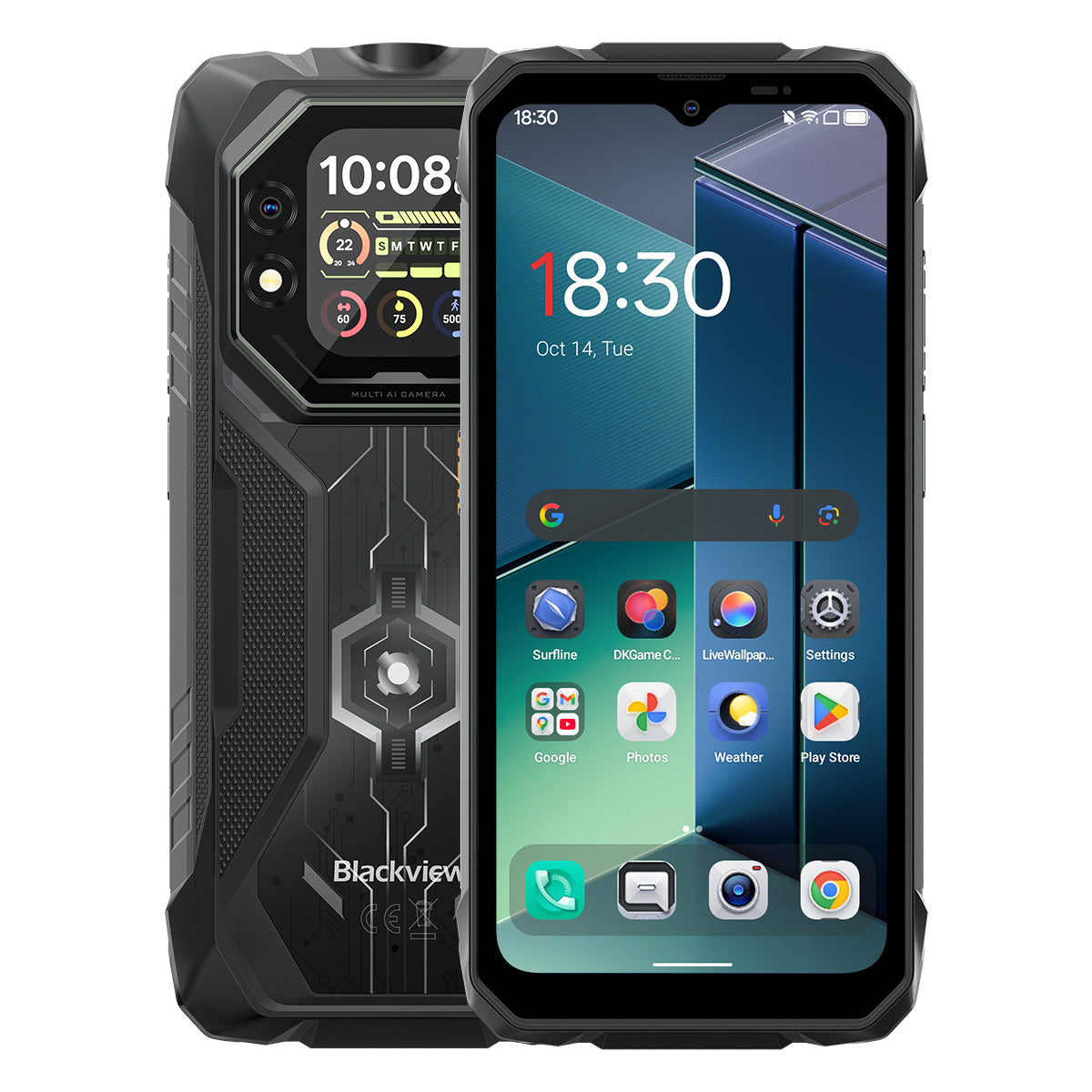


Blackview ROCK 1 6,56palcový hlavní a 2,01palcový vedlejší displej MediaTek Helio G81 osmijádrový 15000mAh 20MP noční vidění fotoaparát odolný 4G mobilní telefon

K dispozici skladem (13)
Hlavní body
Hlavní body
✔6,56palcový hlavní a 2,01palcový víceúčelový sekundární displej
✔Osmijádrový procesor MediaTek Helio G81
✔15000mAh a rychlé nabíjení 33W
✔20MP noční kamera Sony®
✔Certifikace IP68, IP69K a MIL-STD-810H
Informace
Informace
Blackview ROCK 1 je navržen pro uživatele, kteří potřebují spolehlivý mobilní výkon v náročných podmínkách. Kombinuje 6,56palcový hlavní displej s obnovovací frekvencí 90 Hz a 2,01palcový sekundární displej s výkonem MediaTek Helio G81 a baterií o kapacitě 15000 mAh s rychlým nabíjením 33 W pro práci, cestování, navigaci a venkovní použití. Klíčové funkce připravené pro terén zahrnují 20MP Sony noční kameru, duální displej pro rychlé kontroly stavu a ochranu IP68, IP69K a MIL-STD-810H. Navržený pro pracovní místa, vzdálené výpravy a každodenní odolnost dává uživatelům jistotu zůstat připojeni, zachytit detaily a pokračovat, když běžné telefony nestačí.
O značce
O značce
Ve společnosti Blackview věříme, že skvělá technologie by měla jít nad rámec působivých specifikací. Měla by zapadat do reálného života, řešit skutečné problémy a být spolehlivá, když je to nejdůležitější.
Blackview začal s odolnými telefony určenými pro náročné prostředí. Dnes nabízíme širší ekosystém chytrých zařízení, včetně smartphonů, tabletů, notebooků, chytrých hodinek, audio produktů a dalších.
Ve všech kategoriích zůstává náš cíl stejný: odolná kvalita, praktické inovace a dostupné ceny. Navrhujeme produkty, které jsou spolehlivé od prvního dne.
Chápeme, co zákazníci nejvíce oceňují: plynulý výkon, dlouhodobou spolehlivost, užitečné funkce a technologii, která usnadňuje každodenní život bez zbytečných nákladů.
Proto Blackview věnuje skutečnou pozornost testování produktů, uživatelskému zážitku a funkcím, které přinášejí smysluplnou hodnotu pro práci, cestování, tvorbu, venkovní objevování a každodenní spojení.
Blackview je vytvořen pro lidi, kteří chtějí technologii, na kterou se mohou spolehnout: chytrá, schopná zařízení postavená tak, aby držela krok s moderním životem.
Spolehlivé designem. Praktické svou podstatou. Vytvořené pro skutečný život.
Doprava a vrácení zboží
Doprava a vrácení zboží
• Doprava: Objednávky jsou zpracovávány do 1–2 pracovních dnů. Standardní doručení trvá 3–7 pracovních dnů v závislosti na vaší lokalitě.
• Reklamace: Produkty můžete vrátit nebo vyměnit do 30 dnů od obdržení objednávky. Položky musí být v původním stavu a s dokladem o koupi.
Pokud je váš výrobek vadný nebo poškozený z výrobních důvodů, rádi jej zdarma vyměníme.

Inovativní duální displeje
Splňuje obrovskou sílu
Váš spolehlivý outdoorový společník pro objevování dál


Robustní design se setkává s promyšlenou estetikou
ROCK 1 má odolnou robustní konstrukci, která zdůrazňuje jeho tvrdou technologickou sílu. Zadní kryt integruje unikátní matný design, který reaguje na světlo a vytváří dynamické vizuální efekty, dodávající jemný nádech sofistikovanosti jeho robustnímu vzhledu.

Snadno připevněte řemínek, zavěste kdekoli a mějte ho v bezpečí.


Č. 1
Certifikace MIL-STD-810H & IP69K & IP68, navržený
pro zdolání extrémů
Č. 2
Inovativní duální displej, redefinující
Chytré vidění

Č. 1
Certifikace MIL-STD-810H & IP69K & IP68,
Navržen pro zdolání extrémů

Certifikace MIL-STD-810H
Postavený pevně. Připravený na cokoli.
ROCK 1 nabízí vojenskou odolnost, aby vydržel pády, vodu a prach. Od stavenišť po extrémní outdoorové dobrodružství je vaším spolehlivým společníkem pro každou výzvu.
Ověřeno těmito extrémními testy

Déšť

Písek a prach

Vibrace

Náraz

Vlhkost

Nadmořská výška

Zrychlení

Vysoká teplota

Nízká teplota

Ponoření

Zesílené nárazuvzdorné rohy

Extrémně odolný zadní kryt

Hliník letecké kvality
Slitinový rám

Odolný proti poškrábání
Nerozbitné Panda sklo
Certifikace IP69K & IP68
Navržen pro extrémy.
ROCK 1 splňuje normy IP68 i IP69K — plně chráněný proti prachu, hlubokému ponoření do vody a silným vysokotlakým proudům. Navržen pro extrémní prostředí, spolehlivě funguje tam, kde ostatní selhávají.

*Vodotěsný do hloubky 1,5 m po dobu 30 minut.

Bezešvé utěsnění okrajů kolem displeje

Odolná hliníková tlačítka s prémiovými silikonovými vodotěsnými kroužky

TPU zátka pro USB port, kompletní utěsnění

Čištění reproduktoru, automatický prach a
Odstranění vody
Podvodní kamera

Č. 2
Inovativní duální displej, redefinující chytré vidění
6,56" HD+ IPS displej
Vidět víc, užívat si víc
6,56" HD+ IPS displej ROCK 1 kombinuje ohromující jasnost s širokými pozorovacími úhly a poskytuje pohlcující vizuální zážitek pro hraní her, streamování a další.

720*1612
Rozlišení
178°
IPS Full View
450 nitů
Jas
180Hz
Frekvence vzorkování dotyku
83%
Poměr obrazovky k tělu
90Hz AI chytrá obnovovací frekvence
Plynulejší. Rychlejší. Lepší.
Rozlučte se se zpožděním — chytré přepínání zajišťuje plynulé rolování a maximalizuje výdrž baterie.

2,01" multifunkční sekundární displej
Malý displej, velký rozdíl
Chytrý sekundární displej ROCK 1 vám dává na dosah oznámení, ovládání hudby, přizpůsobitelné ciferníky a další — efektivní, pohodlná a nepřerušovaná zábava.

2,01 palce
Velikost
240*296
Rozlišení
Panda
Sklo
16:13
Poměr stran
500 nitů
Jas

Pořiďte selfie s
Zadní kamera

Zkontrolujte čas a datum

Přehrát/Pozastavit/Přepnout skladby

Přijmout/Odmítnout hovory

Zobrazit zprávu
Oznámení

Zkontrolujte předpověď počasí

Použijte vestavěný
Kompas

Sledujte své kroky

Přizpůsobte si styly hodin
Režimy péče o oči
Pohodlí, které vydrží, den i noc.
Čtyři režimy péče o oči pro ochranu zraku kdykoli—čtěte, pracujte nebo relaxujte s maximálním pohodlím.


Režim čtení

Noční světlo

Tmavý režim

Světelný režim
Režim rukavic 2.0
Plynulá kontrola i s rukavicemi.

O 8 % citlivější dotyk 
Č. 3
Helio G81 vylepšený, výkon uvolněn
Osmijádrový MediaTek Helio G81
Rychlý. Efektivní. Spolehlivý.
Žádné zpoždění—jen pokračujte. S ROCK 1 plynule přepínejte pracovní aplikace, navigujte offline a streamujte na cestách—po celý den stabilně.


2*Cortex-A75@2.0GHz+
6*Cortex-A55@1.7GHz
Okamžité otevření, plynulý multitasking

Arm Mali-G52 MC2
Plynulejší grafika, jasnější detaily

345,548
AnTuTu benchmark
Až 24GB LPDDR4X RAM
Multitasking bez kompromisů.
Navržen pro více. ROCK 1 zvládá pracovní aplikace i zábavu s rychlým načítáním, plynulým přepínáním a stabilní rychlostí.

Až 24GB RAM = 8GB RAM + 16GB rozšíření
Atomizovaná paměť 2.0
O 9 % více dostupné RAM
256GB eMMC 5.1 flash paměť
Okamžité spuštění, plynulý chod.
Nainstalujte a otevřete obrovský obsah během okamžiku, aplikace se spouštějí bleskově pro plynulý a nepřetržitý zážitek!

F2FS souborový systém
O 25 % rychlejší náhodné čtení
3× rychlejší náhodné zápisy
EROFS pouze pro čtení
Až o 300 % rychlejší náhodné čtení
Mistrovství chlazení 2651 mm²
Zůstaňte v chladu, podávejte lepší výkon
ROCK 1 využívá trojitou chladicí technologii, která zajišťuje vynikající odvod tepla a hladší, chladnější uživatelský zážitek.

Grafit
Tepelný silikonový tuk
Měděná fólie
Zůstává chladný pod 38°C i po intenzivním hraní
Č. 4
Výkonný zdroj 15 000 mAh, nekonečná výdrž baterie
Obří výkon 15 000 mAh
Neomezená energie, nepřekonatelná zábava!
ROCK 1 má obrovskou kapacitu 15 000 mAh, která poskytuje nepřetržitou energii pro práci, cestování i dobrodružství. Vždy plně nabitý, připravený na každý okamžik!

Inteligentní nabíjení
Ochrana

Úspora energie pomocí AI
Algoritmus


20 hodin
Hra

84 hodin
Hovor

64 hodin
Hudba

26 hodin
Web

22 hodin
Video

45 dní
Pohotovostní režim
*Data jsou testována v laboratoři Blackview na základě nepřetržitého používání. Skutečné použití se může lišit v závislosti na reálných podmínkách.
5W OTG reverzní nabíjení
Napájení kdykoli,
Sdílejte kdekoli.
Snadno nabijte svá sluchátka, chytré hodinky a další zařízení—vždy připraveni na nouzové situace na cestách.


Č.5
Zachyťte každý okamžik, ve dne i v noci.

16MP AI hlavní fotoaparát
Jasné. Živé. Snadné.
Od práce po zábavu, 16MP hlavní fotoaparát na ROCK 1 pořizuje ostré, živé snímky—připravené ke sdílení okamžitě.

13MP AI přední fotoaparát
Dokonalá selfie kdykoli.
AI poháněný 13MP přední fotoaparát na ROCK 1 zajistí, že vždy zazáříte, s chytrými úpravami pro bezchybné výsledky v jakémkoli prostředí.
Portrét
Zaměřte se na to, co je důležité.
AI rozostření pozadí zvýrazní váš objekt s ohromující hloubkou pro profesionální a poutavý vzhled.


Krása
Snadný lesk.
Přirozeně vy.
Hladká pleť, vylepšené tóny a AI dokonalost—rychlé selfie nikdy nevypadaly tak přirozeně a bezchybně.
Noc
Ovládněte noc.
Jasné, ostré a živé—AI vylepšené snímky za nízkého osvětlení zachycují každý detail i v nejtemnějších chvílích.


20MP Sony noční vidění
Vidět za hranice tmy.
ROCK 1 proráží temnotu a odhaluje každý detail noci, zachycující to, co lidské oko nevidí.
Č.6
Exkluzivní chytrý asistent Doke AI v oboru
Díky integraci s třemi nejlepšími AI modely na světě Doke AI přesně rozumí vašim potřebám a poskytuje chytřejší, rychlejší a osobnější služby!

DeepSeek-R1

ChatGPT-4o mini

Gemini AI 2.0 Flash
Gemini AI
Chytřejší asistent, přizpůsobený vám.

Hlasové probuzení a
Rozpoznání hlasového otisku
Okamžité a bezpečné odemknutí hlasem, bez použití rukou.

Globální chytrá kontrola
Jeden příkaz, plynulá kontrola napříč aplikacemi a nastaveními.

Asistence na celou obrazovku
Zeptejte se na svůj displej a získejte odpovědi okamžitě.


Interakce v reálném čase
Okamžité odpovědi, přirozené konverzace kdykoli a kdekoli.
Jediné vlastní Doke AI aplikace v oboru

Aplikace Hi Doki
Váš chytrý AI chat asistent
Od plnění úkolů po podněcování nápadů, Hi Doki je váš vždy připravený společník.


Nová generace
DeepSeek-R1
Hluboké myšlení, inteligence na další úrovni.

AI online vyhledávání
Včasné poznatky, chytřejší odpovědi.

Zpracování dokumentů
Nahrávejte a analyzujte okamžitě.

Výukový asistent
Skenujte, řešte a učte se chytřeji.

Chat s AI
19 AI osobností, nekonečné konverzace

Aplikace ImageX
Váš AI na cestách
Editor fotografií
S 18 nástroji pro AI úpravu fotografií ROCK 1 snadno promění venkovní snímky, fotografie z terénu a každodenní momenty ve ohromující vizuály připravené ke sdílení.

AI odstranění objektů
Odstraňte nechtěné prvky snadno a s přesností.

AI doplnění obrazu
Rozšiřte své plátno a rozšiřte perspektivy plynule.


AI rozostření fotografie
Zvýrazněte objekt inteligentním rozostřením pozadí.
AI nahrazení pozadí
Snadno nahraďte pozadí a redefinujte své scény.

AI animace
Proměňte statické obrázky v dynamické momenty—sledovat, jak ožívají tváře a vzpomínky!


Aplikace VidGen
Váš AI kouzelník videa!
Od textu po video, od fotografií po filmové momenty, chytrá AI VidGen promění vaše každodenní dobrodružství ve ohromující, připravené ke sdílení výtvory s zábavnými, dynamickými efekty—v několika tazích!


Aplikace Soundle
Váš AI hudební skladatel!
Žádné nástroje ani studio nejsou potřeba—Soundle promění váš telefon v silné hudební studio, vytvářející jedinečné melodie pro každý okamžik.

Číslo 7
Nejnovější DokeOS 5.0 založený na Android 16
DokeOS se vyvinul z verze 4.2 (Android 15) na 5.0 (Android 16), přináší rychlejší výkon, plynulejší chod, čistší rozhraní, více personalizovaný zážitek a chytřejší funkce. Kompletní upgrade pro výjimečný uživatelský zážitek.

Objevujte více, přímo na dosah

Svítilna s jasem až 120lm
Silné osvětlení s SOS
baterka pro nouzové situace.

Funkce bočního tlačítka
Jednoduchost na dosah ruky!
Jedno stisknutí, bez komplikací—okamžitý přístup k vašim
Často používané funkce nebo aplikace snadno!

Spustit zvukový záznam

Zapnout svítilnu

Snímky obrazovky

Otevřít podvodní kameru

Otevřít PTT

Otevřít SOS
Užitečná sada nástrojů
Nástroje, které se vejdou do kapsy!
10 nezbytných nástrojů v jedné aplikaci, která promění váš ROCK 1 v všestranný multifunkční nástroj pro každodenní úkoly.


Čtyřjádrová navigace
Navigujte kdekoli,
Dobývejte všude!
Plynulá a přesná navigace poháněná GPS, Beidou, Galileo a Glonass, zajišťující spolehlivost i v nejvzdálenějších nebo nejnáročnějších lokalitách.
Specifikace Blackview ROCK 1
| Model | ROCK 1 |
| Barva | Černá |
| Rozměry | 177.9 * 83.5 * 24.7mm |
| Hmotnost | 490g |
| Operační systém | DokeOS 5.0 založený na Android 16 |
| Displej | 6,56palcový HD+ IPS, rozlišení 720 * 1612 Obnovovací frekvence 90Hz, poměr obrazovky k tělu 83% Druhý displej: 2,01 palce, rozlišení 240 * 296 |
| CPU | Osmijádrový MediaTek Helio G81 |
| RAM & ROM | 8GB RAM + 256GB ROM, LPDDR4X + eMMC 5.1 |
| TF rozšíření | Až 256GB rozšiřitelná paměť |
| Baterie | 15000mAh; 33W rychlé nabíjení |
| Přední kamera | 13MP |
| Zadní kamera | 16MP hlavní + 20MP noční vidění |
| VReproduktor | 1 kus chytrý PA box reproduktor |
| Jas svítilny | Max 120 lm, Min 110 lm |
| Navigace | GPS+GLONASS+Galileo+Beidou |
| Slot na kartu | Dva; 2SIM/1SIM+1*TF karta |
| NFC | Podpora |
| Wi-Fi & Bluetooth | Wi-Fi 5; BT 5.0 |
| Síťové připojení | 2G pásmo: B2/B3/B5/B8 3G pásmo: WCDMA: B1/B8 CDMA: BC0/BC1/BC10 4G pásmo: TDD: B40/B41 FDD:B1/B3/B7/B8/B19/B20/B28A/B28B |
| Design | |
| Produkt | Blackview ROCK 1 |
| Barva | Černá |
| Zobrazit | |
| Hlavní displej | 6,56palcový |
| Sekundární displej | 2,01 palce |
| Obnovovací frekvence | 90Hz |
| Výkon | |
| Procesor | MediaTek Helio G81 |
| Baterie a nabíjení | |
| Baterie | 15000mAh |
| Nabíjení | 33W rychlé nabíjení |
| Fotoaparát | |
| Noční vidění kamera | 20MP Sony |
| Trvanlivost | |
| Odolnost | IP68 & IP69K & MIL-STD-810H |
| Připojení | |
| Síť | 4G |
Who is the Blackview ROCK 1 rugged phone designed for?
The Blackview ROCK 1 is designed for construction workers, maintenance technicians, farmers, delivery drivers, and outdoor enthusiasts such as campers or anglers. It is also well-suited for workers who need a device for communication, navigation, and daily tasks in environments prone to dust, rain, or accidental impacts—such as construction sites or mines.
With its high-capacity battery, rugged, durable build, and night-vision camera, it supports both professional work and outdoor activities. Additionally, the rear display allows for quick access to information and control options. Beyond its practical tools and massive battery, it offers all the standard features found in mainstream smartphones.
Does the Blackview ROCK 1 have a 15,000mAh battery?
Yes. The Blackview ROCK 1 rugged phone is equipped with a 15,000mAh battery, providing ample power for calls, text messages, navigation, and entertainment. This ensures you stay powered up even when you are away from your desk or a wall outlet for the day. If used primarily for routine calls and text messages, the battery will last even longer.
The time between charges depends on how you use the phone. Intensive tasks like prolonged navigation, photography, or gaming may drain the battery down to 20%, while lighter use—such as occasional calls, texts, or a standard workday—will require less frequent charging. This capacity ensures you have enough power to start the next day or handle unexpected situations.
How much does the Blackview ROCK 1 weigh?
The Blackview ROCK 1 weighs 490 grams and measures 24.7 mm thick. These figures refer to the device's weight alone and do not include accessories such as cases or lanyards, which would increase the total weight.
For daily use at work, you can carry the device in a dedicated work pouch or a specific compartment in your bag, making it easy to access. If you prefer to keep it in a pocket, ensure that the pocket is spacious enough to accommodate the device's thickness.
What affects the Blackview ROCK 1’s battery life in everyday use?
The following factors can impact battery life:
Screen Brightness: Higher brightness levels consume more power. It is recommended to adjust the brightness to a comfortable level based on your current environment.
App Usage: Activities such as gaming, video calls, or prolonged navigation consume more power than occasional messaging or a glance at a map.
Mobile Signal Strength: When the signal is weak, the phone works harder to maintain a connection, which leads to increased power consumption.
Background Activity: Even when you are not actively using certain apps, they may still consume power by performing downloads, updates, or data synchronization in the background.
Hotspot and Flashlight: Enabling these features increases power consumption; leaving them on for extended periods will drain the battery significantly faster. It is best to turn them off when they are no longer in use.
You can also check your battery usage in "Settings" to identify which apps are consuming the most power and make adjustments accordingly.
What can I do with the Blackview ROCK 1’s rear display?
When the back of the phone is facing you, you can view notifications, control music playback, or check the time via the customizable watch faces—all without needing to flip the phone over to use the main screen. It provides a more convenient way to access specific information.
You can also view alerts or pause music playback directly, again without needing to turn the phone over. You can choose the display options that best suit your personal habits. For tasks such as reading long messages, typing, or browsing content, the main screen is recommended, as it offers more display space.
Can I use the Blackview ROCK 1’s rear display to take selfies?
Yes. The Blackview ROCK 1 supports taking selfies with the rear camera, and the rear display helps with framing. You can see your position within the frame on the screen, eliminating the need to guess where the camera is pointed.
When using the rear screen for photography, adjust your position within the preview frame and follow the on-screen prompts to take the shot. Clean the lens before shooting and face toward a light source for clearer results. If taking a group photo, ensure everyone is visible within the preview frame before capturing the image.
What can I see with the Blackview ROCK 1’s night vision camera?
The Blackview ROCK 1’s night-vision camera allows you to observe nearby objects, people, and animals in the dark. It is useful for viewing dimly lit areas or monitoring your surroundings when it is too dark for the main camera to capture clear details.
When using it, keep the phone steady and point the lens toward the area you wish to observe. Factors such as distance, obstacles, and reflective surfaces may affect the view. Please note that the night-vision function cannot measure temperature, nor can it see through objects.
Is the Blackview ROCK 1’s main camera suitable for everyday photos?
Yes, it is. The Blackview ROCK 1 features a 16MP main camera, which is capable of handling daily photography needs—such as capturing family moments, outdoor scenery, documents, or the condition of equipment. For the best results and sharper detail, it is recommended to take photos in well-lit environments.
To achieve better image quality, clean the lens, tap the subject on the screen to focus, and keep the phone steady. In low-light conditions, try to increase the available lighting; if your subject is moving, wait until they are still before pressing the shutter button.
How does the Blackview ROCK 1’s speaker perform for calls and music?
The built-in speaker on the Blackview ROCK 1 supports hands-free calling, voice navigation, video viewing, and general music playback. Performance is smooth when the phone is nearby, the network connection is stable, and the surrounding environment is quiet. Conversely, issues such as stuttering or poor audio clarity may occur under less-than-ideal conditions.
When using the speaker for calls, it is best to keep the phone close by, ensure the speaker is not obstructed, and adjust the volume to suit your environment. For the best experience during hands-free calls, choose a quiet location. If you are listening to music—for instance, in a living room—and desire better sound quality, you can connect headphones or an external Bluetooth speaker.
What can I customize with the Blackview ROCK 1’s shortcut button?
You can configure the shortcut key on the Blackview ROCK 1 to perform specific actions, such as starting a voice recording, turning on the flashlight, taking a screenshot, or launching the underwater camera. This allows for quicker access to frequently used features.
Locate the shortcut key settings within the "Settings" menu and select your desired action. For example, if you assign the "Flashlight" function to the shortcut key, you can quickly turn it on whenever you need temporary illumination. Once configured, you may want to test it; please note that some functions may require you to unlock the phone before they can be used.
What does the Blackview ROCK 1’s 90Hz refresh rate mean for everyday use?
A 90Hz refresh rate means the screen can refresh up to 90 times per second. This results in smoother scrolling, swiping, and animations—for instance, when browsing the web, checking messages, or navigating through app menus.
While the refresh rate determines how dynamic content is displayed, it does not increase image resolution, nor does it make every application run faster. Furthermore, since games have their own frame rate limits and hardware requirements, it does not guarantee that all games will run at 90 frames per second.
How does the Blackview ROCK 1 perform when running everyday apps?
The Blackview ROCK 1 is well-suited for daily tasks such as messaging, handling emails, using navigation, and browsing the web. You can easily check emails, switch to a messaging app to reply, and then return to your browser. For more resource-intensive applications—such as demanding games—you may notice slightly longer startup or response times.
If app switching becomes noticeably sluggish, check for background processes like ongoing downloads, system updates, or other high-load tasks. Additionally, freeing up some storage space and restarting the phone can often resolve temporary slowdowns.
What protection does the Blackview ROCK 1 offer for outdoor work?
The Blackview ROCK 1 rugged phone features IP68 and IP69K ingress protection ratings and meets the MIL-STD-810H testing standard. It is designed to effectively withstand dust (such as cement dust), moisture, and impacts that may be encountered during outdoor work.
When working outdoors, ensure that the SIM card slot and all port covers are securely closed. If the phone accidentally falls out of your pocket, check it for any damage. Please note that protective capabilities may diminish over time, so the device should still be handled with care during daily use.
How do I check for software updates on the Blackview ROCK 1?
Check the "Settings" on your phone to see if there is a notification for a system update. If you receive a notification, review the update details and follow the on-screen instructions to download and install it. If no update notification appears, you can check again later.
Before updating, back up important photos, contacts, and files; connect to a stable Wi-Fi network; and ensure your phone has sufficient battery power. It is recommended to perform the update when you are not using your phone—for instance, while you are asleep—as the device may restart during the installation process. Follow the on-screen prompts and wait for the update to complete before using your phone again.
What should I do if the home screen keeps crashing on my Blackview ROCK 1?
First, try restarting your phone to see if the home screen returns to normal. If the issue persists, check whether your phone’s internal storage is nearly full. You can free up space by deleting unnecessary large files or apps, or by backing up your data. Then, check again to see if the screen has returned to normal.
Next, inspect the screen for cracks or other physical damage, and check if it has begun to separate from the device body. Also, observe whether any lines, flickering, or dark spots appear on the display. If these problems continue, consider having the device evaluated by a professional phone repair technician.
Jump to another section