



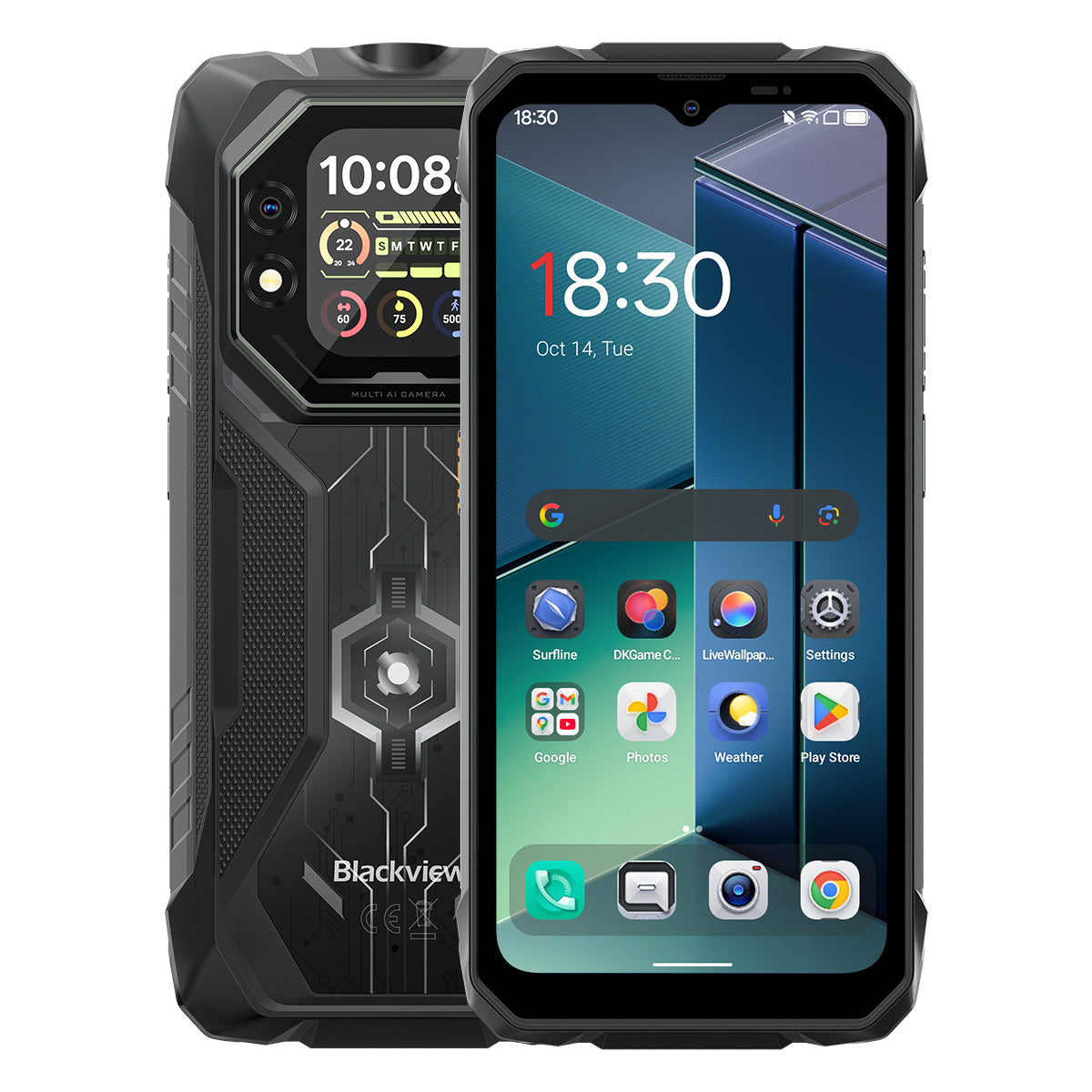


Blackview ROCK 1 6.56 吋 90Hz 主顯示器及 2.01 吋副顯示器 MediaTek Helio G81 八核心 15000mAh 20MP 夜視相機 4G 防摔手機

庫存可用 (13)
重點摘要
重點摘要
✔6.56 吋主螢幕及 2.01 吋多功能副螢幕
✔八核心 MediaTek Helio G81 處理器
✔15000mAh 電池與 33W 快充
✔20MP Sony® 夜視相機
✔IP68、IP69K 及 MIL-STD-810H 認證
資訊
資訊
Blackview ROCK 1 為需要在嚴苛環境中依賴穩定行動性能的用戶打造。它結合了 6.56 吋 90Hz 主顯示螢幕與 2.01 吋副顯示螢幕,搭載 MediaTek Helio G81 處理器及 15000mAh 電池,支援 33W 快充,適合工作、旅行、導航及戶外使用。主要的現場適用功能包括 20MP Sony 夜視相機、雙螢幕快速狀態檢視,以及 IP68、IP69K 和 MIL-STD-810H 防護。專為工地、偏遠旅程及日常耐用性設計,讓用戶在一般手機無法應付時,依然能自信連線、捕捉細節並持續前進。
關於品牌
關於品牌
在 Blackview,我們相信優秀的科技應該超越令人印象深刻的規格。它應該貼近真實生活,解決實際問題,並在最關鍵時刻保持可靠。
Blackview 起初專注於為嚴苛環境打造的堅固手機。如今,我們提供更廣泛的智慧裝置生態系統,包括智慧型手機、平板電腦、筆記型電腦、智慧手錶、音訊產品等。
在每個產品類別中,我們的重點始終如一:耐用品質、實用創新與親民價格。我們設計的產品從第一天起就讓人感到可靠。
我們了解顧客最重視的是什麼:流暢的效能、持久的可靠性、有用的功能,以及讓日常生活更輕鬆且不增加不必要成本的科技。
這就是為什麼 Blackview 對產品測試、使用者體驗以及能為工作、旅行、創作、戶外探險和日常連結帶來實質價值的功能投入真正的關注。
Blackview 為那些想要值得信賴科技的人而生:智慧且強大的裝置,能跟上現代生活的步伐。
設計可靠。天性實用。為真實生活而造。
運送與退貨
運送與退貨
• 運送:訂單會在1至2個工作天內處理。標準配送時間為3至7個工作天,視您的所在地而定。
• 退貨:您可在收到訂單後30天內退貨或換貨。商品必須保持原始狀態並附有購買證明。
若您的商品因製造問題而有缺陷或損壞,我們將免費為您更換。

創新雙螢幕顯示
滿足強大動力需求
您值得信賴的戶外選擇,探索無限可能


堅固設計與細膩美學的結合
ROCK 1 採用耐用堅固結構,展現其硬派科技實力。背蓋融合獨特霧面設計,與光線互動產生動態視覺效果,為堅固外觀增添細膩質感。

輕鬆掛上掛繩,隨處懸掛,安全保護。


第一名
MIL-STD-810H & IP69K & IP68 認證,堅固打造
征服極限
第二代
創新雙螢幕,重新定義
智慧視界

第一名
MIL-STD-810H & IP69K & IP68 認證,
為征服極限而生

MIL-STD-810H 認證
堅固打造,隨時迎戰挑戰。
ROCK 1 提供軍規級耐用性,能抵抗摔落、水浸與沙塵。無論是工地還是極限戶外探險,它都是您值得信賴的夥伴。
通過這些極限測試驗證

雨水

沙塵

震動

衝擊

濕度

高度

加速度

高溫

低溫

浸泡

強化防震角落

超堅固背蓋

航空級鋁合金
合金框架

抗刮耐磨
防碎熊貓玻璃
IP69K & IP68 認證
為極限環境而生。
ROCK 1 通過 IP68 與 IP69K 雙重認證 — 完全防塵、防深水浸泡及強力高壓水柱。專為極端環境打造,表現可靠,超越其他產品。

*防水深度可達 1.5 公尺,持續 30 分鐘。

螢幕周圍無縫邊緣密封

抗腐蝕鋁合金按鍵搭配高級矽膠防水圈

USB 埠 TPU 防塵塞,完整密封

喇叭清潔,自動除塵 &
排水功能
水下相機

第二代
創新雙螢幕,重新定義智慧視界
6.56 吋 HD+ IPS 螢幕
看得更多,享受更多
ROCK 1 的 6.56 吋 HD+ IPS 螢幕結合驚人清晰度與寬廣視角,帶來沉浸式視覺體驗,適合遊戲、串流等多種用途。

720*1612
解析度
178°
IPS 全視角
450 尼特
亮度
180Hz
觸控採樣率
83%
螢幕佔比
90Hz AI 智慧刷新率
更順暢。更快速。更出色。
告別延遲 — 智慧切換確保絲滑順暢的捲動體驗,並最大化電池續航。

2.01 吋多功能副螢幕
小螢幕,大不同
ROCK 1 的智慧副螢幕將通知、音樂控制、自訂錶面等功能盡在指尖 — 高效、便利、不間斷的樂趣。

2.01 吋
尺寸
240*296
解析度
熊貓
玻璃
16:13
長寬比
500尼特
亮度

使用自拍
後置相機

查看時間與日期

播放/暫停/切換曲目

接聽/拒接來電

查看訊息
通知

查看天氣更新

使用內建
指南針

計步追蹤

個性化時鐘樣式
護眼模式
日夜舒適護眼。
四種護眼模式,隨時保護您的視力——閱讀、工作或放鬆,享受極致舒適。


閱讀模式

夜燈

深色模式

淺色模式
手套模式 2.0
即使戴手套也能順暢操控。

觸控靈敏度提升 8% 
第3名
Helio G81 強化,性能釋放
八核心 MediaTek Helio G81
快速、高效、可靠。
無延遲,盡情使用。ROCK 1 讓您無縫切換工作應用、離線導航和移動串流,全天候穩定運行。


2*Cortex-A75@2.0GHz+
6*Cortex-A55@1.7GHz
瞬間開啟,流暢多工

Arm Mali-G52 MC2
更流暢的圖形,更清晰的細節

345,548
安兔兔基準測試
最高 24GB LPDDR4X 記憶體
多工處理,毫不妥協。
為多工而生。ROCK 1 以快速載入、流暢切換和穩定速度,輕鬆應對工作應用和娛樂。

最高 24GB 記憶體=8GB RAM + 16GB 擴充
Atomized 記憶體 2.0
可用記憶體增加 9%
256GB eMMC 5.1 快閃儲存
瞬間啟動,流暢體驗。
瞬間安裝並開啟大量內容,應用程式快速啟動,帶來無縫、隨時待命的體驗!

F2FS 檔案系統
隨機讀取速度提升 25%
隨機寫入速度提升 3 倍
EROFS 只讀檔案系統
隨機讀取速度提升至 300%
2651平方毫米散熱技術
保持涼爽,表現更佳
ROCK 1 採用三重材料散熱技術,提供卓越的散熱效果,帶來更順暢、更涼爽的使用體驗。

石墨
導熱矽脂
銅箔
即使激烈遊戲後,溫度仍保持在 38°C 以下
第4名
15,000mAh 強力電池,持久續航
15,000mAh 巨大電力
無限能量,無盡樂趣!
ROCK 1 配備超大 15,000mAh 容量,為商務、旅行和冒險提供源源不絕的電力。始終充滿電,隨時準備迎接每一刻!

智慧充電
保護

AI 節能
演算法


20小時
遊戲

84小時
通話

64小時
音樂

26小時
網頁

22小時
影片

45天
待機
*數據由 Blackview 實驗室基於連續使用測試。實際使用情況可能因真實使用環境而異。
5W OTG 反向充電
隨時供電,
隨處分享。
輕鬆為您的耳機、智慧手錶等充電——隨時準備應對外出緊急狀況。


第 5 名
捕捉每個時刻,無論白天或夜晚。

16MP AI 主鏡頭
清晰、生動、輕鬆。
從工作到娛樂,ROCK 1 的 16MP 主鏡頭帶來銳利、生動的照片,隨時準備分享。

13MP AI 前置鏡頭
完美自拍,隨時隨地。
ROCK 1 的 AI 13MP 前置鏡頭,確保你隨時閃耀,智能調整讓任何環境下都完美無瑕。
人像
聚焦重要。
AI 驅動的背景模糊,突出主體,營造專業且吸睛的景深效果。


美顏
輕鬆光采。
自然的你。
肌膚柔滑,色調提升,AI 完美修飾—快速自拍從未如此自然無瑕。
夜間
掌控夜晚。
明亮、銳利且生動—AI 強化的低光拍攝捕捉每個細節,即使在最暗的時刻。


20MP Sony 夜視
看見黑暗之外。
ROCK 1 突破黑暗,揭示夜晚每個細節,捕捉肉眼無法見到的景象。
第 6 名
業界獨家 Doke AI 智能助理
結合全球前三大 AI 模型,Doke AI 精準理解你的需求,提供更智慧、更快速、更個人化的服務體驗!

DeepSeek-R1

ChatGPT-4o mini

Gemini AI 2.0 快閃
Gemini AI
更聰明的助理,專屬於你。

語音喚醒&
聲紋識別
用聲音即刻且安全解鎖,免動手。

全球智慧控制
一指令,無縫控制所有應用程式與設定。

全螢幕協助
詢問你的螢幕,立即獲得答案。


即時互動
即時回應,隨時隨地自然對話。
業界唯一自主開發的 Doke AI 應用程式

Hi Doki 應用程式
你的 AI 智能聊天助理
從完成任務到激發靈感,Hi Doki 是你隨時待命的夥伴。


次世代
DeepSeek-R1
深度思考,次世代智慧。

AI 在線搜尋
及時洞察,更聰明的答案。

文件解析
即時上傳與分析。

輔導助理
掃描、解決、聰明學習。

與 AI 聊天
19 種 AI 角色,無限對話

ImageX 應用程式
你的隨身 AI
照片編輯器
憑藉 18 種 AI 照片編輯工具,ROCK 1 輕鬆將戶外拍攝、田野照片和日常時刻轉化為令人驚豔的視覺作品,隨時分享。

AI 移除物件
輕鬆移除不需要的元素,精準無誤。

AI 外延繪畫
無縫延展畫布,拓展視野。


AI 模糊照片
以智慧背景模糊突出主體。
AI 背景替換
輕鬆替換背景,重新定義你的場景。

AI 動畫
將靜態影像變成動態時刻——觀看臉孔與回憶活起來!


VidGen 應用
你的 AI 影片魔法製造者!
從文字到影片,照片到電影時刻,VidGen 的智慧 AI 將你的日常冒險轉化為驚豔且適合分享的創作,搭配有趣且動態的特效——只需輕觸幾下!


Soundle 應用
你的 AI 音樂作曲家!
不需樂器或錄音室—Soundle 將你的手機變成強大的音樂實驗室,為每個時刻創造獨特旋律。

第 7 名
最新 DokeOS 5.0 基於 Android 16
DokeOS 從 4.2(Android 15)升級到 5.0(Android 16),帶來更快的效能、更流暢的操作、更乾淨的介面、更個人化的體驗與更智慧的功能。全面升級,帶來卓越使用體驗。

探索更多,盡在掌握

最高 120 流明亮度手電筒
強力照明與 SOS
緊急閃光燈。

側鍵功能
指尖上的簡單!
一鍵直達,無煩惱——立即存取你的
輕鬆使用常用功能或應用!

開始錄音

開啟手電筒

截圖

開啟水下相機

開啟 PTT

開啟 SOS
實用工具包
口袋裡的工具!
10 種必備工具集於一款應用,將你的 ROCK 1 變成多功能的全能工具箱,應付日常任務。


四核心導航
隨處導航,
征服每一處!
由 GPS、北斗、Galileo 與 Glonass 提供無縫且精準的導航,即使在最偏遠或嚴苛的地點也能確保可靠性。
Blackview ROCK 1 規格
| 型號 | ROCK 1 |
| 顏色 | 黑色 |
| 尺寸 | 177.9 * 83.5 * 24.7mm |
| 重量 | 490 克 |
| 作業系統 | 基於 Android 16 的 DokeOS 5.0 |
| 顯示器 | 6.56 吋 HD+ IPS,720 * 1612 解析度 90Hz 更新率,83% 螢幕佔比 副螢幕:2.01 吋,240 * 296 解析度 |
| 中央處理器 | 八核心 MediaTek Helio G81 |
| 記憶體與儲存 | 8GB RAM + 256GB ROM,LPDDR4X + eMMC 5.1 |
| TF 擴充 | 最高支援 256GB 擴充儲存 |
| 電池 | 15000mAh;33W 快充 |
| 前置相機 | 13MP |
| 後置相機 | 1600 萬主鏡頭 + 2000 萬夜視鏡頭 |
| 揚聲器 | 1 個智慧 PA 喇叭 |
| 手電筒亮度 | 最大 120 流明,最小 110 流明 |
| 導航 | GPS+GLONASS+Galileo+北斗 |
| 卡槽 | 雙卡;2SIM/1SIM+1*TF 卡 |
| NFC | 支援 |
| Wi-Fi 與藍牙 | Wi-Fi 5;藍牙 5.0 |
| 網路連接 | 2G 頻段:B2/B3/B5/B8 3G 頻段:WCDMA:B1/B8 CDMA:BC0/BC1/BC10 4G 頻段:TDD:B40/B41 FDD:B1/B3/B7/B8/B19/B20/B28A/B28B |
| 設計 | |
| 產品 | Blackview ROCK 1 |
| 顏色 | 黑色 |
| 顯示器 | |
| 主顯示器 | 6.56 吋 |
| 次要顯示器 | 2.01 吋 |
| 更新率 | 90赫茲 |
| 效能 | |
| 處理器 | 聯發科 Helio G81 |
| 電池與充電 | |
| 電池 | 15000mAh |
| 充電 | 33W 快速充電 |
| 相機 | |
| 夜視攝影機 | 20MP Sony |
| 耐用性 | |
| 耐用等級 | IP68 & IP69K & MIL-STD-810H |
| 連接性 | |
| 網路 | 4G |
Who is the Blackview ROCK 1 rugged phone designed for?
The Blackview ROCK 1 is designed for construction workers, maintenance technicians, farmers, delivery drivers, and outdoor enthusiasts such as campers or anglers. It is also well-suited for workers who need a device for communication, navigation, and daily tasks in environments prone to dust, rain, or accidental impacts—such as construction sites or mines.
With its high-capacity battery, rugged, durable build, and night-vision camera, it supports both professional work and outdoor activities. Additionally, the rear display allows for quick access to information and control options. Beyond its practical tools and massive battery, it offers all the standard features found in mainstream smartphones.
Does the Blackview ROCK 1 have a 15,000mAh battery?
Yes. The Blackview ROCK 1 rugged phone is equipped with a 15,000mAh battery, providing ample power for calls, text messages, navigation, and entertainment. This ensures you stay powered up even when you are away from your desk or a wall outlet for the day. If used primarily for routine calls and text messages, the battery will last even longer.
The time between charges depends on how you use the phone. Intensive tasks like prolonged navigation, photography, or gaming may drain the battery down to 20%, while lighter use—such as occasional calls, texts, or a standard workday—will require less frequent charging. This capacity ensures you have enough power to start the next day or handle unexpected situations.
How much does the Blackview ROCK 1 weigh?
The Blackview ROCK 1 weighs 490 grams and measures 24.7 mm thick. These figures refer to the device's weight alone and do not include accessories such as cases or lanyards, which would increase the total weight.
For daily use at work, you can carry the device in a dedicated work pouch or a specific compartment in your bag, making it easy to access. If you prefer to keep it in a pocket, ensure that the pocket is spacious enough to accommodate the device's thickness.
What affects the Blackview ROCK 1’s battery life in everyday use?
The following factors can impact battery life:
Screen Brightness: Higher brightness levels consume more power. It is recommended to adjust the brightness to a comfortable level based on your current environment.
App Usage: Activities such as gaming, video calls, or prolonged navigation consume more power than occasional messaging or a glance at a map.
Mobile Signal Strength: When the signal is weak, the phone works harder to maintain a connection, which leads to increased power consumption.
Background Activity: Even when you are not actively using certain apps, they may still consume power by performing downloads, updates, or data synchronization in the background.
Hotspot and Flashlight: Enabling these features increases power consumption; leaving them on for extended periods will drain the battery significantly faster. It is best to turn them off when they are no longer in use.
You can also check your battery usage in "Settings" to identify which apps are consuming the most power and make adjustments accordingly.
What can I do with the Blackview ROCK 1’s rear display?
When the back of the phone is facing you, you can view notifications, control music playback, or check the time via the customizable watch faces—all without needing to flip the phone over to use the main screen. It provides a more convenient way to access specific information.
You can also view alerts or pause music playback directly, again without needing to turn the phone over. You can choose the display options that best suit your personal habits. For tasks such as reading long messages, typing, or browsing content, the main screen is recommended, as it offers more display space.
Can I use the Blackview ROCK 1’s rear display to take selfies?
Yes. The Blackview ROCK 1 supports taking selfies with the rear camera, and the rear display helps with framing. You can see your position within the frame on the screen, eliminating the need to guess where the camera is pointed.
When using the rear screen for photography, adjust your position within the preview frame and follow the on-screen prompts to take the shot. Clean the lens before shooting and face toward a light source for clearer results. If taking a group photo, ensure everyone is visible within the preview frame before capturing the image.
What can I see with the Blackview ROCK 1’s night vision camera?
The Blackview ROCK 1’s night-vision camera allows you to observe nearby objects, people, and animals in the dark. It is useful for viewing dimly lit areas or monitoring your surroundings when it is too dark for the main camera to capture clear details.
When using it, keep the phone steady and point the lens toward the area you wish to observe. Factors such as distance, obstacles, and reflective surfaces may affect the view. Please note that the night-vision function cannot measure temperature, nor can it see through objects.
Is the Blackview ROCK 1’s main camera suitable for everyday photos?
Yes, it is. The Blackview ROCK 1 features a 16MP main camera, which is capable of handling daily photography needs—such as capturing family moments, outdoor scenery, documents, or the condition of equipment. For the best results and sharper detail, it is recommended to take photos in well-lit environments.
To achieve better image quality, clean the lens, tap the subject on the screen to focus, and keep the phone steady. In low-light conditions, try to increase the available lighting; if your subject is moving, wait until they are still before pressing the shutter button.
How does the Blackview ROCK 1’s speaker perform for calls and music?
The built-in speaker on the Blackview ROCK 1 supports hands-free calling, voice navigation, video viewing, and general music playback. Performance is smooth when the phone is nearby, the network connection is stable, and the surrounding environment is quiet. Conversely, issues such as stuttering or poor audio clarity may occur under less-than-ideal conditions.
When using the speaker for calls, it is best to keep the phone close by, ensure the speaker is not obstructed, and adjust the volume to suit your environment. For the best experience during hands-free calls, choose a quiet location. If you are listening to music—for instance, in a living room—and desire better sound quality, you can connect headphones or an external Bluetooth speaker.
What can I customize with the Blackview ROCK 1’s shortcut button?
You can configure the shortcut key on the Blackview ROCK 1 to perform specific actions, such as starting a voice recording, turning on the flashlight, taking a screenshot, or launching the underwater camera. This allows for quicker access to frequently used features.
Locate the shortcut key settings within the "Settings" menu and select your desired action. For example, if you assign the "Flashlight" function to the shortcut key, you can quickly turn it on whenever you need temporary illumination. Once configured, you may want to test it; please note that some functions may require you to unlock the phone before they can be used.
What does the Blackview ROCK 1’s 90Hz refresh rate mean for everyday use?
A 90Hz refresh rate means the screen can refresh up to 90 times per second. This results in smoother scrolling, swiping, and animations—for instance, when browsing the web, checking messages, or navigating through app menus.
While the refresh rate determines how dynamic content is displayed, it does not increase image resolution, nor does it make every application run faster. Furthermore, since games have their own frame rate limits and hardware requirements, it does not guarantee that all games will run at 90 frames per second.
How does the Blackview ROCK 1 perform when running everyday apps?
The Blackview ROCK 1 is well-suited for daily tasks such as messaging, handling emails, using navigation, and browsing the web. You can easily check emails, switch to a messaging app to reply, and then return to your browser. For more resource-intensive applications—such as demanding games—you may notice slightly longer startup or response times.
If app switching becomes noticeably sluggish, check for background processes like ongoing downloads, system updates, or other high-load tasks. Additionally, freeing up some storage space and restarting the phone can often resolve temporary slowdowns.
What protection does the Blackview ROCK 1 offer for outdoor work?
The Blackview ROCK 1 rugged phone features IP68 and IP69K ingress protection ratings and meets the MIL-STD-810H testing standard. It is designed to effectively withstand dust (such as cement dust), moisture, and impacts that may be encountered during outdoor work.
When working outdoors, ensure that the SIM card slot and all port covers are securely closed. If the phone accidentally falls out of your pocket, check it for any damage. Please note that protective capabilities may diminish over time, so the device should still be handled with care during daily use.
How do I check for software updates on the Blackview ROCK 1?
Check the "Settings" on your phone to see if there is a notification for a system update. If you receive a notification, review the update details and follow the on-screen instructions to download and install it. If no update notification appears, you can check again later.
Before updating, back up important photos, contacts, and files; connect to a stable Wi-Fi network; and ensure your phone has sufficient battery power. It is recommended to perform the update when you are not using your phone—for instance, while you are asleep—as the device may restart during the installation process. Follow the on-screen prompts and wait for the update to complete before using your phone again.
What should I do if the home screen keeps crashing on my Blackview ROCK 1?
First, try restarting your phone to see if the home screen returns to normal. If the issue persists, check whether your phone’s internal storage is nearly full. You can free up space by deleting unnecessary large files or apps, or by backing up your data. Then, check again to see if the screen has returned to normal.
Next, inspect the screen for cracks or other physical damage, and check if it has begun to separate from the device body. Also, observe whether any lines, flickering, or dark spots appear on the display. If these problems continue, consider having the device evaluated by a professional phone repair technician.
Jump to another section