



Oscal Pilot 3 6.78 吋 MediaTek Dimensity 6300 12GB+256GB 50MP+20MP 夜視相機 7500mAh 5G AI 耐用型智慧手機

快點,庫存只剩下 5 件。
重點摘要
重點摘要
✔5G AI 防摔手機,配備 DeepSeek-R1、ChatGPT 與 Gemini
✔5G 6nm MediaTek Dimensity 6300 處理器,最高 2.4GHz
✔6.78 吋 2.4K 螢幕,具 120Hz 智慧 AI 更新率
✔50MP AI 主鏡頭與 20MP 夜視鏡頭
資訊
資訊
OSCAL Pilot 3 是一款 5G 防摔手機,專為需要速度、夜間可視性和戶外耐用性於一身的用戶設計。它配備 6.78 吋 120Hz FHD+ 螢幕、Dimensity 6300 處理器、7500mAh 電池及 33W 快充,能滿足高強度的日常使用和現場工作需求。擁有 5000 萬像素主鏡頭、2000 萬像素夜視鏡頭、3200 萬像素前鏡頭、2K 影片錄製、NFC、搭載 QZSS 的 GPS、IP68 及 IP69K 防護等級,以及 AI 工具,專為工地、旅遊及低光環境打造。
關於品牌
關於品牌
在 Blackview,我們相信優秀的科技應該超越令人印象深刻的規格。它應該貼近真實生活,解決實際問題,並在最關鍵時刻保持可靠。
Blackview 起初專注於為嚴苛環境打造的堅固手機。如今,我們提供更廣泛的智慧裝置生態系統,包括智慧型手機、平板電腦、筆記型電腦、智慧手錶、音訊產品等。
在每個產品類別中,我們的重點始終如一:耐用品質、實用創新與親民價格。我們設計的產品從第一天起就讓人感到可靠。
我們了解顧客最重視的是什麼:流暢的效能、持久的可靠性、有用的功能,以及讓日常生活更輕鬆且不增加不必要成本的科技。
這就是為什麼 Blackview 對產品測試、使用者體驗以及能為工作、旅行、創作、戶外探險和日常連結帶來實質價值的功能投入真正的關注。
Blackview 為那些想要值得信賴科技的人而生:智慧且強大的裝置,能跟上現代生活的步伐。
設計可靠。天性實用。為真實生活而造。
運送與退貨
運送與退貨
• 運送:訂單會在1至2個工作天內處理。標準配送時間為3至7個工作天,視您的所在地而定。
• 退貨:您可在收到訂單後30天內退貨或換貨。商品必須保持原始狀態並附有購買證明。
若您的商品因製造問題而有缺陷或損壞,我們將免費為您更換。

 PILOT 3
前三名深度思考 AI 型號
史詩級堅固耐用 採用堅固線條、獨特防滑紋理和銳利邊緣, PILOT 3完美體現戶外探索精神。每個細節,從布局到 從相機模組到框架的螺紋設計,以及每寸材質的精選, 機身展現對完美的執著追求。

Doke AI 應用由...驅動 三大頂尖 AI 模型 全能 DeepSeek-R1、ChatGPT、Gemini AI 2.0 Flash,輕鬆自如& 安全語音啟動,
智慧全球控制,免提未來,極致隱私

OSCAL Doke AI,全方位 AI 助手,成就更多,探索更遠,連接更深

指揮一切 只需說出指令,即可立即啟動 Doke AI 進行免提操作。您的聲音是 您的個人遙控器,讓一切盡在指尖。


用簡單的指令喚醒您的日子,讓您的話語成為力量

冒險旅行前 即使身處荒野,也能秒獲旅行詳情
在陌生地形中即刻導航 即時導航,確保您永不迷路

隨時聊天 只需大聲說出你的問題,即可獲得即時、清晰、自然的回應, 即時回應——無需打字。無論你是在緊急情況還是雙手忙碌時, 建築工地,存取資訊從未如此簡單。


字詞到奇蹟 體驗閃電般快速、深度思考的 AI 搜尋,輕鬆完成文件分析, 以及智能寫作輔助。看著你的文字栩栩如生,解鎖無限創意 各種可能性,盡在指尖。

讓每篇貼文都爆紅 想讓你的每張照片成為社群媒體的焦點嗎?在…的幫助下 多達18種強大的AI編輯工具,讓你的每一篇貼文輕鬆煥發新生命, 瞬間爆紅!
回憶復甦 模擬眨眼、微笑和頭部動作等細節,讓您的 讓照片栩栩如生,讓回憶瞬間鮮活,充滿動感與故事!
替換 天空變換,
情感多變 輕鬆一鍵更換天空。無論是晴朗的藍天,還是戲劇性的 日落或星空,只需將天空變換成您喜愛的樣子。
單調,
脫穎而出 精準識別照片中的主體,讓你自由替換 搭配你喜歡的任何背景,瞬間為照片賦予全新場景與氛圍。
光彩加倍 無論是自拍、肖像還是團體照,都能智能美化 並細膩修飾,讓你的每張照片閃耀自信與光彩!
視野延伸 只需輕觸一下,讓您的照片突破框架限制,瞬間且 智能擴展您的視野,同時保留細節!讓每張照片成為您的視覺傑作!
視覺平衡 如同魔法棒,瞬間修正變形、傾斜和透視問題, 讓您的照片恢復原有的美麗。
品質如您所願 使用 AI 驅動的編輯功能重新想像您的照片,包括裁剪、濾鏡、貼紙, 文字,並超越,將每張照片變成藝術品。
藝術重生 輕鬆疊加兩張照片,創造夢幻般的視覺效果。讓您的照片 打破常規,充滿藝術感!
瞬間鮮明 即刻模糊背景,讓主體突出,營造 電影般的景深效果。
美麗永恆 識別並細緻修復照片上的小斑點或明顯瑕疵。 皮膚或照片表面,使您的照片完美無瑕。
色彩重現 準確還原每個細節的色彩,使人物、風景, 甚至舊照片中的一縷陽光也栩栩如生,彷彿時光倒流。
讓照片說話 輕鬆選擇照片中的特定區域或物體並粘貼到 其他區域,創造獨特的視覺效果。
自由翱翔 複製照片中的任何區域或物體,並將它們粘貼到其他地方。『克隆』 並繪製相同或相似的內容,賦予您的照片新生命和無限可能。
釋放你的風格 點燃你照片的視覺衝擊力!應用鮮明的色彩衝突效果於 你圖片中的不同元素,創造獨特且現代的視覺風格。
創意 捕捉人與環境的互動,無縫銜接 將它們與動態螺旋效果融合,為每張照片注入無限可能。
聚光燈下 從日常影片日誌、創意短片到精彩時刻,它能為你的作品注入活力 利用智能 AI 技術製作影片!想像一下,只需輸入文字或圖片,它就能生成創意內容 為你打造影片,將文字或圖片轉化為視覺盛宴。
交響樂,您的專屬背景音樂 靈感湧現,旋律流淌,沒有專業技巧?自由調整風格、情緒, 樂器與節奏,甚至創作自己的歌詞,使用 Soundle App 讓每首背景音樂獨一無二。從 從火花到交響樂,您的音樂,您的方式。

最高 36GB 記憶體, 256GB 內部儲存空間 高效完成任務,遊戲加速體驗

 反應速度
 多1TB TF卡擴充
7500mAh超大電池 33W快速充電,電力回充 持久電力,流暢瀏覽
護眼優先
體驗 同時進行。


即使在直射陽光下
20%電力提升
便利,安心
心選 不再需要繁瑣的插拔,只需輕輕放入, 開始充電。無論工作或娛樂,保持您的桌面整潔高效。
20MP 夜視相機 清晰與安全,日夜兼備

框住你的光彩


4合1 像素合併技術
提升影像亮度,特別是在夜晚
雙重超級PD
自動對焦更快更銳利

見證一切,黑暗中無所畏懼,安全加倍

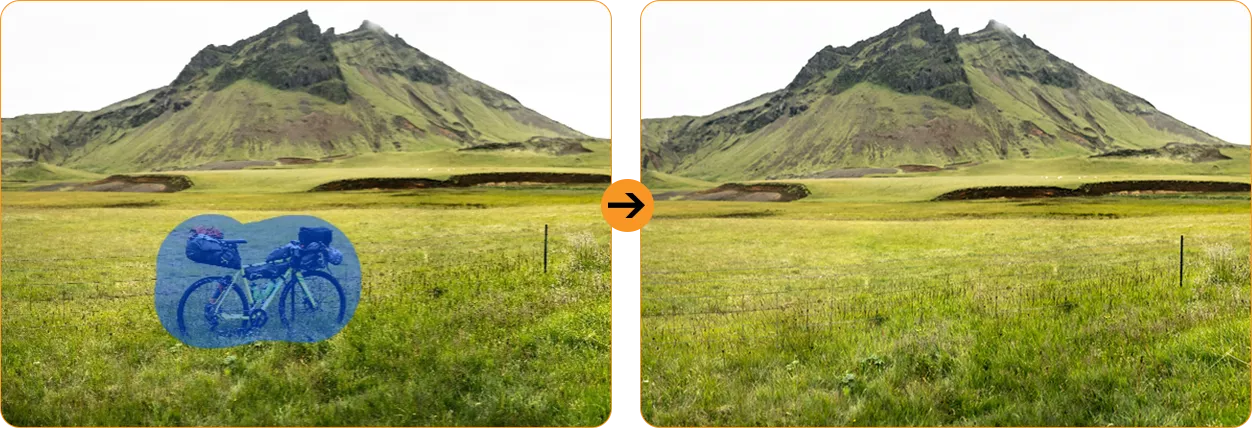
神奇的 AI 編輯工具,
將每個平凡變成傑作
 AI 魔法橡皮擦
 AI 照片去模糊

 AI 天空替換


 AI 肖像模糊
 AI 肖像燈

 AI 色彩焦點


防水及 防塵保護 超越標準:更堅韌、更強大、更卓越

 *防水深度可達1.5米,持續30分鐘。
內外兼備, 無懼任何挑戰

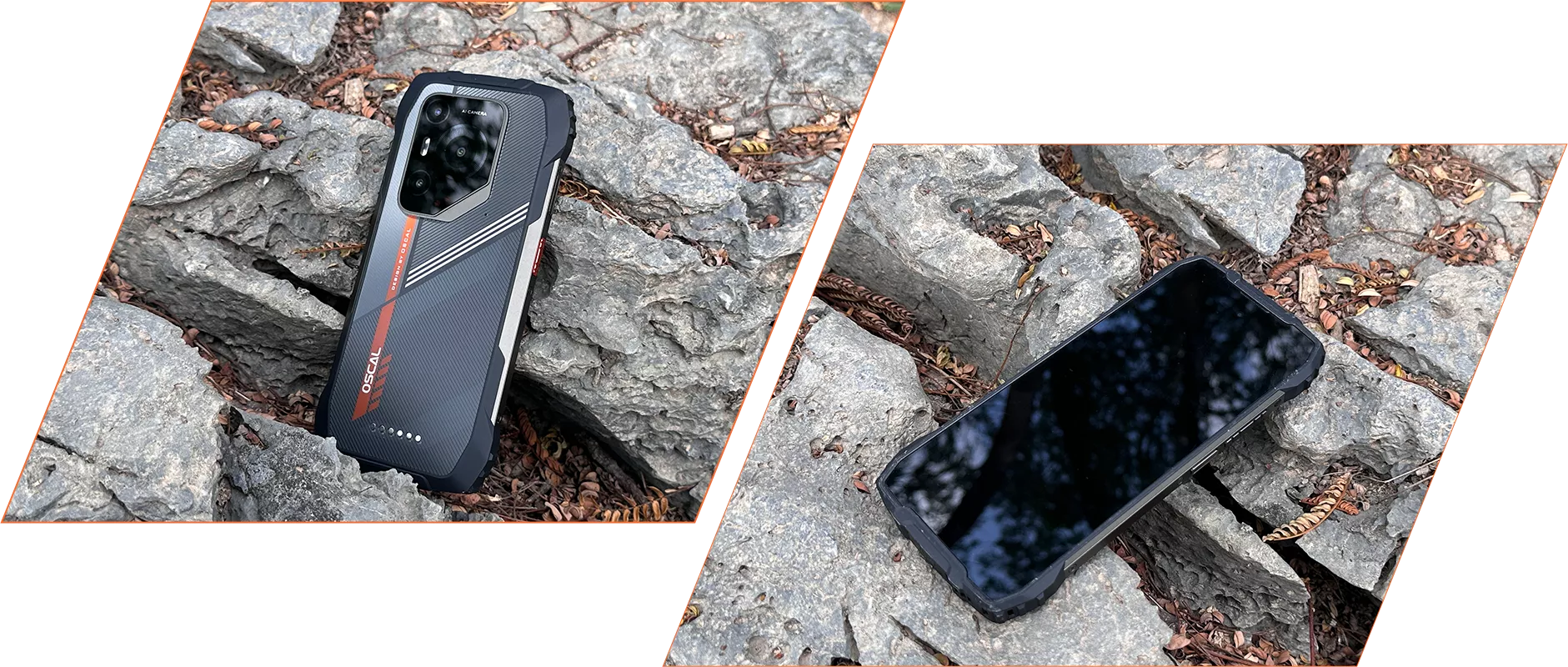 *抗摔高度達1.2米。實際性能可能因以下因素而異
作為表面材料,撞擊角度等。

搭配使用 信心

比以往更順暢 為您量身打造,智慧升級,前所未有 個人化↑ 便利性↑ 流暢度↑ 隱私↑
閃耀活力 讓 PILOT 3 的螢幕充滿流動的藝術和鮮豔的色彩,讓它 充滿活力,開啟全新視覺體驗。
個人空間 您可以通過工作區應用將工作空間與私人空間分開, 從而保持您的商業數據安全,並維持工作與個人之間的明確界限 生活。
效率加倍 為您提供快速且直觀的方式來存取並放置小工具於您的 主畫面新增「新增小工具」按鈕,從而簡化流程並使其更 高效。
全方位即時存取 單指快速觸達


 可用 RAM 增加 9%↑
 *EasyShare 僅在您於設定中開啟 Wi-Fi 時有效,但不會
依賴網路。數據傳輸速度將以實際測試環境為準,因環境可能有所不同。


 系統管理員

立即安全分享 您可以將螢幕錄影限制在特定應用程式,而非整個螢幕,因此您 可以錄製或分享必要或您想要的內容,同時保持其餘部分私密。非常適合線上 會議、教育課程和團隊協作。

24/7 客服中心與歐洲維修中心 更多關懷,減少擔憂
升級支援 在 OSCAL,我們提供定期系統更新,確保您的裝置保持 保持最新的 Android 版本、功能、安全補丁和性能 改進。
即時幫助,隨時可用,
隨處可用 我們專業的技術支援團隊隨時準備解決任何問題,無論是 可透過我們的官方網站、熱線、社交媒體或電子郵件線上,或在我們授權的線下 服務中心。
聯絡我們
 *所有時間均為當地時間。

離線支援,及時幫助

歐洲中心 為了進一步協助,我們的專業技術人員將提供現場支援, 精確的故障診斷和高效的維修服務。
更多功能待您探索
+北斗+QZSS 獲得即時定位追蹤,無論何處皆能保持聯繫。
-
型號PILOT 3
-
顏色黑色,橙色
-
尺寸182.2*86*14.5mm
-
重量357g
-
作業系統基於 Android 15 的 DokeOS 4.1
-
顯示6.78 吋 2.4K IPS,1080*2460 解析度
120Hz 更新率,86% 螢幕佔比
康寧®大猩猩®玻璃 5 -
中央處理器5G 八核 MediaTek 天璣 6300,6nm
-
隨機存取記憶體(RAM)與唯讀記憶體(ROM)最高 36GB RAM=12GB+24GB 擴展
256GB ROM+2TB TF 擴展
LPDDR4X+UFS2.2 -
電池7500mAh;33W 快充
-
前置攝像頭32MP
-
後置攝像頭5000 萬像素(Samsung® ISOCELL JN1)
2000 萬像素夜視(SONY IMX376) -
揚聲器1 台 Smart-K Box 喇叭
-
導航GPS+GLONASS+Galileo+北斗+QZSS
-
卡槽雙卡;2*SIM/1*SIM +1*TF 卡
-
NFC支援
-
雙 5G VoLTE支援
-
Wi-Fi 與 BT802.11 b/g/n/a/ac;BT 5.2
-
網路連接2G 頻段:B2/B3/B5/B8
3G 頻段:WCDMA:B1/B2/B4/B5/B6/B8/B19
CDMA:BC0/BC1/BC10
4G 頻段:TDD:B34/B38/B39/B40/B41
FDD:B1/B2/B3/B4/B5/B7/B8/B12/B13/B17/B18/
B19/B20/B25/B26/B28A/B28B/B30/B66
5G 頻段:N1/3/5/7/8/20/28/38/40/41/77/78/79
| 型號 | PILOT 3 |
| 顏色 | 黑色,橘色 |
| 尺寸 | 182.2*86*14.5 毫米 |
| 重量 | 357 克 |
| 作業系統 | 基於 Android 15 的 DokeOS 4.1 |
| 顯示器 | 6.78 吋 2.4K IPS,1080*2460 解析度 120Hz 更新率,86% 螢幕佔比 康寧®大猩猩®玻璃 5 |
| 中央處理器 | 5G 八核心 MediaTek 天璣 6300,6nm |
| 記憶體與儲存 | 最高 36GB 記憶體=12GB+24GB 擴充 256GB 內建儲存+2TB TF 擴充 LPDDR4X+UFS2.2 |
| 電池 | 7500mAh;33W 快充 |
| 前置相機 | 32MP |
| 後置相機 | 50MP(Samsung® ISOCELL JN1) 20MP 夜視(SONY IMX376) |
| 喇叭 | 1 個 Smart-K 盒子喇叭 |
| 導航 | GPS+GLONASS+Galileo+北斗+QZSS |
| 卡槽 | 雙卡;2*SIM/1*SIM +1*TF 卡 |
| 近場通訊 | 支援 |
| 雙 5G VoLTE | 支援 |
| Wi-Fi 與藍牙 | 802.11 b/g/n/a/ac;藍牙 5.2 |
| 網路連接 | 2G 頻段:B2/B3/B5/B8 3G 頻段:WCDMA:B1/B2/B4/B5/B6/B8/B19 CDMA:BC0/BC1/BC10 4G 頻段:TDD:B34/B38/B39/B40/B41 FDD:B1/B2/B3/B4/B5/B7/B8/B12/B13/B17/B18/ B19/B20/B25/B26/B28A/B28B/B30/B66 5G 頻段:N1/3/5/7/8/20/28/38/40/41/77/78/79 |
Does the OSCAL PILOT 3 rugged phone’s night vision camera support thermal imaging?
No. The PILOT 3 features a 20MP night vision camera for capturing your surroundings in low light or complete darkness. It helps you see details that are difficult to make out with a standard camera after dark, making it useful at campsites and in unlit outdoor areas.
Night vision and thermal imaging serve different purposes. The PILOT 3 captures images of your surroundings rather than measuring temperature differences. You can use it to observe objects and terrain at night, but tasks such as identifying overheating components or locating heat leaks require a thermal imaging device.
How do I use the night vision camera on the OSCAL PILOT 3 rugged phone, and when is it useful?
Access the night vision feature through the phone’s camera interface and frame your subject using the on-screen preview. Keep the camera area clear of fingers or other obstructions, and hold the phone steady while taking the photo. The preview helps you adjust your position and find a suitable shooting distance.
Night vision is useful when checking a campsite, observing nearby surroundings, or photographing outdoor scenes after dark. Image clarity depends on the distance, subject movement, and surrounding conditions. For better results, focus on nearby subjects and pause briefly before taking each shot.
Why aren’t photos always taken at 50MP on the OSCAL PILOT 3 rugged phone?
The PILOT 3’s 50MP main camera uses four-in-one pixel binning technology. When this processing is applied, information from four pixels is combined to produce a photo of approximately 12.5MP. This helps improve brightness in low-light conditions while keeping image files more manageable.
The camera’s sensor resolution and the resolution of a saved photo are different measurements. A 12.5MP image does not mean your camera is limited to 12.5MP; it reflects the processing used for that shot. The final photo resolution depends on the shooting mode and image processing, balancing detail, brightness, and everyday storage needs.
Can I use two SIM cards and a memory card together in the OSCAL PILOT 3 rugged phone?
No, you can’t use all three at once. The PILOT 3 has a shared card slot design that supports either two SIM cards or one SIM card and one TF/microSD memory card. The second slot accommodates a SIM card or a memory card, so you can choose the combination that suits your needs.
Use two SIM cards to keep separate work and personal numbers or add a local number when travelling. If additional storage is more useful, choose one SIM card and a memory card for your photos, videos, and files. Follow the markings on the tray and make sure each card sits securely before reinserting it.
What does “up to 36GB RAM” mean on the OSCAL PILOT 3 rugged phone?
“Up to 36GB RAM” means 12GB of physical RAM plus up to 24GB of expanded RAM. The expanded portion uses part of the phone’s internal storage to provide additional memory resources for managing apps. It supplements the built-in RAM rather than adding another 24GB of physical memory.
RAM expansion can help with multitasking when you regularly switch between several apps. Because it shares space with your stored content, keep enough internal storage available for both expansion and everyday files. The amount you need will depend on how you use your phone and how many apps you typically keep open.
Can I take underwater photos with the OSCAL PILOT 3 rugged phone?
Yes. The PILOT 3 includes an Underwater Camera feature and supports underwater photography at depths of up to 1.5 meters. Its stated water-resistance test conditions are up to 1.5 meters for 30 minutes. Familiarize yourself with the underwater controls before use, and check that the phone’s protective covers and seals are properly closed and undamaged.
Treat these figures as test limits rather than a guarantee for every water environment. Avoid strong currents, high-pressure water, and use beyond the stated depth or duration. After taking the phone out of the water, dry it carefully and allow the charging port and cable connector to dry completely before charging.
Which positioning systems does the OSCAL PILOT 3 rugged phone support for outdoor navigation?
The PILOT 3 supports GPS, GLONASS, Galileo, BeiDou, and QZSS positioning systems. Combined with a compatible navigation app, these help you check your location, follow a route, and find your way during travel or outdoor activities. Before setting off, enable location services and grant your chosen app the necessary permissions.
If your route passes through areas with limited mobile coverage, download the relevant maps in advance using an app with offline support. Satellite positioning can work without mobile data, while available offline navigation features depend on the app. An open view of the sky helps positioning; dense trees, tall buildings, and steep terrain may affect accuracy.
What AI features does the OSCAL PILOT 3 rugged phone offer, and do they require internet access or a subscription?
The PILOT 3 includes Doke AI tools for writing assistance, document analysis, image generation, and photo editing. You can use them to draft text, work through documents, turn ideas into images, and make creative changes to photos. These features bring useful writing and creative tools together on your phone.
Online AI features need an internet connection, and the relevant service may ask you to sign in. Access conditions can vary between tools, so check the feature’s in-app information for any usage limits or payment requirements. Before activating a paid option, review what it includes and choose it only if it suits your needs.
How can I customize the shortcut button on the OSCAL PILOT 3 rugged phone?
The PILOT 3’s shortcut button supports single presses, double presses, and long presses. You can assign available functions or apps to these actions, making frequently used tools easier to reach. For example, a flashlight shortcut can be useful when working in a dim area or moving around a campsite after dark.
Use the shortcut button configuration on your phone to select an action and assign a function from the available options. Once set, try each press action to become familiar with your choices. You can change the assignments as your routine changes, keeping the tools you use most within easy reach.
What does the 120Hz refresh rate offer on the OSCAL PILOT 3 rugged phone, and how can I manage it?
The PILOT 3 features a smart refresh rate of up to 120Hz, helping scrolling, swiping, and animations appear smoother. The difference is especially noticeable when browsing long webpages, scrolling through social feeds, or moving between screens. It contributes to a more fluid experience during everyday use.
To review any refresh-rate controls available on your phone, check its display settings and follow the options shown there. Higher refresh rates generally favor smoother motion, while lower rates can help reduce power use. The available settings depend on the installed software, and actual smoothness also varies with the app and content.
Is the OSCAL PILOT 3 rugged phone compatible with smartwatches and Bluetooth headphones?
Yes. The PILOT 3 supports Bluetooth 5.2 and can connect to compatible wireless headphones and smartwatches. Depending on the accessory, you can listen to music, take calls, receive notifications, or sync activity data. This makes it convenient to use your preferred accessories while commuting, working, or exercising.
For headphones, put them in pairing mode and select them in the phone’s Bluetooth settings. For a smartwatch, follow its companion app’s setup instructions and allow the permissions needed for notifications or syncing. Check that the watch and its app support your phone’s Android version, as available features vary by accessory.
What video resolution and frame rate does the OSCAL PILOT 3 rugged phone support?
The PILOT 3 supports video recording at up to 2K resolution and 30fps, giving you detailed footage of daily life, outdoor trips, and work activities. Use the Camera app’s video interface to review the recording options available for your selected camera and mode before filming.
Higher-resolution videos generally take up more storage, so check your available space before recording longer clips. For clearer results, clean the lens, use good lighting where possible, and hold the phone steadily. Smooth, controlled movements also make your footage easier to watch when filming while on the move.
Can I use two apps in split-screen mode on the OSCAL PILOT 3 rugged phone?
Yes. The PILOT 3 supports split-screen use with compatible apps, allowing you to work with two apps on the screen at once. You can read a document while taking notes or keep a reference page open while writing a message, reducing the need to switch back and forth.
The App Pairs feature lets you save frequently used split-screen combinations and reopen them with a single tap. Follow the on-screen split-screen and pairing options to arrange your preferred apps. App support determines which combinations are available, so choose two compatible apps that work well together for your routine.
How can I keep work and personal apps separate on the OSCAL PILOT 3 rugged phone?
The PILOT 3 includes a Workspace app to help separate work and personal use. It also offers Private Space, which provides a separate area for keeping sensitive apps hidden and protected. Together, these features help you organize different activities and control how you access personal content.
Follow the setup instructions for each feature and add the apps you want to use in that space. For example, keep work tools together for your daily tasks and place selected personal apps in Private Space. This gives you a clearer separation between work activities and content you prefer to keep away from your main interface.
Jump to another section