



Oscal Pilot 3 6,78-tommers MediaTek Dimensity 6300 12GB+256GB 50MP+20MP Nattvisjonskamera 7500mAh 5G AI Robust smarttelefon

Skynd deg, det er bare 5 varer igjen på lager.
Høydepunkter
Høydepunkter
✔5G Al Robust Telefon med DeepSeek-R1, ChatGPT og Gemini
✔5G 6nm MediaTek Dimensity 6300 CPU, opptil 2,4 GHz
✔6,78-tommers 2,4K-skjerm med 120Hz Smart Al oppdateringsfrekvens
✔50MP AI Hovedkamera og 20MP Nattvisjonskameraer
Informasjon
Informasjon
OSCAL Pilot 3 er en robust 5G-telefon laget for brukere som trenger hastighet, nattsyn og utendørs holdbarhet i én enhet. Den har en 6,78-tommers 120Hz FHD+-skjerm, Dimensity 6300-prosessor, 7500mAh batteri og 33W hurtiglading som støtter krevende daglig bruk og feltarbeid. Med et 50MP hovedkamera, 20MP nattsynskamera, 32MP frontkamera, 2K videoopptak, NFC, GPS med QZSS, IP68 & IP69K beskyttelse og AI-verktøy, er den designet for arbeidsplasser, reiser og miljøer med lite lys.
Om merket
Om merket
Hos Blackview mener vi at god teknologi bør gå utover imponerende spesifikasjoner. Den skal passe til det virkelige liv, løse reelle problemer og være pålitelig når det virkelig gjelder.
Blackview startet med robuste telefoner laget for tøffe miljøer. I dag tilbyr vi et bredere økosystem av smarte enheter, inkludert smarttelefoner, nettbrett, bærbare datamaskiner, smartklokker, lydprodukter og mer.
På tvers av alle kategorier er fokuset vårt det samme: holdbar kvalitet, praktisk innovasjon og tilgjengelige priser. Vi designer produkter som føles pålitelige fra første dag.
Vi forstår hva kundene verdsetter mest: jevn ytelse, langvarig pålitelighet, nyttige funksjoner og teknologi som gjør hverdagen enklere uten unødvendige kostnader.
Derfor legger Blackview ekte fokus på produkttesting, brukeropplevelse og funksjoner som gir meningsfull verdi til arbeid, reise, skapelse, utendørs utforskning og daglig kontakt.
Blackview er laget for folk som ønsker teknologi de kan stole på: smarte, kapable enheter bygget for å følge med i det moderne livet.
Pålitelige av design. Praktiske av natur. Laget for det virkelige liv.
Frakt og retur
Frakt og retur
• Frakt: Bestillinger behandles innen 1–2 virkedager. Standard levering tar 3–7 virkedager avhengig av hvor du befinner deg.
• Returer: Du kan returnere eller bytte produkter innen 30 dager etter at du har mottatt bestillingen. Varene må være i original stand med kjøpsbevis.
Hvis varen din er defekt eller skadet på grunn av produksjonsfeil, bytter vi den gjerne uten ekstra kostnad.

 PILOT 3
Topp 3 Dyptenkende AI Modeller
Episk nivå Robusthet Med robuste linjer, unike anti-kropp teksturer, og skarpt definerte kanter, PILOT 3 legemliggjør perfekt ånden av utendørs utforskning. Hver detalj, fra oppsettet av kamera-modul til den gjengede designen av rammen, og valget av hvert eneste materiale for kropp, gjenspeiler en ustoppelig jakt på perfeksjon.

Doke AI-apper drevet av Tre toppnivå AI-modeller Fullt drevet DeepSeek-R1, ChatGPT, Gemini AI 2.0 Flash, enkelt og Sikker stemmeaktivering,
Smart global kontroll, håndfri fremtid med ultimat personvern

OSCAL Doke AI, allsidig AI-hjelper Oppnå mer, utforsk videre, koble dypere

Styr alt Bare si det og aktiver Doke AI umiddelbart for håndfrie oppgaver. Stemmen din er din personlige fjernkontroll, som gir deg alt ved fingertuppene.


Vekk dagen din med en enkel kommando, der ordene dine gjør

Før et Eventyr Få reisedetaljene dine på sekunder selv midt i ødemarken
Umiddelbart i Ukjent Terreng Få umiddelbare veibeskrivelser for å sikre at du aldri mister veien

Chat Når Som Helst Snakk enkelt spørsmålene dine høyt, og motta umiddelbare, klare, naturlig klingende svar i sanntid—ingen skriving nødvendig. Enten du er i en nødsituasjon eller har hendene fulle på en på byggeplassen, har det aldri vært enklere å få tilgang til informasjon.


Ord til underverker Opplev lynrask, dyptgående AI-søk, enkel dokumentanalyse, og smart skriveassistanse. Se ordene dine komme til liv og lås opp uendelig kreativitet muligheter, alt ved fingertuppene dine.

Få hvert innlegg til å gå viralt Vil du gjøre hvert bilde av deg til fokus på sosiale medier? Med hjelp av opptil 18 kraftige AI-redigeringsverktøy, kan du enkelt få hvert innlegg til å skinne med nytt liv og går umiddelbart viralt!
Gjenopplivede minner Simuler detaljer som blinking, smil og hodebevegelser for å bringe dine bilder til liv, og gjør minner umiddelbart levende, fulle av bevegelse og historie!
Erstatning Himmelendringer,
Følelser Varierer Endre himmelen enkelt med ett klikk. Enten det er en klar blå himmel, en dramatisk solnedgang eller en stjerneklar natt, bare forvandle himmelen til den du foretrekker.
Ensformighet,
Skil deg ut Nøyaktig identifiser motivet i bildene dine slik at du fritt kan erstatte det med hvilken som helst bakgrunn du ønsker, og gi bildene dine umiddelbart en ny scene og atmosfære.
Stråleglans Doblet Enten det er selfies, portretter eller gruppebilder, kan det intelligent forskjønne og finjuster forsiktig, slik at hvert bilde av deg skinner og blomstrer med selvtillit!
Visjon Utvides Med bare ett trykk, la bildene dine bryte gjennom rammens begrensninger, umiddelbart og utvid intelligent synsfeltet ditt samtidig som detaljer bevares! Gjør hvert bilde til ditt visuelle mesterverk!
Visjon Balansert Som en magisk tryllestav, fiks umiddelbart forvrengninger, skjevheter og perspektivproblemer for å la bildene dine gjenvinne sin opprinnelige skjønnhet.
Kvalitet Som Du Ønsker Gjenoppdag bildene dine med AI-drevet redigering inkludert beskjæring, filter, klistremerke, tekst og mer for å gjøre hvert bilde til et kunstverk.
Kunst Gjenfødt Legg enkelt to bilder oppå hverandre og skap drømmeaktige visuelle effekter. La bildene dine bryt formen, fylt med kunstnerisk uttrykk!
Umiddelbart levende Slør bakgrunnen umiddelbart og få motivet til å skille seg ut for å skape en filmisk dybdeskarphetseffekt.
Skjønnhet varer Identifiser og reparer forsiktig små flekker eller merkbare ufullkommenheter på hud eller fotooverflater for å gjøre bildet ditt feilfritt.
Farger kommer tilbake Nøyaktig gjenopprett fargene i hver detalj, og gjør menneskene, landskapene, og til og med en solstråle i de gamle bildene våkner til liv, som om tiden har snudd.
La bildene tale Velg enkelt spesifikke områder eller objekter fra et bilde og lim dem inn i andre områder, og skaper unike visuelle effekter.
Svev fritt Dupliser et hvilket som helst område eller objekt i bildene dine og lim dem inn et annet sted. ‘Klon’ og tegn identisk eller lignende innhold, og gi bildene dine nytt liv og ubegrensede muligheter.
Slipp løs din stil Tenn den visuelle effekten i bildene dine! Bruk slående fargekonflikteffekter på forskjellige elementer i bildene dine, og skaper en unik og moderne visuell stil.
Kreativitet Fang samspillet mellom mennesker og omgivelsene deres, sømløst blander dem med en dynamisk spiral effekt for å tilføre hvert bilde uendelige muligheter.
i Rampelyset Fra daglige v-logger, kreative shorts, eller spennende øyeblikk, kan det revitalisere din videoer med intelligent AI-teknologi! Forestill deg, bare ved å skrive inn tekst eller bilder, kan det generere kreativ videoer for deg, som forvandler ord eller bilder til en visuell fest.
Symfoni, Din Egen BGM Inspirasjon treffer, melodi flyter, ingen proffferdigheter? Juster fritt stil, stemning, instrumenter, og rytme, og til og med skriv dine egne tekster, og gjør hver BGM unik med Soundle App. Fra gnist til symfoni, musikken din, på din måte.

Opptil 36GB RAM, 256GB ROM Kraft gjennom oppgaver, fart gjennom spill

 Responshastighet
 1TB mer TF-utvidelse
7500mAh Mega Batteri tilbake i 33W rask opplading Kraft som varer, rulling som flyter
Øye først
opplevelse samtidig.


selv i direkte sollys
20% strømøkning
Bekvemmelighet, fred i
Mind Choice Ikke mer tungvint plugging og plugging ut, bare legg den forsiktig i, og lading starter. Hold skrivebordet ryddig og effektivt, enten du er på jobb eller leker.
20MP Nattvisjonskamera Klarhet og sikkerhet, dag eller natt

Ramm inn din briljans


4-i-1 Pixel Binning-teknologi
Forbedrer bildebelysning spesielt om natten
Dobbel Super PD
Autofokus raskere og skarpere

Vitne alt, fryktløs i mørket, dobbel sikkerhet

Magiske AI Redigeringsverktøy,
Gjør Hverdag til Mesterverk
 AI Magisk Sletting
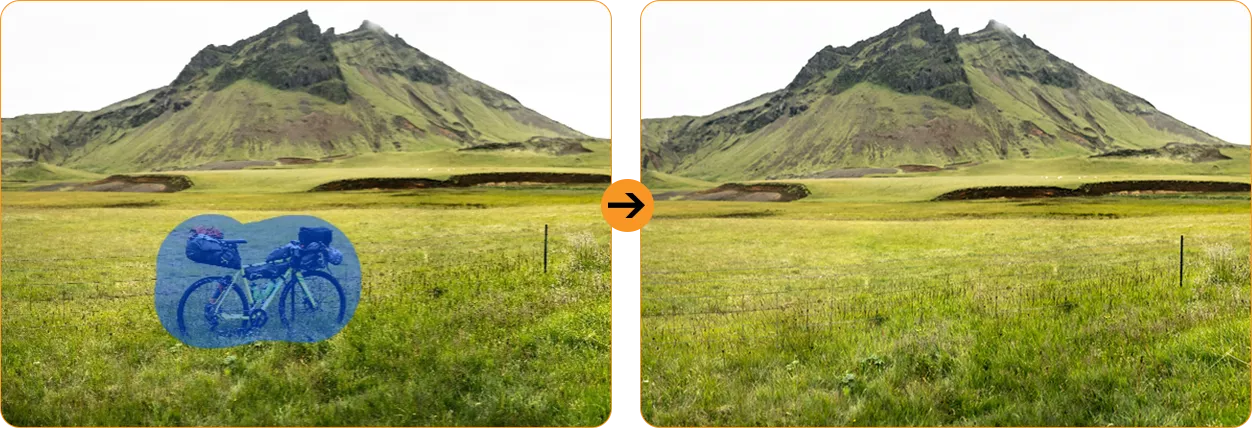
 AI Foto Uskarphet Fjernet

 AI Himmelutskifting


 AI Portrett Usrkarping
 AI Portrettlys

 AI Fargefokus


Vanntett og Støvtett Beskyttelse Utover Standard: Hardere, Sterkere, Bedre

 *Vanntett ned til 1,5 m i 30 minutter.
Inne og ute, Uredd for enhver utfordring

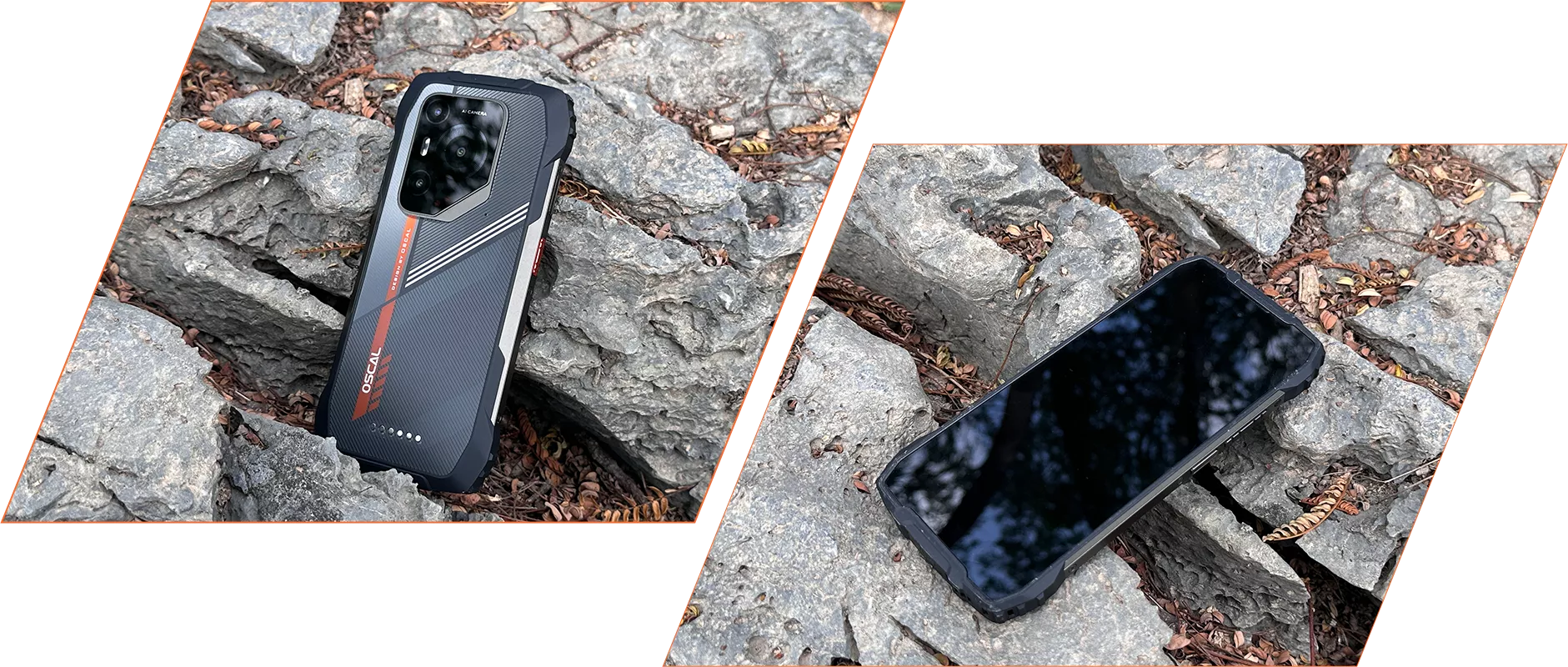 *Støtsikker opptil 1,2 m. Faktisk ytelse kan variere avhengig av faktorer som
som overflatematerialet, innfallsvinkelen osv.

Bruk med Selvtillit

Glattere enn noensinne Tilpasset for deg, smartere enn noensinne Personalisering↑ Bekvemmelighet↑ Flyt↑ Personvern↑
Skinne med livskraft Gi PILOT 3s skjerm liv med flytende kunst og levende farger, noe som gjør den full av energi og låse opp en ny visuell opplevelse.
Personlig område Du kan skille arbeidsområdet ditt fra det private området via Workspace App, og dermed holde bedriftsdataene dine trygge og opprettholde en klar grense mellom jobb og privatliv liv.
Doblet effektivitet Gir en rask og intuitiv måte for deg å få tilgang til og plassere widgets på din startskjerm med den nye «Legg til widget»-knappen, og gjør dermed prosessen mer strømlinjeformet og effektiv.
Umiddelbar tilgang hele veien En-finger rask tilgang


 9 % mer RAM tilgjengelig↑
 *EasyShare fungerer bare når du slår på Wi-Fi i Innstillinger, men gjør ikke
avhenger av nettverket. Dataoverføringshastigheten gjelder da testmiljøer kan variere.


 Systembehandling

Del trygt nå Du kan begrense skjermopptaket til en spesifikk app i stedet for hele skjermen, så du kan ta opp eller dele det som er nødvendig eller du ønsker, samtidig som resten holdes privat. Perfekt for online møter, undervisningsøkter og team-samarbeid.

24/7 Call Center & European Repair Center Mer omsorg, mindre bekymring
Oppgraderingsstøtte Hos OSCAL tilbyr vi regelmessige systemoppdateringer, som sikrer at enheten din forblir oppdatert med de nyeste Android-versjonene, funksjonene, sikkerhetsoppdateringene og ytelses forbedringer.
Umiddelbar hjelp, når som helst,
Hvor som helst Vårt profesjonelle tekniske supportteam er klare til å løse ethvert problem enten online via vår offisielle nettside, hotline, sosiale medier eller e-post, eller offline hos våre autoriserte servicesentre.
Kontakt oss
 *Alle tider er oppgitt i lokal tid.

Offline støtte, rask hjelp

Sentre i Europa For ytterligere hjelp vil våre profesjonelle teknikere tilby assistanse på stedet, nøyaktig feildiagnose og effektiv reparasjonstjeneste.
Flere funksjoner å utforske
+Beidou+QZSS Få sanntids posisjonssporing og hold kontakten uansett hvor du går.
-
ModellPILOT 3
-
FargeSvart, Oransje
-
Dimensjon182,2*86*14,5mm
-
Vekt357g
-
OSDokeOS 4.1 basert på Android 15
-
Skjerm6,78-tommers 2.4K IPS, 1080*2460 oppløsning
120Hz oppdateringsfrekvens, 86% skjerm-til-kropp-forhold
Corning® Gorilla® Glass 5 -
CPU5G Octa-core MediaTek Dimensity 6300, 6nm
-
RAM & ROMOpptil 36GB RAM=12GB+24GB utvidelse
256GB ROM+2TB TF-utvidelse
LPDDR4X+UFS2.2 -
Batteri7500mAh; 33W hurtiglading
-
Frontkamera32MP
-
Bakre kamera50MP (Samsung® ISOCELL JN1)
20MP nattsyn (SONY IMX376) -
Høyttaler1 stk Smart-K Box-høyttaler
-
NavigasjonGPS+GLONASS+Galileo+Beidou+QZSS
-
KortsporDobbelt; 2*SIM/1*SIM +1*TF-kort
-
NFCStøtte
-
Dobbelt 5G VoLTEStøtte
-
Wi-Fi & BT802.11 b/g/n/a/ac; BT 5.2
-
Nettverkstilkobling2G-bånd: B2/B3/B5/B8
3G-bånd: WCDMA:B1/B2/B4/B5/B6/B8/B19
CDMA:BC0/BC1/BC10
4G-bånd: TDD:B34/B38/B39/B40/B41
FDD:B1/B2/B3/B4/B5/B7/B8/B12/B13/B17/B18/
B19/B20/B25/B26/B28A/B28B/B30/B66
5G-bånd: N1/3/5/7/8/20/28/38/40/41/77/78/79
| Modell | PILOT 3 |
| Farge | Svart, Oransje |
| Dimensjon | 182,2*86*14,5mm |
| Vekt | 357g |
| OS | DokeOS 4.1 basert på Android 15 |
| Skjerm | 6,78-tommers 2.4K IPS, 1080*2460 oppløsning 120Hz oppdateringsfrekvens, 86 % skjerm-til-kropp-forhold Corning® Gorilla® Glass 5 |
| CPU | 5G Octa-core MediaTek Dimensity 6300, 6nm |
| RAM & ROM | Opptil 36GB RAM=12GB+24GB utvidelse 256GB ROM+2TB TF-utvidelse LPDDR4X+UFS2.2 |
| Batteri | 7500mAh; 33W hurtiglading |
| Frontkamera | 32MP |
| Bakre kamera | 50MP (Samsung® ISOCELL JN1) 20MP nattsyn (SONY IMX376) |
| Høyttaler | 1 stk Smart-K Box-høyttaler |
| Navigasjon | GPS+GLONASS+Galileo+Beidou+QZSS |
| Kortspor | Dobbelt; 2*SIM/1*SIM +1*TF-kort |
| NFC | Støtte |
| Dobbelt 5G VoLTE | Støtte |
| Wi-Fi & BT | 802.11 b/g/n/a/ac; BT 5.2 |
| Nettverkstilkobling | 2G-bånd: B2/B3/B5/B8 3G-bånd: WCDMA: B1/B2/B4/B5/B6/B8/B19 CDMA: BC0/BC1/BC10 4G-bånd: TDD: B34/B38/B39/B40/B41 FDD: B1/B2/B3/B4/B5/B7/B8/B12/B13/B17/B18/ B19/B20/B25/B26/B28A/B28B/B30/B66 5G-bånd: N1/3/5/7/8/20/28/38/40/41/77/78/79 |
Does the OSCAL PILOT 3 rugged phone’s night vision camera support thermal imaging?
No. The PILOT 3 features a 20MP night vision camera for capturing your surroundings in low light or complete darkness. It helps you see details that are difficult to make out with a standard camera after dark, making it useful at campsites and in unlit outdoor areas.
Night vision and thermal imaging serve different purposes. The PILOT 3 captures images of your surroundings rather than measuring temperature differences. You can use it to observe objects and terrain at night, but tasks such as identifying overheating components or locating heat leaks require a thermal imaging device.
How do I use the night vision camera on the OSCAL PILOT 3 rugged phone, and when is it useful?
Access the night vision feature through the phone’s camera interface and frame your subject using the on-screen preview. Keep the camera area clear of fingers or other obstructions, and hold the phone steady while taking the photo. The preview helps you adjust your position and find a suitable shooting distance.
Night vision is useful when checking a campsite, observing nearby surroundings, or photographing outdoor scenes after dark. Image clarity depends on the distance, subject movement, and surrounding conditions. For better results, focus on nearby subjects and pause briefly before taking each shot.
Why aren’t photos always taken at 50MP on the OSCAL PILOT 3 rugged phone?
The PILOT 3’s 50MP main camera uses four-in-one pixel binning technology. When this processing is applied, information from four pixels is combined to produce a photo of approximately 12.5MP. This helps improve brightness in low-light conditions while keeping image files more manageable.
The camera’s sensor resolution and the resolution of a saved photo are different measurements. A 12.5MP image does not mean your camera is limited to 12.5MP; it reflects the processing used for that shot. The final photo resolution depends on the shooting mode and image processing, balancing detail, brightness, and everyday storage needs.
Can I use two SIM cards and a memory card together in the OSCAL PILOT 3 rugged phone?
No, you can’t use all three at once. The PILOT 3 has a shared card slot design that supports either two SIM cards or one SIM card and one TF/microSD memory card. The second slot accommodates a SIM card or a memory card, so you can choose the combination that suits your needs.
Use two SIM cards to keep separate work and personal numbers or add a local number when travelling. If additional storage is more useful, choose one SIM card and a memory card for your photos, videos, and files. Follow the markings on the tray and make sure each card sits securely before reinserting it.
What does “up to 36GB RAM” mean on the OSCAL PILOT 3 rugged phone?
“Up to 36GB RAM” means 12GB of physical RAM plus up to 24GB of expanded RAM. The expanded portion uses part of the phone’s internal storage to provide additional memory resources for managing apps. It supplements the built-in RAM rather than adding another 24GB of physical memory.
RAM expansion can help with multitasking when you regularly switch between several apps. Because it shares space with your stored content, keep enough internal storage available for both expansion and everyday files. The amount you need will depend on how you use your phone and how many apps you typically keep open.
Can I take underwater photos with the OSCAL PILOT 3 rugged phone?
Yes. The PILOT 3 includes an Underwater Camera feature and supports underwater photography at depths of up to 1.5 meters. Its stated water-resistance test conditions are up to 1.5 meters for 30 minutes. Familiarize yourself with the underwater controls before use, and check that the phone’s protective covers and seals are properly closed and undamaged.
Treat these figures as test limits rather than a guarantee for every water environment. Avoid strong currents, high-pressure water, and use beyond the stated depth or duration. After taking the phone out of the water, dry it carefully and allow the charging port and cable connector to dry completely before charging.
Which positioning systems does the OSCAL PILOT 3 rugged phone support for outdoor navigation?
The PILOT 3 supports GPS, GLONASS, Galileo, BeiDou, and QZSS positioning systems. Combined with a compatible navigation app, these help you check your location, follow a route, and find your way during travel or outdoor activities. Before setting off, enable location services and grant your chosen app the necessary permissions.
If your route passes through areas with limited mobile coverage, download the relevant maps in advance using an app with offline support. Satellite positioning can work without mobile data, while available offline navigation features depend on the app. An open view of the sky helps positioning; dense trees, tall buildings, and steep terrain may affect accuracy.
What AI features does the OSCAL PILOT 3 rugged phone offer, and do they require internet access or a subscription?
The PILOT 3 includes Doke AI tools for writing assistance, document analysis, image generation, and photo editing. You can use them to draft text, work through documents, turn ideas into images, and make creative changes to photos. These features bring useful writing and creative tools together on your phone.
Online AI features need an internet connection, and the relevant service may ask you to sign in. Access conditions can vary between tools, so check the feature’s in-app information for any usage limits or payment requirements. Before activating a paid option, review what it includes and choose it only if it suits your needs.
How can I customize the shortcut button on the OSCAL PILOT 3 rugged phone?
The PILOT 3’s shortcut button supports single presses, double presses, and long presses. You can assign available functions or apps to these actions, making frequently used tools easier to reach. For example, a flashlight shortcut can be useful when working in a dim area or moving around a campsite after dark.
Use the shortcut button configuration on your phone to select an action and assign a function from the available options. Once set, try each press action to become familiar with your choices. You can change the assignments as your routine changes, keeping the tools you use most within easy reach.
What does the 120Hz refresh rate offer on the OSCAL PILOT 3 rugged phone, and how can I manage it?
The PILOT 3 features a smart refresh rate of up to 120Hz, helping scrolling, swiping, and animations appear smoother. The difference is especially noticeable when browsing long webpages, scrolling through social feeds, or moving between screens. It contributes to a more fluid experience during everyday use.
To review any refresh-rate controls available on your phone, check its display settings and follow the options shown there. Higher refresh rates generally favor smoother motion, while lower rates can help reduce power use. The available settings depend on the installed software, and actual smoothness also varies with the app and content.
Is the OSCAL PILOT 3 rugged phone compatible with smartwatches and Bluetooth headphones?
Yes. The PILOT 3 supports Bluetooth 5.2 and can connect to compatible wireless headphones and smartwatches. Depending on the accessory, you can listen to music, take calls, receive notifications, or sync activity data. This makes it convenient to use your preferred accessories while commuting, working, or exercising.
For headphones, put them in pairing mode and select them in the phone’s Bluetooth settings. For a smartwatch, follow its companion app’s setup instructions and allow the permissions needed for notifications or syncing. Check that the watch and its app support your phone’s Android version, as available features vary by accessory.
What video resolution and frame rate does the OSCAL PILOT 3 rugged phone support?
The PILOT 3 supports video recording at up to 2K resolution and 30fps, giving you detailed footage of daily life, outdoor trips, and work activities. Use the Camera app’s video interface to review the recording options available for your selected camera and mode before filming.
Higher-resolution videos generally take up more storage, so check your available space before recording longer clips. For clearer results, clean the lens, use good lighting where possible, and hold the phone steadily. Smooth, controlled movements also make your footage easier to watch when filming while on the move.
Can I use two apps in split-screen mode on the OSCAL PILOT 3 rugged phone?
Yes. The PILOT 3 supports split-screen use with compatible apps, allowing you to work with two apps on the screen at once. You can read a document while taking notes or keep a reference page open while writing a message, reducing the need to switch back and forth.
The App Pairs feature lets you save frequently used split-screen combinations and reopen them with a single tap. Follow the on-screen split-screen and pairing options to arrange your preferred apps. App support determines which combinations are available, so choose two compatible apps that work well together for your routine.
How can I keep work and personal apps separate on the OSCAL PILOT 3 rugged phone?
The PILOT 3 includes a Workspace app to help separate work and personal use. It also offers Private Space, which provides a separate area for keeping sensitive apps hidden and protected. Together, these features help you organize different activities and control how you access personal content.
Follow the setup instructions for each feature and add the apps you want to use in that space. For example, keep work tools together for your daily tasks and place selected personal apps in Private Space. This gives you a clearer separation between work activities and content you prefer to keep away from your main interface.
Jump to another section