



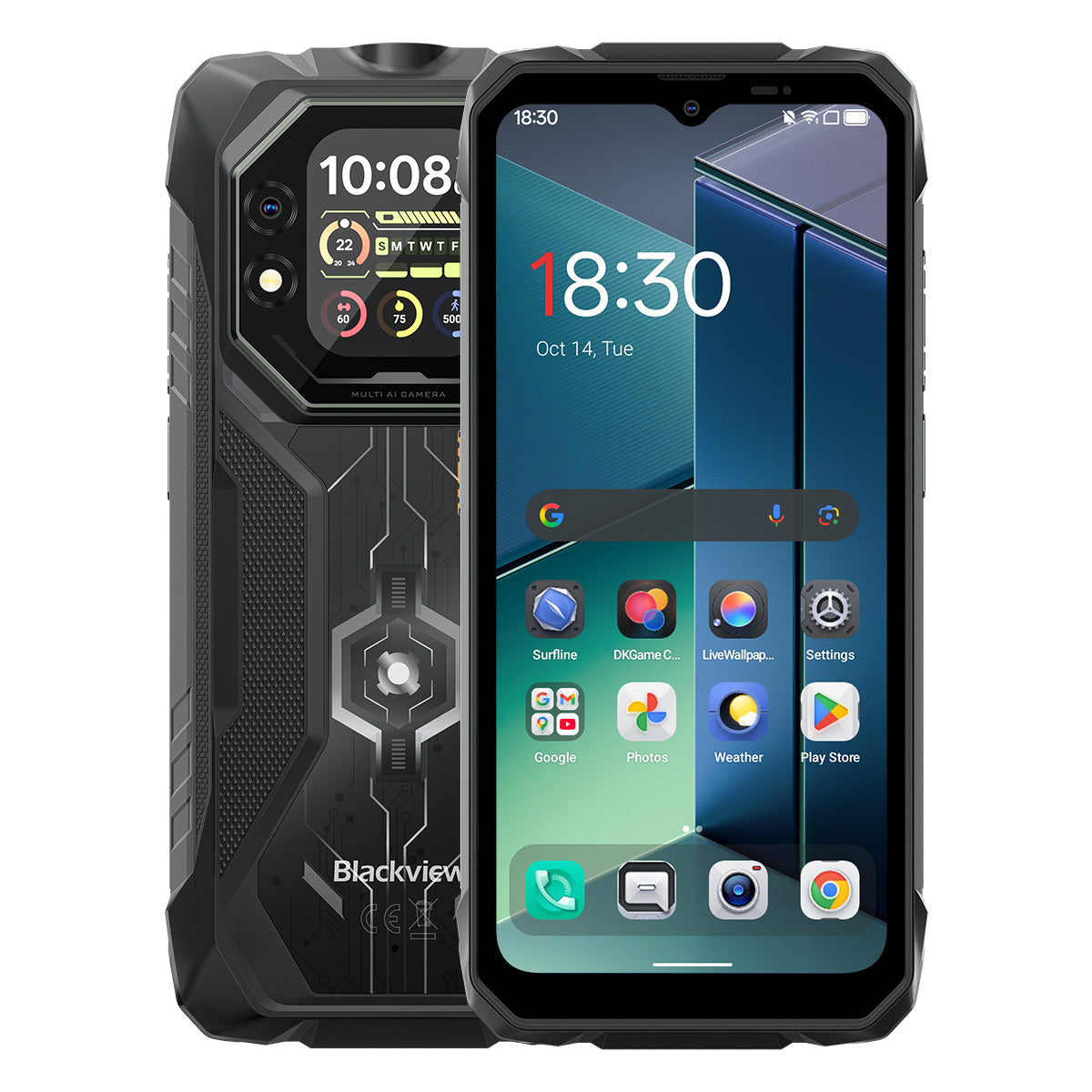


Blackview ROCK 1 6.56인치 90Hz 메인 및 2.01인치 세컨더리 디스플레이 MediaTek Helio G81 옥타코어 15000mAh 20MP 야간 투시 카메라 4G 러기드 폰

재고 있음 (13)
하이라이트
하이라이트
✔6.56인치 메인 및 2.01인치 다기능 보조 디스플레이
✔옥타코어 MediaTek Helio G81 프로세서
✔15000mAh 및 33W 고속 충전
✔20MP Sony® 나이트 비전 카메라
✔IP68, IP69K 및 MIL-STD-810H 인증
정보
정보
Blackview ROCK 1은 까다로운 환경에서 신뢰할 수 있는 모바일 성능이 필요한 사용자를 위해 제작되었습니다. 6.56인치 90Hz 메인 디스플레이와 2.01인치 보조 디스플레이, MediaTek Helio G81 성능, 33W 고속 충전을 지원하는 15000mAh 배터리를 결합하여 업무, 여행, 내비게이션 및 야외 활동에 적합합니다. 주요 현장용 기능으로는 20MP 소니 야간 투시 카메라, 빠른 상태 확인을 위한 듀얼 스크린 유틸리티, IP68 & IP69K & MIL-STD-810H 보호 기능이 포함되어 있습니다. 작업 현장, 원격 여행 및 일상적인 강인함을 위해 설계되어 일반 휴대폰으로는 부족할 때도 사용자가 연결 상태를 유지하고 세부 사항을 포착하며 계속 나아갈 수 있는 자신감을 제공합니다.
브랜드 소개
브랜드 소개
Blackview는 훌륭한 기술이 단순한 사양을 넘어야 한다고 믿습니다. 실제 생활에 맞고, 실제 문제를 해결하며, 가장 중요한 순간에 신뢰할 수 있어야 합니다.
Blackview는 처음에 혹독한 환경을 위한 견고한 휴대폰으로 시작했습니다. 오늘날에는 스마트폰, 태블릿, 노트북, 스마트워치, 오디오 제품 등 더 넓은 스마트 기기 생태계를 제공합니다.
모든 카테고리에서 우리의 초점은 변함없습니다: 내구성 있는 품질, 실용적인 혁신, 그리고 합리적인 가격. 우리는 처음부터 믿음직스러운 제품을 설계합니다.
고객이 가장 중요하게 여기는 것은 무엇인지 이해합니다: 부드러운 성능, 오래가는 신뢰성, 유용한 기능, 그리고 불필요한 비용 없이 일상을 더 편리하게 만드는 기술입니다.
그래서 Blackview는 제품 테스트, 사용자 경험, 그리고 업무, 여행, 창작, 야외 탐험, 일상적인 연결에 의미 있는 가치를 제공하는 기능에 진정한 관심을 기울입니다.
Blackview는 신뢰할 수 있는 기술을 원하는 사람들을 위해 만들어졌습니다: 현대 생활을 따라갈 수 있는 스마트하고 유능한 기기입니다.
설계부터 신뢰할 수 있고, 본질적으로 실용적이며, 실제 생활을 위해 만들어졌습니다.
배송 및 반품
배송 및 반품
• 배송: 주문은 영업일 기준 1~2일 이내에 처리됩니다. 표준 배송은 위치에 따라 영업일 기준 3~7일이 소요됩니다.
• 반품: 주문을 받은 날로부터 30일 이내에 제품을 반품하거나 교환할 수 있습니다. 상품은 구매 증빙과 함께 원래 상태여야 합니다.
제품에 제조상의 결함이나 손상이 있을 경우 추가 비용 없이 기꺼이 교환해 드립니다.

혁신적인 듀얼 디스플레이
강력한 파워 충족
신뢰할 수 있는 야외 선택, 더 넓은 탐험을 위해


견고한 디자인과 세심한 미학의 만남
ROCK 1은 견고한 러기드 구조를 특징으로 하며, 강력한 기술력을 강조합니다. 후면 커버는 빛과 상호작용하는 독특한 무광 디자인을 통합해 러기드한 외관에 세련된 감각을 더합니다.

스트랩을 쉽게 부착하고 어디에나 걸어 안전하게 보관하세요.


No.1
MIL-STD-810H 및 IP69K 및 IP68 인증, 제작됨
극한 환경 정복을 위해
No.2
혁신적인 듀얼 스크린, 재정의
스마트 비전

No.1
MIL-STD-810H 및 IP69K 및 IP68 인증,
극한 환경 정복을 위해 제작됨

MIL-STD-810H 인증
튼튼하게 제작, 어떤 상황에도 준비 완료.
ROCK 1은 군용 등급 내구성으로 낙하, 물, 먼지를 견딥니다. 건설 현장부터 극한 야외 모험까지, 모든 도전에 신뢰할 수 있는 동반자입니다.
이러한 극한 테스트를 통과함

비

모래와 먼지

진동

충격

습도

고도

가속도

고온

저온

침수

보강된 충격 방지 모서리

초강력 후면 커버

항공 등급 알루미늄
합금 프레임

스크래치 방지
파손 방지 판다 글래스
IP69K 및 IP68 인증
극한 환경을 위한 설계.
ROCK 1은 IP68 및 IP69K 기준을 모두 충족하여 먼지, 깊은 수중 침수, 강력한 고압 분사로부터 완벽하게 보호됩니다. 극한 환경을 위해 설계되어 다른 제품이 불가능한 곳에서도 안정적으로 작동합니다.

*최대 1.5m 깊이에서 30분간 방수.

화면 주변 완벽한 엣지 실링

부식 방지 알루미늄 버튼과 프리미엄 실리콘 방수 링

USB 포트용 TPU 플러그, 완전 밀봉

스피커 청소, 자동 먼지 제거 및
물 제거
수중 카메라

No.2
혁신적인 듀얼 스크린, 스마트 비전의 재정의
6.56" HD+ IPS 디스플레이
더 많이 보고, 더 많이 즐기세요
ROCK 1의 6.56" HD+ IPS 디스플레이는 선명한 화질과 넓은 시야각을 결합해 게임, 스트리밍 등 몰입감 있는 시각 경험을 제공합니다.

720*1612
해상도
178°
IPS 풀 뷰
450니트
밝기
180Hz
터치 샘플링 속도
83%
화면 대 본체 비율
90Hz AI 스마트 주사율
더 부드럽고, 더 빠르고, 더 나은.
지연 없이 부드럽게 — 스마트 전환으로 매끄러운 스크롤과 배터리 수명 극대화.

2.01" 다기능 보조 화면
작은 화면, 큰 차이
ROCK 1의 스마트 서브 스크린은 알림, 음악 제어, 맞춤형 시계 화면 등 다양한 기능을 손끝에서 바로 사용할 수 있게 해줍니다 — 효율적이고 편리하며 끊김 없는 즐거움.

2.01인치
크기
240*296
해상도
판다
유리
16:13
화면 비율
500니트
밝기

셀피 촬영
후면 카메라

시간 및 날짜 확인

재생/일시정지/트랙 전환

통화 수락/거절

메시지 보기
알림

날씨 업데이트 확인

내장 기능 사용
나침반

걸음 수 추적

시계 스타일 개인화
아이케어 모드
하루 종일 지속되는 편안함.
언제든 시력을 보호하는 4가지 아이케어 모드—읽기, 작업, 휴식 시 최상의 편안함을 제공합니다.


독서 모드

야간 조명

다크 모드

라이트 모드
장갑 모드 2.0
장갑을 끼고도 부드러운 제어.

8% 더 민감한 터치 
No.3
Helio G81 부스트, 성능 해방
옥타코어 MediaTek Helio G81
빠르고, 효율적이며, 신뢰할 수 있습니다.
지연 없이 바로 실행하세요. ROCK 1과 함께라면 업무 앱을 원활하게 전환하고, 오프라인에서도 탐색하며, 이동 중에도 스트리밍을 끊김 없이 즐길 수 있습니다.


2*Cortex-A75@2.0GHz+
6*Cortex-A55@1.7GHz
즉시 실행, 부드러운 멀티태스킹

Arm Mali-G52 MC2
더 부드러운 그래픽, 더 선명한 디테일

345,548
AnTuTu 벤치마크
최대 24GB LPDDR4X RAM
타협 없는 멀티태스킹.
더 많은 작업을 위해 설계되었습니다. ROCK 1은 빠른 로딩, 부드러운 전환, 안정적인 속도로 업무용 앱과 엔터테인먼트를 원활하게 처리합니다.

최대 24GB RAM=8GB RAM + 16GB 확장
Atomized Memory 2.0
9% 더 많은 RAM 사용 가능
256GB eMMC 5.1 플래시 저장소
즉시 실행, 원활한 흐름.
대용량 콘텐츠를 즉시 설치하고 실행하며, 앱이 빠르게 실행되어 끊김 없는 항상 켜진 경험을 제공합니다!

F2FS 파일 시스템
25% 빠른 랜덤 읽기 속도
3배 빠른 랜덤 쓰기 속도
EROFS 읽기 전용 파일 시스템
최대 300% 빠른 랜덤 읽기 속도
2651mm² 쿨링 마스터리
시원하게 유지하고, 더 나은 성능을 발휘하세요
ROCK 1은 3중 소재 쿨링 기술을 활용해 탁월한 열 방출과 더 부드럽고 시원한 사용자 경험을 제공합니다.

흑연
열 실리콘 그리스
구리 호일
격렬한 게임 후에도 38°C 이하로 유지되는 쿨링
No.4
15,000mAh 파워하우스, 끝없는 배터리 수명
15,000mAh 대용량 파워
무한한 에너지, 멈출 수 없는 즐거움!
ROCK 1은 15,000mAh의 대용량 배터리를 탑재해 비즈니스, 여행, 모험에 끊임없는 전력을 제공합니다. 항상 완전 충전되어 매 순간을 즐길 준비가 되어 있습니다!

지능형 충전
보호 기능

AI 전력 절약
알고리즘


20시간
게임

84시간
통화

64시간
음악

26시간
웹

22시간
동영상

45일
대기 모드
*데이터는 Blackview 연구소에서 연속 사용을 기준으로 테스트한 결과입니다. 실제 사용 환경에 따라 다를 수 있습니다.
5W OTG 역방향 충전
언제든지 충전하세요,
어디서나 공유하세요.
이어폰, 스마트워치 등 다양한 기기를 손쉽게 충전하세요—언제나 이동 중 긴급 상황에 대비할 수 있습니다.


No.5
낮이나 밤이나 모든 순간을 포착하세요.

16MP AI 메인 카메라
선명하고 생생하며 손쉬운.
일과 놀이 모두에서 ROCK 1의 16MP 메인 카메라는 선명하고 생생한 사진을 즉시 공유할 준비가 되어 있습니다.

13MP AI 전면 카메라
언제나 완벽한 셀카.
ROCK 1의 AI 기반 13MP 전면 카메라는 어떤 환경에서도 완벽한 결과를 위한 스마트 조정으로 항상 빛나게 합니다.
인물 사진
중요한 것에 집중하세요.
AI 기반 배경 흐림 효과가 피사체를 돋보이게 하여 전문가처럼 눈길을 끄는 깊이감을 선사합니다.


뷰티
손쉬운 빛남.
자연스러운 당신.
부드러운 피부, 향상된 톤, AI 완벽함—빠른 셀카가 이렇게 자연스럽고 완벽해 보인 적이 없습니다.
야간
밤을 지배하세요.
밝고 선명하며 생생한 AI 강화 저조도 사진이 가장 어두운 순간에도 모든 세부를 포착합니다.


20MP 소니 나이트 비전
어둠 너머를 보세요.
ROCK 1은 어둠을 뚫고 밤의 모든 세부를 드러내며 육안으로 볼 수 없는 것을 포착합니다.
No.6
업계 독점 Doke AI 스마트 어시스턴트
세계 최고 3대 AI 모델과의 통합으로 구동되는 Doke AI는 당신의 필요를 정확히 이해해 더 똑똑하고 빠르며 개인화된 서비스 경험을 제공합니다!

DeepSeek-R1

ChatGPT-4o 미니

Gemini AI 2.0 플래시
Gemini AI
더 똑똑한 어시스턴트, 당신에게 맞춤형.

음성 웨이크업 &
음성 인식
음성으로 즉시 안전하게 잠금 해제, 손이 필요 없습니다.

글로벌 스마트 제어
한 번의 명령으로 앱과 설정을 원활하게 제어.

전체 화면 지원
화면에 대해 물어보고 즉시 답변 받기.


실시간 상호작용
언제 어디서나 즉각적인 응답과 자연스러운 대화.
업계 유일의 자체 개발 Doke AI 앱

Hi Doki 앱
당신의 AI 스마트 채팅 어시스턴트
업무부터 아이디어 발상까지, Hi Doki는 항상 준비된 동반자입니다.


차세대
DeepSeek-R1
깊은 사고, 차세대 지능.

AI 온라인 검색
시기적절한 인사이트, 더 똑똑한 답변.

문서 파싱
즉시 업로드하고 분석하세요.

튜터링 어시스턴트
스캔하고, 문제를 해결하며, 더 똑똑하게 배우세요.

AI와 대화하기
19가지 AI 페르소나, 끝없는 대화

ImageX 앱
언제 어디서나 함께하는 AI
사진 편집기
18가지 AI 사진 편집 도구로 ROCK 1이 야외 사진, 현장 사진, 일상 순간을 멋진 비주얼로 손쉽게 변신시켜 공유할 준비를 합니다.

AI 오브젝트 제거
원하지 않는 요소를 정확하게 손쉽게 제거하세요.

AI 아웃페인팅
캔버스를 확장하고 시야를 자연스럽게 넓히세요.


AI 블러 사진
지능형 배경 흐림으로 피사체를 강조합니다.
AI 배경 교체
배경을 손쉽게 교체하고 장면을 재정의하세요.

AI 애니메이트
정지 이미지를 역동적인 순간으로 바꾸세요—얼굴과 추억이 살아납니다!


VidGen 앱
당신의 AI 비디오 매직 메이커!
텍스트에서 비디오, 사진에서 영화 같은 순간까지, VidGen의 스마트 AI가 일상 모험을 멋지고 공유하기 좋은 작품으로 바꾸며 재미있고 역동적인 효과를 몇 번의 탭으로 완성합니다!


Soundle 앱
당신의 AI 음악 작곡가!
악기나 스튜디오 없이도 Soundle이 휴대폰을 강력한 음악 실험실로 바꿔 매 순간마다 독특한 멜로디를 만듭니다.

No.7
Android 16 기반 최신 DokeOS 5.0
DokeOS는 4.2(Android 15)에서 5.0(Android 16)으로 진화하여 더 빠른 성능, 부드러운 작동, 깔끔한 인터페이스, 더 개인화된 경험, 더 스마트한 기능을 제공합니다. 탁월한 사용자 경험을 위한 완전한 업그레이드입니다.

더 많은 탐험, 손 닿는 곳에

최대 120lm 밝기 손전등
SOS와 함께하는 강력한 조명
비상시 플래시

측면 키 기능
손끝에서 느끼는 간편함!
한 번 누르면 번거로움 없이 즉시 접근
자주 사용하는 기능이나 앱을 쉽게!

음성 녹음 시작

손전등 켜기

스크린샷

수중 카메라 열기

PTT 열기

SOS 열기
유용한 도구 가방
주머니 속에 쏙 들어가는 도구!
10가지 필수 도구가 하나의 앱에 모여 ROCK 1을 일상 작업에 다재다능한 올인원 도구 상자로 바꿉니다.


쿼드코어 내비게이션
어디서나 내비게이션,
어디서든 정복하세요!
GPS, Beidou, Galileo, Glonass가 지원하는 원활하고 정밀한 내비게이션으로 가장 외진 곳이나 까다로운 장소에서도 신뢰할 수 있습니다.
Blackview ROCK 1 사양
| 모델 | ROCK 1 |
| 색상 | 블랙 |
| 크기 | 177.9 * 83.5 * 24.7mm |
| 무게 | 490g |
| 운영체제 | Android 16 기반 DokeOS 5.0 |
| 디스플레이 | 6.56인치 HD+ IPS, 720 * 1612 해상도 90Hz 주사율, 83% 화면 대 본체 비율 보조 화면: 2.01인치, 240 * 296 해상도 |
| CPU | 옥타코어 MediaTek Helio G81 |
| 램 및 롬 | 8GB RAM + 256GB ROM, LPDDR4X + eMMC 5.1 |
| TF 확장 | 최대 256GB 확장 저장 공간 |
| 배터리 | 15000mAh; 33W 고속 충전 |
| 전면 카메라 | 13MP |
| 후면 카메라 | 16MP 메인 + 20MP 야간 촬영 |
| V스피커 | 1개 스마트-PA 박스 스피커 |
| 손전등 밝기 | 최대 120 lm, 최소 110 lm |
| 내비게이션 | GPS+GLONASS+Galileo+Beidou |
| 카드 슬롯 | 두 개; 2SIM/1SIM+1*TF 카드 |
| NFC | 지원 |
| Wi-Fi 및 블루투스 | Wi-Fi 5; BT 5.0 |
| 네트워크 연결 | 2G 대역: B2/B3/B5/B8 3G 대역: WCDMA: B1/B8 CDMA: BC0/BC1/BC10 4G 대역: TDD: B40/B41 FDD:B1/B3/B7/B8/B19/B20/B28A/B28B |
| 디자인 | |
| 제품 | Blackview ROCK 1 |
| 색상 | 검정색 |
| 디스플레이 | |
| 메인 디스플레이 | 6.56인치 |
| 보조 디스플레이 | 2.01인치 |
| 주사율 | 90Hz |
| 성능 | |
| 프로세서 | 미디어텍 헬리오 G81 |
| 배터리 및 충전 | |
| 배터리 | 15000mAh |
| 충전 | 33W 고속 충전 |
| 카메라 | |
| 야간 투시 카메라 | 20MP 소니 |
| 내구성 | |
| 내구 등급 | IP68 & IP69K & MIL-STD-810H |
| 연결성 | |
| 네트워크 | 4G |
Who is the Blackview ROCK 1 rugged phone designed for?
The Blackview ROCK 1 is designed for construction workers, maintenance technicians, farmers, delivery drivers, and outdoor enthusiasts such as campers or anglers. It is also well-suited for workers who need a device for communication, navigation, and daily tasks in environments prone to dust, rain, or accidental impacts—such as construction sites or mines.
With its high-capacity battery, rugged, durable build, and night-vision camera, it supports both professional work and outdoor activities. Additionally, the rear display allows for quick access to information and control options. Beyond its practical tools and massive battery, it offers all the standard features found in mainstream smartphones.
Does the Blackview ROCK 1 have a 15,000mAh battery?
Yes. The Blackview ROCK 1 rugged phone is equipped with a 15,000mAh battery, providing ample power for calls, text messages, navigation, and entertainment. This ensures you stay powered up even when you are away from your desk or a wall outlet for the day. If used primarily for routine calls and text messages, the battery will last even longer.
The time between charges depends on how you use the phone. Intensive tasks like prolonged navigation, photography, or gaming may drain the battery down to 20%, while lighter use—such as occasional calls, texts, or a standard workday—will require less frequent charging. This capacity ensures you have enough power to start the next day or handle unexpected situations.
How much does the Blackview ROCK 1 weigh?
The Blackview ROCK 1 weighs 490 grams and measures 24.7 mm thick. These figures refer to the device's weight alone and do not include accessories such as cases or lanyards, which would increase the total weight.
For daily use at work, you can carry the device in a dedicated work pouch or a specific compartment in your bag, making it easy to access. If you prefer to keep it in a pocket, ensure that the pocket is spacious enough to accommodate the device's thickness.
What affects the Blackview ROCK 1’s battery life in everyday use?
The following factors can impact battery life:
Screen Brightness: Higher brightness levels consume more power. It is recommended to adjust the brightness to a comfortable level based on your current environment.
App Usage: Activities such as gaming, video calls, or prolonged navigation consume more power than occasional messaging or a glance at a map.
Mobile Signal Strength: When the signal is weak, the phone works harder to maintain a connection, which leads to increased power consumption.
Background Activity: Even when you are not actively using certain apps, they may still consume power by performing downloads, updates, or data synchronization in the background.
Hotspot and Flashlight: Enabling these features increases power consumption; leaving them on for extended periods will drain the battery significantly faster. It is best to turn them off when they are no longer in use.
You can also check your battery usage in "Settings" to identify which apps are consuming the most power and make adjustments accordingly.
What can I do with the Blackview ROCK 1’s rear display?
When the back of the phone is facing you, you can view notifications, control music playback, or check the time via the customizable watch faces—all without needing to flip the phone over to use the main screen. It provides a more convenient way to access specific information.
You can also view alerts or pause music playback directly, again without needing to turn the phone over. You can choose the display options that best suit your personal habits. For tasks such as reading long messages, typing, or browsing content, the main screen is recommended, as it offers more display space.
Can I use the Blackview ROCK 1’s rear display to take selfies?
Yes. The Blackview ROCK 1 supports taking selfies with the rear camera, and the rear display helps with framing. You can see your position within the frame on the screen, eliminating the need to guess where the camera is pointed.
When using the rear screen for photography, adjust your position within the preview frame and follow the on-screen prompts to take the shot. Clean the lens before shooting and face toward a light source for clearer results. If taking a group photo, ensure everyone is visible within the preview frame before capturing the image.
What can I see with the Blackview ROCK 1’s night vision camera?
The Blackview ROCK 1’s night-vision camera allows you to observe nearby objects, people, and animals in the dark. It is useful for viewing dimly lit areas or monitoring your surroundings when it is too dark for the main camera to capture clear details.
When using it, keep the phone steady and point the lens toward the area you wish to observe. Factors such as distance, obstacles, and reflective surfaces may affect the view. Please note that the night-vision function cannot measure temperature, nor can it see through objects.
Is the Blackview ROCK 1’s main camera suitable for everyday photos?
Yes, it is. The Blackview ROCK 1 features a 16MP main camera, which is capable of handling daily photography needs—such as capturing family moments, outdoor scenery, documents, or the condition of equipment. For the best results and sharper detail, it is recommended to take photos in well-lit environments.
To achieve better image quality, clean the lens, tap the subject on the screen to focus, and keep the phone steady. In low-light conditions, try to increase the available lighting; if your subject is moving, wait until they are still before pressing the shutter button.
How does the Blackview ROCK 1’s speaker perform for calls and music?
The built-in speaker on the Blackview ROCK 1 supports hands-free calling, voice navigation, video viewing, and general music playback. Performance is smooth when the phone is nearby, the network connection is stable, and the surrounding environment is quiet. Conversely, issues such as stuttering or poor audio clarity may occur under less-than-ideal conditions.
When using the speaker for calls, it is best to keep the phone close by, ensure the speaker is not obstructed, and adjust the volume to suit your environment. For the best experience during hands-free calls, choose a quiet location. If you are listening to music—for instance, in a living room—and desire better sound quality, you can connect headphones or an external Bluetooth speaker.
What can I customize with the Blackview ROCK 1’s shortcut button?
You can configure the shortcut key on the Blackview ROCK 1 to perform specific actions, such as starting a voice recording, turning on the flashlight, taking a screenshot, or launching the underwater camera. This allows for quicker access to frequently used features.
Locate the shortcut key settings within the "Settings" menu and select your desired action. For example, if you assign the "Flashlight" function to the shortcut key, you can quickly turn it on whenever you need temporary illumination. Once configured, you may want to test it; please note that some functions may require you to unlock the phone before they can be used.
What does the Blackview ROCK 1’s 90Hz refresh rate mean for everyday use?
A 90Hz refresh rate means the screen can refresh up to 90 times per second. This results in smoother scrolling, swiping, and animations—for instance, when browsing the web, checking messages, or navigating through app menus.
While the refresh rate determines how dynamic content is displayed, it does not increase image resolution, nor does it make every application run faster. Furthermore, since games have their own frame rate limits and hardware requirements, it does not guarantee that all games will run at 90 frames per second.
How does the Blackview ROCK 1 perform when running everyday apps?
The Blackview ROCK 1 is well-suited for daily tasks such as messaging, handling emails, using navigation, and browsing the web. You can easily check emails, switch to a messaging app to reply, and then return to your browser. For more resource-intensive applications—such as demanding games—you may notice slightly longer startup or response times.
If app switching becomes noticeably sluggish, check for background processes like ongoing downloads, system updates, or other high-load tasks. Additionally, freeing up some storage space and restarting the phone can often resolve temporary slowdowns.
What protection does the Blackview ROCK 1 offer for outdoor work?
The Blackview ROCK 1 rugged phone features IP68 and IP69K ingress protection ratings and meets the MIL-STD-810H testing standard. It is designed to effectively withstand dust (such as cement dust), moisture, and impacts that may be encountered during outdoor work.
When working outdoors, ensure that the SIM card slot and all port covers are securely closed. If the phone accidentally falls out of your pocket, check it for any damage. Please note that protective capabilities may diminish over time, so the device should still be handled with care during daily use.
How do I check for software updates on the Blackview ROCK 1?
Check the "Settings" on your phone to see if there is a notification for a system update. If you receive a notification, review the update details and follow the on-screen instructions to download and install it. If no update notification appears, you can check again later.
Before updating, back up important photos, contacts, and files; connect to a stable Wi-Fi network; and ensure your phone has sufficient battery power. It is recommended to perform the update when you are not using your phone—for instance, while you are asleep—as the device may restart during the installation process. Follow the on-screen prompts and wait for the update to complete before using your phone again.
What should I do if the home screen keeps crashing on my Blackview ROCK 1?
First, try restarting your phone to see if the home screen returns to normal. If the issue persists, check whether your phone’s internal storage is nearly full. You can free up space by deleting unnecessary large files or apps, or by backing up your data. Then, check again to see if the screen has returned to normal.
Next, inspect the screen for cracks or other physical damage, and check if it has begun to separate from the device body. Also, observe whether any lines, flickering, or dark spots appear on the display. If these problems continue, consider having the device evaluated by a professional phone repair technician.
Jump to another section