



Oscal Pilot 3 6.78인치 MediaTek Dimensity 6300 12GB+256GB 50MP+20MP 나이트 비전 카메라 7500mAh 5G AI 러기드폰

서두르세요. 재고가 4개밖에 남지 않았습니다.
주요 특징
주요 특징
✔DeepSeek-R1, ChatGPT 및 Gemini가 탑재된 5G AI 견고한 휴대폰
✔5G 6nm MediaTek Dimensity 6300 CPU, 최대 2.4GHz
✔6.78인치 2.4K 디스플레이 w/ 120Hz 스마트 Al 주사율
✔50MP AI 메인 & 20MP 야간 투시 카메라
정보
정보
OSCAL Pilot 3는 속도, 야간 시야, 야외 내구성을 하나의 기기에 담아야 하는 사용자를 위해 제작된 5G 러기드 폰입니다. 6.78인치 120Hz FHD+ 디스플레이, Dimensity 6300 프로세서, 7500mAh 배터리, 33W 고속 충전으로 까다로운 일상 사용과 현장 작업을 지원합니다. 50MP 메인 카메라, 20MP 야간 투시 카메라, 32MP 전면 카메라, 2K 비디오 녹화, NFC, QZSS 지원 GPS, IP68 및 IP69K 방수·방진, AI 도구를 갖추어 작업 현장, 여행, 저조도 환경에 적합하게 설계되었습니다.
브랜드 소개
브랜드 소개
Blackview는 훌륭한 기술이 인상적인 사양을 뛰어넘어야 한다고 믿습니다. 실생활에 잘 맞고, 실제 문제를 해결하며, 가장 중요한 순간에도 믿고 쓸 수 있어야 합니다.
Blackview는 거친 환경에 맞춰 설계한 러기드폰으로 시작했습니다. 오늘날에는 스마트폰, 태블릿, 노트북, 스마트워치, 오디오 제품 등을 비롯한 더욱 폭넓은 스마트 기기 생태계를 제공합니다.
어떤 제품군에서든 우리의 초점은 같습니다. 튼튼한 품질, 실용적인 혁신, 합리적인 가격입니다. 처음부터 믿음직하게 느껴지는 제품을 설계합니다.
고객이 가장 중요하게 여기는 것이 무엇인지 잘 알고 있습니다. 원활한 성능, 오래가는 신뢰성, 유용한 기능, 불필요한 비용 없이 일상을 더 편리하게 해주는 기술입니다.
그래서 Blackview는 제품 테스트, 사용자 경험, 업무와 여행, 창작 활동, 야외 탐험, 일상 속 소통에 실질적인 가치를 더하는 기능에 세심한 주의를 기울입니다.
Blackview는 믿고 쓸 수 있는 기술을 원하는 사람들을 위해 만들어졌습니다. 현대인의 생활에 맞춰 함께할 수 있도록 스마트하고 성능이 뛰어난 기기를 만듭니다.
믿음직하게 설계했습니다. 실용성을 추구합니다. 일상에 꼭 맞게 만들었습니다.
배송 및 반품
배송 및 반품
• 배송: 선판매 제품을 제외한 주문은 일반적으로 처리에 영업일 기준 약 2~7일이 소요됩니다. 배송 기간은 공휴일이나 비영업일을 제외한 영업일 기준입니다. 배송 기간은 배송 방법에 따라 달라집니다.
• 반품: 휴대전화가 사용되지 않았고 손상되지 않았으며 모든 기본 구성품이 포함된 경우 배송일로부터 14일 이내에 반품을 요청할 수 있습니다. 제품 결함은 구매 후 한 달 이내에 점검을 거쳐 교환, 환불 또는 무상 수리 대상이 될 수 있습니다. 단, 오용, 낙하, 침수, 분해 또는 무단 개조로 인한 손상은 보증 대상이 아닙니다.

 PILOT 3
딥 씽킹 AI 모델 세계 3대
압도적인 견고함 견고한 라인과 독특한 안티 바디 텍스처, 날카롭게 다듬어진 엣지가 특징인 PILOT 3는 아웃도어 탐험 정신을 완벽하게 담아냅니다. 카메라 모듈의 배치부터 프레임의 나사산 디자인, body를 구성하는 소재 하나하나의 선택까지 모든 디테일에 완벽을 향한 끊임없는 노력이 담겨 있습니다.

세계 최고 수준 AI 모델 3종 기반 DeepSeek-R1, ChatGPT, Gemini AI 2.0 Flash의 강력한 성능, 간편하고 안전한 음성 활성화,
스마트한 글로벌 제어, 최고의 개인정보 보호와 함께하는 핸즈프리의 미래

OSCAL Doke AI, 다재다능한 AI 도우미. 더 많이 이루고, 더 멀리 탐험하며, 더 깊이 소통하세요

모든 것을 제어하세요 말 한마디로 Doke AI를 즉시 활성화해 핸즈프리로 작업하세요. 음성은 손끝에서 모든 것을 제어할 수 있는 나만의 리모컨입니다.


간단한 명령으로 하루를 시작하세요. 말 한마디로 원하는 것을

항공편 정보와 호텔 예약을 확인하세요 아무도 없는 곳에서도 몇 초 만에 여행 정보를 확인하세요
바로 길 안내를 받으세요 길을 잃지 않도록 즉시 길 안내를 받으세요

언제든 대화 질문을 소리 내어 말하기만 하면 타이핑할 필요 없이 실시간으로 명확하고 자연스러운 답변을 바로 받을 수 있습니다. 긴급한 상황이나 건설 현장에서 손이 바쁠 때도 정보에 손쉽게 접근할 수 있습니다.


말에서 놀라움으로 빠른 속도와 깊이 있는 사고를 갖춘 AI 검색, 간편한 문서 분석, 스마트한 글쓰기 지원을 경험해 보세요. 손끝에서 말이 생생하게 펼쳐지고 무한한 창작의 가능성이 열립니다.

모든 게시물을 화제의 중심으로 내 사진을 모두 소셜 미디어의 화제로 만들고 싶으신가요? 최대 18가지 강력한 AI 편집 도구를 활용하면 모든 게시물을 새롭게 빛나게 하고 순식간에 화제를 모을 수 있습니다!
추억을 되살리다 눈 깜빡임, 미소, 고개 움직임 같은 디테일을 구현해 사진에 생기를 불어넣고, 추억을 생동감과 이야기가 가득한 순간으로 만들어 보세요!
교체 하늘은 바꾸고,
감성은 더하고 클릭 한 번으로 하늘을 간편하게 바꿔 보세요. 맑고 푸른 하늘부터 극적인 노을, 별이 빛나는 밤하늘까지 원하는 하늘로 바꿀 수 있습니다.
돋보이게 사진 속 피사체를 정확하게 인식해 원하는 배경으로 자유롭게 바꿔 보세요. 사진에 새로운 장면과 분위기를 즉시 더할 수 있습니다.
광채는 두 배로 셀카, 인물 사진, 단체 사진까지 지능적으로 아름답게 보정하고 섬세하게 다듬어, 모든 사진에서 자신감 넘치는 매력을 빛내 보세요!
시야는 확장 탭 한 번으로 사진의 프레임 제한을 뛰어넘어 디테일은 그대로 보존하면서 시야를 즉시 지능적으로 넓혀 보세요! 모든 사진을 나만의 시각적 걸작으로 만들어 보세요!
균형 잡힌 시야 마법 지팡이처럼 왜곡과 기울어짐, 원근 문제를 순식간에 바로잡아 사진 본연의 아름다움을 되찾아보세요.
원하는 화질로 자르기, 필터, 스티커, 텍스트 등 AI 기반 편집 기능으로 사진을 새롭게 꾸며 모든 사진을 예술 작품으로 만들어보세요.
새롭게 탄생한 예술 두 장의 사진을 손쉽게 겹쳐 몽환적인 시각 효과를 만들어보세요. 틀을 깨고 예술적 감성을 가득 담아보세요!
순식간에 생생하게 배경을 순식간에 흐리게 하고 피사체를 돋보이게 해 영화 같은 심도 효과를 연출하세요.
아름다움은 간직하세요 피부나 사진 표면의 작은 점이나 눈에 띄는 결점을 찾아 섬세하게 보정해 완벽한 사진을 만들어보세요.
색을 되살리세요 세밀한 부분까지 정확하게 색을 복원해 오래된 사진 속 인물과 풍경은 물론 한 줄기 햇살까지 생생하게 되살립니다. 마치 시간이 되돌아간 듯한 느낌을 줍니다.
사진으로 표현하세요 사진에서 원하는 영역이나 사물을 손쉽게 선택해 다른 곳에 붙여넣고 독특한 시각 효과를 만들어보세요.
마음껏 펼쳐보세요 사진 속 원하는 영역이나 사물을 복제해 다른 곳에 붙여넣으세요. ‘복제’ 기능으로 동일하거나 비슷한 요소를 그려 넣어 사진에 새로운 생명과 무한한 가능성을 더할 수 있습니다.
나만의 스타일을 펼쳐보세요 사진에 강렬한 시각적 효과를 더해보세요! 이미지의 다양한 요소에 개성 넘치는 컬러 대비 효과를 적용해 독특하고 현대적인 비주얼 스타일을 완성할 수 있습니다.
창의력을 펼쳐 보세요 사람과 주변 환경의 상호작용을 포착하고 역동적인 나선 효과와 자연스럽게 결합해 모든 사진에 무한한 가능성을 더해 줍니다.
주목받는 순간 일상 브이로그부터 창의적인 짧은 영상, 짜릿한 순간까지, 지능형 AI 기술로 동영상에 생기를 불어넣어 보세요! 텍스트나 이미지를 입력하기만 하면 창의적인 동영상을 만들어 글이나 이미지를 눈을 사로잡는 영상으로 바꿔 줍니다.
교향곡까지, 나만의 배경 음악 영감이 떠오르고 멜로디가 흐르지만, 전문 기술은 없어도 괜찮습니다. 스타일, 분위기, 악기, 리듬을 자유롭게 조정하고 직접 가사까지 써서 Soundle 앱으로 세상에 하나뿐인 배경 음악을 만들어 보세요. 작은 영감에서 교향곡까지, 나만의 음악을 만들어 보세요.

최대 36GB RAM, 256GB ROM 작업은 힘차게, 게임은 빠르게

 응답 속도
 TF 카드 확장으로 1TB 추가
7500mAh 대용량 배터리와 33W 고속 충전 오래가는 배터리, 매끄러운 스크롤
시청 경험을 동시에.


더 선명하고 읽기 쉽게
배터리 20% 충전
편리함과 마음의 평안,
탁월한 선택 번거롭게 꽂았다 뺐다 할 필요 없이 가볍게 올려놓기만 하면 충전이 시작됩니다. 업무 중이든 여가 중이든 책상을 깔끔하고 효율적으로 유지하세요.
20MP 나이트 비전 카메라로 안전성 향상 낮과 밤 모두 선명하고 안전하게

빛나는 나를 담아보세요


4-in-1 픽셀 비닝 기술
특히 밤에 이미지 밝기 향상
듀얼 슈퍼 PD
더욱 빠르고 선명한 자동 초점

모든 것을 지켜보고, 어둠 속에서도 두려움 없이, 안전은 두 배로

마법 같은 AI 편집 도구,
평범함을 걸작으로
 AI 매직 지우개
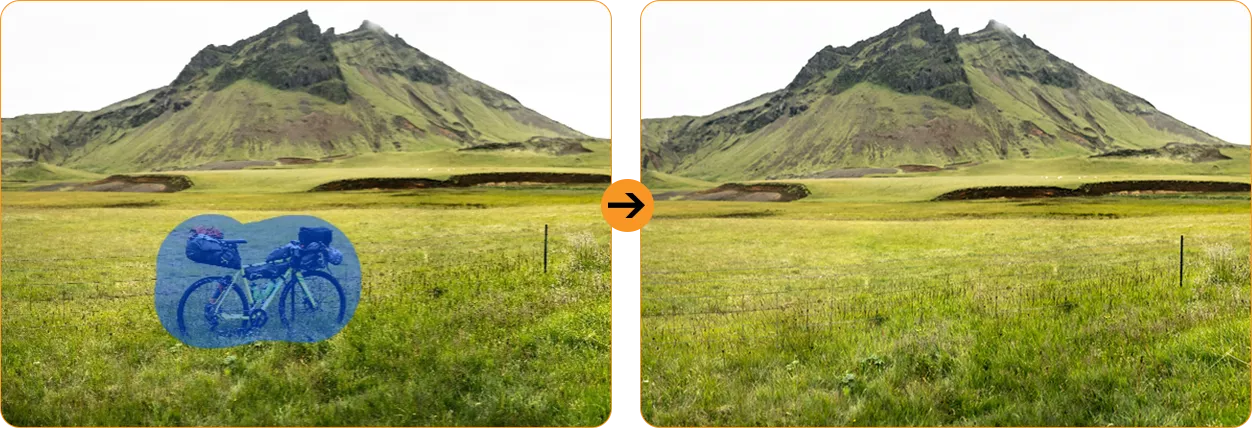
 AI 사진 선명도 복원

 AI 하늘 교체


 AI 인물 사진 흐림 효과
 AI 인물 조명

 AI 컬러 포커스


방수·방진 보호 기능 기준을 뛰어넘는 견고함, 강력함, 우수함

 *최대 수심 1.5m에서 30분간 방수됩니다.
안팎으로, 어떤 도전도 두렵지 않게

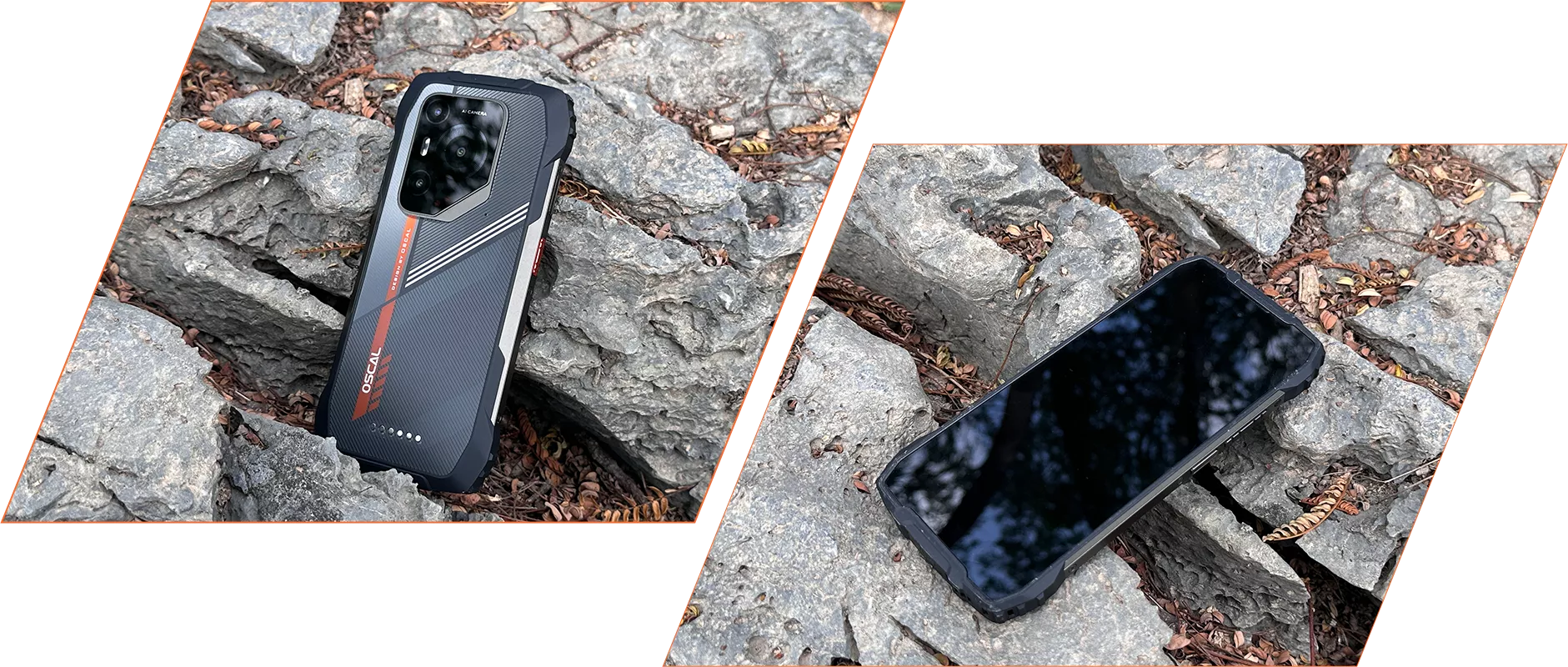 *최대 1.2m 낙하 충격을 견딥니다. 실제 성능은 표면 재질, 충격 각도 등
여러 요인에 따라 달라질 수 있습니다.

안심하고 사용하세요

그 어느 때보다 부드럽게 나에게 맞춤 설정, 전에 없이 스마트하게 개인화↑ 편의성↑ 유연성↑ 개인정보 보호↑
생동감 넘치는 빛으로 생동감 넘치는 아트와 선명한 색상으로 PILOT 3의 화면에 생기를 불어넣어 에너지를 가득 채우고 새로운 시각적 경험을 선사합니다.
개인 공간을 분리 워크스페이스 앱으로 업무 공간과 개인 공간을 분리해 비즈니스 데이터를 안전하게 보호하고 업무와 개인 생활 사이에 명확한 경계를 유지할 수 있습니다.
두 배의 효율 새 ‘위젯 추가’ 버튼으로 홈 화면에서 위젯에 빠르게 액세스하고 배치할 수 있어 과정이 간소화되고 효율성이 높아집니다.
언제든 즉시 액세스 한 손가락으로 빠르게 이용


 사용 가능한 RAM 9% 증가↑
 *EasyShare는 설정에서 Wi-Fi를 켜야 사용할 수 있지만 네트워크에 의존하지는 않습니다. 테스트 환경에 따라 달라질 수 있으므로 데이터 전송 속도는 실제 측정값을 기준으로 합니다.


 시스템 관리자

이제 안전하게 공유하세요 화면 전체가 아닌 특정 앱의 화면만 유지할 수 있어, 나머지는 비공개로 두고 필요한 부분이나 원하는 내용만 녹화하거나 공유할 수 있습니다. 온라인 회의, 교육 세션, 팀 협업에 안성맞춤입니다.

24시간 연중무휴 콜센터 & 유럽 수리 센터 더 세심한 지원, 더 적은 걱정
업그레이드 지원 OSCAL은 정기적인 시스템 업데이트를 제공하여 기기를 최신 Android 버전과 기능, 보안 패치 및 성능 개선 사항으로 최신 상태로 유지해 드립니다.
언제 어디서나
즉시 도움 공식 웹사이트, 핫라인, 소셜 미디어, 이메일을 통한 온라인 지원이나 공인 서비스 센터에서의 오프라인 지원을 통해 전문 기술 지원팀이 어떤 문제든 해결해 드립니다.
문의하기
 *모든 시간은 현지 시간 기준입니다.

오프라인 지원, 신속한 도움

센터 추가 지원이 필요하신 경우, 전문 기술자가 현장 지원, 정확한 고장 진단 및 효율적인 수리 서비스를 제공합니다.
더 많은 기능 살펴보기
+Beidou+QZSS 실시간 위치 추적으로 어디를 가든 연락을 유지할 수 있습니다.
-
모델PILOT 3
-
색상검정, 주황
-
크기182.2*86*14.5mm
-
무게357g
-
운영체제Android 15 기반 DokeOS 4.1
-
디스플레이6.78인치 2.4K IPS, 1080*2460 해상도
120Hz 주사율, 화면 대 본체 비율 86%
Corning® Gorilla® Glass 5 -
CPU5G 옥타코어 MediaTek Dimensity 6300, 6nm
-
RAM & ROM최대 36GB RAM=12GB+24GB 확장
256GB ROM+2TB TF 확장
LPDDR4X+UFS2.2 -
배터리7500mAh; 33W 고속 충전
-
전면 카메라32MP
-
후면 카메라50MP (Samsung® ISOCELL JN1)
20MP 나이트 비전 (SONY IMX376) -
스피커1PC 스마트 K 박스 스피커
-
내비게이션GPS+GLONASS+Galileo+Beidou+QZSS
-
카드 슬롯듀얼; 2*SIM/1*SIM +1*TF 카드
-
NFC지원
-
듀얼 5G VoLTE지원
-
Wi-Fi & BT802.11 b/g/n/a/ac; BT 5.2
-
네트워크 연결2G 대역: B2/B3/B5/B8
3G 대역: WCDMA:B1/B2/B4/B5/B6/B8/B19
CDMA:BC0/BC1/BC10
4G 대역: TDD:B34/B38/B39/B40/B41
FDD:B1/B2/B3/B4/B5/B7/B8/B12/B13/B17/B18/
B19/B20/B25/B26/B28A/B28B/B30/B66
5G 대역: N1/3/5/7/8/20/28/38/40/41/77/78/79
| 모델 | PILOT 3 |
| 색상 | 블랙, 오렌지 |
| 크기 | 182.2*86*14.5mm |
| 무게 | 357g |
| 운영체제 | DokeOS 4.1, Android 15 기반 |
| 디스플레이 | 6.78인치 2.4K IPS, 1080*2460 해상도 120Hz 주사율, 86% 화면 대 본체 비율 Corning® Gorilla® Glass 5 |
| CPU | 5G 옥타코어 MediaTek Dimensity 6300, 6nm |
| RAM 및 ROM | 최대 36GB RAM=12GB+24GB 확장 256GB ROM+2TB TF 확장 LPDDR4X+UFS2.2 |
| 배터리 | 7500mAh; 33W 고속 충전 |
| 전면 카메라 | 32MP |
| 후면 카메라 | 50MP (Samsung® ISOCELL JN1) 20MP 야간 촬영 (SONY IMX376) |
| 스피커 | 1개 스마트-K 박스 스피커 |
| 내비게이션 | GPS+GLONASS+Galileo+Beidou+QZSS |
| 카드 슬롯 | 듀얼; 2*SIM/1*SIM +1*TF 카드 |
| NFC | 지원 |
| 듀얼 5G VoLTE | 지원 |
| Wi-Fi 및 BT | 802.11 b/g/n/a/ac; BT 5.2 |
| 네트워크 연결 | 2G 밴드: B2/B3/B5/B8 3G 밴드: WCDMA: B1/B2/B4/B5/B6/B8/B19 CDMA: BC0/BC1/BC10 4G 밴드: TDD: B34/B38/B39/B40/B41 FDD: B1/B2/B3/B4/B5/B7/B8/B12/B13/B17/B18/ B19/B20/B25/B26/B28A/B28B/B30/B66 5G 밴드: N1/3/5/7/8/20/28/38/40/41/77/78/79 |
Does the OSCAL PILOT 3 rugged phone’s night vision camera support thermal imaging?
No. The PILOT 3 features a 20MP night vision camera for capturing your surroundings in low light or complete darkness. It helps you see details that are difficult to make out with a standard camera after dark, making it useful at campsites and in unlit outdoor areas.
Night vision and thermal imaging serve different purposes. The PILOT 3 captures images of your surroundings rather than measuring temperature differences. You can use it to observe objects and terrain at night, but tasks such as identifying overheating components or locating heat leaks require a thermal imaging device.
How do I use the night vision camera on the OSCAL PILOT 3 rugged phone, and when is it useful?
Access the night vision feature through the phone’s camera interface and frame your subject using the on-screen preview. Keep the camera area clear of fingers or other obstructions, and hold the phone steady while taking the photo. The preview helps you adjust your position and find a suitable shooting distance.
Night vision is useful when checking a campsite, observing nearby surroundings, or photographing outdoor scenes after dark. Image clarity depends on the distance, subject movement, and surrounding conditions. For better results, focus on nearby subjects and pause briefly before taking each shot.
Why aren’t photos always taken at 50MP on the OSCAL PILOT 3 rugged phone?
The PILOT 3’s 50MP main camera uses four-in-one pixel binning technology. When this processing is applied, information from four pixels is combined to produce a photo of approximately 12.5MP. This helps improve brightness in low-light conditions while keeping image files more manageable.
The camera’s sensor resolution and the resolution of a saved photo are different measurements. A 12.5MP image does not mean your camera is limited to 12.5MP; it reflects the processing used for that shot. The final photo resolution depends on the shooting mode and image processing, balancing detail, brightness, and everyday storage needs.
Can I use two SIM cards and a memory card together in the OSCAL PILOT 3 rugged phone?
No, you can’t use all three at once. The PILOT 3 has a shared card slot design that supports either two SIM cards or one SIM card and one TF/microSD memory card. The second slot accommodates a SIM card or a memory card, so you can choose the combination that suits your needs.
Use two SIM cards to keep separate work and personal numbers or add a local number when travelling. If additional storage is more useful, choose one SIM card and a memory card for your photos, videos, and files. Follow the markings on the tray and make sure each card sits securely before reinserting it.
What does “up to 36GB RAM” mean on the OSCAL PILOT 3 rugged phone?
“Up to 36GB RAM” means 12GB of physical RAM plus up to 24GB of expanded RAM. The expanded portion uses part of the phone’s internal storage to provide additional memory resources for managing apps. It supplements the built-in RAM rather than adding another 24GB of physical memory.
RAM expansion can help with multitasking when you regularly switch between several apps. Because it shares space with your stored content, keep enough internal storage available for both expansion and everyday files. The amount you need will depend on how you use your phone and how many apps you typically keep open.
Can I take underwater photos with the OSCAL PILOT 3 rugged phone?
Yes. The PILOT 3 includes an Underwater Camera feature and supports underwater photography at depths of up to 1.5 meters. Its stated water-resistance test conditions are up to 1.5 meters for 30 minutes. Familiarize yourself with the underwater controls before use, and check that the phone’s protective covers and seals are properly closed and undamaged.
Treat these figures as test limits rather than a guarantee for every water environment. Avoid strong currents, high-pressure water, and use beyond the stated depth or duration. After taking the phone out of the water, dry it carefully and allow the charging port and cable connector to dry completely before charging.
Which positioning systems does the OSCAL PILOT 3 rugged phone support for outdoor navigation?
The PILOT 3 supports GPS, GLONASS, Galileo, BeiDou, and QZSS positioning systems. Combined with a compatible navigation app, these help you check your location, follow a route, and find your way during travel or outdoor activities. Before setting off, enable location services and grant your chosen app the necessary permissions.
If your route passes through areas with limited mobile coverage, download the relevant maps in advance using an app with offline support. Satellite positioning can work without mobile data, while available offline navigation features depend on the app. An open view of the sky helps positioning; dense trees, tall buildings, and steep terrain may affect accuracy.
What AI features does the OSCAL PILOT 3 rugged phone offer, and do they require internet access or a subscription?
The PILOT 3 includes Doke AI tools for writing assistance, document analysis, image generation, and photo editing. You can use them to draft text, work through documents, turn ideas into images, and make creative changes to photos. These features bring useful writing and creative tools together on your phone.
Online AI features need an internet connection, and the relevant service may ask you to sign in. Access conditions can vary between tools, so check the feature’s in-app information for any usage limits or payment requirements. Before activating a paid option, review what it includes and choose it only if it suits your needs.
How can I customize the shortcut button on the OSCAL PILOT 3 rugged phone?
The PILOT 3’s shortcut button supports single presses, double presses, and long presses. You can assign available functions or apps to these actions, making frequently used tools easier to reach. For example, a flashlight shortcut can be useful when working in a dim area or moving around a campsite after dark.
Use the shortcut button configuration on your phone to select an action and assign a function from the available options. Once set, try each press action to become familiar with your choices. You can change the assignments as your routine changes, keeping the tools you use most within easy reach.
What does the 120Hz refresh rate offer on the OSCAL PILOT 3 rugged phone, and how can I manage it?
The PILOT 3 features a smart refresh rate of up to 120Hz, helping scrolling, swiping, and animations appear smoother. The difference is especially noticeable when browsing long webpages, scrolling through social feeds, or moving between screens. It contributes to a more fluid experience during everyday use.
To review any refresh-rate controls available on your phone, check its display settings and follow the options shown there. Higher refresh rates generally favor smoother motion, while lower rates can help reduce power use. The available settings depend on the installed software, and actual smoothness also varies with the app and content.
Is the OSCAL PILOT 3 rugged phone compatible with smartwatches and Bluetooth headphones?
Yes. The PILOT 3 supports Bluetooth 5.2 and can connect to compatible wireless headphones and smartwatches. Depending on the accessory, you can listen to music, take calls, receive notifications, or sync activity data. This makes it convenient to use your preferred accessories while commuting, working, or exercising.
For headphones, put them in pairing mode and select them in the phone’s Bluetooth settings. For a smartwatch, follow its companion app’s setup instructions and allow the permissions needed for notifications or syncing. Check that the watch and its app support your phone’s Android version, as available features vary by accessory.
What video resolution and frame rate does the OSCAL PILOT 3 rugged phone support?
The PILOT 3 supports video recording at up to 2K resolution and 30fps, giving you detailed footage of daily life, outdoor trips, and work activities. Use the Camera app’s video interface to review the recording options available for your selected camera and mode before filming.
Higher-resolution videos generally take up more storage, so check your available space before recording longer clips. For clearer results, clean the lens, use good lighting where possible, and hold the phone steadily. Smooth, controlled movements also make your footage easier to watch when filming while on the move.
Can I use two apps in split-screen mode on the OSCAL PILOT 3 rugged phone?
Yes. The PILOT 3 supports split-screen use with compatible apps, allowing you to work with two apps on the screen at once. You can read a document while taking notes or keep a reference page open while writing a message, reducing the need to switch back and forth.
The App Pairs feature lets you save frequently used split-screen combinations and reopen them with a single tap. Follow the on-screen split-screen and pairing options to arrange your preferred apps. App support determines which combinations are available, so choose two compatible apps that work well together for your routine.
How can I keep work and personal apps separate on the OSCAL PILOT 3 rugged phone?
The PILOT 3 includes a Workspace app to help separate work and personal use. It also offers Private Space, which provides a separate area for keeping sensitive apps hidden and protected. Together, these features help you organize different activities and control how you access personal content.
Follow the setup instructions for each feature and add the apps you want to use in that space. For example, keep work tools together for your daily tasks and place selected personal apps in Private Space. This gives you a clearer separation between work activities and content you prefer to keep away from your main interface.
Jump to another section