



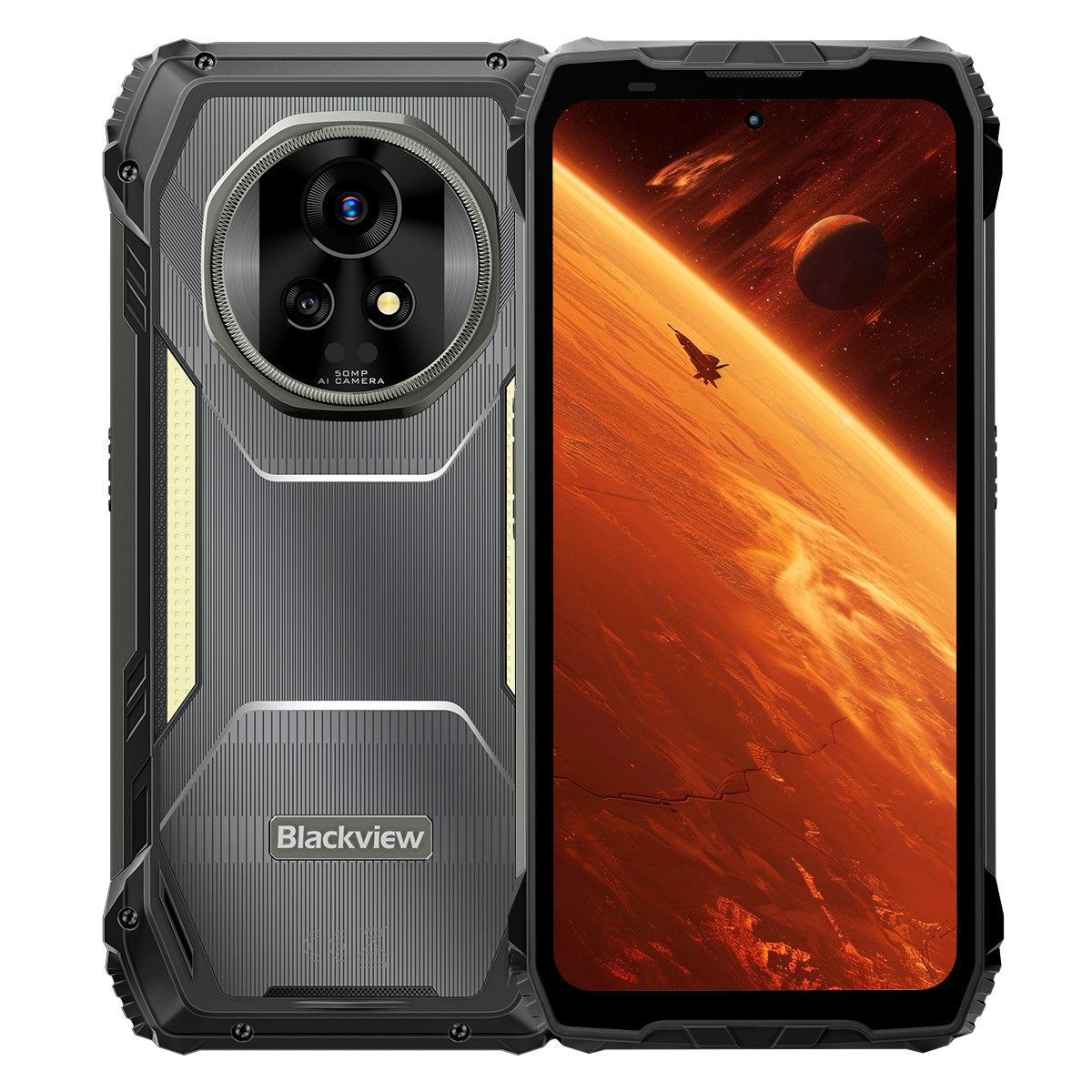


Blackview XPLORE 2 Telefono rugged 5G AI con display AMOLED 3.2K da 6.73-Inch, 12+256GB o 16+1TB, Dimensity 8300, 20000mAh e luce da campeggio da 467LM

Disponibile in magazzino (41)
Punti salienti
Punti salienti
✔Display AMOLED LTPO 6,73" 120Hz 3,2K
✔Luce da campeggio doppia integrata da 467 lumen
✔MediaTek Dimensity 8300 4nm 5G Octa-core e WiFi 6E
✔Batteria da 20000mAh con ricarica rapida da 120W
✔Fotocamera principale da 50MP + visione notturna da 20MP
✔Certificazioni IP68, IP69K e MIL-STD-810H
✔Supporto eSIM
Informazioni
Informazioni
Il Blackview XPLORE 2 è uno smartphone rugged 5G di punta progettato per utenti che desiderano una qualità del display d'élite, lunga autonomia e funzionalità professionali per l'outdoor. Il suo schermo AMOLED da 6,73 pollici 120Hz 3.2K, il processore Dimensity 8300, il WiFi 6E e la massiccia batteria da 20.000mAh con ricarica rapida da 120W lo rendono potente per lavoro, navigazione, media e viaggi. Una fotocamera principale da 50MP, una fotocamera per visione notturna da 20MP, una luce da campeggio da 467LM, il supporto eSIM, la protezione IP68 e IP69K e la resistenza MIL-STD-810H lo rendono pronto per condizioni di campo impegnative.
Informazioni sul brand
Informazioni sul brand
In Blackview, crediamo che una tecnologia eccellente debba andare oltre specifiche impressionanti. Deve adattarsi alla vita di tutti i giorni, risolvere problemi concreti e restare affidabile quando è più importante.
Blackview è nata con telefoni robusti, progettati per gli ambienti più difficili. Oggi offriamo un ecosistema più ampio di dispositivi intelligenti, tra cui smartphone, tablet, laptop, smartwatch, prodotti audio e molto altro.
In ogni categoria, il nostro obiettivo è lo stesso: qualità durevole, innovazione pratica e prezzi accessibili. Progettiamo prodotti affidabili fin dal primo giorno.
Sappiamo cosa conta di più per i clienti: prestazioni fluide, affidabilità duratura, funzionalità utili e una tecnologia che semplifica la vita di tutti i giorni senza costi superflui.
Ecco perché Blackview dedica grande attenzione ai test dei prodotti, all’esperienza utente e alle funzionalità che offrono un valore concreto per il lavoro, i viaggi, la creatività, le avventure all’aria aperta e le relazioni quotidiane.
Blackview è pensato per chi desidera una tecnologia affidabile: dispositivi intelligenti e capaci, progettati per stare al passo con la vita moderna.
Affidabile per design. Pratico per natura. Pensato per la vita di tutti i giorni.
Spedizioni e resi
Spedizioni e resi
• Spedizione: I tempi di elaborazione dell'ordine sono solitamente di circa 2-7 giorni lavorativi, ad eccezione dei prodotti in prevendita. I tempi di spedizione si riferiscono solo ai giorni lavorativi, esclusi i festivi e i giorni non lavorativi. I tempi di spedizione dipendono dal metodo scelto.
• Resi: È possibile richiedere un reso entro 14 giorni dalla consegna, purché il telefono non sia stato utilizzato né danneggiato e siano inclusi tutti gli accessori originali. I difetti del prodotto riscontrati entro un mese possono dare diritto a una sostituzione, a un rimborso o a una riparazione gratuita, previa verifica. Non sono invece coperti i danni causati da uso improprio, cadute, acqua, smontaggio o modifiche non autorizzate.


Il primo 5G AMOLED 3.2K al mondo
Ammiraglia rugged con armatura IA
Nato per raggiungere la vetta. Costruito per la natura selvaggia.
Display AMOLED 3.2K da 6.73" a 120 Hz | Immagini HDR straordinarie | Doppia fotocamera Samsung® da 50 MP + visione notturna da 20 MP| Doppia stabilizzazione (OIS + EIS) | 5G con Dimensity 8300 a 4 nm | 48 GB LPDDR5X e 1 TB UFS4.0 + espansione TF fino a 2 TB | Mega batteria da 20000 mAh e ricarica superveloce a 120 W
I 9 motivi principali per scegliere Blackview
XPLORE 2

La resistenza più elevata del settore
MIL-STD-810H di grado militare di livello superiore
Resistenza alle cadute da 6 metri | Carico ultra pesante da 500 kg | Resistenza alle temperature estreme da -20°C a +60°C

Il massimo della protezione impermeabile
Protezione IP69K e IP68 di livello superiore
Espulsione di polvere e acqua con un tocco | Touch AI resistente alla pioggia| Scatti subacquei
Impermeabile fino a 2 m per 30 minuti | Resiste all'acqua bollente a 80℃

Guardiano notturno
Luce da campeggio da 467 lm
Luce più brillante | Potente luce stroboscopica per segnalazioni e difesa | Segnale SOS immediato in caso di emergenza

Audio stereo rivoluzionario
Altoparlanti stereo Smart-K doppi da 2 W
Fino al 316% di potenza stereo in più per un audio coinvolgente ovunque.

Telecomando a infrarossi
Trasforma il tuo telefono in un telecomando universale in pochi secondi!

Oltre i limiti della visione
Display HDR da 6,73” e 3,2K: senza rivali nella sua categoria
Luminosità di picco leader del settore, 2600 nit | Frequenza di aggiornamento adattiva LTPO da 1 a 120 Hz | Regolazione della luminosità ad alta frequenza a 1920 Hz | Certificazione TÜV SÜD per la riduzione della luce blu

L'eccellenza dell'immagine
Doppia fotocamera AI Samsung® da 50 MP | Visione notturna da 20 MP | Ultra HDR | OIS ed EIS
Registrazione video cinematografica 4K HDR10+ | Tracciamento del movimento | Zoom 8×

Prestazioni al massimo dell'evoluzione
Chip Dimensity 8300 5G di fascia alta | 16 GB di RAM LPDDR5X + 32 GB di espansione | 1 TB di ROM UFS 4.0
1,339,275
Punteggio AnTuTu
 84%
Prestazioni complessive

Connettività di nuova generazione
Supporto Wi-Fi 6E + dual 5G
Velocità 3 volte superiore
Caricamento istantaneo. Streaming senza interruzioni.
Connettività davvero globale

Il primo del settore
Smartphone rugged con supporto eSIM
Risparmia fino al 90% sui costi di roaming | Nessuna SIM fisica necessaria | Libertà di cambiare operatore

Il re della potenza
La batteria più capiente mai montata su uno smartphone rugged
Enorme batteria a doppia cella da 20.000 mAh | Fino a 75 giorni in standby | Ricarica ultraveloce da 120 W | Ricarica inversa da 10 W

L’unico del settore sviluppato internamente
I 3 migliori modelli di IA al mondo. Tutti in uno.
Attivazione tramite riconoscimento vocale & controllo a mani libere

L’unico del settore sviluppato internamente
Il nuovo DokeOS 4.2 basato su Android 15

Aggiornamenti intelligenti per ogni situazione

L’unico impegno post-vendita del settore
Una nuova definizione di robustezza
Protezione estrema di livello superiore.
Certificazioni di resistenza di livello superiore
Certificato con le classificazioni MIL-STD-810H di grado militare e IP68/IP69K, XPLORE 2 offre la massima protezione da cadute, polvere, acqua e schiacciamenti, stabilendo un nuovo punto di riferimento per la resistenza estrema.

6 metri
A prova di caduta
Resiste a cadute da un'altezza massima di 6 metri, da qualsiasi angolazione e su qualsiasi superficie.1

IP6X
A prova di polvere
Protezione completa da sabbia, polvere e particelle industriali.

IPX9K
Impermeabilità totale
Resiste a getti d'acqua ad alta temperatura e pressione, schizzi e immersioni.

MIL-STD-810H
A prova di schiacciamento
Resiste a compressioni estreme, urti e ambienti difficili.
La resistenza più elevata del settore
Indistruttibile da ogni lato
Più resistente che mai: rinforzato dentro e fuori per resistere a cadute, schiacciamenti e temperature estreme.
6 metri
Resistenza alle cadute
Resistenza alle cadute di livello superiore
1.5 metri
Caduta estrema
Resiste alle cadute verticali
500kg
Capacità di carico
Resiste a pressioni elevatissime2
-20°C a +60°C
Temperature estreme
Ampio intervallo operativo

Collaudato con questi test estremi

Struttura ultraresistente
Il primo del settore
Struttura ArmorShield
XPLORE 2 adotta un design ArmorShield a 5 strati, rinforzato con Gorilla® Glass 5 e lega Al-Ti di grado aerospaziale per una resistenza a tutto tondo.
5 strati
ArmorShield
Struttura
4 angoli
Rinforzato
Protezione
400%
Maggiore resistenza agli urti
Resistenza3

Il massimo della protezione impermeabile
Protezione IP69K ai massimi livelli
Certificato IP69K e IP68, resiste a tutto: acqua bollente, getti ad alta pressione incessanti, spruzzi da più angolazioni e immersioni prolungate.
80℃
Resiste all'acqua bollente
10000 kPa
Resiste ai getti di livello industriale
0° / 30° / 60° / 90°
Protezione dagli spruzzi da ogni angolazione
2 m per 30 minuti
Resistenza alle immersioni profonde4
Oltre 1.000.000 di volte
Affidabilità testata in immersione

Porta USB impermeabile doppia
Resistente all'acqua senza copertura, con doppia protezione quando è chiuso.

Espulsione di polvere e acqua con un tocco
Libera all'istante l'altoparlante per mantenere ogni chiamata forte e chiara.5

Touch AI resistente alla pioggia
Anche sotto la pioggia battente, lo schermo rimane fluido e reattivo.6

Scatti subacquei
Dagli schizzi alle immersioni, riprendi il mondo sottomarino con facilità.
Guardiano notturno
Luce da campeggio da 467 lm per una natura selvaggia più luminosa e sicura
Quando scende la notte, la luce da campeggio da 467 lm di XPLORE 2 trasforma il buio in sicurezza. Dal campeggio ai blackout, ti aiuta a essere preparato e a mantenere il controllo.


Telecomando a infrarossi
Trasforma il tuo telefono in un telecomando universale in pochi secondi!8

Audio stereo rivoluzionario
Altoparlanti stereo Smart-K doppi da 2 W
Fino al 316% di potenza stereo in più per un audio coinvolgente ovunque.9

5 dB
Volume più alto 10
+50%
Audio più nitido11
Oltre i limiti della visione
Display
Vivido
Realistico
HDR
Contrasto e dettagli migliorati
Precisione cromatica professionale
Contrasto e dettagli migliorati
2600 nit
Luminosità di picco ai vertici del settore12
6,73 pollici
Display AMOLED premium
521 PPI
Densità di pixel elevatissima
Schermo sempre attivo
Ora e notifiche a colpo d'occhio
DCI-P3
Ampia gamma cromatica di livello cinematografico13
68,7 miliardi
Colori realistici
10,000,000:1
Rapporto di contrasto ultra elevato
1–120 Hz
Frequenza di aggiornamento adattiva LTPO14

Display
Allevia
Confortevole


Full-Link HDR
Dalle immagini straordinarie alle riprese ad alta gamma dinamica, Full-Link HDR offre una brillantezza realistica e preserva ogni dettaglio.

L'eccellenza dell'immagine
Immagini più nitide e stabili
Fotocamera principale premium Samsung® GN9 da 50 MP
Dalle vedute lontane ai momenti in movimento, cattura ogni dettaglio.
1/1.57"
Sensore più grande
f/1.88
Scatti notturni più luminosi
6P
Nitidezza ultra elevata


Dettagli ai vertici della categoria
Foto Ultra HDR, 3× più dettagli15
Ammira la natura selvaggia in ogni dettaglio: dagli orizzonti assolati ai sentieri ombreggiati, con ogni ombra, luce e colore più vividi che mai.

Leader del settore
8× più vicino. Sempre ultra nitido
Avvicina le scene lontane con dettagli cristallini e messa a fuoco stabile.

Fotocamera frontale Samsung® JN1 da 50 MP
Che sia in piena luce o in condizioni di scarsa illuminazione, scatta selfie nitidi, luminosi e naturali.

Visione notturna di un altro livello
Fotocamera per visione notturna Sony® da 20 MP
Dalle ispezioni di sicurezza alle missioni di soccorso, vedi chiaramente anche nel buio più totale.

Video di livello professionale
4K cinematografico HDR10+
Cattura dettagli nitidissimi, colori vividi e contrasto realistico a 60 FPS. Dai paesaggi ai filmati personali, ogni ripresa racconta una storia cinematografica.

Strumenti di scatto più intelligenti

Funzioni intelligenti IA

AI tutto in uno  Modifica immagini
Trasforma le tue foto in immagini straordinarie con un solo clic: modificare non è mai stato così facile!
AI Rimuovi oggetti
Rimuovi facilmente le distrazioni con precisione.

AI Outpainting
Espandi i confini in modo intelligente.

AI Sfoca foto
Metti in risalto ciò che conta con la sfocatura intelligente.

AI Sostituisci sfondo
Cambia gli sfondi e trasforma le scene a piacimento.

Momenti che rinascono
AI Anima
Dai vita alle foto! Aggiungi movimento ai volti e guarda i tuoi ricordi animarsi con energia

Prestazioni al massimo dell'evoluzione
Prestazioni di un altro livello
Chip MediaTek Dimensity 8300 5G a 4 nm di fascia alta
Realizzato con processo a 4 nm e potenziato fino a 3,35 GHz, XPLORE 2 affronta maratone di gioco e multitasking intenso con una fluidità da top di gamma.
40%
CPU più veloce16
30%
GPU più potente17
84%
Prestazioni complessive18
1,339,275
Punteggio AnTuTu

Memoria al massimo
Fino a 48 GB di RAM
(16 GB fisici + 32 GB di espansione)
Grazie a un massimo di 48 GB di RAM e alla memoria atomizzata 2.0, XPLORE 2 offre una risposta più rapida, multitasking fluido e prestazioni senza ritardi.
2X
Trasmissione dati più veloce19
45%
Avvio e passaggio da un'app all'altra più rapidi20
22 app
Multitasking fluido, senza ritardi21
LPDDR5X
RAM ad alta velocità

Archiviazione accelerata
1 TB di ROM + fino a
fino a 2 TB di espansione TF
Con 1 TB di ROM UFS 4.0 e fino a 2 TB di espansione TF, XPLORE 2 archivia tutto, dalle mappe ad alta risoluzione e i filmati dei droni ai file di soccorso: accesso istantaneo, anche sul campo.
2X
Maggiore capacità di archiviazione22
2,3 volte
Velocità di lettura e scrittura superiori23
UFS 4.0
Archiviazione ultraveloce
1 TB + espansione TF da 2 TB = spazio per tutto

Connettività di nuova generazione
Supporto Wi-Fi 6E + dual 5G
Resta al passo con Wi-Fi 6E e dual 5G: più veloci, fluidi e davvero globali.
Velocità 3 volte superiore
Caricamento istantaneo. Streaming senza interruzioni.24
6 GHz + 5 GHz + 2,4 GHz
Wi-Fi tri-band. Più veloce. Più potente.

2,5 Gbps in upload | 5,11 Gbps in download
Upload e download ultraveloci.25
Supporto dual 5G
Connettività davvero globale

Prestazioni al massimo
Sistema di raffreddamento efficiente 3 in 1
Resta al fresco grazie all'avanzato design termico, anche durante sessioni di gaming intense, streaming 5G continuo o giornate di lavoro all'aperto.

Grafite + rame + silicone
Tre materiali, trasferimento rapido del calore
Superficie di dissipazione di 2.262,8 mm²
Dissipazione del calore più rapida, prestazioni di picco più durature
<37°C nell'uso quotidiano
Sempre fresco, sempre stabile
Il primo del settore
Smartphone rugged con supporto eSIM
Una rivoluzione globale nelle comunicazioni!
Comunicare in tutto il mondo, in modo più semplice e conveniente!

Risparmia: riduci i costi di roaming fino al 90%!
Risparmia fatica: niente SIM fisica, libertà di cambiare operatore!
Resta connesso: segnale affidabile, sempre online!
Resta connesso sempre e ovunque!
Viaggia per il mondo
Esplora liberamente, resta connesso!

Viaggi di lavoro
Attraversa i confini, lavora in modo più intelligente!

Avventure all'aria aperta
Resta online, resta al sicuro!

Il re della potenza
Enorme batteria a doppia cella da 20.000 mAh
Come avere quattro telefoni da 5.000 mAh in uno: energia inarrestabile, autonomia per tutto il giorno.

Gestione energetica IA


1,6X
Durata maggiore26
Oltre 36 ore
Uso intenso27
Oltre 23 ore
Gaming
Oltre 24 ore
Navigazione web
Oltre 166 ore
Chiamate
Oltre 10 ore
Illuminazione continua
75 giorni
Standby
Il più veloce della categoria
Ricarica ultraveloce da 120 W
50% in 39 min. 100% in 117 min. Sempre pronto quando serve.28
118% Più veloce
Ricarica
Nessuna attesa. Solo energia.29
Ricarica inversa da 10 W
Condividi energia, sempre e ovunque.


L’unico del settore sviluppato internamente


Intelligenza a comando vocale
Gemini AI 2.0
Più intelligente. Più veloce. Comandi vocali. XPLORE 2 ti lascia il controllo, a mani libere, ovunque tu vada.
Attivazione tramite riconoscimento vocale & controllo a mani libere
Sblocca e controlla con la voce: sicurezza e mani libere.

Controllo intelligente globale
Una sola voce per controllare tutto, tra app e impostazioni.

Assistenza a schermo intero
Assistenza immediata sullo schermo, ovunque ti trovi.

Interazione in tempo reale
Parla in modo naturale, ovunque ti porti il dovere.

L'unica suite IA sviluppata internamente del settore
Hi Doki | ImageX | VidGen | Soundle
Quattro app, infinite creazioni: scrivi, modifica, riprendi e componi senza limiti.30

L’unico del settore sviluppato internamente
Hi Doki
Ricerca basata sull'IA, analisi dei documenti e scrittura intelligente. Dalla ricerca alla creazione, le idee prendono vita con un tocco.

L’unico del settore sviluppato internamente
ImageX
Con 18 strumenti di editing basati sull'IA, trasforma scatti ordinari in immagini straordinarie: migliorate, personalizzate e pronte da condividere.

L’unico del settore sviluppato internamente
VidGen
Dal testo al video, dalle immagini alle storie: l'IA trasforma le tue idee in vlog, video brevi e storie avvincenti con facilità.

L’unico del settore sviluppato internamente
Soundle
Indica il tuo stato d'animo e lascia che l'IA componga per te. Dalle melodie romantiche ai ritmi più energici, la musica è fatta su misura per te.

L’unico del settore sviluppato internamente
Il nuovo DokeOS 4.2 basato su Android 15
Più intelligente. Più veloce. Più sicuro. Più tuo.
XPLORE 2 ridefinisce le prestazioni grazie a velocità, efficienza, privacy e personalizzazione senza limiti.31

Aggiornamenti intelligenti per ogni situazione

Sistema a quattro satelliti
Resta sulla giusta rotta grazie al posizionamento ad alta precisione: accuratezza affidabile di 1 metro in qualsiasi ambiente.32

Ultimo BT wireless 5.4
Trasferisci file il 50% più velocemente, goditi connessioni più stabili e associa senza problemi tutti i tuoi dispositivi.34

Giroscopio ad alta precisione
Naviga con precisione. Misura accuratamente con la realtà aumentata. Gioca con maggiore fluidità a ogni mossa.

Pulsante di scelta rapida personalizzabile
Le funzioni essenziali a portata di un tasto.

NFC per ogni esigenza
Dai pagamenti alle tessere di accesso, basta un tocco.35
L’unico impegno post-vendita del settore
Assistenza più rapida. Aggiornamenti più duraturi. Massima tranquillità.36

3 anni di aggiornamenti del sistema operativo Android
Assistenza più duratura, sempre aggiornata

Assistenza telefonica
Assistenza telefonica diretta quando ne hai bisogno

Servizio online 24/7
Assistenza immediata, giorno e notte

Centri di riparazione autorizzati
Un servizio offline affidabile su cui puoi contare
Specifiche di Blackview XPLORE 2

| Modello | XPLORE 2 |
| Colore | Nero |
| Dimensioni | 186 * 87,8 * 29 mm |
| Peso | 670 g |
| Sistema operativo | DokeOS 4.2 basato su Android 15 |
| Display | Display AMOLED da 6,73 pollici e 3,2K, risoluzione 1440 * 3200, Corning® Gorilla® Glass 5, frequenza di aggiornamento di 120 Hz |
| CPU | Processore MediaTek Dimensity 8300 octa-core 5G, 4 nm, fino a 3,35 GHz |
| RAM e ROM | 12 GB di RAM e 256 GB di ROM, LPDDR5X+UFS4.0 16 GB di RAM e 1 TB di ROM, LPDDR5X+UFS4.0 |
| Espansione TF | Espansione TF fino a 2 TB |
| Batteria | 20.000 mAh; ricarica ultraveloce Hyper da 120 W |
| Fotocamera anteriore | 50MP |
| Fotocamera posteriore | Fotocamera principale da 50 MP + visione notturna da 20 MP |
| Altoparlante | Doppio altoparlante Smart-K BOX |
| Grado di resistenza | IP68 & IP69K & MIL-STD-810H |
| Navigazione | L1+L5 GPS/GLONASS/BeiDou/Galileo |
| Slot per scheda | Dual: 2*SIM/1*SIM +1*scheda TF |
| NFC | Supporto |
| Dual 5G VoLTE | Supporto |
| Wi-Fi&Bluetooth | Wi-Fi 6E; BT 5.4 |
| Connettività di rete | Bande 2G: B2/B3/B5/B8 Bande 3G: WCDMA: B1/B2/B4/B5/B6/B8/B19 (RXD) CDMA: BC0 Bande 4G: TDD:B34/B38/B39/B40/B41 FDD:B1/2/3/4/5/7/8/12/13/17/18/19/20/25/26/28A/28B/30/66 Bande 5G: N1/3/5/7/8/20/28/38/40/41/77/78/79 |
1. Dati forniti dal laboratorio Blackview. Essendo un dispositivo elettronico di precisione, il telefono può comunque subire danni in caso di caduta. Evita di far cadere o urtare il dispositivo. Le prestazioni effettive possono variare in base all’ambiente di utilizzo, all’angolazione della caduta e al materiale della superficie. Fai riferimento alla tua esperienza diretta.
2. Dati forniti dal laboratorio Blackview. Essendo un dispositivo elettronico di precisione, il telefono può comunque subire danni se sottoposto a una forte pressione. Evita di schiacciare o urtare il dispositivo.
3.Dati forniti dal laboratorio Corning, che confrontano Gorilla® Glass 5 con il normale vetro sodico-calcico. In condizioni controllate, Gorilla® Glass 5 offre prestazioni superiori.
4.XPLORE 2 resiste a schizzi, acqua e polvere in normali condizioni d'uso e ha ottenuto le certificazioni IP69K e IP68 in condizioni di laboratorio controllate. La protezione non è permanente e i risultati effettivi possono variare in base all'invecchiamento del dispositivo, alle abitudini d'uso e ai fattori ambientali. Non caricare il telefono quando è bagnato.
5.Utilizza le vibrazioni delle onde sonore per rimuovere polvere e acqua dall'altoparlante, contribuendo a mantenere chiare le chiamate e normali le prestazioni audio. I risultati effettivi della pulizia possono variare in base alla quantità di polvere o acqua accumulata e all'ambiente d'uso. Fare riferimento all'esperienza effettiva.
6.L'esperienza di utilizzo del touchscreen può variare in base alle precipitazioni, agli scenari d'uso e alle abitudini individuali. Fare riferimento all'esperienza effettiva.
7. Dati forniti dal laboratorio Blackview. I tre livelli di luminosità sono: Ultra Bright 467 lm, High Bright 368 lm e Low Bright 236 lm.
8. In teoria, la funzione di telecomando a infrarossi supporta la maggior parte dei dispositivi controllati a infrarossi, ma la compatibilità effettiva può variare in base al modello specifico e all'ambiente. Le prestazioni possono differire nell'uso reale.
9.Il confronto delle prestazioni con i tradizionali altoparlanti doppi da 1 W si basa sui risultati di test di laboratorio simulati e valuta le caratteristiche tecniche del prodotto. I risultati effettivi possono variare in base all'ambiente d'uso, al modello del dispositivo o alla configurazione tecnica.
10.Rispetto a due altoparlanti da 1 W, il livello sonoro aumenta di circa 5 dB. Le prestazioni audio possono variare in base alle situazioni d'uso, alla qualità della sorgente audio e al rumore ambientale. Fare riferimento all'esperienza effettiva.
11.Rispetto a due altoparlanti da 1 W, il miglioramento della percezione uditiva è di circa il 50%. Le prestazioni audio specifiche dipendono dall'esperienza effettiva.
12.La luminosità di picco può raggiungere i 2600 nit, mentre la luminosità di attivazione globale è di 1300 nit ed è disponibile solo in scenari specifici. La luminosità manuale standard è di 500 nit. L'esperienza effettiva dipende dalle condizioni d'uso.
13.Il display con ampia gamma cromatica DCI-P3 richiede sorgenti di immagini e video compatibili per ottenere un effetto ottimale.
14.Lo schermo supporta una frequenza di aggiornamento dinamica di 120 Hz. La frequenza può variare leggermente tra le diverse interfacce delle app e le situazioni di gioco. Fare riferimento all'esperienza effettiva.
15.I dati derivano da test condotti nei laboratori di Blackview in condizioni controllate. Le prestazioni effettive possono variare in base a fattori quali l'illuminazione, la complessità della scena o la configurazione del dispositivo.
16.Dati provenienti dai test teorici del laboratorio Blackview, con confronto con Blackview XPLORE 1. Le prestazioni effettive possono essere influenzate dall’ottimizzazione del sistema, dal carico delle applicazioni e dall’ambiente di rete. Fare riferimento all’esperienza effettiva.
17.Dati provenienti dai test teorici del laboratorio Blackview, con confronto con Blackview XPLORE 1. Le prestazioni effettive possono variare a causa dell’ottimizzazione del sistema, del carico delle applicazioni e dell’ambiente di rete. Fare riferimento all’esperienza effettiva.
18.Dati provenienti dai test teorici del laboratorio Blackview, con confronto con Blackview XPLORE 1. Le prestazioni complessive possono variare a causa dell’ottimizzazione del sistema, del carico delle applicazioni e dell’ambiente di rete. Fare riferimento all’esperienza effettiva.
19.Dati ricavati dal laboratorio Blackview in condizioni di test standardizzate, a confronto con Blackview XPLORE 1. Le prestazioni specifiche possono variare in base alle condizioni di utilizzo effettive.
20.Dati ricavati dal laboratorio Blackview in condizioni di test standardizzate, a confronto con Blackview XPLORE 1. Le prestazioni specifiche possono variare in base alle condizioni di utilizzo effettive.
21.Dati basati su test condotti nel laboratorio Blackview in condizioni controllate. Le prestazioni effettive possono variare a causa di fattori quali il tipo di app, le impostazioni di sistema, i processi in background e altri.
22.I dati provengono dal laboratorio Blackview; il confronto è stato effettuato con Blackview XPLORE 1.
23.Dati provenienti dai test teorici del laboratorio Blackview, con confronti effettuati con Blackview XPLORE 1. Le velocità effettive possono variare in base alle condizioni di utilizzo.
24.Dati provenienti dal laboratorio Blackview, con confronto con Wi-Fi 5. L’esperienza effettiva può variare a causa di fattori ambientali e del dispositivo.
25.Le velocità di rete indicate rappresentano i valori massimi teorici. Le velocità effettive possono variare in base alle condizioni della rete, al supporto dell’operatore, alla configurazione del dispositivo e ad altri fattori. Le prestazioni dipendono dalle condizioni di utilizzo effettive.
26.Supporta fino a 800 cicli di ricarica completi. Le prestazioni effettive possono variare in base alle modalità di utilizzo, ai fattori ambientali, alla manutenzione del dispositivo e ad altri fattori.
27.Tutti i tempi di utilizzo si basano su test condotti su modelli del laboratorio Blackview. Le prestazioni effettive possono variare in base agli scenari d’uso, al carico delle applicazioni, alle condizioni della rete e alle abitudini individuali.
28.La velocità di ricarica può variare in base al caricabatterie, al cavo di ricarica, alla tensione e alla temperatura ambientale. Fare riferimento alle condizioni d’uso effettive.
29.Dati forniti dal laboratorio Blackview, con confronto con Blackview XPLORE 1.
30.Doke AI offre una prova gratuita di 30 giorni. L’efficacia delle funzioni di IA può variare in base agli scenari d’uso, ai contenuti inseriti e alle abitudini individuali. Fare riferimento all’esperienza d’uso effettiva.
31.Le funzioni saranno costantemente migliorate con gli aggiornamenti OTA. Fare riferimento all’esperienza d’uso effettiva.
32.Dati forniti dal laboratorio Blackview. La precisione del posizionamento può variare a causa di ostacoli ambientali, interferenze ed effetti multipath. Fare riferimento all’esperienza d’uso effettiva.
33.Dati forniti dal laboratorio Blackview, con confronto con Blackview XPLORE 1.
34.Gli effetti d’uso specifici possono variare in base al tipo di scheda, al metodo di crittografia e alla compatibilità del dispositivo. Le schede di accesso crittografate potrebbero non essere supportate; per le funzioni di pagamento potrebbero essere necessarie password o verifiche. Fare riferimento all’esperienza d’uso effettiva.
35.I servizi specifici possono variare in base alle politiche regionali e alle capacità dei centri di riparazione. Fare riferimento alle condizioni effettive.
*Potrebbero esserci differenze di pixel tra le diverse modalità foto e video. Fare riferimento alle condizioni effettive.
*Le immagini dei prodotti e i contenuti dello schermo riportati nelle pagine sopra indicate hanno finalità puramente illustrative. L’aspetto effettivo del prodotto (inclusi, a titolo esemplificativo ma non esaustivo, aspetto, colore e dimensioni) e i contenuti visualizzati sullo schermo (inclusi, a titolo esemplificativo ma non esaustivo, sfondi, interfaccia utente e illustrazioni) potrebbero presentare lievi differenze. Fare riferimento al prodotto effettivo.
*I dati riportati nelle pagine sopra indicate sono valori teorici forniti dal laboratorio Blackview, ottenuti in specifiche condizioni di prova (consultare le descrizioni specifiche di ciascun elemento). L’utilizzo effettivo può presentare lievi variazioni dovute alle differenze tra i singoli prodotti, alle versioni software, alle condizioni d’uso e ai fattori ambientali. Fare riferimento alle condizioni d’uso effettive.
*A causa delle variazioni in tempo reale dei lotti di prodotti e dei fattori legati alla fornitura e alla produzione, Blackview potrebbe modificare e aggiornare le descrizioni testuali e le immagini delle pagine sopra riportate, per adeguarle il più possibile alle prestazioni, alle specifiche, agli indici e ai componenti effettivi dei prodotti.
*Nel caso in cui tali modifiche e adeguamenti siano necessari, non verranno forniti avvisi specifici.
| Modello | XPLORE 2 |
| Colore | Nero |
| Dimensione | 186 * 87,8 * 29mm |
| Peso | 670g |
| Sistema operativo | DokeOS 4.2 basato su Android 15 |
| Visualizza | Display AMOLED 3.2K da 6,73 pollici, risoluzione 1440 * 3200 Corning® Gorilla® Glass 5, frequenza di aggiornamento 120Hz |
| CPU | CPU Octa-core 5G MediaTek Dimensity 8300, 4nm, fino a 3,35GHz |
| RAM & ROM | 12GB RAM & 256GB ROM, LPDDR5X+UFS4.0 16GB RAM & 1TB ROM, LPDDR5X+UFS4.0 |
| Espansione TF | Espansione TF fino a 2TB |
| Batteria | 20.000mAh; Ricarica ultraveloce da 120W |
| Fotocamera frontale | 50MP |
| Fotocamera posteriore | Fotocamera principale 50MP + Visione notturna 20MP |
| Altoparlante | Altoparlante Dual Smart-K BOX |
| Certificazione rugged | IP68 & IP69K & MIL-STD-810H |
| Navigazione | GPS L1+L5/GLONASS/BeiDou/Galileo |
| Slot per schede | Dual: 2*SIM/1*SIM +1*Scheda TF |
| NFC | Supporto |
| Dual 5G VoLTE | Supporto |
| Wi-Fi&Bluetooth | Wi-Fi6E; BT 5.4 |
| Connettività di rete | Banda 2G: B2/B3/B5/B8 Banda 3G: WCDMA: B1/B2/B4/B5/B6/B8/B19 (RXD) CDMA: BC0 Banda 4G: TDD: B34/B38/B39/B40/B41 FDD: B1/2/3/4/5/7/8/12/13/17/18/19/20/25/26/28A/28B/30/66 Banda 5G: N1/3/5/7/8/20/28/38/40/41/77/78/79 |
• Confezione UE: Alimentatore non incluso
• Confezione non UE: Alimentatore incluso

How can I check whether the Blackview XPLORE 2 is compatible with my mobile carrier?
The Blackview XPLORE 2 supports 2G, 3G, 4G LTE, and 5G networks. Before purchasing, please check that the network bands supported by the XPLORE 2 match those used by your mobile network operator. First, identify which networks you use, then check the supported network bands in the specifications section of the product details page.
Alternatively, you can contact your mobile network operator to enquire whether this handset supports voice calls, text messages, and mobile data services via a SIM card. This will help you determine whether it is compatible. Please note that the availability of 4G or 5G services also depends on your operator’s network coverage, your mobile plan, and the operator’s support for this handset.
Does the Blackview XPLORE 2 support eSIM, and how do I activate it?
Yes. The Blackview XPLORE 2 series supports eSIM, allowing you to activate a mobile plan online without inserting a physical SIM card. To use this feature, you will need to register for the eSIM service with a mobile network operator or service provider that supports the XPLORE 2.
Before registering, please check whether this service is available in your region and whether it includes all the features you require. Some eSIM plans offer mobile data only, whilst others also include voice calls and text messaging. Ask your service provider for instructions on how to activate the service.
How long does the Blackview XPLORE 2’s 20,000mAh battery last with everyday use?
In laboratory testing, the Blackview XPLORE 2’s 20,000mAh battery delivered more than 36 hours of heavy use, making it well suited to long workdays and outdoor activities. Actual battery life varies depending on how much time you spend on calls, navigation, browsing, and entertainment.
Keeping navigation running on screen throughout the day uses more power than occasionally checking directions or replying to messages. Gaming and high screen brightness also drain the battery faster. Before a longer trip, try using the phone as you normally would for a day to get a better idea of how long a charge will last for you. This can help you decide whether to bring a power bank.
Should I choose the Blackview XPLORE 2 with 12GB RAM and 256GB storage or 16GB RAM and 1TB storage?
The 12GB/256GB version is suitable for everyday use, photography, navigation, and gaming. If you frequently use large apps or prefer to store more large games, videos, and work files, we recommend the 16GB/1TB version.
You can base your decision on your storage habits. If you regularly back up your photos and clear out junk files, 256GB should be sufficient. Conversely, if you prefer to keep everything—such as downloaded films and offline maps—1TB would be more suitable, as you won’t need to free up space as frequently.
How does the Blackview XPLORE 2 perform in demanding games like Genshin Impact?
Yes, you can play demanding games such as Genshin Impact on the Blackview XPLORE 2. Its Dimensity 8300 processor and LPDDR5X RAM enable it to handle these games and deliver smooth gameplay with appropriate graphics settings. It is recommended to start with medium graphics settings, which offer a better balance of image quality and responsiveness.
Higher graphics settings and extended play sessions may result in occasional drops in frame rate, particularly in complex scenes or when the device is warm. Should this occur, reducing the graphics quality can help maintain smoother gameplay. However, a consistent frame rate or the complete absence of stuttering cannot be guaranteed.
Is the Blackview XPLORE 2’s camera suitable for quick snapshots and moving subjects?
Yes. The XPLORE 2’s 50-megapixel main camera is ideal for everyday snapshots, such as moments in family life or work scenes. The optical image stabilisation feature helps reduce camera shake, whilst the motion tracking function ensures moving objects remain sharply in focus at all times.
When photographing children, pets, or other moving subjects, it is advisable to shoot in well-lit conditions and ensure the subject remains within the frame at all times. In low light, ask the subject to pause briefly; This will yield better results than adjusting the camera settings. The image stabilisation feature effectively minimises hand shake, but cannot eliminate blurring caused by fast-moving subjects.
How do I turn on the Blackview XPLORE 2’s camping light, and what lighting modes are available?
The XPLORE 2’s camping light offers three modes: steady, flashing, and SOS. Steady mode is suitable for lighting while pitching a tent, searching for equipment, or during a power cut; flashing mode can attract the attention of people nearby; SOS mode lets you send a distress signal with the light.
When using the light, select the appropriate mode for the situation; switch it off when not in use to conserve battery power. Please note that SOS mode is merely a visible light signal; it does not automatically transmit your location or contact emergency services.
What can I use the Blackview XPLORE 2’s night vision camera for?
The 20-megapixel infrared night vision camera helps you observe and photograph your surroundings in the dark. When there is insufficient ambient light, you can use it to check around your tent, inspect unlit storage spaces, or capture details of your equipment.
The images produced by the night vision function are in black and white, not colour photographs. Its operating principle also differs from thermal imaging: you can see the outline of objects in the dark, but you cannot use it to measure temperature or identify hot or cold areas.
Can I replace the Blackview XPLORE 2’s battery myself?
If your XPLORE 2’s battery life isn’t as long as it used to be and you don’t want to buy a new phone, you can replace the battery. We recommend contacting Blackview’s after-sales team first to help determine whether the issue requires a battery replacement or a repair. If you find it more convenient or quicker to visit a local repair shop, be sure to ask the technician whether they are familiar with repairing rugged smartphones to ensure the phone functions correctly after repair.
Alternatively, if you are a qualified repair technician or have the relevant experience and tools, you may purchase a suitable battery and replace it yourself. Before replacing the battery, please ensure it is compatible and that you can reassemble and reseal the phone correctly. Please note that opening the phone will affect its water resistance, and any damage caused during unauthorised repairs will not be covered by the Blackview warranty.
What are the differences between the Blackview XPLORE 2 Standard, Satellite, and Projector versions?
The Blackview XPLORE 2 Standard is primarily designed for everyday tasks. The Satellite Edition adds messaging capabilities in supported areas without mobile network coverage, whilst the Projector Edition allows you to watch films at your campsite or share presentations on a wall or screen. The table below outlines their main differences.
| Feature | XPLORE 2 Standard | XPLORE 2 Satellite | XPLORE 2 Projector |
|---|---|---|---|
| eSIM support | Yes | Yes | Yes |
| Satellite messaging | No | Yes—voice, text, and location messages* | No |
| Built-in projector | No | No | 100 lumens; 854 × 480 resolution; up to 100″ |
| Processor | MediaTek Dimensity 8300 | MediaTek Dimensity 8300 | MediaTek Dimensity 8300 |
| RAM / Storage | 12GB / 256GB or 16GB / 1TB | 12GB / 256GB or 16GB / 1TB | 12GB / 256GB or 16GB / 1TB |
| Battery / Charging | 20,000mAh / Up to 120W wired | 20,000mAh / Up to 120W wired | 20,000mAh / Up to 120W wired |
| Weight / Dimensions | 670g / 186 × 87.8 × 29mm | 675g / 186 × 87.8 × 29mm | 710g / 186 × 87.8 × 29mm |
| Best suited for | Everyday work and outdoor activities | Remote work and exploration beyond mobile coverage | Movies, camping entertainment, and presentations |
What software updates are available for the Blackview XPLORE 2, and how do I install them?
The XPLORE 2 comes pre-installed with DokeOS 4.2, based on Android 15, and offers three years of Android operating system update support. This refers to the support period, not a guaranteed number of major Android version upgrades.
When your phone notifies you that an update is available, connect to Wi-Fi and follow the on-screen instructions to install it. Before starting the update, we recommend backing up important files and ensuring the battery is sufficiently charged. If the installation fails, please send the error message and the current software version to Blackview Customer Service so that we can assist you with the next steps.
What warranty and after-sales services are available for the Blackview XPLORE 2 purchased from the official shop?
If you have purchased the XPLORE 2 from the official Blackview store, you are entitled to a 12-month repair warranty covering eligible faults. Should your mobile phone fail to function properly, please provide your order number and a brief description of the issue to our official customer service team. Attaching photographs or videos will help us understand the problem and provide more useful troubleshooting advice.
If repairs are required, please contact us before posting the phone so that we can confirm the relevant arrangements. For approved warranty repairs, you will be responsible for the cost of returning the phone, whilst Blackview will cover the cost of returning the repaired device. Damage caused by improper use is not covered by the free repair service; Please check with our team in advance if any repair costs are incurred.
Can I use the Blackview XPLORE 2 Projector to watch movies at home or while camping?
Yes. The XPLORE 2 projector allows you to turn any suitable wall or portable screen into a cinema. It supports a maximum screen size of 100 inches, with a brightness of 100 lumens and a resolution of 854 × 480.
For a family film night, we recommend a dimly lit room or watching after dark, using a smooth, light-coloured surface. If the image appears too dark, you can reduce the image size or dim the surrounding lights. Before going camping, download films onto your mobile phone in advance to avoid issues with unstable network signals at your campsite.
How do I turn on the projector on the Blackview XPLORE 2 Projector and adjust the image for a clear picture?
Once the projection function is enabled, point the lens at a flat surface and turn the physical focus knob until the text and edges appear clear and sharp. When the phone is projecting at an upward or downward angle, the automatic vertical keystone correction feature helps to correct the image.
Place the phone on a stable coffee table or desk, facing the centre of the viewing area. Move the phone closer to produce a smaller image, or further away to produce a larger one, then refocus. If the image remains blurry, try dimming the surrounding lights first, then increase the projection size.
Where are satellite services available for the Blackview XPLORE 2 Satellite, and do they require a subscription?
The Blackview XPLORE 2 Satellite service covers satellite messaging in 36 countries across regions including Australia and New Zealand. If you are unsure whether the service is available in your area before purchasing, please contact the Blackview customer service team and let us know where you plan to use it, so that we can help you check whether that location is supported.
Satellite messaging is a paid service separate from standard mobile plans. Before travelling to areas without mobile coverage, please check the available plans, text message limits, and activation requirements, and complete the setup in advance.
Jump to another section