



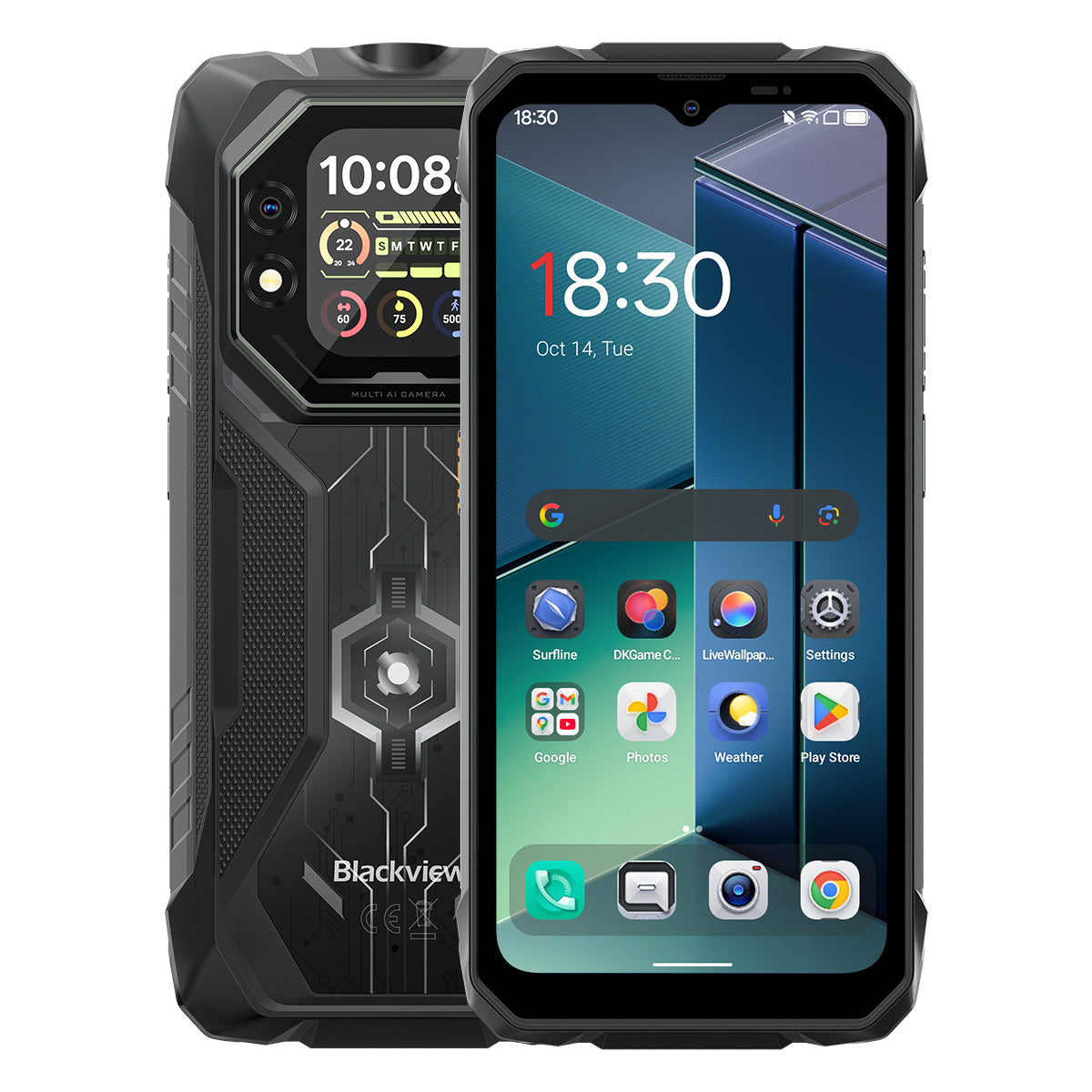


Blackview ROCK 1 Smartphone Rugged 6,56 pollici 90Hz Display Principale & 2,01" Display Secondario MediaTek Helio G81 Octa-core 15000mAh Fotocamera Visione Notturna 20MP 4G

Disponibile in magazzino (13)
Punti salienti
Punti salienti
✔Display principale da 6,56 pollici e display secondario multifunzionale da 2,01"
✔Processore Octa-core MediaTek Helio G81
✔Batteria da 15000mAh e ricarica rapida da 33W
✔Fotocamera Sony® Night Vision da 20MP
✔Certificazioni IP68, IP69K e MIL-STD-810H
Informazioni
Informazioni
Il Blackview ROCK 1 è progettato per utenti che necessitano di prestazioni mobili affidabili in ambienti impegnativi. Combina un display principale da 6,56 pollici a 90Hz e un display secondario da 2,01 pollici con le prestazioni del MediaTek Helio G81 e una batteria da 15000mAh con ricarica rapida da 33W per lavoro, viaggi, navigazione e uso all'aperto. Le principali caratteristiche pronte per il campo includono una fotocamera Sony da 20MP con visione notturna, l'utilità a doppio schermo per controlli rapidi dello stato e la protezione IP68, IP69K e MIL-STD-810H. Progettato per cantieri, viaggi remoti e resistenza quotidiana, offre agli utenti la sicurezza di rimanere connessi, catturare dettagli e continuare quando i telefoni normali non sono sufficienti.
Informazioni su Brand
Informazioni su Brand
Da Blackview, crediamo che la grande tecnologia debba andare oltre specifiche impressionanti. Deve adattarsi alla vita reale, risolvere problemi concreti e rimanere affidabile quando conta davvero.
Blackview è nata con telefoni rugged progettati per ambienti difficili. Oggi offriamo un ecosistema più ampio di dispositivi smart, tra cui smartphone, tablet, laptop, smartwatch, prodotti audio e altro ancora.
In ogni categoria, il nostro focus rimane lo stesso: qualità durevole, innovazione pratica e prezzi accessibili. Progettiamo prodotti che risultano affidabili fin dal primo giorno.
Comprendiamo cosa i clienti apprezzano di più: prestazioni fluide, affidabilità duratura, funzionalità utili e tecnologia che rende la vita quotidiana più semplice senza costi inutili.
Per questo Blackview dedica vera attenzione ai test di prodotto, all’esperienza utente e alle funzionalità che portano un valore significativo al lavoro, ai viaggi, alla creatività, all’esplorazione all’aperto e alla connessione quotidiana.
Blackview è pensata per chi desidera una tecnologia di cui potersi fidare: dispositivi smart e capaci, costruiti per stare al passo con la vita moderna.
Affidabile per progettazione. Pratico per natura. Fatto per la vita reale.
Spedizioni e Resi
Spedizioni e Resi
• Spedizione: Gli ordini vengono elaborati entro 1-2 giorni lavorativi. La consegna standard richiede da 3 a 7 giorni lavorativi a seconda della tua posizione.
• Resi: Puoi restituire o scambiare i prodotti entro 30 giorni dal ricevimento dell'ordine. Gli articoli devono essere nelle condizioni originali con prova d'acquisto.
Se il tuo articolo è difettoso o danneggiato a causa di problemi di fabbricazione, lo sostituiremo volentieri senza costi aggiuntivi.

Display doppi innovativi
Potenza massiccia
La tua scelta affidabile per esplorare oltre all'aperto


Design robusto incontra un'estetica curata
ROCK 1 presenta una struttura robusta e resistente, che mette in risalto la sua forza tecnologica hardcore. La cover posteriore integra un design opaco unico che interagisce con la luce per creare effetti visivi dinamici, aggiungendo un tocco sottile di sofisticazione al suo aspetto robusto.

Attacca facilmente una cinghia, appendilo ovunque e tienilo al sicuro.


N.1
Certificato MIL-STD-810H & IP69K & IP68, costruito
per conquistare gli estremi
N.2
Innovativo doppio schermo, ridefinisce
Visione intelligente

N.1
Certificato MIL-STD-810H & IP69K & IP68,
Costruito per conquistare gli estremi

Certificato MIL-STD-810H
Costruito robusto. Pronto a tutto.
ROCK 1 offre durata militare per resistere a cadute, acqua e polvere. Dai cantieri alle avventure estreme all'aperto, è il tuo compagno affidabile per ogni sfida.
Provato attraverso questi test estremi

Pioggia

Sabbia e polvere

Vibrazione

Urto

Umidità

Altitudine

Accelerazione

Alta temperatura

Bassa temperatura

Immersione

Angoli rinforzati antiurto

Cover posteriore ultra resistente

Alluminio di grado aeronautico
Cornice in lega

Resistente ai graffi
Vetro Panda infrangibile
Certificato IP69K & IP68
Progettato per gli estremi.
ROCK 1 soddisfa gli standard IP68 e IP69K — completamente protetto da polvere, immersione in acqua profonda e getti ad alta pressione potenti. Progettato per ambienti estremi, funziona in modo affidabile dove altri non possono.

*Impermeabile fino a 1,5 m di profondità per 30 minuti.

Sigillatura senza soluzione di continuità ai bordi dello schermo

Pulsanti in alluminio resistenti alla corrosione con anelli impermeabili in silicone premium

Tappo in TPU per porta USB, sigillatura completa

Pulizia degli altoparlanti, polvere automatica &
Rimozione dell'acqua
Fotocamera subacquea

N.2
Innovativo doppio schermo, ridefinisce la visione intelligente
Display HD+ IPS da 6,56"
Vedi di più, goditi di più
Il display HD+ IPS da 6,56" di ROCK 1 combina una chiarezza straordinaria con ampi angoli di visione, offrendo un'esperienza visiva immersiva per giochi, streaming e altro.

720*1612
Risoluzione
178°
IPS Full View
450nits
Luminosità
180Hz
Frequenza di campionamento touch
83%
Rapporto schermo-corpo
Frequenza di aggiornamento intelligente AI a 90Hz
Più fluido. Più veloce. Migliore.
Dì addio ai rallentamenti — il passaggio intelligente garantisce uno scorrimento fluido come seta e massimizza la durata della batteria.

Schermo secondario multifunzionale da 2,01"
Schermo piccolo, grande differenza
Il sottoschermo intelligente di ROCK 1 mette notifiche, controllo della musica, quadranti personalizzabili e altro ancora a portata di mano — divertimento efficiente, comodo e senza interruzioni.

2,01 pollici
Dimensione
240*296
Risoluzione
Panda
Vetro
16:13
Rapporto d'aspetto
500nits
Luminosità

Scatta Selfie con
Fotocamera posteriore

Controlla Ora & Data

Riproduci/Pausa/Cambia Brani

Accetta/Rifiuta Chiamate

Visualizza Messaggi
Notifiche

Controlla gli Aggiornamenti Meteo

Usa il Integrato
Bussola

Monitora i Tuoi Passi

Personalizza gli Stili dell'Orologio
Modalità Cura Occhi
Comfort che Dura, Giorno e Notte.
Quattro modalità per la cura degli occhi per proteggere la tua vista in ogni momento—leggi, lavora o rilassati con il massimo comfort.


Modalità Lettura

Luce Notturna

Modalità Scura

Modalità Chiara
Modalità Guanti 2.0
Controllo Fluido, Anche con i Guanti.

8% di Sensibilità al Tocco in più 
N.3
Helio G81 Potenziato, Prestazioni Sbloccate
MediaTek Helio G81 Octa-core
Veloce. Efficiente. Affidabile.
Nessun ritardo—vai avanti. Con ROCK 1, passa senza problemi tra app di lavoro, naviga offline e trasmetti in movimento—tutto il giorno con stabilità.


2*Cortex-A75@2.0GHz+
6*Cortex-A55@1.7GHz
Aperture Istantanee, Multitasking Fluido

Arm Mali-G52 MC2
Grafica più fluida, dettagli più nitidi

345,548
Benchmark AnTuTu
Fino a 24GB di RAM LPDDR4X
Multitasking Senza Compromessi.
Progettato per fare di più. ROCK 1 gestisce app di lavoro e intrattenimento con caricamenti rapidi, passaggi fluidi e velocità costante.

Fino a 24GB di RAM=8GB RAM + 16GB Espansione
Memoria Atomizzata 2.0
9% di RAM Disponibile in più
Memoria Flash eMMC 5.1 da 256GB
Avvio Istantaneo, Flusso Continuo.
Installa e apri contenuti enormi in un attimo, con app che si avviano in un lampo per un'esperienza sempre attiva e senza interruzioni!

File System F2FS
Velocità di Lettura Casuale 25% più Veloce
Velocità di Scrittura Casuale 3× più Veloce
File System di Sola Lettura EROFS
Fino al 300% di Velocità di Lettura Casuale più Veloce
Maestria nel Raffreddamento da 2651mm²
Rimani Fresco, Rendi Meglio
ROCK 1 sfrutta la tecnologia di raffreddamento a triplo materiale, offrendo un'eccezionale dissipazione del calore e un'esperienza utente più fluida e fresca.

Grafite
Grasso Termico in Silicone
Lamina di Rame
Rimane fresco a 38°C anche dopo intense sessioni di gioco
N.4
Batteria Potente da 15.000mAh, Durata Infinita
Potenza Gigante da 15.000mAh
Energia Illimitata, Divertimento Inarrestabile!
ROCK 1 offre una capacità enorme di 15.000mAh, fornendo energia inarrestabile per lavoro, viaggi e avventure. Sempre completamente carico, pronto a dare il massimo in ogni momento!

Ricarica Intelligente
Protezione

Risparmio Energetico AI
Algoritmo


20 ore
Gioco

84 ore
Chiamata

64 ore
Musica

26 ore
Web

22 ore
Video

45 giorni
Standby
*I dati sono testati dal Blackview Lab basandosi sull'uso continuo. L'uso reale può variare a seconda delle condizioni d'uso reali.
Ricarica inversa OTG da 5W
Energia Sempre,
Condividi Ovunque.
Ricarica facilmente le tue cuffie, smartwatch e altro ancora—sempre pronti per emergenze in movimento.


N.5
Cattura ogni momento, giorno e notte.

Fotocamera principale AI 16MP
Nitido. Vivido. Senza sforzo.
Dal lavoro al divertimento, la fotocamera principale da 16MP di ROCK 1 offre scatti nitidi e vivaci—pronti da condividere all'istante.

Fotocamera frontale AI 13MP
Selfie perfetti, sempre.
La fotocamera frontale AI da 13MP di ROCK 1 ti assicura di brillare sempre, con regolazioni intelligenti per risultati impeccabili in ogni ambiente.
Ritratto
Concentrati su ciò che conta.
La sfocatura dello sfondo potenziata dall'AI mette in risalto il soggetto con una profondità sorprendente per un aspetto professionale e accattivante.


Bellezza
Bagliore senza sforzo.
Naturalmente te.
Pelle liscia, toni migliorati e perfezione AI—i selfie veloci non sono mai stati così naturali e impeccabili.
Notte
Dominare la notte.
Scatti nitidi, luminosi e vividi—le foto in condizioni di scarsa illuminazione migliorate dall'AI catturano ogni dettaglio, anche nei momenti più bui.


Visione notturna Sony 20MP
Vedi oltre il buio.
ROCK 1 rompe l'oscurità per rivelare ogni dettaglio della notte, catturando ciò che l'occhio nudo non può vedere.
N.6
Assistente intelligente Doke AI esclusivo del settore
Grazie all'integrazione con i primi tre modelli AI al mondo, Doke AI comprende le tue esigenze con precisione, offrendo esperienze di servizio più intelligenti, rapide e personalizzate!

DeepSeek-R1

ChatGPT-4o mini

Gemini AI 2.0 Flash
Gemini AI
Assistente più intelligente, su misura per te.

Risveglio vocale &
Riconoscimento vocale
Sblocca istantaneamente e in sicurezza con la tua voce, senza mani.

Controllo intelligente globale
Un comando, controllo senza interruzioni tra app e impostazioni.

Assistenza a schermo intero
Chiedi del tuo schermo e ottieni risposte subito.


Interazione in tempo reale
Risposte istantanee, conversazioni naturali ovunque e in qualsiasi momento.
Le uniche app Doke AI sviluppate internamente nel settore

App Hi Doki
Il tuo assistente intelligente AI per chat
Dal completare compiti allo stimolare idee, Hi Doki è il tuo compagno sempre pronto.


Next-Gen
DeepSeek-R1
Pensiero profondo, intelligenza di livello superiore.

Ricerca online AI
Approfondimenti tempestivi, risposte più intelligenti.

Parsing documenti
Carica e analizza all'istante.

Assistente per lo studio
Scansiona, risolvi e impara in modo più intelligente.

Chatta con l'AI
19 personalità AI, conversazioni infinite

App ImageX
La tua AI sempre con te
Editor fotografico
Con 18 strumenti di fotoritocco AI, ROCK 1 trasforma senza sforzo scatti all'aperto, foto di campi e momenti quotidiani in immagini straordinarie pronte da condividere.

Rimozione oggetti AI
Rimuovi elementi indesiderati con facilità e precisione.

AI OutPainting
Estendi la tua tela e amplia le prospettive senza soluzione di continuità.


Foto con sfocatura AI
Evidenzia il soggetto con sfocatura intelligente dello sfondo.
AI Sostituisci sfondo
Sostituisci facilmente gli sfondi e ridefinisci le tue scene.

AI Animate
Trasforma immagini statiche in momenti dinamici—guarda volti e ricordi prendere vita!


App VidGen
Il tuo creatore di magia video AI!
Da testo a video, da foto a momenti cinematografici, l'intelligenza artificiale intelligente di VidGen trasforma le tue avventure quotidiane in creazioni sorprendenti pronte da condividere con effetti divertenti e dinamici—tutto in pochi tocchi!


App Soundle
Il tuo compositore musicale AI!
Nessun strumento o studio necessario—Soundle trasforma il tuo telefono in un potente laboratorio musicale, creando melodie uniche per ogni momento.

N.7
Ultimo DokeOS 5.0 basato su Android 16
DokeOS è passato dalla versione 4.2 (Android 15) alla 5.0 (Android 16), offrendo prestazioni più veloci, operazioni più fluide, interfaccia più pulita, esperienza più personalizzata e funzioni più intelligenti. Un aggiornamento completo per un'esperienza utente eccezionale.

Esplora di più, a portata di mano

Torcia luminosa fino a 120lm
Illuminazione potente con SOS
torcia per emergenze.

Funzione tasto laterale
Semplicità a portata di mano!
Un tocco, senza problemi—accedi istantaneamente al tuo
funzioni o app usate frequentemente con facilità!

Avvia registrazione audio

Apri torcia

Screenshot

Apri fotocamera subacquea

Apri PTT

Apri SOS
Kit di strumenti utile
Strumenti che stanno in tasca!
10 strumenti essenziali in un'unica app, trasformando il tuo ROCK 1 in una cassetta degli attrezzi versatile per le attività quotidiane.


Navigazione Quad-Core
Naviga ovunque,
Conquista ovunque!
Navigazione precisa e senza interruzioni alimentata da GPS, Beidou, Galileo e Glonass, garantendo affidabilità anche nei luoghi più remoti o impegnativi.
Specifiche Blackview ROCK 1
| Modello | ROCK 1 |
| Colore | Nero |
| Dimensioni | 177.9 * 83.5 * 24.7mm |
| Peso | 490g |
| Sistema operativo | DokeOS 5.0 basato su Android 16 |
| Display | Display HD+ IPS da 6,56 pollici, risoluzione 720 * 1612 Frequenza di aggiornamento 90Hz, rapporto schermo-corpo 83% Schermo secondario: 2,01 pollici, risoluzione 240 * 296 |
| CPU | MediaTek Helio G81 Octa-core |
| RAM e ROM | 8GB RAM + 256GB ROM, LPDDR4X + eMMC 5.1 |
| Espansione TF | Memoria espandibile fino a 256GB |
| Batteria | 15000mAh; Ricarica rapida 33W |
| Fotocamera frontale | 13MP |
| Fotocamera posteriore | Fotocamera principale 16MP + Visione notturna 20MP |
| Altoparlante V | 1 Altoparlante Smart-PA Box |
| Luminosità torcia | Max 120 lm, Min 110 lm |
| Navigazione | GPS+GLONASS+Galileo+Beidou |
| Slot per schede | Due; 2SIM/1SIM+1*Scheda TF |
| NFC | Supporto |
| Wi-Fi e Bluetooth | Wi-Fi 5; BT 5.0 |
| Connettività di rete | Banda 2G: B2/B3/B5/B8 Banda 3G: WCDMA: B1/B8 CDMA: BC0/BC1/BC10 Banda 4G: TDD: B40/B41 FDD:B1/B3/B7/B8/B19/B20/B28A/B28B |
| Design | |
| Prodotto | Blackview ROCK 1 |
| Colore | Nero |
| Visualizza | |
| Display Principale | 6,56 pollici |
| Display secondario | 2,01 pollici |
| Frequenza di Aggiornamento | 90Hz |
| Prestazioni | |
| Processore | MediaTek Helio G81 |
| Batteria e Ricarica | |
| Batteria | 15000mAh |
| Ricarica | Ricarica rapida da 33W |
| Fotocamera | |
| Telecamera a visione notturna | Sony 20MP |
| Durabilità | |
| Classificazione Rugged | IP68 & IP69K & MIL-STD-810H |
| Connettività | |
| Rete | 4G |
Who is the Blackview ROCK 1 rugged phone designed for?
The Blackview ROCK 1 is designed for construction workers, maintenance technicians, farmers, delivery drivers, and outdoor enthusiasts such as campers or anglers. It is also well-suited for workers who need a device for communication, navigation, and daily tasks in environments prone to dust, rain, or accidental impacts—such as construction sites or mines.
With its high-capacity battery, rugged, durable build, and night-vision camera, it supports both professional work and outdoor activities. Additionally, the rear display allows for quick access to information and control options. Beyond its practical tools and massive battery, it offers all the standard features found in mainstream smartphones.
Does the Blackview ROCK 1 have a 15,000mAh battery?
Yes. The Blackview ROCK 1 rugged phone is equipped with a 15,000mAh battery, providing ample power for calls, text messages, navigation, and entertainment. This ensures you stay powered up even when you are away from your desk or a wall outlet for the day. If used primarily for routine calls and text messages, the battery will last even longer.
The time between charges depends on how you use the phone. Intensive tasks like prolonged navigation, photography, or gaming may drain the battery down to 20%, while lighter use—such as occasional calls, texts, or a standard workday—will require less frequent charging. This capacity ensures you have enough power to start the next day or handle unexpected situations.
How much does the Blackview ROCK 1 weigh?
The Blackview ROCK 1 weighs 490 grams and measures 24.7 mm thick. These figures refer to the device's weight alone and do not include accessories such as cases or lanyards, which would increase the total weight.
For daily use at work, you can carry the device in a dedicated work pouch or a specific compartment in your bag, making it easy to access. If you prefer to keep it in a pocket, ensure that the pocket is spacious enough to accommodate the device's thickness.
What affects the Blackview ROCK 1’s battery life in everyday use?
The following factors can impact battery life:
Screen Brightness: Higher brightness levels consume more power. It is recommended to adjust the brightness to a comfortable level based on your current environment.
App Usage: Activities such as gaming, video calls, or prolonged navigation consume more power than occasional messaging or a glance at a map.
Mobile Signal Strength: When the signal is weak, the phone works harder to maintain a connection, which leads to increased power consumption.
Background Activity: Even when you are not actively using certain apps, they may still consume power by performing downloads, updates, or data synchronization in the background.
Hotspot and Flashlight: Enabling these features increases power consumption; leaving them on for extended periods will drain the battery significantly faster. It is best to turn them off when they are no longer in use.
You can also check your battery usage in "Settings" to identify which apps are consuming the most power and make adjustments accordingly.
What can I do with the Blackview ROCK 1’s rear display?
When the back of the phone is facing you, you can view notifications, control music playback, or check the time via the customizable watch faces—all without needing to flip the phone over to use the main screen. It provides a more convenient way to access specific information.
You can also view alerts or pause music playback directly, again without needing to turn the phone over. You can choose the display options that best suit your personal habits. For tasks such as reading long messages, typing, or browsing content, the main screen is recommended, as it offers more display space.
Can I use the Blackview ROCK 1’s rear display to take selfies?
Yes. The Blackview ROCK 1 supports taking selfies with the rear camera, and the rear display helps with framing. You can see your position within the frame on the screen, eliminating the need to guess where the camera is pointed.
When using the rear screen for photography, adjust your position within the preview frame and follow the on-screen prompts to take the shot. Clean the lens before shooting and face toward a light source for clearer results. If taking a group photo, ensure everyone is visible within the preview frame before capturing the image.
What can I see with the Blackview ROCK 1’s night vision camera?
The Blackview ROCK 1’s night-vision camera allows you to observe nearby objects, people, and animals in the dark. It is useful for viewing dimly lit areas or monitoring your surroundings when it is too dark for the main camera to capture clear details.
When using it, keep the phone steady and point the lens toward the area you wish to observe. Factors such as distance, obstacles, and reflective surfaces may affect the view. Please note that the night-vision function cannot measure temperature, nor can it see through objects.
Is the Blackview ROCK 1’s main camera suitable for everyday photos?
Yes, it is. The Blackview ROCK 1 features a 16MP main camera, which is capable of handling daily photography needs—such as capturing family moments, outdoor scenery, documents, or the condition of equipment. For the best results and sharper detail, it is recommended to take photos in well-lit environments.
To achieve better image quality, clean the lens, tap the subject on the screen to focus, and keep the phone steady. In low-light conditions, try to increase the available lighting; if your subject is moving, wait until they are still before pressing the shutter button.
How does the Blackview ROCK 1’s speaker perform for calls and music?
The built-in speaker on the Blackview ROCK 1 supports hands-free calling, voice navigation, video viewing, and general music playback. Performance is smooth when the phone is nearby, the network connection is stable, and the surrounding environment is quiet. Conversely, issues such as stuttering or poor audio clarity may occur under less-than-ideal conditions.
When using the speaker for calls, it is best to keep the phone close by, ensure the speaker is not obstructed, and adjust the volume to suit your environment. For the best experience during hands-free calls, choose a quiet location. If you are listening to music—for instance, in a living room—and desire better sound quality, you can connect headphones or an external Bluetooth speaker.
What can I customize with the Blackview ROCK 1’s shortcut button?
You can configure the shortcut key on the Blackview ROCK 1 to perform specific actions, such as starting a voice recording, turning on the flashlight, taking a screenshot, or launching the underwater camera. This allows for quicker access to frequently used features.
Locate the shortcut key settings within the "Settings" menu and select your desired action. For example, if you assign the "Flashlight" function to the shortcut key, you can quickly turn it on whenever you need temporary illumination. Once configured, you may want to test it; please note that some functions may require you to unlock the phone before they can be used.
What does the Blackview ROCK 1’s 90Hz refresh rate mean for everyday use?
A 90Hz refresh rate means the screen can refresh up to 90 times per second. This results in smoother scrolling, swiping, and animations—for instance, when browsing the web, checking messages, or navigating through app menus.
While the refresh rate determines how dynamic content is displayed, it does not increase image resolution, nor does it make every application run faster. Furthermore, since games have their own frame rate limits and hardware requirements, it does not guarantee that all games will run at 90 frames per second.
How does the Blackview ROCK 1 perform when running everyday apps?
The Blackview ROCK 1 is well-suited for daily tasks such as messaging, handling emails, using navigation, and browsing the web. You can easily check emails, switch to a messaging app to reply, and then return to your browser. For more resource-intensive applications—such as demanding games—you may notice slightly longer startup or response times.
If app switching becomes noticeably sluggish, check for background processes like ongoing downloads, system updates, or other high-load tasks. Additionally, freeing up some storage space and restarting the phone can often resolve temporary slowdowns.
What protection does the Blackview ROCK 1 offer for outdoor work?
The Blackview ROCK 1 rugged phone features IP68 and IP69K ingress protection ratings and meets the MIL-STD-810H testing standard. It is designed to effectively withstand dust (such as cement dust), moisture, and impacts that may be encountered during outdoor work.
When working outdoors, ensure that the SIM card slot and all port covers are securely closed. If the phone accidentally falls out of your pocket, check it for any damage. Please note that protective capabilities may diminish over time, so the device should still be handled with care during daily use.
How do I check for software updates on the Blackview ROCK 1?
Check the "Settings" on your phone to see if there is a notification for a system update. If you receive a notification, review the update details and follow the on-screen instructions to download and install it. If no update notification appears, you can check again later.
Before updating, back up important photos, contacts, and files; connect to a stable Wi-Fi network; and ensure your phone has sufficient battery power. It is recommended to perform the update when you are not using your phone—for instance, while you are asleep—as the device may restart during the installation process. Follow the on-screen prompts and wait for the update to complete before using your phone again.
What should I do if the home screen keeps crashing on my Blackview ROCK 1?
First, try restarting your phone to see if the home screen returns to normal. If the issue persists, check whether your phone’s internal storage is nearly full. You can free up space by deleting unnecessary large files or apps, or by backing up your data. Then, check again to see if the screen has returned to normal.
Next, inspect the screen for cracks or other physical damage, and check if it has begun to separate from the device body. Also, observe whether any lines, flickering, or dark spots appear on the display. If these problems continue, consider having the device evaluated by a professional phone repair technician.
Jump to another section