



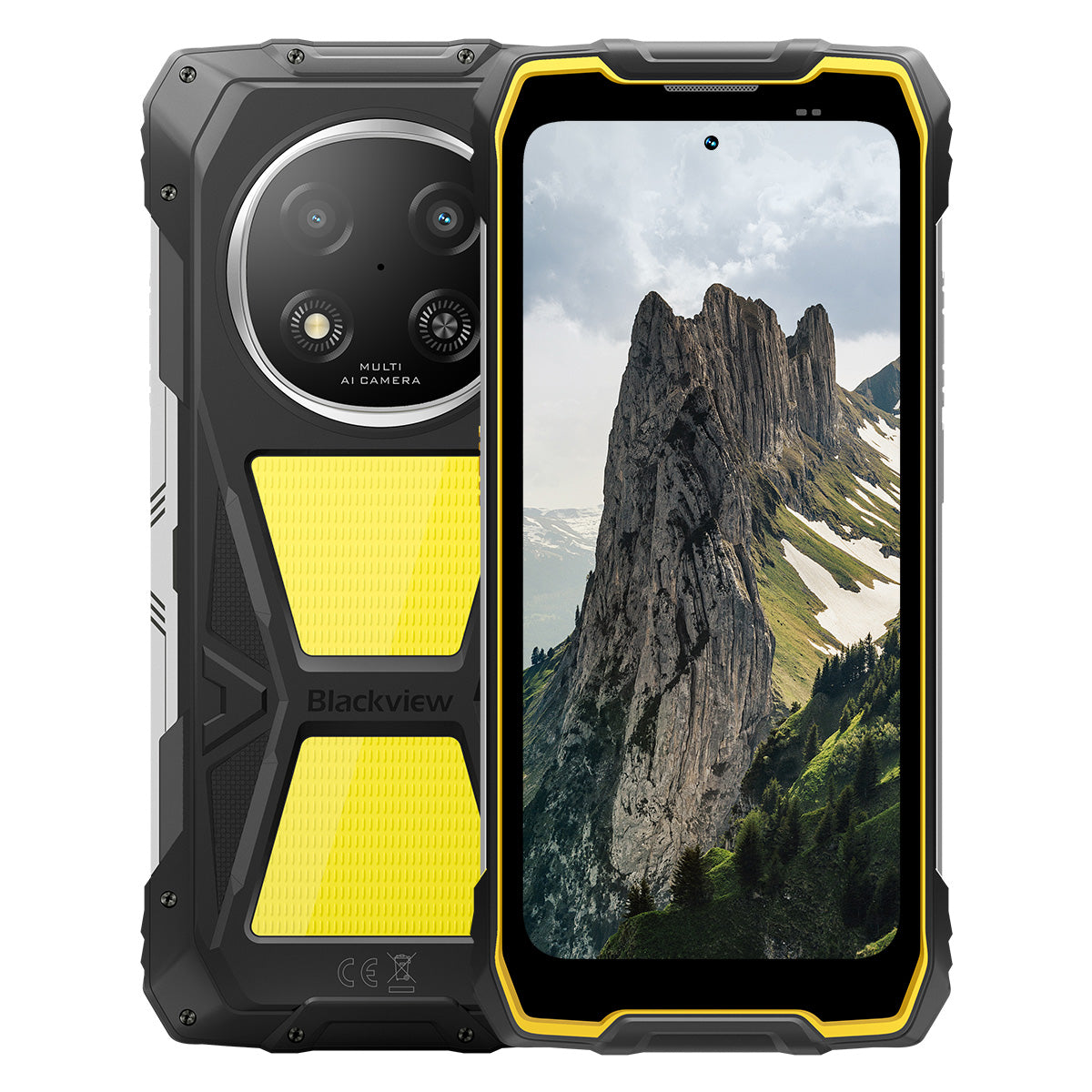


Blackview ROCK 2 Pro 6.67-inch 120Hz Display 8+256GB 400LM Camping Light 15000mAh 5G Rugged Phone

Hurry up, only 2 items left in stock.
Highlights
Highlights
✔6.67-inch 120Hz Smart Refresh Rate Display
✔Built-in Dual 400LM Camping Light
✔5G 6nm UNISOC T8100 Octa-core Processor
✔15000mAh & 33W Fast Charging
✔16MP AI Main + 13MP AI Front Camera
✔IP68 & IP69K & MIL-STD-810H Certified
Infomations
Infomations
The Blackview ROCK 2 Pro is built for users who need dependable mobile performance in demanding environments. It combines a 6.67-inch 120Hz display with UNISOC T8100 5G performance and a 15000mAh battery with 33W fast charging for work, travel, navigation, and outdoor use. Key field-ready features include 16MP rear and 13MP front AI cameras, dual 400LM camping lights, and IP68 & IP69K & MIL-STD-810H protection. Designed for job sites, remote trips, and everyday toughness, it gives users the confidence to stay connected, capture details, and keep going when regular phones are not enough.
About Brand
About Brand
At Blackview, we believe great technology should go beyond impressive specs. It should fit real life, solve real problems, and stay reliable when it matters most.
Blackview began with rugged phones built for tough environments. Today, we offer a wider ecosystem of smart devices, including smartphones, tablets, laptops, smartwatches, audio products, and more.
Across every category, our focus stays the same: durable quality, practical innovation, and accessible pricing. We design products that feel dependable from day one.
We understand what customers value most: smooth performance, long-lasting reliability, useful features, and technology that makes everyday life easier without unnecessary cost.
That’s why Blackview puts real attention into product testing, user experience, and features that bring meaningful value to work, travel, creation, outdoor exploration, and daily connection.
Blackview is made for people who want technology they can trust: smart, capable devices built to keep up with modern life.
Reliable by design. Practical by nature. Made for real life.
Shipping & Rerturns
Shipping & Rerturns
• Shipping: The order processing time usually takes about 2-7 business days except for the presale products. The shipping period, is only for business days excluding the holidays or non-working days. Shipping times will depends on the shipping methods.
• Returns: You may request a return within 14 days of delivery if the phone is unused, undamaged, and includes all original accessories. Product-related faults within one month may qualify for a replacement, refund, or free repair after inspection, while damage caused by misuse, drops, water, disassembly, or unauthorized modifications is not covered.

Faster 5G, Brighter Light, Unstoppable Power
Go Beyond Limits, Conquer Every Challenge


Why Choose Blackview ROCK 2 Pro?

No.1
IP69K, IP68 & MIL-STD-810H Certified,
Built to Conquer Any Extreme.

No.2
Blazing 5G with 6nm UNISOC T8100,
Experience Unmatched Speed
Smooth and Stunning
Days Standby.
Anywhere
2.0, Intelligence Beyond Limits
Based on Android 16
No.1
IP69K, IP68 & MIL-STD-810H Certified,
Built to Conquer Any Extreme.

400lm Camping Light
Bright, adjustable, and reliable — designed to illuminate your camp and ensure safety in every outdoor adventure.

Lighting ModeThree Brightness Levels:Low/Highlight/Extremely bright
Low for power-saving, High and Ultra-Bright for versatile outdoor lighting needs.

Outdoor Camping

Outdoor Repairs

Night Hiking

SOS Mode
Sends a clear, visible distress signal to ensure your safety in critical outdoor situations.

Lost in the Wild

Vehicle Breakdown

Severe Weather Distress

Quick Flashing Mode
Ideal for emergency warnings, deterring potential threats, or quickly attracting attention.

Outdoor Defense

Roadside Warning

Emergency Evacuation

Dive. Spray. Soak. It just works.
IP69K & IP68 Certified
ROCK 2 Pro is engineered for the toughest conditions, delivering unmatched protection against water, dust, and high-pressure jets.


Seamless Screen Sealing: Flawless
waterproof performance.

Corrosion-Resistant Aluminum Buttons:
Reinforced with premium silicone seals.

TPU Sealed USB Port: Maximum dust
and water resistance.

Underwater Camera: Capture unforgettable
moments below the surface.

Speaker Cleaning: Auto-expels water and
debris for crystal-clear audio.

Drop-Proof. Dust-Proof. Battle-Ready.
MIL-STD-810H Certified
From -20°C Arctic sites to 60°C desert heat, from 1.2m concrete drops to sandstorms — ROCK 2 Pro survives where others fail.

Proven through these extreme tests

Rain

Sand and Dust

Vibration

Shock

Humidity

Altitude

Acceleration

High Temperature

Low Temperature

Immersion

Reinforced Rubber Corners:
Shock absorption at its best.

Ultra-Durable Composite Back:
Built to endure.

Aviation-Grade Aluminum Frame:
Strong, lightweight, and impact-resistant.

Panda Glass Display: Scratch-resistant and
shatterproof for ultimate durability.
Glove Mode 2.0
Operate flawlessly —
even with thick gloves on.


Useful ToolBag
Compass, Torch, Magnifier, and more —
your all-in-one practical toolkit.
No.2
Blazing 5G with 6nm UNISOC T8100,
Experience Unmatched Speed
5G 6nm UNISOC T8100
Speed You Need. Power You Trust.
Experience blazing-fast 5G with the 6nm UNISOC T8100 chipset, featuring a powerful 2.2GHz CPU for seamless multitasking and smooth performance in demanding apps!


4*A76@2.2GHz
+ 4*A55@2.0GHz

Arm Mali G57

748,099
AnTuTu Benchmark
Up to 32GB LPDDR4X RAM
Multitask Like It's Nothing.
Multitask effortlessly—launch apps instantly, switch seamlessly, and power through work and entertainment with unwavering speed.
Up to 32GB RAM=8GB RAM + 24GB Expansion
Atomized Memory 2.0
9% More RAM Available


256GB UFS 3.1 Storage
Upgraded to UFS 3.1 for 2.4x faster speeds, lower power consumption, reduced latency, and accelerated write performance—store more, load faster, and work smarter.

ROCK 2 Pro
UFS 3.1

ROCK 2
UFS 2.2
2.4x Faster Data Transfer Speed
Efficient Heat Dissipation
Cool Under Pressure
With a 1700mm² cooling area, enjoy rapid heat dispersion for stable, smooth performance no matter how intense the task.

No.3
6.67" 120Hz Smart Eye-Care Display,
Smooth and Stunning
6.67" HD+ IPS Display
Broader View, Sharper Details
Equipped with a 6.67" HD+ IPS screen, ROCK 2 Pro delivers immersive visuals with 120Hz smart refresh and 650nits brightness — perfect for gaming, streaming, and everyday tasks.

120Hz
AI Smart Refresh Rate
650nits
Brightness
85%
Screen-to-body Ratio
720*1604
Resolution
120Hz AI Smart Refresh Rate
Smoother, Faster, Smarter
Say goodbye to lag—smart refresh adapts to your needs, ensuring silky scrolling while optimizing battery life.
120Hz
60Hz
Twice the Refresh Rate,
Twice the Smoothness

Eye-Care Modes
Comfort That Lasts All Day
Protect your eyes with four tailored modes designed for reading, working, and relaxing.


Reading Mode
Paper-like comfort for long hours of reading

Night Light
Gentle lighting to reduce blue light strain

Dark Mode
Perfect for low-light environments

Light Mode
Bright and clear for daytime use
2W High-Power Box Speaker
Powerful Sound, Exceptional Clarity
ROCK 2 Pro delivers bold, crystal-clear audio with its 2W high-power speaker, cutting through noisy environments to ensure top-tier sound for both communication and entertainment.

No.4
Massive 15,000mAh Battery,
Up to 50 Days Standby.
15,000mAh Massive Battery
Power That Keeps Up. With a gigantic 15,000mAh battery, ROCK 2 Pro effortlessly handles work trips, outdoor adventures, and daily use—no outlet hunting required.

Intelligent Charging
Protection

AI Power Saving
Algorithm


28hrs
Game

43hrs
Call

97hrs
Music

34hrs
Web Browsing

26hrs
Video Playback

50 days
Standby
*Data is tested by Blackview Lab based on continuous use. The actual use may vary depending on real-world usage conditions.

Class-Exclusive Intelligent Deep
Power-Saving Mode
ROCK 2 Pro intelligently adjusts power consumption with advanced optimization during idle periods — delivering longer battery life without sacrificing performance.
Longer Light-Use Time
Less Overnight Drain
5W OTG Reverse Charging
Share Power On the Go
ROCK 2 Pro doubles as a portable power bank, letting you charge earbuds, smartwatches, or even your friend's phone on the go.

No.5
Capture Every Moment,
Anytime, Anywhere

16MP AI Main Camera
Capture Perfectly. Share Instantly.
The 16MP AI main camera of ROCK 2 Pro delivers crystal-clear, vibrant images—whether you’re capturing professional shots or chasing the perfect sunset.
16MP
13MP AI Front Camera
Be You—Just Brighter.
ROCK 2 Pro's 13MP AI front camera adjusts to any lighting condition, ensuring your selfies remain sharp, natural, and effortlessly stunning.

Beauty Mode
Glow Effortlessly, Naturally.
AI beauty mode enhances your skin and tone with subtle, natural adjustments—highlighting your best features with finesse.

Portrait Mode
Focus on You, Blur the Rest.
AI depth sensing highlights your subject while creating a smooth, studio-quality bokeh effect—no extra equipment needed.

Night Mode
Master the Night, Every Detail Counts.
AI night mode reveals hidden details in the dark—bright skies, sharp edges, and perfectly stable shots, no matter how dim the scene.

No.6
Exclusively Self-Developed Doke
AI 2.0, Intelligence Beyond Limits
By integrating three cutting-edge AI models, Doke AI leverages cutting-edge technology to deeply understand user needs, delivering faster, smarter, and more tailored solutions.

DeepSeek-R1

ChatGPT-4o mini

Gemini AI 2.0 Flash
Your Exclusive Smart Life Manager

Voice Activation &
Voiceprint Recognition
Unlock effortlessly with your voice —
touch-free and highly secure!

AI Global Smart Control
Manage apps and settings with ease using simple voice commands, streamlining your daily tasks.
 Compatible Apps:
AI Full-Screen Assistance
Instantly provide answers and insights related
to your current screen content.


AI Real-Time Interaction
Enjoy seamless, real-time communication,
enhancing productivity in every moment.
Four Innovative Doke AI Apps to
Elevate Your Experience

AI Chat App
Your Always-Available AI Chat Companion From task planning to creative brainstorming, AI Chat is your trusted intelligent assistant, always ready to help.


Next-Gen
DeepSeek-R1

AI Online Search

Document Parsing

Tutoring Assistant

Chat with AI

AI Photos App
Your Portable AI Photo Editing Tool With 18 advanced AI features, AI Photos transforms ordinary photos into stunning visual creations, ready to impress and share.

AI Remove Objects

AI OutPainting


AI Blur Photo
AI Replace Background

AI Animate


AI Video App
Your AI Video Creation Tool
Transform text, images, and everyday moments into cinematic videos effortlessly — no expertise required!


AI Music App
Your AI Music Creation
Platform
No instruments or studio needed—AI Music empowers you to create unique music effortlessly, tailored to every occasion.

No.7
Latest DokeOS 5.0 Based on Android 16
From DokeOS 4.2 to 5.0, we've rebuilt the experience: faster, cleaner, smarter, and deeply personal. This isn't just an update—it's a leap forward in how you interact with your ROCK 2.

Do What Matters. Without the Noise.

Side Key Function
One Press. Instant Access.
Quickly activate flashlight, SOS, underwater camera, PTT, or your favorite app. Always ready, no waiting.

Start Soundrecording

Open flashlight

Screenshots

Open Underwater Camera

Open PTT

Open SOS

Quad-Core Navigation
Global Precision. Always On Track.
Powered by GPS, Beidou, Galileo, and Glonass for accurate positioning — anywhere, anytime.
Beyond the Purchase, We’ve Got You Covered.

Android Version Update

Hotline Assistance

24/7 Online Service

Trusted Offline Repair Center
Blackview ROCK 1 Specifications
| Model | ROCK 2 Pro |
| Color | Black/Yellow |
| Dimension | 187.6 * 85.8 * 26mm |
| Weight | 558g |
| OS | DokeOS 5.0 Based on Android 16 |
| Display | 6.67-inch HD+ IPS, 720 * 1604 Resolution 120Hz Smart Refresh Rate, 85% Screen-to-body Ratio |
| CPU | Octa-core 5G 6nm UNISOC T8100 |
| RAM & ROM | 8GB RAM + 256GB ROM, LPDDR4X + UFS3.1 |
| TF Expansion | Up to 512GB Expandable Storage |
| Battery | 15000mAh; 33W Fast Charging |
| Front Camera | 13MP |
| Rear Camera | 16MP |
| Speaker | 2W Box Speaker |
| Navigation | GPS+GLONASS+Galileo+Beidou |
| Card Slot | Two; 2SIM/1SIM +1*TF Card |
| NFC | Support |
| Wi-Fi & Bluetooth | (IEEE802.11a/b/g/n/ac) (2.4GHz/5GHz) ; BT 5.0 |
| Network Connectivity | 2G Band: B2/B3/B5/B8 3G Band: WCDMA: B1/B2/B5/B8 4G Band: TDD:B38/B40/B41 FDD:B1/B2/B3/B4/B5/B7/B8/B12/B17 B19/B20/B26/28A/28B/B66 5G Band: N1/2/3/5/7/8/20/26 28/38/40/41/66/77/78 |
| Model | ROCK 2 Pro |
| Color | Black/Yellow |
| Dimension | 187.6 * 85.8 * 26mm |
| Weight | 558g |
| OS | DokeOS 5.0 Based on Android 16 |
| Display | 6.67-inch HD+ IPS, 720 * 1604 Resolution 120Hz Smart Refresh Rate, 85% Screen-to-body Ratio |
| CPU | Octa-core 5G 6nm UNISOC T8100 |
| RAM & ROM | 8GB RAM + 256GB ROM, LPDDR4X + UFS3.1 |
| TF Expansion | Up to 512GB Expandable Storage |
| Battery | 15000mAh; 33W Fast Charging |
| Front Camera | 13MP |
| Rear Camera | 16MP |
| Speaker | 2W Box Speaker |
| Navigation | GPS+GLONASS+Galileo+Beidou |
| Card Slot | Two; 2SIM/1SIM +1*TF Card |
| NFC | Support |
| Wi-Fi & Bluetooth | (IEEE802.11a/b/g/n/ac) (2.4GHz/5GHz); BT 5.0 |
| Network Connectivity | 2G Band: B2/B3/B5/B8 3G Band: WCDMA: B1/B2/B5/B8 4G Band: TDD:B38/B40/B41 FDD:B1/B2/B3/B4/B5/B7/B8/B12/B17 B19/B20/B26/28A/28B/B66 5G Band: N1/2/3/5/7/8/20/26 28/38/40/41/66/77/78 |
Is the Blackview ROCK 2 Pro comfortable to carry every day?
Yes, the Blackview ROCK 2 Pro is well-suited for daily carry, making it highly convenient for commutes, site inspections, and travel between different work locations. Weighing approximately 558 grams and measuring about 26 mm in thickness, it features a high-capacity battery and a rugged, durable design. You can adjust how you carry it based on your personal preferences and specific needs.
For ease of movement and quick access, you might consider placing it in a work bag or a suitably sized waist pouch. If you are purchasing a waist pouch or a vehicle mount, ensure that the model you choose is compatible with the device's dimensions and weight.
How does continuous navigation affect the Blackview ROCK 2 Pro’s battery life?
Using navigation continuously increases power consumption and shortens the phone's battery life, as the device must maintain location tracking and process route information. While the 15,000mAh high-capacity battery offers significantly more power than a typical smartphone, the actual duration for continuous navigation will still vary based on screen settings, network signal strength, and other applications running in the background.
For long-duration navigation, consider using voice prompts—provided it is safe to do so and does not hinder your ability to follow the route. If your work requires all-day continuous navigation, it is advisable to estimate power consumption based on your specific route and settings, and to plan time for recharging
Can I use the Blackview ROCK 2 Pro’s camping light for nighttime work?
Yes. The Blackview ROCK 2 Pro features a 400-lumen camping light with three adjustable brightness levels. It provides illumination for close-range tasks such as inspecting equipment, locating tools, checking wiring, or performing temporary repairs at night. You can adjust the brightness based on ambient lighting conditions and the specific requirements of your task to ensure the work area remains clearly visible.
When you need both hands free, you can place the phone securely so that the light is directed toward your work area. Keep in mind that using the camping light for extended periods will increase battery consumption; it is recommended to select an appropriate brightness level and turn the light off when it is no longer needed.
Is the Blackview ROCK 2 Pro suitable for use in dusty construction environments?
Yes, it is. With IP68 and IP69K ratings, the rugged Blackview ROCK 2 Pro is well-suited for environments prone to dust, moisture, and frequent physical impact—such as renovation sites, outdoor construction zones, and various maintenance work areas.
After a day of work in a dusty environment, it is recommended to wipe any loose dust off the device before placing it in a bag or connecting a charging cable. Before charging, ensure that the USB-C port is clean and dry. Additionally, keep the phone away from cutting tools and operating machinery, and avoid placing it in locations where it might be crushed or compressed.
Is the Blackview ROCK 2 Pro’s front camera suitable for video calls?
Yes, it is. The Blackview ROCK 2 Pro features a 13MP front-facing camera, which is well-suited for everyday video calls—whether you are communicating with colleagues for work or staying in touch with friends and family. In well-lit conditions with a stable network connection, it captures facial expressions clearly, making interactions smoother.
During video calls, it is recommended to face a light source and avoid having a window or a strong light source directly behind you. For longer calls, you may want to place the phone on a stand to keep the image steady and free up your hands. If you experience lag or a blurry image, check your network connection and try adjusting the lighting or the camera angle.
What should I do if a banking app does not work on my Blackview ROCK 2 Pro?
If you are unable to open a banking app, log in, or complete a transaction, first check your internet connection, restart your phone, and ensure the app is updated to the latest version via the download channels specified on the bank’s official website. Additionally, verify that your phone’s date and time settings are correct, and grant any necessary permissions as prompted by the app.
If the issue persists, note down any specific error messages and contact the bank’s customer service to check if your account or device is subject to any security restrictions. If you need to reinstall the app, ensure that your login password, linked phone number, and verification methods are accessible so that you can successfully log back in or complete device verification.
What should I do if an app cannot verify my identity using the Blackview ROCK 2 Pro’s front camera?
Before starting, ensure you have granted the app permission to access the camera and clean the lens. In an environment with even lighting, position your face within the indicated frame. Remove any face masks or sunglasses, and ensure your hair is not covering your eyebrows or eyes. If your glasses are causing reflections, or if you are wearing colored contact lenses, try removing them before attempting the verification again.
If verification fails, try adjusting the lighting or the angle of your face; follow any specific instructions provided by the app. If the issue persists after multiple attempts, contact the platform's customer support to ask if they offer manual review, allow the submission of valid identification documents, or provide alternative verification methods.
What should I do if an app keeps freezing or crashing on my Blackview ROCK 2 Pro?
If you experience frequent freezing or crashing, try restarting the app or the phone, and ensure the app is updated to the latest version. Additionally, check that you have sufficient storage space, close any background apps you aren't currently using, and delete any unnecessary files.
If the issue is limited to a single app, try clearing its cache, or back up your important data and reinstall the app. If multiple apps are frequently freezing or crashing, first check for system updates. If the problem persists, make a note of any error messages and the circumstances under which the issues occur, then contact customer support for further assistance.
How can I check for software updates on the Blackview ROCK 2 Pro?
Open "Settings" on your phone, navigate to the system update page, and tap "Check for updates." If a new version is available, you can review the update notes to learn about the included feature enhancements and bug fixes, then follow the on-screen prompts to download and install it. Checking for updates regularly ensures you receive system optimizations and security patches in a timely manner.
Before updating, connect to a stable Wi-Fi network, ensure your phone has sufficient battery, and back up any important data. It is best to perform the update when you do not need to use your phone; do not force a shutdown or restart during the process—simply wait for the system to complete the update. If no updates are currently available, you can continue using your phone as usual and check again later.
What accessories are included with the Blackview ROCK 2 Pro?
The Blackview ROCK 2 Pro comes with different charger configurations, depending on the version purchased. In the UK, you can choose a version that includes either a UK-standard three-pin plug charger or an EU-standard two-pin plug charger. In the US, you can choose a version that either excludes a charger or includes an EU-standard two-pin plug charger.
Please verify the charger configuration of your chosen version before placing an order. US users who select the version with an EU-standard plug will need to obtain a suitable plug adapter; those who select the version without a charger will need to provide their own compatible charger.
How can I protect the Blackview ROCK 2 Pro’s camera lenses during outdoor work?
When carrying the phone outdoors, avoid direct contact between the lens and hard objects such as keys, screws, or tools; it is best to keep the phone in a separate pocket or a dedicated compartment in your bag. When setting the phone down, choose a clean, flat surface to prevent the lens area from coming into contact with sand or gravel.
If the lens becomes dusty or sandy, gently remove the debris using a soft-bristled brush or an air blower, then wipe it lightly with a clean microfiber cloth. Avoid rubbing the lens directly, as this may cause scratches. If you choose to use a protective case or a lens protector, ensure it is specifically designed for the ROCK 2 Pro, and take care not to obstruct the lens, flash, or camping light.
What should I check when my Blackview ROCK 2 Pro arrives?
After receiving your package, first inspect it and the phone for any visible damage. Verify that the model, color, storage capacity, and included accessories match your order. If the package is damaged or any accessories are missing, take clear photographs and retain the original packaging along with the shipping label.
Once powered on, check that the touchscreen, physical buttons, camera, speakers, microphone, and charging port are all functioning correctly. You may also want to test the device by connecting to Wi-Fi and inserting a SIM card. Please note: Do not test the phone’s ruggedness by intentionally dropping it or submerging it in water. If you encounter any issues, contact the seller through the platform where you made the purchase, providing your order number and a detailed description of the problem.
How can I request a return if there is a problem with my Blackview ROCK 2 Pro?
If you experience any issues with your Blackview ROCK 2 Pro, please contact the customer service team of the channel where you purchased the device. You will need to provide your order details, a description of the issue, and photos or videos that clearly illustrate the problem. The customer service team will assist in troubleshooting, verify the device's warranty status, and advise on the next steps.
For devices that qualify for warranty coverage, service will be provided in accordance with the warranty policy. If your device is outside the warranty period or the scope of coverage, you may consult with customer service regarding paid repair options. If you need to send your device in for repair, please contact customer service first to make arrangements; additionally, ensure that you back up your personal data and remove your SIM card and any memory cards.
Jump to another section