



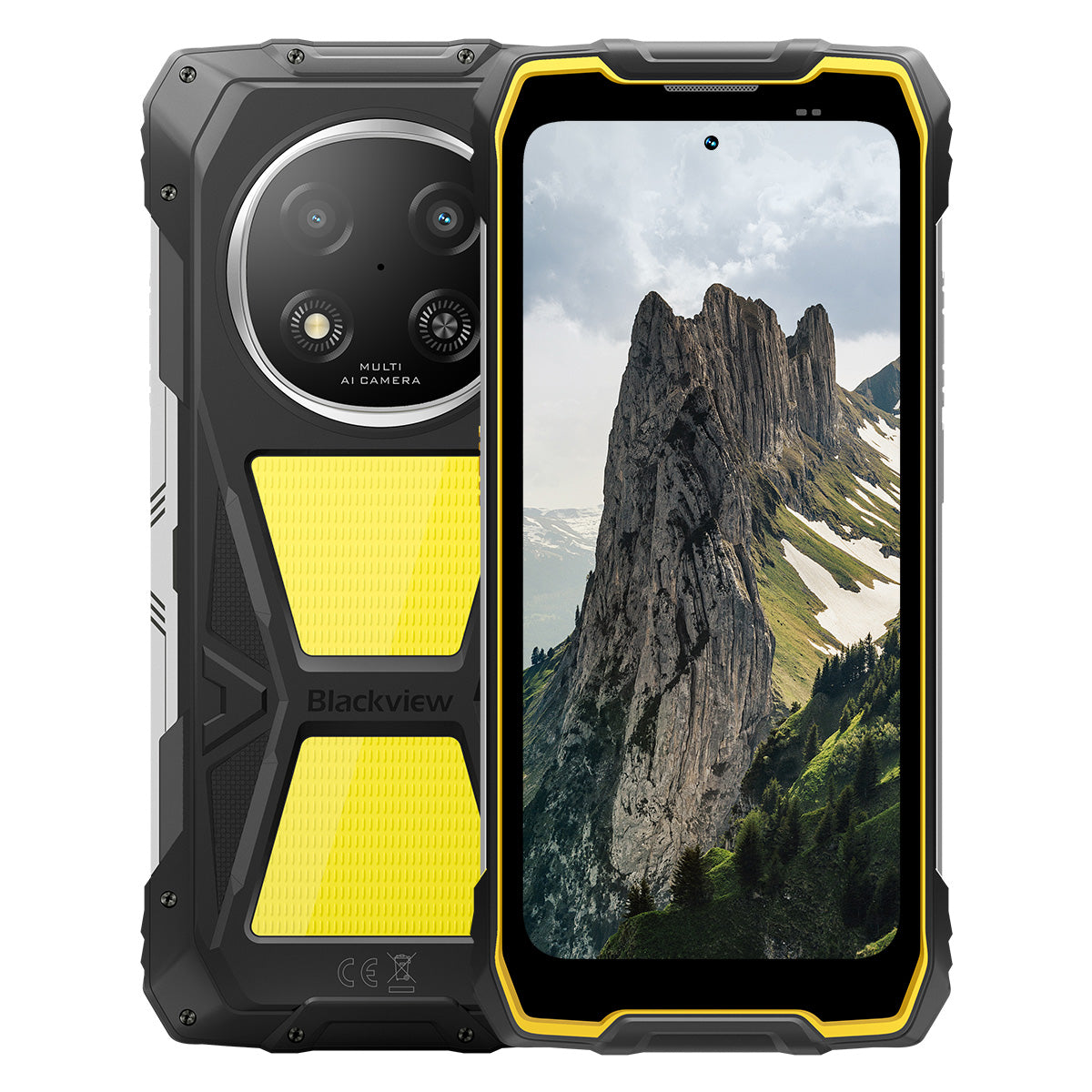


Blackview ROCK 2 Pro 6,67-Zoll 120Hz Bildschirm 400LM Campinglampe 15000mAh 5G Robustes Telefon

Beeilen Sie sich, nur noch 9 Artikel auf Lager.
Highlights
Highlights
✔6,67-Zoll-Display mit 120Hz intelligenter Bildwiederholrate
✔Eingebautes doppeltes 400 Lumen Campinglicht
✔5G 6nm UNISOC T8100 Achtkern-Prozessor
✔15000mAh & 33W Schnellladung
✔16MP KI Hauptkamera + 13MP KI Frontkamera
✔IP68 & IP69K & MIL-STD-810H Zertifiziert
Informationen
Informationen
Das Blackview ROCK 2 Pro ist für Nutzer konzipiert, die zuverlässige mobile Leistung in anspruchsvollen Umgebungen benötigen. Es kombiniert ein 6,67-Zoll-120Hz-Display mit UNISOC T8100 5G-Leistung und einem 15.000mAh Akku mit 33W Schnellladung für Arbeit, Reisen, Navigation und den Außeneinsatz. Wichtige einsatzbereite Funktionen umfassen 16MP Rück- und 13MP Front-AI-Kameras, zwei 400LM Campinglichter sowie IP68-, IP69K- und MIL-STD-810H-Schutz. Entwickelt für Baustellen, entfernte Reisen und den täglichen harten Einsatz, gibt es den Nutzern die Sicherheit, verbunden zu bleiben, Details festzuhalten und weiterzumachen, wenn herkömmliche Telefone nicht ausreichen.
Über die Marke
Über die Marke
Bei Blackview sind wir der Meinung, dass großartige Technologie mehr als nur beeindruckende Spezifikationen bieten sollte. Sie muss zum echten Leben passen, reale Probleme lösen und zuverlässig bleiben, wenn es am wichtigsten ist.
Blackview begann mit robusten Handys für anspruchsvolle Umgebungen. Heute bieten wir ein breiteres Ökosystem intelligenter Geräte an, darunter Smartphones, Tablets, Laptops, Smartwatches, Audioprodukte und mehr.
In jeder Kategorie bleibt unser Fokus derselbe: langlebige Qualität, praktische Innovation und erschwingliche Preise. Wir entwerfen Produkte, die sich von Anfang an verlässlich anfühlen.
Wir verstehen, was Kunden am meisten schätzen: reibungslose Leistung, langanhaltende Zuverlässigkeit, nützliche Funktionen und Technologie, die den Alltag erleichtert, ohne unnötige Kosten.
Deshalb legt Blackview großen Wert auf Produkttests, Benutzererfahrung und Funktionen, die echten Mehrwert für Arbeit, Reisen, Kreativität, Outdoor-Erkundungen und tägliche Vernetzung bieten.
Blackview ist für Menschen gemacht, die Technologie wollen, der sie vertrauen können: intelligente, leistungsfähige Geräte, die mit dem modernen Leben Schritt halten.
Zuverlässig durch Design. Praktisch von Natur aus. Für das echte Leben gemacht.
Versand & Rückgabe
Versand & Rückgabe
• Versand: Bestellungen werden innerhalb von 1–2 Werktagen bearbeitet. Die Standardlieferung dauert je nach Standort 3–7 Werktage.
• Rückgaben: Sie können Produkte innerhalb von 30 Tagen nach Erhalt Ihrer Bestellung zurückgeben oder umtauschen. Die Artikel müssen sich im Originalzustand befinden und ein Kaufnachweis vorliegen.
Wenn Ihr Artikel aufgrund von Herstellungsfehlern defekt oder beschädigt ist, ersetzen wir ihn gerne kostenlos.

Schnelleres 5G, helleres Licht, unaufhaltsame Power
Gehe über Grenzen hinaus, meistere jede Herausforderung


Warum Blackview ROCK 2 Pro wählen?

Nr. 1
IP69K, IP68 & MIL-STD-810H Zertifiziert,
Gebaut, um jede Extreme zu meistern.

Nr. 2
Blitzschnelles 5G mit 6nm UNISOC T8100,
Erleben Sie unvergleichliche Geschwindigkeit
Flüssig und beeindruckend
Tage Standby.
Überall
2.0, Intelligenz ohne Grenzen
Basierend auf Android 16
Nr. 1
IP69K, IP68 & MIL-STD-810H Zertifiziert,
Gebaut, um jede Extreme zu meistern.

400lm Campinglicht
Hell, einstellbar und zuverlässig — entwickelt, um Ihr Lager zu beleuchten und Sicherheit bei jedem Outdoor-Abenteuer zu gewährleisten.

BeleuchtungsmodusDrei Helligkeitsstufen:Niedrig/Hoch/Extrem hell
Niedrig für Energiesparen, Hoch und Ultrahell für vielseitige Outdoor-Beleuchtungsbedürfnisse.

Outdoor-Camping

Outdoor-Reparaturen

Nachtwanderung

SOS-Modus
Sendet ein klares, sichtbares Notsignal, um Ihre Sicherheit in kritischen Outdoor-Situationen zu gewährleisten.

Verloren in der Wildnis

Fahrzeugpanne

Schweres Unwetter-Notfall

Schneller Blinkmodus
Ideal für Notfallwarnungen, Abschreckung potenzieller Bedrohungen oder schnelles Aufmerksammachen.

Outdoor-Schutz

Warnung am Straßenrand

Notfall-Evakuierung

Tauchen. Spritzen. Durchnässt werden. Es funktioniert einfach.
IP69K & IP68 Zertifiziert
ROCK 2 Pro ist für die härtesten Bedingungen, die unvergleichlichen Schutz gegen Wasser, Staub und Hochdruckstrahlen bieten.


Nahtlose Bildschirmabdichtung: Fehlerfreie
wasserdichte Leistung.

Korrosionsbeständige Aluminiumtasten:
Verstärkt mit hochwertigen Silikondichtungen.

TPU-abgedichteter USB-Anschluss: Maximale Staub
und Wasserbeständigkeit.

Unterwasserkamera: Halten Sie unvergessliche
Momente unter der Oberfläche.

Lautsprecherreinigung: Automatisches Ausstoßen von Wasser und
Schmutz für kristallklaren Ton.

Sturzsicher. Staubdicht. Kampferprobt.
MIL-STD-810H Zertifiziert
Von -20°C arktischen Regionen bis 60°C Wüstenhitze, von 1,2m Betonstürzen bis zu Sandstürmen — ROCK 2 Pro überlebt, wo andere versagen.

Bewährt durch diese extremen Tests

Regen

Sand und Staub

Vibration

Stoß

Feuchtigkeit

Höhe

Beschleunigung

Hohe Temperatur

Niedrige Temperatur

Eintauchen

Verstärkte Gummiecken:
Stoßdämpfung vom Feinsten.

Ultrahaltbarer Verbundrücken:
Gebaut, um zu bestehen.

Aluminiumrahmen in Luftfahrtqualität:
Stark, leicht und stoßfest.

Panda Glass Display: Kratzfest und
bruchfest für ultimative Haltbarkeit.
Handschuhmodus 2.0
Funktioniert einwandfrei —
sogar mit dicken Handschuhen.


Nützliche Werkzeugtasche
Kompass, Taschenlampe, Lupe und mehr —
Ihr praktisches All-in-One-Werkzeugset.
Nr. 2
Blitzschnelles 5G mit 6nm UNISOC T8100,
Erleben Sie unvergleichliche Geschwindigkeit
5G 6nm UNISOC T8100
Geschwindigkeit, die Sie brauchen. Leistung, der Sie vertrauen.
Erleben Sie ultraschnelles 5G mit dem 6nm UNISOC T8100-Chipsatz, ausgestattet mit einer leistungsstarken 2,2GHz CPU für nahtloses Multitasking und flüssige Leistung in anspruchsvollen Apps!


4*A76@2.2GHz
+ 4*A55@2.0GHz

Arm Mali G57

748,099
AnTuTu Benchmark
Bis zu 32GB LPDDR4X RAM
Multitasking wie nichts.
Multitasking mühelos – Apps sofort starten, nahtlos wechseln und Arbeit sowie Unterhaltung mit konstanter Geschwindigkeit bewältigen.
Bis zu 32GB RAM=8GB RAM + 24GB Erweiterung
Atomized Memory 2.0
9% mehr verfügbarer RAM


256GB UFS 3.1 Speicher
Aufgerüstet auf UFS 3.1 für 2,4x schnellere Geschwindigkeiten, geringeren Stromverbrauch, reduzierte Latenz und beschleunigte Schreibgeschwindigkeit – mehr speichern, schneller laden und smarter arbeiten.

ROCK 2 Pro
UFS 3.1

ROCK 2
UFS 2.2
2,4x schnellere Datenübertragung
Effiziente Wärmeableitung
Cool unter Druck
Mit einer Kühlfläche von 1700mm² genießen Sie schnelle Wärmeableitung für stabile, flüssige Leistung, egal wie anspruchsvoll die Aufgabe ist.

Nr.3
6,67" 120Hz intelligentes Augenschutz-Display,
Flüssig und beeindruckend
6,67" HD+ IPS-Display
Größere Sicht, schärfere Details
Ausgestattet mit einem 6,67" HD+ IPS-Display bietet ROCK 2 Pro beeindruckende Bilder mit 120Hz intelligenter Bildwiederholrate und 650 Nits Helligkeit – perfekt für Gaming, Streaming und den Alltag.

120Hz
KI-intelligente Bildwiederholrate
650 Nits
Helligkeit
85%
Bildschirm-zu-Gehäuse-Verhältnis
720*1604
Auflösung
120Hz KI-intelligente Bildwiederholrate
Flüssiger, schneller, intelligenter
Verabschieden Sie sich von Verzögerungen – die intelligente Bildwiederholrate passt sich Ihren Bedürfnissen an und sorgt für flüssiges Scrollen bei optimiertem Akkuverbrauch.
120Hz
60Hz
Doppelte Bildwiederholrate,
Doppelte Flüssigkeit

Augenschutz-Modi
Komfort, der den ganzen Tag anhält
Schützen Sie Ihre Augen mit vier speziell abgestimmten Modi für Lesen, Arbeiten und Entspannen.


Lesemodus
Papierähnlicher Komfort für lange Lesestunden

Nachtlicht
Sanfte Beleuchtung zur Reduzierung von Blaulichtbelastung

Dunkelmodus
Perfekt für Umgebungen mit wenig Licht

Lichtmodus
Hell und klar für den Tagesgebrauch
2W Hochleistungslautsprecher
Kraftvoller Klang, außergewöhnliche Klarheit
ROCK 2 Pro liefert kraftvollen, kristallklaren Sound mit seinem 2W Hochleistungslautsprecher, der sich in lauten Umgebungen durchsetzt um erstklassigen Klang für Kommunikation und Unterhaltung zu gewährleisten.

Nr.4
Riesiger 15.000mAh Akku,
Bis zu 50 Tage Standby.
15.000mAh riesiger Akku
Leistung, die mithält. Mit einem riesigen 15.000mAh Akku meistert ROCK 2 Pro mühelos Geschäftsreisen, für Outdoor-Abenteuer und den täglichen Gebrauch – keine Steckdosensuche nötig.

Intelligentes Laden
Schutz

KI-Energiesparen
Algorithmus


28 Std.
Spiel

43 Std.
Anruf

97 Std.
Musik

34 Std.
Web-Browsing

26 Std.
Video-Wiedergabe

50 Tage
Standby
*Daten wurden im Blackview Labor bei kontinuierlicher Nutzung getestet. Die tatsächliche Nutzung kann je nach realen Bedingungen variieren.

Klassenexklusiver intelligenter Tiefschlaf
Energiesparmodus
ROCK 2 Pro passt die Energie intelligent an Verbrauch mit fortschrittlicher Optimierung in Leerlaufphasen — für längere Akkulaufzeit ohne Leistungseinbußen.
Längere Nutzungsdauer bei leichter Verwendung
Weniger Entladung über Nacht
5W OTG Reverse Charging
Teilen Sie Energie unterwegs
ROCK 2 Pro dient auch als tragbare Powerbank, mit der du Ohrhörer, Smartwatches oder sogar dein Handy eines Freundes unterwegs.

Nr. 5
Halte jeden Moment fest,
Jederzeit, überall

16MP AI-Hauptkamera
Perfekt aufnehmen. Sofort teilen.
Die 16MP AI-Hauptkamera des ROCK 2 Pro liefert kristallklare, lebendige Bilder – egal ob du professionelle Aufnahmen machst oder den perfekten Sonnenuntergang einfängst.
16MP
13MP AI-Frontkamera
Sei du selbst – nur strahlender.
Die 13MP AI-Frontkamera des ROCK 2 Pro passt sich jeder Lichtbedingung an und sorgt dafür, dass deine Selfies scharf bleiben, natürlich und mühelos beeindruckend.

Schönheitsmodus
Strahle mühelos und natürlich.
Der AI-Schönheitsmodus verbessert Haut und Ton mit subtilen, natürlichen Anpassungen – hebt deine besten Merkmale gekonnt hervor.

Porträtmodus
Fokussiere dich, verwische den Rest.
AI-Tiefensensor hebt dein Motiv hervor und erzeugt einen sanften, studioähnlichen Bokeh-Effekt – kein zusätzliches Equipment nötig.

Nachtmodus
Meistere die Nacht, jedes Detail zählt.
Der AI-Nachtmodus enthüllt verborgene Details im Dunkeln – helle Himmel, scharfe Kanten und perfekt stabile Aufnahmen, egal wie dunkel die Szene ist.

Nr. 6
Exklusiv selbstentwickelt von Doke
AI 2.0, Intelligenz ohne Grenzen
Durch die Integration von drei hochmodernen AI-Modellen nutzt Doke AI Spitzentechnologie, um Nutzerbedürfnisse tief zu verstehen und schnellere, intelligentere und maßgeschneiderte Lösungen zu liefern.

DeepSeek-R1

ChatGPT-4o mini

Gemini AI 2.0 Flash
Dein exklusiver Smart-Life-Manager

Sprachaktivierung &
Stimmerkennung
Entsperre mühelos mit deiner Stimme –
berührungslos und hochsicher!

AI Global Smart Control
Verwalte Apps und Einstellungen mühelos mit einfachen Sprachbefehlen und vereinfache deine täglichen Aufgaben.
 Kompatible Apps:
AI Vollbild-Unterstützung
Sofortige Antworten und Einblicke zu
zu deinem aktuellen Bildschirminhalt.


AI Echtzeit-Interaktion
Genieße nahtlose, Echtzeit-Kommunikation,
Steigerung der Produktivität in jedem Moment.
Vier innovative Doke AI Apps zum
Verbessere dein Erlebnis

AI Chat App
Dein immer verfügbarer AI-Chat-Begleiter Von Aufgabenplanung bis kreatives Brainstorming, AI Chat ist dein vertrauenswürdiger intelligenter Assistent, immer bereit zu helfen.


Next-Gen
DeepSeek-R1

AI Online-Suche

Dokumenten-Parsing

Nachhilfe-Assistent

Chat mit AI

AI Photos App
Dein tragbares AI-Foto-Bearbeitungstool mit 18 fortschrittliche AI-Funktionen, AI Photos verwandelt gewöhnliche Fotos in atemberaubende visuelle Kreationen, bereit zu beeindrucken und zu teilen.

AI Objekte entfernen

AI OutPainting


AI Foto unscharf machen
AI Hintergrund ersetzen

AI Animate


AI Video App
Dein AI-Video-Erstellungstool
Verwandle Text, Bilder und alltägliche Momente mühelos in kinoreife Videos – keine Vorkenntnisse erforderlich!


AI Music App
Deine AI-Musik-Kreation
Plattform
Keine Instrumente oder Studio nötig – AI Music ermöglicht es dir, einzigartige Musik zu erstellen mühelos, auf jeden Anlass zugeschnitten.

Nr. 7
Neueste DokeOS 5.0 basierend auf Android 16
Von DokeOS 4.2 bis 5.0 haben wir das Erlebnis neu gestaltet: schneller, sauberer, intelligenter und tief persönlich. Das ist nicht nur ein Update – es ist ein großer Schritt vorwärts, wie Sie mit Ihrem ROCK 2 interagieren.

Konzentrieren Sie sich auf das Wesentliche. Ohne Ablenkung.

Seitentastenfunktion
Ein Knopfdruck. Sofortiger Zugriff.
Schnelles Aktivieren von Taschenlampe, SOS, Unterwasserkamera, PTT oder Ihrer Lieblings-App. Immer bereit, kein Warten.

Tonaufnahme starten

Taschenlampe einschalten

Screenshots

Unterwasserkamera aktivieren

PTT aktivieren

SOS aktivieren

Quad-Core Navigation
Globale Präzision. Immer auf Kurs.
Angetrieben von GPS, Beidou, Galileo und Glonass für präzise Positionierung – überall, jederzeit.
Über den Kauf hinaus sind wir für Sie da.

Android Versions-Update

Hotline-Unterstützung

24/7 Online-Service

Vertrauenswürdiges Offline-Reparaturzentrum
Blackview ROCK 1 Spezifikationen
| Modell | ROCK 2 Pro |
| Farbe | Schwarz/Gelb |
| Abmessungen | 187,6 * 85,8 * 26mm |
| Gewicht | 558g |
| Betriebssystem | DokeOS 5.0 basierend auf Android 16 |
| Display | 6,67-Zoll HD+ IPS, 720 * 1604 Auflösung 120Hz intelligente Bildwiederholrate, 85% Bildschirm-zu-Gehäuse-Verhältnis |
| CPU | Octa-Core 5G 6nm UNISOC T8100 |
| RAM & ROM | 8GB RAM + 256GB ROM, LPDDR4X + UFS3.1 |
| TF-Erweiterung | Bis zu 512GB erweiterbarer Speicher |
| Akku | 15000mAh; 33W Schnellladung |
| Frontkamera | 13MP |
| Hauptkamera | 16MP |
| Lautsprecher | 2W Box-Lautsprecher |
| Navigation | GPS+GLONASS+Galileo+Beidou |
| Kartensteckplatz | Zwei; 2SIM/1SIM +1*TF-Karte |
| NFC | Unterstützung |
| Wi-Fi & Bluetooth | (IEEE802.11a/b/g/n/ac) (2,4GHz/5GHz) ; BT 5.0 |
| Netzwerkverbindung | 2G-Band: B2/B3/B5/B8 3G-Band: WCDMA: B1/B2/B5/B8 4G-Band: TDD: B38/B40/B41 FDD: B1/B2/B3/B4/B5/B7/B8/B12/B17 B19/B20/B26/28A/28B/B66 5G-Band: N1/2/3/5/7/8/20/26 28/38/40/41/66/77/78 |
| Modell | ROCK 2 Pro |
| Farbe | Schwarz/Gelb |
| Abmessung | 187,6 * 85,8 * 26 mm |
| Gewicht | 558 g |
| Betriebssystem | DokeOS 5.0 basierend auf Android 16 |
| Anzeigen | 6,67 Zoll HD+ IPS, 720 * 1604 Auflösung 120 Hz intelligente Bildwiederholrate, 85 % Bildschirm-zu-Gehäuse-Verhältnis |
| CPU | Octa-Core 5G 6nm UNISOC T8100 |
| RAM & ROM | 8 GB RAM + 256 GB ROM, LPDDR4X + UFS3.1 |
| TF-Erweiterung | Bis zu 512 GB erweiterbarer Speicher |
| Batterie | 15000 mAh; 33W Schnellladung |
| Frontkamera | 13MP |
| Hauptkamera | 16MP |
| Lautsprecher | 2W Box-Lautsprecher |
| Navigation | GPS+GLONASS+Galileo+Beidou |
| Kartensteckplatz | Zwei; 2 SIM/1 SIM + 1*TF-Karte |
| NFC | Unterstützung |
| WLAN & Bluetooth | (IEEE802.11a/b/g/n/ac) (2,4 GHz/5 GHz); BT 5.0 |
| Netzwerkverbindung | 2G-Band: B2/B3/B5/B8 3G-Band: WCDMA: B1/B2/B5/B8 4G-Band: TDD: B38/B40/B41 FDD: B1/B2/B3/B4/B5/B7/B8/B12/B17 B19/B20/B26/28A/28B/B66 5G-Band: N1/2/3/5/7/8/20/26 28/38/40/41/66/77/78 |
Is the Blackview ROCK 2 Pro comfortable to carry every day?
Yes, the Blackview ROCK 2 Pro is well-suited for daily carry, making it highly convenient for commutes, site inspections, and travel between different work locations. Weighing approximately 558 grams and measuring about 26 mm in thickness, it features a high-capacity battery and a rugged, durable design. You can adjust how you carry it based on your personal preferences and specific needs.
For ease of movement and quick access, you might consider placing it in a work bag or a suitably sized waist pouch. If you are purchasing a waist pouch or a vehicle mount, ensure that the model you choose is compatible with the device's dimensions and weight.
How does continuous navigation affect the Blackview ROCK 2 Pro’s battery life?
Using navigation continuously increases power consumption and shortens the phone's battery life, as the device must maintain location tracking and process route information. While the 15,000mAh high-capacity battery offers significantly more power than a typical smartphone, the actual duration for continuous navigation will still vary based on screen settings, network signal strength, and other applications running in the background.
For long-duration navigation, consider using voice prompts—provided it is safe to do so and does not hinder your ability to follow the route. If your work requires all-day continuous navigation, it is advisable to estimate power consumption based on your specific route and settings, and to plan time for recharging
Can I use the Blackview ROCK 2 Pro’s camping light for nighttime work?
Yes. The Blackview ROCK 2 Pro features a 400-lumen camping light with three adjustable brightness levels. It provides illumination for close-range tasks such as inspecting equipment, locating tools, checking wiring, or performing temporary repairs at night. You can adjust the brightness based on ambient lighting conditions and the specific requirements of your task to ensure the work area remains clearly visible.
When you need both hands free, you can place the phone securely so that the light is directed toward your work area. Keep in mind that using the camping light for extended periods will increase battery consumption; it is recommended to select an appropriate brightness level and turn the light off when it is no longer needed.
Is the Blackview ROCK 2 Pro suitable for use in dusty construction environments?
Yes, it is. With IP68 and IP69K ratings, the rugged Blackview ROCK 2 Pro is well-suited for environments prone to dust, moisture, and frequent physical impact—such as renovation sites, outdoor construction zones, and various maintenance work areas.
After a day of work in a dusty environment, it is recommended to wipe any loose dust off the device before placing it in a bag or connecting a charging cable. Before charging, ensure that the USB-C port is clean and dry. Additionally, keep the phone away from cutting tools and operating machinery, and avoid placing it in locations where it might be crushed or compressed.
Is the Blackview ROCK 2 Pro’s front camera suitable for video calls?
Yes, it is. The Blackview ROCK 2 Pro features a 13MP front-facing camera, which is well-suited for everyday video calls—whether you are communicating with colleagues for work or staying in touch with friends and family. In well-lit conditions with a stable network connection, it captures facial expressions clearly, making interactions smoother.
During video calls, it is recommended to face a light source and avoid having a window or a strong light source directly behind you. For longer calls, you may want to place the phone on a stand to keep the image steady and free up your hands. If you experience lag or a blurry image, check your network connection and try adjusting the lighting or the camera angle.
What should I do if a banking app does not work on my Blackview ROCK 2 Pro?
If you are unable to open a banking app, log in, or complete a transaction, first check your internet connection, restart your phone, and ensure the app is updated to the latest version via the download channels specified on the bank’s official website. Additionally, verify that your phone’s date and time settings are correct, and grant any necessary permissions as prompted by the app.
If the issue persists, note down any specific error messages and contact the bank’s customer service to check if your account or device is subject to any security restrictions. If you need to reinstall the app, ensure that your login password, linked phone number, and verification methods are accessible so that you can successfully log back in or complete device verification.
What should I do if an app cannot verify my identity using the Blackview ROCK 2 Pro’s front camera?
Before starting, ensure you have granted the app permission to access the camera and clean the lens. In an environment with even lighting, position your face within the indicated frame. Remove any face masks or sunglasses, and ensure your hair is not covering your eyebrows or eyes. If your glasses are causing reflections, or if you are wearing colored contact lenses, try removing them before attempting the verification again.
If verification fails, try adjusting the lighting or the angle of your face; follow any specific instructions provided by the app. If the issue persists after multiple attempts, contact the platform's customer support to ask if they offer manual review, allow the submission of valid identification documents, or provide alternative verification methods.
What should I do if an app keeps freezing or crashing on my Blackview ROCK 2 Pro?
If you experience frequent freezing or crashing, try restarting the app or the phone, and ensure the app is updated to the latest version. Additionally, check that you have sufficient storage space, close any background apps you aren't currently using, and delete any unnecessary files.
If the issue is limited to a single app, try clearing its cache, or back up your important data and reinstall the app. If multiple apps are frequently freezing or crashing, first check for system updates. If the problem persists, make a note of any error messages and the circumstances under which the issues occur, then contact customer support for further assistance.
How can I check for software updates on the Blackview ROCK 2 Pro?
Open "Settings" on your phone, navigate to the system update page, and tap "Check for updates." If a new version is available, you can review the update notes to learn about the included feature enhancements and bug fixes, then follow the on-screen prompts to download and install it. Checking for updates regularly ensures you receive system optimizations and security patches in a timely manner.
Before updating, connect to a stable Wi-Fi network, ensure your phone has sufficient battery, and back up any important data. It is best to perform the update when you do not need to use your phone; do not force a shutdown or restart during the process—simply wait for the system to complete the update. If no updates are currently available, you can continue using your phone as usual and check again later.
What accessories are included with the Blackview ROCK 2 Pro?
The Blackview ROCK 2 Pro comes with different charger configurations, depending on the version purchased. In the UK, you can choose a version that includes either a UK-standard three-pin plug charger or an EU-standard two-pin plug charger. In the US, you can choose a version that either excludes a charger or includes an EU-standard two-pin plug charger.
Please verify the charger configuration of your chosen version before placing an order. US users who select the version with an EU-standard plug will need to obtain a suitable plug adapter; those who select the version without a charger will need to provide their own compatible charger.
How can I protect the Blackview ROCK 2 Pro’s camera lenses during outdoor work?
When carrying the phone outdoors, avoid direct contact between the lens and hard objects such as keys, screws, or tools; it is best to keep the phone in a separate pocket or a dedicated compartment in your bag. When setting the phone down, choose a clean, flat surface to prevent the lens area from coming into contact with sand or gravel.
If the lens becomes dusty or sandy, gently remove the debris using a soft-bristled brush or an air blower, then wipe it lightly with a clean microfiber cloth. Avoid rubbing the lens directly, as this may cause scratches. If you choose to use a protective case or a lens protector, ensure it is specifically designed for the ROCK 2 Pro, and take care not to obstruct the lens, flash, or camping light.
What should I check when my Blackview ROCK 2 Pro arrives?
After receiving your package, first inspect it and the phone for any visible damage. Verify that the model, color, storage capacity, and included accessories match your order. If the package is damaged or any accessories are missing, take clear photographs and retain the original packaging along with the shipping label.
Once powered on, check that the touchscreen, physical buttons, camera, speakers, microphone, and charging port are all functioning correctly. You may also want to test the device by connecting to Wi-Fi and inserting a SIM card. Please note: Do not test the phone’s ruggedness by intentionally dropping it or submerging it in water. If you encounter any issues, contact the seller through the platform where you made the purchase, providing your order number and a detailed description of the problem.
How can I request a return if there is a problem with my Blackview ROCK 2 Pro?
If you experience any issues with your Blackview ROCK 2 Pro, please contact the customer service team of the channel where you purchased the device. You will need to provide your order details, a description of the issue, and photos or videos that clearly illustrate the problem. The customer service team will assist in troubleshooting, verify the device's warranty status, and advise on the next steps.
For devices that qualify for warranty coverage, service will be provided in accordance with the warranty policy. If your device is outside the warranty period or the scope of coverage, you may consult with customer service regarding paid repair options. If you need to send your device in for repair, please contact customer service first to make arrangements; additionally, ensure that you back up your personal data and remove your SIM card and any memory cards.
Jump to another section