



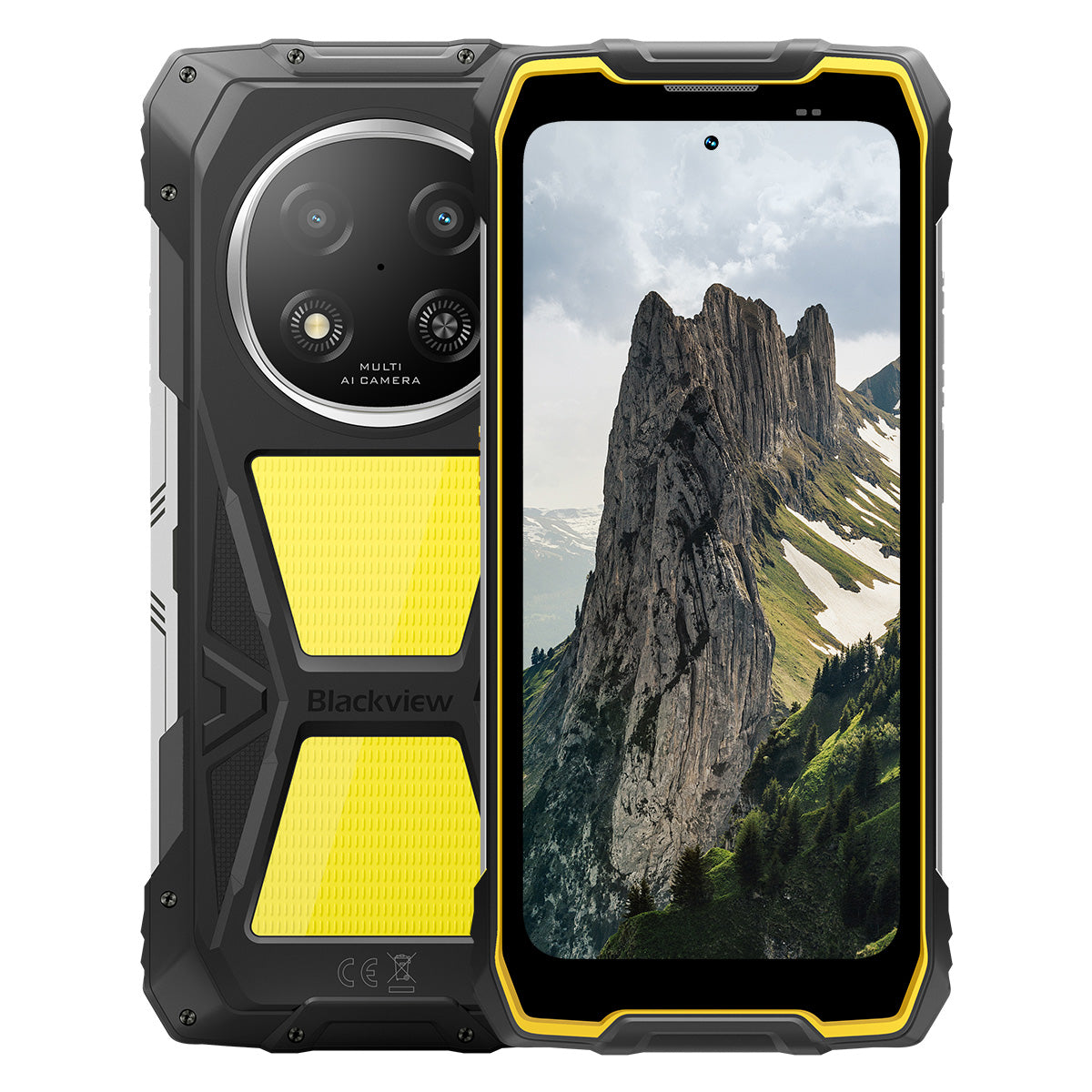


Blackview ROCK 2 Pro Teléfono Resistente 5G con Pantalla de 6.67 pulgadas 120Hz, Luz de Campamento de 400LM, Batería de 15000mAh

Date prisa, solo quedan 2 artículos en stock.
Destacados
Destacados
✔Pantalla inteligente de tasa de refresco de 120 Hz de 6.67 pulgadas
✔Luz de campamento doble integrada de 400 lúmenes
✔Procesador octa núcleo UNISOC T8100 de 6 nm y 5G
✔Batería de 15000 mAh y carga rápida de 33 W
✔Cámara principal AI de 16 MP + cámara frontal AI de 13 MP
✔Certificación IP68, IP69K y MIL-STD-810H
Información
Información
El Blackview ROCK 2 Pro está diseñado para usuarios que necesitan un rendimiento móvil confiable en entornos exigentes. Combina una pantalla de 6.67 pulgadas con 120Hz, el rendimiento 5G del UNISOC T8100 y una batería de 15000mAh con carga rápida de 33W para trabajo, viajes, navegación y uso al aire libre. Las características clave para el campo incluyen cámaras AI trasera de 16MP y frontal de 13MP, dos luces de camping de 400LM y protección IP68, IP69K y MIL-STD-810H. Diseñado para sitios de trabajo, viajes remotos y resistencia diaria, ofrece a los usuarios la confianza para mantenerse conectados, capturar detalles y seguir adelante cuando los teléfonos normales no son suficientes.
Acerca de la marca
Acerca de la marca
En Blackview, creemos que la gran tecnología debe ir más allá de especificaciones impresionantes. Debe adaptarse a la vida real, resolver problemas reales y mantenerse confiable cuando más importa.
Blackview comenzó con teléfonos resistentes diseñados para entornos difíciles. Hoy, ofrecemos un ecosistema más amplio de dispositivos inteligentes, incluyendo smartphones, tablets, laptops, smartwatches, productos de audio y más.
En cada categoría, nuestro enfoque sigue siendo el mismo: calidad duradera, innovación práctica y precios accesibles. Diseñamos productos que se sienten confiables desde el primer día.
Entendemos lo que los clientes valoran más: rendimiento fluido, confiabilidad duradera, funciones útiles y tecnología que facilita la vida diaria sin costos innecesarios.
Por eso, Blackview pone verdadera atención en las pruebas de producto, la experiencia del usuario y las características que aportan un valor significativo al trabajo, los viajes, la creación, la exploración al aire libre y la conexión diaria.
Blackview está hecho para personas que quieren tecnología en la que puedan confiar: dispositivos inteligentes y capaces, diseñados para seguir el ritmo de la vida moderna.
Confiable por diseño. Práctico por naturaleza. Hecho para la vida real.
Envíos y Devoluciones
Envíos y Devoluciones
• Envío: Los pedidos se procesan en 1–2 días hábiles. La entrega estándar tarda de 3 a 7 días hábiles, según su ubicación.
• Devoluciones: Puede devolver o cambiar productos dentro de los 30 días posteriores a la recepción de su pedido. Los artículos deben estar en condiciones originales con comprobante de compra.
Si su artículo está defectuoso o dañado por problemas de fabricación, con gusto lo reemplazaremos sin costo adicional.

5G más rápido, luz más brillante, potencia imparable
Ve más allá de los límites, conquista cada desafío


¿Por qué elegir Blackview ROCK 2 Pro?

No.1
Certificado IP69K, IP68 y MIL-STD-810H,
Construido para conquistar cualquier extremo.

No.2
5G ultrarrápido con UNISOC T8100 de 6nm,
Experimenta una velocidad inigualable
Suave y espectacular
Días en espera.
En cualquier lugar
2.0, inteligencia sin límites
Basado en Android 16
No.1
Certificado IP69K, IP68 y MIL-STD-810H,
Construido para conquistar cualquier extremo.

Luz de campamento de 400lm
Brillante, ajustable y confiable — diseñado para iluminar tu campamento y garantizar seguridad en cada aventura al aire libre.

Modo de iluminaciónTres niveles de brillo: Bajo/Alto/Extremadamente brillante
Bajo para ahorro de energía, Alto y Ultra Brillante para necesidades versátiles de iluminación exterior.

Campamento al aire libre

Reparaciones al aire libre

Senderismo nocturno

Modo SOS
Envía una señal de socorro clara y visible para garantizar tu seguridad en situaciones críticas al aire libre.

Perdido en la naturaleza

Avería del vehículo

Situaciones de emergencia por clima severo

Modo de destello rápido
Ideal para advertencias de emergencia, disuadir amenazas potenciales o atraer atención rápidamente.

Defensa al aire libre

Advertencia en carretera

Evacuación de emergencia

Sumérgete. Rocía. Empápate. Simplemente funciona.
Certificado IP69K e IP68
ROCK 2 Pro está diseñado para las condiciones más duras en condiciones extremas, ofreciendo protección inigualable contra agua, polvo y chorros de alta presión.


Sellado perfecto de pantalla: Protección impecable
rendimiento impermeable.

Botones de aluminio resistentes a la corrosión:
Reforzado con sellos de silicona premium.

Puerto USB sellado con TPU: Máxima protección contra polvo
y resistencia al agua.

Cámara submarina: Captura momentos inolvidables
momentos bajo la superficie.

Limpieza de altavoz: Expulsa automáticamente agua y
residuos para un audio cristalino.

A prueba de caídas. A prueba de polvo. Listo para la batalla.
Certificado MIL-STD-810H
Desde -20°C en sitios árticos hasta 60°C en el calor del desierto, desde caídas de 1.2m sobre concreto hasta tormentas de arena — ROCK 2 Pro sobrevive donde otros fallan.

Probado mediante estas pruebas extremas

Lluvia

Arena y polvo

Vibración

Impacto

Humedad

Altitud

Aceleración

Alta temperatura

Baja temperatura

Inmersión

Esquinas reforzadas de goma:
Absorción de impactos al máximo.

Parte trasera compuesta ultra resistente:
Construido para durar.

Marco de aluminio grado aviación:
Fuerte, ligera y resistente a impactos.

Pantalla Panda Glass: Resistente a rayaduras y
resistente a roturas para máxima durabilidad.
Modo Guantes 2.0
Funciona perfectamente —
incluso con guantes gruesos puestos.


Bolsa de herramientas útil
Brújula, linterna, lupa y más —
tu kit de herramientas práctico todo en uno.
No.2
5G ultrarrápido con UNISOC T8100 de 6nm,
Experimenta una velocidad inigualable
5G 6nm UNISOC T8100
Velocidad que necesitas. Potencia en la que confías.
Experimenta un 5G ultrarrápido con el chipset UNISOC T8100 de 6nm, que cuenta con un potente 2.2GHz CPU para multitarea sin interrupciones y rendimiento fluido en aplicaciones exigentes.


4*A76@2.2GHz
+ 4*A55@2.0GHz

Arm Mali G57

748,099
Benchmark AnTuTu
Hasta 32GB de RAM LPDDR4X
Multitarea como si nada.
Multitarea sin esfuerzo—abre aplicaciones al instante, cambia sin interrupciones y trabaja o disfruta del entretenimiento con velocidad constante.
Hasta 32GB de RAM=8GB RAM + 24GB de expansión
Memoria atomizada 2.0
9% más RAM disponible


Almacenamiento UFS 3.1 de 256GB
Actualizado a UFS 3.1 para velocidades 2.4 veces más rápidas, menor consumo de energía, latencia reducida y rendimiento de escritura acelerado—almacena más, carga más rápido y trabaja de forma más inteligente.

ROCK 2 Pro
UFS 3.1

ROCK 2
UFS 2.2
Velocidad de transferencia de datos 2.4 veces más rápida
Disipación eficiente del calor
Fresco bajo presión
Con un área de enfriamiento de 1700mm², disfruta de una rápida disipación de calor para un rendimiento estable y fluido sin importar la intensidad de la tarea.

No.3
Pantalla inteligente para cuidado ocular de 6.67" y 120Hz,
Suave y espectacular
Pantalla IPS HD+ de 6.67"
Vista más amplia, detalles más nítidos
Equipado con una pantalla IPS HD+ de 6.67", ROCK 2 Pro ofrece imágenes inmersivas con refresco inteligente de 120Hz y brillo de 650 nits — perfecto para juegos, streaming y tareas diarias.

120Hz
Tasa de refresco inteligente con IA
650 nits
Brillo
85%
Relación pantalla-cuerpo
720*1604
Resolución
Tasa de refresco inteligente con IA de 120Hz
Más suave, rápido e inteligente
Despídete del retraso—la tasa de refresco inteligente se adapta a tus necesidades, asegurando un desplazamiento fluido mientras optimiza la batería.
120Hz
60Hz
Doble tasa de refresco,
Doble suavidad

Modos para cuidado ocular
Comodidad que dura todo el día
Protege tus ojos con cuatro modos diseñados para leer, trabajar y relajarte.


Modo lectura
Comodidad similar al papel para largas horas de lectura

Luz nocturna
Iluminación suave para reducir la fatiga por luz azul

Modo oscuro
Perfecto para ambientes con poca luz

Modo claro
Brillante y claro para uso diurno
Altavoz de caja de alta potencia de 2W
Sonido potente, claridad excepcional
ROCK 2 Pro ofrece un audio audaz y cristalino con su altavoz de alta potencia de 2W, que destaca en ambientes ruidosos para asegurar sonido de primera calidad tanto para comunicación como entretenimiento.

No.4
Batería masiva de 15,000mAh,
Hasta 50 días en espera.
Batería masiva de 15,000mAh
Energía que acompaña. Con una enorme batería de 15,000mAh, ROCK 2 Pro maneja sin esfuerzo viajes de trabajo, aventuras al aire libre y uso diario—sin necesidad de buscar enchufes.

Carga inteligente
Protección

Ahorro de energía con IA
Algoritmo


28 horas
Juego

43 horas
Llamada

97 horas
Música

34 horas
Navegación web

26 horas
Reproducción de video

50 días
En espera
*Los datos son probados por el laboratorio Blackview basándose en uso continuo. El uso real puede variar según las condiciones del mundo real.

Profundidad inteligente exclusiva en su clase
Modo de ahorro de energía
ROCK 2 Pro ajusta inteligentemente la energía consumo con optimización avanzada durante los períodos de inactividad — ofreciendo mayor duración de la batería sin sacrificar el rendimiento.
Mayor duración en uso ligero
Menor consumo durante la noche
Carga inversa OTG de 5W
Comparte energía en movimiento
ROCK 2 Pro también funciona como banco de energía portátil, permitiéndote cargar auriculares, relojes inteligentes o incluso tu el teléfono de un amigo mientras estás en movimiento.

No.5
Captura cada momento,
En cualquier momento, en cualquier lugar

Cámara principal AI de 16MP
Captura perfectamente. Comparte al instante.
La cámara principal AI de 16MP de ROCK 2 Pro ofrece imágenes nítidas y vibrantes—ya sea que captures fotos profesionales o persigas la puesta de sol perfecta.
16MP
Cámara frontal AI de 13MP
Sé tú—solo más brillante.
La cámara frontal AI de 13MP de ROCK 2 Pro se ajusta a cualquier condición de iluminación, asegurando que tus selfies permanezcan nítidos, natural y deslumbrante sin esfuerzo.

Modo belleza
Brilla sin esfuerzo, naturalmente.
El modo belleza con IA mejora tu piel y tono con ajustes sutiles y naturales—resaltando tus mejores rasgos con delicadeza.

Modo retrato
Enfócate en ti, desenfoca el resto.
La detección de profundidad con IA resalta tu sujeto mientras crea un efecto bokeh suave y de calidad de estudio—sin necesidad de equipo adicional.

Modo nocturno
Domina la noche, cada detalle cuenta.
El modo nocturno con IA revela detalles ocultos en la oscuridad—cielos brillantes, bordes nítidos y tomas perfectamente estables, sin importar lo tenue que sea la escena.

No.6
Doke desarrollado exclusivamente
IA 2.0, inteligencia sin límites
Al integrar tres modelos de IA de vanguardia, Doke AI aprovecha tecnología avanzada para comprender profundamente las necesidades del usuario, ofreciendo soluciones más rápidas, inteligentes y personalizadas.

DeepSeek-R1

ChatGPT-4o mini

Gemini AI 2.0 Flash
Tu exclusivo gestor inteligente de vida

Activación por voz y
Reconocimiento de huella de voz
Desbloquea sin esfuerzo con tu voz —
¡sin contacto y altamente seguro!

Control inteligente global con IA
Gestiona aplicaciones y configuraciones fácilmente con comandos de voz simples, agilizando tus tareas diarias.
 Aplicaciones compatibles:
Asistencia de pantalla completa con IA
Proporciona respuestas e ideas instantáneamente relacionadas
a tu contenido actual en pantalla.


Interacción en tiempo real con IA
Disfruta de comunicación fluida y en tiempo real,
aumentar la productividad en cada momento.
Cuatro innovadoras aplicaciones Doke AI para
Mejora tu experiencia

Aplicación AI Chat
Tu compañero de chat con IA siempre disponible Desde la planificación de tareas hasta la lluvia de ideas creativa, AI Chat es tu asistente inteligente de confianza, siempre listo para ayudar.


Nueva generación
DeepSeek-R1

Búsqueda en línea con IA

Análisis de documentos

Asistente de tutoría

Chatea con IA

Aplicación AI Photos
Tu herramienta portátil de edición de fotos con IA con 18 funciones avanzadas de IA, AI Photos transforma fotos ordinarias en impresionantes creaciones visuales, listas para impresionar y compartir.

AI Eliminar Objetos

AI OutPainting


AI Desenfocar Foto
AI Reemplazar Fondo

AI Animate


Aplicación AI Video
Tu herramienta de creación de videos con IA
Transforma texto, imágenes y momentos cotidianos en videos cinematográficos sin esfuerzo — ¡no se requiere experiencia!


Aplicación AI Music
Tu creación musical con IA
Plataforma
No se necesitan instrumentos ni estudio: AI Music te permite crear música única sin esfuerzo, adaptado a cada ocasión.

No.7
Último DokeOS 5.0 basado en Android 16
Desde DokeOS 4.2 hasta 5.0, hemos reconstruido la experiencia: más rápido, más limpio, más inteligente y profundamente personal. Esto no es solo una actualización—es un salto adelante en cómo interactúas con tu ROCK 2.

Haz lo que importa. Sin ruido.

Función de tecla lateral
Un toque. Acceso instantáneo.
Activa rápidamente la linterna, SOS, cámara submarina, PTT o tu aplicación favorita. Siempre listo, sin esperas.

Iniciar grabación de sonido

Linterna abierta

Capturas de pantalla

Cámara submarina abierta

PTT abierto

SOS abierto

Navegación de cuatro núcleos
Precisión global. Siempre en ruta.
Impulsado por GPS, Beidou, Galileo y Glonass para posicionamiento preciso — en cualquier lugar, en cualquier momento.
Más allá de la compra, te respaldamos.

Actualización de versión de Android

Asistencia telefónica

Servicio en línea 24/7

Centro de reparación confiable sin conexión
Especificaciones de Blackview ROCK 1
| Modelo | ROCK 2 Pro |
| Color | Negro/Amarillo |
| Dimensiones | 187.6 * 85.8 * 26mm |
| Peso | 558g |
| Sistema operativo | DokeOS 5.0 basado en Android 16 |
| Pantalla | Pantalla HD+ IPS de 6.67 pulgadas, resolución 720 * 1604 Frecuencia de actualización inteligente de 120Hz, relación pantalla-cuerpo del 85% |
| CPU | Octa-core 5G 6nm UNISOC T8100 |
| RAM y ROM | 8GB RAM + 256GB ROM, LPDDR4X + UFS3.1 |
| Expansión TF | Almacenamiento expandible hasta 512GB |
| Batería | 15000mAh; carga rápida de 33W |
| Cámara frontal | 13MP |
| Cámara trasera | 16MP |
| Altavoz | Altavoz de caja de 2W |
| Navegación | GPS+GLONASS+Galileo+Beidou |
| Ranura para tarjeta | Dos; 2SIM/1SIM +1*Tarjeta TF |
| NFC | Soporte |
| Wi-Fi y Bluetooth | (IEEE802.11a/b/g/n/ac) (2.4GHz/5GHz) ; BT 5.0 |
| Conectividad de red | Banda 2G: B2/B3/B5/B8 Banda 3G: WCDMA: B1/B2/B5/B8 Banda 4G: TDD:B38/B40/B41 FDD:B1/B2/B3/B4/B5/B7/B8/B12/B17 B19/B20/B26/28A/28B/B66 Banda 5G: N1/2/3/5/7/8/20/26 28/38/40/41/66/77/78 |
| Modelo | ROCK 2 Pro |
| Color | Negro/Amarillo |
| Dimensión | 187.6 * 85.8 * 26mm |
| Peso | 558g |
| TALLA ÚNICA | DokeOS 5.0 basado en Android 16 |
| Mostrar | Pantalla HD+ IPS de 6.67 pulgadas, resolución 720 * 1604 Frecuencia de actualización inteligente de 120Hz, 85% de relación pantalla-cuerpo |
| CPU | Octa-core 5G 6nm UNISOC T8100 |
| RAM y ROM | 8GB RAM + 256GB ROM, LPDDR4X + UFS3.1 |
| Expansión TF | Almacenamiento expandible hasta 512GB |
| Batería | 15000mAh; carga rápida de 33W |
| Cámara frontal | 13MP |
| Cámara trasera | 16MP |
| Altavoz | Altavoz de caja de 2W |
| Navegación | GPS+GLONASS+Galileo+Beidou |
| Ranura para tarjeta | Dos; 2SIM/1SIM + 1 tarjeta TF |
| NFC | Soporte |
| Wi-Fi y Bluetooth | (IEEE802.11a/b/g/n/ac) (2.4GHz/5GHz); BT 5.0 |
| Conectividad de red | Banda 2G: B2/B3/B5/B8 Banda 3G: WCDMA: B1/B2/B5/B8 Banda 4G: TDD: B38/B40/B41 FDD: B1/B2/B3/B4/B5/B7/B8/B12/B17 B19/B20/B26/28A/28B/B66 Banda 5G: N1/2/3/5/7/8/20/26 28/38/40/41/66/77/78 |
Is the Blackview ROCK 2 Pro comfortable to carry every day?
Yes, the Blackview ROCK 2 Pro is well-suited for daily carry, making it highly convenient for commutes, site inspections, and travel between different work locations. Weighing approximately 558 grams and measuring about 26 mm in thickness, it features a high-capacity battery and a rugged, durable design. You can adjust how you carry it based on your personal preferences and specific needs.
For ease of movement and quick access, you might consider placing it in a work bag or a suitably sized waist pouch. If you are purchasing a waist pouch or a vehicle mount, ensure that the model you choose is compatible with the device's dimensions and weight.
How does continuous navigation affect the Blackview ROCK 2 Pro’s battery life?
Using navigation continuously increases power consumption and shortens the phone's battery life, as the device must maintain location tracking and process route information. While the 15,000mAh high-capacity battery offers significantly more power than a typical smartphone, the actual duration for continuous navigation will still vary based on screen settings, network signal strength, and other applications running in the background.
For long-duration navigation, consider using voice prompts—provided it is safe to do so and does not hinder your ability to follow the route. If your work requires all-day continuous navigation, it is advisable to estimate power consumption based on your specific route and settings, and to plan time for recharging
Can I use the Blackview ROCK 2 Pro’s camping light for nighttime work?
Yes. The Blackview ROCK 2 Pro features a 400-lumen camping light with three adjustable brightness levels. It provides illumination for close-range tasks such as inspecting equipment, locating tools, checking wiring, or performing temporary repairs at night. You can adjust the brightness based on ambient lighting conditions and the specific requirements of your task to ensure the work area remains clearly visible.
When you need both hands free, you can place the phone securely so that the light is directed toward your work area. Keep in mind that using the camping light for extended periods will increase battery consumption; it is recommended to select an appropriate brightness level and turn the light off when it is no longer needed.
Is the Blackview ROCK 2 Pro suitable for use in dusty construction environments?
Yes, it is. With IP68 and IP69K ratings, the rugged Blackview ROCK 2 Pro is well-suited for environments prone to dust, moisture, and frequent physical impact—such as renovation sites, outdoor construction zones, and various maintenance work areas.
After a day of work in a dusty environment, it is recommended to wipe any loose dust off the device before placing it in a bag or connecting a charging cable. Before charging, ensure that the USB-C port is clean and dry. Additionally, keep the phone away from cutting tools and operating machinery, and avoid placing it in locations where it might be crushed or compressed.
Is the Blackview ROCK 2 Pro’s front camera suitable for video calls?
Yes, it is. The Blackview ROCK 2 Pro features a 13MP front-facing camera, which is well-suited for everyday video calls—whether you are communicating with colleagues for work or staying in touch with friends and family. In well-lit conditions with a stable network connection, it captures facial expressions clearly, making interactions smoother.
During video calls, it is recommended to face a light source and avoid having a window or a strong light source directly behind you. For longer calls, you may want to place the phone on a stand to keep the image steady and free up your hands. If you experience lag or a blurry image, check your network connection and try adjusting the lighting or the camera angle.
What should I do if a banking app does not work on my Blackview ROCK 2 Pro?
If you are unable to open a banking app, log in, or complete a transaction, first check your internet connection, restart your phone, and ensure the app is updated to the latest version via the download channels specified on the bank’s official website. Additionally, verify that your phone’s date and time settings are correct, and grant any necessary permissions as prompted by the app.
If the issue persists, note down any specific error messages and contact the bank’s customer service to check if your account or device is subject to any security restrictions. If you need to reinstall the app, ensure that your login password, linked phone number, and verification methods are accessible so that you can successfully log back in or complete device verification.
What should I do if an app cannot verify my identity using the Blackview ROCK 2 Pro’s front camera?
Before starting, ensure you have granted the app permission to access the camera and clean the lens. In an environment with even lighting, position your face within the indicated frame. Remove any face masks or sunglasses, and ensure your hair is not covering your eyebrows or eyes. If your glasses are causing reflections, or if you are wearing colored contact lenses, try removing them before attempting the verification again.
If verification fails, try adjusting the lighting or the angle of your face; follow any specific instructions provided by the app. If the issue persists after multiple attempts, contact the platform's customer support to ask if they offer manual review, allow the submission of valid identification documents, or provide alternative verification methods.
What should I do if an app keeps freezing or crashing on my Blackview ROCK 2 Pro?
If you experience frequent freezing or crashing, try restarting the app or the phone, and ensure the app is updated to the latest version. Additionally, check that you have sufficient storage space, close any background apps you aren't currently using, and delete any unnecessary files.
If the issue is limited to a single app, try clearing its cache, or back up your important data and reinstall the app. If multiple apps are frequently freezing or crashing, first check for system updates. If the problem persists, make a note of any error messages and the circumstances under which the issues occur, then contact customer support for further assistance.
How can I check for software updates on the Blackview ROCK 2 Pro?
Open "Settings" on your phone, navigate to the system update page, and tap "Check for updates." If a new version is available, you can review the update notes to learn about the included feature enhancements and bug fixes, then follow the on-screen prompts to download and install it. Checking for updates regularly ensures you receive system optimizations and security patches in a timely manner.
Before updating, connect to a stable Wi-Fi network, ensure your phone has sufficient battery, and back up any important data. It is best to perform the update when you do not need to use your phone; do not force a shutdown or restart during the process—simply wait for the system to complete the update. If no updates are currently available, you can continue using your phone as usual and check again later.
What accessories are included with the Blackview ROCK 2 Pro?
The Blackview ROCK 2 Pro comes with different charger configurations, depending on the version purchased. In the UK, you can choose a version that includes either a UK-standard three-pin plug charger or an EU-standard two-pin plug charger. In the US, you can choose a version that either excludes a charger or includes an EU-standard two-pin plug charger.
Please verify the charger configuration of your chosen version before placing an order. US users who select the version with an EU-standard plug will need to obtain a suitable plug adapter; those who select the version without a charger will need to provide their own compatible charger.
How can I protect the Blackview ROCK 2 Pro’s camera lenses during outdoor work?
When carrying the phone outdoors, avoid direct contact between the lens and hard objects such as keys, screws, or tools; it is best to keep the phone in a separate pocket or a dedicated compartment in your bag. When setting the phone down, choose a clean, flat surface to prevent the lens area from coming into contact with sand or gravel.
If the lens becomes dusty or sandy, gently remove the debris using a soft-bristled brush or an air blower, then wipe it lightly with a clean microfiber cloth. Avoid rubbing the lens directly, as this may cause scratches. If you choose to use a protective case or a lens protector, ensure it is specifically designed for the ROCK 2 Pro, and take care not to obstruct the lens, flash, or camping light.
What should I check when my Blackview ROCK 2 Pro arrives?
After receiving your package, first inspect it and the phone for any visible damage. Verify that the model, color, storage capacity, and included accessories match your order. If the package is damaged or any accessories are missing, take clear photographs and retain the original packaging along with the shipping label.
Once powered on, check that the touchscreen, physical buttons, camera, speakers, microphone, and charging port are all functioning correctly. You may also want to test the device by connecting to Wi-Fi and inserting a SIM card. Please note: Do not test the phone’s ruggedness by intentionally dropping it or submerging it in water. If you encounter any issues, contact the seller through the platform where you made the purchase, providing your order number and a detailed description of the problem.
How can I request a return if there is a problem with my Blackview ROCK 2 Pro?
If you experience any issues with your Blackview ROCK 2 Pro, please contact the customer service team of the channel where you purchased the device. You will need to provide your order details, a description of the issue, and photos or videos that clearly illustrate the problem. The customer service team will assist in troubleshooting, verify the device's warranty status, and advise on the next steps.
For devices that qualify for warranty coverage, service will be provided in accordance with the warranty policy. If your device is outside the warranty period or the scope of coverage, you may consult with customer service regarding paid repair options. If you need to send your device in for repair, please contact customer service first to make arrangements; additionally, ensure that you back up your personal data and remove your SIM card and any memory cards.
Jump to another section