



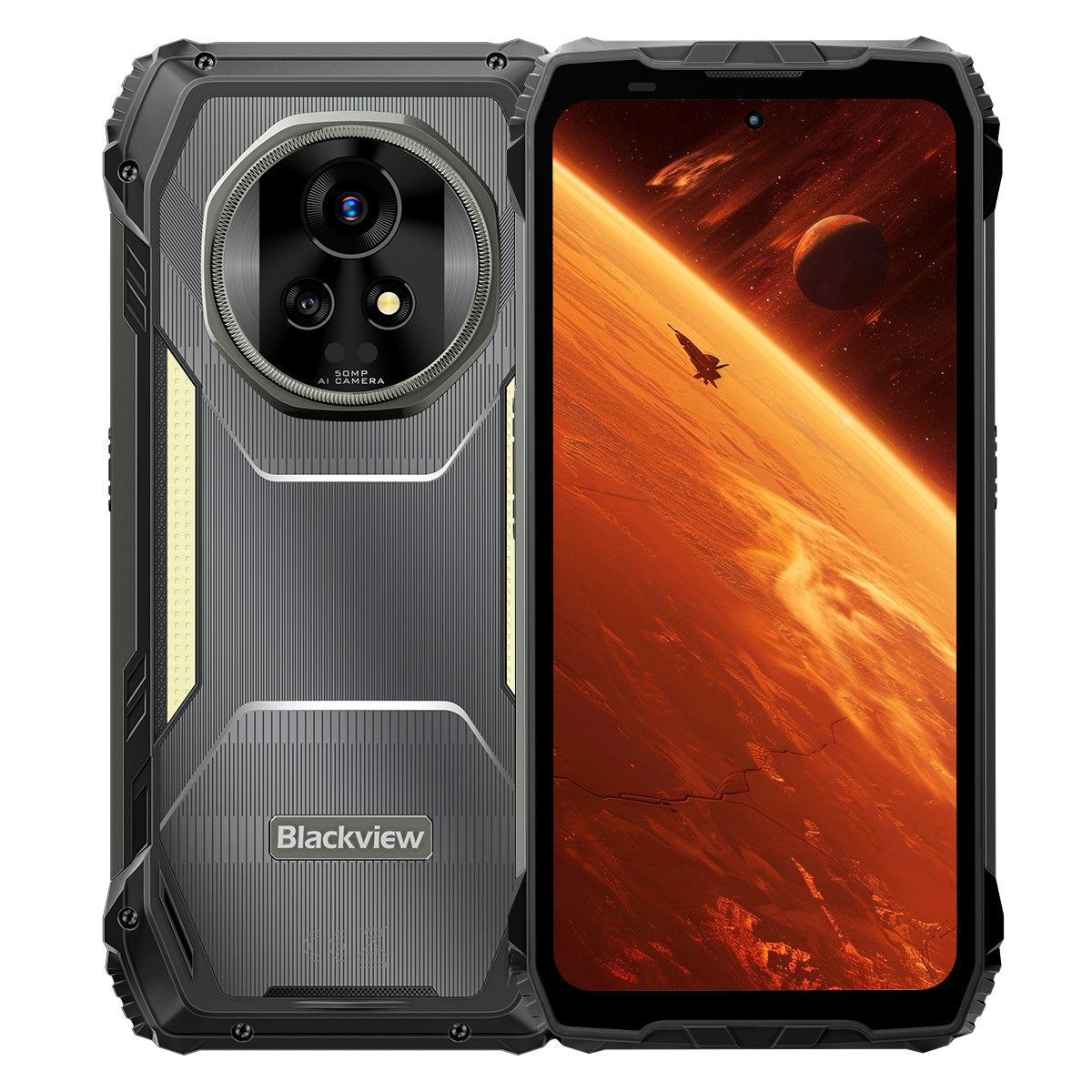


Blackview XPLORE 2 6.73" 3.2K AMOLED Display MediaTek Dimensity 8300 Octa-core 20000mAh 467LM Camping Licht 5G KI Robust Telefon

Verfügbar auf Lager (41)
Highlights
Highlights
✔6,73" 120Hz 3,2K LTPO AMOLED Display
✔Eingebautes 467 Lumen Doppel-Campinglicht
✔MediaTek Dimensity 8300 4nm 5G Octa-Core & WiFi 6E
✔20000mAh Akku mit 120W Schnellladung
✔50MP Haupt- + 20MP Nachtsichtkamera
✔IP68 & IP69K & MIL-STD-810H Zertifiziert
✔eSIM Unterstützung
Informationen
Informationen
Das Blackview XPLORE 2 ist ein robustes 5G-Flaggschiff, das für Nutzer entwickelt wurde, die erstklassige Displayqualität, lange Ausdauer und professionelle Outdoor-Funktionalität wünschen. Sein 6,73 Zoll großes 120Hz 3,2K AMOLED-Display, der Dimensity 8300 Prozessor, WiFi 6E und der riesige 20.000mAh Akku mit 120W Schnellladung machen es leistungsstark für Arbeit, Navigation, Medien und Reisen. Eine 50MP Hauptkamera, eine 20MP Nachtsichtkamera, ein 467LM Campinglicht, eSIM-Unterstützung, IP68- & IP69K-Schutz sowie MIL-STD-810H-Zertifizierung machen es bereit für anspruchsvolle Einsatzbedingungen im Feld.
Über die Marke
Über die Marke
Bei Blackview sind wir der Meinung, dass großartige Technologie mehr als nur beeindruckende Spezifikationen bieten sollte. Sie muss zum echten Leben passen, reale Probleme lösen und zuverlässig bleiben, wenn es am wichtigsten ist.
Blackview begann mit robusten Handys für anspruchsvolle Umgebungen. Heute bieten wir ein breiteres Ökosystem intelligenter Geräte an, darunter Smartphones, Tablets, Laptops, Smartwatches, Audioprodukte und mehr.
In jeder Kategorie bleibt unser Fokus derselbe: langlebige Qualität, praktische Innovation und erschwingliche Preise. Wir entwerfen Produkte, die sich von Anfang an verlässlich anfühlen.
Wir verstehen, was Kunden am meisten schätzen: reibungslose Leistung, langanhaltende Zuverlässigkeit, nützliche Funktionen und Technologie, die den Alltag erleichtert, ohne unnötige Kosten.
Deshalb legt Blackview großen Wert auf Produkttests, Benutzererfahrung und Funktionen, die echten Mehrwert für Arbeit, Reisen, Kreativität, Outdoor-Erkundungen und tägliche Vernetzung bieten.
Blackview ist für Menschen gemacht, die Technologie wollen, der sie vertrauen können: intelligente, leistungsfähige Geräte, die mit dem modernen Leben Schritt halten.
Zuverlässig durch Design. Praktisch von Natur aus. Für das echte Leben gemacht.
Versand & Rückgabe
Versand & Rückgabe
• Versand: Bestellungen werden innerhalb von 1–2 Werktagen bearbeitet. Die Standardlieferung dauert je nach Standort 3–7 Werktage.
• Rückgaben: Sie können Produkte innerhalb von 30 Tagen nach Erhalt Ihrer Bestellung zurückgeben oder umtauschen. Die Artikel müssen sich im Originalzustand befinden und ein Kaufnachweis vorliegen.
Wenn Ihr Artikel aufgrund von Herstellungsfehlern defekt oder beschädigt ist, ersetzen wir ihn gerne kostenlos.


Weltweit erstes 3.2K AMOLED 5G
KI Robustes Armor-Flaggschiff
Geboren für den Gipfel. Gebaut für die Wildnis.
6,73" 3.2K AMOLED 120Hz Display | HDR Atemberaubende Bilder | Dual 50MP Samsung® Kameras+20MP Nachtsicht| Duale Anti-Wackel (OIS + EIS) | 5G 4nm Dimensity 8300 | 48GB LPDDR5X & 1TB UFS4.0 + Bis zu 2TB TF-Erweiterung | 20000mAh Mega-Akku & 120W Super-schnelles Laden
Top 9 Gründe, Blackview zu wählen
XPLORE 2

Branchenweit härteste Haltbarkeit
Top-Militärstandard MIL-STD-810H
6 Meter Fallresistenz | 500kg Ultra-Schwerlast | -20°C bis +60°C Extreme Temperaturbeständigkeit

Der Gipfel des Wasserschutzes
Top-Level IP69K & IP68 Schutz
Staub- & Wasserabweisung mit nur einem Tipp | KI-Regenfester Touch| Unterwasseraufnahmen fest
2m für 30 Minuten Tiefentauchfest | 80℃ Kochwasserbeständigkeit

Nachtwächter
467lm Campinglicht
Helleres Licht | Leistungsstroboskop für Warnungen & Verteidigung | Sofortiges SOS-Signal für Notfälle

Revolutionärer Stereo-Sound
Duale 2W Smart-K Box Stereo-Lautsprecher
Bis zu 316% leistungsstärkerer Stereo-Sound für ein immersives Audioerlebnis überall.

Infrarot-Fernbedienung
Verwandle dein Telefon in Sekundenschnelle in eine All-in-One-Fernbedienung!

Jenseits der visuellen Grenzen
Ein 6,73" 3,2K HDR Display – Unübertroffen in seiner Klasse
2600 Nits Branchenführende Spitzenhelligkeit | 1–120Hz LTPO Adaptive Bildwiederholrate 1920Hz Hochfrequenz-Dimmung | TÜV SÜD Low Blue Light Zertifiziert

Bildgebung auf dem Höhepunkt
Duale 50MP Samsung® AI-Kameras | 20MP Nachtsicht | Ultra HDR | OIS & EIS
Kinematische 4K HDR10+ Videoaufnahme | Bewegungsverfolgung | 8× Zoom

Leistung, voll entwickelt
Top 5G Dimensity 8300 Chip | 16GB LPDDR5X RAM + 32GB Erweiterung | 1TB UFS4.0 ROM
1,339,275
AnTuTu Score
↑ 84%
Gesamtleistung

All-in-One KI-Bildbearbeitung
KI-Objektentfernung | KI-OutPainting | KI-Fotounschärfe | KI-Hintergrund ersetzen | KI-Animation


Batterie-Power-König
Größter Rugged Phone Akku aller Zeiten
20.000mAh Riesen-Dual-Cell-Akku | Bis zu 75 Tage ultra-langer Standby | 120W Hyper-Schnellladen | 10W Rückwärtsladen

Die einzige selbstentwickelte Lösung der Branche
Die weltweit besten 3 KI-Modelle. Alle in einem.
Stimmerkennung & freihändige Steuerung

Die einzige selbstentwickelte Lösung der Branche
Brandneues DokeOS 4.2 basierend auf Android 15

Intelligente Upgrades für jede Situation

Einzigartiges After-Sales-Versprechen der Branche
Robustheit neu definiert
Robuster Schutz auf höchstem Niveau.
Branchenführende robuste Zertifizierungen
Zertifiziert nach militärischem Standard MIL-STD-810H und IP68/IP69K, bietet der XPLORE 2 ultimativen Schutz gegen Stürze, Staub, Wasser und Quetschungen – und setzt damit einen neuen Maßstab für robuste Haltbarkeit.

6 Meter
Wirklich stoßfest
Übersteht Stürze aus bis zu 6 Metern Höhe, aus jedem Winkel, auf jeder Oberfläche.

IP6X
Wirklich staubdicht
Vollständiger Schutz gegen Sand, Staub und Industriepartikel.

IPX9K
Wirklich wasserdicht
Hält Hochtemperatur-, Hochdruckstrahlen, Spritzwasser und Eintauchen stand.

MIL-STD-810H
Wirklich druckfest
Hält extremem Druck, Stößen und rauen Umgebungen stand.
Die härteste Haltbarkeit der Branche
Unzerbrechlich von jeder Seite
Stärker denn je – innen und außen verstärkt, um Stürze zu überstehen, zerquetschende Kraft und extreme Temperaturen.
6 Meter
Fallbeständigkeit
Nächste Stufe der Fallbeständigkeit
1,5 Meter
Todessturz
Übersteht direkte Stürze
500kg
Tragfähigkeit
Hält extrem hohem Druck stand2
-20°C bis +60°C
Extreme Temperaturen
Breiter Betriebsbereich

Bewährt durch diese extremen Tests

Ultra-Robuste Bauweise
Branchenweit Erster
ArmorShield-Struktur
XPLORE 2 verwendet ein 5-lagiges ArmorShield-Design, verstärkt mit Gorilla® Glass 5 und aero-gradigem Al-Ti Legierung für Rundumschutz.
5-lagig
ArmorShield
Struktur
4 Ecken
Verstärkt
Schutz
400% ↑
Stärkerer Aufprall
Widerstand

Der Gipfel des Wasserschutzes
Top-Level IP69K Schutz
Zertifiziert mit IP69K und IP68, hält es allem stand – kochend heißem Wasser, unaufhörlichen Hochdruckstrahlen, Spritzwasser aus mehreren Winkeln und langanhaltendem Eintauchen.
80℃
Beständigkeit gegen kochendes Wasser
10000 kPa
Resistent gegen Industrie-Druckstrahlen
0° / 30° / 60° / 90°
Rundumspritzschutz
2 m für 30 Minuten
Tiefenwasserdicht4
Über 1.000.000 Mal
Auf Zuverlässigkeit bei Eintauchen getestet

Doppelter wasserdichter USB-Anschluss
Wasserresistent ohne Abdeckung, doppelt geschützt, wenn versiegelt.

Staub- & Wasserabweisung mit nur einem Tipp
Reinigt sofort den Lautsprecher, um jeden Anruf laut und klar.5

KI-Regenfester Touch
Selbst bei starkem Regen bleibt der Bildschirm bleibt glatt und reaktionsschnell.6

Unterwasseraufnahmen fest
Von Spritzern bis zu Tauchgängen, halte deine die Unterwasserwelt mühelos.
Nachtwächter
467lm Campinglicht für eine hellere, sicherere Wildnis
Wenn die Nacht hereinbricht, verwandelt das 467lm Campinglicht des XPLORE 2 Dunkelheit in Sicherheit. Von Campingplätzen bis zu Stromausfällen hält es dich vorbereitet und in Kontrolle.


Infrarot-Fernbedienung
Verwandle dein Telefon in Sekundenschnelle in eine All-in-One-Fernbedienung!8

Revolutionärer Stereo-Sound
Duale 2W Smart-K Box Stereo-Lautsprecher
Bis zu 316% leistungsstärkerer Stereo-Sound für ein immersives Audioerlebnis überall.

5dB ↑
Lautere Lautstärke 10
+50% ↑
Klarerer Klang11
Jenseits der visuellen Grenzen
Display
Lebendig
Lebensecht
HDR
Verbesserter Kontrast & Details
Professionelle Farbgenauigkeit
Verbesserter Kontrast & Details
2600 Nits
Branchenführende Spitzenhelligkeit12
6,73 Zoll
Flaggschiff AMOLED Display
521 PPI
Kristallklare Pixeldichte
Always-On Display
Zeit & Benachrichtigungen auf einen Blick
DCI-P3
Kinoreifes breites Farbspektrum13
68,7 Milliarden
Lebensechte Farben
10,000,000:1
Ultra-hoher Kontrastverhältnis
1–120Hz
LTPO Adaptive Bildwiederholfrequenz14

Display
Lindert
Komfort


Full-Link HDR
Ausgehend von atemberaubenden Bildern und erweitert um ultra-dynamische Aufnahmen liefert Full-Link HDR lebensechte Brillanz und stellt sicher, dass jedes Detail erhalten bleibt.

Bildgebung auf dem Höhepunkt
Klarere & stabilere Bildgebung
50MP Samsung® GN9 Flaggschiff-Hauptkamera
Von entfernten Ansichten bis zu bewegten Momenten, erfassen Sie alles im Detail.
1/1.57"
Größerer Sensor
f/1.88
Hellere Nachtaufnahmen
6P
Ultra-scharfe Klarheit


Beste Detailtreue ihrer Klasse
Ultra HDR Fotografie, 3× mehr Details
Erlebe die Wildnis in voller Detailtreue – von sonnenverbrannten Horizonten bis zu schattigen Pfaden, mit jedem Schatten, Highlight und jeder Farbe lebendig wie nie zuvor.

Branchenführend
8× näher. Trotzdem ultra-klar
Hole entfernte Szenen mit kristallklaren Details und stabilem Fokus näher heran.

50MP Samsung® JN1 Frontkamera
Ob bei strahlendem Tageslicht oder schwachem Licht, mache Selfies, die klar, hell und natürlich sind.

Nachtsicht auf neuem Niveau
20MP Sony® Nachtsichtkamera
Von Sicherheitsinspektionen bis zu Rettungseinsätzen – sieh klar in völliger Dunkelheit.

Video in Profiqualität
Kinematografisches 4K HDR10+
Erfasse ultra-klare Details, lebendige Farben und realistischen Kontrast mit 60FPS. Von Landschaften bis zu persönlichen Filmen erzählt jede Aufnahme eine filmische Geschichte.


All-in-One KI  Bildbearbeitung
Verwandle deine Fotos mit nur einem Klick in atemberaubende Bilder — Bildbearbeitung war noch nie so einfach!
KI Objekte entfernen
Ablenkungen mühelos und präzise entfernen.

KI OutPainting
Grenzen intelligent erweitern.

KI Foto unscharf machen
Hintergründe ändern und Szenen nach Belieben verwandeln.

KI Hintergrund ersetzen
Hintergründe ändern und Szenen nach Belieben verwandeln.

Momente, neu geboren
KI Animieren
Bringen Sie Standbilder zum Leben! Fügen Sie Gesichtern Bewegung hinzu und sehen Sie, wie Ihre Erinnerungen voller Energie tanzen

Leistung, voll entwickelt
Leistung auf nächstem Niveau
Erstklassiger 5G 4nm MediaTek Dimensity 8300
Basierend auf einem 4-nm-Prozess und mit bis zu 3,35 GHz getaktet, bewältigt XPLORE 2 Gaming-Marathons und intensives Multitasking mit Flaggschiff-Performance.
40%
Größerer Sensor
30% ↑
Stärkerer GPU17
84% ↑
Gesamtleistung18
1,339,275
AnTuTu Score

Speicher, Maximal Ausgereizt
Bis zu 48GB RAM
(16GB Physisch + 32GB Erweiterung)
Basierend auf einem 4-nm-Prozess und mit bis zu 3,35 GHz getaktet, bewältigt XPLORE 2 Gaming-Marathons und intensives Multitasking mit Flaggschiff-Performance.
2X ↑
Schnellere Datenübertragung19
45% ↑
Schnelleres Starten & Wechseln von Apps20
22 Apps ↑
Flüssiges Multitasking, Kein Lag21
LPDDR5X
Hochgeschwindigkeits-RAM

Speicher, Beschleunigt
1TB ROM + Mehr
bis zu 2TB TF-Erweiterung
Mit 1TB UFS4.0 ROM plus bis zu 2TB TF-Erweiterung speichert XPLORE 2 alles von hochauflösenden Karten und Drohnenaufnahmen bis hin zu Rettungsdateien – sofortiger Zugriff, selbst im Feld.
2X ↑
Größere Speicherkapazität22
2,3X ↑
Schnellere Lese- & Schreibgeschwindigkeit23
UFS4.0
Ultraschneller Speicher
1TB + 2TB TF Erweiterung = Alles Speichern

Next-Gen Konnektivität
WiFi 6E + Dual 5G Unterstützung
Bleiben Sie mit WiFi 6E und Dual 5G voraus — schneller, flüssiger und wirklich global.
↑ 3X Schnellere Geschwindigkeit
Sofortiges Laden. Nahtloses Streaming.24
6GHz + 5GHz + 2.4GHz
Tri-Band WiFi. Schneller. Stärker.

2,5Gbps Uplink | 5,11Gbps Downlink
Blitzschnelle Uploads & Downloads.25
Dual 5G Unterstützung
Wirklich Globale Konnektivität

Volle Leistung Entfesselt
3-in-1 effizientes Kühlsystem
Bleiben Sie mit fortschrittlichem Thermodesign kühl — selbst bei intensivem Gaming, kontinuierlichem 5G-Streaming oder ganztägiger Arbeit im Freien.

Graphit + Kupfer + Silikon
Dreifache Materialien, schnelle Wärmeübertragung
2.262,8 mm² Ableitungsfläche
Schnellere Wärmeverteilung, längere Spitzenleistung
<37°C tägliche Nutzung
Immer kühl, immer stabil
Bildgebung auf dem Höhepunkt
20.000mAh Riesen-Dual-Cell-Akku
Entspricht 4×5000mAh-Handys in einem — unaufhaltsame Leistung, ganztägige Ausdauer.

KI-Energieverwaltung


1,6X ↑
Längere Lebensdauer26
36 Std.+
Starke Nutzung27
23 Std.+
Gaming
24 Std.+
Web-Browsing
166 Std.+
Telefonieren
10 Std.+
Kontinuierliche Beleuchtung
75 Tage
Standby
Schnellste in ihrer Klasse
120W Hyper-Schnellladen
50 % in 39 Min. 100 % in 117 Min. Immer bereit, wenn Sie es sind.
118%
Schneller
Laden
Keine Wartezeit. Pure Power.29
10W Rückwärtsladen
Teilen Sie Energie jederzeit und überall.


Die einzige selbstentwickelte Lösung der Branche


Sprachgesteuerte Intelligenz
Gemini AI 2.0
Intelligenter. Schneller. Sprachgesteuert. XPLORE 2 hält Sie in Kontrolle – freihändig, wo immer Sie sind.
Stimmerkennung & freihändige Steuerung
Entsperren und steuern mit deiner Stimme — sicher und freihändig.

Globale intelligente Steuerung
Eine Stimme, volle Kontrolle über Apps und Einstellungen.

Hilfe im Vollbildmodus
Sofortige Hilfe auf dem Bildschirm, wo immer du bist.

Interaktion in Echtzeit
Führe natürliche Gespräche, wo immer die Pflicht dich hinführt.

Die einzige selbstentwickelte KI-Suite der Branche
Hi Doki | ImageX | VidGen | Soundle
Vier Apps, endlose Kreationen — schreiben, bearbeiten, filmen und komponieren ohne Grenzen.

Die einzige selbstentwickelte Lösung der Branche
Hi Doki
KI-gestützte Suche, Dokumentenanalyse und intelligentes Schreiben. Von der Recherche bis zur Kreation werden Ideen mit einem Fingertipp lebendig.

Die einzige selbstentwickelte Lösung der Branche
ImageX
Mit 18 KI-Bearbeitungstools verwandelst du gewöhnliche Aufnahmen in atemberaubende Bilder — verbessert, gestylt und bereit zum Teilen.

Die einzige selbstentwickelte Lösung der Branche
VidGen
Von Text zu Video, von Bildern zu Geschichten — KI verwandelt deine Ideen mühelos in Vlogs, Kurzvideos und fesselnde Geschichten.

Die einzige selbstentwickelte Lösung der Branche
Soundle
Gib deine Stimmung ein und lass die KI komponieren. Von romantischen Melodien bis zu energiegeladenen Beats wird Musik nur für dich gemacht.

Die einzige selbstentwickelte Lösung der Branche
Brandneues DokeOS 4.2 basierend auf Android 15
Intelligenter. Schneller. Sicherer. Mehr Sie.
XPLORE 2 definiert Leistung neu mit Geschwindigkeit, Effizienz, Datenschutz und grenzenloser Personalisierung.

Intelligente Upgrades für jede Situation

eSIM Support &
Globale Konnektivität
Blackview's erstes robustes Telefon mit eSIM-Unterstützung, das Sie weltweit mit mühelosem Roaming verbunden hält.32

Quad-Satellitensystem
Bleiben Sie auf Kurs mit hochpräziser Positionierung – zuverlässige 1-Meter-Genauigkeit in jeder Umgebung.32

Neueste Wireless BT 5.4
Übertragen Sie Dateien 50 % schneller, genießen Sie stärkere Verbindungen und koppeln Sie nahtlos mit all Ihren Geräten.34

Hochpräzises Gyroskop
Navigieren Sie präzise. Messen Sie genau mit AR. Spielen Sie flüssiger bei jeder Bewegung.

Benutzerdefinierte Shortcut-Taste
Ihre Essentials, nur einen Knopfdruck entfernt.

All-Szenario NFC
Von Zahlungen bis zu Zugangskarten, alles mit einer Berührung.35

3 Jahre Android Betriebssystem-Updates
Längere Unterstützung, immer auf dem neuesten Stand

Callcenter-Support
Direkte Hotline-Unterstützung, wenn Sie sie brauchen

24/7 Online-Service
Soforthilfe, Tag und Nacht

Vertrauenswürdige Reparaturzentren
Zuverlässiger Offline-Service, dem Sie vertrauen können
Blackview XPLORE 2 Spezifikationen

| Modell | XPLORE 2 |
| Farbe | Schwarz |
| Abmessungen | 186 * 87.8 * 29mm |
| Gewicht | 670g |
| Betriebssystem | DokeOS 4.2 basierend auf Android 15 |
| Display | 6,73-Zoll 3,2K AMOLED Display, 1440 * 3200 Auflösung, Corning® Gorilla® Glass 5, 120Hz Bildwiederholrate |
| CPU | Octa-Core 5G MediaTek Dimensity 8300, 4nm, bis zu 3,35GHz |
| RAM & ROM | 12GB RAM & 256GB ROM, LPDDR5X+UFS4.0 16GB RAM & 1TB ROM, LPDDR5X+UFS4.0 |
| TF-Erweiterung | Bis zu 2TB TF-Erweiterung |
| Akku | 20.000mAh; 120W Hyper-Schnellladen |
| Frontkamera | 50MP |
| Rückkamera | 50MP Hauptkamera+20MP Nachtsicht |
| Lautsprecher | Dual Smart-K BOX Lautsprecher |
| Robustes Rating | IP68 & IP69K & MIL-STD-810H |
| Navigation | L1+L5 GPS/GLONASS/BeiDou/Galileo |
| Kartensteckplatz | Dual: 2*SIM/1*SIM +1*TF Karte |
| NFC | Unterstützung |
| Dual 5G VoLTE | Unterstützung |
| Wi-Fi&Bluetooth | Wi-Fi6E; BT 5.4 |
| Netzwerkverbindung |
2G Band: B2/B3/B5/B8 3G Band: WCDMA: B1/B2/B4/B5/B6/B8/B19 (RXD) CDMA: BC0 4G Band: TDD:B34/B38/B39/B40/B41 FDD:B1/2/3/4/5/7/8/12/13/17/18/19/20/25/26/28A/28B/30/66 5G Band: N1/3/5/7/8/20/28/38/40/41/77/78/79 |
1. Daten stammen aus dem Blackview Labor. Als präzises elektronisches Gerät kann das Telefon bei Stürzen dennoch beschädigt werden. Bitte vermeiden Sie das Fallenlassen oder Stoßen des Geräts. Die tatsächliche Leistung kann je nach Nutzungsumgebung, Fallwinkel und Oberflächenmaterial variieren. Bitte beziehen Sie sich auf die tatsächliche Erfahrung.
2. Daten stammen aus dem Blackview Labor. Als präzises elektronisches Gerät kann das Telefon bei starkem Druck dennoch beschädigt werden. Bitte vermeiden Sie das Zusammendrücken oder Stoßen des Geräts.
3. Daten stammen aus dem Corning Labor, Vergleich von Gorilla® Glass 5 mit gewöhnlichem Kalk-Natron-Glas. Unter kontrollierten Bedingungen zeigt Gorilla® Glass 5 überlegene Leistung.
4. XPLORE 2 kann unter normalen Nutzungsbedingungen Spritzwasser, Wasser und Staub widerstehen und erreicht unter kontrollierten Laborbedingungen die IP69K- und IP68-Zertifizierungen. Der Schutz ist nicht dauerhaft, und die tatsächlichen Ergebnisse können aufgrund von Gerätealterung, Nutzungsgewohnheiten und Umweltfaktoren variieren. Laden Sie das Telefon nicht, wenn es nass ist.
5. Nutzt Schallwellenvibration, um Staub und Wasser vom Lautsprecher zu entfernen, was hilft, klare Anrufe und normale Audioleistung zu erhalten. Die tatsächlichen Reinigungsergebnisse können je nach Staub- oder Wasseransammlung und Nutzungsumgebung variieren. Bitte beziehen Sie sich auf die tatsächliche Erfahrung.
6. Das Touch-Erlebnis kann je nach Regen, Anwendungsszenarien und individuellen Nutzungsgewohnheiten variieren. Bitte beziehen Sie sich auf die tatsächliche Erfahrung.
7. Daten stammen aus dem Blackview Labor. Drei Helligkeitsstufen sind: Ultra Hell 467lm, Hoch Hell 368lm und Niedrig Hell 236lm.
8. Die Infrarot-Fernbedienungsfunktion unterstützt theoretisch die meisten IR-gesteuerten Geräte, aber die tatsächliche Kompatibilität kann je nach spezifischem Modell und Umgebung variieren. Die Leistung kann in der Praxis unterschiedlich sein.
9. Der Leistungsvergleich mit herkömmlichen 1W-Dual-Lautsprechern basiert auf simulierten Laborergebnissen, bewertet anhand der technischen Merkmale des Produkts. Die tatsächlichen Ergebnisse können aufgrund der Nutzungsumgebung, des Gerätemodells oder der technischen Konfiguration variieren.
10. Im Vergleich zu dualen 1W-Lautsprechern steigt der Schalldruckpegel um etwa 5 dB. Die Audioleistung kann je nach Nutzungsszenarien, Audioquellenqualität und Umgebungsgeräuschen variieren. Bitte beziehen Sie sich auf die tatsächliche Erfahrung.
11. Im Vergleich zu dualen 1W-Lautsprechern beträgt die menschliche Hörempfindlichkeit etwa 50 % mehr. Die spezifische Audioleistung richtet sich nach der tatsächlichen Erfahrung.
12. Die Spitzenhelligkeit kann 2600 Nits erreichen, mit globaler Aktivierungshelligkeit bei 1300 Nits, wirksam nur in bestimmten Szenarien. Die reguläre manuelle Helligkeit beträgt 500 Nits. Die tatsächliche Erfahrung hängt von den Nutzungsbedingungen ab.
13. Die DCI-P3 Wide-Color-Gamut-Anzeige erfordert kompatible Bild- und Videoquellen für optimale Wirkung.
14. Der Bildschirm unterstützt eine dynamische Bildwiederholfrequenz von 120 Hz. Die Bildwiederholraten können je nach App-Oberfläche und Spielszenarien leicht variieren. Bitte beziehen Sie sich auf die tatsächliche Erfahrung.
15. Die Daten stammen aus Tests, die im Labor von Blackview unter kontrollierten Bedingungen durchgeführt wurden. Die tatsächliche Leistung kann aufgrund von Faktoren wie Beleuchtung, Szenenkomplexität oder Gerätekonfigurationen variieren.
16. Daten stammen aus theoretischen Tests im Blackview Labor, im Vergleich zum Blackview XPLORE 1. Die tatsächliche Leistung kann durch Systemoptimierung, Anwendungsbelastung und Netzwerkumgebung beeinflusst werden. Bitte beziehen Sie sich auf die tatsächliche Erfahrung.
17. Daten stammen aus theoretischen Tests im Blackview Labor, im Vergleich zum Blackview XPLORE 1. Die tatsächliche Leistung kann aufgrund von Systemoptimierung, Anwendungsbelastung und Netzwerkumgebung variieren. Bitte beziehen Sie sich auf die tatsächliche Erfahrung.
18. Daten stammen aus theoretischen Tests im Blackview Labor, im Vergleich zum Blackview XPLORE 1. Die umfassende Leistung kann aufgrund von Systemoptimierung, Anwendungsbelastung und Netzwerkumgebung variieren. Bitte beziehen Sie sich auf die tatsächliche Erfahrung.
19. Daten stammen aus dem Blackview Labor unter standardisierten Testbedingungen, verglichen mit dem Blackview XPLORE 1. Die spezifische Leistung kann je nach tatsächlichen Nutzungsbedingungen variieren.
20. Daten stammen aus dem Blackview Labor unter standardisierten Testbedingungen, verglichen mit dem Blackview XPLORE 1. Die spezifische Leistung kann je nach tatsächlichen Nutzungsbedingungen variieren.
21. Daten basieren auf Tests, die im Blackview Labor unter kontrollierten Bedingungen durchgeführt wurden. Die tatsächliche Leistung kann aufgrund von Faktoren wie App-Typ, Systemeinstellungen, Hintergrundprozessen usw. variieren.
22. Die Daten stammen aus dem Blackview Labor, mit dem Vergleich zum Blackview XPLORE 1.
23. Daten stammen aus theoretischen Tests im Blackview Labor, mit Vergleichen zum Blackview XPLORE 1. Die tatsächlichen Geschwindigkeiten können je nach tatsächlichen Nutzungsbedingungen variieren.
24. Daten stammen aus dem Blackview Labor, im Vergleich zu WiFi 5. Die tatsächliche Erfahrung kann aufgrund von Umwelt- und Gerätefaktoren variieren.
25.Die angegebenen Netzgeschwindigkeiten stellen theoretische Maximalwerte dar. Die tatsächlichen Geschwindigkeiten können je nach Netzbedingungen, Netzbetreiberunterstützung, Gerätekonfiguration und anderen Faktoren variieren. Die Leistung richtet sich nach den tatsächlichen Nutzungsbedingungen.
26.Unterstützt bis zu 800 vollständige Ladezyklen. Die tatsächliche Leistung kann je nach Nutzungsmustern, Umweltfaktoren, Gerätewartung usw. variieren.
27.Alle Nutzungszeiten basieren auf Tests an Modellen des Blackview Labors. Die tatsächliche Leistung kann je nach Nutzungsszenarien, Anwendungsbelastungen, Netzbedingungen und individuellen Gewohnheiten variieren.
28.Die Ladegeschwindigkeit kann je nach Ladegerät, Ladekabel, Spannung und Umgebungstemperatur variieren. Bitte beziehen Sie sich auf die tatsächlichen Nutzungsbedingungen.
29.Daten stammen aus dem Blackview Labor, im Vergleich mit Blackview XPLORE 1.
30.Doke AI unterstützt eine 30-tägige kostenlose Testphase. Die Effektivität der KI-Funktion kann je nach Nutzungsszenarien, Eingabedaten und individuellen Gewohnheiten variieren. Bitte beziehen Sie sich auf die tatsächlichen Erfahrungen.
31.Funktionen werden kontinuierlich mit OTA-Updates verbessert. Bitte beziehen Sie sich auf die tatsächlichen Erfahrungen.
32.Wenn eSIM aktiviert ist, wird eine SIM-Karte und eine TF-Karte unterstützt. Wenn eSIM nicht aktiviert ist, werden zwei SIM-Karten oder eine SIM-Karte und eine TF-Karte gleichzeitig unterstützt.
33.Daten stammen aus dem Blackview Labor. Die Positionsgenauigkeit kann aufgrund von Umwelt-Hindernissen, Störungen und Mehrwegeffekten variieren. Bitte beziehen Sie sich auf die tatsächlichen Erfahrungen.
34.Daten stammen aus dem Blackview Labor, im Vergleich mit Blackview XPLORE 1.
35.Spezifische Nutzungseffekte können je nach Kartentyp, Verschlüsselungsmethode und Gerätekompatibilität variieren. Verschlüsselte Zugangskarten werden möglicherweise nicht unterstützt, und Zahlungsfunktionen können Passwörter oder Verifizierungen erfordern. Bitte beziehen Sie sich auf die tatsächlichen Erfahrungen.
36.Spezifische Serviceinhalte können je nach regionalen Richtlinien und Reparaturzentrum-Fähigkeiten variieren. Bitte beziehen Sie sich auf die tatsächlichen Bedingungen.
*Pixelunterschiede können zwischen verschiedenen Foto- und Videomodi bestehen. Bitte beziehen Sie sich auf die tatsächlichen Bedingungen.
*Produktbilder und Bildschirm-Inhalte auf den obigen Seiten dienen nur zur Veranschaulichung. Tatsächliche Produkteffekte (einschließlich, aber nicht beschränkt auf Aussehen, Farbe, Größe) und Bildschirmdarstellungen (einschließlich, aber nicht beschränkt auf Hintergründe, UI, Illustrationen) können leicht abweichen. Bitte beziehen Sie sich auf das tatsächliche Produkt.
*Daten auf den obigen Seiten sind theoretische Werte, die aus dem Blackview Labor stammen und unter spezifischen Testbedingungen ermittelt wurden (siehe spezifische Beschreibungen für jeden Punkt). Die tatsächliche Nutzung kann aufgrund von Produktunterschieden, Softwareversionen, Nutzungsbedingungen und Umweltfaktoren leicht variieren. Bitte beziehen Sie sich auf die tatsächlichen Nutzungsbedingungen.
*Aufgrund von Echtzeitänderungen bei Produktchargen und Produktionsfaktoren kann Blackview die textlichen Beschreibungen und Bildeffekte auf den obigen Seiten anpassen und überarbeiten, um die tatsächliche Produktleistung, Spezifikationen, Indizes und Komponenten so genau wie möglich widerzuspiegeln.
*In Fällen, in denen solche Änderungen und Anpassungen erforderlich sind, wird keine gesonderte Benachrichtigung erfolgen.
| Modell | XPLORE 2 |
| Farbe | Schwarz |
| Abmessung | 186 * 87,8 * 29mm |
| Gewicht | 670g |
| Betriebssystem | DokeOS 4.2 basierend auf Android 15 |
| Anzeigen | 6,73-Zoll 3,2K AMOLED Display, 1440 * 3200 Auflösung Corning® Gorilla® Glas 5, 120Hz Bildwiederholrate |
| CPU | Octa-Core 5G MediaTek Dimensity 8300, 4nm, bis zu 3,35GHz |
| RAM & ROM | 12GB RAM & 256GB ROM, LPDDR5X+UFS4.0 16GB RAM & 1TB ROM, LPDDR5X+UFS4.0 |
| TF-Erweiterung | Bis zu 2TB TF-Erweiterung |
| Batterie | 20.000mAh; 120W Hyper-Schnellladen |
| Frontkamera | 50MP |
| Rückkamera | 50MP Hauptkamera + 20MP Nachtsicht |
| Lautsprecher | Dual Smart-K BOX Lautsprecher |
| Robustes Rating | IP68 & IP69K & MIL-STD-810H |
| Navigation | L1+L5 GPS/GLONASS/BeiDou/Galileo |
| Kartensteckplatz | Dual: 2*SIM/1*SIM + 1*TF-Karte |
| NFC | Unterstützung |
| Dual 5G VoLTE | Unterstützung |
| Wi-Fi & Bluetooth | Wi-Fi 6E; BT 5.4 |
| Netzwerkverbindung | 2G-Band: B2/B3/B5/B8 3G-Band: WCDMA: B1/B2/B4/B5/B6/B8/B19 (RXD) CDMA: BC0 4G-Band: TDD: B34/B38/B39/B40/B41 FDD: B1/2/3/4/5/7/8/12/13/17/18/19/20/25/26/28A/28B/30/66 5G-Band: N1/3/5/7/8/20/28/38/40/41/77/78/79 |
• EU-Paket: Netzteil nicht enthalten
• Nicht-EU-Paket: Netzteil enthalten

How can I check whether the Blackview XPLORE 2 is compatible with my mobile carrier?
The Blackview XPLORE 2 supports 2G, 3G, 4G LTE, and 5G networks. Before purchasing, please check that the network bands supported by the XPLORE 2 match those used by your mobile network operator. First, identify which networks you use, then check the supported network bands in the specifications section of the product details page.
Alternatively, you can contact your mobile network operator to enquire whether this handset supports voice calls, text messages, and mobile data services via a SIM card. This will help you determine whether it is compatible. Please note that the availability of 4G or 5G services also depends on your operator’s network coverage, your mobile plan, and the operator’s support for this handset.
Does the Blackview XPLORE 2 support eSIM, and how do I activate it?
Yes. The Blackview XPLORE 2 series supports eSIM, allowing you to activate a mobile plan online without inserting a physical SIM card. To use this feature, you will need to register for the eSIM service with a mobile network operator or service provider that supports the XPLORE 2.
Before registering, please check whether this service is available in your region and whether it includes all the features you require. Some eSIM plans offer mobile data only, whilst others also include voice calls and text messaging. Ask your service provider for instructions on how to activate the service.
How long does the Blackview XPLORE 2’s 20,000mAh battery last with everyday use?
In laboratory testing, the Blackview XPLORE 2’s 20,000mAh battery delivered more than 36 hours of heavy use, making it well suited to long workdays and outdoor activities. Actual battery life varies depending on how much time you spend on calls, navigation, browsing, and entertainment.
Keeping navigation running on screen throughout the day uses more power than occasionally checking directions or replying to messages. Gaming and high screen brightness also drain the battery faster. Before a longer trip, try using the phone as you normally would for a day to get a better idea of how long a charge will last for you. This can help you decide whether to bring a power bank.
Should I choose the Blackview XPLORE 2 with 12GB RAM and 256GB storage or 16GB RAM and 1TB storage?
The 12GB/256GB version is suitable for everyday use, photography, navigation, and gaming. If you frequently use large apps or prefer to store more large games, videos, and work files, we recommend the 16GB/1TB version.
You can base your decision on your storage habits. If you regularly back up your photos and clear out junk files, 256GB should be sufficient. Conversely, if you prefer to keep everything—such as downloaded films and offline maps—1TB would be more suitable, as you won’t need to free up space as frequently.
How does the Blackview XPLORE 2 perform in demanding games like Genshin Impact?
Yes, you can play demanding games such as Genshin Impact on the Blackview XPLORE 2. Its Dimensity 8300 processor and LPDDR5X RAM enable it to handle these games and deliver smooth gameplay with appropriate graphics settings. It is recommended to start with medium graphics settings, which offer a better balance of image quality and responsiveness.
Higher graphics settings and extended play sessions may result in occasional drops in frame rate, particularly in complex scenes or when the device is warm. Should this occur, reducing the graphics quality can help maintain smoother gameplay. However, a consistent frame rate or the complete absence of stuttering cannot be guaranteed.
Is the Blackview XPLORE 2’s camera suitable for quick snapshots and moving subjects?
Yes. The XPLORE 2’s 50-megapixel main camera is ideal for everyday snapshots, such as moments in family life or work scenes. The optical image stabilisation feature helps reduce camera shake, whilst the motion tracking function ensures moving objects remain sharply in focus at all times.
When photographing children, pets, or other moving subjects, it is advisable to shoot in well-lit conditions and ensure the subject remains within the frame at all times. In low light, ask the subject to pause briefly; This will yield better results than adjusting the camera settings. The image stabilisation feature effectively minimises hand shake, but cannot eliminate blurring caused by fast-moving subjects.
How do I turn on the Blackview XPLORE 2’s camping light, and what lighting modes are available?
The XPLORE 2’s camping light offers three modes: steady, flashing, and SOS. Steady mode is suitable for lighting while pitching a tent, searching for equipment, or during a power cut; flashing mode can attract the attention of people nearby; SOS mode lets you send a distress signal with the light.
When using the light, select the appropriate mode for the situation; switch it off when not in use to conserve battery power. Please note that SOS mode is merely a visible light signal; it does not automatically transmit your location or contact emergency services.
What can I use the Blackview XPLORE 2’s night vision camera for?
The 20-megapixel infrared night vision camera helps you observe and photograph your surroundings in the dark. When there is insufficient ambient light, you can use it to check around your tent, inspect unlit storage spaces, or capture details of your equipment.
The images produced by the night vision function are in black and white, not colour photographs. Its operating principle also differs from thermal imaging: you can see the outline of objects in the dark, but you cannot use it to measure temperature or identify hot or cold areas.
Can I replace the Blackview XPLORE 2’s battery myself?
If your XPLORE 2’s battery life isn’t as long as it used to be and you don’t want to buy a new phone, you can replace the battery. We recommend contacting Blackview’s after-sales team first to help determine whether the issue requires a battery replacement or a repair. If you find it more convenient or quicker to visit a local repair shop, be sure to ask the technician whether they are familiar with repairing rugged smartphones to ensure the phone functions correctly after repair.
Alternatively, if you are a qualified repair technician or have the relevant experience and tools, you may purchase a suitable battery and replace it yourself. Before replacing the battery, please ensure it is compatible and that you can reassemble and reseal the phone correctly. Please note that opening the phone will affect its water resistance, and any damage caused during unauthorised repairs will not be covered by the Blackview warranty.
What are the differences between the Blackview XPLORE 2 Standard, Satellite, and Projector versions?
The Blackview XPLORE 2 Standard is primarily designed for everyday tasks. The Satellite Edition adds messaging capabilities in supported areas without mobile network coverage, whilst the Projector Edition allows you to watch films at your campsite or share presentations on a wall or screen. The table below outlines their main differences.
| Feature | XPLORE 2 Standard | XPLORE 2 Satellite | XPLORE 2 Projector |
|---|---|---|---|
| eSIM support | Yes | Yes | Yes |
| Satellite messaging | No | Yes—voice, text, and location messages* | No |
| Built-in projector | No | No | 100 lumens; 854 × 480 resolution; up to 100″ |
| Processor | MediaTek Dimensity 8300 | MediaTek Dimensity 8300 | MediaTek Dimensity 8300 |
| RAM / Storage | 12GB / 256GB or 16GB / 1TB | 12GB / 256GB or 16GB / 1TB | 12GB / 256GB or 16GB / 1TB |
| Battery / Charging | 20,000mAh / Up to 120W wired | 20,000mAh / Up to 120W wired | 20,000mAh / Up to 120W wired |
| Weight / Dimensions | 670g / 186 × 87.8 × 29mm | 675g / 186 × 87.8 × 29mm | 710g / 186 × 87.8 × 29mm |
| Best suited for | Everyday work and outdoor activities | Remote work and exploration beyond mobile coverage | Movies, camping entertainment, and presentations |
What software updates are available for the Blackview XPLORE 2, and how do I install them?
The XPLORE 2 comes pre-installed with DokeOS 4.2, based on Android 15, and offers three years of Android operating system update support. This refers to the support period, not a guaranteed number of major Android version upgrades.
When your phone notifies you that an update is available, connect to Wi-Fi and follow the on-screen instructions to install it. Before starting the update, we recommend backing up important files and ensuring the battery is sufficiently charged. If the installation fails, please send the error message and the current software version to Blackview Customer Service so that we can assist you with the next steps.
What warranty and after-sales services are available for the Blackview XPLORE 2 purchased from the official shop?
If you have purchased the XPLORE 2 from the official Blackview store, you are entitled to a 12-month repair warranty covering eligible faults. Should your mobile phone fail to function properly, please provide your order number and a brief description of the issue to our official customer service team. Attaching photographs or videos will help us understand the problem and provide more useful troubleshooting advice.
If repairs are required, please contact us before posting the phone so that we can confirm the relevant arrangements. For approved warranty repairs, you will be responsible for the cost of returning the phone, whilst Blackview will cover the cost of returning the repaired device. Damage caused by improper use is not covered by the free repair service; Please check with our team in advance if any repair costs are incurred.
Can I use the Blackview XPLORE 2 Projector to watch movies at home or while camping?
Yes. The XPLORE 2 projector allows you to turn any suitable wall or portable screen into a cinema. It supports a maximum screen size of 100 inches, with a brightness of 100 lumens and a resolution of 854 × 480.
For a family film night, we recommend a dimly lit room or watching after dark, using a smooth, light-coloured surface. If the image appears too dark, you can reduce the image size or dim the surrounding lights. Before going camping, download films onto your mobile phone in advance to avoid issues with unstable network signals at your campsite.
How do I turn on the projector on the Blackview XPLORE 2 Projector and adjust the image for a clear picture?
Once the projection function is enabled, point the lens at a flat surface and turn the physical focus knob until the text and edges appear clear and sharp. When the phone is projecting at an upward or downward angle, the automatic vertical keystone correction feature helps to correct the image.
Place the phone on a stable coffee table or desk, facing the centre of the viewing area. Move the phone closer to produce a smaller image, or further away to produce a larger one, then refocus. If the image remains blurry, try dimming the surrounding lights first, then increase the projection size.
Where are satellite services available for the Blackview XPLORE 2 Satellite, and do they require a subscription?
The Blackview XPLORE 2 Satellite service covers satellite messaging in 36 countries across regions including Australia and New Zealand. If you are unsure whether the service is available in your area before purchasing, please contact the Blackview customer service team and let us know where you plan to use it, so that we can help you check whether that location is supported.
Satellite messaging is a paid service separate from standard mobile plans. Before travelling to areas without mobile coverage, please check the available plans, text message limits, and activation requirements, and complete the setup in advance.
Jump to another section