



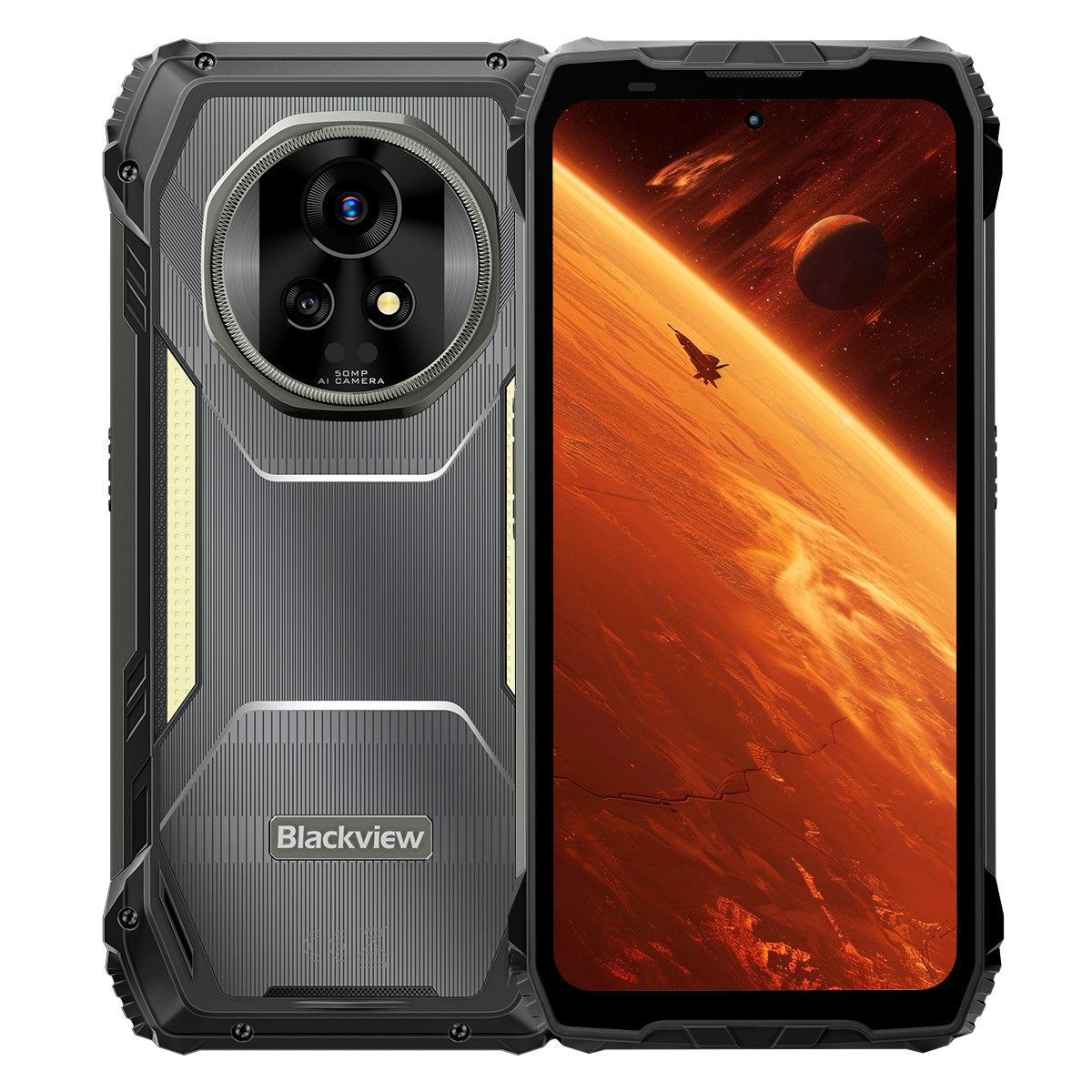


Blackview XPLORE 2 Pantalla AMOLED 3.2K de 6.73" MediaTek Dimensity 8300 Octa-core Luz de Camping 467LM 20000mAh Teléfono Resistente 5G AI

Disponible en stock (12)
Destacados
Destacados
✔Pantalla AMOLED LTPO de 6.73" 120Hz 3.2K
✔Luz de camping dual incorporada de 467 lúmenes
✔MediaTek Dimensity 8300 4nm 5G Octa-core y WiFi 6E
✔Batería de 20000mAh con carga rápida de 120W
✔Cámara principal de 50MP + cámara de visión nocturna de 20MP
✔Certificación IP68, IP69K y MIL-STD-810H
✔Soporte eSIM
Información
Información
El Blackview XPLORE 2 es un teléfono resistente 5G de alta gama diseñado para usuarios que desean una calidad de pantalla de élite, gran autonomía y utilidad profesional al aire libre. Su pantalla AMOLED de 6.73 pulgadas, 120Hz y 3.2K, procesador Dimensity 8300, WiFi 6E y enorme batería de 20,000mAh con carga rápida de 120W lo hacen potente para el trabajo, la navegación, los medios y los viajes. Una cámara principal de 50MP, cámara de visión nocturna de 20MP, luz de camping de 467LM, soporte eSIM, protección IP68 e IP69K y durabilidad MIL-STD-810H lo preparan para condiciones exigentes en el campo.
Acerca de la marca
Acerca de la marca
En Blackview, creemos que la gran tecnología debe ir más allá de especificaciones impresionantes. Debe adaptarse a la vida real, resolver problemas reales y mantenerse confiable cuando más importa.
Blackview comenzó con teléfonos resistentes diseñados para entornos difíciles. Hoy, ofrecemos un ecosistema más amplio de dispositivos inteligentes, incluyendo smartphones, tablets, laptops, smartwatches, productos de audio y más.
En cada categoría, nuestro enfoque sigue siendo el mismo: calidad duradera, innovación práctica y precios accesibles. Diseñamos productos que se sienten confiables desde el primer día.
Entendemos lo que los clientes valoran más: rendimiento fluido, confiabilidad duradera, funciones útiles y tecnología que facilita la vida diaria sin costos innecesarios.
Por eso, Blackview pone verdadera atención en las pruebas de producto, la experiencia del usuario y las características que aportan un valor significativo al trabajo, los viajes, la creación, la exploración al aire libre y la conexión diaria.
Blackview está hecho para personas que quieren tecnología en la que puedan confiar: dispositivos inteligentes y capaces, diseñados para seguir el ritmo de la vida moderna.
Confiable por diseño. Práctico por naturaleza. Hecho para la vida real.
Envíos y Devoluciones
Envíos y Devoluciones
• Envío: Los pedidos se procesan en 1–2 días hábiles. La entrega estándar tarda de 3 a 7 días hábiles, según su ubicación.
• Devoluciones: Puede devolver o cambiar productos dentro de los 30 días posteriores a la recepción de su pedido. Los artículos deben estar en condiciones originales con comprobante de compra.
Si su artículo está defectuoso o dañado por problemas de fabricación, con gusto lo reemplazaremos sin costo adicional.


El primer 3.2K AMOLED 5G del mundo
AI Rugged Armor Flagship
Nacido para la cima. Construido para la naturaleza.
Pantalla AMOLED 3.2K de 6.73" 120Hz | Visuales HDR impresionantes | Doble 50MP Samsung® Cámaras + Visión Nocturna de 20MP| Doble Anti-Vibración (OIS + EIS) | 5G 4nm Dimensity 8300 | 48GB LPDDR5X & 1TB UFS4.0 + Hasta 2TB de expansión TF | Batería Mega de 20000mAh y carga súper rápida de 120W
Las 9 Principales Razones para Elegir Blackview
XPLORE 2

La Durabilidad Más Resistente de la Industria
MIL-STD-810H de Grado Militar de Primera Categoría
Resistencia a Caídas de 6 Metros | Carga Ultra Pesada de 500kg | Resistencia a Temperaturas Extremas de -20°C a +60°C

La cima de la protección impermeable
Defensa de Nivel Superior IP69K & IP68
Expulsión de polvo y agua con un solo toque | Toque a prueba de lluvia con IA| Tomas submarinas
Prueba de Inmersión Profunda de 2m por 30 minutos | Resistencia a Agua Hirviendo a 80℃

Guardián nocturno
Luz de Camping de 467lm
Luz Más Brillante | Estroboscópico Potente para Advertencias y Defensa | Señal SOS Instantánea para Emergencias

Sonido estéreo revolucionario
Altavoces estéreo Dual 2W Smart-K Box
Estéreo hasta un 316% más potente para un audio envolvente en cualquier lugar.

Control remoto por infrarrojos
¡Convierte tu teléfono en un control remoto todo en uno en segundos!

Más allá de los límites visuales
Una pantalla HDR 3.2K de 6.73” — Inigualable en su clase
2600 nits de Brillo Máximo Líder en la Industria | Frecuencia de Actualización Adaptativa LTPO de 1–120Hz Atenuación de Alta Frecuencia de 1920Hz | Certificado TÜV SÜD de Baja Luz Azul

Imágenes en su punto máximo
Cámaras AI Duales Samsung® de 50MP | Visión Nocturna de 20MP | Ultra HDR | OIS y EIS
Grabación de Video Cinematográfica 4K HDR10+ | Seguimiento de Movimiento | Zoom 8×

Rendimiento, completamente evolucionado
Chip Dimensity 8300 5G de primera | 16GB LPDDR5X RAM + 32GB de expansión | ROM UFS4.0 de 1TB
1,339,275
Puntuación AnTuTu
↑ 84%
Rendimiento general

Edición de Imágenes AI Todo en Uno
AI para Eliminar Objetos | AI OutPainting | AI para Desenfocar Fotos | AI para Reemplazar el Fondo | Animación AI


Rey de la Potencia de la Batería
La batería más grande en un teléfono resistente
Batería gigante dual de 20,000mAh | Hasta 75 Días de Espera Ultra-Larga | Carga hiper rápida de 120W | Carga inversa de 10W

El único desarrollado internamente de la industria
Los 3 mejores modelos de IA del mundo. Todos en uno.
Activación por huella de voz y control manos libres

El único desarrollado internamente de la industria
Nuevo DokeOS 4.2 Basado en Android 15

Actualizaciones Inteligentes para Cada Escenario

El Único Compromiso Postventa de la Industria
Resistencia Redefinida
Protección Rugged de Primer Nivel.
Certificaciones Rugged de Primer Nivel en la Industria
Certificado con estándares militares MIL-STD-810H y clasificaciones IP68/IP69K, XPLORE 2 ofrece la máxima protección contra caídas, polvo, agua y aplastamientos, estableciendo un nuevo referente en durabilidad resistente.

6 Metros
Verdaderamente a prueba de caídas
Sobrevive a caídas desde hasta 6 metros, en cualquier ángulo, sobre cualquier superficie.

IP6X
Verdaderamente a prueba de polvo
Protección completa contra arena, polvo y partículas industriales.

IPX9K
Verdaderamente Impermeable
Resiste chorros de alta temperatura y presión, salpicaduras e inmersión.

MIL-STD-810H
Verdaderamente a Prueba de Aplastamiento
Resiste compresión extrema, impactos y ambientes difíciles.
La Durabilidad Más Resistente de la Industria
Irrompible desde Todos los Lados
Más fuerte que nunca—reforzado por dentro y por fuera para soportar caídas, fuerza de aplastamiento y temperaturas extremas.
6 Metros
Resistencia a Caídas
Resistencia a caídas de siguiente nivel
1.5 Metros
Caída Mortal
Sobrevive a caídas directas
500kg
Capacidad de Carga
Resiste presiones ultra intensas2
-20°C a +60°C
Temperaturas Extremas
Amplio rango de operación

Probado mediante estas pruebas extremas

Construcción ultra resistente
Primero en la industria
Estructura ArmorShield
XPLORE 2 adopta un diseño ArmorShield de 5 capas, reforzado con Gorilla® Glass 5 y aleación Al-Ti de grado aeroespacial para una durabilidad total.
5 capas
ArmorShield
Estructura
4 esquinas
Reforzado
Protección
400% ↑
Impacto más fuerte
Resistencia

La cima de la protección impermeable
Defensa IP69K de nivel superior
Certificado con IP69K e IP68, lo soporta todo: agua hirviendo, chorros de alta presión implacables, rociados en múltiples ángulos e inmersiones prolongadas.
80℃
Resistencia al agua hirviendo
10000 kPa
Resiste chorros de grado industrial
0° / 30° / 60° / 90°
Protección contra rociado en todos los ángulos
2 m durante 30 minutos
Prueba de inmersión profunda4
Más de 1,000,000 de veces
Fiabilidad probada por inmersión

Puerto USB impermeable dual
Resiste el agua sin cubierta, doble protegido cuando está sellado.

Expulsión de polvo y agua con un solo toque
Limpia instantáneamente el altavoz para mantener cada llamada alta y clara.5

Toque a prueba de lluvia con IA
Incluso en fuertes aguaceros, el la pantalla se mantiene suave y sensible.6

Tomas submarinas
Desde salpicaduras hasta inmersiones, captura tu mundo submarino con facilidad.
Guardián nocturno
Luz de camping de 467lm para una naturaleza más brillante y segura
Cuando cae la noche, la luz de camping de 467lm del XPLORE 2 convierte la oscuridad en seguridad. Desde campamentos hasta apagones, te mantiene preparado y en control.


Control remoto por infrarrojos
¡Convierte tu teléfono en un control remoto todo en uno en segundos!8

Sonido estéreo revolucionario
Altavoces estéreo Dual 2W Smart-K Box
Estéreo hasta un 316% más potente para un audio envolvente en cualquier lugar.

5dB ↑
Volumen más alto 10
+50% ↑
Audio más claro11
Más allá de los límites visuales
Pantalla
Vívido
Realista
HDR
Contraste y detalle mejorados
Precisión de color profesional
Contraste y detalle mejorados
2600 nits
Brillo máximo líder en la industria12
6.73 pulgadas
Pantalla AMOLED de primera línea
521 PPI
Densidad de píxeles nítida
Pantalla siempre activa
Hora y alertas de un vistazo
DCI-P3
Gama de colores amplia de calidad cinematográfica13
68.7 Mil millones
Colores Realistas
10,000,000:1
Relación de Contraste Ultra Alta
1–120Hz
Frecuencia de Actualización Adaptativa LTPO14

Pantalla
Alivia
Comodidades


Full-Link HDR
Comenzando con imágenes impresionantes y extendiéndose a capturas ultra dinámicas, Full-Link HDR ofrece un brillo realista y asegura que cada detalle se preserve.

Imágenes en su punto máximo
Imágenes Más Claras y Estables
Cámara Principal Insignia Samsung® GN9 de 50MP
Desde vistas lejanas hasta momentos en movimiento, captura todo con detalle.
1/1.57"
Sensor más grande
f/1.88
Fotos Nocturnas Más Brillantes
6P
Claridad Ultra Nítida


Detalle de Primera Clase
Fotografía Ultra HDR, 3× Más Detalles
Ve la naturaleza salvaje con todo detalle — desde horizontes quemados por el sol hasta senderos sombríos, con cada sombra, reflejo y color vivos como nunca antes.

Líder en la Industria
8× Más Cerca. Aún Ultra Claro
Acerca escenas lejanas con detalles cristalinos y enfoque estable.

Cámara Frontal Samsung® JN1 de 50MP
Ya sea a plena luz del día o con poca luz, captura selfies claras, brillantes y naturales.

Visión Nocturna de Próximo Nivel
Cámara de Visión Nocturna Sony® de 20MP
Desde inspecciones de seguridad hasta misiones de rescate, ve claramente en completa oscuridad.

Video Profesional
Cinematográfico 4K HDR10+
Captura detalles ultra claros, colores vivos y contraste realista a 60FPS. Desde paisajes hasta películas personales, cada toma cuenta una historia cinematográfica.


IA Todo en Uno  Edición de Imágenes
Transforma tus fotos en imágenes impresionantes con un solo clic — ¡editar nunca ha sido tan fácil!
IA Eliminar objetos
Borra distracciones con precisión sin esfuerzo.

IA OutPainting
Expande los límites inteligentemente.

IA Desenfocar foto
Cambia fondos y transforma escenas a voluntad.

IA Reemplazar fondo
Cambia fondos y transforma escenas a voluntad.

Momentos, renacidos
IA Animar
¡Da vida a las fotos! Añade movimiento a los rostros y observa cómo tus recuerdos bailan con energía

Rendimiento, completamente evolucionado
Rendimiento de siguiente nivel
MediaTek Dimensity 8300 5G de 4nm de primera categoría
Construido con un proceso de 4nm y acelerado hasta 3.35GHz, XPLORE 2 avanza con potencia maratones de juegos y multitarea pesada con la fluidez de un flagship.
40%
Sensor más grande
30% ↑
GPU más potente17
84% ↑
Rendimiento general18
1,339,275
Puntuación AnTuTu

Memoria, al máximo
Hasta 48GB de RAM
(16GB Físicos + 32GB de Expansión)
Construido con un proceso de 4nm y acelerado hasta 3.35GHz, XPLORE 2 avanza con potencia maratones de juegos y multitarea pesada con la fluidez de un flagship.
2X ↑
Transmisión de datos más rápida19
45% ↑
Inicio y cambio de apps más rápido20
22 Apps ↑
Multitarea fluida, sin retrasos21
LPDDR5X
RAM de Alta Velocidad

Almacenamiento, Acelerado
1TB ROM + Más
hasta 2TB de expansión TF
Con 1TB UFS4.0 ROM más hasta 2TB de expansión TF, XPLORE 2 almacena todo, desde mapas de alta resolución y grabaciones de drones hasta archivos de rescate — acceso instantáneo, incluso en el campo.
2X ↑
Mayor Capacidad de Almacenamiento22
2.3X ↑
Velocidad de Lectura y Escritura Más Rápida23
UFS4.0
Almacenamiento Ultra-Rápido
Expansión TF de 1TB + 2TB = Guarda Todo

Conectividad de Próxima Generación
WiFi 6E + Soporte Dual 5G
Mantente a la vanguardia con WiFi 6E y Dual 5G — más rápido, más fluido y verdaderamente global.
↑ Velocidad 3X Más Rápida
Carga Instantánea. Transmisión Sin Interrupciones.24
6GHz + 5GHz + 2.4GHz
WiFi Tri-Banda. Más Rápido. Más Fuerte.

2.5Gbps de Subida | 5.11Gbps de Descarga
Subidas y Descargas Ultrarrápidas.25
Soporte Dual 5G
Conectividad Verdaderamente Global

Rendimiento Completo Desatado
Sistema de enfriamiento eficiente 3 en 1
Mantente fresco con un diseño térmico avanzado — incluso durante juegos intensos, streaming 5G continuo o trabajo al aire libre todo el día.

Grafito + Cobre + Silicona
Tres materiales, transferencia rápida de calor
Área de disipación de 2,262.8 mm²
Dispersión de calor más rápida, rendimiento máximo más duradero
<37°C Uso diario
Siempre fresco, siempre estable
Imágenes en su punto máximo
Batería gigante dual de 20,000mAh
Equivale a 4 teléfonos de 5000mAh en uno — potencia imparable, resistencia todo el día.

Gestión de energía con IA


1.6X ↑
Mayor duración26
36hrs+
Uso intensivo27
23hrs+
Juegos
24hrs+
Navegación web
Más de 166 horas
Llamadas
Más de 10 horas
Iluminación continua
75 días
En espera
El más rápido de su clase
Carga hiper rápida de 120W
50% en 39 minutos. 100% en 117 minutos. Siempre listo cuando tú lo estés.
118%
Más rápido
Cargando
Cero espera. Potencia pura.29
Carga inversa de 10W
Comparte energía en cualquier momento y lugar.


El único desarrollado internamente de la industria


Inteligencia controlada por voz
Gemini AI 2.0
Más inteligente. Más rápido. Control por voz. XPLORE 2 te mantiene al mando — manos libres, dondequiera que vayas.
Activación por huella de voz y control manos libres
Desbloquea y controla con tu voz: seguro y manos libres.

Control inteligente global
Una voz, control total en aplicaciones y configuraciones.

Asistencia a pantalla completa
Ayuda instantánea en pantalla, dondequiera que estés.

Interacción en tiempo real
Conversa de forma natural, dondequiera que el deber te lleve.

Suite de IA única desarrollada internamente en la industria
Hi Doki | ImageX | VidGen | Soundle
Cuatro aplicaciones, creaciones infinitas: escribe, edita, filma y compone sin límites.

El único desarrollado internamente de la industria
Hi Doki
Búsqueda impulsada por IA, análisis de documentos y escritura inteligente. De la investigación a la creación, las ideas cobran vida con un solo toque.

El único desarrollado internamente de la industria
ImageX
Con 18 herramientas de edición de IA, transforma tomas ordinarias en visuales impresionantes: mejorados, estilizados y listos para compartir.

El único desarrollado internamente de la industria
VidGen
De texto a video, de imágenes a historias: la IA convierte tus ideas en vlogs, videos cortos e historias cautivadoras sin esfuerzo.

El único desarrollado internamente de la industria
Soundle
Introduce tu estado de ánimo y deja que la IA componga. Desde melodías románticas hasta ritmos enérgicos, la música se crea solo para ti.

El único desarrollado internamente de la industria
Nuevo DokeOS 4.2 Basado en Android 15
Más Inteligente. Más Rápido. Más Seguro. Más Tú.
XPLORE 2 redefine el rendimiento con velocidad, eficiencia, privacidad y personalización ilimitada.

Actualizaciones Inteligentes para Cada Escenario

Soporte eSIM &
Conectividad Global
El primer teléfono resistente de Blackview con soporte eSIM, manteniéndote conectado mundialmente con roaming sin esfuerzo.32

Sistema de Cuatro Satélites
Mantente en ruta con posicionamiento de alta precisión — precisión confiable de 1 metro en cualquier entorno.32

Último Bluetooth Inalámbrico 5.4
Transfiere archivos un 50 % más rápido, disfruta de conexiones más fuertes y empareja sin problemas con todos tus dispositivos.34

Giroscopio de Alta Precisión
Navega con precisión. Mide con exactitud con AR. Juega más fluido en cada movimiento.

Botón de Acceso Directo Personalizado
Tus esenciales, a un solo toque.

NFC para Todos los Escenarios
Desde pagos hasta tarjetas de acceso, todo con un toque.35

3 Años de Android Actualizaciones del SO
Soporte más prolongado, siempre actualizado

Soporte del centro de llamadas
Asistencia directa por línea directa cuando la necesites

Servicio en línea 24/7
Ayuda instantánea, día o noche

Centros de reparación confiables
Servicio confiable sin conexión en el que puedes confiar
Especificaciones de Blackview XPLORE 2

| Modelo | XPLORE 2 |
| Color | Negro |
| Dimensiones | 186 * 87.8 * 29mm |
| Peso | 670g |
| SO | DokeOS 4.2 basado en Android 15 |
| Pantalla | Pantalla AMOLED 3.2K de 6.73 pulgadas, resolución 1440 * 3200, Corning® Gorilla® Glass 5, tasa de refresco de 120Hz |
| CPU | MediaTek Dimensity 8300 5G de ocho núcleos, 4nm, hasta 3.35GHz |
| RAM & ROM | 12GB RAM & 256GB ROM, LPDDR5X+UFS4.0 16GB RAM & 1TB ROM, LPDDR5X+UFS4.0 |
| Expansión TF | Expansión TF hasta 2TB |
| Batería | 20,000mAh; Carga rápida hiper de 120W |
| Cámara frontal | 50MP |
| Cámara trasera | Principal de 50MP + Visión Nocturna de 20MP |
| Altavoz | Altavoz Dual Smart-K BOX |
| Clasificación resistente | IP68 & IP69K & MIL-STD-810H |
| Navegación | L1+L5 GPS/GLONASS/BeiDou/Galileo |
| Ranura para tarjeta | Doble: 2*SIM/1*SIM +1*Tarjeta TF |
| NFC | Soporte |
| Doble 5G VoLTE | Soporte |
| Wi-Fi&Bluetooth | Wi-Fi6E; BT 5.4 |
| Conectividad de Red |
Banda 2G: B2/B3/B5/B8 Banda 3G: WCDMA: B1/B2/B4/B5/B6/B8/B19 (RXD) CDMA: BC0 Banda 4G: TDD:B34/B38/B39/B40/B41 FDD:B1/2/3/4/5/7/8/12/13/17/18/19/20/25/26/28A/28B/30/66 Banda 5G: N1/3/5/7/8/20/28/38/40/41/77/78/79 |
1. Datos obtenidos del Laboratorio Blackview. Como dispositivo electrónico de precisión, el teléfono aún puede sufrir daños por caídas. Por favor, evite dejar caer o golpear el dispositivo. El rendimiento real puede variar según el entorno de uso, el ángulo de caída y el material de la superficie. Por favor, consulte la experiencia real.
2. Datos obtenidos del Laboratorio Blackview. Como dispositivo electrónico de precisión, el teléfono aún puede sufrir daños bajo presión intensa. Por favor, evite apretar o golpear el dispositivo.
3. Datos obtenidos del Laboratorio Corning, comparando Gorilla® Glass 5 con vidrio común de sosa-cálcico. Bajo condiciones controladas, Gorilla® Glass 5 demuestra un rendimiento superior.
4. XPLORE 2 puede resistir salpicaduras, agua y polvo bajo condiciones normales de uso y alcanza las certificaciones IP69K e IP68 bajo condiciones controladas de laboratorio. El rendimiento protector no es permanente y los resultados reales pueden variar debido al envejecimiento del dispositivo, hábitos de uso y factores ambientales. No cargue el teléfono mientras esté mojado.
5. Utiliza vibración por ondas sonoras para eliminar polvo y agua del altavoz, ayudando a mantener llamadas claras y un rendimiento de audio normal. Los resultados reales de limpieza pueden variar según la cantidad de polvo o agua acumulada y el entorno de uso. Por favor, consulte la experiencia real.
6. La experiencia táctil puede variar debido a la lluvia, escenarios de aplicación y hábitos individuales de uso. Por favor, consulte la experiencia real.
7. Datos obtenidos del Laboratorio Blackview. Tres niveles de brillo son: Ultra Brillante 467lm, Alto Brillo 368lm y Bajo Brillo 236lm.
8. La función de control remoto infrarrojo soporta en teoría la mayoría de los dispositivos controlados por IR, pero la compatibilidad real puede variar según el modelo específico y el entorno. El rendimiento puede diferir en el uso real.
9.La comparación de rendimiento con altavoces duales convencionales de 1W se basa en resultados simulados de pruebas de laboratorio, evaluados con las características técnicas del producto. Los resultados reales pueden variar debido al entorno de uso, modelo del dispositivo o configuración técnica.
10.En comparación con altavoces duales de 1W, los decibelios aumentan aproximadamente 5dB. El rendimiento de audio puede variar según los escenarios de uso, la calidad de la fuente de audio y el ruido ambiental. Por favor, consulte la experiencia real.
11.En comparación con altavoces duales de 1W, la mejora en la audición humana es aproximadamente del 50%. El rendimiento específico de audio está sujeto a la experiencia real.
12.El brillo máximo puede alcanzar 2600 nits, con un brillo de activación global de 1300 nits, efectivo solo en escenarios específicos. El brillo manual regular es de 500 nits. La experiencia real depende de las condiciones de uso.
13.La pantalla con amplio gamut de color DCI-P3 requiere fuentes de imagen y video compatibles para un efecto óptimo.
14.La pantalla soporta una tasa de refresco dinámica de 120Hz. Las tasas de refresco pueden variar ligeramente entre diferentes interfaces de aplicaciones y escenarios de juego. Por favor, consulte la experiencia real.
15.Los datos se derivan de pruebas realizadas en el laboratorio de Blackview bajo condiciones controladas. El rendimiento real puede variar debido a factores como iluminación, complejidad de la escena o configuraciones del dispositivo.
16.Los datos provienen de pruebas teóricas del Laboratorio Blackview, comparando con Blackview XPLORE 1. El rendimiento real puede verse afectado por la optimización del sistema, carga de aplicaciones y entorno de red. Por favor, consulte la experiencia real.
17.Los datos provienen de pruebas teóricas del Laboratorio Blackview, comparando con Blackview XPLORE 1. El rendimiento real puede variar debido a la optimización del sistema, carga de aplicaciones y entorno de red. Por favor, consulte la experiencia real.
18.Los datos provienen de pruebas teóricas del Laboratorio Blackview, comparando con Blackview XPLORE 1. El rendimiento integral puede variar debido a la optimización del sistema, carga de aplicaciones y entorno de red. Por favor, consulte la experiencia real.
19.Los datos se derivan del Laboratorio Blackview bajo condiciones de prueba estandarizadas, comparados con Blackview XPLORE 1. El rendimiento específico puede variar según las condiciones reales de uso.
20.Los datos se derivan del Laboratorio Blackview bajo condiciones de prueba estandarizadas, comparados con Blackview XPLORE 1. El rendimiento específico puede variar según las condiciones reales de uso.
21.Los datos se basan en pruebas realizadas en el Laboratorio Blackview bajo condiciones controladas. El rendimiento real puede variar debido a factores como el tipo de aplicación, configuración del sistema, procesos en segundo plano, etc.
22.Los datos provienen del Laboratorio Blackview, con la comparación realizada contra Blackview XPLORE 1.
23.Los datos provienen de pruebas teóricas del Laboratorio Blackview, con comparaciones realizadas contra Blackview XPLORE 1. Las velocidades reales pueden variar según las condiciones de uso.
24.Los datos provienen del Laboratorio Blackview, comparando con WiFi 5. La experiencia real puede variar debido a factores ambientales y del dispositivo.
25.Las velocidades de red mencionadas representan valores máximos teóricos. Las velocidades reales pueden variar según condiciones de red, soporte del operador, configuración del dispositivo y otros factores. El rendimiento está sujeto a condiciones reales de uso.
26.Soporta hasta 800 ciclos completos de carga. El rendimiento real puede variar según patrones de uso, factores ambientales, mantenimiento del dispositivo, etc.
27.Todos los tiempos de uso se basan en pruebas realizadas en modelos del Laboratorio Blackview. El rendimiento real puede variar según escenarios de uso, cargas de aplicaciones, condiciones de red y hábitos individuales.
28.La velocidad de carga puede variar debido al cargador, cable de carga, voltaje y temperatura ambiental. Por favor, consulte las condiciones reales de uso.
29.Datos obtenidos del Laboratorio Blackview, comparando con Blackview XPLORE 1.
30.Doke AI ofrece una prueba gratuita de 30 días. La efectividad de las funciones AI puede variar según escenarios de uso, contenido de entrada y hábitos individuales. Por favor, consulte la experiencia real.
31.Las funciones se mejorarán continuamente con actualizaciones OTA. Por favor, consulte la experiencia real.
32.Cuando eSIM está habilitado, soporta una tarjeta SIM y una tarjeta TF. Cuando eSIM no está habilitado, soporta dos tarjetas SIM o una tarjeta SIM y una tarjeta TF simultáneamente.
33.Datos obtenidos del Laboratorio Blackview. La precisión de posicionamiento puede variar debido a obstáculos ambientales, interferencias y efectos de multipath. Por favor, consulte la experiencia real.
34.Datos obtenidos del Laboratorio Blackview, comparando con Blackview XPLORE 1.
35.Los efectos específicos de uso pueden variar debido al tipo de tarjeta, método de encriptación y compatibilidad del dispositivo. Las tarjetas de acceso encriptadas pueden no ser compatibles, y las funciones de pago pueden requerir contraseñas o verificación. Por favor, consulte la experiencia real.
36.El contenido específico del servicio puede variar debido a políticas regionales y capacidades del centro de reparación. Por favor, consulte las condiciones reales.
*Pueden existir diferencias de píxeles entre diferentes modos de foto y video. Por favor, consulte las condiciones reales.
*Las imágenes del producto y el contenido de pantalla en las páginas anteriores son solo para fines ilustrativos. Los efectos reales del producto (incluyendo pero no limitado a apariencia, color, tamaño) y el contenido mostrado en pantalla (incluyendo pero no limitado a fondos, UI, ilustraciones) pueden diferir ligeramente. Por favor, consulte el producto real.
*Los datos en las páginas anteriores son valores teóricos obtenidos del Laboratorio Blackview, bajo entornos de prueba específicos (consulte las descripciones específicas para cada ítem). El uso real puede variar ligeramente debido a diferencias individuales del producto, versiones de software, condiciones de uso y factores ambientales. Por favor, consulte las condiciones reales de uso.
*Debido a cambios en tiempo real en lotes de productos y factores de suministro de producción, Blackview puede ajustar y revisar las descripciones textuales y los efectos de imagen en las páginas anteriores para que coincidan lo más posible con el rendimiento real del producto, especificaciones, índices y componentes.
*En casos donde tales modificaciones y ajustes sean necesarios, no se proporcionará una notificación especial.
| Modelo | XPLORE 2 |
| Color | Negro |
| Dimensión | 186 * 87.8 * 29mm |
| Peso | 670g |
| TALLA ÚNICA | DokeOS 4.2 basado en Android 15 |
| Mostrar | Pantalla AMOLED 3.2K de 6.73 pulgadas, resolución 1440 * 3200, Corning® Gorilla® Glass 5, tasa de refresco de 120Hz |
| CPU | MediaTek Dimensity 8300 5G octa-core, 4nm, hasta 3.35GHz |
| RAM y ROM | 12GB RAM y 256GB ROM, LPDDR5X+UFS4.0 16GB RAM y 1TB ROM, LPDDR5X+UFS4.0 |
| Expansión TF | Expansión TF hasta 2TB |
| Batería | 20,000mAh; Carga rápida hiper de 120W |
| Cámara frontal | 50MP |
| Cámara trasera | Cámara principal de 50MP + Visión nocturna de 20MP |
| Altavoz | Altavoz Dual Smart-K BOX |
| Clasificación resistente | IP68 e IP69K y MIL-STD-810H |
| Navegación | GPS L1+L5/GLONASS/BeiDou/Galileo |
| Ranura para tarjeta | Doble: 2*SIM/1*SIM +1*Tarjeta TF |
| NFC | Soporte |
| Doble 5G VoLTE | Soporte |
| Wi-Fi y Bluetooth | Wi-Fi6E; BT 5.4 |
| Conectividad de red | Banda 2G: B2/B3/B5/B8 Banda 3G: WCDMA: B1/B2/B4/B5/B6/B8/B19 (RXD) CDMA: BC0 Banda 4G: TDD: B34/B38/B39/B40/B41 FDD: B1/2/3/4/5/7/8/12/13/17/18/19/20/25/26/28A/28B/30/66 Banda 5G: N1/3/5/7/8/20/28/38/40/41/77/78/79 |
• Paquete UE: Adaptador de corriente no incluido
• Paquete fuera de la UE: Adaptador de corriente incluido

How can I check whether the Blackview XPLORE 2 is compatible with my mobile carrier?
The Blackview XPLORE 2 supports 2G, 3G, 4G LTE, and 5G networks. Before purchasing, please check that the network bands supported by the XPLORE 2 match those used by your mobile network operator. First, identify which networks you use, then check the supported network bands in the specifications section of the product details page.
Alternatively, you can contact your mobile network operator to enquire whether this handset supports voice calls, text messages, and mobile data services via a SIM card. This will help you determine whether it is compatible. Please note that the availability of 4G or 5G services also depends on your operator’s network coverage, your mobile plan, and the operator’s support for this handset.
Does the Blackview XPLORE 2 support eSIM, and how do I activate it?
Yes. The Blackview XPLORE 2 series supports eSIM, allowing you to activate a mobile plan online without inserting a physical SIM card. To use this feature, you will need to register for the eSIM service with a mobile network operator or service provider that supports the XPLORE 2.
Before registering, please check whether this service is available in your region and whether it includes all the features you require. Some eSIM plans offer mobile data only, whilst others also include voice calls and text messaging. Ask your service provider for instructions on how to activate the service.
How long does the Blackview XPLORE 2’s 20,000mAh battery last with everyday use?
In laboratory testing, the Blackview XPLORE 2’s 20,000mAh battery delivered more than 36 hours of heavy use, making it well suited to long workdays and outdoor activities. Actual battery life varies depending on how much time you spend on calls, navigation, browsing, and entertainment.
Keeping navigation running on screen throughout the day uses more power than occasionally checking directions or replying to messages. Gaming and high screen brightness also drain the battery faster. Before a longer trip, try using the phone as you normally would for a day to get a better idea of how long a charge will last for you. This can help you decide whether to bring a power bank.
Should I choose the Blackview XPLORE 2 with 12GB RAM and 256GB storage or 16GB RAM and 1TB storage?
The 12GB/256GB version is suitable for everyday use, photography, navigation, and gaming. If you frequently use large apps or prefer to store more large games, videos, and work files, we recommend the 16GB/1TB version.
You can base your decision on your storage habits. If you regularly back up your photos and clear out junk files, 256GB should be sufficient. Conversely, if you prefer to keep everything—such as downloaded films and offline maps—1TB would be more suitable, as you won’t need to free up space as frequently.
How does the Blackview XPLORE 2 perform in demanding games like Genshin Impact?
Yes, you can play demanding games such as Genshin Impact on the Blackview XPLORE 2. Its Dimensity 8300 processor and LPDDR5X RAM enable it to handle these games and deliver smooth gameplay with appropriate graphics settings. It is recommended to start with medium graphics settings, which offer a better balance of image quality and responsiveness.
Higher graphics settings and extended play sessions may result in occasional drops in frame rate, particularly in complex scenes or when the device is warm. Should this occur, reducing the graphics quality can help maintain smoother gameplay. However, a consistent frame rate or the complete absence of stuttering cannot be guaranteed.
Is the Blackview XPLORE 2’s camera suitable for quick snapshots and moving subjects?
Yes. The XPLORE 2’s 50-megapixel main camera is ideal for everyday snapshots, such as moments in family life or work scenes. The optical image stabilisation feature helps reduce camera shake, whilst the motion tracking function ensures moving objects remain sharply in focus at all times.
When photographing children, pets, or other moving subjects, it is advisable to shoot in well-lit conditions and ensure the subject remains within the frame at all times. In low light, ask the subject to pause briefly; This will yield better results than adjusting the camera settings. The image stabilisation feature effectively minimises hand shake, but cannot eliminate blurring caused by fast-moving subjects.
How do I turn on the Blackview XPLORE 2’s camping light, and what lighting modes are available?
The XPLORE 2’s camping light offers three modes: steady, flashing, and SOS. Steady mode is suitable for lighting while pitching a tent, searching for equipment, or during a power cut; flashing mode can attract the attention of people nearby; SOS mode lets you send a distress signal with the light.
When using the light, select the appropriate mode for the situation; switch it off when not in use to conserve battery power. Please note that SOS mode is merely a visible light signal; it does not automatically transmit your location or contact emergency services.
What can I use the Blackview XPLORE 2’s night vision camera for?
The 20-megapixel infrared night vision camera helps you observe and photograph your surroundings in the dark. When there is insufficient ambient light, you can use it to check around your tent, inspect unlit storage spaces, or capture details of your equipment.
The images produced by the night vision function are in black and white, not colour photographs. Its operating principle also differs from thermal imaging: you can see the outline of objects in the dark, but you cannot use it to measure temperature or identify hot or cold areas.
Can I replace the Blackview XPLORE 2’s battery myself?
If your XPLORE 2’s battery life isn’t as long as it used to be and you don’t want to buy a new phone, you can replace the battery. We recommend contacting Blackview’s after-sales team first to help determine whether the issue requires a battery replacement or a repair. If you find it more convenient or quicker to visit a local repair shop, be sure to ask the technician whether they are familiar with repairing rugged smartphones to ensure the phone functions correctly after repair.
Alternatively, if you are a qualified repair technician or have the relevant experience and tools, you may purchase a suitable battery and replace it yourself. Before replacing the battery, please ensure it is compatible and that you can reassemble and reseal the phone correctly. Please note that opening the phone will affect its water resistance, and any damage caused during unauthorised repairs will not be covered by the Blackview warranty.
What are the differences between the Blackview XPLORE 2 Standard, Satellite, and Projector versions?
The Blackview XPLORE 2 Standard is primarily designed for everyday tasks. The Satellite Edition adds messaging capabilities in supported areas without mobile network coverage, whilst the Projector Edition allows you to watch films at your campsite or share presentations on a wall or screen. The table below outlines their main differences.
| Feature | XPLORE 2 Standard | XPLORE 2 Satellite | XPLORE 2 Projector |
|---|---|---|---|
| eSIM support | Yes | Yes | Yes |
| Satellite messaging | No | Yes—voice, text, and location messages* | No |
| Built-in projector | No | No | 100 lumens; 854 × 480 resolution; up to 100″ |
| Processor | MediaTek Dimensity 8300 | MediaTek Dimensity 8300 | MediaTek Dimensity 8300 |
| RAM / Storage | 12GB / 256GB or 16GB / 1TB | 12GB / 256GB or 16GB / 1TB | 12GB / 256GB or 16GB / 1TB |
| Battery / Charging | 20,000mAh / Up to 120W wired | 20,000mAh / Up to 120W wired | 20,000mAh / Up to 120W wired |
| Weight / Dimensions | 670g / 186 × 87.8 × 29mm | 675g / 186 × 87.8 × 29mm | 710g / 186 × 87.8 × 29mm |
| Best suited for | Everyday work and outdoor activities | Remote work and exploration beyond mobile coverage | Movies, camping entertainment, and presentations |
What software updates are available for the Blackview XPLORE 2, and how do I install them?
The XPLORE 2 comes pre-installed with DokeOS 4.2, based on Android 15, and offers three years of Android operating system update support. This refers to the support period, not a guaranteed number of major Android version upgrades.
When your phone notifies you that an update is available, connect to Wi-Fi and follow the on-screen instructions to install it. Before starting the update, we recommend backing up important files and ensuring the battery is sufficiently charged. If the installation fails, please send the error message and the current software version to Blackview Customer Service so that we can assist you with the next steps.
What warranty and after-sales services are available for the Blackview XPLORE 2 purchased from the official shop?
If you have purchased the XPLORE 2 from the official Blackview store, you are entitled to a 12-month repair warranty covering eligible faults. Should your mobile phone fail to function properly, please provide your order number and a brief description of the issue to our official customer service team. Attaching photographs or videos will help us understand the problem and provide more useful troubleshooting advice.
If repairs are required, please contact us before posting the phone so that we can confirm the relevant arrangements. For approved warranty repairs, you will be responsible for the cost of returning the phone, whilst Blackview will cover the cost of returning the repaired device. Damage caused by improper use is not covered by the free repair service; Please check with our team in advance if any repair costs are incurred.
Can I use the Blackview XPLORE 2 Projector to watch movies at home or while camping?
Yes. The XPLORE 2 projector allows you to turn any suitable wall or portable screen into a cinema. It supports a maximum screen size of 100 inches, with a brightness of 100 lumens and a resolution of 854 × 480.
For a family film night, we recommend a dimly lit room or watching after dark, using a smooth, light-coloured surface. If the image appears too dark, you can reduce the image size or dim the surrounding lights. Before going camping, download films onto your mobile phone in advance to avoid issues with unstable network signals at your campsite.
How do I turn on the projector on the Blackview XPLORE 2 Projector and adjust the image for a clear picture?
Once the projection function is enabled, point the lens at a flat surface and turn the physical focus knob until the text and edges appear clear and sharp. When the phone is projecting at an upward or downward angle, the automatic vertical keystone correction feature helps to correct the image.
Place the phone on a stable coffee table or desk, facing the centre of the viewing area. Move the phone closer to produce a smaller image, or further away to produce a larger one, then refocus. If the image remains blurry, try dimming the surrounding lights first, then increase the projection size.
Where are satellite services available for the Blackview XPLORE 2 Satellite, and do they require a subscription?
The Blackview XPLORE 2 Satellite service covers satellite messaging in 36 countries across regions including Australia and New Zealand. If you are unsure whether the service is available in your area before purchasing, please contact the Blackview customer service team and let us know where you plan to use it, so that we can help you check whether that location is supported.
Satellite messaging is a paid service separate from standard mobile plans. Before travelling to areas without mobile coverage, please check the available plans, text message limits, and activation requirements, and complete the setup in advance.
Jump to another section